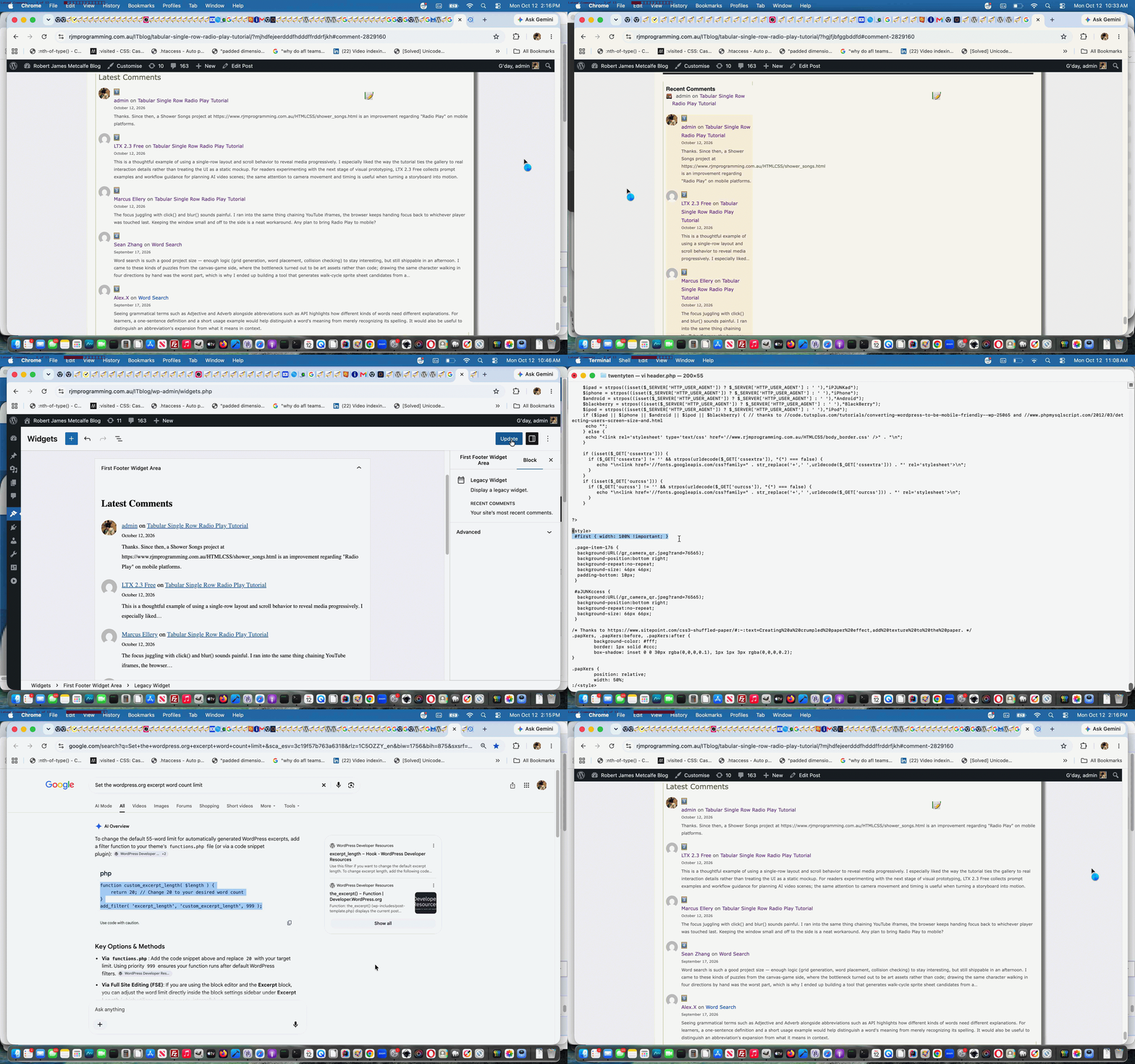
WordPress Blog Comments Latest Comments Widget Tutorial
We’re delving into WordPress.org comments again today, further to WordPress Blog Comments URL Right Click Popup Check Prevent Default Tutorial …
- improving on the old “Recent Comments” widget … transferring it into the “Inactive Widgets” webpage section in favour of …
- the newer “Latest Comments” widget being placed into our WordPress blog’s “First Footer” webpage section
All this is, at first, controlled within the WordPress.org blog “admin” user …
Appearance -> Widgets
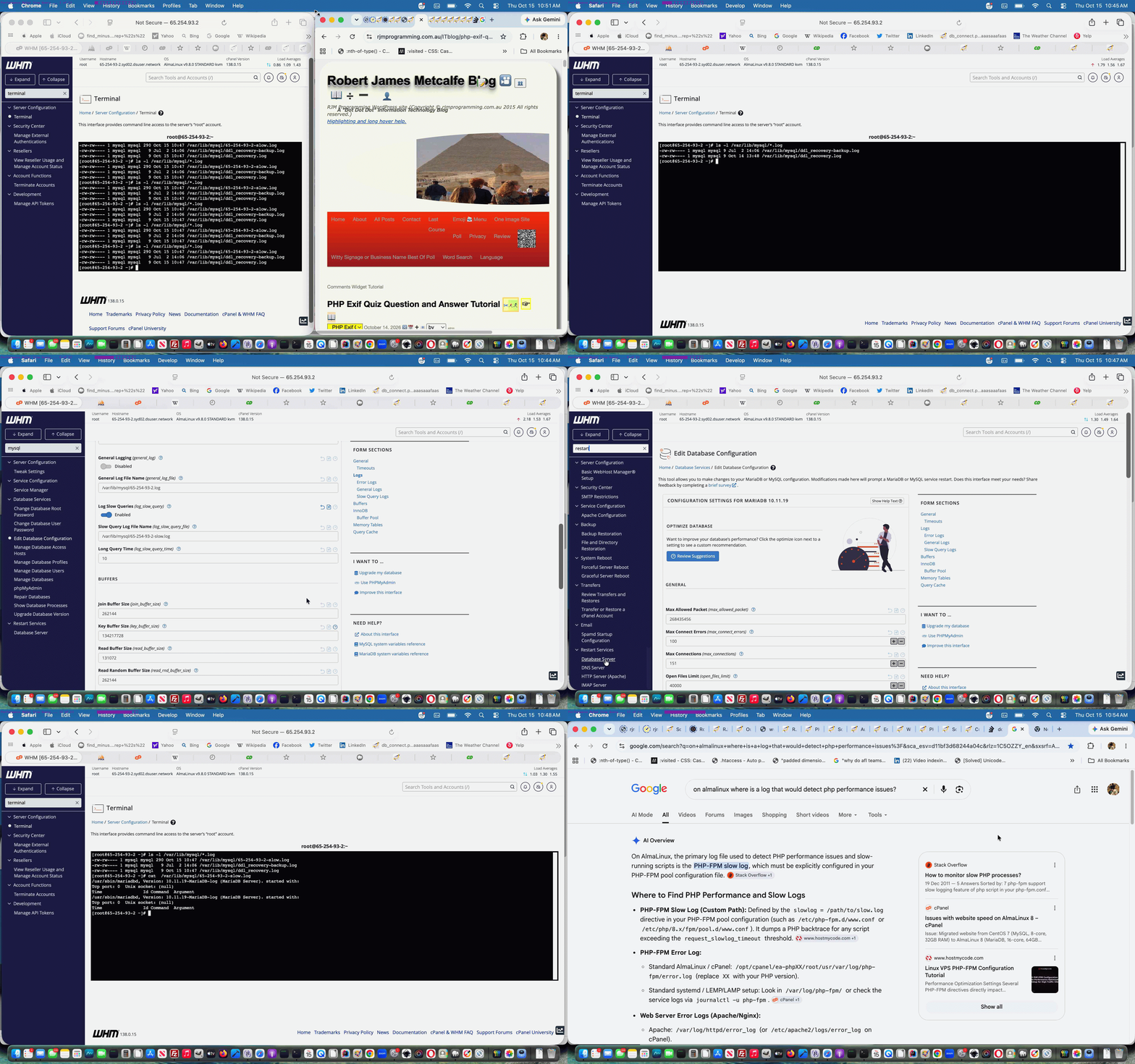
… configuration section. That got the comment text showing better, but if more than 20 words, we were getting “ellipsis display”, so in our WordPress.org blog Twenty Ten theme’s “functions.php” we added in (thanks to advice of Set the wordpress.org excerpt word count limit) …
function custom_comment_excerpt_length( $length ) {

    return 480; // Set your desired word count where default is 20

}

add_filter( 'comment_excerpt_length', 'custom_comment_excerpt_length' );
… to start allowing for longer comments. Relevant comments? We filter for spam via an Akismet plugin.
Previous relevant WordPress Blog Comments URL Right Click Popup Check Prevent Default Tutorial is shown below.
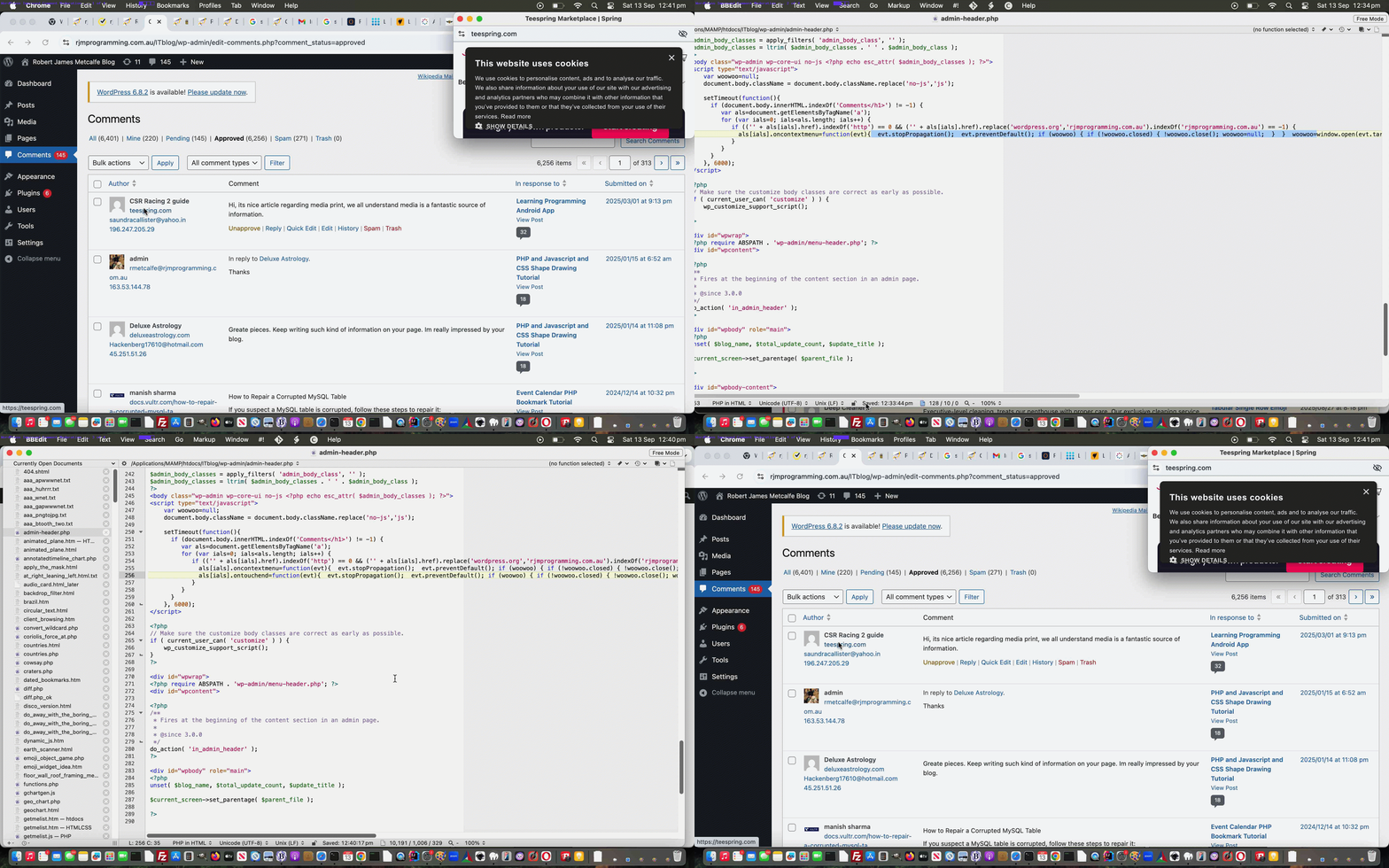
WordPress Blog Comments URL Right Click Popup Check Prevent Default Tutorial
We’re coming back to the previous WordPress administrator Comment moderation section URL Popup Window Checker functionality last talked about with WordPress Blog Comments URL Right Click Popup Check Tutorial.
We were finding before this Javascript code fix …
<?php
	setTimeout(function(){

	  if (document.body.innerHTML.indexOf('Comments</h1>') != -1) {

	     var als=document.getElementsByTagName('a');

	     for (var ials=0; ials<als.length; ials++) {

	        if (('' + als[ials].href).indexOf('http') == 0 && ('' + als[ials].href).replace('wordpress.org','rjmprogramming.com.au').indexOf('rjmprogramming.com.au') == -1) {

	          als[ials].oncontextmenu=function(evt){  evt.stopPropagation();  evt.preventDefault(); if (woowoo) { if (!woowoo.closed) { !woowoo.close(); woowoo=null;  }  }  woowoo=window.open(evt.target.href, '_blank', 'left=' + eval(-480 + eval('' + screen.width)) + ',top=0,width=500,height=200'); setTimeout(function(){ woowoo.focus(); }, 500);  };

	          als[ials].ontouchend=function(evt){  evt.stopPropagation();  evt.preventDefault(); if (woowoo) { if (!woowoo.closed) { !woowoo.close(); woowoo=null;  }  }  woowoo=window.open(evt.target.href, '_blank', 'left=' + eval(-480 + eval('' + screen.width)) + ',top=0,width=500,height=200'); setTimeout(function(){ woowoo.focus(); }, 500);  };

	        }

	     }

	  }

	}, 6000);
?>
… in admin-header.php that popup windows were being created but immediately falling behind the main WordPress blog “admin” section Comments section webpage window, annoyingly. Our investigations tracked it down to the right click “default behaviour” forcing the popup window out of view.
The remedy being? Anyone, anyone?
.
.
.
.
No takers … how about a hint? … It starts with
.
.
.
.
p
.
.
.
… no takers … then with
.
.
.
.
r
.
.
.
… no takers … then with
.
.
.
.
e
.
.
.
… no takers … then with
.
.
.
.
v
.
.
.
… no takers … then with
.
.
.
.
e
.
.
.
.
… finally, yes Nicola … are you saying “Preve Fountain” …
.
.
.
Alas, no … and it’s not Spanish Steps or Pantheon or Colosseum or Trevi Fountain or Piazza Venezia or Saint Peter’s Square either, if that helps … Anyone else?
.
.
.
.
… yes, Audrey?
.
.
… you’re saying “The Mouth of Truth”?
.
.
… no, sorry, no doubt it was on the tip of your collective tongues, when we say it’s …
event.preventDefault();
Aaaahhhh
… thank you, Sage … preventing that right click menu from appearing, and so not compromising window focus web browser rendering. We do very little WordPress administration on mobile, but just in case, we added an ontouchend event (usually happening at the finish of a gesture) mimicking of the non-mobile right click logic, for good measure.
Previous relevant WordPress Blog Comments URL Right Click Popup Check Tutorial is shown below.
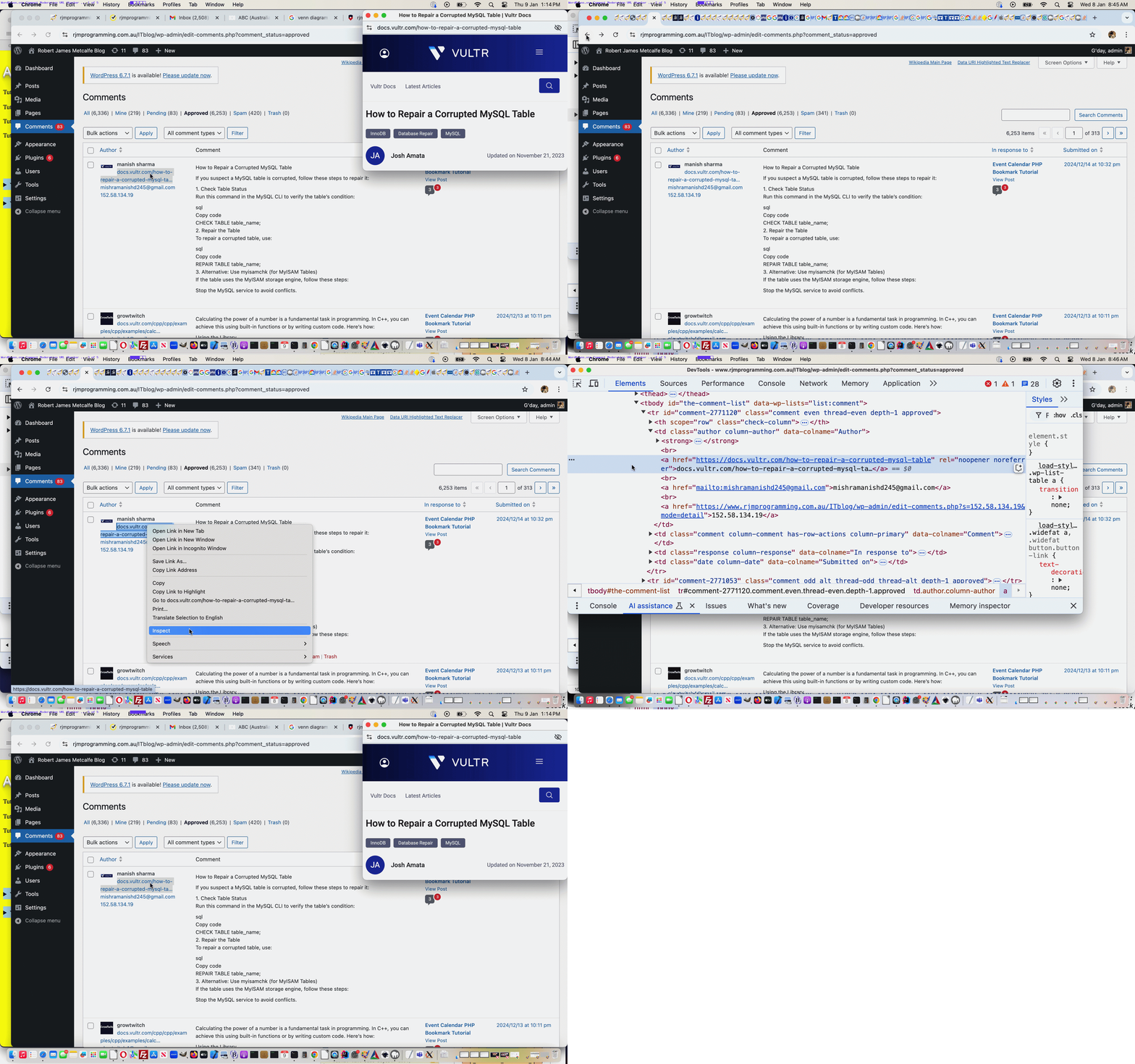
WordPress Blog Comments URL Right Click Popup Check Tutorial
In the past we have only mildly changed the administration section of our TwentyTen themed WordPress.org blog (you are currently reading) here at RJM Programming, and some of that involved new WordPress plugins, as you can read a bit about with WordPress Blog Data URI in Post Plugin Tutorial.
We maintain that blog within an “admin” part of the WordPress blog, and any changes we’d put in a “dessert island wish list” usually just absorb and move on, but we thought we’d improve on …
WordPress comment moderation
… by allowing myself (well, thanks awfully, I don’t really know what to say) the chance to …
- on any comments webpage …
- right click on “a” links whose domain is neither wordpress.org nor rjmprogramming.com.au and … in so doing …
- be able to see a small popup window to the top right of the screen
… because, even if we wanted to argue with the great Akismet (we use and are very happy with around here) calling it spam, one of the steps we’d want to investigate would be to rule out a potential “broken link”, and this is a way to check for that.
Now, what we discovered marrying “a wish” with “an action plan” was that …
- in parallel to the TwentyTen non-admin parts being manageable largely via changes to good ol’ header.php … we found …
- the easy approach to changes in the admin parts could be achieved by changes to good new admin-header.php
… with our action plan moving to “deployment” via PHP (writes Javascript) admin-header.php modified code …
<?php
<script type="text/javascript">

	document.body.className = document.body.className.replace('no-js','js');


	setTimeout(function(){

	  if (document.body.innerHTML.indexOf('Comments</h1>') != -1) {

	     var als=document.getElementsByTagName('a');

	     for (var ials=0; ials<als.length; ials++) {

	        if (('' + als[ials].href).indexOf('http') == 0 && ('' + als[ials].href).replace('wordpress.org','rjmprogramming.com.au').indexOf('rjmprogramming.com.au') == -1) {

	          als[ials].oncontextmenu=function(evt){  window.open(evt.target.href, '_blank', 'left=' + eval(-500 + eval('' + screen.width)) + ',top=0,width=500,height=200');  };

	        }

	     }

	  }

	}, 6000);

</script>
?>
Pretty straightforward really, and perhaps of interest to some WordPress.org comment moderators out there!
Previous relevant WordPress Blog Data URI in Post Plugin Tutorial is shown below.
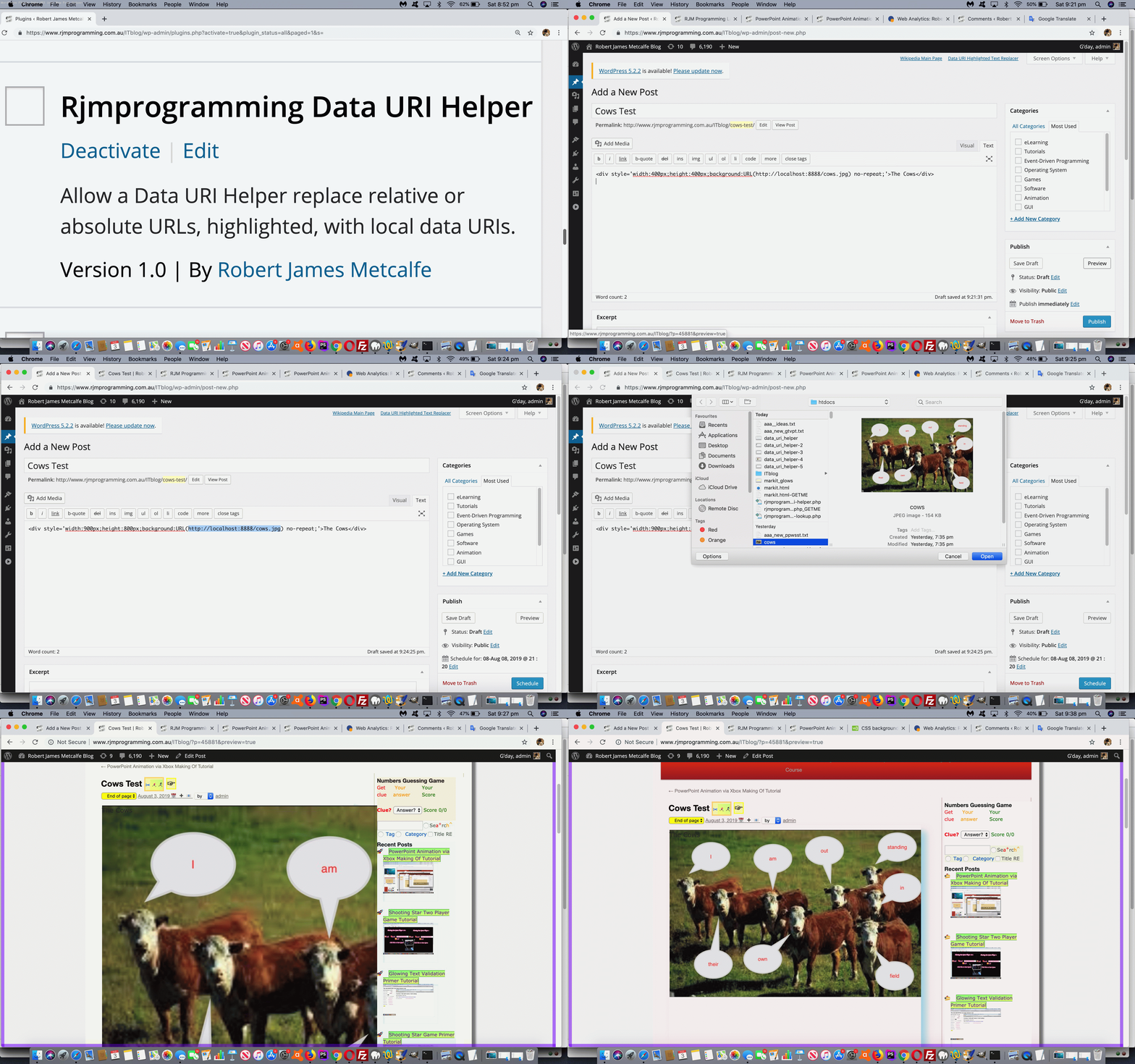
WordPress Blog Data URI in Post Plugin Tutorial
Today, we’ve got another WordPress plugin to suit the TwentyTen themed blog you are reading, adding onto those described at WordPress Blog Collaborative Annotated Email FormData Post Tutorial.
This plugin suits the Content Editor creating the posts in the administration end of the WordPress TwentyTen themed blog, when they desire to add a data URI, rather than an absolute URL or relative URL (which would probably involve an upload). To use data URIs will make your blog posts independent of web server file arrangements, but if you are looking for this to save (web server) diskspace, this might be a mute point. The diskspace could still be used up by the MySql database storing the data URI in its base64 encoding.
What does our PHP plugin call on to do its thangthing?
- plugin actions (similar to other plugins talked about in postings below) …
- add_action( ‘admin_notices’, ‘rjmprogramming_Data_URI_Helper’ ); // for Javascript adding HTML to webpage dynamically
- add_action( ‘admin_footer’, ‘rjmprogramming_data_uri_helper_css’ ); // for CSS
- File API and its FileReader.readAsDataURL() method to browse for local device files
- highlighted text (within the blog posting, where we rely on TwentyTen “id”s and “className”s to identify user intent) that gets substituted by the data URI if successful … when the user clicks/touches the newly introduced …
- “Data URI Highlighted Text Replacer” a link
And so we have for you today rjmprogramming-data-uri-helper.php PHP source code that goes into this plugin should you want to write your own version for a theme that isn’t the WordPress TwentyTen theme (looking for those TwentyTen “id”s and “className”s as changepoints), and/or view us using it with today’s animated GIF presentation.
Previous relevant WordPress Blog Collaborative Annotated Email FormData Post Tutorial is shown below.
WordPress Blog Collaborative Annotated Email FormData Post Tutorial
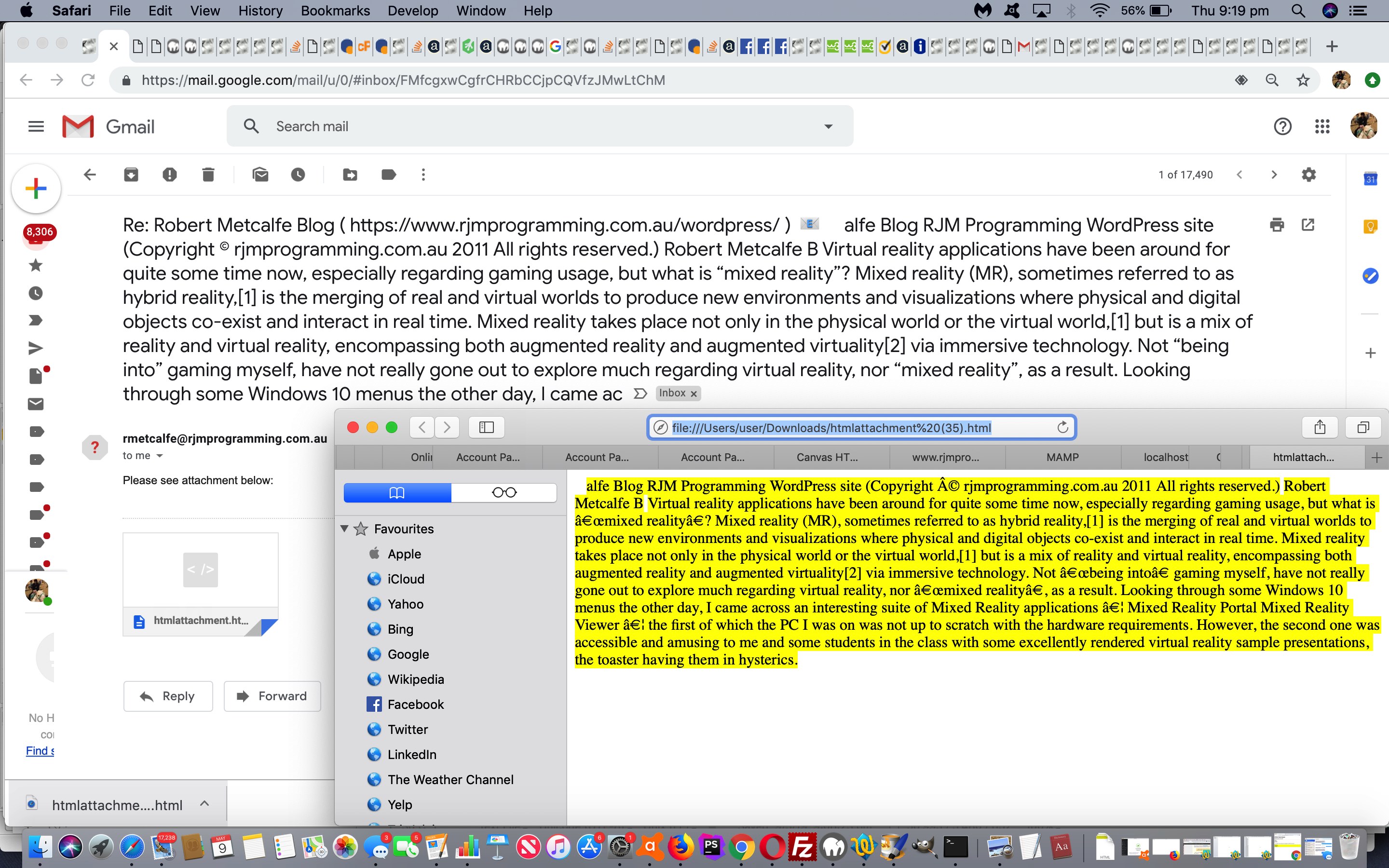
Yesterday’s WordPress Blog Collaborative Annotated Email User Experience Tutorial helped with practicalities regarding user experience with this WordPress Blog highlighting of text accumulated into the body (as HTML attachment) and subject (as text) of an Annotated Email form of collaborative communication.
The “subject” extension here makes it all the more important to try to look out for long email URLs that will exceed the web server limit here. When too long, that …
- previous GET method of navigation … needs to be converted to a …
- POST method of navigation
… and today we do not write out any discrete HTML form element to do this (when required), but instead resort to the wonderfully powerful combination of …
… to be used by the new dynamic thinking Javascript function as below …
function iftoolongpost(prefixu, restsub, restu) {

  var prefixrest=prefixu.replace('&body=', encodeURIComponent(restsub) + '&body=') + restu;

  if ((prefixrest).length > 900) {

  // dynamic form

  var xhr = new XMLHttpRequest();

  var form=new FormData();

  form.append('to', decodeURIComponent(prefixrest.split('to=')[1].split('&')[0]));

  form.append('subject', decodeURIComponent(prefixrest.split('subject=')[1].split('&')[0]));

  form.append('body',  decodeURIComponent(prefixrest.split('body=')[1].split('&')[0]));

  xhr.open('post', '//www.rjmprogramming.com.au/HTMLCSS/emailhtml.php', true);

  xhr.send(form);

  // end of dynamic form

  location.href='#hfloater';

  } else {

  document.getElementById('aeciframe').src=prefixrest;

  }

}
… called in that different calling arrangement as per …
document.getElementById('hfloater').innerHTML+='<b>Annotated Email <a class="hlclass" style="inline-block;cursor:pointer;text-decoration:none;" onclick="iftoolongpost(this.title, encodeURIComponent((this.innerText || this.contentWindow || this.contentDocument)), encodeURIComponent(this.innerHTML.substring(this.innerHTML.indexOf(String.fromCharCode(60)))));" data-href="//www.rjmprogramming.com.au/HTMLCSS/emailhtml.php?to=&subject=Re%3a%20' + encodeURIComponent(document.title.split('|')[0]) + '%20%28' + encodeURIComponent(document.URL) + '%29%0a&body=" title="//www.rjmprogramming.com.au/HTMLCSS/emailhtml.php?to=&subject=Re%3a%20' + encodeURIComponent(document.title.split('|')[0]) + '%20%28%20' + encodeURIComponent(document.URL) + '%20%29%0a&body=" target=aeciframe onmouseover="this.title=emaileeis(this.title);" ontouchstart="this.title=emaileeis(this.title);" id=b_hfloater_annotated_email>' + aec + '</a></b><iframe id=aeciframe name=aeciframe style=display:none; src=#></iframe><br>';
… featuring in changed PHP rjmprogramming-multi-lookup.php plugin and/or changed TwentyTen theme header.php file.
Previous relevant WordPress Blog Collaborative Annotated Email User Experience Tutorial is shown below.
WordPress Blog Collaborative Annotated Email User Experience Tutorial
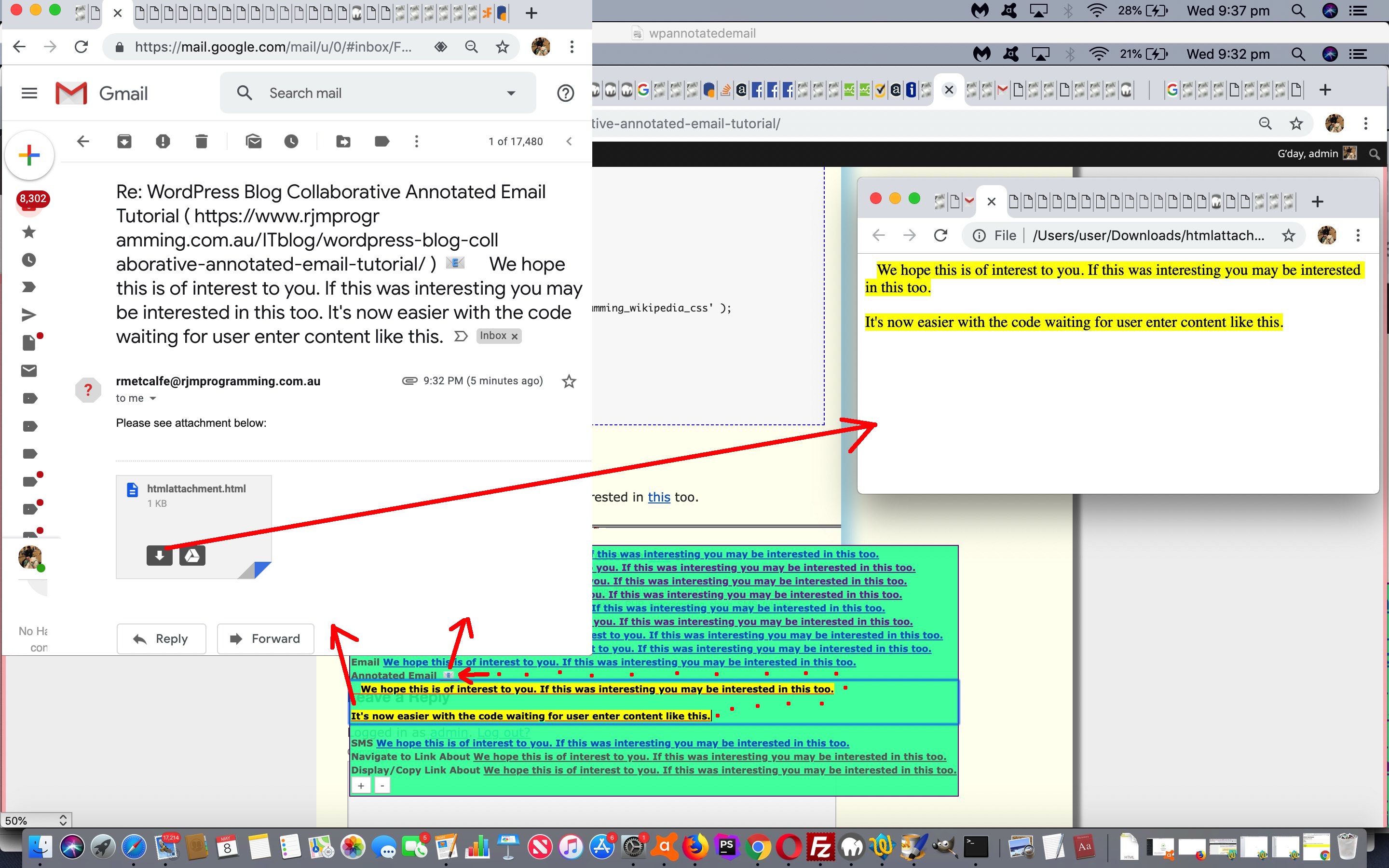
Did you try yesterday’s WordPress Blog Collaborative Annotated Email Tutorial highlighting of text Annotated Email functionality? If you did, you might have found a “hair trigger” timed user experience. You had a very small amount of time to decide on any amendments “by hand” to your email.
On this, did you notice how we relied on a Javascript prompt window to garner an email address off the user? There is method in this “kludginess”. We wanted the highlighting not to be destroyed by a change of focus. The downside though, is that the whole time you spend answering contributes to any setTimeout based timing we have going before we automatically make the highlighting functionality menu disappear. Today, we control that, waiting an extra 10 seconds or so after that for the user to start entering their own Annotated Email content, should they wish, and the HTML div contenteditable=true is reminded by a new onchange replenishment of the delay that the user is still writing … a bit like with SMSes and those blinking dots telling you the other SMSer is writing something (but not as cute here, looks wise, alas).
Again, into the WordPress (changed PHP rjmprogramming-multi-lookup.php) plugin or header.php the changed (header.php) code involves new Javascript (that dynamically creates HTML) as per …
var mpn='', eod='', aec='', withindiv=0;


function emaileeis(inideais) {

  var presm='', postsm='';

  if (inideais.indexOf(':') != -1) {

    presm=inideais.split(':')[0] + ':';

    postsm=inideais.replace(presm,'');

  } else if (inideais.indexOf('?to=') != -1) {

    presm=inideais.split('?to=')[0] + '?to=';

    if (inideais.indexOf('&') != -1) {

    postsm=inideais.replace(presm,'').replace(inideais.split('?to=')[1].split('&')[0],'');

    }

  } else if (inideais.indexOf('&') != -1) {

    presm=inideais.split('&')[0] + '&';

    postsm=inideais.replace(presm,'');

  } else {

    presm=inideais.split('?')[0];

    postsm=inideais.replace(presm,'');

  }

  if (eod == '') {

    if (inideais.indexOf('?to=') != -1) {

      eod=inideais.split('?to=')[1].split('&')[0];

    }

    var pwithindiv=withindiv;

    withindiv=9000;

    eod=prompt('Enter email address', eod);

    if (pwithindiv == 0) {

    withindiv=0.9999;

    } else {

    withindiv=pwithindiv;

    }

    if (eod == null) {

      eod='';

    }

  }

  return presm + encodeURIComponent(eod) + postsm;

}


function smsee(inideais) {

  var presm='', postsm='';

  if (inideais.indexOf(':') != -1) {

    presm=inideais.split(':')[0] + ':';

  }

  if (inideais.indexOf('&') != -1) {

    postsm='&' + inideais.split('&')[1];

  }

  if (mpn == '') {

    if (inideais.indexOf(':') != -1) {

      mpn=inideais.split(':')[1].split('&')[0];

    }

    var pwithindiv=withindiv;

    withindiv=9000;

    mpn=prompt('Enter phone number for SMS (or Cancel to do it at the Messager app', mpn);

    if (pwithindiv == 0) {

    withindiv=0.9999;

    } else {

    withindiv=pwithindiv;

    }

    if (mpn == null) {

      mpn='';

    }

  }

  return presm + mpn + postsm;

}


function lookforhighlight() {

  var usualdelay=2000, oRange=null, oRect=null, s_top='0px', s_left='5px', opis='', fourhundred=300, isfx='0', otit='';

  if (hight == ' ') {

    setTimeout(lfhlater, 5000);

    hight='';

    xcbackc=cookieHHVal('linktoothers');

    if (xcbackc != '') {

      oharr=xcbackc.split('|');

    }

  }

  if (('' + withindiv).indexOf('.') != -1) {

    setTimeout(lookforhighlight, eval(('' + withindiv).split('.')[1]));

    withindiv=eval(('' + withindiv).split('.')[0]);

    return;

  } else if (withindiv != 0) {

    setTimeout(lookforhighlight, withindiv);

    return;

  } else {

    setTimeout(lookforhighlight, usualdelay);

  }

  var xsel=window.getSelection().toString();

  if (xsel.length == 0) {

    try {

    xsel=document.selection.createRange().htmlText;

    xsel=xsel.replace(String.fromCharCode(10),' ').replace(String.fromCharCode(10),' ').replace(String.fromCharCode(10),' ').replace(String.fromCharCode(10),' ');

    xsel=xsel.replace(String.fromCharCode(13),' ').replace(String.fromCharCode(13),' ').replace(String.fromCharCode(13),' ').replace(String.fromCharCode(13),' ');

    } catch(ertw) {

    xsel='';

    }

  } else {

    xsel=xsel.replace(String.fromCharCode(10),' ').replace(String.fromCharCode(10),' ').replace(String.fromCharCode(10),' ').replace(String.fromCharCode(10),' ');

    xsel=xsel.replace(String.fromCharCode(13),' ').replace(String.fromCharCode(13),' ').replace(String.fromCharCode(13),' ').replace(String.fromCharCode(13),' ');

    if (xsel != hight && xsel != '') {

     oRange = window.getSelection().getRangeAt(0); //get the text range

     oRect = oRange.getBoundingClientRect();

     s_top = ('' + oRect.top).replace('px','') + 'px';

     s_left = ('' + oRect.left).replace('px','') + 'px';

     if (s_top != '0px') {

        fourhundred=eval('' + s_top.replace('px',''));

        s_top='0px';

        var dse='', dde='';

        if (document.scrollingElement) {

          if (document.scrollingElement.scrollTop) {

            dse=('' + document.scrollingElement.scrollTop);

          }

        }

        if (document.documentElement) {

          if (document.documentElement.scrollTop) {

            dde=('' + document.documentElement.scrollTop);

          }

        }

        if (dse != '') {

          fourhundred+=eval('' + dse.replace('px',''));

          isfx='0';

        } else if (dde != '') {

          fourhundred+=eval('' + dde.replace('px',''));

          isfx='0';

        } else if (('' + window.scrollY) != '') {

          fourhundred+=eval('' + ('' + window.scrollY).replace('px',''));

          isfx='0';

        } else if (('' + window.pageYOffset) != '') {

          fourhundred+=eval('' + ('' + window.pageYOffset).replace('px',''));

          isfx='0';

        } else {

          isfx=('' + document.body.scrollTop).replace('px','');

          if (isfx.replace('0','') == '') {

            isfx=('' + document.scrollingElement.scrollTop).replace('px','');

            if (isfx.replace('0','') == '') {

               isfx=('' + window.scrollY).replace('px','');

               if (isfx.replace('0','') == '') {

                  isfx=('' + window.pageYOffset).replace('px','');

               }

            }

          }

        }

        fourhundred+=100;

     }

    }

  }

  if (xsel != hight && xsel != '') {

    hight=xsel;

    if (s_top == '0px') { s_top = ('' + eval(fourhundred + eval('' + isfx))) + 'px'; }

    if (aec == '') {

          aec=' 📧 <div id=daec contenteditable=true onblur="withindiv=0;" onchange="withindiv=9000;" onclick="withindiv=9000; event.stopPropagation();">  </div>';

    } else if (document.getElementById('daec') && document.getElementById('b_hfloater_annotated_email')) {

          aec=document.getElementById('b_hfloater_annotated_email').innerHTML;

    }

    if (aec.indexOf('<mark>' + hight + '</mark>') == -1) {

          if (('              ' + aec).slice(-14).substring(0,1).replace('?','.').replace('!','.') == '.') {

           aec=aec.replace('</div>', '   <mark>' + hight + '</mark></div>');

          } else {

           aec=aec.replace('</div>', ' <mark>' + hight + '</mark></div>');

          }

    }

    if (document.getElementById('hfloater')) {

      if (document.getElementById('hfloater').innerHTML == '') {

        document.getElementById('hfloater').style.position='absolute';

        document.getElementById('hfloater').style.top=s_top;

        document.getElementById('hfloater').style.left=s_left;

        document.getElementById('hfloater').style.zIndex='87';

        document.getElementById('hfloater').style.backgroundColor='rgba(255,165,0,0.9)';

        document.getElementById('hfloater').style.border='1px solid purple';

        document.getElementById('hfloater').style.padding='2px 2px 2px 2px';

        document.getElementById('hfloater').style.display='block';

        document.getElementById('hfloater').innerHTML='<b>Wikipedia <a class="hlclass" style="inline-block;" href="//wikipedia.org/wiki/Main_Page" title="//wikipedia.org/wiki/" target=_blank onmouseover="this.href=this.title + hight.replace(/\ /g,' + "'_'" + ');" ontouchstart="this.href=this.title + hight.replace(/\ /g,' + "'_'" + ');" id=b_hfloater_wikipedia>' + hight + '</a></b><br>';

        document.getElementById('hfloater').innerHTML+='<b>Google Translate <a class="hlclass" style="inline-block;" href="//translate.google.com" title="//translate.google.com/#view=home&op=translate&sl=auto&tl=en&text=" target=_blank onmouseover="this.href=this.title + encodeURIComponent(hight);" ontouchstart="this.href=this.title + encodeURIComponent(hight);" id=b_hfloater_google_translate>' + hight + '</a></b><br>';

        document.getElementById('hfloater').innerHTML+='<b>Free Dictionary <a class="hlclass" style="inline-block;" href="//www.thefreedictionary.com/" title="//www.thefreedictionary.com/" target=_blank onmouseover="this.href=this.title + hight.replace(/\ /g,' + "'+'" + ');" ontouchstart="this.href=this.title + hight.replace(/\ /g,' + "'+'" + ');" id=b_hfloater_free_dictionary>' + hight + '</a></b><br>';

        document.getElementById('hfloater').innerHTML+='<b>Google Search <a class="hlclass" style="inline-block;" href="//www.google.com/" title="//www.google.com/search?q=" target=_blank onmouseover="this.href=this.title + hight.replace(/\ /g,' + "'+'" + ');" ontouchstart="this.href=this.title + hight.replace(/\ /g,' + "'+'" + ');" id=b_hfloater_google_search>' + hight + '</a></b><br>';

        document.getElementById('hfloater').innerHTML+='<b>Tag Search <a class="hlclass" style="inline-block;" href="//www.rjmprogramming.com.au/ITblog/" title="//www.rjmprogramming.com.au/ITblog/tag/" target=_blank onmouseover="this.href=this.title + hight.replace(/\ /g,' + "'-'" + ');" ontouchstart="this.href=this.title + hight.replace(/\ /g,' + "'-'" + ');" id=b_hfloater_tag_search>' + hight + '</a></b><br>';

        document.getElementById('hfloater').innerHTML+='<b>Category Search <a class="hlclass" style="inline-block;" href="//www.rjmprogramming.com.au/ITblog/" title="//www.rjmprogramming.com.au/ITblog/category/" target=_blank onmouseover="this.href=this.title + hight.replace(/\ /g,' + "'-'" + ');" ontouchstart="this.href=this.title + hight.replace(/\ /g,' + "'-'" + ');" id=b_hfloater_category_search>' + hight + '</a></b><br>';

        document.getElementById('hfloater').innerHTML+='<b>Tag First Word Search <a class="hlclass" style="inline-block;" href="//www.rjmprogramming.com.au/ITblog/" title="//www.rjmprogramming.com.au/ITblog/tag/" target=_blank onmouseover="this.href=this.title + hight.replace(/\ /g,' + "'-'" + ').replace(' + "'-','/?wopenall='" + ');" ontouchstart="this.href=this.title + hight.replace(/\ /g,' + "'-'" + ').replace(' + "'-','/?wopenall='" + ');" id=b_hfloater_tag_first_word_search>' + hight + '</a></b><br>';

        document.getElementById('hfloater').innerHTML+='<b>Posting Title Search <a class="hlclass" style="inline-block;" href="//www.rjmprogramming.com.au/itblog/match/mapper.php" title="//www.rjmprogramming.com.au/itblog/match/mapper.php?pm=" target=_blank onmouseover="this.href=this.title + encodeURIComponent(hight);" ontouchstart="this.href=this.title + encodeURIComponent(hight);" id=b_hfloater_posting_title_search>' + hight + '</a></b><br>';


        document.getElementById('hfloater').innerHTML+='<b>Email <a class="hlclass" style="inline-block;" href="mailto:?subject=Re%3a%20' + encodeURIComponent(thetwords) + '%20%28' + encodeURIComponent(document.URL) + '%29&body=" title="mailto:?subject=Re%3a%20' + encodeURIComponent(thetwords) + '%20%28%20' + encodeURIComponent(document.URL) + '%20%29&body=" target=_blank onmouseover="this.href=emaileeis(this.title) + encodeURIComponent(hight);" ontouchstart="this.href=emaileeis(this.title) + encodeURIComponent(hight);" id=b_hfloater_email>' + hight + '</a></b><br>';

        document.getElementById('hfloater').innerHTML+='<b>Annotated Email <a class="hlclass" style="inline-block;" href="//www.rjmprogramming.com.au/HTMLCSS/emailhtml.php?to=&subject=Re%3a%20' + encodeURIComponent(thetwords) + '%20%28' + encodeURIComponent(document.URL) + '%29%0a&body=" title="//www.rjmprogramming.com.au/HTMLCSS/emailhtml.php?to=&subject=Re%3a%20' + encodeURIComponent(thetwords) + '%20%28%20' + encodeURIComponent(document.URL) + '%20%29%0a&body=" target=aeciframe onmouseover="this.href=emaileeis(this.title).replace(this.title.slice(-6), encodeURIComponent((this.innerText || this.contentWindow || this.contentDocument)) + this.title.slice(-6)) + encodeURIComponent(this.innerHTML.substring(this.innerHTML.indexOf(String.fromCharCode(60))));" ontouchstart="this.href=emaileeis(this.title).replace(this.title.slice(-6), encodeURIComponent((this.innerText || this.contentWindow || this.contentDocument)) + this.title.slice(-6)) + encodeURIComponent(this.innerHTML.substring(this.innerHTML.indexOf(String.fromCharCode(60))));" id=b_hfloater_annotated_email>' + aec + '</a></b><iframe name=aeciframe style=display:none; src=#></iframe><br>';

        document.getElementById('hfloater').innerHTML+='<b>SMS <a class="hlclass" style="inline-block;" href="sms:&body=" title="sms:&body=" target=_blank onmouseover="this.href=smsee(this.title) + encodeURIComponent(hight);" ontouchstart="this.href=smsee(this.title) + encodeURIComponent(hight);" id=b_hfloater_sms>' + hight + '</a></b><br>';


        document.getElementById('hfloater').innerHTML+='<b>Navigate to Link About <a class="hlclass" style="inline-block;text-decoration:underline;cursor:pointer;" title=" " onclick="thisasearch(this.innerHTML,this);" onmouseover="thisasearch(this.innerHTML,this);" ontouchstart="thisasearch(this.innerHTML,this);" id=b_hfloater_posting_a_search>' + hight + '</a></b><br>';

        document.getElementById('hfloater').innerHTML+='<b>Display/Copy Link About <a class="hlclass" style="inline-block;text-decoration:underline;cursor:pointer;" title=" " onclick="thisacopysearch(this.innerHTML,this);" onmouseover="thisacopysearch(this.innerHTML,this);" ontouchstart="thisacopysearch(this.innerHTML,this);" id=b_hfloater_posting_a_copy_search>' + hight + '</a></b><br>';

        if (oharr.length >= 1) {

         for (var ioharr=0; ioharr<oharr.length; ioharr++) {

          otit='Other Link ' + eval(1 + ioharr);

          if (oharr[ioharr].indexOf('#') != -1) {

            otit=oharr[ioharr].split('#')[1].trim();

          }

          if (oharr[ioharr].split('#')[1].indexOf('  ') == 0) {

            opis=hight.replace(/\ /g,' + \"'-'\" + ');

            document.getElementById('hfloater').innerHTML+='<b>' + otit + ' <a style=\"inline-block;\" href=\"' + oharr[ioharr].split('#')[0].trim() + '\" title=\"' + oharr[ioharr].split('#')[0].trim() + '\" target=_blank onmouseover=\"this.href=this.title + hhopis(String.fromCharCode(45));\" ontouchstart=\"this.href=this.title + hhopis(String.fromCharCode(45));\" id=b_hfloater_' + xcookcnt + '>' + hight + '</a></b><br>';

          } else if (oharr[ioharr].split('#')[1].indexOf(' ') == 0) {

            opis=hight.replace(/\ /g,' + \"'+'\" + ');

            document.getElementById('hfloater').innerHTML+='<b>' + otit + ' <a style=\"inline-block;\" href=\"' + oharr[ioharr].split('#')[0].trim() + '\" title=\"' + oharr[ioharr].split('#')[0].trim() + '\" target=_blank onmouseover=\"this.href=this.title + hhopis(String.fromCharCode(43));\" ontouchstart=\"this.href=this.title + hhopis(String.fromCharCode(43));\" id=b_hfloater_' + xcookcnt + '>' + hight + '</a></b><br>';

          } else {

            document.getElementById('hfloater').innerHTML+='<b>' + otit + ' <a style=\"inline-block;\" href=\"' + oharr[ioharr].split('#')[0].trim() + '\" title=\"' + oharr[ioharr].split('#')[0].trim() + '\" target=_blank onmouseover=\"this.href=this.title + encodeURIComponent(hight);\" ontouchstart=\"this.href=this.title + encodeURIComponent(hight);\" id=b_hfloater_' + xcookcnt + '>' + hight + '</a></b><br>';

          }

          xcookcnt++;

         }

        }

        document.getElementById('hfloater').innerHTML+='<b><input title=\"Add your own into HTTP Cookies\" type=button onclick=cookiePutHHVal(xcookblank); value=+></input> <input title=\"Remove all HTTP Cookie URLs\" type=button onclick=cookiePutHHVal(xcookblank.trim()); value=-></input></b><br>';

      } else {

        document.getElementById('b_hfloater_wikipedia').innerHTML=hight;

        document.getElementById('b_hfloater_google_translate').innerHTML=hight;

        document.getElementById('b_hfloater_free_dictionary').innerHTML=hight;

        document.getElementById('b_hfloater_google_search').innerHTML=hight;

        document.getElementById('b_hfloater_tag_search').innerHTML=hight;

        document.getElementById('b_hfloater_category_search').innerHTML=hight;

        document.getElementById('b_hfloater_tag_first_word_search').innerHTML=hight;

        document.getElementById('b_hfloater_posting_title_search').innerHTML=hight;


        document.getElementById('b_hfloater_email').innerHTML=hight;

        document.getElementById('b_hfloater_annotated_email').innerHTML=aec;

        document.getElementById('b_hfloater_sms').innerHTML=hight;


        document.getElementById('b_hfloater_posting_a_search').innerHTML=hight;

        document.getElementById('b_hfloater_posting_a_copy_search').innerHTML=hight;


        if (xcookcnt > 0) {

          for (var icook=0; icook<xcookcnt; icook++) {

            document.getElementById('b_hfloater_' + icook).innerHTML=hight;

          }

        }

        document.getElementById('hfloater').style.top=s_top;

        document.getElementById('hfloater').style.left=s_left;

        document.getElementById('hfloater').style.display='block';

      }

    }

  } else if (xsel == '') {

    if (document.getElementById('hfloater')) {

      document.getElementById('hfloater').style.display='none';

    }

    hight='';

  }

}
Some email clients baulk at downloading HTML attachments, so the other change today is to append the wording of the email’s inherent HTML to the email subject, so if an emailee is unlucky in this way, they can still get “second prize” … but no cigar!
Previous relevant WordPress Blog Collaborative Annotated Email Tutorial is shown below.
WordPress Blog Collaborative Annotated Email Tutorial
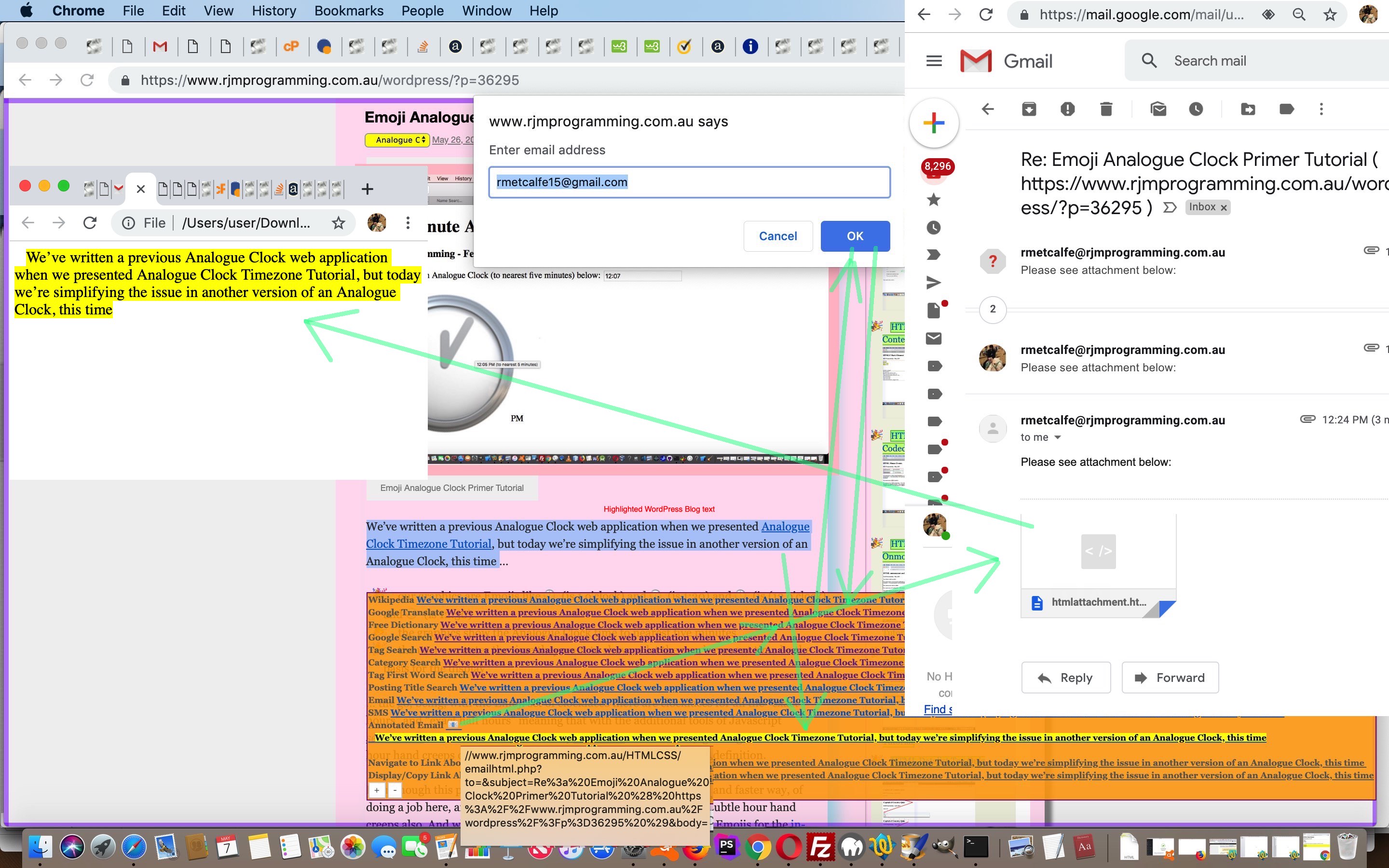
Further to WordPress Plugin Primer Tutorial of recent times, we’re adding to that “highlighting of blog text” (dynamic menu) the options …
- Email (that highlighted text) via the email client application via a “mailto:” “a” link
- SMS (that highlighted text) via the email client application via a “sms:” “a” link
- Annotated Email of the highlighted text converted to mark (marked up) text, accumulated onto for the whole WordPress blog session,and emailed off via PHP’s mail function, as an HTML email attachment (downloaded at the emailee end)
… and we think the last of these has good scope for collaborative thoughts and usages. Want to try it out? You’re here, ready. Just highlight some text to get started.
Into the WordPress (changed PHP rjmprogramming-multi-lookup.php) plugin or header.php the changed (header.php) code involves new Javascript (that dynamically creates HTML) as per …
var mpn='', eod='', aec='', withindiv=false;


function emaileeis(inideais) {

  var presm='', postsm='';

  if (inideais.indexOf(':') != -1) {

    presm=inideais.split(':')[0] + ':';

    postsm=inideais.replace(presm,'');

  } else if (inideais.indexOf('?to=') != -1) {

    presm=inideais.split('?to=')[0] + '?to=';

    if (inideais.indexOf('&') != -1) {

    postsm=inideais.replace(presm,'').replace(inideais.split('?to=')[1].split('&')[0],'');

    }

  } else if (inideais.indexOf('&') != -1) {

    presm=inideais.split('&')[0] + '&';

    postsm=inideais.replace(presm,'');

  } else {

    presm=inideais.split('?')[0];

    postsm=inideais.replace(presm,'');

  }

  if (eod == '') {

    if (inideais.indexOf('?to=') != -1) {

      eod=inideais.split('?to=')[1].split('&')[0];

    }

    eod=prompt('Enter email address', eod);

    if (eod == null) {

      eod='';

    }

  }

  return presm + encodeURIComponent(eod) + postsm;

}


function smsee(inideais) {

  var presm='', postsm='';

  if (inideais.indexOf(':') != -1) {

    presm=inideais.split(':')[0] + ':';

  }

  if (inideais.indexOf('&') != -1) {

    postsm='&' + inideais.split('&')[1];

  }

  if (mpn == '') {

    if (inideais.indexOf(':') != -1) {

      mpn=inideais.split(':')[1].split('&')[0];

    }

    mpn=prompt('Enter phone number for SMS (or Cancel to do it at the Messager app', mpn);

    if (mpn == null) {

      mpn='';

    }

  }

  return presm + mpn + postsm;

}


function lookforhighlight() {

  var usualdelay=2000, oRange=null, oRect=null, s_top='0px', s_left='5px', opis='', fourhundred=300, isfx='0', otit='';

  if (hight == ' ') {

    setTimeout(lfhlater, 5000);

    hight='';

    xcbackc=cookieHHVal('linktoothers');

    if (xcbackc != '') {

      oharr=xcbackc.split('|');

    }

  }

  setTimeout(lookforhighlight, usualdelay);

  if (withindiv) { return;  }

  var xsel=window.getSelection().toString();

  if (xsel.length == 0) {

    try {

    xsel=document.selection.createRange().htmlText;

    xsel=xsel.replace(String.fromCharCode(10),' ').replace(String.fromCharCode(10),' ').replace(String.fromCharCode(10),' ').replace(String.fromCharCode(10),' ');

    xsel=xsel.replace(String.fromCharCode(13),' ').replace(String.fromCharCode(13),' ').replace(String.fromCharCode(13),' ').replace(String.fromCharCode(13),' ');

    } catch(ertw) {

    xsel='';

    }

  } else {

    xsel=xsel.replace(String.fromCharCode(10),' ').replace(String.fromCharCode(10),' ').replace(String.fromCharCode(10),' ').replace(String.fromCharCode(10),' ');

    xsel=xsel.replace(String.fromCharCode(13),' ').replace(String.fromCharCode(13),' ').replace(String.fromCharCode(13),' ').replace(String.fromCharCode(13),' ');

    if (xsel != hight && xsel != '') {

     oRange = window.getSelection().getRangeAt(0); //get the text range

     oRect = oRange.getBoundingClientRect();

     s_top = ('' + oRect.top).replace('px','') + 'px';

     s_left = ('' + oRect.left).replace('px','') + 'px';

     if (s_top != '0px') {

        fourhundred=eval('' + s_top.replace('px',''));

        s_top='0px';

        var dse='', dde='';

        if (document.scrollingElement) {

          if (document.scrollingElement.scrollTop) {

            dse=('' + document.scrollingElement.scrollTop);

          }

        }

        if (document.documentElement) {

          if (document.documentElement.scrollTop) {

            dde=('' + document.documentElement.scrollTop);

          }

        }

        if (dse != '') {

          fourhundred+=eval('' + dse.replace('px',''));

          isfx='0';

        } else if (dde != '') {

          fourhundred+=eval('' + dde.replace('px',''));

          isfx='0';

        } else if (('' + window.scrollY) != '') {

          fourhundred+=eval('' + ('' + window.scrollY).replace('px',''));

          isfx='0';

        } else if (('' + window.pageYOffset) != '') {

          fourhundred+=eval('' + ('' + window.pageYOffset).replace('px',''));

          isfx='0';

        } else {

          isfx=('' + document.body.scrollTop).replace('px','');

          if (isfx.replace('0','') == '') {

            isfx=('' + document.scrollingElement.scrollTop).replace('px','');

            if (isfx.replace('0','') == '') {

               isfx=('' + window.scrollY).replace('px','');

               if (isfx.replace('0','') == '') {

                  isfx=('' + window.pageYOffset).replace('px','');

               }

            }

          }

        }

        fourhundred+=100;

     }

    }

  }

  if (xsel != hight && xsel != '') {

    hight=xsel;

    if (s_top == '0px') { s_top = ('' + eval(fourhundred + eval('' + isfx))) + 'px'; }

    if (aec == '') {

          aec=' 📧 <div id=daec contenteditable=true onblur="withindiv=false;" onclick="withindiv=true; event.stopPropagation();">  </div>';

    } else if (document.getElementById('daec') && document.getElementById('b_hfloater_annotated_email')) {

          aec=document.getElementById('b_hfloater_annotated_email').innerHTML;

    }

    if (aec.indexOf('<mark>' + hight + '</mark>') == -1) {

          if (('              ' + aec).slice(-14).substring(0,1).replace('?','.').replace('!','.') == '.') {

           aec=aec.replace('</div>', '   <mark>' + hight + '</mark></div>');

          } else {

           aec=aec.replace('</div>', ' <mark>' + hight + '</mark></div>');

          }

    }

    if (document.getElementById('hfloater')) {

      if (document.getElementById('hfloater').innerHTML == '') {

        document.getElementById('hfloater').style.position='absolute';

        document.getElementById('hfloater').style.top=s_top;

        document.getElementById('hfloater').style.left=s_left;

        document.getElementById('hfloater').style.zIndex='87';

        document.getElementById('hfloater').style.backgroundColor='rgba(255,165,0,0.9)';

        document.getElementById('hfloater').style.border='1px solid purple';

        document.getElementById('hfloater').style.padding='2px 2px 2px 2px';

        document.getElementById('hfloater').style.display='block';

        document.getElementById('hfloater').innerHTML='<b>Wikipedia <a class="hlclass" style="inline-block;" href="//wikipedia.org/wiki/Main_Page" title="//wikipedia.org/wiki/" target=_blank onmouseover="this.href=this.title + hight.replace(/\ /g,' + "'_'" + ');" ontouchstart="this.href=this.title + hight.replace(/\ /g,' + "'_'" + ');" id=b_hfloater_wikipedia>' + hight + '</a></b><br>';

        document.getElementById('hfloater').innerHTML+='<b>Google Translate <a class="hlclass" style="inline-block;" href="//translate.google.com" title="//translate.google.com/#view=home&op=translate&sl=auto&tl=en&text=" target=_blank onmouseover="this.href=this.title + encodeURIComponent(hight);" ontouchstart="this.href=this.title + encodeURIComponent(hight);" id=b_hfloater_google_translate>' + hight + '</a></b><br>';

        document.getElementById('hfloater').innerHTML+='<b>Free Dictionary <a class="hlclass" style="inline-block;" href="//www.thefreedictionary.com/" title="//www.thefreedictionary.com/" target=_blank onmouseover="this.href=this.title + hight.replace(/\ /g,' + "'+'" + ');" ontouchstart="this.href=this.title + hight.replace(/\ /g,' + "'+'" + ');" id=b_hfloater_free_dictionary>' + hight + '</a></b><br>';

        document.getElementById('hfloater').innerHTML+='<b>Google Search <a class="hlclass" style="inline-block;" href="//www.google.com/" title="//www.google.com/search?q=" target=_blank onmouseover="this.href=this.title + hight.replace(/\ /g,' + "'+'" + ');" ontouchstart="this.href=this.title + hight.replace(/\ /g,' + "'+'" + ');" id=b_hfloater_google_search>' + hight + '</a></b><br>';

        document.getElementById('hfloater').innerHTML+='<b>Tag Search <a class="hlclass" style="inline-block;" href="//www.rjmprogramming.com.au/ITblog/" title="//www.rjmprogramming.com.au/ITblog/tag/" target=_blank onmouseover="this.href=this.title + hight.replace(/\ /g,' + "'-'" + ');" ontouchstart="this.href=this.title + hight.replace(/\ /g,' + "'-'" + ');" id=b_hfloater_tag_search>' + hight + '</a></b><br>';

        document.getElementById('hfloater').innerHTML+='<b>Category Search <a class="hlclass" style="inline-block;" href="//www.rjmprogramming.com.au/ITblog/" title="//www.rjmprogramming.com.au/ITblog/category/" target=_blank onmouseover="this.href=this.title + hight.replace(/\ /g,' + "'-'" + ');" ontouchstart="this.href=this.title + hight.replace(/\ /g,' + "'-'" + ');" id=b_hfloater_category_search>' + hight + '</a></b><br>';

        document.getElementById('hfloater').innerHTML+='<b>Tag First Word Search <a class="hlclass" style="inline-block;" href="//www.rjmprogramming.com.au/ITblog/" title="//www.rjmprogramming.com.au/ITblog/tag/" target=_blank onmouseover="this.href=this.title + hight.replace(/\ /g,' + "'-'" + ').replace(' + "'-','/?wopenall='" + ');" ontouchstart="this.href=this.title + hight.replace(/\ /g,' + "'-'" + ').replace(' + "'-','/?wopenall='" + ');" id=b_hfloater_tag_first_word_search>' + hight + '</a></b><br>';

        document.getElementById('hfloater').innerHTML+='<b>Posting Title Search <a class="hlclass" style="inline-block;" href="//www.rjmprogramming.com.au/itblog/match/mapper.php" title="//www.rjmprogramming.com.au/itblog/match/mapper.php?pm=" target=_blank onmouseover="this.href=this.title + encodeURIComponent(hight);" ontouchstart="this.href=this.title + encodeURIComponent(hight);" id=b_hfloater_posting_title_search>' + hight + '</a></b><br>';


        document.getElementById('hfloater').innerHTML+='<b>Email <a class="hlclass" style="inline-block;" href="mailto:?subject=Re%3a%20' + encodeURIComponent(thetwords) + '%20%28' + encodeURIComponent(document.URL) + '%29&body=" title="mailto:?subject=Re%3a%20' + encodeURIComponent(thetwords) + '%20%28%20' + encodeURIComponent(document.URL) + '%20%29&body=" target=_blank onmouseover="this.href=emaileeis(this.title) + encodeURIComponent(hight);" ontouchstart="this.href=emaileeis(this.title) + encodeURIComponent(hight);" id=b_hfloater_email>' + hight + '</a></b><br>';

        document.getElementById('hfloater').innerHTML+='<b>Annotated Email <a class="hlclass" style="inline-block;" href="//www.rjmprogramming.com.au/HTMLCSS/emailhtml.php?to=&subject=Re%3a%20' + encodeURIComponent(thetwords) + '%20%28' + encodeURIComponent(document.URL) + '%29&body=" title="//www.rjmprogramming.com.au/HTMLCSS/emailhtml.php?to=&subject=Re%3a%20' + encodeURIComponent(thetwords) + '%20%28%20' + encodeURIComponent(document.URL) + '%20%29&body=" target=aeciframe onmouseover="this.href=emaileeis(this.title) + encodeURIComponent(this.innerHTML.substring(this.innerHTML.indexOf(String.fromCharCode(60))));" ontouchstart="this.href=emaileeis(this.title) + encodeURIComponent(this.innerHTML.substring(this.innerHTML.indexOf(String.fromCharCode(60))));" id=b_hfloater_annotated_email>' + aec + '</a></b><iframe name=aeciframe style=display:none; src=#></iframe><br>';        document.getElementById('hfloater').innerHTML+='<b>SMS <a class="hlclass" style="inline-block;" href="sms:&body=" title="sms:&body=" target=_blank onmouseover="this.href=smsee(this.title) + encodeURIComponent(hight);" ontouchstart="this.href=smsee(this.title) + encodeURIComponent(hight);" id=b_hfloater_sms>' + hight + '</a></b><br>';


        document.getElementById('hfloater').innerHTML+='<b>Navigate to Link About <a class="hlclass" style="inline-block;text-decoration:underline;cursor:pointer;" title=" " onclick="thisasearch(this.innerHTML,this);" onmouseover="thisasearch(this.innerHTML,this);" ontouchstart="thisasearch(this.innerHTML,this);" id=b_hfloater_posting_a_search>' + hight + '</a></b><br>';

        document.getElementById('hfloater').innerHTML+='<b>Display/Copy Link About <a class="hlclass" style="inline-block;text-decoration:underline;cursor:pointer;" title=" " onclick="thisacopysearch(this.innerHTML,this);" onmouseover="thisacopysearch(this.innerHTML,this);" ontouchstart="thisacopysearch(this.innerHTML,this);" id=b_hfloater_posting_a_copy_search>' + hight + '</a></b><br>';

        if (oharr.length >= 1) {

         for (var ioharr=0; ioharr<oharr.length; ioharr++) {

          otit='Other Link ' + eval(1 + ioharr);

          if (oharr[ioharr].indexOf('#') != -1) {

            otit=oharr[ioharr].split('#')[1].trim();

          }

          if (oharr[ioharr].split('#')[1].indexOf('  ') == 0) {

            opis=hight.replace(/\ /g,' + \"'-'\" + ');

            document.getElementById('hfloater').innerHTML+='<b>' + otit + ' <a style=\"inline-block;\" href=\"' + oharr[ioharr].split('#')[0].trim() + '\" title=\"' + oharr[ioharr].split('#')[0].trim() + '\" target=_blank onmouseover=\"this.href=this.title + hhopis(String.fromCharCode(45));\" ontouchstart=\"this.href=this.title + hhopis(String.fromCharCode(45));\" id=b_hfloater_' + xcookcnt + '>' + hight + '</a></b><br>';

          } else if (oharr[ioharr].split('#')[1].indexOf(' ') == 0) {

            opis=hight.replace(/\ /g,' + \"'+'\" + ');

            document.getElementById('hfloater').innerHTML+='<b>' + otit + ' <a style=\"inline-block;\" href=\"' + oharr[ioharr].split('#')[0].trim() + '\" title=\"' + oharr[ioharr].split('#')[0].trim() + '\" target=_blank onmouseover=\"this.href=this.title + hhopis(String.fromCharCode(43));\" ontouchstart=\"this.href=this.title + hhopis(String.fromCharCode(43));\" id=b_hfloater_' + xcookcnt + '>' + hight + '</a></b><br>';

          } else {

            document.getElementById('hfloater').innerHTML+='<b>' + otit + ' <a style=\"inline-block;\" href=\"' + oharr[ioharr].split('#')[0].trim() + '\" title=\"' + oharr[ioharr].split('#')[0].trim() + '\" target=_blank onmouseover=\"this.href=this.title + encodeURIComponent(hight);\" ontouchstart=\"this.href=this.title + encodeURIComponent(hight);\" id=b_hfloater_' + xcookcnt + '>' + hight + '</a></b><br>';

          }

          xcookcnt++;

         }

        }

        document.getElementById('hfloater').innerHTML+='<b><input title=\"Add your own into HTTP Cookies\" type=button onclick=cookiePutHHVal(xcookblank); value=+></input> <input title=\"Remove all HTTP Cookie URLs\" type=button onclick=cookiePutHHVal(xcookblank.trim()); value=-></input></b><br>';

      } else {

        document.getElementById('b_hfloater_wikipedia').innerHTML=hight;

        document.getElementById('b_hfloater_google_translate').innerHTML=hight;

        document.getElementById('b_hfloater_free_dictionary').innerHTML=hight;

        document.getElementById('b_hfloater_google_search').innerHTML=hight;

        document.getElementById('b_hfloater_tag_search').innerHTML=hight;

        document.getElementById('b_hfloater_category_search').innerHTML=hight;

        document.getElementById('b_hfloater_tag_first_word_search').innerHTML=hight;

        document.getElementById('b_hfloater_posting_title_search').innerHTML=hight;


        document.getElementById('b_hfloater_email').innerHTML=hight;

        document.getElementById('b_hfloater_annotated_email').innerHTML=aec;

        document.getElementById('b_hfloater_sms').innerHTML=hight;


        document.getElementById('b_hfloater_posting_a_search').innerHTML=hight;

        document.getElementById('b_hfloater_posting_a_copy_search').innerHTML=hight;


        if (xcookcnt > 0) {

          for (var icook=0; icook<xcookcnt; icook++) {

            document.getElementById('b_hfloater_' + icook).innerHTML=hight;

          }

        }

        document.getElementById('hfloater').style.top=s_top;

        document.getElementById('hfloater').style.left=s_left;

        document.getElementById('hfloater').style.display='block';

      }

    }

  } else if (xsel == '') {

    if (document.getElementById('hfloater')) {

      document.getElementById('hfloater').style.display='none';

    }

    hight='';

  }

}
Previous relevant WordPress Plugin Primer Tutorial is shown below.
WordPress Plugin Primer Tutorial
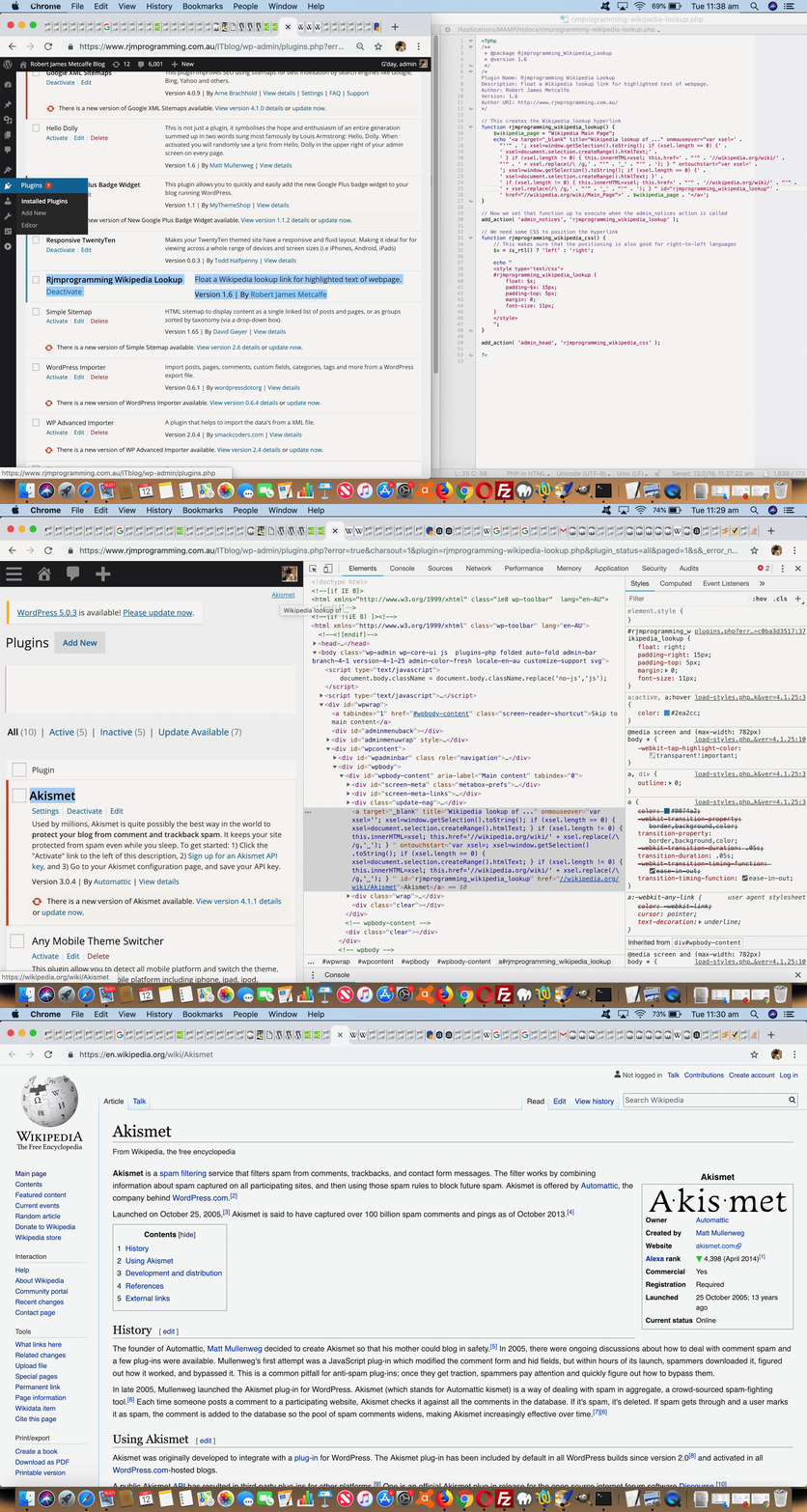
Normally we make changes to this TwentyTen themed WordPress blog by changing that theme’s wp-content/themes/twentyten/header.php file. But today we show you how to write the PHP code needed to write a WordPress.org admin login plugin to create a hyperlink to a Wikipedia page regarding any text you have highlighted on your WordPress admin area webpage.
We thank …
… and we think you should read …
For us, with our very simple rjmprogramming-wikipedia-lookup.php plugin, we only needed the one piece of PHP to sit in the current WordPress wp-content/plugins directory, and then immediately be accessible to the WordPress blog admin area’s Plugins -> Activate option …
<?php

/**

 * @package Rjmprogramming_Wikipedia_Lookup

 * @version 1.6

 */

/*

Plugin Name: Rjmprogramming Wikipedia Lookup

Description: Float a Wikipedia lookup link for highlighted text of an admin webpage.

Author: Robert James Metcalfe

Version: 1.6

Author URI: http://www.rjmprogramming.com.au/

*/


// This creates the Wikipedia lookup hyperlink

function rjmprogramming_wikipedia_lookup() {

	$wikipedia_page = "Wikipedia Main Page";

	echo '<a target="_blank" title="Wikipedia lookup of ..." onmouseover="var xsel=' .

	  "''" . '; xsel=window.getSelection().toString(); if (xsel.length == 0) {' .

	  ' xsel=document.selection.createRange().htmlText;' .

	  ' } if (xsel.length != 0) { this.innerHTML=xsel; this.href=' . "'" . '//wikipedia.org/wiki/' .

	  "'" . ' + xsel.replace(/\ /g,' . "'" . '_' . "'" . '); } " ontouchstart="var xsel=' .

	  '; xsel=window.getSelection().toString(); if (xsel.length == 0) {' .

	  ' xsel=document.selection.createRange().htmlText; }' .

	  ' if (xsel.length != 0) { this.innerHTML=xsel; this.href=' . "'" . '//wikipedia.org/wiki/' . "'" .

	  ' + xsel.replace(/\ /g,' . "'" . '_' . "'" . '); } " id="rjmprogramming_wikipedia_lookup"' .

	  ' href="//wikipedia.org/wiki/Main_Page">' . $wikipedia_page . '</a>';

}


// Now we set that function up to execute when the admin_notices action is called

add_action( 'admin_notices', 'rjmprogramming_wikipedia_lookup' );


// We need some CSS to position the hyperlink

function rjmprogramming_wikipedia_css() {

	// This makes sure that the positioning is also good for right-to-left languages

	$x = is_rtl() ? 'left' : 'right';


	echo "

	<style type='text/css'>

	#rjmprogramming_wikipedia_lookup {

		float: $x;

		padding-$x: 15px;

		padding-top: 5px;

		margin: 0;

		font-size: 11px;

	}

	</style>

	";

}


add_action( 'admin_footer', 'rjmprogramming_wikipedia_css' );


?>
We hope this is of interest to you.
If this was interesting you may be interested in this too.
If this was interesting you may be interested in this too.
If this was interesting you may be interested in this too.
If this was interesting you may be interested in this too.
If this was interesting you may be interested in this too.
If this was interesting you may be interested in this too.
If this was interesting you may be interested in this too.
If this was interesting you may be interested in this too.









WordPress Blog Comments Latest Comments Widget Tutorial
WordPress Blog Comments Latest Comments Widget Tutorial
We’re delving into WordPress.org comments again today, further to WordPress Blog Comments URL Right Click Popup Check Prevent Default Tutorial …
All this is, at first, controlled within the WordPress.org blog “admin” user …
Appearance -> Widgets
… configuration section. That got the comment text showing better, but if more than 20 words, we were getting “ellipsis display”, so in our WordPress.org blog Twenty Ten theme’s “functions.php” we added in (thanks to advice of Set the wordpress.org excerpt word count limit) …
function custom_comment_excerpt_length( $length ) {
return 480; // Set your desired word count where default is 20
}
add_filter( 'comment_excerpt_length', 'custom_comment_excerpt_length' );
… to start allowing for longer comments. Relevant comments? We filter for spam via an Akismet plugin.
Previous relevant WordPress Blog Comments URL Right Click Popup Check Prevent Default Tutorial is shown below.
WordPress Blog Comments URL Right Click Popup Check Prevent Default Tutorial
We’re coming back to the previous WordPress administrator Comment moderation section URL Popup Window Checker functionality last talked about with WordPress Blog Comments URL Right Click Popup Check Tutorial.
We were finding before this Javascript code fix …
<?php
setTimeout(function(){
if (document.body.innerHTML.indexOf('Comments</h1>') != -1) {
var als=document.getElementsByTagName('a');
for (var ials=0; ials<als.length; ials++) {
if (('' + als[ials].href).indexOf('http') == 0 && ('' + als[ials].href).replace('wordpress.org','rjmprogramming.com.au').indexOf('rjmprogramming.com.au') == -1) {
als[ials].oncontextmenu=function(evt){ evt.stopPropagation(); evt.preventDefault(); if (woowoo) { if (!woowoo.closed) { !woowoo.close(); woowoo=null; } } woowoo=window.open(evt.target.href, '_blank', 'left=' + eval(-480 + eval('' + screen.width)) + ',top=0,width=500,height=200'); setTimeout(function(){ woowoo.focus(); }, 500); };
als[ials].ontouchend=function(evt){ evt.stopPropagation(); evt.preventDefault(); if (woowoo) { if (!woowoo.closed) { !woowoo.close(); woowoo=null; } } woowoo=window.open(evt.target.href, '_blank', 'left=' + eval(-480 + eval('' + screen.width)) + ',top=0,width=500,height=200'); setTimeout(function(){ woowoo.focus(); }, 500); };
}
}
}
}, 6000);
?>
… in admin-header.php that popup windows were being created but immediately falling behind the main WordPress blog “admin” section Comments section webpage window, annoyingly. Our investigations tracked it down to the right click “default behaviour” forcing the popup window out of view.
The remedy being? Anyone, anyone?
.
.
.
.
No takers … how about a hint? … It starts with
.
.
.
.
p
.
.
.
… no takers … then with
.
.
.
.
r
.
.
.
… no takers … then with
.
.
.
.
e
.
.
.
… no takers … then with
.
.
.
.
v
.
.
.
… no takers … then with
.
.
.
.
e
.
.
.
.
… finally, yes Nicola … are you saying “Preve Fountain” …
.
.
.
Alas, no … and it’s not Spanish Steps or Pantheon or Colosseum or Trevi Fountain or Piazza Venezia or Saint Peter’s Square either, if that helps … Anyone else?
.
.
.
.
… yes, Audrey?
.
.
… you’re saying “The Mouth of Truth”?
.
.
… no, sorry, no doubt it was on the tip of your collective tongues, when we say it’s …
event.preventDefault();
… thank you, Sage … preventing that right click menu from appearing, and so not compromising window focus web browser rendering. We do very little WordPress administration on mobile, but just in case, we added an ontouchend event (usually happening at the finish of a gesture) mimicking of the non-mobile right click logic, for good measure.
Previous relevant WordPress Blog Comments URL Right Click Popup Check Tutorial is shown below.
WordPress Blog Comments URL Right Click Popup Check Tutorial
In the past we have only mildly changed the administration section of our TwentyTen themed WordPress.org blog (you are currently reading) here at RJM Programming, and some of that involved new WordPress plugins, as you can read a bit about with WordPress Blog Data URI in Post Plugin Tutorial.
We maintain that blog within an “admin” part of the WordPress blog, and any changes we’d put in a “des
sert island wish list” usually just absorb and move on, but we thought we’d improve on …WordPress comment moderation
… by allowing myself (well, thanks awfully, I don’t really know what to say) the chance to …
… because, even if we wanted to argue with the great Akismet (we use and are very happy with around here) calling it spam, one of the steps we’d want to investigate would be to rule out a potential “broken link”, and this is a way to check for that.
Now, what we discovered marrying “a wish” with “an action plan” was that …
… with our action plan moving to “deployment” via PHP (writes Javascript) admin-header.php modified code …
<?php
<script type="text/javascript">
document.body.className = document.body.className.replace('no-js','js');
setTimeout(function(){
if (document.body.innerHTML.indexOf('Comments</h1>') != -1) {
var als=document.getElementsByTagName('a');
for (var ials=0; ials<als.length; ials++) {
if (('' + als[ials].href).indexOf('http') == 0 && ('' + als[ials].href).replace('wordpress.org','rjmprogramming.com.au').indexOf('rjmprogramming.com.au') == -1) {
als[ials].oncontextmenu=function(evt){ window.open(evt.target.href, '_blank', 'left=' + eval(-500 + eval('' + screen.width)) + ',top=0,width=500,height=200'); };
}
}
}
}, 6000);
</script>
?>
Pretty straightforward really, and perhaps of interest to some WordPress.org comment moderators out there!
Previous relevant WordPress Blog Data URI in Post Plugin Tutorial is shown below.
WordPress Blog Data URI in Post Plugin Tutorial
Today, we’ve got another WordPress plugin to suit the TwentyTen themed blog you are reading, adding onto those described at WordPress Blog Collaborative Annotated Email FormData Post Tutorial.
This plugin suits the Content Editor creating the posts in the administration end of the WordPress TwentyTen themed blog, when they desire to add a data URI, rather than an absolute URL or relative URL (which would probably involve an upload). To use data URIs will make your blog posts independent of web server file arrangements, but if you are looking for this to save (web server) diskspace, this might be a mute point. The diskspace could still be used up by the MySql database storing the data URI in its base64 encoding.
What does our PHP plugin call on to do its
thangthing?And so we have for you today rjmprogramming-data-uri-helper.php PHP source code that goes into this plugin should you want to write your own version for a theme that isn’t the WordPress TwentyTen theme (looking for those TwentyTen “id”s and “className”s as changepoints), and/or view us using it with today’s animated GIF presentation.
Previous relevant WordPress Blog Collaborative Annotated Email FormData Post Tutorial is shown below.
WordPress Blog Collaborative Annotated Email FormData Post Tutorial
Yesterday’s WordPress Blog Collaborative Annotated Email User Experience Tutorial helped with practicalities regarding user experience with this WordPress Blog highlighting of text accumulated into the body (as HTML attachment) and subject (as text) of an Annotated Email form of collaborative communication.
The “subject” extension here makes it all the more important to try to look out for long email URLs that will exceed the web server limit here. When too long, that …
… and today we do not write out any discrete HTML form element to do this (when required), but instead resort to the wonderfully powerful combination of …
… to be used by the new dynamic thinking Javascript function as below …
function iftoolongpost(prefixu, restsub, restu) {
var prefixrest=prefixu.replace('&body=', encodeURIComponent(restsub) + '&body=') + restu;
if ((prefixrest).length > 900) {
// dynamic form
var xhr = new XMLHttpRequest();
var form=new FormData();
form.append('to', decodeURIComponent(prefixrest.split('to=')[1].split('&')[0]));
form.append('subject', decodeURIComponent(prefixrest.split('subject=')[1].split('&')[0]));
form.append('body', decodeURIComponent(prefixrest.split('body=')[1].split('&')[0]));
xhr.open('post', '//www.rjmprogramming.com.au/HTMLCSS/emailhtml.php', true);
xhr.send(form);
// end of dynamic form
location.href='#hfloater';
} else {
document.getElementById('aeciframe').src=prefixrest;
}
}
… called in that different calling arrangement as per …
document.getElementById('hfloater').innerHTML+='<b>Annotated Email <a class="hlclass" style="inline-block;cursor:pointer;text-decoration:none;" onclick="iftoolongpost(this.title, encodeURIComponent((this.innerText || this.contentWindow || this.contentDocument)), encodeURIComponent(this.innerHTML.substring(this.innerHTML.indexOf(String.fromCharCode(60)))));" data-href="//www.rjmprogramming.com.au/HTMLCSS/emailhtml.php?to=&subject=Re%3a%20' + encodeURIComponent(document.title.split('|')[0]) + '%20%28' + encodeURIComponent(document.URL) + '%29%0a&body=" title="//www.rjmprogramming.com.au/HTMLCSS/emailhtml.php?to=&subject=Re%3a%20' + encodeURIComponent(document.title.split('|')[0]) + '%20%28%20' + encodeURIComponent(document.URL) + '%20%29%0a&body=" target=aeciframe onmouseover="this.title=emaileeis(this.title);" ontouchstart="this.title=emaileeis(this.title);" id=b_hfloater_annotated_email>' + aec + '</a></b><iframe id=aeciframe name=aeciframe style=display:none; src=#></iframe><br>';
… featuring in changed PHP rjmprogramming-multi-lookup.php plugin and/or changed TwentyTen theme header.php file.
Previous relevant WordPress Blog Collaborative Annotated Email User Experience Tutorial is shown below.
WordPress Blog Collaborative Annotated Email User Experience Tutorial
Did you try yesterday’s WordPress Blog Collaborative Annotated Email Tutorial highlighting of text Annotated Email functionality? If you did, you might have found a “hair trigger” timed user experience. You had a very small amount of time to decide on any amendments “by hand” to your email.
On this, did you notice how we relied on a Javascript prompt window to garner an email address off the user? There is method in this “kludginess”. We wanted the highlighting not to be destroyed by a change of focus. The downside though, is that the whole time you spend answering contributes to any setTimeout based timing we have going before we automatically make the highlighting functionality menu disappear. Today, we control that, waiting an extra 10 seconds or so after that for the user to start entering their own Annotated Email content, should they wish, and the HTML div contenteditable=true is reminded by a new onchange replenishment of the delay that the user is still writing … a bit like with SMSes and those blinking dots telling you the other SMSer is writing something (but not as cute here, looks wise, alas).
Again, into the WordPress (changed PHP rjmprogramming-multi-lookup.php) plugin or header.php the changed (header.php) code involves new Javascript (that dynamically creates HTML) as per …
var mpn='', eod='', aec='', withindiv=0;
function emaileeis(inideais) {
var presm='', postsm='';
if (inideais.indexOf(':') != -1) {
presm=inideais.split(':')[0] + ':';
postsm=inideais.replace(presm,'');
} else if (inideais.indexOf('?to=') != -1) {
presm=inideais.split('?to=')[0] + '?to=';
if (inideais.indexOf('&') != -1) {
postsm=inideais.replace(presm,'').replace(inideais.split('?to=')[1].split('&')[0],'');
}
} else if (inideais.indexOf('&') != -1) {
presm=inideais.split('&')[0] + '&';
postsm=inideais.replace(presm,'');
} else {
presm=inideais.split('?')[0];
postsm=inideais.replace(presm,'');
}
if (eod == '') {
if (inideais.indexOf('?to=') != -1) {
eod=inideais.split('?to=')[1].split('&')[0];
}
var pwithindiv=withindiv;
withindiv=9000;
eod=prompt('Enter email address', eod);
if (pwithindiv == 0) {
withindiv=0.9999;
} else {
withindiv=pwithindiv;
}
if (eod == null) {
eod='';
}
}
return presm + encodeURIComponent(eod) + postsm;
}
function smsee(inideais) {
var presm='', postsm='';
if (inideais.indexOf(':') != -1) {
presm=inideais.split(':')[0] + ':';
}
if (inideais.indexOf('&') != -1) {
postsm='&' + inideais.split('&')[1];
}
if (mpn == '') {
if (inideais.indexOf(':') != -1) {
mpn=inideais.split(':')[1].split('&')[0];
}
var pwithindiv=withindiv;
withindiv=9000;
mpn=prompt('Enter phone number for SMS (or Cancel to do it at the Messager app', mpn);
if (pwithindiv == 0) {
withindiv=0.9999;
} else {
withindiv=pwithindiv;
}
if (mpn == null) {
mpn='';
}
}
return presm + mpn + postsm;
}
function lookforhighlight() {
var usualdelay=2000, oRange=null, oRect=null, s_top='0px', s_left='5px', opis='', fourhundred=300, isfx='0', otit='';
if (hight == ' ') {
setTimeout(lfhlater, 5000);
hight='';
xcbackc=cookieHHVal('linktoothers');
if (xcbackc != '') {
oharr=xcbackc.split('|');
}
}
if (('' + withindiv).indexOf('.') != -1) {
setTimeout(lookforhighlight, eval(('' + withindiv).split('.')[1]));
withindiv=eval(('' + withindiv).split('.')[0]);
return;
} else if (withindiv != 0) {
setTimeout(lookforhighlight, withindiv);
return;
} else {
setTimeout(lookforhighlight, usualdelay);
}
var xsel=window.getSelection().toString();
if (xsel.length == 0) {
try {
xsel=document.selection.createRange().htmlText;
xsel=xsel.replace(String.fromCharCode(10),' ').replace(String.fromCharCode(10),' ').replace(String.fromCharCode(10),' ').replace(String.fromCharCode(10),' ');
xsel=xsel.replace(String.fromCharCode(13),' ').replace(String.fromCharCode(13),' ').replace(String.fromCharCode(13),' ').replace(String.fromCharCode(13),' ');
} catch(ertw) {
xsel='';
}
} else {
xsel=xsel.replace(String.fromCharCode(10),' ').replace(String.fromCharCode(10),' ').replace(String.fromCharCode(10),' ').replace(String.fromCharCode(10),' ');
xsel=xsel.replace(String.fromCharCode(13),' ').replace(String.fromCharCode(13),' ').replace(String.fromCharCode(13),' ').replace(String.fromCharCode(13),' ');
if (xsel != hight && xsel != '') {
oRange = window.getSelection().getRangeAt(0); //get the text range
oRect = oRange.getBoundingClientRect();
s_top = ('' + oRect.top).replace('px','') + 'px';
s_left = ('' + oRect.left).replace('px','') + 'px';
if (s_top != '0px') {
fourhundred=eval('' + s_top.replace('px',''));
s_top='0px';
var dse='', dde='';
if (document.scrollingElement) {
if (document.scrollingElement.scrollTop) {
dse=('' + document.scrollingElement.scrollTop);
}
}
if (document.documentElement) {
if (document.documentElement.scrollTop) {
dde=('' + document.documentElement.scrollTop);
}
}
if (dse != '') {
fourhundred+=eval('' + dse.replace('px',''));
isfx='0';
} else if (dde != '') {
fourhundred+=eval('' + dde.replace('px',''));
isfx='0';
} else if (('' + window.scrollY) != '') {
fourhundred+=eval('' + ('' + window.scrollY).replace('px',''));
isfx='0';
} else if (('' + window.pageYOffset) != '') {
fourhundred+=eval('' + ('' + window.pageYOffset).replace('px',''));
isfx='0';
} else {
isfx=('' + document.body.scrollTop).replace('px','');
if (isfx.replace('0','') == '') {
isfx=('' + document.scrollingElement.scrollTop).replace('px','');
if (isfx.replace('0','') == '') {
isfx=('' + window.scrollY).replace('px','');
if (isfx.replace('0','') == '') {
isfx=('' + window.pageYOffset).replace('px','');
}
}
}
}
fourhundred+=100;
}
}
}
if (xsel != hight && xsel != '') {
hight=xsel;
if (s_top == '0px') { s_top = ('' + eval(fourhundred + eval('' + isfx))) + 'px'; }
if (aec == '') {
aec=' 📧 <div id=daec contenteditable=true onblur="withindiv=0;" onchange="withindiv=9000;" onclick="withindiv=9000; event.stopPropagation();"> </div>';
} else if (document.getElementById('daec') && document.getElementById('b_hfloater_annotated_email')) {
aec=document.getElementById('b_hfloater_annotated_email').innerHTML;
}
if (aec.indexOf('<mark>' + hight + '</mark>') == -1) {
if ((' ' + aec).slice(-14).substring(0,1).replace('?','.').replace('!','.') == '.') {
aec=aec.replace('</div>', ' <mark>' + hight + '</mark></div>');
} else {
aec=aec.replace('</div>', ' <mark>' + hight + '</mark></div>');
}
}
if (document.getElementById('hfloater')) {
if (document.getElementById('hfloater').innerHTML == '') {
document.getElementById('hfloater').style.position='absolute';
document.getElementById('hfloater').style.top=s_top;
document.getElementById('hfloater').style.left=s_left;
document.getElementById('hfloater').style.zIndex='87';
document.getElementById('hfloater').style.backgroundColor='rgba(255,165,0,0.9)';
document.getElementById('hfloater').style.border='1px solid purple';
document.getElementById('hfloater').style.padding='2px 2px 2px 2px';
document.getElementById('hfloater').style.display='block';
document.getElementById('hfloater').innerHTML='<b>Wikipedia <a class="hlclass" style="inline-block;" href="//wikipedia.org/wiki/Main_Page" title="//wikipedia.org/wiki/" target=_blank onmouseover="this.href=this.title + hight.replace(/\ /g,' + "'_'" + ');" ontouchstart="this.href=this.title + hight.replace(/\ /g,' + "'_'" + ');" id=b_hfloater_wikipedia>' + hight + '</a></b><br>';
document.getElementById('hfloater').innerHTML+='<b>Google Translate <a class="hlclass" style="inline-block;" href="//translate.google.com" title="//translate.google.com/#view=home&op=translate&sl=auto&tl=en&text=" target=_blank onmouseover="this.href=this.title + encodeURIComponent(hight);" ontouchstart="this.href=this.title + encodeURIComponent(hight);" id=b_hfloater_google_translate>' + hight + '</a></b><br>';
document.getElementById('hfloater').innerHTML+='<b>Free Dictionary <a class="hlclass" style="inline-block;" href="//www.thefreedictionary.com/" title="//www.thefreedictionary.com/" target=_blank onmouseover="this.href=this.title + hight.replace(/\ /g,' + "'+'" + ');" ontouchstart="this.href=this.title + hight.replace(/\ /g,' + "'+'" + ');" id=b_hfloater_free_dictionary>' + hight + '</a></b><br>';
document.getElementById('hfloater').innerHTML+='<b>Google Search <a class="hlclass" style="inline-block;" href="//www.google.com/" title="//www.google.com/search?q=" target=_blank onmouseover="this.href=this.title + hight.replace(/\ /g,' + "'+'" + ');" ontouchstart="this.href=this.title + hight.replace(/\ /g,' + "'+'" + ');" id=b_hfloater_google_search>' + hight + '</a></b><br>';
document.getElementById('hfloater').innerHTML+='<b>Tag Search <a class="hlclass" style="inline-block;" href="//www.rjmprogramming.com.au/ITblog/" title="//www.rjmprogramming.com.au/ITblog/tag/" target=_blank onmouseover="this.href=this.title + hight.replace(/\ /g,' + "'-'" + ');" ontouchstart="this.href=this.title + hight.replace(/\ /g,' + "'-'" + ');" id=b_hfloater_tag_search>' + hight + '</a></b><br>';
document.getElementById('hfloater').innerHTML+='<b>Category Search <a class="hlclass" style="inline-block;" href="//www.rjmprogramming.com.au/ITblog/" title="//www.rjmprogramming.com.au/ITblog/category/" target=_blank onmouseover="this.href=this.title + hight.replace(/\ /g,' + "'-'" + ');" ontouchstart="this.href=this.title + hight.replace(/\ /g,' + "'-'" + ');" id=b_hfloater_category_search>' + hight + '</a></b><br>';
document.getElementById('hfloater').innerHTML+='<b>Tag First Word Search <a class="hlclass" style="inline-block;" href="//www.rjmprogramming.com.au/ITblog/" title="//www.rjmprogramming.com.au/ITblog/tag/" target=_blank onmouseover="this.href=this.title + hight.replace(/\ /g,' + "'-'" + ').replace(' + "'-','/?wopenall='" + ');" ontouchstart="this.href=this.title + hight.replace(/\ /g,' + "'-'" + ').replace(' + "'-','/?wopenall='" + ');" id=b_hfloater_tag_first_word_search>' + hight + '</a></b><br>';
document.getElementById('hfloater').innerHTML+='<b>Posting Title Search <a class="hlclass" style="inline-block;" href="//www.rjmprogramming.com.au/itblog/match/mapper.php" title="//www.rjmprogramming.com.au/itblog/match/mapper.php?pm=" target=_blank onmouseover="this.href=this.title + encodeURIComponent(hight);" ontouchstart="this.href=this.title + encodeURIComponent(hight);" id=b_hfloater_posting_title_search>' + hight + '</a></b><br>';
document.getElementById('hfloater').innerHTML+='<b>Email <a class="hlclass" style="inline-block;" href="mailto:?subject=Re%3a%20' + encodeURIComponent(thetwords) + '%20%28' + encodeURIComponent(document.URL) + '%29&body=" title="mailto:?subject=Re%3a%20' + encodeURIComponent(thetwords) + '%20%28%20' + encodeURIComponent(document.URL) + '%20%29&body=" target=_blank onmouseover="this.href=emaileeis(this.title) + encodeURIComponent(hight);" ontouchstart="this.href=emaileeis(this.title) + encodeURIComponent(hight);" id=b_hfloater_email>' + hight + '</a></b><br>';
document.getElementById('hfloater').innerHTML+='<b>Annotated Email <a class="hlclass" style="inline-block;" href="//www.rjmprogramming.com.au/HTMLCSS/emailhtml.php?to=&subject=Re%3a%20' + encodeURIComponent(thetwords) + '%20%28' + encodeURIComponent(document.URL) + '%29%0a&body=" title="//www.rjmprogramming.com.au/HTMLCSS/emailhtml.php?to=&subject=Re%3a%20' + encodeURIComponent(thetwords) + '%20%28%20' + encodeURIComponent(document.URL) + '%20%29%0a&body=" target=aeciframe onmouseover="this.href=emaileeis(this.title).replace(this.title.slice(-6), encodeURIComponent((this.innerText || this.contentWindow || this.contentDocument)) + this.title.slice(-6)) + encodeURIComponent(this.innerHTML.substring(this.innerHTML.indexOf(String.fromCharCode(60))));" ontouchstart="this.href=emaileeis(this.title).replace(this.title.slice(-6), encodeURIComponent((this.innerText || this.contentWindow || this.contentDocument)) + this.title.slice(-6)) + encodeURIComponent(this.innerHTML.substring(this.innerHTML.indexOf(String.fromCharCode(60))));" id=b_hfloater_annotated_email>' + aec + '</a></b><iframe name=aeciframe style=display:none; src=#></iframe><br>';
document.getElementById('hfloater').innerHTML+='<b>SMS <a class="hlclass" style="inline-block;" href="sms:&body=" title="sms:&body=" target=_blank onmouseover="this.href=smsee(this.title) + encodeURIComponent(hight);" ontouchstart="this.href=smsee(this.title) + encodeURIComponent(hight);" id=b_hfloater_sms>' + hight + '</a></b><br>';
document.getElementById('hfloater').innerHTML+='<b>Navigate to Link About <a class="hlclass" style="inline-block;text-decoration:underline;cursor:pointer;" title=" " onclick="thisasearch(this.innerHTML,this);" onmouseover="thisasearch(this.innerHTML,this);" ontouchstart="thisasearch(this.innerHTML,this);" id=b_hfloater_posting_a_search>' + hight + '</a></b><br>';
document.getElementById('hfloater').innerHTML+='<b>Display/Copy Link About <a class="hlclass" style="inline-block;text-decoration:underline;cursor:pointer;" title=" " onclick="thisacopysearch(this.innerHTML,this);" onmouseover="thisacopysearch(this.innerHTML,this);" ontouchstart="thisacopysearch(this.innerHTML,this);" id=b_hfloater_posting_a_copy_search>' + hight + '</a></b><br>';
if (oharr.length >= 1) {
for (var ioharr=0; ioharr<oharr.length; ioharr++) {
otit='Other Link ' + eval(1 + ioharr);
if (oharr[ioharr].indexOf('#') != -1) {
otit=oharr[ioharr].split('#')[1].trim();
}
if (oharr[ioharr].split('#')[1].indexOf(' ') == 0) {
opis=hight.replace(/\ /g,' + \"'-'\" + ');
document.getElementById('hfloater').innerHTML+='<b>' + otit + ' <a style=\"inline-block;\" href=\"' + oharr[ioharr].split('#')[0].trim() + '\" title=\"' + oharr[ioharr].split('#')[0].trim() + '\" target=_blank onmouseover=\"this.href=this.title + hhopis(String.fromCharCode(45));\" ontouchstart=\"this.href=this.title + hhopis(String.fromCharCode(45));\" id=b_hfloater_' + xcookcnt + '>' + hight + '</a></b><br>';
} else if (oharr[ioharr].split('#')[1].indexOf(' ') == 0) {
opis=hight.replace(/\ /g,' + \"'+'\" + ');
document.getElementById('hfloater').innerHTML+='<b>' + otit + ' <a style=\"inline-block;\" href=\"' + oharr[ioharr].split('#')[0].trim() + '\" title=\"' + oharr[ioharr].split('#')[0].trim() + '\" target=_blank onmouseover=\"this.href=this.title + hhopis(String.fromCharCode(43));\" ontouchstart=\"this.href=this.title + hhopis(String.fromCharCode(43));\" id=b_hfloater_' + xcookcnt + '>' + hight + '</a></b><br>';
} else {
document.getElementById('hfloater').innerHTML+='<b>' + otit + ' <a style=\"inline-block;\" href=\"' + oharr[ioharr].split('#')[0].trim() + '\" title=\"' + oharr[ioharr].split('#')[0].trim() + '\" target=_blank onmouseover=\"this.href=this.title + encodeURIComponent(hight);\" ontouchstart=\"this.href=this.title + encodeURIComponent(hight);\" id=b_hfloater_' + xcookcnt + '>' + hight + '</a></b><br>';
}
xcookcnt++;
}
}
document.getElementById('hfloater').innerHTML+='<b><input title=\"Add your own into HTTP Cookies\" type=button onclick=cookiePutHHVal(xcookblank); value=+></input> <input title=\"Remove all HTTP Cookie URLs\" type=button onclick=cookiePutHHVal(xcookblank.trim()); value=-></input></b><br>';
} else {
document.getElementById('b_hfloater_wikipedia').innerHTML=hight;
document.getElementById('b_hfloater_google_translate').innerHTML=hight;
document.getElementById('b_hfloater_free_dictionary').innerHTML=hight;
document.getElementById('b_hfloater_google_search').innerHTML=hight;
document.getElementById('b_hfloater_tag_search').innerHTML=hight;
document.getElementById('b_hfloater_category_search').innerHTML=hight;
document.getElementById('b_hfloater_tag_first_word_search').innerHTML=hight;
document.getElementById('b_hfloater_posting_title_search').innerHTML=hight;
document.getElementById('b_hfloater_email').innerHTML=hight;
document.getElementById('b_hfloater_annotated_email').innerHTML=aec;
document.getElementById('b_hfloater_sms').innerHTML=hight;
document.getElementById('b_hfloater_posting_a_search').innerHTML=hight;
document.getElementById('b_hfloater_posting_a_copy_search').innerHTML=hight;
if (xcookcnt > 0) {
for (var icook=0; icook<xcookcnt; icook++) {
document.getElementById('b_hfloater_' + icook).innerHTML=hight;
}
}
document.getElementById('hfloater').style.top=s_top;
document.getElementById('hfloater').style.left=s_left;
document.getElementById('hfloater').style.display='block';
}
}
} else if (xsel == '') {
if (document.getElementById('hfloater')) {
document.getElementById('hfloater').style.display='none';
}
hight='';
}
}
Some email clients baulk at downloading HTML attachments, so the other change today is to append the wording of the email’s inherent HTML to the email subject, so if an emailee is unlucky in this way, they can still get “second prize” … but no cigar!
Previous relevant WordPress Blog Collaborative Annotated Email Tutorial is shown below.
WordPress Blog Collaborative Annotated Email Tutorial
Further to WordPress Plugin Primer Tutorial of recent times, we’re adding to that “highlighting of blog text” (dynamic menu) the options …
… and we think the last of these has good scope for collaborative thoughts and usages. Want to try it out? You’re here, ready. Just highlight some text to get started.
Into the WordPress (changed PHP rjmprogramming-multi-lookup.php) plugin or header.php the changed (header.php) code involves new Javascript (that dynamically creates HTML) as per …
var mpn='', eod='', aec='', withindiv=false;
function emaileeis(inideais) {
var presm='', postsm='';
if (inideais.indexOf(':') != -1) {
presm=inideais.split(':')[0] + ':';
postsm=inideais.replace(presm,'');
} else if (inideais.indexOf('?to=') != -1) {
presm=inideais.split('?to=')[0] + '?to=';
if (inideais.indexOf('&') != -1) {
postsm=inideais.replace(presm,'').replace(inideais.split('?to=')[1].split('&')[0],'');
}
} else if (inideais.indexOf('&') != -1) {
presm=inideais.split('&')[0] + '&';
postsm=inideais.replace(presm,'');
} else {
presm=inideais.split('?')[0];
postsm=inideais.replace(presm,'');
}
if (eod == '') {
if (inideais.indexOf('?to=') != -1) {
eod=inideais.split('?to=')[1].split('&')[0];
}
eod=prompt('Enter email address', eod);
if (eod == null) {
eod='';
}
}
return presm + encodeURIComponent(eod) + postsm;
}
function smsee(inideais) {
var presm='', postsm='';
if (inideais.indexOf(':') != -1) {
presm=inideais.split(':')[0] + ':';
}
if (inideais.indexOf('&') != -1) {
postsm='&' + inideais.split('&')[1];
}
if (mpn == '') {
if (inideais.indexOf(':') != -1) {
mpn=inideais.split(':')[1].split('&')[0];
}
mpn=prompt('Enter phone number for SMS (or Cancel to do it at the Messager app', mpn);
if (mpn == null) {
mpn='';
}
}
return presm + mpn + postsm;
}
function lookforhighlight() {
var usualdelay=2000, oRange=null, oRect=null, s_top='0px', s_left='5px', opis='', fourhundred=300, isfx='0', otit='';
if (hight == ' ') {
setTimeout(lfhlater, 5000);
hight='';
xcbackc=cookieHHVal('linktoothers');
if (xcbackc != '') {
oharr=xcbackc.split('|');
}
}
setTimeout(lookforhighlight, usualdelay);
if (withindiv) { return; }
var xsel=window.getSelection().toString();
if (xsel.length == 0) {
try {
xsel=document.selection.createRange().htmlText;
xsel=xsel.replace(String.fromCharCode(10),' ').replace(String.fromCharCode(10),' ').replace(String.fromCharCode(10),' ').replace(String.fromCharCode(10),' ');
xsel=xsel.replace(String.fromCharCode(13),' ').replace(String.fromCharCode(13),' ').replace(String.fromCharCode(13),' ').replace(String.fromCharCode(13),' ');
} catch(ertw) {
xsel='';
}
} else {
xsel=xsel.replace(String.fromCharCode(10),' ').replace(String.fromCharCode(10),' ').replace(String.fromCharCode(10),' ').replace(String.fromCharCode(10),' ');
xsel=xsel.replace(String.fromCharCode(13),' ').replace(String.fromCharCode(13),' ').replace(String.fromCharCode(13),' ').replace(String.fromCharCode(13),' ');
if (xsel != hight && xsel != '') {
oRange = window.getSelection().getRangeAt(0); //get the text range
oRect = oRange.getBoundingClientRect();
s_top = ('' + oRect.top).replace('px','') + 'px';
s_left = ('' + oRect.left).replace('px','') + 'px';
if (s_top != '0px') {
fourhundred=eval('' + s_top.replace('px',''));
s_top='0px';
var dse='', dde='';
if (document.scrollingElement) {
if (document.scrollingElement.scrollTop) {
dse=('' + document.scrollingElement.scrollTop);
}
}
if (document.documentElement) {
if (document.documentElement.scrollTop) {
dde=('' + document.documentElement.scrollTop);
}
}
if (dse != '') {
fourhundred+=eval('' + dse.replace('px',''));
isfx='0';
} else if (dde != '') {
fourhundred+=eval('' + dde.replace('px',''));
isfx='0';
} else if (('' + window.scrollY) != '') {
fourhundred+=eval('' + ('' + window.scrollY).replace('px',''));
isfx='0';
} else if (('' + window.pageYOffset) != '') {
fourhundred+=eval('' + ('' + window.pageYOffset).replace('px',''));
isfx='0';
} else {
isfx=('' + document.body.scrollTop).replace('px','');
if (isfx.replace('0','') == '') {
isfx=('' + document.scrollingElement.scrollTop).replace('px','');
if (isfx.replace('0','') == '') {
isfx=('' + window.scrollY).replace('px','');
if (isfx.replace('0','') == '') {
isfx=('' + window.pageYOffset).replace('px','');
}
}
}
}
fourhundred+=100;
}
}
}
if (xsel != hight && xsel != '') {
hight=xsel;
if (s_top == '0px') { s_top = ('' + eval(fourhundred + eval('' + isfx))) + 'px'; }
if (aec == '') {
aec=' 📧 <div id=daec contenteditable=true onblur="withindiv=false;" onclick="withindiv=true; event.stopPropagation();"> </div>';
} else if (document.getElementById('daec') && document.getElementById('b_hfloater_annotated_email')) {
aec=document.getElementById('b_hfloater_annotated_email').innerHTML;
}
if (aec.indexOf('<mark>' + hight + '</mark>') == -1) {
if ((' ' + aec).slice(-14).substring(0,1).replace('?','.').replace('!','.') == '.') {
aec=aec.replace('</div>', ' <mark>' + hight + '</mark></div>');
} else {
aec=aec.replace('</div>', ' <mark>' + hight + '</mark></div>');
}
}
if (document.getElementById('hfloater')) {
if (document.getElementById('hfloater').innerHTML == '') {
document.getElementById('hfloater').style.position='absolute';
document.getElementById('hfloater').style.top=s_top;
document.getElementById('hfloater').style.left=s_left;
document.getElementById('hfloater').style.zIndex='87';
document.getElementById('hfloater').style.backgroundColor='rgba(255,165,0,0.9)';
document.getElementById('hfloater').style.border='1px solid purple';
document.getElementById('hfloater').style.padding='2px 2px 2px 2px';
document.getElementById('hfloater').style.display='block';
document.getElementById('hfloater').innerHTML='<b>Wikipedia <a class="hlclass" style="inline-block;" href="//wikipedia.org/wiki/Main_Page" title="//wikipedia.org/wiki/" target=_blank onmouseover="this.href=this.title + hight.replace(/\ /g,' + "'_'" + ');" ontouchstart="this.href=this.title + hight.replace(/\ /g,' + "'_'" + ');" id=b_hfloater_wikipedia>' + hight + '</a></b><br>';
document.getElementById('hfloater').innerHTML+='<b>Google Translate <a class="hlclass" style="inline-block;" href="//translate.google.com" title="//translate.google.com/#view=home&op=translate&sl=auto&tl=en&text=" target=_blank onmouseover="this.href=this.title + encodeURIComponent(hight);" ontouchstart="this.href=this.title + encodeURIComponent(hight);" id=b_hfloater_google_translate>' + hight + '</a></b><br>';
document.getElementById('hfloater').innerHTML+='<b>Free Dictionary <a class="hlclass" style="inline-block;" href="//www.thefreedictionary.com/" title="//www.thefreedictionary.com/" target=_blank onmouseover="this.href=this.title + hight.replace(/\ /g,' + "'+'" + ');" ontouchstart="this.href=this.title + hight.replace(/\ /g,' + "'+'" + ');" id=b_hfloater_free_dictionary>' + hight + '</a></b><br>';
document.getElementById('hfloater').innerHTML+='<b>Google Search <a class="hlclass" style="inline-block;" href="//www.google.com/" title="//www.google.com/search?q=" target=_blank onmouseover="this.href=this.title + hight.replace(/\ /g,' + "'+'" + ');" ontouchstart="this.href=this.title + hight.replace(/\ /g,' + "'+'" + ');" id=b_hfloater_google_search>' + hight + '</a></b><br>';
document.getElementById('hfloater').innerHTML+='<b>Tag Search <a class="hlclass" style="inline-block;" href="//www.rjmprogramming.com.au/ITblog/" title="//www.rjmprogramming.com.au/ITblog/tag/" target=_blank onmouseover="this.href=this.title + hight.replace(/\ /g,' + "'-'" + ');" ontouchstart="this.href=this.title + hight.replace(/\ /g,' + "'-'" + ');" id=b_hfloater_tag_search>' + hight + '</a></b><br>';
document.getElementById('hfloater').innerHTML+='<b>Category Search <a class="hlclass" style="inline-block;" href="//www.rjmprogramming.com.au/ITblog/" title="//www.rjmprogramming.com.au/ITblog/category/" target=_blank onmouseover="this.href=this.title + hight.replace(/\ /g,' + "'-'" + ');" ontouchstart="this.href=this.title + hight.replace(/\ /g,' + "'-'" + ');" id=b_hfloater_category_search>' + hight + '</a></b><br>';
document.getElementById('hfloater').innerHTML+='<b>Tag First Word Search <a class="hlclass" style="inline-block;" href="//www.rjmprogramming.com.au/ITblog/" title="//www.rjmprogramming.com.au/ITblog/tag/" target=_blank onmouseover="this.href=this.title + hight.replace(/\ /g,' + "'-'" + ').replace(' + "'-','/?wopenall='" + ');" ontouchstart="this.href=this.title + hight.replace(/\ /g,' + "'-'" + ').replace(' + "'-','/?wopenall='" + ');" id=b_hfloater_tag_first_word_search>' + hight + '</a></b><br>';
document.getElementById('hfloater').innerHTML+='<b>Posting Title Search <a class="hlclass" style="inline-block;" href="//www.rjmprogramming.com.au/itblog/match/mapper.php" title="//www.rjmprogramming.com.au/itblog/match/mapper.php?pm=" target=_blank onmouseover="this.href=this.title + encodeURIComponent(hight);" ontouchstart="this.href=this.title + encodeURIComponent(hight);" id=b_hfloater_posting_title_search>' + hight + '</a></b><br>';
document.getElementById('hfloater').innerHTML+='<b>Email <a class="hlclass" style="inline-block;" href="mailto:?subject=Re%3a%20' + encodeURIComponent(thetwords) + '%20%28' + encodeURIComponent(document.URL) + '%29&body=" title="mailto:?subject=Re%3a%20' + encodeURIComponent(thetwords) + '%20%28%20' + encodeURIComponent(document.URL) + '%20%29&body=" target=_blank onmouseover="this.href=emaileeis(this.title) + encodeURIComponent(hight);" ontouchstart="this.href=emaileeis(this.title) + encodeURIComponent(hight);" id=b_hfloater_email>' + hight + '</a></b><br>';
document.getElementById('hfloater').innerHTML+='<b>Annotated Email <a class="hlclass" style="inline-block;" href="//www.rjmprogramming.com.au/HTMLCSS/emailhtml.php?to=&subject=Re%3a%20' + encodeURIComponent(thetwords) + '%20%28' + encodeURIComponent(document.URL) + '%29&body=" title="//www.rjmprogramming.com.au/HTMLCSS/emailhtml.php?to=&subject=Re%3a%20' + encodeURIComponent(thetwords) + '%20%28%20' + encodeURIComponent(document.URL) + '%20%29&body=" target=aeciframe onmouseover="this.href=emaileeis(this.title) + encodeURIComponent(this.innerHTML.substring(this.innerHTML.indexOf(String.fromCharCode(60))));" ontouchstart="this.href=emaileeis(this.title) + encodeURIComponent(this.innerHTML.substring(this.innerHTML.indexOf(String.fromCharCode(60))));" id=b_hfloater_annotated_email>' + aec + '</a></b><iframe name=aeciframe style=display:none; src=#></iframe><br>'; document.getElementById('hfloater').innerHTML+='<b>SMS <a class="hlclass" style="inline-block;" href="sms:&body=" title="sms:&body=" target=_blank onmouseover="this.href=smsee(this.title) + encodeURIComponent(hight);" ontouchstart="this.href=smsee(this.title) + encodeURIComponent(hight);" id=b_hfloater_sms>' + hight + '</a></b><br>';
document.getElementById('hfloater').innerHTML+='<b>Navigate to Link About <a class="hlclass" style="inline-block;text-decoration:underline;cursor:pointer;" title=" " onclick="thisasearch(this.innerHTML,this);" onmouseover="thisasearch(this.innerHTML,this);" ontouchstart="thisasearch(this.innerHTML,this);" id=b_hfloater_posting_a_search>' + hight + '</a></b><br>';
document.getElementById('hfloater').innerHTML+='<b>Display/Copy Link About <a class="hlclass" style="inline-block;text-decoration:underline;cursor:pointer;" title=" " onclick="thisacopysearch(this.innerHTML,this);" onmouseover="thisacopysearch(this.innerHTML,this);" ontouchstart="thisacopysearch(this.innerHTML,this);" id=b_hfloater_posting_a_copy_search>' + hight + '</a></b><br>';
if (oharr.length >= 1) {
for (var ioharr=0; ioharr<oharr.length; ioharr++) {
otit='Other Link ' + eval(1 + ioharr);
if (oharr[ioharr].indexOf('#') != -1) {
otit=oharr[ioharr].split('#')[1].trim();
}
if (oharr[ioharr].split('#')[1].indexOf(' ') == 0) {
opis=hight.replace(/\ /g,' + \"'-'\" + ');
document.getElementById('hfloater').innerHTML+='<b>' + otit + ' <a style=\"inline-block;\" href=\"' + oharr[ioharr].split('#')[0].trim() + '\" title=\"' + oharr[ioharr].split('#')[0].trim() + '\" target=_blank onmouseover=\"this.href=this.title + hhopis(String.fromCharCode(45));\" ontouchstart=\"this.href=this.title + hhopis(String.fromCharCode(45));\" id=b_hfloater_' + xcookcnt + '>' + hight + '</a></b><br>';
} else if (oharr[ioharr].split('#')[1].indexOf(' ') == 0) {
opis=hight.replace(/\ /g,' + \"'+'\" + ');
document.getElementById('hfloater').innerHTML+='<b>' + otit + ' <a style=\"inline-block;\" href=\"' + oharr[ioharr].split('#')[0].trim() + '\" title=\"' + oharr[ioharr].split('#')[0].trim() + '\" target=_blank onmouseover=\"this.href=this.title + hhopis(String.fromCharCode(43));\" ontouchstart=\"this.href=this.title + hhopis(String.fromCharCode(43));\" id=b_hfloater_' + xcookcnt + '>' + hight + '</a></b><br>';
} else {
document.getElementById('hfloater').innerHTML+='<b>' + otit + ' <a style=\"inline-block;\" href=\"' + oharr[ioharr].split('#')[0].trim() + '\" title=\"' + oharr[ioharr].split('#')[0].trim() + '\" target=_blank onmouseover=\"this.href=this.title + encodeURIComponent(hight);\" ontouchstart=\"this.href=this.title + encodeURIComponent(hight);\" id=b_hfloater_' + xcookcnt + '>' + hight + '</a></b><br>';
}
xcookcnt++;
}
}
document.getElementById('hfloater').innerHTML+='<b><input title=\"Add your own into HTTP Cookies\" type=button onclick=cookiePutHHVal(xcookblank); value=+></input> <input title=\"Remove all HTTP Cookie URLs\" type=button onclick=cookiePutHHVal(xcookblank.trim()); value=-></input></b><br>';
} else {
document.getElementById('b_hfloater_wikipedia').innerHTML=hight;
document.getElementById('b_hfloater_google_translate').innerHTML=hight;
document.getElementById('b_hfloater_free_dictionary').innerHTML=hight;
document.getElementById('b_hfloater_google_search').innerHTML=hight;
document.getElementById('b_hfloater_tag_search').innerHTML=hight;
document.getElementById('b_hfloater_category_search').innerHTML=hight;
document.getElementById('b_hfloater_tag_first_word_search').innerHTML=hight;
document.getElementById('b_hfloater_posting_title_search').innerHTML=hight;
document.getElementById('b_hfloater_email').innerHTML=hight;
document.getElementById('b_hfloater_annotated_email').innerHTML=aec;
document.getElementById('b_hfloater_sms').innerHTML=hight;
document.getElementById('b_hfloater_posting_a_search').innerHTML=hight;
document.getElementById('b_hfloater_posting_a_copy_search').innerHTML=hight;
if (xcookcnt > 0) {
for (var icook=0; icook<xcookcnt; icook++) {
document.getElementById('b_hfloater_' + icook).innerHTML=hight;
}
}
document.getElementById('hfloater').style.top=s_top;
document.getElementById('hfloater').style.left=s_left;
document.getElementById('hfloater').style.display='block';
}
}
} else if (xsel == '') {
if (document.getElementById('hfloater')) {
document.getElementById('hfloater').style.display='none';
}
hight='';
}
}
Previous relevant WordPress Plugin Primer Tutorial is shown below.
WordPress Plugin Primer Tutorial
Normally we make changes to this TwentyTen themed WordPress blog by changing that theme’s wp-content/themes/twentyten/header.php file. But today we show you how to write the PHP code needed to write a WordPress.org admin login plugin to create a hyperlink to a Wikipedia page regarding any text you have highlighted on your WordPress admin area webpage.
We thank …
… and we think you should read …
For us, with our very simple rjmprogramming-wikipedia-lookup.php plugin, we only needed the one piece of PHP to sit in the current WordPress wp-content/plugins directory, and then immediately be accessible to the WordPress blog admin area’s Plugins -> Activate option …
<?php
/**
* @package Rjmprogramming_Wikipedia_Lookup
* @version 1.6
*/
/*
Plugin Name: Rjmprogramming Wikipedia Lookup
Description: Float a Wikipedia lookup link for highlighted text of an admin webpage.
Author: Robert James Metcalfe
Version: 1.6
Author URI: http://www.rjmprogramming.com.au/
*/
// This creates the Wikipedia lookup hyperlink
function rjmprogramming_wikipedia_lookup() {
$wikipedia_page = "Wikipedia Main Page";
echo '<a target="_blank" title="Wikipedia lookup of ..." onmouseover="var xsel=' .
"''" . '; xsel=window.getSelection().toString(); if (xsel.length == 0) {' .
' xsel=document.selection.createRange().htmlText;' .
' } if (xsel.length != 0) { this.innerHTML=xsel; this.href=' . "'" . '//wikipedia.org/wiki/' .
"'" . ' + xsel.replace(/\ /g,' . "'" . '_' . "'" . '); } " ontouchstart="var xsel=' .
'; xsel=window.getSelection().toString(); if (xsel.length == 0) {' .
' xsel=document.selection.createRange().htmlText; }' .
' if (xsel.length != 0) { this.innerHTML=xsel; this.href=' . "'" . '//wikipedia.org/wiki/' . "'" .
' + xsel.replace(/\ /g,' . "'" . '_' . "'" . '); } " id="rjmprogramming_wikipedia_lookup"' .
' href="//wikipedia.org/wiki/Main_Page">' . $wikipedia_page . '</a>';
}
// Now we set that function up to execute when the admin_notices action is called
add_action( 'admin_notices', 'rjmprogramming_wikipedia_lookup' );
// We need some CSS to position the hyperlink
function rjmprogramming_wikipedia_css() {
// This makes sure that the positioning is also good for right-to-left languages
$x = is_rtl() ? 'left' : 'right';
echo "
<style type='text/css'>
#rjmprogramming_wikipedia_lookup {
float: $x;
padding-$x: 15px;
padding-top: 5px;
margin: 0;
font-size: 11px;
}
</style>
";
}
add_action( 'admin_footer', 'rjmprogramming_wikipedia_css' );
?>
We hope this is of interest to you.
If this was interesting you may be interested in this too.
If this was interesting you may be interested in this too.
If this was interesting you may be interested in this too.
If this was interesting you may be interested in this too.
If this was interesting you may be interested in this too.
If this was interesting you may be interested in this too.
If this was interesting you may be interested in this too.
If this was interesting you may be interested in this too.