Mobile Paperless Meets Table Discussion Paper Tutorial

Mobile Paperless Meets Table Discussion Paper Tutorial

Mobile Paperless Meets Table Discussion Paper Tutorial

The online world has got us going paperless for more and more of the things we want to achieve. But what about where our mobile device communications meet with the requirement for a round table discussion and the subject matter is graphical and complex by nature, such as with CAD architectural drawings? You might want the paper (or “hardcopy”) to re-enter the scene, unless you have a brilliant 3D brain, that is!

The other day such a scenario involved …

  • incoming email …
  • containing a link to …
  • website …
  • PDF document containing 16 pages … of which …
  • only page 10 was relevant and interesting, at the time … and needed …
  • regarding a round table decision making discussion

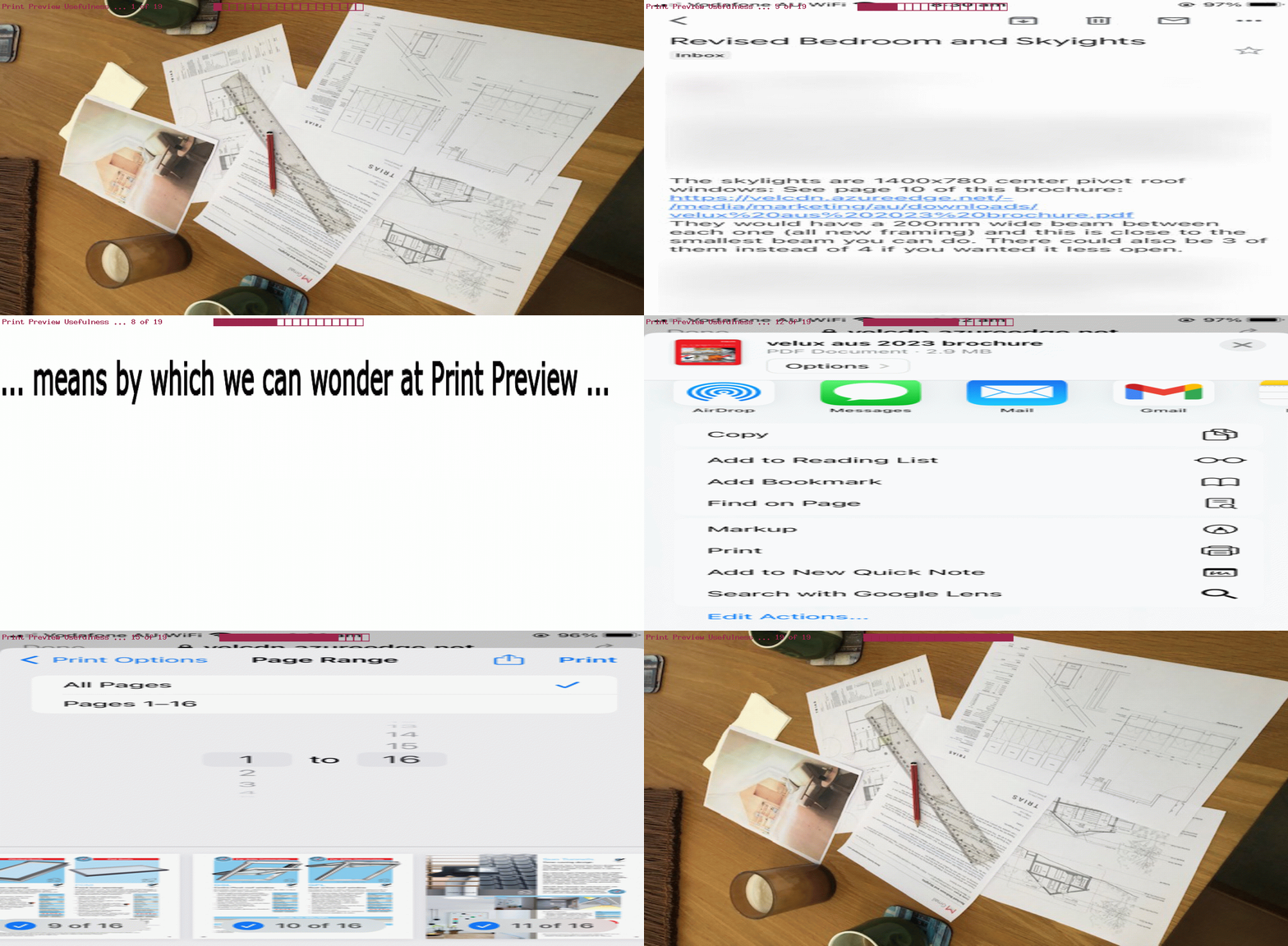
Well, it’s not much talked about, but hardcopy (paper) sophisticated functionality is still out there, not surprisingly! Today, we stop and wonder at how good “Print Preview” screens, on mobile and/or non-mobile, can be.

Take a look at a Print Preview scenario using …

  • A4 paper … in a …
  • WiFi networked colour printer … printing out a …
  • slide from a 16 page PDF … residing on a …
  • public website … we got to via a …
  • link … within an …
  • email … arriving on an …
  • iPhone … sent by a …
  • person (perhaps via their mobile device, or laptop?)

… to help a round table discussion.

If this was interesting you may be interested in this too.

Posted in eLearning, Hardware, iOS, Networking, Software, Tutorials | Tagged , , , , , , , , , , , , , , , , , , , , , , , , , , , , , , | Leave a comment

Event Calendar PHP Bookmark Tutorial

Event Calendar PHP Bookmark Tutorial

Event Calendar PHP Bookmark Tutorial

Client meets server today, allowing the PHP data storage talents in yesterday’s Event Calendar PHP Tutorial‘s work to meet a “clientside” way to


Record to Remember via Bookmark

… use the web browser Bookmarks to help you recall an Events in Month report with long entries.

Involving a Bookmark still needs those “get” ? and & arguments, and we allow the PHP to lookup for us the data underscoring an address bar URL such as …


https://www.rjmprogramming.com.au/HTMLCSS/events_in_month.php?exactlabel=August__2023_00000__1

… that mapping being possible, now, making use of a pseudo hashtag arrangement … your Clayton‘s hashtag, if you will!

To start to use a hashtag suits, as your hashtag navigation only makes sense in the “clientside” woooorrrrrllllddd, and even there, really using one only tries to position a webpage where an element with an ID matching the hashtag sits (and we are never going to have this ID element in our work), and in the meantime we’ve passed across from the child PHP to the parent HTML a valuable piece of information helping the link to the Bookmark system be possible. The Javascript codeline (you may have noticed) …


var documentURL=document.URL;

… as stupid and simple looking as it is, is crucial for us. We get child webpage parts (like our PHP) to change document.URL to a far too long in normal circumstances address bar URL the rest of the code feeds off. It’s just that now, that far too long in normal circumstances address bar URL has a #[hashtag] appended such as …


#August__2023_00000__1

… uniquifying a Month, Year Events in Month identifier part with a version of the user’s IP address (so that they only see what is relevant to them).

Address bar URLs such as “https://www.rjmprogramming.com.au/HTMLCSS/events_in_month.php?exactlabel=August__2023_00000__1” are Bookmarkable, and so we allow for similar outcomes with less concern about how much data is being “recorded” and recallable (via that web browser’s Bookmark system).

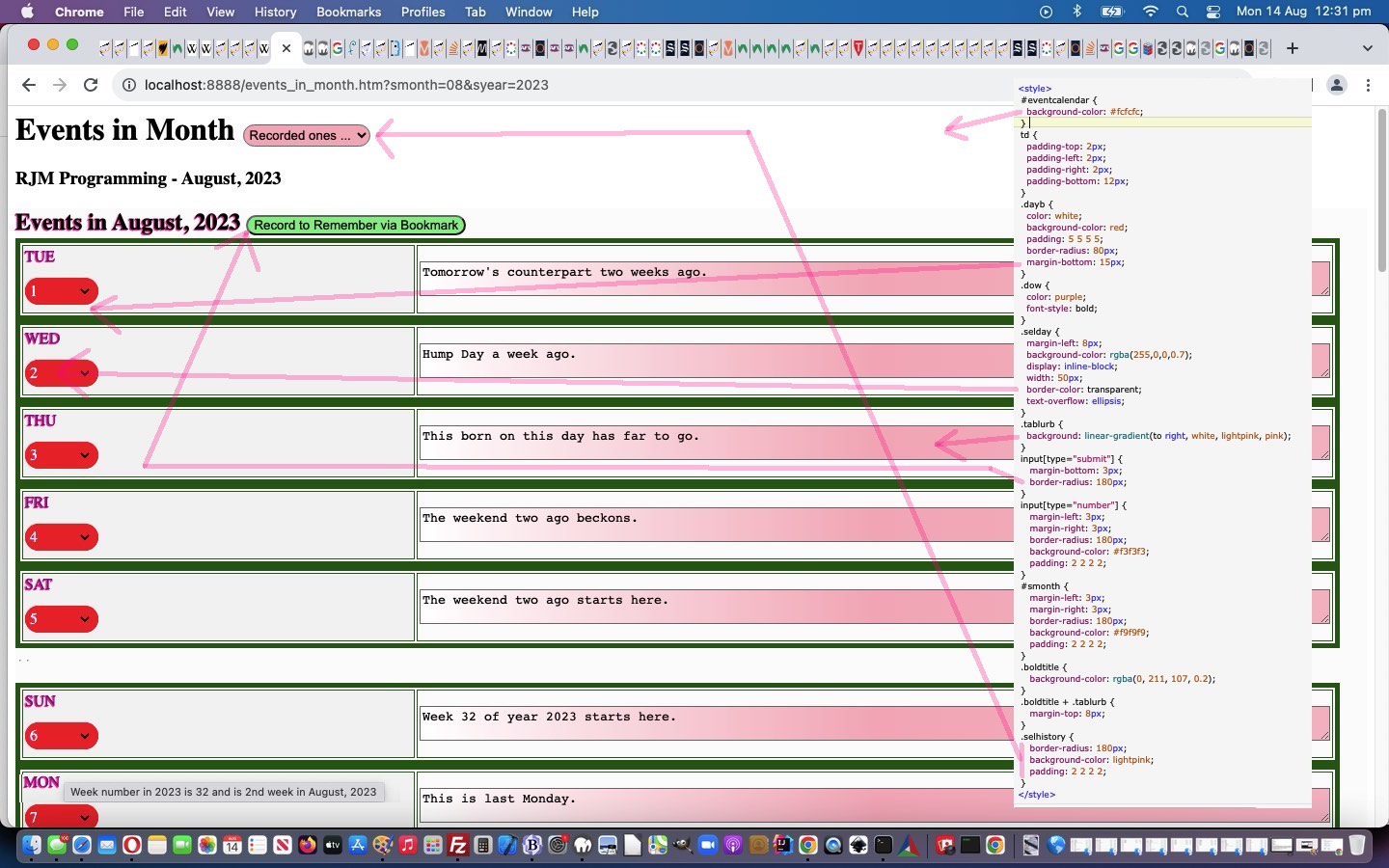
Also, today, a lot of CSS tweaks, so that the CSS styling now looks like …


<style>
#eventcalendar {
background-color: #fcfcfc;
}

td {
padding-top: 2px;
padding-left: 2px;
padding-right: 2px;
padding-bottom: 12px;
}

.dayb {
color: white;
background-color: red;
padding: 5 5 5 5;
border-radius: 80px;
margin-bottom: 15px;
}

.dow {
color: purple;
font-style: bold;
}

.selday {
margin-left: 8px;
background-color: rgba(255,0,0,0.7);
display: inline-block;
width: 50px;
border-color: transparent;
text-overflow: ellipsis;
}

.tablurb {
background: linear-gradient(to right, white, lightpink, pink);
}

input[type="submit"] {
margin-bottom: 3px;
border-radius: 180px;
}

input[type="number"] {
margin-left: 3px;
margin-right: 3px;
border-radius: 180px;
background-color: #f3f3f3;
padding: 2 2 2 2;
}

#smonth {
margin-left: 3px;
margin-right: 3px;
border-radius: 180px;
background-color: #f9f9f9;
padding: 2 2 2 2;
}

.boldtitle {
background-color: rgba(0, 211, 107, 0.2);
}

.boldtitle + .tablurb {
margin-top: 8px;
}


.selhistory {
border-radius: 180px;
background-color: lightpink;
padding: 2 2 2 2;
}
</style>

… and we thank this webpage for the heads up regarding how to calculate week numbers within a year data item displays now available in …


Previous relevant Event Calendar PHP Tutorial is shown below.

Event Calendar PHP Tutorial

Event Calendar PHP Tutorial

Let’s face it. Serverside PHP is just great! It opens up so many opportunities regarding data in your web applications.

As such, onto yesterday’s Event Calendar New Window Tutorial logic we now have a …


Record to Remember

… form submit button (toggling) value to start involving PHP with those longer datasets of Event in Month descriptions, in our most recent project. What do we use as the data conduit? No, not a database. No, not a serverside flat file. No, not clientside window.localStorage nor window.sessionStorage nor HTTP Cookies. We store long Event in Month description data in our new events_in_month.php PHP itself. And this same PHP can populate options in a new dropdown element in the parent to facilitate the recalling of any relevant “Record to Remember” recordings.

The PHP is kind of short, so we will show it below, including one MAMP example of that “self storage” …


<?php
// events_in_month.php
// RJM Programming
// August, 2023
// Help out events_in_month.htm

$hcont=file_get_contents(dirname(__FILE__) . DIRECTORY_SEPARATOR . 'events_in_month.htm');
$cont=file_get_contents(dirname(__FILE__) . DIRECTORY_SEPARATOR . 'events_in_month.php');
$ipad=server_remote_addr();
$ipadless=$ipad;
$js='';

function server_remote_addr() {
global $ipadless;
$rma = $_SERVER['REMOTE_ADDR'];
$ua = strtolower($_SERVER['HTTP_USER_AGENT']);
// you can add different browsers with the same way ..
$ipadless=str_replace(".", "_", str_replace(":", "_", $rma));
if(preg_match('/(chromium)[ \/]([\w.]+)/', $ua))
$rma = '000000'.$rma;
elseif(preg_match('/(chrome)[ \/]([\w.]+)/', $ua))
$rma = '00000'.$rma;
elseif(preg_match('/(safari)[ \/]([\w.]+)/', $ua))
$rma = '0000'.$rma;
elseif(preg_match('/(opera)[ \/]([\w.]+)/', $ua))
$rma = '000'.$rma;
elseif(preg_match('/(msie)[ \/]([\w.]+)/', $ua))
$rma = '00'.$rma;
elseif(preg_match('/(mozilla)[ \/]([\w.]+)/', $ua))
$rma = '0'.$rma;
return str_replace(".", "_", str_replace(":", "_", $rma));
}

$itdone=false;
if (isset($_GET['init'])) {
if (strpos($cont, '_' . $ipad . '=') !== false) {
$things=explode('_' . $ipad . '=', $cont);
for ($it=1; $it<sizeof($things); $it++) {
if ($it == 1 && !$itdone) {
$itdone=true;
$js.="\n parent.document.getElementById('myoldsel').style.display='inline-block'; \n";
}
$js.="\n parent.document.getElementById('myoldsel').innerHTML+='<option value=\"" . explode("\n", $things[$it])[0] . "\">" . explode('__', explode(' ' . ' ' . ' ', $things[-1 + $it])[-1 + sizeof(explode(' ' . ' ' . ' ', $things[-1 + $it]))])[0] . ', ' . explode('_', explode('__', explode(' ' . ' ' . ' ', $things[-1 + $it])[-1 + sizeof(explode(' ' . ' ' . ' ', $things[-1 + $it]))])[1])[0] . "</option>'; \n";
}
}
if (strpos($cont, '0' . $ipadless . '=') !== false) {
$things=explode('0' . $ipadless . '=', $cont);
for ($it=1; $it<sizeof($things); $it++) {
if ($it == 1 && !$itdone) {
$itdone=true;
$js.="\n parent.document.getElementById('myoldsel').style.display='inline-block'; \n";
}
$js.="\n parent.document.getElementById('myoldsel').innerHTML+='<option value=\"" . explode("\n", $things[$it])[0] . "\">" . explode('__', explode(' ' . ' ' . ' ', $things[-1 + $it])[-1 + sizeof(explode(' ' . ' ' . ' ', $things[-1 + $it]))])[0] . ', ' . explode('_', explode('__', explode(' ' . ' ' . ' ', $things[-1 + $it])[-1 + sizeof(explode(' ' . ' ' . ' ', $things[-1 + $it]))])[1])[0] . "</option>'; \n";
}
}
echo "<html><head><script type='text/javascript'> " . $js . " </script></head><body><p>" . $ipad . "</p></body></html>";
} else if (isset($_POST['phpthere']) && isset($_POST['bigurl']) && isset($_POST['caltitle'])) {
//file_put_contents('xz.xz', 'l');
if (strpos($cont, '// ' . str_replace(' ','_',str_replace(',','_',str_replace('+',' ',urldecode($_POST['caltitle'])))) . '_' . str_replace('+',' ',urldecode($_POST['phpthere'])) . '=' . $_POST['bigurl'] . "\n") === false) {
//file_put_contents('xz.xzz', 'l');
$cont=str_replace('?' . '>', '// ' . str_replace(' ','_',str_replace(',','_',str_replace('+',' ',urldecode($_POST['caltitle'])))) . '_' . str_replace('+',' ',urldecode($_POST['phpthere'])) . '=' . $_POST['bigurl'] . "\n" . '?' . '>', $cont);
file_put_contents(dirname(__FILE__) . DIRECTORY_SEPARATOR . 'events_in_month.php', $cont);
}
if (strpos($cont, '_' . $ipad . '=') !== false) {
$things=explode('_' . $ipad . '=', $cont);
for ($it=1; $it<sizeof($things); $it++) {
if ($it == 1 && !$itdone) {
$itdone=true;
$js.="\n parent.document.getElementById('myoldsel').style.display='inline-block'; \n";
}
$js.="\n parent.document.getElementById('myoldsel').innerHTML+='<option value=\"" . explode("\n", $things[$it])[0] . "\">" . explode('__', explode(' ' . ' ' . ' ', $things[-1 + $it])[-1 + sizeof(explode(' ' . ' ' . ' ', $things[-1 + $it]))])[0] . ', ' . explode('_', explode('__', explode(' ' . ' ' . ' ', $things[-1 + $it])[-1 + sizeof(explode(' ' . ' ' . ' ', $things[-1 + $it]))])[1])[0] . "</option>'; \n";
}
}
if (strpos($cont, '0' . $ipadless . '=') !== false) {
$things=explode('0' . $ipadless . '=', $cont);
for ($it=1; $it<sizeof($things); $it++) {
if ($it == 1 && !$itdone) {
$itdone=true;
$js.="\n parent.document.getElementById('myoldsel').style.display='inline-block'; \n";
}
$js.="\n parent.document.getElementById('myoldsel').innerHTML+='<option value=\"" . explode("\n", $things[$it])[0] . "\">" . explode('__', explode(' ' . ' ' . ' ', $things[-1 + $it])[-1 + sizeof(explode(' ' . ' ' . ' ', $things[-1 + $it]))])[0] . ', ' . explode('_', explode('__', explode(' ' . ' ' . ' ', $things[-1 + $it])[-1 + sizeof(explode(' ' . ' ' . ' ', $things[-1 + $it]))])[1])[0] . "</option>'; \n";
}
}
//file_put_contents('xz.xzzz', "<html><head><script type='text/javascript'> " . $js . "\n parent.checkif(parent.document.getElementById('phpif')); \n" . " </script></head><body><p>" . str_replace(' ','%20',str_replace('+',' ',urldecode($_POST['bigurl']))) . "</p></body></html>");
echo "<html><head><script type='text/javascript'> " . $js . "\n parent.checkif(parent.document.getElementById('phpif')); \n" . " </script></head><body><p>" . str_replace(' ','%20',str_replace('+',' ',urldecode($_POST['bigurl']))) . "</p></body></html>";
} else {
echo $hcont;
}
exit;

//
//
// January__1970_00000__1=http://localhost:8888/events_in_month.htm?caltitle=January%2C%201970&i01.00=&ta01.00=kgjfjhf%20jhgfjhf%20jhkgkjhg%20jhgkjhg%20jkghhg%20jkhgkjhg%20kjhgkjhg&i02.00=&ta02.00=kjhgkjh%20kjhgkjhg%20jkhgkjhg%20kjhgkjhg%20kjhgkjhg%20jhkgkjhg%20kjgkjhg&i03.00=&ta03.00=kjhgkjhg%20kjhgkjhg%20kjhgkjhg%20kjhgkjhg%20kjhgkjhg%20jhkgkjhg&i04.00=&ta04.00=&i05.00=&ta05.00=&i06.00=&ta06.00=&i07.00=&ta07.00=&i08.00=&ta08.00=&i09.00=&ta09.00=&i10.00=&ta10.00=&i11.00=&ta11.00=&i12.00=&ta12.00=&i13.00=&ta13.00=&i14.00=&ta14.00=&i15.00=&ta15.00=&i16.00=&ta16.00=&i17.00=&ta17.00=&i18.00=&ta18.00=&i19.00=&ta19.00=&i20.00=&ta20.00=&i21.00=&ta21.00=&i22.00=&ta22.00=&i23.00=&ta23.00=&i24.00=&ta24.00=&i25.00=&ta25.00=&i26.00=&ta26.00=&i27.00=&ta27.00=&i28.00=&ta28.00=&i29.00=&ta29.00=&i30.00=&ta30.00=&i31.00=&ta31.00=
?>

Yes, the parent needed to change for our events_in_month.htm parent of Events in Month web application role.


Previous relevant Event Calendar New Window Tutorial is shown below.

Event Calendar New Window Tutorial

Event Calendar New Window Tutorial

Onto yesterday’s Event Calendar Remembered Tutorial‘s “Mystery Dilemma”

But, there’s an inherent weakness with the design, we’ll go into more into the future.

… well … it’s a perennial for us, regarding how if you stick with clientside thinking, only, web applications, when the amount of data to remember starts adding up, the “get arguments approach” ( ie. use ? and & arguments at the address bar ) is restricted by length restrictions regarding URL lengths.

Rather than jump to PHP serverside ideas just yet, we wanted to show some more ideas, staying with “clientside only thinking”, today, as well as improving the UX (user experience) and small steps forward regarding styling.

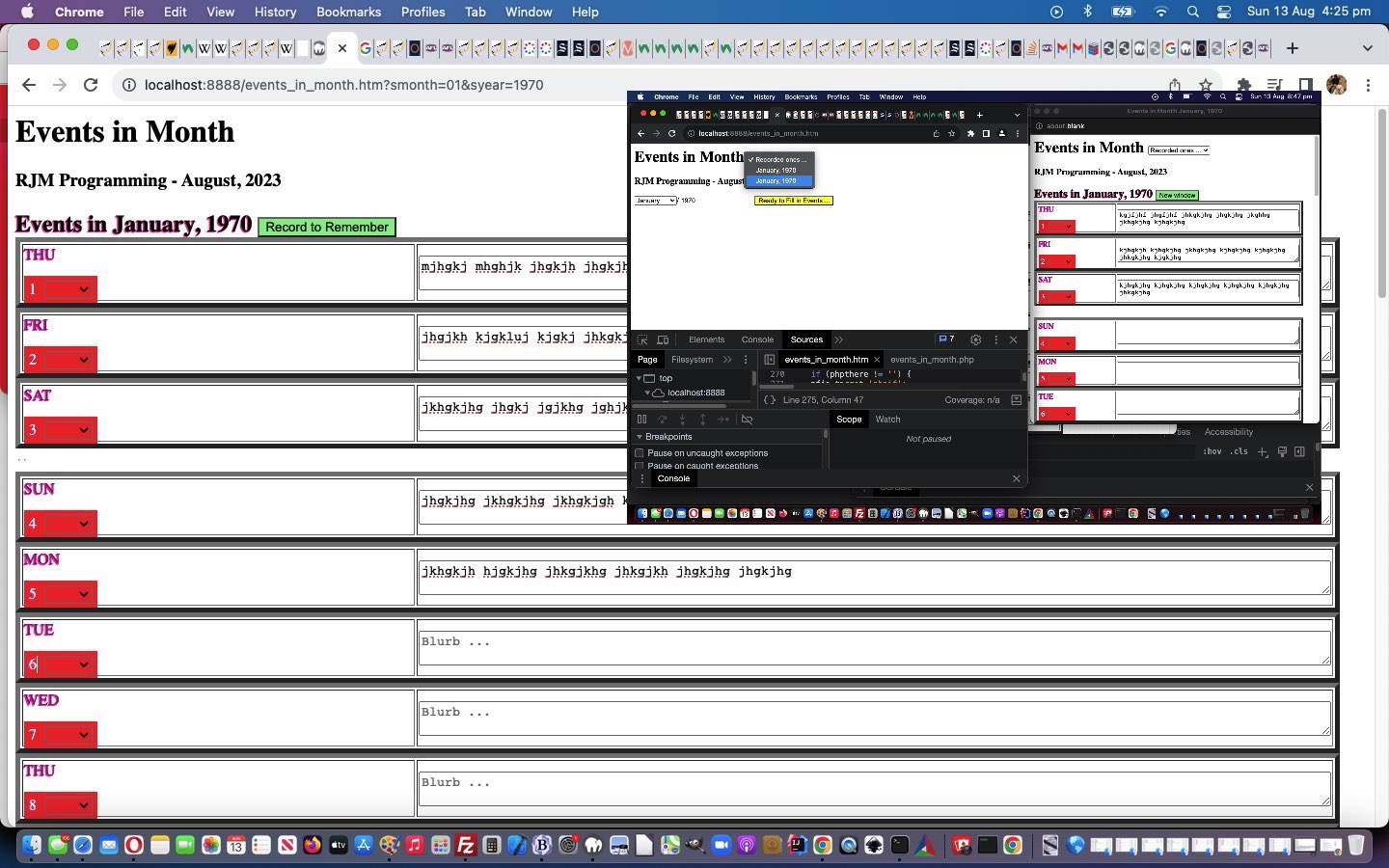
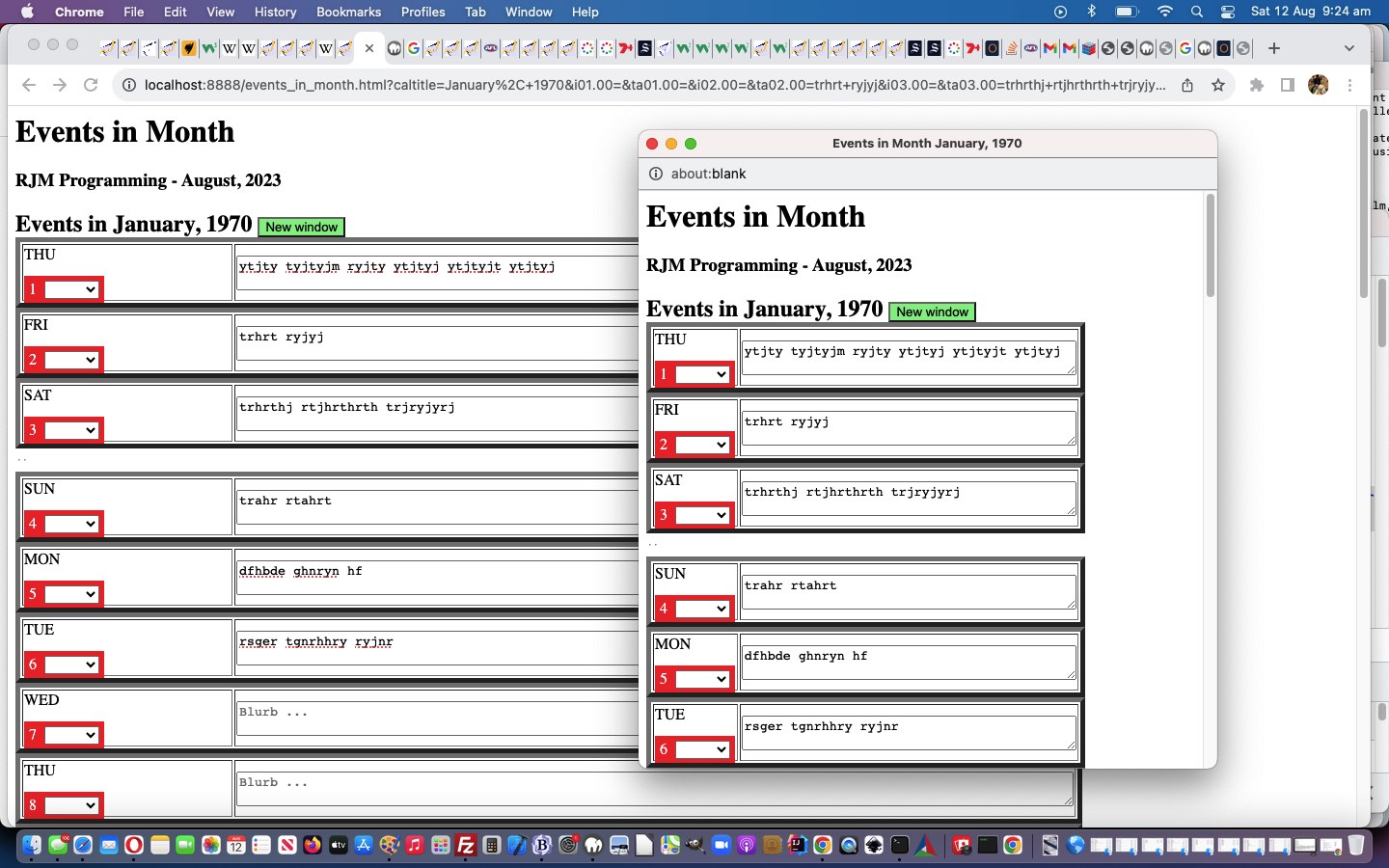
Okay then, regarding the idea to remember an Event in Month form, when there is a lot of data, and staying “just clientside”, we’ve coded for a “New Window” idea, albeit not as memorable as the default “Remember in Bookmark” possible for your smaller datasets. However, in saying that, we found that within this new window, with our Google Chrome web browser, we could …

  1. bring up Context Menu with a right click or two finger gesture within the popup window webpage content …
  2. pick Inspect option …
  3. be in Elements tab of your Web Inspector … and …
  4. highlight top <html> tag …
  5. Context Menu with a right click or two finger gesture …
  6. pick Copy -> Copy outerHTML … so that …
  7. your Event Calendar for your Events in Month choice is in a text buffer … ready for you to …
  8. Paste into a Text Editor that Events in Month webpage to store (perhaps in a MAMP local Apache/PHP/mySql web server environment, where you can further look at and develop your own ideas)

The user is told when the switch to “New Window” compromise becomes active, decided upon by reconstructing the proposed address bar URL regularly and when too long …


function formanalyze() {
var fio=document.getElementsByTagName('form')[0];
var delm='?';
var fioih=fio.innerHTML;
var fions=fioih.split(' name="');
var testurl=documentURL.split('?')[0].split('#')[0];
for (var ijk=1; ijk<fions.length; ijk++) {
testurl+=delm + fions[ijk].split('"')[0] + '=' + encodeURIComponent(document.getElementById(fions[ijk].split('"')[0]).value);
delm='&';
}
setTimeout(formanalyze, 3000);
if (eval('' + testurl.length) >= 750) {
if (document.getElementById('remember')) { document.getElementById('remember').value='New window'; }
if (document.getElementById('rememberme')) { document.getElementById('rememberme').value='New window'; }
if (document.getElementById('remembermoi')) { document.getElementById('remembermoi').value='New window'; }
} else {
if (document.getElementById('remember')) { document.getElementById('remember').value=document.getElementById('remember').value.replace(/^Remember$/g, 'Remember via Bookmark'); }
if (document.getElementById('rememberme')) { document.getElementById('rememberme').value=document.getElementById('rememberme').value.replace(/^Remember$/g, 'Remember via Bookmark'); }
if (document.getElementById('remembermoi')) { document.getElementById('remembermoi').value=document.getElementById('remembermoi').value.replace(/^Remember$/g, 'Remember via Bookmark'); }
}
return eval('' + testurl.length);
}

… the form submit buttons are reworded accordingly.

Another idea from this blog thread’s inspiration …

… we’ve now addressed in today’s “second draft” is allowing for an optional bold Event Day Blurb Title, available to the user via a new dropdown “Bold Title” option.

And, how can we do more with colour, to help the right bits stand out, and be consistent? We thought …

  • text shadow means by which the text of Event Calendar can be more impactive

    <div style="text-shadow:-1px 1px 1px #ff2d95;" id=eventcalendar></div>
  • dropdown element conditional styling

    <style>
    .dayb {
    color: white;
    background-color: red;
    padding: 5 5 5 5;
    }


    .dow {
    color: purple;
    font-style: bold;
    }

    .selday {
    margin-left: 8px;
    background-color: rgba(255,0,0,0.7);
    display: inline-block;
    width: 50px;
    }
    </style>


    if (thislabel.substring(0,1) == 'i') {
    if (thisval.trim() != '') {
    document.getElementById(thislabel.replace('i', 'sel')).style.color='white';
    document.getElementById(thislabel.replace('i', 'sel')).style.backgroundColor='red';

    }
    document.getElementById(thislabel.replace('i', 'opt')).innerText=thisval.replace(/\+/g, ' ').replace(/\ \ \ /g, ' + '); //.replace(/\+$/g, ' ');
    document.getElementById(thislabel).value=thisval.replace(/\+$/g, ' ');
    } else {
    document.getElementById(thislabel).value=thisval.replace(/\+/g, ' ').replace(/\ \ \ /g, ' + ');
    }
    }
  • placeholder on Blurb conditional existence

    var ourdata='';
    // ...
    if (documentURL.indexOf('?') != -1) {
    if (documentURL.indexOf('?caltitle=') != -1) { ourdata='data-'; }
    // ...
    trtemplate='<tr id=tr01.00><td style=width:22%;><span id=sone01.00 class=dow>' + dotw[adate.getDay()].toUpperCase().substring(0,3) + '</span><br><br><span id=stwo01.00 class=dayb>1<span onblur=sepit(this); contenteditable=true id=sp01.00></span><input type=hidden id=i01.00 name=i01.00 value=""></input><select data-dow=' + dotw[adate.getDay()].toUpperCase().substring(0,3) + ' class=selday onchange="selit(this);" id=sel01.00><option id=opt01.00 value=""></option><option title="All such in month (ie. weekly)" value="...">...</option><option title="And ..." value="&...">&</option><option value=Bold>Bold Title</option><option value=Clone>Clone</option></select></span></td><td class=blurb title="What is on?" id=tb01.00><span title="Event title" style="font-style:bold;color:blue;" id=bd01.00></span><textarea name=ta01.00 id=ta01.00 style="width:100%;height=100%;" ' + ourdata + 'placeholder="Blurb ..." class=tablurb></textarea></td></tr>';
    // ...
    }
    // ...
    }

… for our “second draft” events_in_month.htm Events in Month web application.


Previous relevant Event Calendar Remembered Tutorial is shown below.

Event Calendar Remembered Tutorial

Event Calendar Remembered Tutorial

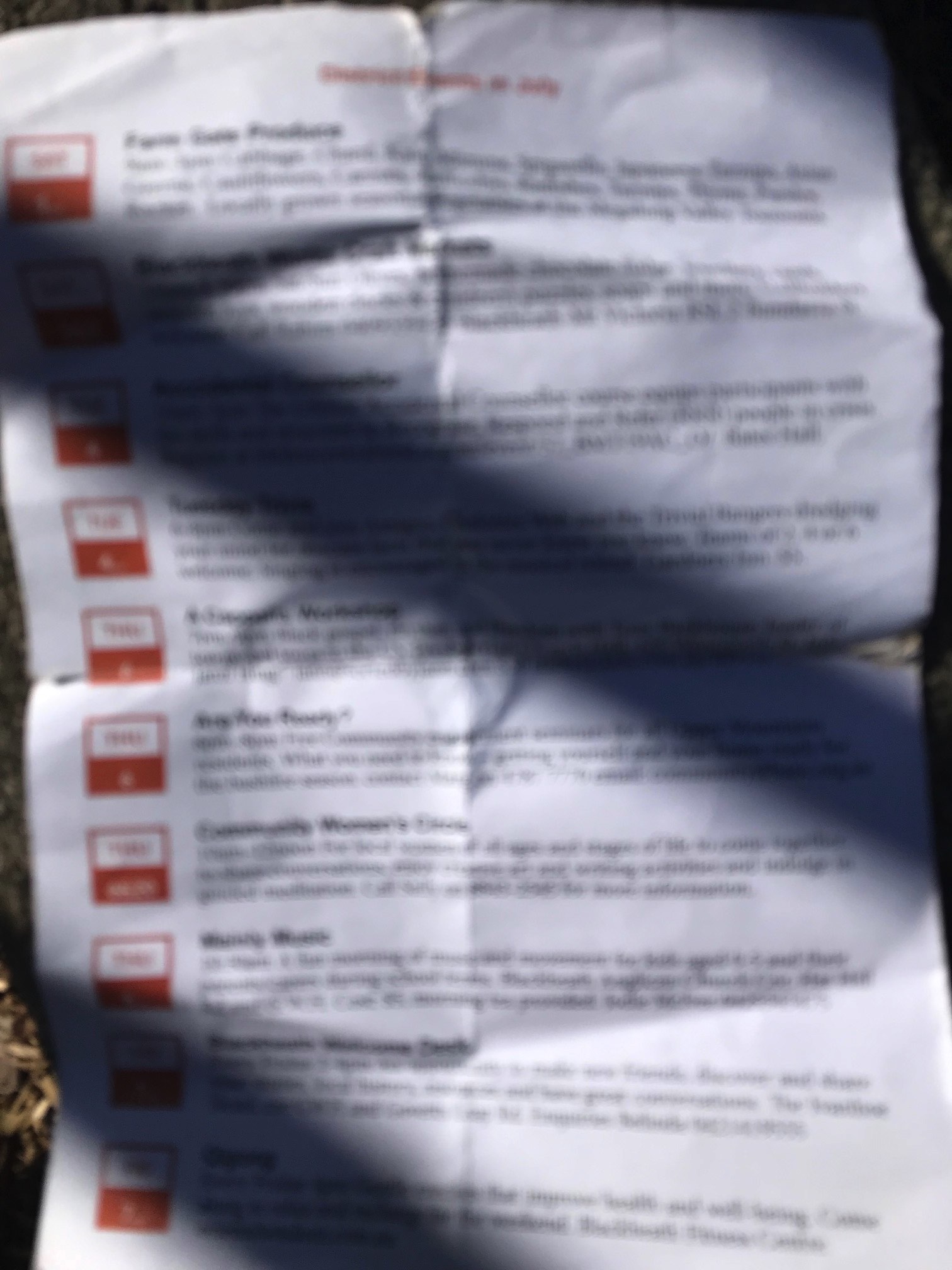
We were inspired by an Event Calendar pamplette we saw the other day …

… to write a new “proof of concept” Events in Month web application, whose content can be recalled via the web browser’s Bookmark methodologies.

We liked the ideas for day of week and/or date of month grouping arrangements we included, being, the way we interpreted it …

  • just on this day in this month … default
  • on this day of the week throughout the month in question … “
  • on this day and some others in that month in question … “&” … to start with and further amendments available via contenteditable=true span element
  • “Clone” value allows for multiple separated “blurbs” for the one signature day

But, there’s an inherent weakness with the design, we’ll go into more into the future. For now, you can try it yourself below …

Stop Press

This is where we get to for a “second draft” we’ll get into, further, tomorrow …

If this was interesting you may be interested in this too.


If this was interesting you may be interested in this too.

If this was interesting you may be interested in this too.

If this was interesting you may be interested in this too.
Posted in eLearning, Event-Driven Programming, Tutorials | Tagged , , , , , , , , , , , , , , , , , , , , , , , , , , , , , , , , , , , , , , , , , , , | 3 Comments

Event Calendar PHP Tutorial

Event Calendar PHP Tutorial

Event Calendar PHP Tutorial

Let’s face it. Serverside PHP is just great! It opens up so many opportunities regarding data in your web applications.

As such, onto yesterday’s Event Calendar New Window Tutorial logic we now have a …


Record to Remember

… form submit button (toggling) value to start involving PHP with those longer datasets of Event in Month descriptions, in our most recent project. What do we use as the data conduit? No, not a database. No, not a serverside flat file. No, not clientside window.localStorage nor window.sessionStorage nor HTTP Cookies. We store long Event in Month description data in our new events_in_month.php PHP itself. And this same PHP can populate options in a new dropdown element in the parent to facilitate the recalling of any relevant “Record to Remember” recordings.

The PHP is kind of short, so we will show it below, including one MAMP example of that “self storage” …


<?php
// events_in_month.php
// RJM Programming
// August, 2023
// Help out events_in_month.htm

$hcont=file_get_contents(dirname(__FILE__) . DIRECTORY_SEPARATOR . 'events_in_month.htm');
$cont=file_get_contents(dirname(__FILE__) . DIRECTORY_SEPARATOR . 'events_in_month.php');
$ipad=server_remote_addr();
$ipadless=$ipad;
$js='';

function server_remote_addr() {
global $ipadless;
$rma = $_SERVER['REMOTE_ADDR'];
$ua = strtolower($_SERVER['HTTP_USER_AGENT']);
// you can add different browsers with the same way ..
$ipadless=str_replace(".", "_", str_replace(":", "_", $rma));
if(preg_match('/(chromium)[ \/]([\w.]+)/', $ua))
$rma = '000000'.$rma;
elseif(preg_match('/(chrome)[ \/]([\w.]+)/', $ua))
$rma = '00000'.$rma;
elseif(preg_match('/(safari)[ \/]([\w.]+)/', $ua))
$rma = '0000'.$rma;
elseif(preg_match('/(opera)[ \/]([\w.]+)/', $ua))
$rma = '000'.$rma;
elseif(preg_match('/(msie)[ \/]([\w.]+)/', $ua))
$rma = '00'.$rma;
elseif(preg_match('/(mozilla)[ \/]([\w.]+)/', $ua))
$rma = '0'.$rma;
return str_replace(".", "_", str_replace(":", "_", $rma));
}

$itdone=false;
if (isset($_GET['init'])) {
if (strpos($cont, '_' . $ipad . '=') !== false) {
$things=explode('_' . $ipad . '=', $cont);
for ($it=1; $it<sizeof($things); $it++) {
if ($it == 1 && !$itdone) {
$itdone=true;
$js.="\n parent.document.getElementById('myoldsel').style.display='inline-block'; \n";
}
$js.="\n parent.document.getElementById('myoldsel').innerHTML+='<option value=\"" . explode("\n", $things[$it])[0] . "\">" . explode('__', explode(' ' . ' ' . ' ', $things[-1 + $it])[-1 + sizeof(explode(' ' . ' ' . ' ', $things[-1 + $it]))])[0] . ', ' . explode('_', explode('__', explode(' ' . ' ' . ' ', $things[-1 + $it])[-1 + sizeof(explode(' ' . ' ' . ' ', $things[-1 + $it]))])[1])[0] . "</option>'; \n";
}
}
if (strpos($cont, '0' . $ipadless . '=') !== false) {
$things=explode('0' . $ipadless . '=', $cont);
for ($it=1; $it<sizeof($things); $it++) {
if ($it == 1 && !$itdone) {
$itdone=true;
$js.="\n parent.document.getElementById('myoldsel').style.display='inline-block'; \n";
}
$js.="\n parent.document.getElementById('myoldsel').innerHTML+='<option value=\"" . explode("\n", $things[$it])[0] . "\">" . explode('__', explode(' ' . ' ' . ' ', $things[-1 + $it])[-1 + sizeof(explode(' ' . ' ' . ' ', $things[-1 + $it]))])[0] . ', ' . explode('_', explode('__', explode(' ' . ' ' . ' ', $things[-1 + $it])[-1 + sizeof(explode(' ' . ' ' . ' ', $things[-1 + $it]))])[1])[0] . "</option>'; \n";
}
}
echo "<html><head><script type='text/javascript'> " . $js . " </script></head><body><p>" . $ipad . "</p></body></html>";
} else if (isset($_POST['phpthere']) && isset($_POST['bigurl']) && isset($_POST['caltitle'])) {
//file_put_contents('xz.xz', 'l');
if (strpos($cont, '// ' . str_replace(' ','_',str_replace(',','_',str_replace('+',' ',urldecode($_POST['caltitle'])))) . '_' . str_replace('+',' ',urldecode($_POST['phpthere'])) . '=' . $_POST['bigurl'] . "\n") === false) {
//file_put_contents('xz.xzz', 'l');
$cont=str_replace('?' . '>', '// ' . str_replace(' ','_',str_replace(',','_',str_replace('+',' ',urldecode($_POST['caltitle'])))) . '_' . str_replace('+',' ',urldecode($_POST['phpthere'])) . '=' . $_POST['bigurl'] . "\n" . '?' . '>', $cont);
file_put_contents(dirname(__FILE__) . DIRECTORY_SEPARATOR . 'events_in_month.php', $cont);
}
if (strpos($cont, '_' . $ipad . '=') !== false) {
$things=explode('_' . $ipad . '=', $cont);
for ($it=1; $it<sizeof($things); $it++) {
if ($it == 1 && !$itdone) {
$itdone=true;
$js.="\n parent.document.getElementById('myoldsel').style.display='inline-block'; \n";
}
$js.="\n parent.document.getElementById('myoldsel').innerHTML+='<option value=\"" . explode("\n", $things[$it])[0] . "\">" . explode('__', explode(' ' . ' ' . ' ', $things[-1 + $it])[-1 + sizeof(explode(' ' . ' ' . ' ', $things[-1 + $it]))])[0] . ', ' . explode('_', explode('__', explode(' ' . ' ' . ' ', $things[-1 + $it])[-1 + sizeof(explode(' ' . ' ' . ' ', $things[-1 + $it]))])[1])[0] . "</option>'; \n";
}
}
if (strpos($cont, '0' . $ipadless . '=') !== false) {
$things=explode('0' . $ipadless . '=', $cont);
for ($it=1; $it<sizeof($things); $it++) {
if ($it == 1 && !$itdone) {
$itdone=true;
$js.="\n parent.document.getElementById('myoldsel').style.display='inline-block'; \n";
}
$js.="\n parent.document.getElementById('myoldsel').innerHTML+='<option value=\"" . explode("\n", $things[$it])[0] . "\">" . explode('__', explode(' ' . ' ' . ' ', $things[-1 + $it])[-1 + sizeof(explode(' ' . ' ' . ' ', $things[-1 + $it]))])[0] . ', ' . explode('_', explode('__', explode(' ' . ' ' . ' ', $things[-1 + $it])[-1 + sizeof(explode(' ' . ' ' . ' ', $things[-1 + $it]))])[1])[0] . "</option>'; \n";
}
}
//file_put_contents('xz.xzzz', "<html><head><script type='text/javascript'> " . $js . "\n parent.checkif(parent.document.getElementById('phpif')); \n" . " </script></head><body><p>" . str_replace(' ','%20',str_replace('+',' ',urldecode($_POST['bigurl']))) . "</p></body></html>");
echo "<html><head><script type='text/javascript'> " . $js . "\n parent.checkif(parent.document.getElementById('phpif')); \n" . " </script></head><body><p>" . str_replace(' ','%20',str_replace('+',' ',urldecode($_POST['bigurl']))) . "</p></body></html>";
} else {
echo $hcont;
}
exit;

//
//
// January__1970_00000__1=http://localhost:8888/events_in_month.htm?caltitle=January%2C%201970&i01.00=&ta01.00=kgjfjhf%20jhgfjhf%20jhkgkjhg%20jhgkjhg%20jkghhg%20jkhgkjhg%20kjhgkjhg&i02.00=&ta02.00=kjhgkjh%20kjhgkjhg%20jkhgkjhg%20kjhgkjhg%20kjhgkjhg%20jhkgkjhg%20kjgkjhg&i03.00=&ta03.00=kjhgkjhg%20kjhgkjhg%20kjhgkjhg%20kjhgkjhg%20kjhgkjhg%20jhkgkjhg&i04.00=&ta04.00=&i05.00=&ta05.00=&i06.00=&ta06.00=&i07.00=&ta07.00=&i08.00=&ta08.00=&i09.00=&ta09.00=&i10.00=&ta10.00=&i11.00=&ta11.00=&i12.00=&ta12.00=&i13.00=&ta13.00=&i14.00=&ta14.00=&i15.00=&ta15.00=&i16.00=&ta16.00=&i17.00=&ta17.00=&i18.00=&ta18.00=&i19.00=&ta19.00=&i20.00=&ta20.00=&i21.00=&ta21.00=&i22.00=&ta22.00=&i23.00=&ta23.00=&i24.00=&ta24.00=&i25.00=&ta25.00=&i26.00=&ta26.00=&i27.00=&ta27.00=&i28.00=&ta28.00=&i29.00=&ta29.00=&i30.00=&ta30.00=&i31.00=&ta31.00=
?>

Yes, the parent needed to change for our events_in_month.htm parent of Events in Month web application role.


Previous relevant Event Calendar New Window Tutorial is shown below.

Event Calendar New Window Tutorial

Event Calendar New Window Tutorial

Onto yesterday’s Event Calendar Remembered Tutorial‘s “Mystery Dilemma”

But, there’s an inherent weakness with the design, we’ll go into more into the future.

… well … it’s a perennial for us, regarding how if you stick with clientside thinking, only, web applications, when the amount of data to remember starts adding up, the “get arguments approach” ( ie. use ? and & arguments at the address bar ) is restricted by length restrictions regarding URL lengths.

Rather than jump to PHP serverside ideas just yet, we wanted to show some more ideas, staying with “clientside only thinking”, today, as well as improving the UX (user experience) and small steps forward regarding styling.

Okay then, regarding the idea to remember an Event in Month form, when there is a lot of data, and staying “just clientside”, we’ve coded for a “New Window” idea, albeit not as memorable as the default “Remember in Bookmark” possible for your smaller datasets. However, in saying that, we found that within this new window, with our Google Chrome web browser, we could …

  1. bring up Context Menu with a right click or two finger gesture within the popup window webpage content …
  2. pick Inspect option …
  3. be in Elements tab of your Web Inspector … and …
  4. highlight top <html> tag …
  5. Context Menu with a right click or two finger gesture …
  6. pick Copy -> Copy outerHTML … so that …
  7. your Event Calendar for your Events in Month choice is in a text buffer … ready for you to …
  8. Paste into a Text Editor that Events in Month webpage to store (perhaps in a MAMP local Apache/PHP/mySql web server environment, where you can further look at and develop your own ideas)

The user is told when the switch to “New Window” compromise becomes active, decided upon by reconstructing the proposed address bar URL regularly and when too long …


function formanalyze() {
var fio=document.getElementsByTagName('form')[0];
var delm='?';
var fioih=fio.innerHTML;
var fions=fioih.split(' name="');
var testurl=documentURL.split('?')[0].split('#')[0];
for (var ijk=1; ijk<fions.length; ijk++) {
testurl+=delm + fions[ijk].split('"')[0] + '=' + encodeURIComponent(document.getElementById(fions[ijk].split('"')[0]).value);
delm='&';
}
setTimeout(formanalyze, 3000);
if (eval('' + testurl.length) >= 750) {
if (document.getElementById('remember')) { document.getElementById('remember').value='New window'; }
if (document.getElementById('rememberme')) { document.getElementById('rememberme').value='New window'; }
if (document.getElementById('remembermoi')) { document.getElementById('remembermoi').value='New window'; }
} else {
if (document.getElementById('remember')) { document.getElementById('remember').value=document.getElementById('remember').value.replace(/^Remember$/g, 'Remember via Bookmark'); }
if (document.getElementById('rememberme')) { document.getElementById('rememberme').value=document.getElementById('rememberme').value.replace(/^Remember$/g, 'Remember via Bookmark'); }
if (document.getElementById('remembermoi')) { document.getElementById('remembermoi').value=document.getElementById('remembermoi').value.replace(/^Remember$/g, 'Remember via Bookmark'); }
}
return eval('' + testurl.length);
}

… the form submit buttons are reworded accordingly.

Another idea from this blog thread’s inspiration …

… we’ve now addressed in today’s “second draft” is allowing for an optional bold Event Day Blurb Title, available to the user via a new dropdown “Bold Title” option.

And, how can we do more with colour, to help the right bits stand out, and be consistent? We thought …

  • text shadow means by which the text of Event Calendar can be more impactive

    <div style="text-shadow:-1px 1px 1px #ff2d95;" id=eventcalendar></div>
  • dropdown element conditional styling

    <style>
    .dayb {
    color: white;
    background-color: red;
    padding: 5 5 5 5;
    }


    .dow {
    color: purple;
    font-style: bold;
    }

    .selday {
    margin-left: 8px;
    background-color: rgba(255,0,0,0.7);
    display: inline-block;
    width: 50px;
    }
    </style>


    if (thislabel.substring(0,1) == 'i') {
    if (thisval.trim() != '') {
    document.getElementById(thislabel.replace('i', 'sel')).style.color='white';
    document.getElementById(thislabel.replace('i', 'sel')).style.backgroundColor='red';

    }
    document.getElementById(thislabel.replace('i', 'opt')).innerText=thisval.replace(/\+/g, ' ').replace(/\ \ \ /g, ' + '); //.replace(/\+$/g, ' ');
    document.getElementById(thislabel).value=thisval.replace(/\+$/g, ' ');
    } else {
    document.getElementById(thislabel).value=thisval.replace(/\+/g, ' ').replace(/\ \ \ /g, ' + ');
    }
    }
  • placeholder on Blurb conditional existence

    var ourdata='';
    // ...
    if (documentURL.indexOf('?') != -1) {
    if (documentURL.indexOf('?caltitle=') != -1) { ourdata='data-'; }
    // ...
    trtemplate='<tr id=tr01.00><td style=width:22%;><span id=sone01.00 class=dow>' + dotw[adate.getDay()].toUpperCase().substring(0,3) + '</span><br><br><span id=stwo01.00 class=dayb>1<span onblur=sepit(this); contenteditable=true id=sp01.00></span><input type=hidden id=i01.00 name=i01.00 value=""></input><select data-dow=' + dotw[adate.getDay()].toUpperCase().substring(0,3) + ' class=selday onchange="selit(this);" id=sel01.00><option id=opt01.00 value=""></option><option title="All such in month (ie. weekly)" value="...">...</option><option title="And ..." value="&...">&</option><option value=Bold>Bold Title</option><option value=Clone>Clone</option></select></span></td><td class=blurb title="What is on?" id=tb01.00><span title="Event title" style="font-style:bold;color:blue;" id=bd01.00></span><textarea name=ta01.00 id=ta01.00 style="width:100%;height=100%;" ' + ourdata + 'placeholder="Blurb ..." class=tablurb></textarea></td></tr>';
    // ...
    }
    // ...
    }

… for our “second draft” events_in_month.htm Events in Month web application.


Previous relevant Event Calendar Remembered Tutorial is shown below.

Event Calendar Remembered Tutorial

Event Calendar Remembered Tutorial

We were inspired by an Event Calendar pamplette we saw the other day …

… to write a new “proof of concept” Events in Month web application, whose content can be recalled via the web browser’s Bookmark methodologies.

We liked the ideas for day of week and/or date of month grouping arrangements we included, being, the way we interpreted it …

  • just on this day in this month … default
  • on this day of the week throughout the month in question … “
  • on this day and some others in that month in question … “&” … to start with and further amendments available via contenteditable=true span element
  • “Clone” value allows for multiple separated “blurbs” for the one signature day

But, there’s an inherent weakness with the design, we’ll go into more into the future. For now, you can try it yourself below …

Stop Press

This is where we get to for a “second draft” we’ll get into, further, tomorrow …

If this was interesting you may be interested in this too.


If this was interesting you may be interested in this too.

If this was interesting you may be interested in this too.
Posted in eLearning, Event-Driven Programming, Tutorials | Tagged , , , , , , , , , , , , , , , , , , , , , , , , , , , , , | Leave a comment

Event Calendar New Window Tutorial

Event Calendar New Window Tutorial

Event Calendar New Window Tutorial

Onto yesterday’s Event Calendar Remembered Tutorial‘s “Mystery Dilemma”

But, there’s an inherent weakness with the design, we’ll go into more into the future.

… well … it’s a perennial for us, regarding how if you stick with clientside thinking, only, web applications, when the amount of data to remember starts adding up, the “get arguments approach” ( ie. use ? and & arguments at the address bar ) is restricted by length restrictions regarding URL lengths.

Rather than jump to PHP serverside ideas just yet, we wanted to show some more ideas, staying with “clientside only thinking”, today, as well as improving the UX (user experience) and small steps forward regarding styling.

Okay then, regarding the idea to remember an Event in Month form, when there is a lot of data, and staying “just clientside”, we’ve coded for a “New Window” idea, albeit not as memorable as the default “Remember in Bookmark” possible for your smaller datasets. However, in saying that, we found that within this new window, with our Google Chrome web browser, we could …

  1. bring up Context Menu with a right click or two finger gesture within the popup window webpage content …
  2. pick Inspect option …
  3. be in Elements tab of your Web Inspector … and …
  4. highlight top <html> tag …
  5. Context Menu with a right click or two finger gesture …
  6. pick Copy -> Copy outerHTML … so that …
  7. your Event Calendar for your Events in Month choice is in a text buffer … ready for you to …
  8. Paste into a Text Editor that Events in Month webpage to store (perhaps in a MAMP local Apache/PHP/mySql web server environment, where you can further look at and develop your own ideas)

The user is told when the switch to “New Window” compromise becomes active, decided upon by reconstructing the proposed address bar URL regularly and when too long …


function formanalyze() {
var fio=document.getElementsByTagName('form')[0];
var delm='?';
var fioih=fio.innerHTML;
var fions=fioih.split(' name="');
var testurl=documentURL.split('?')[0].split('#')[0];
for (var ijk=1; ijk<fions.length; ijk++) {
testurl+=delm + fions[ijk].split('"')[0] + '=' + encodeURIComponent(document.getElementById(fions[ijk].split('"')[0]).value);
delm='&';
}
setTimeout(formanalyze, 3000);
if (eval('' + testurl.length) >= 750) {
if (document.getElementById('remember')) { document.getElementById('remember').value='New window'; }
if (document.getElementById('rememberme')) { document.getElementById('rememberme').value='New window'; }
if (document.getElementById('remembermoi')) { document.getElementById('remembermoi').value='New window'; }
} else {
if (document.getElementById('remember')) { document.getElementById('remember').value=document.getElementById('remember').value.replace(/^Remember$/g, 'Remember via Bookmark'); }
if (document.getElementById('rememberme')) { document.getElementById('rememberme').value=document.getElementById('rememberme').value.replace(/^Remember$/g, 'Remember via Bookmark'); }
if (document.getElementById('remembermoi')) { document.getElementById('remembermoi').value=document.getElementById('remembermoi').value.replace(/^Remember$/g, 'Remember via Bookmark'); }
}
return eval('' + testurl.length);
}

… the form submit buttons are reworded accordingly.

Another idea from this blog thread’s inspiration …

… we’ve now addressed in today’s “second draft” is allowing for an optional bold Event Day Blurb Title, available to the user via a new dropdown “Bold Title” option.

And, how can we do more with colour, to help the right bits stand out, and be consistent? We thought …

  • text shadow means by which the text of Event Calendar can be more impactive

    <div style="text-shadow:-1px 1px 1px #ff2d95;" id=eventcalendar></div>
  • dropdown element conditional styling

    <style>
    .dayb {
    color: white;
    background-color: red;
    padding: 5 5 5 5;
    }


    .dow {
    color: purple;
    font-style: bold;
    }

    .selday {
    margin-left: 8px;
    background-color: rgba(255,0,0,0.7);
    display: inline-block;
    width: 50px;
    }
    </style>


    if (thislabel.substring(0,1) == 'i') {
    if (thisval.trim() != '') {
    document.getElementById(thislabel.replace('i', 'sel')).style.color='white';
    document.getElementById(thislabel.replace('i', 'sel')).style.backgroundColor='red';

    }
    document.getElementById(thislabel.replace('i', 'opt')).innerText=thisval.replace(/\+/g, ' ').replace(/\ \ \ /g, ' + '); //.replace(/\+$/g, ' ');
    document.getElementById(thislabel).value=thisval.replace(/\+$/g, ' ');
    } else {
    document.getElementById(thislabel).value=thisval.replace(/\+/g, ' ').replace(/\ \ \ /g, ' + ');
    }
    }
  • placeholder on Blurb conditional existence

    var ourdata='';
    // ...
    if (documentURL.indexOf('?') != -1) {
    if (documentURL.indexOf('?caltitle=') != -1) { ourdata='data-'; }
    // ...
    trtemplate='<tr id=tr01.00><td style=width:22%;><span id=sone01.00 class=dow>' + dotw[adate.getDay()].toUpperCase().substring(0,3) + '</span><br><br><span id=stwo01.00 class=dayb>1<span onblur=sepit(this); contenteditable=true id=sp01.00></span><input type=hidden id=i01.00 name=i01.00 value=""></input><select data-dow=' + dotw[adate.getDay()].toUpperCase().substring(0,3) + ' class=selday onchange="selit(this);" id=sel01.00><option id=opt01.00 value=""></option><option title="All such in month (ie. weekly)" value="...">...</option><option title="And ..." value="&...">&</option><option value=Bold>Bold Title</option><option value=Clone>Clone</option></select></span></td><td class=blurb title="What is on?" id=tb01.00><span title="Event title" style="font-style:bold;color:blue;" id=bd01.00></span><textarea name=ta01.00 id=ta01.00 style="width:100%;height=100%;" ' + ourdata + 'placeholder="Blurb ..." class=tablurb></textarea></td></tr>';
    // ...
    }
    // ...
    }

… for our “second draft” events_in_month.htm Events in Month web application.


Previous relevant Event Calendar Remembered Tutorial is shown below.

Event Calendar Remembered Tutorial

Event Calendar Remembered Tutorial

We were inspired by an Event Calendar pamplette we saw the other day …

… to write a new “proof of concept” Events in Month web application, whose content can be recalled via the web browser’s Bookmark methodologies.

We liked the ideas for day of week and/or date of month grouping arrangements we included, being, the way we interpreted it …

  • just on this day in this month … default
  • on this day of the week throughout the month in question … “
  • on this day and some others in that month in question … “&” … to start with and further amendments available via contenteditable=true span element
  • “Clone” value allows for multiple separated “blurbs” for the one signature day

But, there’s an inherent weakness with the design, we’ll go into more into the future. For now, you can try it yourself below …

Stop Press

This is where we get to for a “second draft” we’ll get into, further, tomorrow …

If this was interesting you may be interested in this too.


If this was interesting you may be interested in this too.
Posted in eLearning, Event-Driven Programming, Tutorials | Tagged , , , , , , , , , , , , , , , , , , , , , , , , , | Leave a comment

Event Calendar Remembered Tutorial

Event Calendar Remembered Tutorial

Event Calendar Remembered Tutorial

We were inspired by an Event Calendar pamplette we saw the other day …

… to write a new “proof of concept” Events in Month web application, whose content can be recalled via the web browser’s Bookmark methodologies.

We liked the ideas for day of week and/or date of month grouping arrangements we included, being, the way we interpreted it …

  • just on this day in this month … default
  • on this day of the week throughout the month in question … “
  • on this day and some others in that month in question … “&” … to start with and further amendments available via contenteditable=true span element
  • “Clone” value allows for multiple separated “blurbs” for the one signature day

But, there’s an inherent weakness with the design, we’ll go into more into the future. For now, you can try it yourself below …

Stop Press

This is where we get to for a “second draft” we’ll get into, further, tomorrow …

If this was interesting you may be interested in this too.

Posted in eLearning, Event-Driven Programming, Tutorials | Tagged , , , , , , , , , , , , , , , | Leave a comment

Drag and Drop via Hotlinked Javascript Global Variable Tutorial

Drag and Drop via Hotlinked Javascript Global Variable Tutorial

Drag and Drop via Hotlinked Javascript Global Variable Tutorial

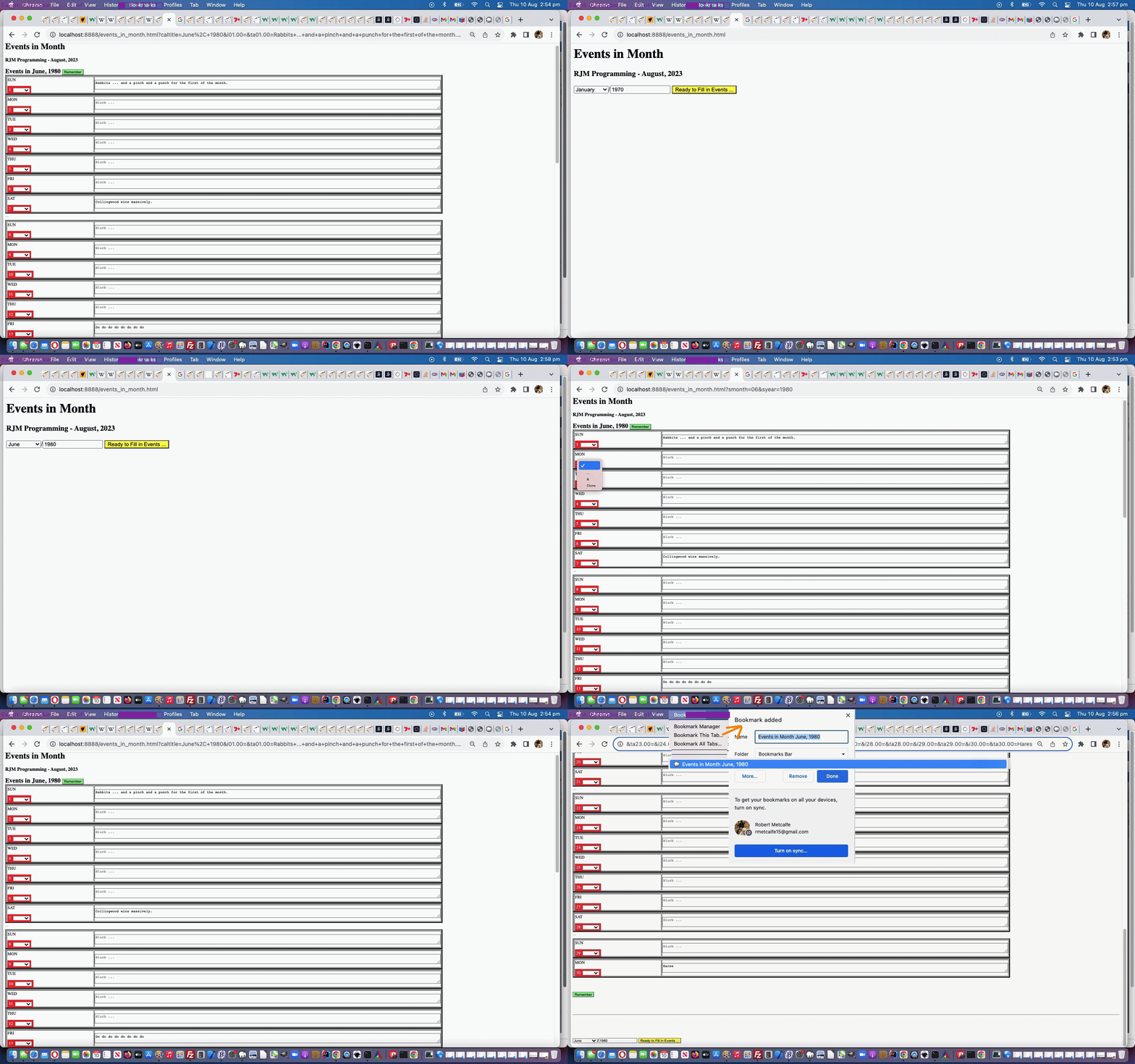
The recent Drag and Drop via Hotlinked External Javascript Tutorial had an annoyance, whereby, regarding its modus operandi of …

  • write their own HTML (and derived Javascript) via a textarea element with initial template HTML code
  • construct a personalized HTML webpage after the light green submit button press … so that …
  • downloading the HTML is possible via “View Page Source” (context option) and Copy/Paste into a text editor (and then, perhaps, onto local system web server environment development via an Apache/PHP/MySql local web server product such as MAMP)

… in its middle phase that if you …

  • clicked into that middle phase‘s HTML textarea element … the logic was the same as the …
  • external Javascript’s …


    parent.document.getElementById('textareaaction').click();


    function doit(what) {
    if (viaej) { eval(what); }
    }

… but we really only want that HTML textarea element (id=’textareaaction’) onclick logic


<textarea style=background-color:silver; ontouchdown='viaej=false; event.stopPropagation();' onmousedown='viaej=false; event.stopPropagation();' onclick=doit(this.value); data-onblur=doit(this.value); rows=5 cols=80 placeholder='Please place your drop action to do Javascript here below ...' id=textareaaction>
alert('You just dropped off');
</textarea>

… to happen in the second scenario, but not the first (which is really just a mechanism to give the textarea element the webpage focus). How can we differentiate? Well, there are probably a lot of ways, but our preferred way is to involve a new global variable


var viaej=false;

… which our external Javascript can reference, usefully, via code like


function dolaterwo() {
window.opener.viaej=false;
}

function dolaternonwo() {
parent.viaej=false;
}


if (typeof(parent.viaej) !== 'undefined') {
parent.viaej=true;
}

parent.document.getElementById('textareaaction').click();
if (typeof(parent.viaej) !== 'undefined') {
setTimeout(dolaternonwo, 3000); //parent.viaej=false;
}

… so that an onclick event’s click or touch into the textarea element equates to global variable viaej having value false (because onmousedown or ontouchdown (yayyyy!!!) events precede onclick event) and for the external Javascript parent.document.getElementById(‘textareaaction’).click() call equates to a timing where global variable viaej having value true (and the function doit’s eval logic is executed).

In order to fix this issue we made changes to our external Javascript countries.js “Drag and Drop specialist” use by our changed “second draft proof of concept” PHP draganddrop_hotwiring.php web application you can try below.


Previous relevant Drag and Drop via Hotlinked External Javascript Tutorial is shown below.

Drag and Drop via Hotlinked External Javascript Tutorial

Drag and Drop via Hotlinked External Javascript Tutorial

There are three very useful “hotwiring” ideas that usually work with your web applications …

  • via absolute image URLs
  • via absolute stylesheet URLs
  • via absolute external Javascript URLs

… and that last one is what we want to hone in regarding, with an idea we had to allow a user to …

  • write their own HTML (and derived Javascript) via a textarea element with initial template HTML code
  • construct a personalized HTML webpage after the light green submit button press … so that …
  • downloading the HTML is possible via “View Page Source” (context option) and Copy/Paste into a text editor (and then, perhaps, onto local system web server environment development via an Apache/PHP/MySql local web server product such as MAMP)

In order to allow this more generic approach we made changes to our external Javascript countries.js “Drag and Drop specialist” use by our “first draft proof of concept” PHP draganddrop_hotwiring.php web application you can try below (where a context option like “View Frame Source” might more be the go regarding downloading your HTML invention)

If this was interesting you may be interested in this too.


If this was interesting you may be interested in this too.
Posted in eLearning, Event-Driven Programming, Tutorials | Tagged , , , , , , , , , , , , , , , , , , , , , , , , , , , , , , , , | Leave a comment

Drag and Drop Three Dimensional Look Tutorial

Drag and Drop Three Dimensional Look Tutorial

Drag and Drop Three Dimensional Look Tutorial

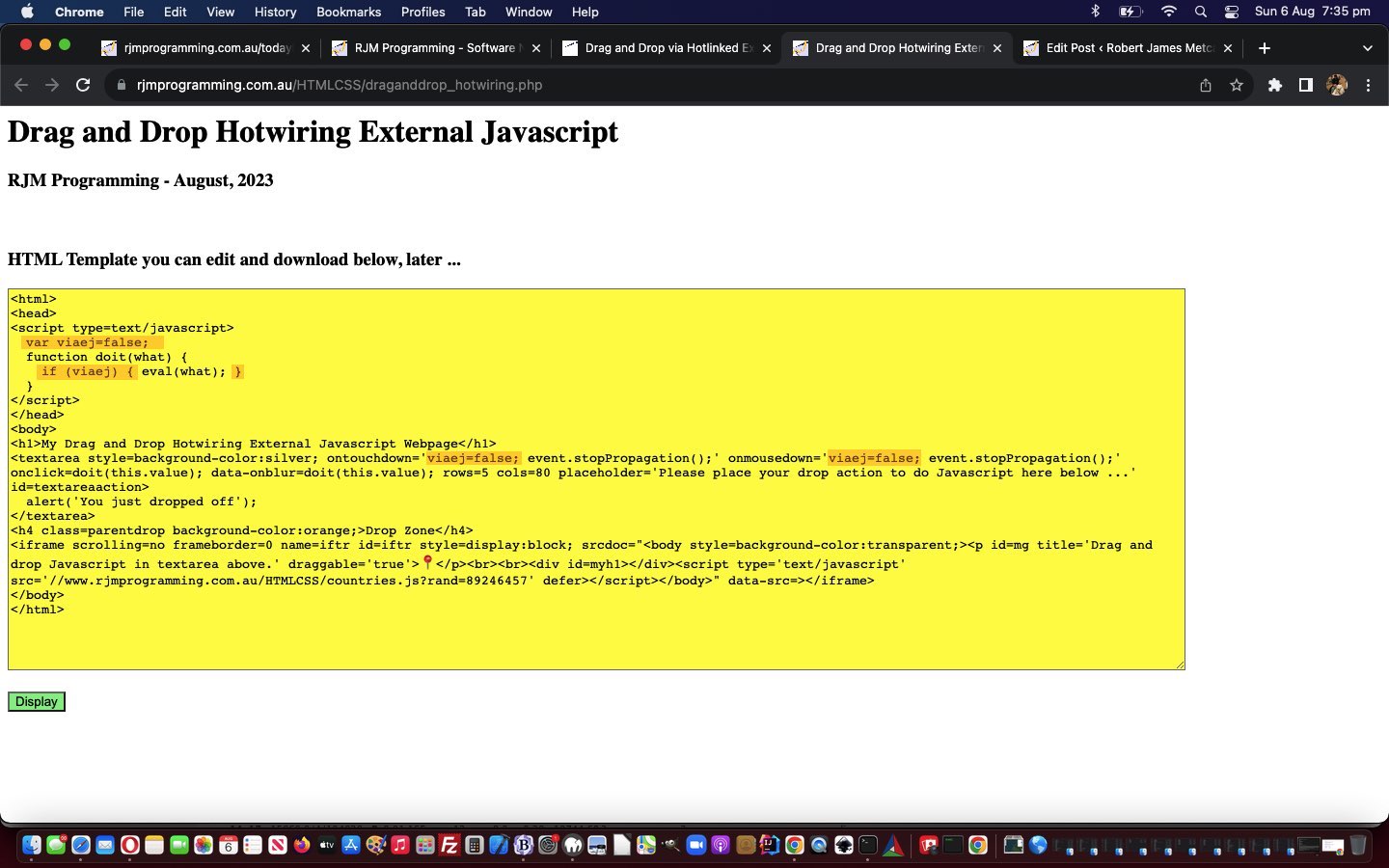
So far with our latest Drag and Drop work, further to that of Drag and Drop via Hotlinked External Javascript Tutorial below, we’ve concentrated on Javascript. So, you’d think it would be CSS’s time for attention?! Well, sort of. We like to do a lot of CSS styling via Javascript DOM like (today’s simple intervention to add a Three Dimensional look to our drag via CSS property text-shadow) …


window.addEventListener("DOMContentLoaded", () => {
gelo=wod('body');
const source = document.querySelector("#mg");
if (source.title.indexOf('ong drag') == -1 && !classo) {
source.title+=' ... long drag (eg. more than 10 seconds) also opens a Google Maps webpage ... very long drag (eg. more than 20 seconds) also opens a Google Earth webpage';
}

if (source) {
if (source.outerHTML.indexOf('text-shadow:') == -1) {
source.style.textShadow='-1px 1px 3px #952dff';
}
}

if (noyes == noyes.toUpperCase()) {
source.style.border='1px dashed pink';
}
console.log('source.id=' + source.id);
source.addEventListener("dragstart", (ev) => {
var elo=null;
dragdt=(new Date());
// more code follows
});
source.addEventListener("dragend", (ev) =>
ev.target.classList.remove("dragging")
);

That’s it! Guess this is the joy of involving genericized external Javascript, because this simple change to our external Javascript countries.js “Drag and Drop specialist” has affected (the look of) about five web applications, so far, calling it … one per codeline!


Previous relevant Drag and Drop via Hotlinked External Javascript Tutorial is shown below.

Drag and Drop via Hotlinked External Javascript Tutorial

Drag and Drop via Hotlinked External Javascript Tutorial

There are three very useful “hotwiring” ideas that usually work with your web applications …

  • via absolute image URLs
  • via absolute stylesheet URLs
  • via absolute external Javascript URLs

… and that last one is what we want to hone in regarding, with an idea we had to allow a user to …

  • write their own HTML (and derived Javascript) via a textarea element with initial template HTML code
  • construct a personalized HTML webpage after the light green submit button press … so that …
  • downloading the HTML is possible via “View Page Source” (context option) and Copy/Paste into a text editor (and then, perhaps, onto local system web server environment development via an Apache/PHP/MySql local web server product such as MAMP)

In order to allow this more generic approach we made changes to our external Javascript countries.js “Drag and Drop specialist” use by our “first draft proof of concept” PHP draganddrop_hotwiring.php web application you can try below (where a context option like “View Frame Source” might more be the go regarding downloading your HTML invention)

If this was interesting you may be interested in this too.


If this was interesting you may be interested in this too.
Posted in eLearning, Event-Driven Programming, Tutorials | Tagged , , , , , , , , , , , , , , , , , , , , , , , , , , , , , , , , , , , , , , | Leave a comment

Tic Tac Toe Game Timing Tutorial

Tic Tac Toe Game Timing Tutorial

Tic Tac Toe Game Timing Tutorial

Yesterday’s Tic Tac Toe Game Drag and Drop Tutorial‘s Tic Tac Toe game had an annoyance. You, as the interactive player, playing the Computer, had to imagine how the Computer won, should it do so. How come? Well, when writing …

  • Javascript … especially …
  • DOM style … you need to look out for the combination of …
    1. Javascript DOM that crucially affects the look of the visible webpage … followed by …
    2. a modal popup window such as alert or confirm or prompt … followed by a …
    3. webpage reload

    … because …

  • if step 2 above immediately follows step 1 it can be that the user never sees that Javascript DOM code’s visible webpage effects … we believe, because, Javascript DOM (maybe sometimes) needs some “flush” (no … not … to da loo) time before any modal Javascript windows appear, demanding attention.

We have almost answered our own question about how to resolve this issue where we say above “if step 2 above immediately follows step 1”. Can you think how? Anyone, anyone?! Yes, Brendan, we can embed a static Javascript snippet of code ( eg. alert(‘Some blurb’); ) into a …


setTimeout(function(){
alert('Some blurb');
newgame();
}, 3000);

… delayed ( eg. by 3 seconds ) setTimeout timed function type of scenario, as above. In that 3 seconds, Javascript DOM’s work can have time to complete.

And regarding how our step 3 is described by webpage reload above, that equates to newgame(); in our Tic Tac Toe game code, it needs to be in the delayed sequence of events ( the purple snippets representing the basis for a 2 second delay solution to this timing issue ) …


if (oemail.indexOf(',') != -1) {
if ((oemail.split(',')[0] + oemail.split(',')[1]).indexOf('Computer') != -1) { emojithem('Computer'); }
setTimeout(function(){
alert(emojithem(oemail.split(',')[1]) + " wins! Bad luck, " + emojithem(oemail.split(',')[0]));
newgame();
}, 2000);
} else {
emojithem('Computer');
setTimeout(function(){
alert(emojithem("Computer") + " wins! Bad luck. Scores: " + emojithem("Computer") + " " + cscore + " vs " + emojithem("You") + " " + yscore + " (" + dscore + " draws)");
newgame();
}, 2000);
}
//newgame();

… within the changed tictactoe.js Tic Tac Toe logic external Javascript specialist used for the Tic Tac Toe game you can play below also.


Previous relevant Tic Tac Toe Game Drag and Drop Tutorial is shown below.

Tic Tac Toe Game Drag and Drop Tutorial

Tic Tac Toe Game Drag and Drop Tutorial

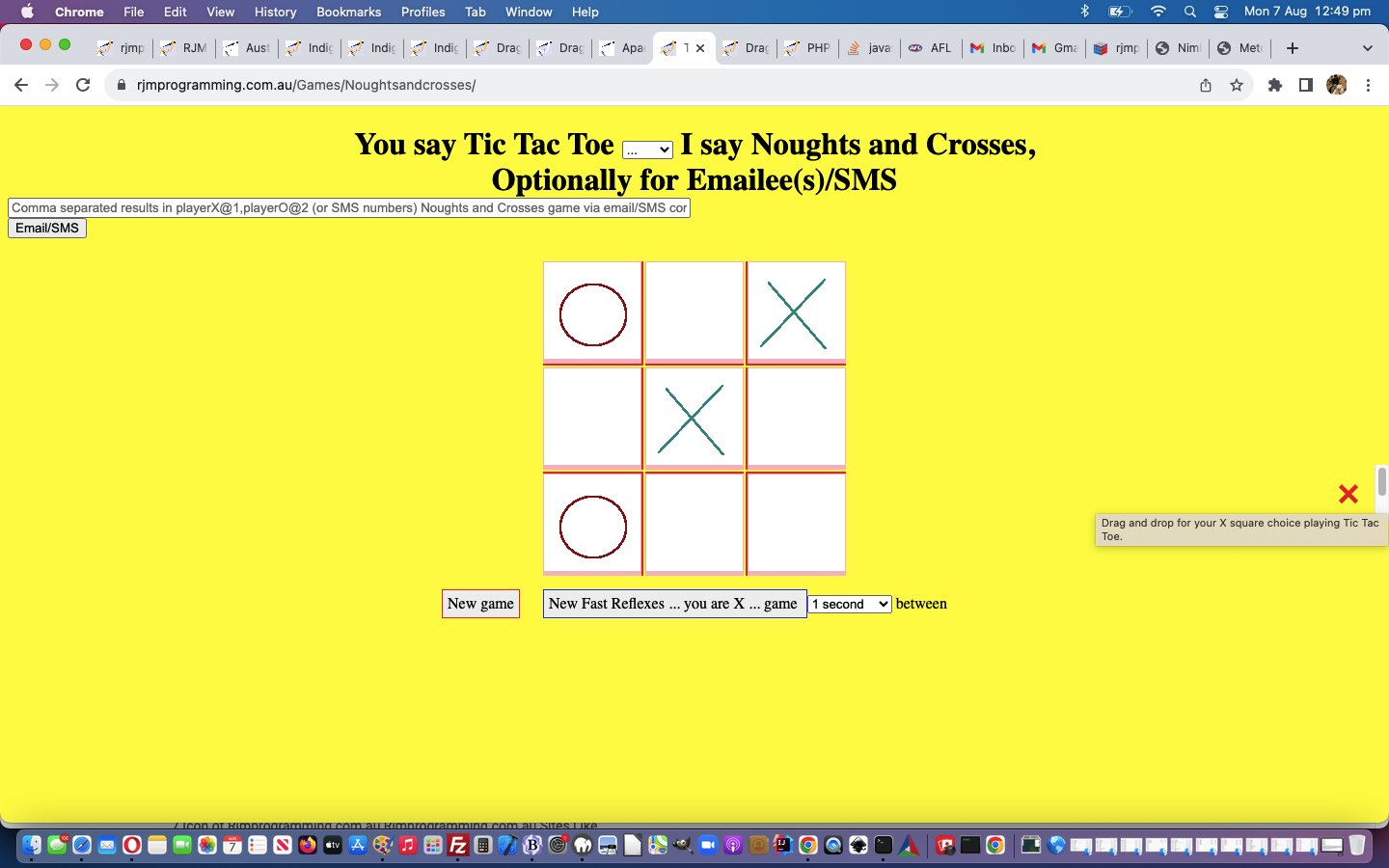
The Tic Tac Toe game talked about in Apache PHP Code Control Tutorial already has a variety of inputs such as mouse and touch and email and SMS possibilities, and so to also allow drag and drop as an alternative does not sound like too much of a stretch for our extremely able and perspicacious audience!

Again, “click” or “touch” reigns supreme here, but because the user is being asked to fill a (3×3 grid) square with their (usually “X”) answer of “X” or “O” a drag and drop paradigm can well suit the player’s thinking.

Yesterday’s Australian Indigenous Language Drag and Drop Tutorial‘s logic panned out to be a great help with fleshing out what was required, but again, there were nuances

tictactoe.js countries.js

var amdragging=false, havedropped=false, dropthing='';
var defxo='❌';

// ...
var ifbittwo='<iframe scrolling=no frameborder=0 name=iftr id=iftr style="display:block;position:absolute;left:calc(100% - 60px);top:50%;width:60px;height:60px;" srcdoc="<body style=background-color:transparent;><p id=mg title=' + "'" + 'Drag and drop for your X square choice playing Tic Tac Toe.' + "'" + ' draggable=' + "'" + 'true' + "'" + '>' + defxo + '</p><br><br><div id=myh1></div><script type=' + "'" + 'text/javascript' + "'" + ' src=' + "'" + '//www.rjmprogramming.com.au/HTMLCSS/countries.js?rand=89742464857' + "'" + ' defer></script></body>" data-src=></iframe>';

// ...
document.body.innerHTML = hcont + hcont2 + hcont3 + hcont4 + hcont5 + hcont6 + hcont7 + hcont8 + hcont9 + hcont10 + hcont11 + hcont12 + hcont13 + hcont14 + hcont15 + hcont16 + hcont17 + hcont18 + hcont19 + hcont20 + hcont21 + eform + ifbit + ifbittwo;

console.log("Drop ... " + ev.target.id + ' --- ' + ev.target.outerHTML);
dropdt=(new Date());
if (('' + ev.target.id) != '') {
if (typeof(parent.amdragging) !== 'undefined') { parent.amdragging=false; }
if (typeof(parent.havedropped) !== 'undefined') { parent.havedropped=true; }
if (('' + ev.target.outerHTML).indexOf('else if (('' + ev.target.outerHTML).indexOf(' alt="') != -1 && typeof(parent.amdragging) !== 'undefined' && typeof(parent.havedropped) !== 'undefined' && typeof(parent.dropthing) !== 'undefined') {
parent.dropthing=('' + ev.target.outerHTML).split(' alt="')[1].split('"')[0];
parent.langwo();
} else if (('' + ev.target.outerHTML).indexOf('

… asking for our still needing to be changed changed external Javascript countries.js “Drag and Drop specialist” to be tweaked, so that a call by the changed tictactoe.js Tic Tac Toe logic external Javascript specialist used for the Tic Tac Toe game could be made to work, as you might want to try below …


Previous relevant Apache PHP Code Control Tutorial is shown below.

Apache PHP Code Control Tutorial

Apache PHP Code Control Tutorial

It might be tempting to ask, after the event, with web application code on an Apache web server, can controlling code be added to an existing web application codeset, that does not rely on changes to any existent code? The answer is yes, with a lot of provisos …

  • it’s not a great idea, as much to do with causing confusion as to do with security looseness … but, nonetheless, depending on other php.ini configurations you might be able to add …
  • into Apache domain’s php.ini configuration file …

    ; Automatically add files before or after any PHP document.
    auto_prepend_file = somestartingphp.php
    auto_append_file = someendingphp.php

    … as we intimated in Apache/PHP/MySql Linux Language Considerations Primer Tutorial … or …
  • within a folder of Apache web server directory structure via an Apache .htaccess file mention, such as …

    php_value auto_prepend_file ../../ncmailxitin.php
    php_value auto_append_file ../../ncmailxitout.php

    … the exact contents of our MAMP Apache .htaccess for HTTP://localhost:8888/Games/Noughtsandcrosses/ in explanation below

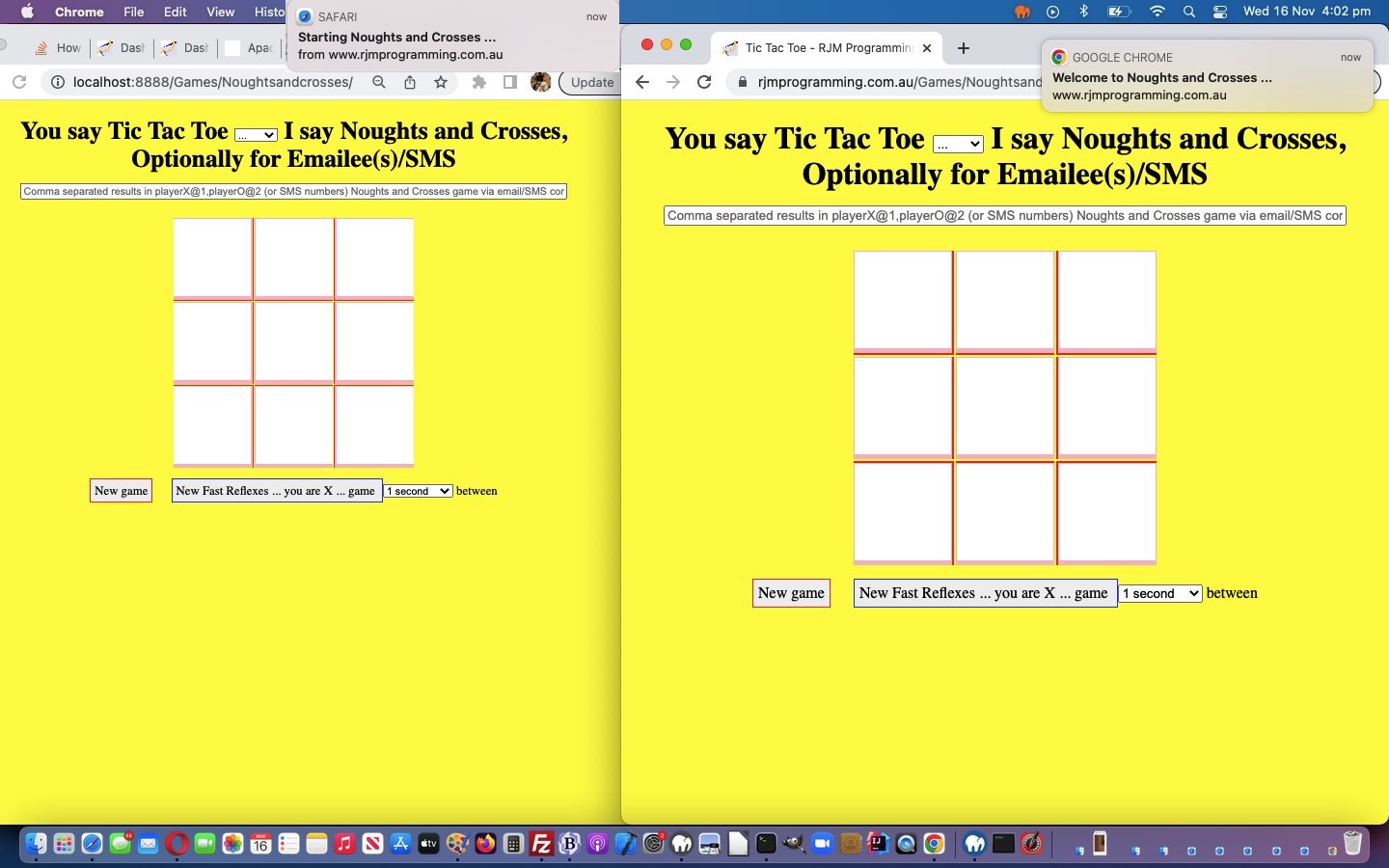
We were kind of sad and relieved at the same time seeing that to apply this .htaccess approach of allowing for introductory Notification welcome messages up at the RJM Programming domain’s Noughts and Crosses web application we tried it on, but it did not work, whereas trying to apply it to our Apache MAMP (local web server) environment via …

  • downloaded existing code to MAMP place in Games/Noughtsandcrosses off the MAMP Document Root folder …
  • tweaked the changed tictactoe.js … in a way that suited allowing new introductory Notifications welcoming players in both MAMP and RJM Programming domain brands of Apache web servers, but in different ways … please note that this change to existent code would not have been needed had the RJM Programming domain accepted the .htaccess methodologies, and we were not wanting the same Noughts and Crosses codeset suiting both Apache environments …
  • renamed the Games/Noughtsandcrosses index.html (default web application filename) to index.php … to allow for an Apache .htaccess methodology to possibly work (but only does, for us, at MAMP) … it’s only noticed when PHP code is involved (even if there are no starting <?php and ending ?> delimitations in the code, as in our, what was, index.html case)
  • created a 644 permissions .htaccess in Games/Noughtsandcrosses off the MAMP Document Root folder …

    php_value auto_prepend_file ../../ncmailxitin.php
    php_value auto_append_file ../../ncmailxitout.php
  • created in MAMP Document Root folder ncmailxitin.php
  • created in MAMP Document Root folder ncmailxitout.php

… did!


Previous relevant Apache/PHP/MySql Linux Language Considerations Primer Tutorial is shown below.

Apache/PHP/MySql Linux Language Considerations Primer Tutorial

Apache/PHP/MySql Linux Language Considerations Primer Tutorial

The recent CSS Style Javascript DOM Override Onload Primer Tutorial “proof of concept” web application ended up with the name …


are_you_happy_with_my_or_do_you_think_my_derriere_needs_work.html

… but along the way we wanted to call it …


are_you_happy_with_my_or_do_you_think_my_derrière_needs_work.html

… but this didn’t work as an RJM Programming website filename. Rather than make it work, we compromised, and called it (the final) are_you_happy_with_my_or_do_you_think_my_derriere_needs_work.html it ended up as. But this didn’t stop us wondering about all this language and the relationship of these language characters and where and how you can or can’t use those characters outside those usual US-keyboard type characters.

And that brings us to the great MAMP local Apache/PHP/MySql web server product, as a place to experiment, comforted in the knowledge that the Mac OS X Terminal application …


ls -li

… and knowledge of inodes (all the way to their “extreme case Linux system file removal talents) you can read about at Linux Inode File Removal Tutorial would probably protect me from home grown stupidities.

So what followed for me was a quick look at MAMP’s relevant php.ini file and its httpd.conf configuration files to see that the web server default “goto look for” file list for the web server directory can be altered by a change of …


DirectoryIndex index.html index.php

… to something else in httpd.conf Apache configuration file. But nothing to easily reinvent the US-keyboard feeling file extensions .htm and .html and .php that was apparent to me. And noting to change that …


[protocol]://localhost:[localHostPortNumber]/

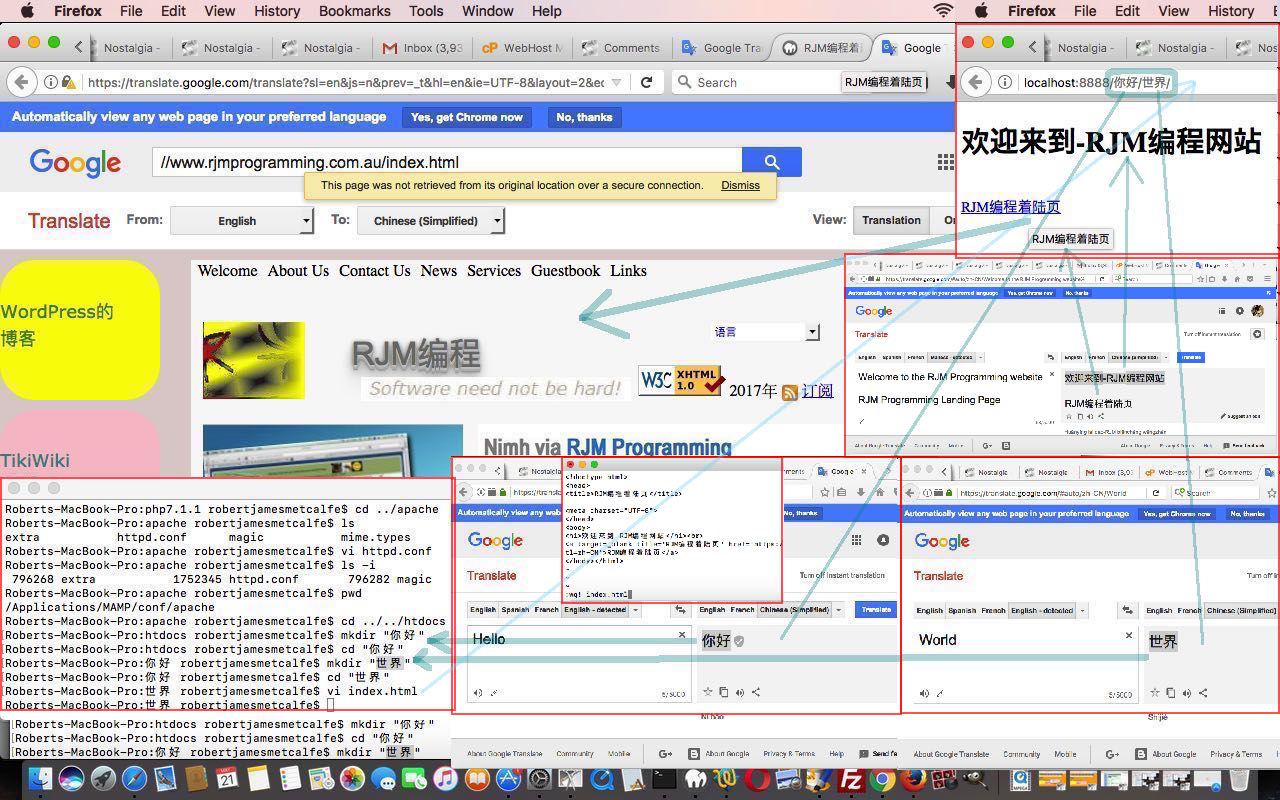
… US-keyboard feeling prefix to a URL, such as our http://localhost:8888/ prefix to a MAMP local Apache/PHP/MySql URL we created a Simplified Chinese character set “Hello World” folder scenario (and thank Google Translate for translation help today) …

http://localhost:8888/你好/世界/

index.html as per …


<!doctype html>
<head>
<title>RJM编程着陆页</title>
<meta charset="UTF-8">
</head>
<body>
<h1>欢迎来到-RJM编程网站</h1><br>
<a target=_blank title='RJM编程着陆页' href='https://translate.google.com/translate?sl=en&js=n&prev=_t&hl=en&ie=UTF-8&layout=2&eotf=1&u=%2F%2Fwww.rjmprogramming.com.au%2Findex.html&tl=zh-CN'>RJM编程着陆页</a>
</body></html>

Within the php.ini configuration file we found interesting, in particular …


; Automatically add files before or after any PHP document.
auto_prepend_file =
auto_append_file =

; PHP's built-in default is text/html
default_mimetype = "text/html"

; Whether to allow the treatment of URLs (like http:// or ftp://) as files.
allow_url_fopen = On

… the last of which, if set to Off could set up for the scenario of setting up a web server full of index.html and index.php code in web server folders that could include non US-keyboard characters, and so you could have within the code of …

http://localhost:8888/你好/

index.html a relative URL such as …

<a target=_blank title='你好 世界' href='世界'>你好 世界</a>

… taking you off to today’s (URL) starting place.

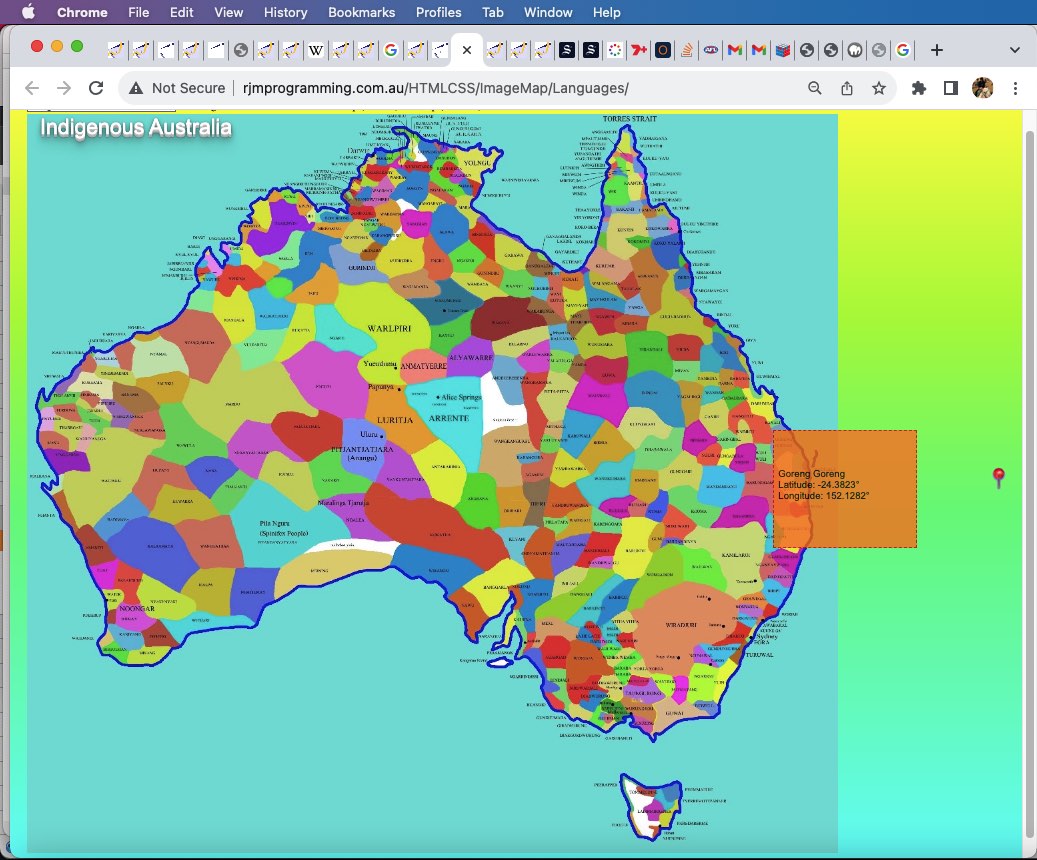
Am sure you can feel yourself, there is so much more to explore in this topic area, and we’ll be returning soon to this neck of the woods soon, we hope. In the meantime, take a look at our tutorial picture for a bit of what we did on MAMP with some of these concepts not changing any configuration files at all.

If this was interesting you may be interested in this too.


If this was interesting you may be interested in this too.

If this was interesting you may be interested in this too.

If this was interesting you may be interested in this too.
Posted in eLearning, Event-Driven Programming, Games, Tutorials | Tagged , , , , , , , , , , , , , , , , , , , , , , , , , , , | Leave a comment