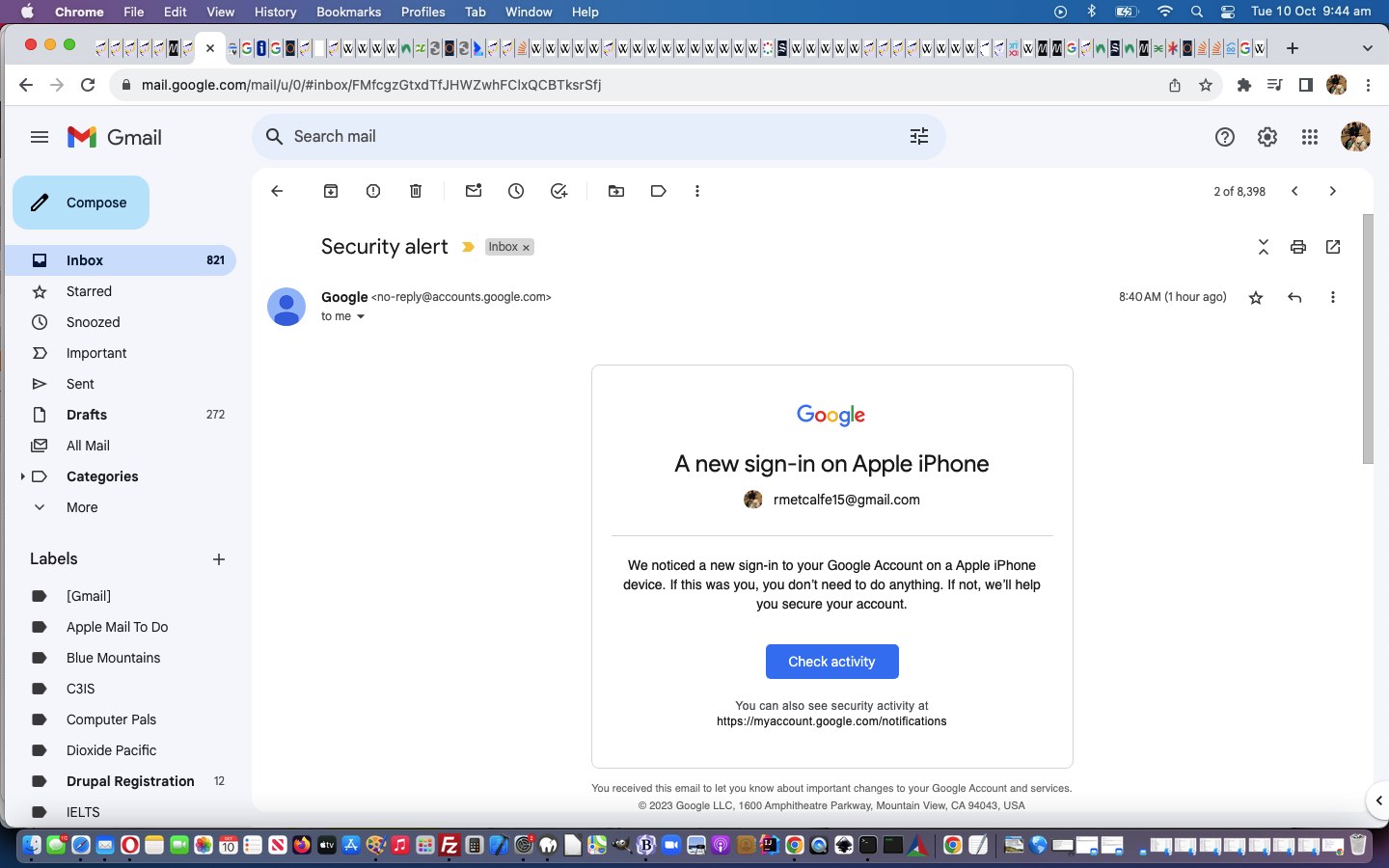
Changing passwords regarding online accounts remains a good way to increase security for your online world activities. We just changed our Gmailemail password the other day, and it made us realize that the email password change procedure is likely to be far more arduous for you, as it was for me, than, say, even, a Bank online password change, as one example. Why? Well …
email is an important conduit for getting work done, often, and in all likelihood it’s the situation that …
“each guise” of display of your emails whether they be via …
web browser URL (eg. Gmail) (we find easier for attachments and piled up communications, somehow)
desktop app like Mail (we like for ease of placing on every device we might need) on iOS or macOS (and we’re sure Android would be similar)
Gmail mobile app (am sure is liked by many users out there, and am using for the reverse partner email look … with triple pike)
… on …
the variety of mobile and laptop devices you have them on … perhaps shared with …
other people’s device’s Mail desktop app (or Gmail app) incarnations
… may all come into play for attending to, whereas with the bank it might be the one website URL and some two factor authentication only … boooorrrriiinnnnngggg!
If you are like me, any iOS iPad or iPhone or laptop me and my partner share has an incarnation of Mail desktop application pointing at my Gmail email account. Everything synchs well …
… until it does not … do do do do do do do do
My partner’s iPhone’s incarnation of my Gmail account Mail desktop app had not been refreshing for a couple of days. It was a couple of days ago I changed the Gmail password, and her iPhone was not around at the time I ventured into this scary woooooorrrrrlllllldddd?! This is important. If you see that happening, check that somebody else has not changed the password “under you”. Hopefully not, with all those Gmail notifications and/or emails you get telling you about a change of device, and “is this you” asks … but definitely worth getting concerned if you do.
This Mail desktop app behaviour (of still working, but not showing you any recent emails) is curious and not as obvious an issue to fix, and macOS and iOS might have different places to fix this.
Settings (System Preferences) -> Internet Accounts -> Google -> Mail (where you can re-enter password)
We admire all those people regularly changing their password (obviously accutely in touch with their designated two factor authentication device, close by), as of course, all we online users should be doing, probably more regularly!
Honestly, if it all sounds too much … you are not alone … seek help from somebody more in the know, and that you can trust, only, but if that is the case, see how they go about it, for the next time! Believe it or not, it is “follow your notification nose” stuff with your modern email clients such as Gmail, despite the intricacies underlying what you are doing!
If this was interesting you may be interested in this too.
Javascript Lazy Evaluation In the Hour Game Daylight Saving Tutorial
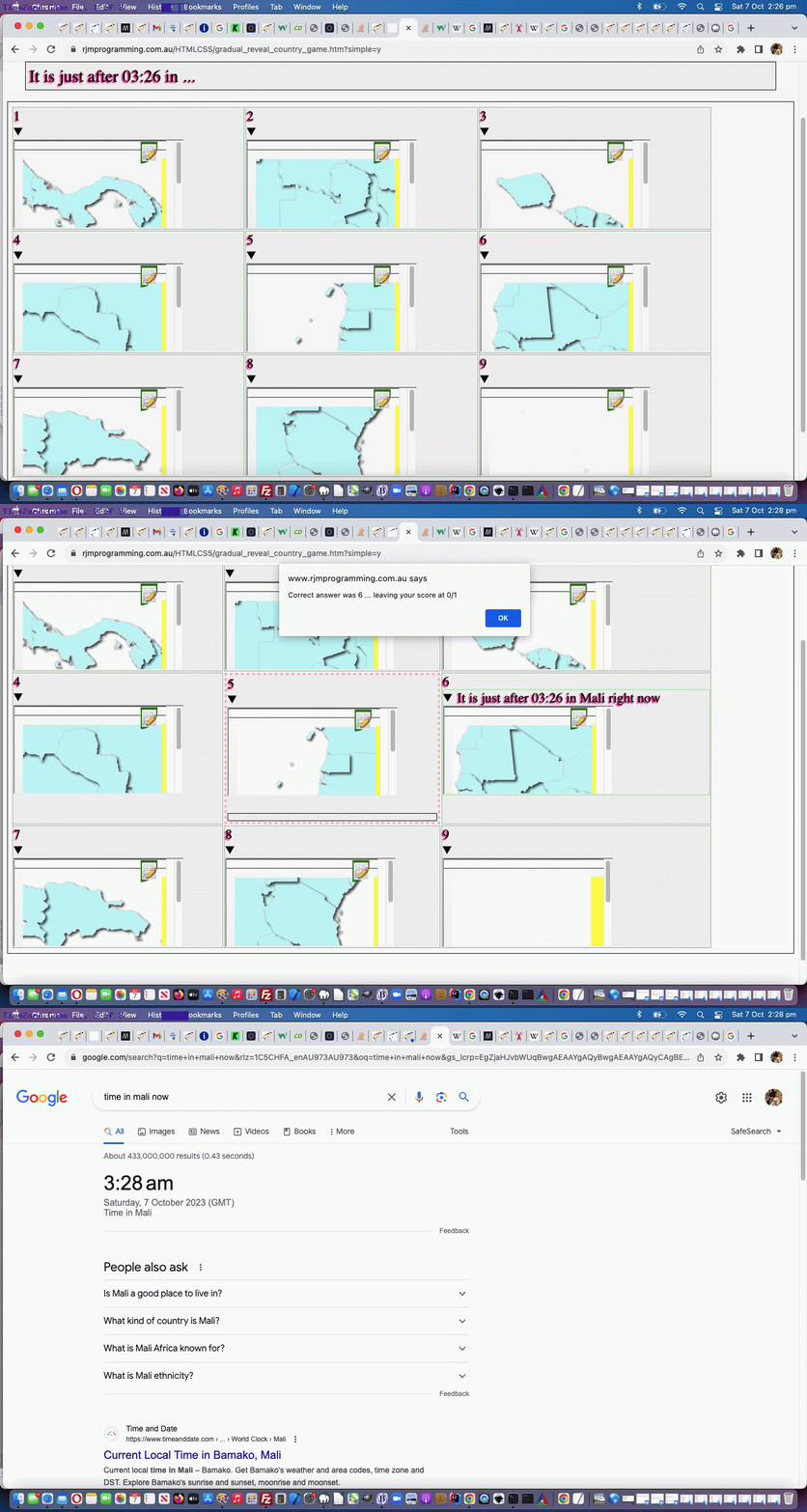
Regarding yesterday’s Javascript Lazy Evaluation Country Game Hints Tutorial progress with the “In the Hour” mode of game play, we thought there would only be the rare annoyance regarding Daylight Saving alterations to the default timezone offsets to GMT time, but there were more than we realized, prompting us to start using codelines like …
var newd = new Date(new Date().toLocaleString("en-US", {timeZone: yourtzlist.split(',' + opts[eval('' + atry)].value + ',')[1].split('>')[1].split('<')[0]}));
… to start working out timezone offsets in the client world (as you may remember us discussing with SVG Network Clock Minimize Tutorial in recent times) checking on those PHP timezone derivations we default to, but might be wrong by an hour, regarding Daylight Saving timezone arrangements in place for certain times of the year in some countries …
We’ve also added in more linking that adds on to yesterday’s existant …
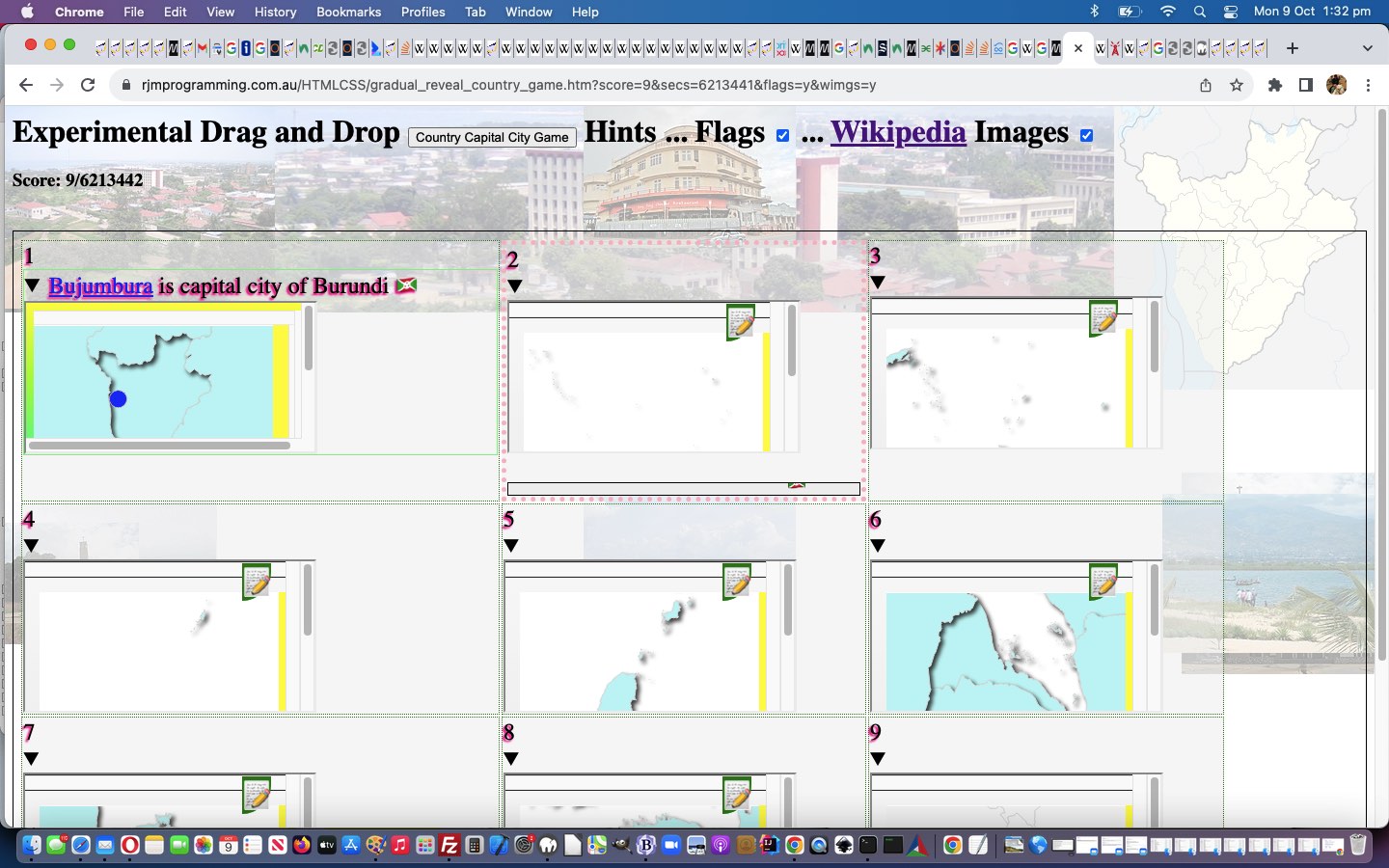
Placename links to Wikipedia … so that now we also have …
Country links to Wikipedia … and …
TimeZone information links added to the “just after” times shown
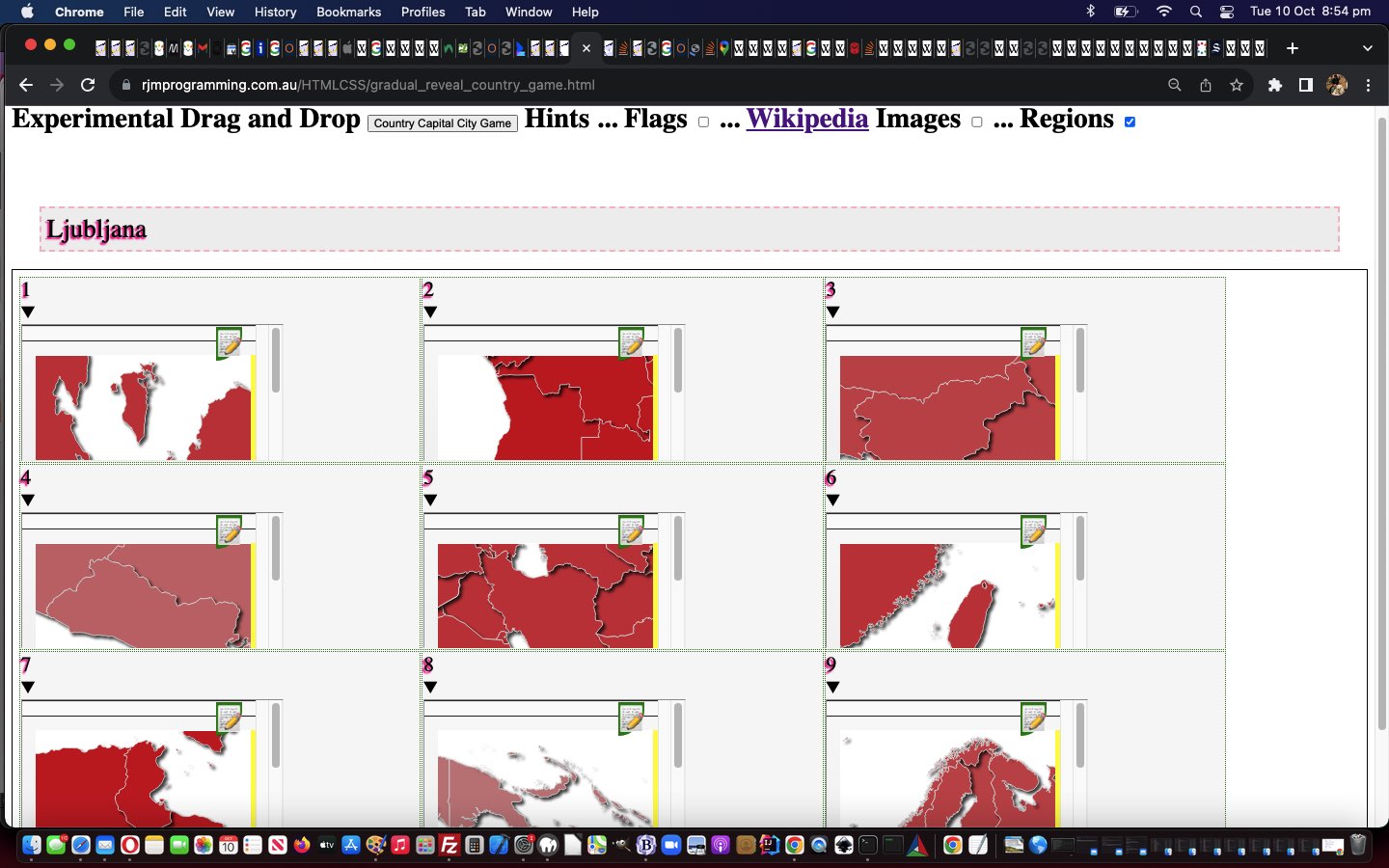
Also added, today, is another hint, we’ve called “Regions”, which colour codes Geo Charts (albeit in a subtle way) according to those Regional first words in a TimeZone name like …
Asia/Singapore
… where that “Asia” is differentiated via our new arrays …
 var rcolmaps=['Africa','Asia','Europe','GMT','America','Pacific','Arctic','Atlantic','Indian','Australia','Antarctica'];

 var rcolmapred=['15','45','55','55','75','85','95','a5','b5','d5','e5'];
We also thought “right now” was a bit of a waste of time, when we could show the user (a phrase like) “on Monday” (ie. on day of the week).
… alike. Or at least we’d like to help this be so, and in that respect we decided to offer two modes of Hints for the Country Game (whether that be Capitals Game or In the Hour Game) play …
show country flags (ie. those “combination emojis” for the country flags, derivable from that country’s ISO 2 letter country code) …
var useflags=location.search.split('flags=')[1] ? true : false;
useflags=location.search.split('wimgs=')[1] ? true : useflags;
function checkflags(cbo, cbochecked) {
if (cbochecked || document.getElementById('wimgs').checked) {
useflags=true;
} else {
useflags=false;
}
applyhints('');
}
function orflag(thiscc) {
var ccchar='', ccsuff='';
var lri='ABCDEFGHIJKLMNOPQRSTUVWXYZ';
var dri=['127462','127463','127464','127465','127466','127467','127468','127469','127470','127471','127472','127473','127474','127475','127476','127477','127478','127479','127480','127481','127482','127483','127484','127485','127486','127487'];
for (var iccsuff=0; iccsuff<thiscc.length; iccsuff++) {
ccchar=thiscc.substring(iccsuff, eval(1 + eval('' + iccsuff))).toUpperCase();
ccsuff+=String.fromCodePoint(eval('' + dri[eval('' + lri.indexOf(ccchar))])); //'&#' + dri[eval('' + lri.indexOf(ccchar))] + ';';
}
return ccsuff;
}
Country Capital Game … and today we start down the road to other game types that could involve “country map iframe Geo Chart content” and came up with a …
Country “In the Hour” Game
… whereby a user matches …
a “draggable” source time in some country … with …
We wanted to start involving Wikipedia links and update Geo Charts in either mode of play for the games above, and as a result “function getnextcountrycode” became …
there’s the “context” between land masses and sea … as well as …
there’s the “context” between country and world view
… both of which take us further into the realms of Google ChartGeo Chart usage, even “unique usage for us”, as far as the first one above.
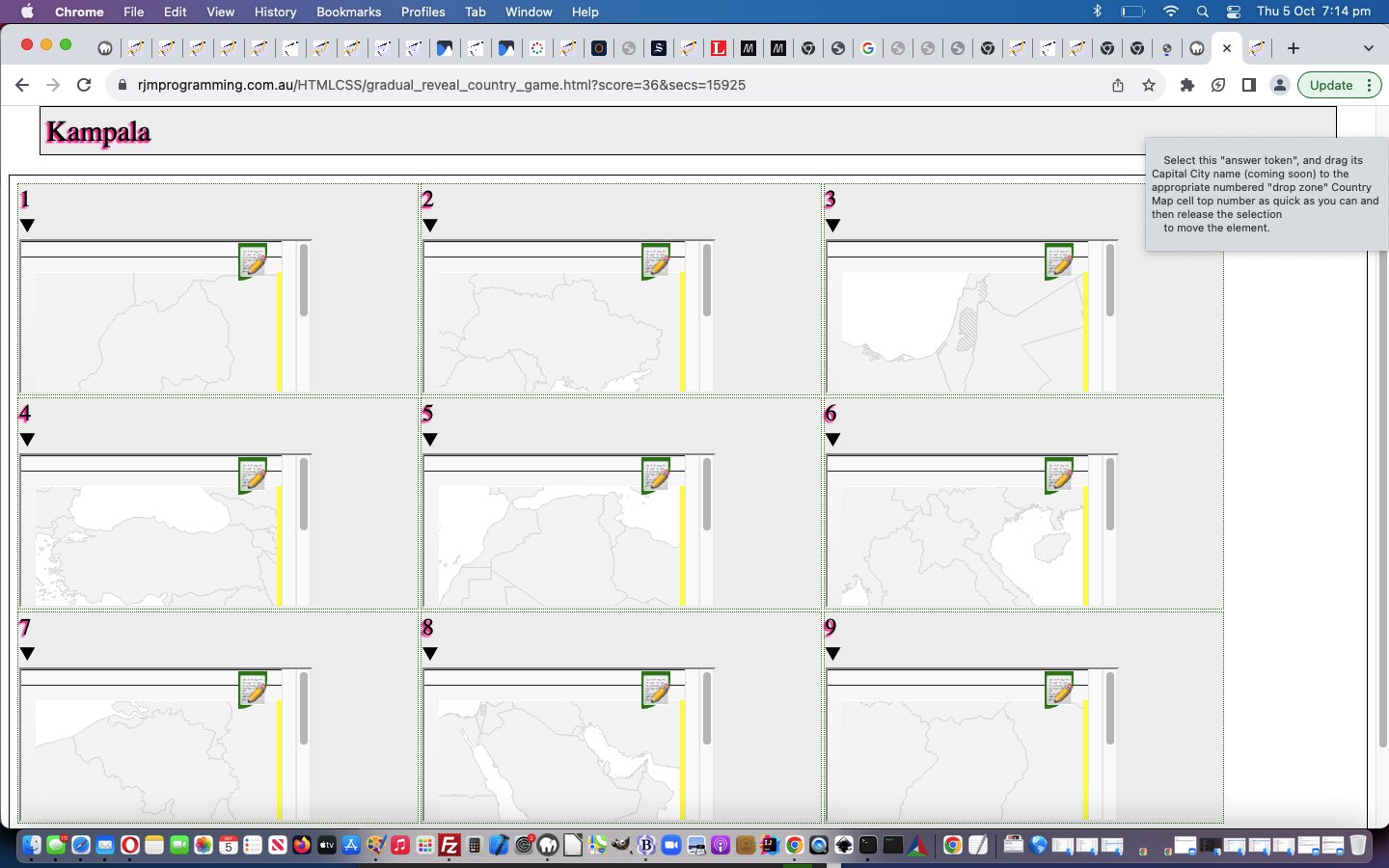
Regarding the “context” between land masses and sea, wouldn’t it be good, on the map to colour the land with a greener tinge? Anyone, anyone, is green the go? Yes, 3GPP, or is that CP3O, disguised as R2D2 … anyway … yes, we could …
isolate the inherent map contents in its SVG guise … but if we could just censure the content here just that teensy weensy bit, now …
we could torture that SVG to reveal its fill colourwe could do research and development, via a web browser web inspector, into that SVG’s path element fill colour … spoiler alert … #f5f5f5 (grey) … and …
liquidate its assetsgently coerce the map into thinking its SVG path element fill colour should be #c5f5f5 (our greenish tinge)
Oh, okay then. Sorry. Thanks, 3GPPsubsection III! You do get straight to the point, there!
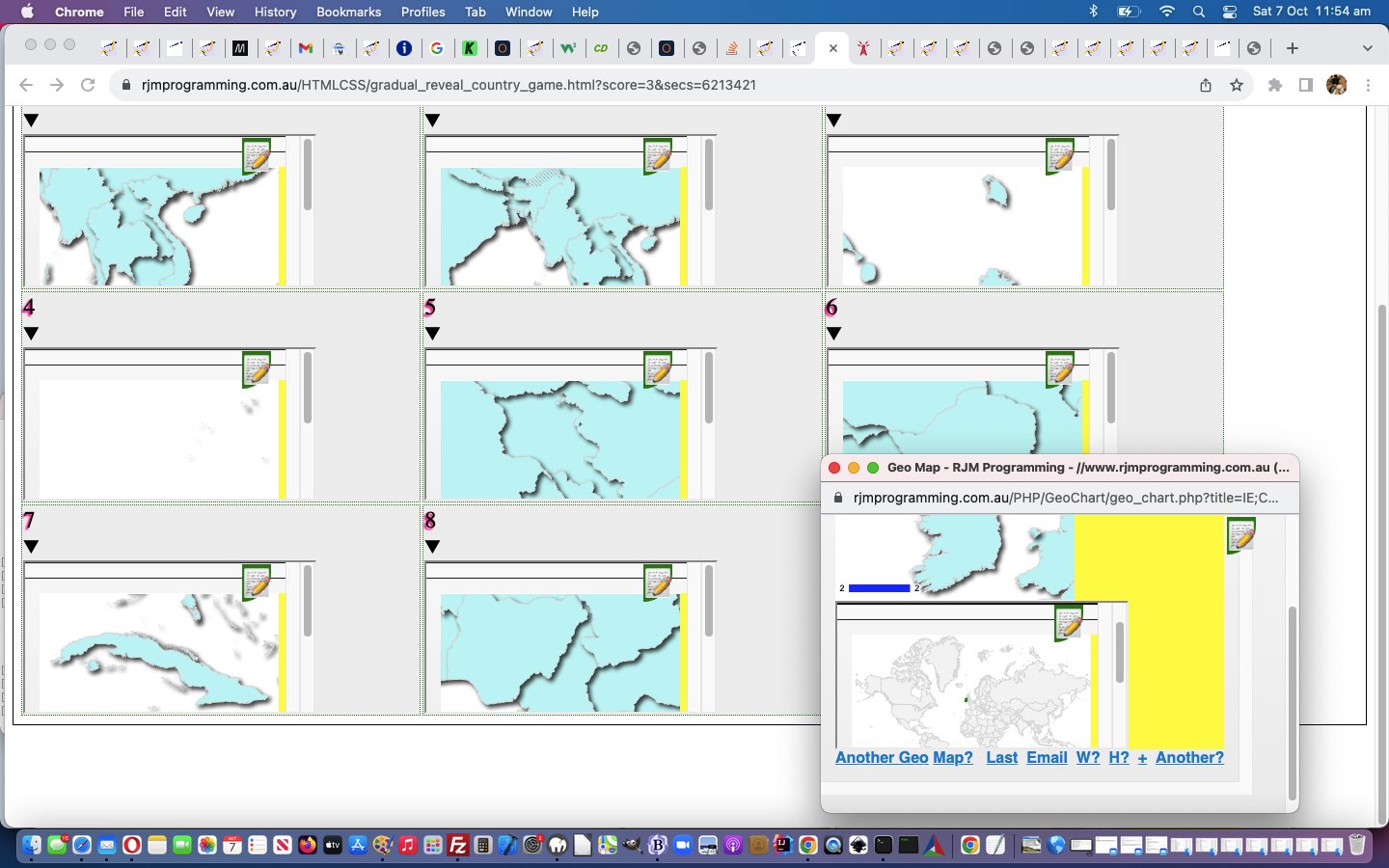
And then, regarding the “context” between country and world view, we have a two part improvement to matters here, we feel. Firstly, we hope to help contextualize “where in the world” is a country, and secondly, we wanted to “value add” for these popup windows we might open as the user hovers over a “country map” cell (filled with iframe Google ChartGeo Chart content), otherwise such interventions can be annoying, and we hope we’re not making the game too easy by adding to …
the existant onmouseover event creating popup window … now …
identical #c5f5f5 filled land mass “country map” … our newly added …
“world map” view of that same country, highlighted
… for context …
var wmapurl='<iframe src="//www.rjmprogramming.com.au/PHP/GeoChart/geo_chart.php?title=World%20Map&width=834&height=520&country=Country&popularity=Popularity&data=%20[~IT~,2]"></iframe>';
… to match the associated source “Drag” element available for the user to drag and drop into the correct table cell below, to score in today’s geography game.
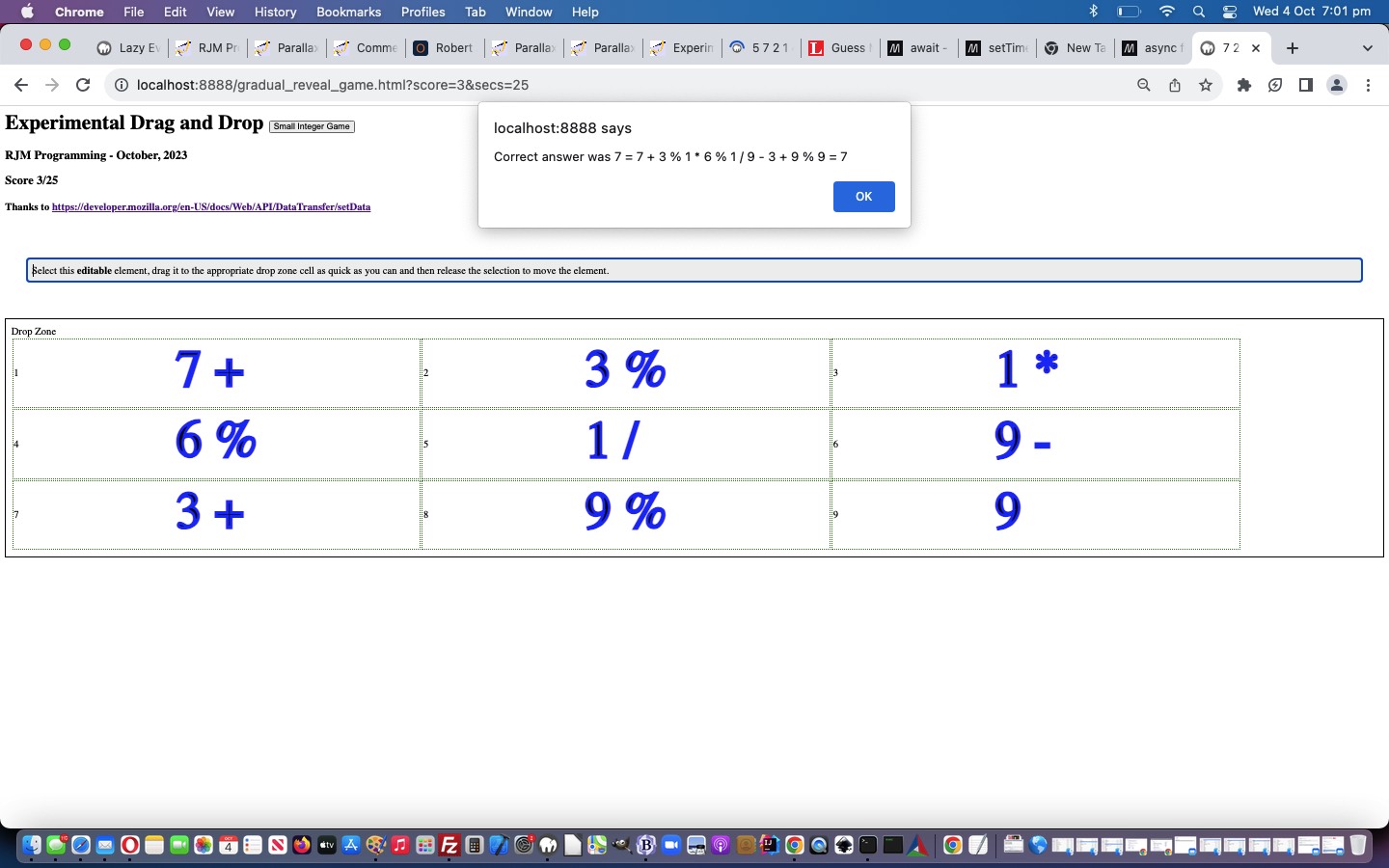
Our “mathematical sentences” to solve in this game, where the operators can be + or – or / or * or %, and integer is number from 1 to 9, can be …
hard … made up of …
integeroperator
integeroperator
integeroperator
integeroperator
integeroperator
integeroperator
integeroperator
integeroperator
integer
… or …
simple … made up of …
integer
operator
integer
operator
integer
operator
integer
operator
integer
… parts to the “mathematical sentence” revealed gradually, using those aforesaid mentioned Javascript techniques, the less revealed as the user answers, the bigger the score, if correct.
The (non-mobile only) cursor and cell background images are formed via data URI svg+xml formats …
The async function declaration creates a binding of a new async function to a given name. The await keyword is permitted within the function body, enabling asynchronous, promise-based behavior to be written in a cleaner style and avoiding the need to explicitly configure promise chains.
The await operator is used to wait for a Promise and get its fulfillment value. It can only be used inside an async function or at the top level of a module.
Lazy evaluation means to delay the evaluation of an expression until it’s needed. Lazy evaluation is sometimes referred to as call-by-need.
The opposite of lazy evaluation is an eager evaluation. It’s an evaluation strategy used in most programming languages.
Lazy evaluation makes it possible to:
define potentially infinite data structures
increase performance by avoiding needless computations
customize iteration behavior for data structures that want its elements accessible to the public
Lazy evaluation means to delay the evaluation of an expression until it’s needed. Lazy evaluation is sometimes referred to as call-by-need.
The opposite of lazy evaluation is an eager evaluation. It’s an evaluation strategy used in most programming languages.
Lazy evaluation makes it possible to:
define potentially infinite data structures
increase performance by avoiding needless computations
customize iteration behavior for data structures that want its elements accessible to the public
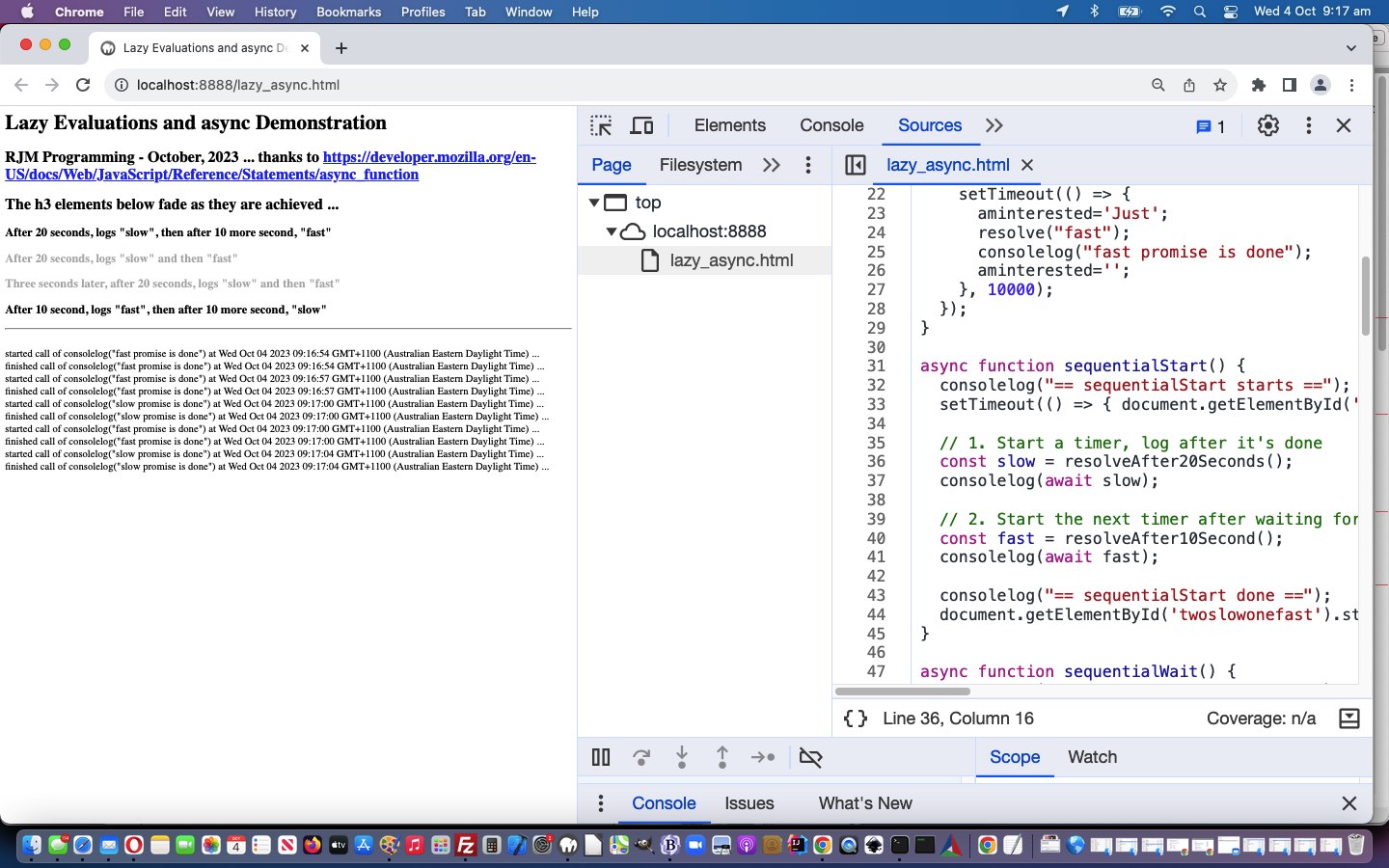
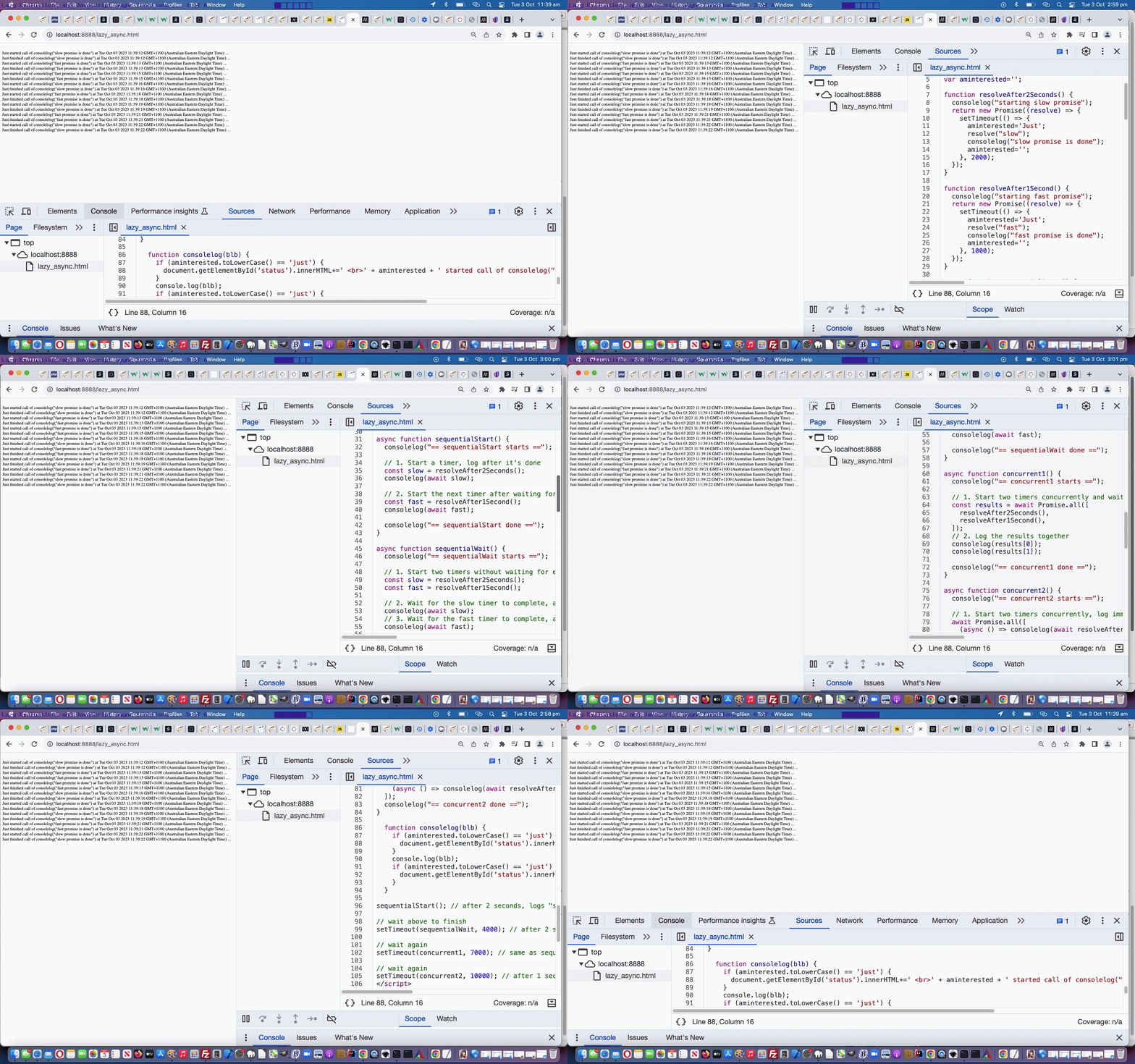
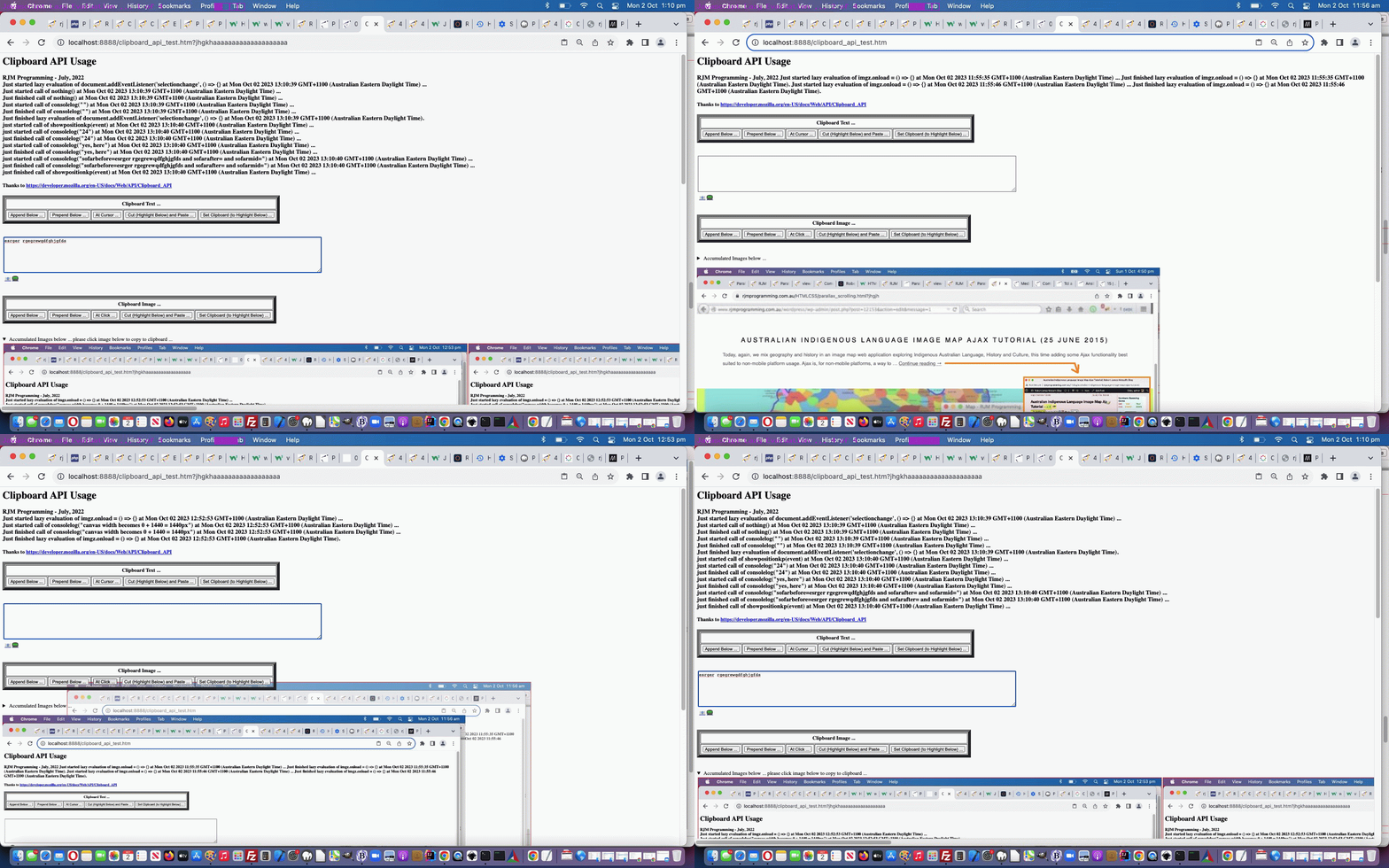
Personally, we’re more your “eager” types, but we’ve had help in the past from brilliant “lazy” types too, especially when we presented Selection API and Clipboard API Tutorial, and so, we honed in on some Javascript “Lazy Evaluation” code, and put together some status information shown regarding timings and calls with respect to Javascript …
“Lazy Evaluation” in Javascript … classical syntax goes …
f = () => expression;
… and …
async function in Javascript … classical syntax example goes …
function resolveAfter2Seconds() {

  return new Promise((resolve) => {

    setTimeout(() => {

      resolve('resolved');

    }, 2000);

  });

}


async function asyncCall() {

  console.log('calling');

  const result = await resolveAfter2Seconds();

  console.log(result);

  // Expected output: "resolved"

}
… which reminded me that we need to learn some more about the promise object
… and were happy to discover the Promise object talents of …
sleeping … allowing for …
multitasking
doing … all using clientside Javascript
… very interesting. The serverside languages such as PHP make it a doddle to multitask (via sleep) but Javascript sleep has not always been a straightforward proposition, until we could promise, that is!
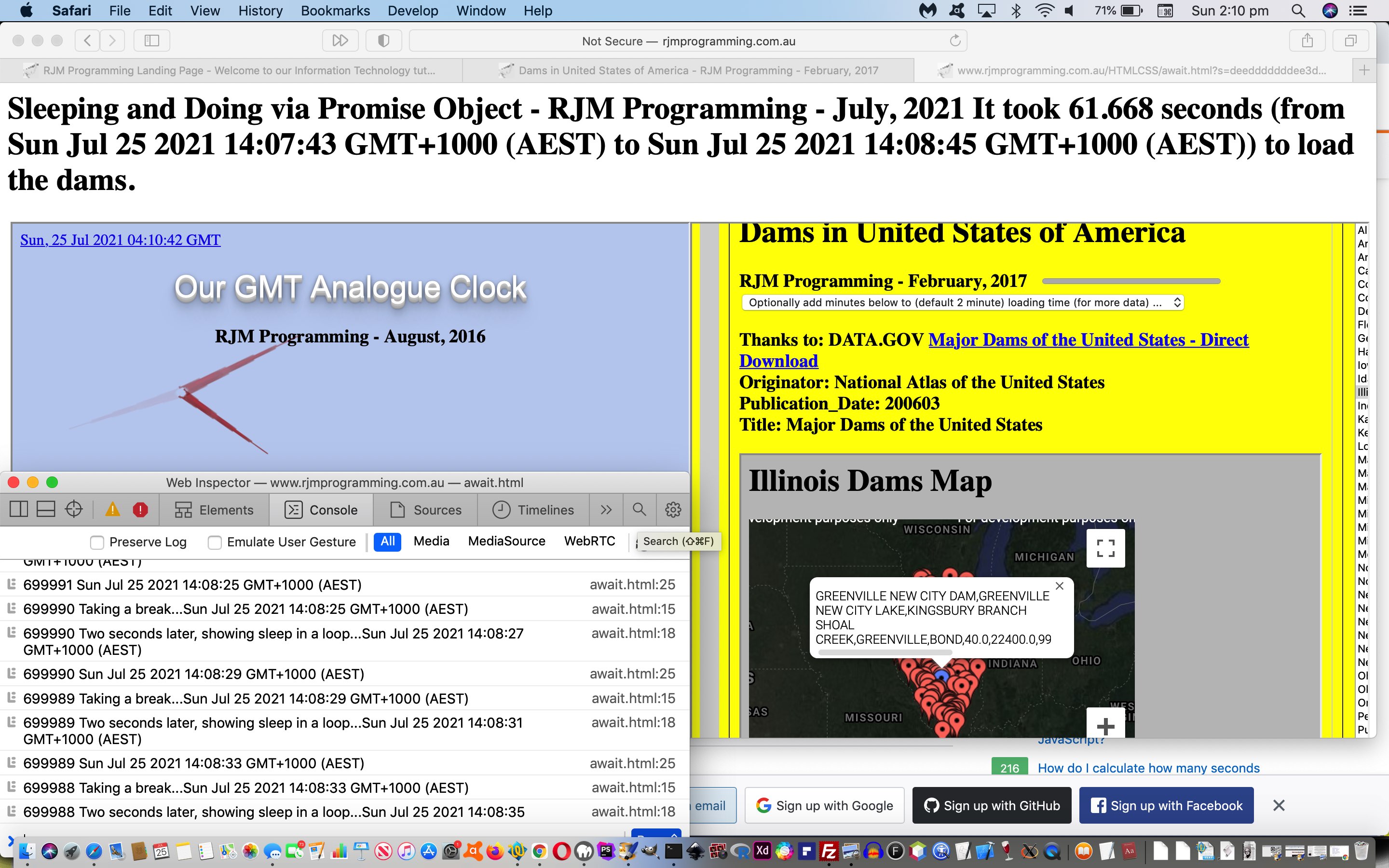
Today’s await.html‘s use of it to sleep and in between show …
… asynchronously both doing their own thing while the await.html works away in the background too, feeding off “child 2” clicks of “child 1” above to know when to say how long the dams took to load. Yes, the “child 2” “onload” event, alone, cannot help determine this, but more “drilling into” the inner workings of the code behind “child 2″‘s progress element, via …
<html>
<head>
<script type='text/javascript'>
var numsleeps=700000;
var ix=0;
var d=new Date();
var marks=[new Date(), new Date()];
var imark=0;
Web Application Controlled Progress Cursor Primer Tutorial
We had occasion to revisit the card game (and more) recent web application exploits highlighted in the recent Just Javascript Card Game Cursor Tutorial thread of blog postings and shaped to play Bridge via …
… and was “personally relatively” happy up to the first Javascript prompt popup window. Huh?! What’s with “personally relatively”? Can I be serious? Well, I’m insulted!
The thing is, I don’t mind, when I’m writing the code (funny about that?!) very complex and convoluted prompt window instructions and options. But …
not everybody is willing to read such long diatribes
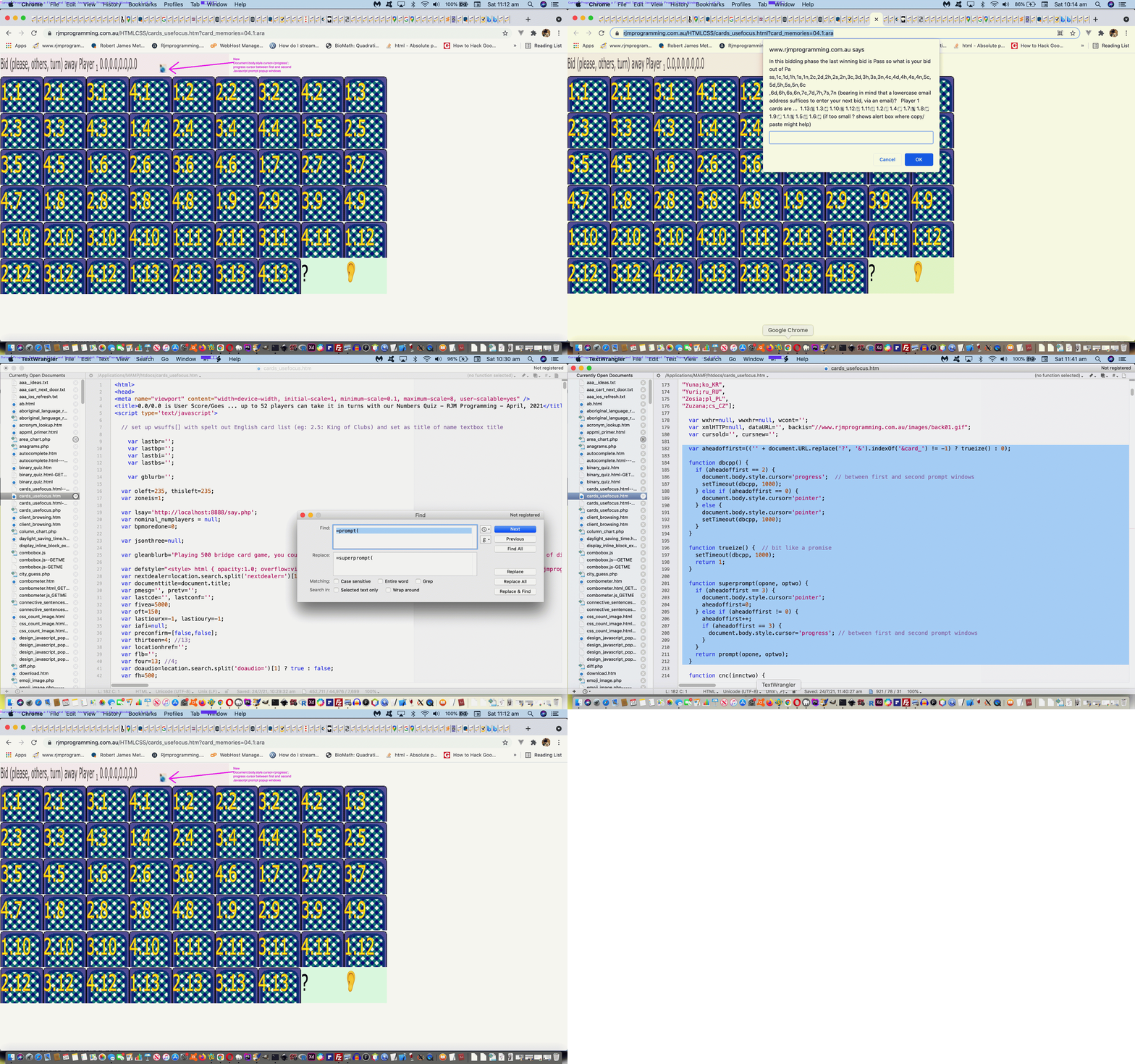
actions can speak louder than words, so we figure between those first two prompt windows in a Bridge or 500 card game, it would be beneficial to show a “progress cursor” (ie. usually associated with the user waiting for a process to finish) between the first and second prompt windows to help show the players there could be waiting and irrelevant players turning away should all four players want to play fairly in their game
It was an interesting Javascript coding exercise …
(sort of) overload the “prompt” function with our inhouse “superprompt” function via …
globally replace ” prompt(” with ” superprompt(“
globally replace “=prompt(” with “=superprompt(“
add the following Javascript code …
  var aheadoffirst=(('' + document.URL.replace('?', '&').indexOf('&card_') != -1) ? trueize() : 0);


  function dbcpp() {

    if (aheadoffirst == 2) {

      document.body.style.cursor='progress';  // between first and second prompt windows

      setTimeout(dbcpp, 1000);

    } else if (aheadoffirst == 0) {

      document.body.style.cursor='pointer';

    } else {

      document.body.style.cursor='pointer';

      setTimeout(dbcpp, 1000);

    }

  }


  function trueize() {  // bit like a promise

    setTimeout(dbcpp, 1000);

    return 1;

  }


  function superprompt(opone, optwo) {

    if (aheadoffirst == 3) {

      document.body.style.cursor='pointer';

      aheadoffirst=0;

    } else if (aheadoffirst != 0) {

      aheadoffirst++;

      if (aheadoffirst == 3) {

        document.body.style.cursor='progress'; // between first and second prompt windows

      }

    }

    return prompt(opone, optwo);

  }
… which reminded me that we need to learn some more about the promise object.
… alike. Or at least we’d like to help this be so, and in that respect we decided to offer two modes of Hints for the Country Game (whether that be Capitals Game or In the Hour Game) play …
show country flags (ie. those “combination emojis” for the country flags, derivable from that country’s ISO 2 letter country code) …
var useflags=location.search.split('flags=')[1] ? true : false;
useflags=location.search.split('wimgs=')[1] ? true : useflags;
function checkflags(cbo, cbochecked) {
if (cbochecked || document.getElementById('wimgs').checked) {
useflags=true;
} else {
useflags=false;
}
applyhints('');
}
function orflag(thiscc) {
var ccchar='', ccsuff='';
var lri='ABCDEFGHIJKLMNOPQRSTUVWXYZ';
var dri=['127462','127463','127464','127465','127466','127467','127468','127469','127470','127471','127472','127473','127474','127475','127476','127477','127478','127479','127480','127481','127482','127483','127484','127485','127486','127487'];
for (var iccsuff=0; iccsuff<thiscc.length; iccsuff++) {
ccchar=thiscc.substring(iccsuff, eval(1 + eval('' + iccsuff))).toUpperCase();
ccsuff+=String.fromCodePoint(eval('' + dri[eval('' + lri.indexOf(ccchar))])); //'&#' + dri[eval('' + lri.indexOf(ccchar))] + ';';
}
return ccsuff;
}
Country Capital Game … and today we start down the road to other game types that could involve “country map iframe Geo Chart content” and came up with a …
Country “In the Hour” Game
… whereby a user matches …
a “draggable” source time in some country … with …
We wanted to start involving Wikipedia links and update Geo Charts in either mode of play for the games above, and as a result “function getnextcountrycode” became …
there’s the “context” between land masses and sea … as well as …
there’s the “context” between country and world view
… both of which take us further into the realms of Google ChartGeo Chart usage, even “unique usage for us”, as far as the first one above.
Regarding the “context” between land masses and sea, wouldn’t it be good, on the map to colour the land with a greener tinge? Anyone, anyone, is green the go? Yes, 3GPP, or is that CP3O, disguised as R2D2 … anyway … yes, we could …
isolate the inherent map contents in its SVG guise … but if we could just censure the content here just that teensy weensy bit, now …
we could torture that SVG to reveal its fill colourwe could do research and development, via a web browser web inspector, into that SVG’s path element fill colour … spoiler alert … #f5f5f5 (grey) … and …
liquidate its assetsgently coerce the map into thinking its SVG path element fill colour should be #c5f5f5 (our greenish tinge)
Oh, okay then. Sorry. Thanks, 3GPPsubsection III! You do get straight to the point, there!
And then, regarding the “context” between country and world view, we have a two part improvement to matters here, we feel. Firstly, we hope to help contextualize “where in the world” is a country, and secondly, we wanted to “value add” for these popup windows we might open as the user hovers over a “country map” cell (filled with iframe Google ChartGeo Chart content), otherwise such interventions can be annoying, and we hope we’re not making the game too easy by adding to …
the existant onmouseover event creating popup window … now …
identical #c5f5f5 filled land mass “country map” … our newly added …
“world map” view of that same country, highlighted
… for context …
var wmapurl='<iframe src="//www.rjmprogramming.com.au/PHP/GeoChart/geo_chart.php?title=World%20Map&width=834&height=520&country=Country&popularity=Popularity&data=%20[~IT~,2]"></iframe>';
… to match the associated source “Drag” element available for the user to drag and drop into the correct table cell below, to score in today’s geography game.
Our “mathematical sentences” to solve in this game, where the operators can be + or – or / or * or %, and integer is number from 1 to 9, can be …
hard … made up of …
integeroperator
integeroperator
integeroperator
integeroperator
integeroperator
integeroperator
integeroperator
integeroperator
integer
… or …
simple … made up of …
integer
operator
integer
operator
integer
operator
integer
operator
integer
… parts to the “mathematical sentence” revealed gradually, using those aforesaid mentioned Javascript techniques, the less revealed as the user answers, the bigger the score, if correct.
The (non-mobile only) cursor and cell background images are formed via data URI svg+xml formats …
The async function declaration creates a binding of a new async function to a given name. The await keyword is permitted within the function body, enabling asynchronous, promise-based behavior to be written in a cleaner style and avoiding the need to explicitly configure promise chains.
The await operator is used to wait for a Promise and get its fulfillment value. It can only be used inside an async function or at the top level of a module.
Lazy evaluation means to delay the evaluation of an expression until it’s needed. Lazy evaluation is sometimes referred to as call-by-need.
The opposite of lazy evaluation is an eager evaluation. It’s an evaluation strategy used in most programming languages.
Lazy evaluation makes it possible to:
define potentially infinite data structures
increase performance by avoiding needless computations
customize iteration behavior for data structures that want its elements accessible to the public
Lazy evaluation means to delay the evaluation of an expression until it’s needed. Lazy evaluation is sometimes referred to as call-by-need.
The opposite of lazy evaluation is an eager evaluation. It’s an evaluation strategy used in most programming languages.
Lazy evaluation makes it possible to:
define potentially infinite data structures
increase performance by avoiding needless computations
customize iteration behavior for data structures that want its elements accessible to the public
Personally, we’re more your “eager” types, but we’ve had help in the past from brilliant “lazy” types too, especially when we presented Selection API and Clipboard API Tutorial, and so, we honed in on some Javascript “Lazy Evaluation” code, and put together some status information shown regarding timings and calls with respect to Javascript …
“Lazy Evaluation” in Javascript … classical syntax goes …
f = () => expression;
… and …
async function in Javascript … classical syntax example goes …
function resolveAfter2Seconds() {

  return new Promise((resolve) => {

    setTimeout(() => {

      resolve('resolved');

    }, 2000);

  });

}


async function asyncCall() {

  console.log('calling');

  const result = await resolveAfter2Seconds();

  console.log(result);

  // Expected output: "resolved"

}
… which reminded me that we need to learn some more about the promise object
… and were happy to discover the Promise object talents of …
sleeping … allowing for …
multitasking
doing … all using clientside Javascript
… very interesting. The serverside languages such as PHP make it a doddle to multitask (via sleep) but Javascript sleep has not always been a straightforward proposition, until we could promise, that is!
Today’s await.html‘s use of it to sleep and in between show …
… asynchronously both doing their own thing while the await.html works away in the background too, feeding off “child 2” clicks of “child 1” above to know when to say how long the dams took to load. Yes, the “child 2” “onload” event, alone, cannot help determine this, but more “drilling into” the inner workings of the code behind “child 2″‘s progress element, via …
<html>
<head>
<script type='text/javascript'>
var numsleeps=700000;
var ix=0;
var d=new Date();
var marks=[new Date(), new Date()];
var imark=0;
Web Application Controlled Progress Cursor Primer Tutorial
We had occasion to revisit the card game (and more) recent web application exploits highlighted in the recent Just Javascript Card Game Cursor Tutorial thread of blog postings and shaped to play Bridge via …
… and was “personally relatively” happy up to the first Javascript prompt popup window. Huh?! What’s with “personally relatively”? Can I be serious? Well, I’m insulted!
The thing is, I don’t mind, when I’m writing the code (funny about that?!) very complex and convoluted prompt window instructions and options. But …
not everybody is willing to read such long diatribes
actions can speak louder than words, so we figure between those first two prompt windows in a Bridge or 500 card game, it would be beneficial to show a “progress cursor” (ie. usually associated with the user waiting for a process to finish) between the first and second prompt windows to help show the players there could be waiting and irrelevant players turning away should all four players want to play fairly in their game
It was an interesting Javascript coding exercise …
(sort of) overload the “prompt” function with our inhouse “superprompt” function via …
globally replace ” prompt(” with ” superprompt(“
globally replace “=prompt(” with “=superprompt(“
add the following Javascript code …
  var aheadoffirst=(('' + document.URL.replace('?', '&').indexOf('&card_') != -1) ? trueize() : 0);


  function dbcpp() {

    if (aheadoffirst == 2) {

      document.body.style.cursor='progress';  // between first and second prompt windows

      setTimeout(dbcpp, 1000);

    } else if (aheadoffirst == 0) {

      document.body.style.cursor='pointer';

    } else {

      document.body.style.cursor='pointer';

      setTimeout(dbcpp, 1000);

    }

  }


  function trueize() {  // bit like a promise

    setTimeout(dbcpp, 1000);

    return 1;

  }


  function superprompt(opone, optwo) {

    if (aheadoffirst == 3) {

      document.body.style.cursor='pointer';

      aheadoffirst=0;

    } else if (aheadoffirst != 0) {

      aheadoffirst++;

      if (aheadoffirst == 3) {

        document.body.style.cursor='progress'; // between first and second prompt windows

      }

    }

    return prompt(opone, optwo);

  }
… which reminded me that we need to learn some more about the promise object.
Country Capital Game … and today we start down the road to other game types that could involve “country map iframe Geo Chart content” and came up with a …
Country “In the Hour” Game
… whereby a user matches …
a “draggable” source time in some country … with …
We wanted to start involving Wikipedia links and update Geo Charts in either mode of play for the games above, and as a result “function getnextcountrycode” became …
there’s the “context” between land masses and sea … as well as …
there’s the “context” between country and world view
… both of which take us further into the realms of Google ChartGeo Chart usage, even “unique usage for us”, as far as the first one above.
Regarding the “context” between land masses and sea, wouldn’t it be good, on the map to colour the land with a greener tinge? Anyone, anyone, is green the go? Yes, 3GPP, or is that CP3O, disguised as R2D2 … anyway … yes, we could …
isolate the inherent map contents in its SVG guise … but if we could just censure the content here just that teensy weensy bit, now …
we could torture that SVG to reveal its fill colourwe could do research and development, via a web browser web inspector, into that SVG’s path element fill colour … spoiler alert … #f5f5f5 (grey) … and …
liquidate its assetsgently coerce the map into thinking its SVG path element fill colour should be #c5f5f5 (our greenish tinge)
Oh, okay then. Sorry. Thanks, 3GPPsubsection III! You do get straight to the point, there!
And then, regarding the “context” between country and world view, we have a two part improvement to matters here, we feel. Firstly, we hope to help contextualize “where in the world” is a country, and secondly, we wanted to “value add” for these popup windows we might open as the user hovers over a “country map” cell (filled with iframe Google ChartGeo Chart content), otherwise such interventions can be annoying, and we hope we’re not making the game too easy by adding to …
the existant onmouseover event creating popup window … now …
identical #c5f5f5 filled land mass “country map” … our newly added …
“world map” view of that same country, highlighted
… for context …
var wmapurl='<iframe src="//www.rjmprogramming.com.au/PHP/GeoChart/geo_chart.php?title=World%20Map&width=834&height=520&country=Country&popularity=Popularity&data=%20[~IT~,2]"></iframe>';
… to match the associated source “Drag” element available for the user to drag and drop into the correct table cell below, to score in today’s geography game.
Our “mathematical sentences” to solve in this game, where the operators can be + or – or / or * or %, and integer is number from 1 to 9, can be …
hard … made up of …
integeroperator
integeroperator
integeroperator
integeroperator
integeroperator
integeroperator
integeroperator
integeroperator
integer
… or …
simple … made up of …
integer
operator
integer
operator
integer
operator
integer
operator
integer
… parts to the “mathematical sentence” revealed gradually, using those aforesaid mentioned Javascript techniques, the less revealed as the user answers, the bigger the score, if correct.
The (non-mobile only) cursor and cell background images are formed via data URI svg+xml formats …
The async function declaration creates a binding of a new async function to a given name. The await keyword is permitted within the function body, enabling asynchronous, promise-based behavior to be written in a cleaner style and avoiding the need to explicitly configure promise chains.
The await operator is used to wait for a Promise and get its fulfillment value. It can only be used inside an async function or at the top level of a module.
Lazy evaluation means to delay the evaluation of an expression until it’s needed. Lazy evaluation is sometimes referred to as call-by-need.
The opposite of lazy evaluation is an eager evaluation. It’s an evaluation strategy used in most programming languages.
Lazy evaluation makes it possible to:
define potentially infinite data structures
increase performance by avoiding needless computations
customize iteration behavior for data structures that want its elements accessible to the public
Lazy evaluation means to delay the evaluation of an expression until it’s needed. Lazy evaluation is sometimes referred to as call-by-need.
The opposite of lazy evaluation is an eager evaluation. It’s an evaluation strategy used in most programming languages.
Lazy evaluation makes it possible to:
define potentially infinite data structures
increase performance by avoiding needless computations
customize iteration behavior for data structures that want its elements accessible to the public
Personally, we’re more your “eager” types, but we’ve had help in the past from brilliant “lazy” types too, especially when we presented Selection API and Clipboard API Tutorial, and so, we honed in on some Javascript “Lazy Evaluation” code, and put together some status information shown regarding timings and calls with respect to Javascript …
“Lazy Evaluation” in Javascript … classical syntax goes …
f = () => expression;
… and …
async function in Javascript … classical syntax example goes …
function resolveAfter2Seconds() {

  return new Promise((resolve) => {

    setTimeout(() => {

      resolve('resolved');

    }, 2000);

  });

}


async function asyncCall() {

  console.log('calling');

  const result = await resolveAfter2Seconds();

  console.log(result);

  // Expected output: "resolved"

}
… which reminded me that we need to learn some more about the promise object
… and were happy to discover the Promise object talents of …
sleeping … allowing for …
multitasking
doing … all using clientside Javascript
… very interesting. The serverside languages such as PHP make it a doddle to multitask (via sleep) but Javascript sleep has not always been a straightforward proposition, until we could promise, that is!
Today’s await.html‘s use of it to sleep and in between show …
… asynchronously both doing their own thing while the await.html works away in the background too, feeding off “child 2” clicks of “child 1” above to know when to say how long the dams took to load. Yes, the “child 2” “onload” event, alone, cannot help determine this, but more “drilling into” the inner workings of the code behind “child 2″‘s progress element, via …
<html>
<head>
<script type='text/javascript'>
var numsleeps=700000;
var ix=0;
var d=new Date();
var marks=[new Date(), new Date()];
var imark=0;
Web Application Controlled Progress Cursor Primer Tutorial
We had occasion to revisit the card game (and more) recent web application exploits highlighted in the recent Just Javascript Card Game Cursor Tutorial thread of blog postings and shaped to play Bridge via …
… and was “personally relatively” happy up to the first Javascript prompt popup window. Huh?! What’s with “personally relatively”? Can I be serious? Well, I’m insulted!
The thing is, I don’t mind, when I’m writing the code (funny about that?!) very complex and convoluted prompt window instructions and options. But …
not everybody is willing to read such long diatribes
actions can speak louder than words, so we figure between those first two prompt windows in a Bridge or 500 card game, it would be beneficial to show a “progress cursor” (ie. usually associated with the user waiting for a process to finish) between the first and second prompt windows to help show the players there could be waiting and irrelevant players turning away should all four players want to play fairly in their game
It was an interesting Javascript coding exercise …
(sort of) overload the “prompt” function with our inhouse “superprompt” function via …
globally replace ” prompt(” with ” superprompt(“
globally replace “=prompt(” with “=superprompt(“
add the following Javascript code …
  var aheadoffirst=(('' + document.URL.replace('?', '&').indexOf('&card_') != -1) ? trueize() : 0);


  function dbcpp() {

    if (aheadoffirst == 2) {

      document.body.style.cursor='progress';  // between first and second prompt windows

      setTimeout(dbcpp, 1000);

    } else if (aheadoffirst == 0) {

      document.body.style.cursor='pointer';

    } else {

      document.body.style.cursor='pointer';

      setTimeout(dbcpp, 1000);

    }

  }


  function trueize() {  // bit like a promise

    setTimeout(dbcpp, 1000);

    return 1;

  }


  function superprompt(opone, optwo) {

    if (aheadoffirst == 3) {

      document.body.style.cursor='pointer';

      aheadoffirst=0;

    } else if (aheadoffirst != 0) {

      aheadoffirst++;

      if (aheadoffirst == 3) {

        document.body.style.cursor='progress'; // between first and second prompt windows

      }

    }

    return prompt(opone, optwo);

  }
… which reminded me that we need to learn some more about the promise object.
there’s the “context” between land masses and sea … as well as …
there’s the “context” between country and world view
… both of which take us further into the realms of Google ChartGeo Chart usage, even “unique usage for us”, as far as the first one above.
Regarding the “context” between land masses and sea, wouldn’t it be good, on the map to colour the land with a greener tinge? Anyone, anyone, is green the go? Yes, 3GPP, or is that CP3O, disguised as R2D2 … anyway … yes, we could …
isolate the inherent map contents in its SVG guise … but if we could just censure the content here just that teensy weensy bit, now …
we could torture that SVG to reveal its fill colourwe could do research and development, via a web browser web inspector, into that SVG’s path element fill colour … spoiler alert … #f5f5f5 (grey) … and …
liquidate its assetsgently coerce the map into thinking its SVG path element fill colour should be #c5f5f5 (our greenish tinge)
Oh, okay then. Sorry. Thanks, 3GPPsubsection III! You do get straight to the point, there!
And then, regarding the “context” between country and world view, we have a two part improvement to matters here, we feel. Firstly, we hope to help contextualize “where in the world” is a country, and secondly, we wanted to “value add” for these popup windows we might open as the user hovers over a “country map” cell (filled with iframe Google ChartGeo Chart content), otherwise such interventions can be annoying, and we hope we’re not making the game too easy by adding to …
the existant onmouseover event creating popup window … now …
identical #c5f5f5 filled land mass “country map” … our newly added …
“world map” view of that same country, highlighted
… for context …
var wmapurl='<iframe src="//www.rjmprogramming.com.au/PHP/GeoChart/geo_chart.php?title=World%20Map&width=834&height=520&country=Country&popularity=Popularity&data=%20[~IT~,2]"></iframe>';
… to match the associated source “Drag” element available for the user to drag and drop into the correct table cell below, to score in today’s geography game.
Our “mathematical sentences” to solve in this game, where the operators can be + or – or / or * or %, and integer is number from 1 to 9, can be …
hard … made up of …
integeroperator
integeroperator
integeroperator
integeroperator
integeroperator
integeroperator
integeroperator
integeroperator
integer
… or …
simple … made up of …
integer
operator
integer
operator
integer
operator
integer
operator
integer
… parts to the “mathematical sentence” revealed gradually, using those aforesaid mentioned Javascript techniques, the less revealed as the user answers, the bigger the score, if correct.
The (non-mobile only) cursor and cell background images are formed via data URI svg+xml formats …
The async function declaration creates a binding of a new async function to a given name. The await keyword is permitted within the function body, enabling asynchronous, promise-based behavior to be written in a cleaner style and avoiding the need to explicitly configure promise chains.
The await operator is used to wait for a Promise and get its fulfillment value. It can only be used inside an async function or at the top level of a module.
Lazy evaluation means to delay the evaluation of an expression until it’s needed. Lazy evaluation is sometimes referred to as call-by-need.
The opposite of lazy evaluation is an eager evaluation. It’s an evaluation strategy used in most programming languages.
Lazy evaluation makes it possible to:
define potentially infinite data structures
increase performance by avoiding needless computations
customize iteration behavior for data structures that want its elements accessible to the public
Lazy evaluation means to delay the evaluation of an expression until it’s needed. Lazy evaluation is sometimes referred to as call-by-need.
The opposite of lazy evaluation is an eager evaluation. It’s an evaluation strategy used in most programming languages.
Lazy evaluation makes it possible to:
define potentially infinite data structures
increase performance by avoiding needless computations
customize iteration behavior for data structures that want its elements accessible to the public
Personally, we’re more your “eager” types, but we’ve had help in the past from brilliant “lazy” types too, especially when we presented Selection API and Clipboard API Tutorial, and so, we honed in on some Javascript “Lazy Evaluation” code, and put together some status information shown regarding timings and calls with respect to Javascript …
“Lazy Evaluation” in Javascript … classical syntax goes …
f = () => expression;
… and …
async function in Javascript … classical syntax example goes …
function resolveAfter2Seconds() {

  return new Promise((resolve) => {

    setTimeout(() => {

      resolve('resolved');

    }, 2000);

  });

}


async function asyncCall() {

  console.log('calling');

  const result = await resolveAfter2Seconds();

  console.log(result);

  // Expected output: "resolved"

}
… which reminded me that we need to learn some more about the promise object
… and were happy to discover the Promise object talents of …
sleeping … allowing for …
multitasking
doing … all using clientside Javascript
… very interesting. The serverside languages such as PHP make it a doddle to multitask (via sleep) but Javascript sleep has not always been a straightforward proposition, until we could promise, that is!
Today’s await.html‘s use of it to sleep and in between show …
… asynchronously both doing their own thing while the await.html works away in the background too, feeding off “child 2” clicks of “child 1” above to know when to say how long the dams took to load. Yes, the “child 2” “onload” event, alone, cannot help determine this, but more “drilling into” the inner workings of the code behind “child 2″‘s progress element, via …
<html>
<head>
<script type='text/javascript'>
var numsleeps=700000;
var ix=0;
var d=new Date();
var marks=[new Date(), new Date()];
var imark=0;
Web Application Controlled Progress Cursor Primer Tutorial
We had occasion to revisit the card game (and more) recent web application exploits highlighted in the recent Just Javascript Card Game Cursor Tutorial thread of blog postings and shaped to play Bridge via …
… and was “personally relatively” happy up to the first Javascript prompt popup window. Huh?! What’s with “personally relatively”? Can I be serious? Well, I’m insulted!
The thing is, I don’t mind, when I’m writing the code (funny about that?!) very complex and convoluted prompt window instructions and options. But …
not everybody is willing to read such long diatribes
actions can speak louder than words, so we figure between those first two prompt windows in a Bridge or 500 card game, it would be beneficial to show a “progress cursor” (ie. usually associated with the user waiting for a process to finish) between the first and second prompt windows to help show the players there could be waiting and irrelevant players turning away should all four players want to play fairly in their game
It was an interesting Javascript coding exercise …
(sort of) overload the “prompt” function with our inhouse “superprompt” function via …
globally replace ” prompt(” with ” superprompt(“
globally replace “=prompt(” with “=superprompt(“
add the following Javascript code …
  var aheadoffirst=(('' + document.URL.replace('?', '&').indexOf('&card_') != -1) ? trueize() : 0);


  function dbcpp() {

    if (aheadoffirst == 2) {

      document.body.style.cursor='progress';  // between first and second prompt windows

      setTimeout(dbcpp, 1000);

    } else if (aheadoffirst == 0) {

      document.body.style.cursor='pointer';

    } else {

      document.body.style.cursor='pointer';

      setTimeout(dbcpp, 1000);

    }

  }


  function trueize() {  // bit like a promise

    setTimeout(dbcpp, 1000);

    return 1;

  }


  function superprompt(opone, optwo) {

    if (aheadoffirst == 3) {

      document.body.style.cursor='pointer';

      aheadoffirst=0;

    } else if (aheadoffirst != 0) {

      aheadoffirst++;

      if (aheadoffirst == 3) {

        document.body.style.cursor='progress'; // between first and second prompt windows

      }

    }

    return prompt(opone, optwo);

  }
… which reminded me that we need to learn some more about the promise object.
… to match the associated source “Drag” element available for the user to drag and drop into the correct table cell below, to score in today’s geography game.
Our “mathematical sentences” to solve in this game, where the operators can be + or – or / or * or %, and integer is number from 1 to 9, can be …
hard … made up of …
integeroperator
integeroperator
integeroperator
integeroperator
integeroperator
integeroperator
integeroperator
integeroperator
integer
… or …
simple … made up of …
integer
operator
integer
operator
integer
operator
integer
operator
integer
… parts to the “mathematical sentence” revealed gradually, using those aforesaid mentioned Javascript techniques, the less revealed as the user answers, the bigger the score, if correct.
The (non-mobile only) cursor and cell background images are formed via data URI svg+xml formats …
The async function declaration creates a binding of a new async function to a given name. The await keyword is permitted within the function body, enabling asynchronous, promise-based behavior to be written in a cleaner style and avoiding the need to explicitly configure promise chains.
The await operator is used to wait for a Promise and get its fulfillment value. It can only be used inside an async function or at the top level of a module.
Lazy evaluation means to delay the evaluation of an expression until it’s needed. Lazy evaluation is sometimes referred to as call-by-need.
The opposite of lazy evaluation is an eager evaluation. It’s an evaluation strategy used in most programming languages.
Lazy evaluation makes it possible to:
define potentially infinite data structures
increase performance by avoiding needless computations
customize iteration behavior for data structures that want its elements accessible to the public
Lazy evaluation means to delay the evaluation of an expression until it’s needed. Lazy evaluation is sometimes referred to as call-by-need.
The opposite of lazy evaluation is an eager evaluation. It’s an evaluation strategy used in most programming languages.
Lazy evaluation makes it possible to:
define potentially infinite data structures
increase performance by avoiding needless computations
customize iteration behavior for data structures that want its elements accessible to the public
Personally, we’re more your “eager” types, but we’ve had help in the past from brilliant “lazy” types too, especially when we presented Selection API and Clipboard API Tutorial, and so, we honed in on some Javascript “Lazy Evaluation” code, and put together some status information shown regarding timings and calls with respect to Javascript …
“Lazy Evaluation” in Javascript … classical syntax goes …
f = () => expression;
… and …
async function in Javascript … classical syntax example goes …
function resolveAfter2Seconds() {

  return new Promise((resolve) => {

    setTimeout(() => {

      resolve('resolved');

    }, 2000);

  });

}


async function asyncCall() {

  console.log('calling');

  const result = await resolveAfter2Seconds();

  console.log(result);

  // Expected output: "resolved"

}
… which reminded me that we need to learn some more about the promise object
… and were happy to discover the Promise object talents of …
sleeping … allowing for …
multitasking
doing … all using clientside Javascript
… very interesting. The serverside languages such as PHP make it a doddle to multitask (via sleep) but Javascript sleep has not always been a straightforward proposition, until we could promise, that is!
Today’s await.html‘s use of it to sleep and in between show …
… asynchronously both doing their own thing while the await.html works away in the background too, feeding off “child 2” clicks of “child 1” above to know when to say how long the dams took to load. Yes, the “child 2” “onload” event, alone, cannot help determine this, but more “drilling into” the inner workings of the code behind “child 2″‘s progress element, via …
<html>
<head>
<script type='text/javascript'>
var numsleeps=700000;
var ix=0;
var d=new Date();
var marks=[new Date(), new Date()];
var imark=0;
Web Application Controlled Progress Cursor Primer Tutorial
We had occasion to revisit the card game (and more) recent web application exploits highlighted in the recent Just Javascript Card Game Cursor Tutorial thread of blog postings and shaped to play Bridge via …
… and was “personally relatively” happy up to the first Javascript prompt popup window. Huh?! What’s with “personally relatively”? Can I be serious? Well, I’m insulted!
The thing is, I don’t mind, when I’m writing the code (funny about that?!) very complex and convoluted prompt window instructions and options. But …
not everybody is willing to read such long diatribes
actions can speak louder than words, so we figure between those first two prompt windows in a Bridge or 500 card game, it would be beneficial to show a “progress cursor” (ie. usually associated with the user waiting for a process to finish) between the first and second prompt windows to help show the players there could be waiting and irrelevant players turning away should all four players want to play fairly in their game
It was an interesting Javascript coding exercise …
(sort of) overload the “prompt” function with our inhouse “superprompt” function via …
globally replace ” prompt(” with ” superprompt(“
globally replace “=prompt(” with “=superprompt(“
add the following Javascript code …
  var aheadoffirst=(('' + document.URL.replace('?', '&').indexOf('&card_') != -1) ? trueize() : 0);


  function dbcpp() {

    if (aheadoffirst == 2) {

      document.body.style.cursor='progress';  // between first and second prompt windows

      setTimeout(dbcpp, 1000);

    } else if (aheadoffirst == 0) {

      document.body.style.cursor='pointer';

    } else {

      document.body.style.cursor='pointer';

      setTimeout(dbcpp, 1000);

    }

  }


  function trueize() {  // bit like a promise

    setTimeout(dbcpp, 1000);

    return 1;

  }


  function superprompt(opone, optwo) {

    if (aheadoffirst == 3) {

      document.body.style.cursor='pointer';

      aheadoffirst=0;

    } else if (aheadoffirst != 0) {

      aheadoffirst++;

      if (aheadoffirst == 3) {

        document.body.style.cursor='progress'; // between first and second prompt windows

      }

    }

    return prompt(opone, optwo);

  }
… which reminded me that we need to learn some more about the promise object.
Our “mathematical sentences” to solve in this game, where the operators can be + or – or / or * or %, and integer is number from 1 to 9, can be …
hard … made up of …
integeroperator
integeroperator
integeroperator
integeroperator
integeroperator
integeroperator
integeroperator
integeroperator
integer
… or …
simple … made up of …
integer
operator
integer
operator
integer
operator
integer
operator
integer
… parts to the “mathematical sentence” revealed gradually, using those aforesaid mentioned Javascript techniques, the less revealed as the user answers, the bigger the score, if correct.
The (non-mobile only) cursor and cell background images are formed via data URI svg+xml formats …
The async function declaration creates a binding of a new async function to a given name. The await keyword is permitted within the function body, enabling asynchronous, promise-based behavior to be written in a cleaner style and avoiding the need to explicitly configure promise chains.
The await operator is used to wait for a Promise and get its fulfillment value. It can only be used inside an async function or at the top level of a module.
Lazy evaluation means to delay the evaluation of an expression until it’s needed. Lazy evaluation is sometimes referred to as call-by-need.
The opposite of lazy evaluation is an eager evaluation. It’s an evaluation strategy used in most programming languages.
Lazy evaluation makes it possible to:
define potentially infinite data structures
increase performance by avoiding needless computations
customize iteration behavior for data structures that want its elements accessible to the public
Lazy evaluation means to delay the evaluation of an expression until it’s needed. Lazy evaluation is sometimes referred to as call-by-need.
The opposite of lazy evaluation is an eager evaluation. It’s an evaluation strategy used in most programming languages.
Lazy evaluation makes it possible to:
define potentially infinite data structures
increase performance by avoiding needless computations
customize iteration behavior for data structures that want its elements accessible to the public
Personally, we’re more your “eager” types, but we’ve had help in the past from brilliant “lazy” types too, especially when we presented Selection API and Clipboard API Tutorial, and so, we honed in on some Javascript “Lazy Evaluation” code, and put together some status information shown regarding timings and calls with respect to Javascript …
“Lazy Evaluation” in Javascript … classical syntax goes …
f = () => expression;
… and …
async function in Javascript … classical syntax example goes …
function resolveAfter2Seconds() {

  return new Promise((resolve) => {

    setTimeout(() => {

      resolve('resolved');

    }, 2000);

  });

}


async function asyncCall() {

  console.log('calling');

  const result = await resolveAfter2Seconds();

  console.log(result);

  // Expected output: "resolved"

}
… which reminded me that we need to learn some more about the promise object
… and were happy to discover the Promise object talents of …
sleeping … allowing for …
multitasking
doing … all using clientside Javascript
… very interesting. The serverside languages such as PHP make it a doddle to multitask (via sleep) but Javascript sleep has not always been a straightforward proposition, until we could promise, that is!
Today’s await.html‘s use of it to sleep and in between show …
… asynchronously both doing their own thing while the await.html works away in the background too, feeding off “child 2” clicks of “child 1” above to know when to say how long the dams took to load. Yes, the “child 2” “onload” event, alone, cannot help determine this, but more “drilling into” the inner workings of the code behind “child 2″‘s progress element, via …
<html>
<head>
<script type='text/javascript'>
var numsleeps=700000;
var ix=0;
var d=new Date();
var marks=[new Date(), new Date()];
var imark=0;
Web Application Controlled Progress Cursor Primer Tutorial
We had occasion to revisit the card game (and more) recent web application exploits highlighted in the recent Just Javascript Card Game Cursor Tutorial thread of blog postings and shaped to play Bridge via …
… and was “personally relatively” happy up to the first Javascript prompt popup window. Huh?! What’s with “personally relatively”? Can I be serious? Well, I’m insulted!
The thing is, I don’t mind, when I’m writing the code (funny about that?!) very complex and convoluted prompt window instructions and options. But …
not everybody is willing to read such long diatribes
actions can speak louder than words, so we figure between those first two prompt windows in a Bridge or 500 card game, it would be beneficial to show a “progress cursor” (ie. usually associated with the user waiting for a process to finish) between the first and second prompt windows to help show the players there could be waiting and irrelevant players turning away should all four players want to play fairly in their game
It was an interesting Javascript coding exercise …
(sort of) overload the “prompt” function with our inhouse “superprompt” function via …
globally replace ” prompt(” with ” superprompt(“
globally replace “=prompt(” with “=superprompt(“
add the following Javascript code …
  var aheadoffirst=(('' + document.URL.replace('?', '&').indexOf('&card_') != -1) ? trueize() : 0);


  function dbcpp() {

    if (aheadoffirst == 2) {

      document.body.style.cursor='progress';  // between first and second prompt windows

      setTimeout(dbcpp, 1000);

    } else if (aheadoffirst == 0) {

      document.body.style.cursor='pointer';

    } else {

      document.body.style.cursor='pointer';

      setTimeout(dbcpp, 1000);

    }

  }


  function trueize() {  // bit like a promise

    setTimeout(dbcpp, 1000);

    return 1;

  }


  function superprompt(opone, optwo) {

    if (aheadoffirst == 3) {

      document.body.style.cursor='pointer';

      aheadoffirst=0;

    } else if (aheadoffirst != 0) {

      aheadoffirst++;

      if (aheadoffirst == 3) {

        document.body.style.cursor='progress'; // between first and second prompt windows

      }

    }

    return prompt(opone, optwo);

  }
… which reminded me that we need to learn some more about the promise object.
The async function declaration creates a binding of a new async function to a given name. The await keyword is permitted within the function body, enabling asynchronous, promise-based behavior to be written in a cleaner style and avoiding the need to explicitly configure promise chains.
The await operator is used to wait for a Promise and get its fulfillment value. It can only be used inside an async function or at the top level of a module.
Lazy evaluation means to delay the evaluation of an expression until it’s needed. Lazy evaluation is sometimes referred to as call-by-need.
The opposite of lazy evaluation is an eager evaluation. It’s an evaluation strategy used in most programming languages.
Lazy evaluation makes it possible to:
define potentially infinite data structures
increase performance by avoiding needless computations
customize iteration behavior for data structures that want its elements accessible to the public
Lazy evaluation means to delay the evaluation of an expression until it’s needed. Lazy evaluation is sometimes referred to as call-by-need.
The opposite of lazy evaluation is an eager evaluation. It’s an evaluation strategy used in most programming languages.
Lazy evaluation makes it possible to:
define potentially infinite data structures
increase performance by avoiding needless computations
customize iteration behavior for data structures that want its elements accessible to the public
Personally, we’re more your “eager” types, but we’ve had help in the past from brilliant “lazy” types too, especially when we presented Selection API and Clipboard API Tutorial, and so, we honed in on some Javascript “Lazy Evaluation” code, and put together some status information shown regarding timings and calls with respect to Javascript …
“Lazy Evaluation” in Javascript … classical syntax goes …
f = () => expression;
… and …
async function in Javascript … classical syntax example goes …
function resolveAfter2Seconds() {

  return new Promise((resolve) => {

    setTimeout(() => {

      resolve('resolved');

    }, 2000);

  });

}


async function asyncCall() {

  console.log('calling');

  const result = await resolveAfter2Seconds();

  console.log(result);

  // Expected output: "resolved"

}
… which reminded me that we need to learn some more about the promise object
… and were happy to discover the Promise object talents of …
sleeping … allowing for …
multitasking
doing … all using clientside Javascript
… very interesting. The serverside languages such as PHP make it a doddle to multitask (via sleep) but Javascript sleep has not always been a straightforward proposition, until we could promise, that is!
Today’s await.html‘s use of it to sleep and in between show …
… asynchronously both doing their own thing while the await.html works away in the background too, feeding off “child 2” clicks of “child 1” above to know when to say how long the dams took to load. Yes, the “child 2” “onload” event, alone, cannot help determine this, but more “drilling into” the inner workings of the code behind “child 2″‘s progress element, via …
<html>
<head>
<script type='text/javascript'>
var numsleeps=700000;
var ix=0;
var d=new Date();
var marks=[new Date(), new Date()];
var imark=0;
Web Application Controlled Progress Cursor Primer Tutorial
We had occasion to revisit the card game (and more) recent web application exploits highlighted in the recent Just Javascript Card Game Cursor Tutorial thread of blog postings and shaped to play Bridge via …
… and was “personally relatively” happy up to the first Javascript prompt popup window. Huh?! What’s with “personally relatively”? Can I be serious? Well, I’m insulted!
The thing is, I don’t mind, when I’m writing the code (funny about that?!) very complex and convoluted prompt window instructions and options. But …
not everybody is willing to read such long diatribes
actions can speak louder than words, so we figure between those first two prompt windows in a Bridge or 500 card game, it would be beneficial to show a “progress cursor” (ie. usually associated with the user waiting for a process to finish) between the first and second prompt windows to help show the players there could be waiting and irrelevant players turning away should all four players want to play fairly in their game
It was an interesting Javascript coding exercise …
(sort of) overload the “prompt” function with our inhouse “superprompt” function via …
globally replace ” prompt(” with ” superprompt(“
globally replace “=prompt(” with “=superprompt(“
add the following Javascript code …
  var aheadoffirst=(('' + document.URL.replace('?', '&').indexOf('&card_') != -1) ? trueize() : 0);


  function dbcpp() {

    if (aheadoffirst == 2) {

      document.body.style.cursor='progress';  // between first and second prompt windows

      setTimeout(dbcpp, 1000);

    } else if (aheadoffirst == 0) {

      document.body.style.cursor='pointer';

    } else {

      document.body.style.cursor='pointer';

      setTimeout(dbcpp, 1000);

    }

  }


  function trueize() {  // bit like a promise

    setTimeout(dbcpp, 1000);

    return 1;

  }


  function superprompt(opone, optwo) {

    if (aheadoffirst == 3) {

      document.body.style.cursor='pointer';

      aheadoffirst=0;

    } else if (aheadoffirst != 0) {

      aheadoffirst++;

      if (aheadoffirst == 3) {

        document.body.style.cursor='progress'; // between first and second prompt windows

      }

    }

    return prompt(opone, optwo);

  }
… which reminded me that we need to learn some more about the promise object.