Circular Text Button Nuance Tutorial

Circular Text Button Nuance Tutorial

Circular Text Button Nuance Tutorial

There is little doubt that an objective look at a project the day after an initial “proof of concept” phase can be worth it. It can be our …

Nuance Day

… but hopefully not a “Throw Out Day” when the realities of data meet the HTML and Javascript and CSS (and PHP or other serverside code) design you have. Yesterday’s Circular Text Button Tutorial‘s “Circular Text Buttons” (the concept, and its associated web application conduit) have been improved, we hope, by a series of nuanced changes …

  • as far as inner text goes, encase this in a “p” element so that we can now go

    if (atendih != '') { document.getElementById('atend').innerHTML='<br>' + '<p style=text-align:center;vertical-align:middle;>' + atendih + '</p>'; }

    … allowing for better control of inner text justification (thanks, useful nesting advice regarding text justification webpage) … and in the same line of thinking regarding that struck out kludge above …
  • we keep a textbox for entry purposes (because all this button stuff is optional, after all) but allow the user their own control over vertical positioning via the new placeholder advice …

    this text is in a circle &#x1f34d; &#x1f34c; (Optionally | separate words (++ is line feed) & image URL & onclick URL or Javascript)

    secondary kludge initiative to save the user the boredom of entering any <br> linefeeds themselves … heaven forebid!

  • and did you notice, above, the quietly mentioned last optional field idea that on top of …
    1. onclick URL (yesterday’s assumption) … today we code for …
    2. your own onclick Javascript as a choice to ponder

    … as per …

    if (atendiu != '') {
    if (atendiu.substring(0,2) == '//') {
    atendiu=document.URL.split('//')[0] + atendiu;
    } else if (atendiu.substring(0,1) == '/') {
    atendiu=document.URL.split('//')[0] + '//' + document.URL.split('//')[1].split('/')[0] + atendiu;
    } else if (atendiu.substring(0,4) == 'www.') {
    atendiu=document.URL.split('//')[0] + '//' + atendiu;
    }

    document.getElementById('atend').title = 'Click for ' + atendiu;
    document.getElementById('atend').style.cursor='pointer';
    document.getElementById('atend').setAttribute('data-url', atendiu);
    var valid = /^(ftp|http|https):\/\/[^ "]+$/.test(atendiu); // thanks to https://stackoverflow.com/questions/1410311/regular-expression-for-url-validation-in-javascript
    if (valid) {

    document.getElementById('atend').addEventListener('click', function(evt) { window.open(evt.target.getAttribute('data-url'), '_blank', 'top=50,left=50,width=600,height=600'); });
    } else {
    document.getElementById('atend').addEventListener('click', function(event) { eval(event.target.getAttribute('data-url')); });
    }

    }

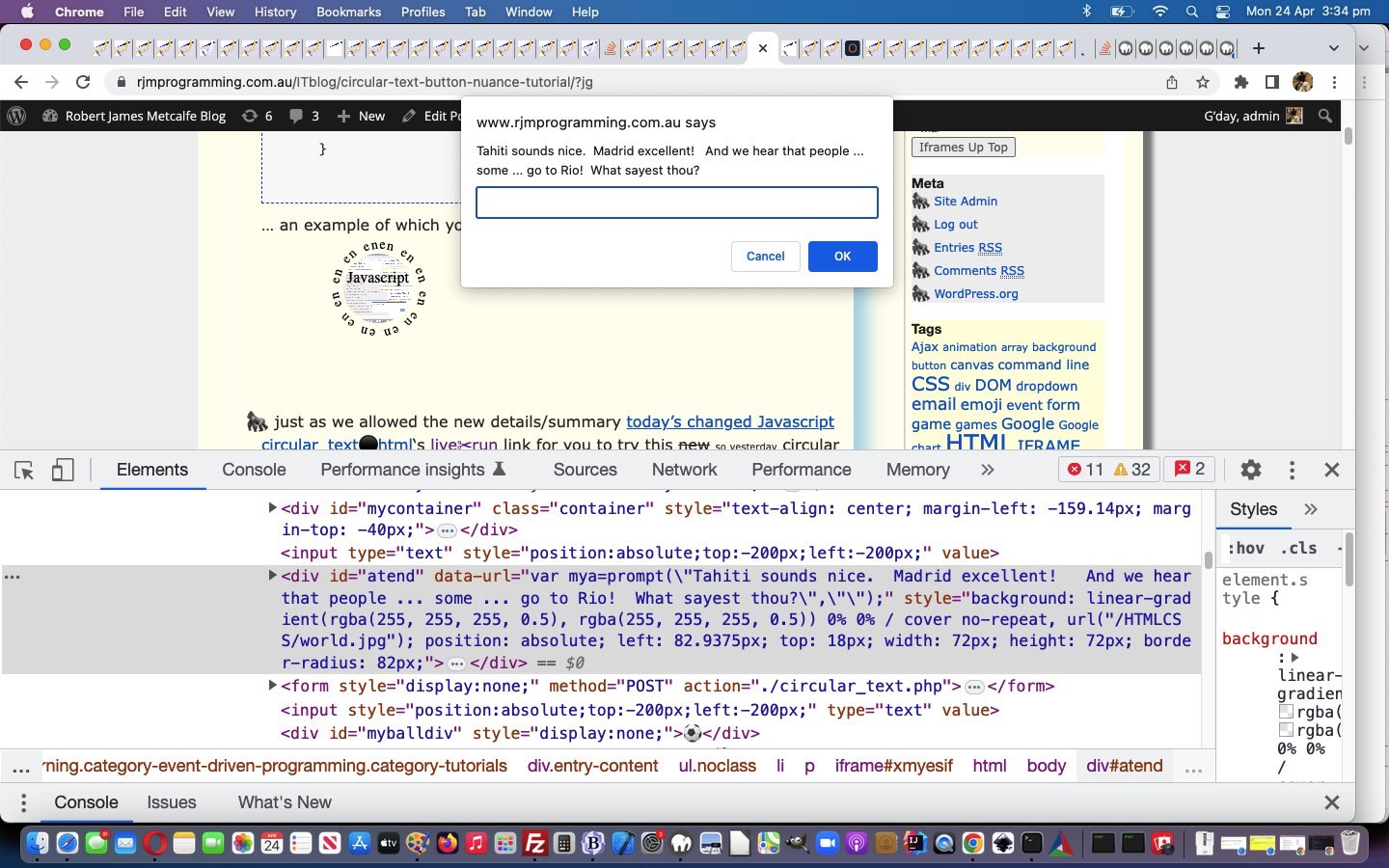
    … an example of which you can try below …

  • just as we allowed the new details/summary reveal arrangement to start as not there for a button but there for everything else at the start, and as of yesterday for the button scenario we catered for the user toggling the visibility of the details/summary elements (by adjusting CSS margin-top of element atend), today we return the compliment for the Analogue Clock and Roulette Wheel and Periodic Table Quiz parts of the web application functionality
  • we add an “a” “-” link to start again with the default Circular Text, as default, webpage look

… in today’s changed Javascript circular_text.html‘s live run link for you to try this new so yesterday circular text button creating logic.


Previous relevant Circular Text Button Tutorial is shown below.
Circular Text Button Tutorial

Circular Text Button Tutorial

At the end of March we made functionality extensions to our Circular Text web application featuring in Chemistry Wonder Periodic Table Quiz Tutorial, but concerning today’s idea we wanted to explore, it comes more in line with the idea of …


web application tool

… involving the idea of incorporating circular text in the design and creation of a button.

Getting this going, we could imagine uses straight from today’s amended code ideas, but the original thought for all this stemmed from another integration idea that we’ll see what happens about into the near future.

We need to facilite additional optional pieces of information in addition to the already asked for …

  • font size (in px)
  • radius (in px)
  • arc (in degrees)
  • circular text … but, today, into that same “circular text” textbox (with the new placeholder advice) …

    this text is in a circle &#x1f34d; &#x1f34c; (Optionally | separate words and image URL and onclick URL)

    … allowing for new optional …

  • inner text (of the div element the circular text surrounds)
  • background image URL (background-repeat:no-repeat; and background-size:cover;)
  • onclick URL to navigate to

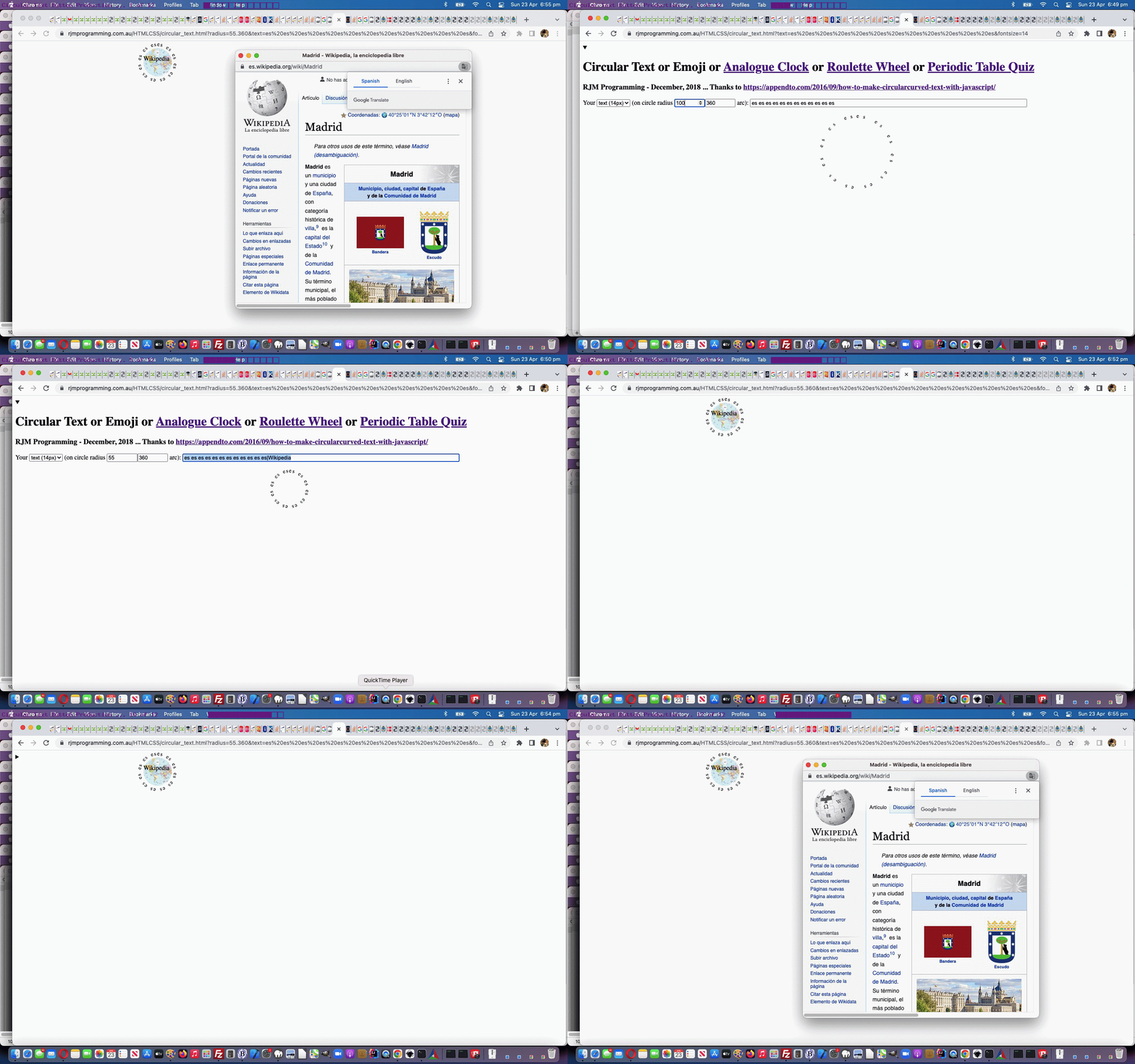
… to open up the possibility of showing a user constructed button with a look that can resemble a button and onclick logic that can help this button be useful to a user, in a dynamic way, as you can see with today’s animated GIF presentation, creating a button shown here or here or

Let’s see how the onload event logic changed below …


function onl() {
var factor=1.0;
var stt=0, stl=0;

var crad=location.search.split('radius=')[1] ? decodeURIComponent(location.search.split('radius=')[1].split('&')[0]) : '' + rad;
if (atendih != '' || atendim != '' || atendiu != '') {
//document.title='' + eval(eval(-0.5 * screen.width) + eval(crad / 2.0) - 30) + 'px';
//document.getElementById('mycontainer').style.marginLeft='' + eval(eval(-0.5 * screen.width) + eval(crad / 2.0) - 30) + 'px';
//document.title='' + eval(eval(-0.5 * window.innerWidth) + eval(crad / 2.0) - 30) + 'px';
var recta=document.getElementById('mycontainer').getBoundingClientRect();
if (1 == 1) {
//alert('' + recta.left);
document.getElementById('mycontainer').style.marginLeft='' + eval(eval(-0.5 * recta.width) + eval(crad * 1.0) - 30) + 'px';
} else {
document.getElementById('mycontainer').style.marginLeft='' + eval(eval(-0.5 * window.innerWidth) + eval(crad / 2.0) - 220) + 'px';
}
document.getElementById('mycontainer').style.marginTop='-40px';
if (atendih != '') { document.getElementById('atend').innerHTML='<br>' + atendih; }
if (atendim != '') {
//alert(atendim);
if (atendih.trim() != '') {
document.getElementById('atend').style.background="linear-gradient(rgba(255,255,255,0.5),rgba(255,255,255,0.5)),URL('" + atendim + "')";
} else {
document.getElementById('atend').style.background="URL('" + atendim + "')";
}
document.getElementById('atend').style.backgroundRepeat="no-repeat";
document.getElementById('atend').style.backgroundSize="cover";
}
if (atendiu != '') {
document.getElementById('atend').title = 'Click for ' + atendiu;
document.getElementById('atend').onclick = function() { window.open(atendiu, '_blank', 'top=50,left=50,width=600,height=600'); };
}
setTimeout(detvis, 5000);
} else {
document.getElementById('mydetails').open=true;
}


var notr=location.search.split('notr=')[1] ? (' ' + decodeURIComponent(location.search.split('notr=')[1].split('&')[0])) : '';
var textis=location.search.split('text=')[1] ? decodeURIComponent(location.search.split('text=')[1].split('&')[0]) : '';
if (textis == rw) { if (notr == '') { isRoulette=true; } else { isThirtySeven=true; } preitc=oncr + " class=\"roulettered\""; }
deg=location.search.split('degrees=')[1] ? eval(decodeURIComponent(location.search.split('degrees=')[1].split('&')[0])) : deg;
fs=location.search.split('fontsize=')[1] ? decodeURIComponent(location.search.split('fontsize=')[1].split('&')[0]) : fs;
if (crad != ('' + rad)) {
if (crad.indexOf('.') != -1) {
deg=eval(crad.split('.')[1]);
rad=eval(crad.split('.')[0]);
} else if (rad.indexOf('.') != -1) {
deg=eval(rad.split('.')[1]);
rad=eval(rad.split('.')[0]);
} else {
rad=eval(crad);
}
}
document.getElementById('iself').value='' + fs;
//alert(1);
if (('' + rad) != '100' || ('' + deg) != '360') { radbit='radius=' + encodeURIComponent('' + rad + '.' + deg) + '&'; document.getElementById('irad').value=('' + rad).split('.')[0]; document.getElementById('ideg').value='' + deg; }
if (textis == '') {
//alert(11);
circularText("this text is in a circle &#x1f34d; &#x1f34c; (Optionally | separate words and image URL and onclick URL)", rad, deg);
} else {
//document.getElementById('inp').value=textis; //.replace(/\&\#/g,'&#');
//alert(textis);
//alert(111);
circularText(textis, rad, deg);
document.getElementById('inp').value=textis.replace(/\&\#/g,'&#');
}
var rect=document.getElementById('test').getBoundingClientRect();
var twenty=20, thirtyeight=38, thirtyeight=38, twentyeight=28, four=4;
//alert(1111);
if (isRoulette || isThirtySeven) {
//alert('here');
twenty=-15;
thirtyeight=-30;
twentyeight=0;
four=-14;
} else if (window.self !== window.top && (atendih != '' || atendim != '' || atendiu != '')) {
//alert(11111);
twenty=25;
} //else {
//alert(98);
//}

//alert('' + rect.left + ',' + rect.top + ' ... ' + rect.width + ',' + rect.height);
document.getElementById('atend').style.position='absolute';
document.getElementById('atend').style.left=eval(factor * eval(-rad + (eval('' + twenty)) + rect.left)) + 'px';
stl=eval(factor * eval(-rad + (eval('' + twenty)) + rect.left));
//document.getElementById('atend').style.top=eval(38 + rect.top) + 'px';
//document.getElementById('atend').style.top=eval(98 + rect.top) + 'px'; // 14.34 32.? 54.98
document.getElementById('atend').style.top=eval(factor * eval(eval('' + fs) * 2 + (eval('' + four)) + eval('' + rect.top))) + 'px';
stt=eval(factor * eval(eval('' + fs) * 2 + (eval('' + four)) + eval('' + rect.top)));

document.getElementById('atend').style.width=eval(2 * rad - (eval('' + thirtyeight))) + 'px';
document.getElementById('atend').style.height=eval(2 * rad - (eval('' + thirtyeight))) + 'px';
//document.getElementById('atend').innerHTML='X';
document.getElementById('atend').style.borderRadius=eval(2 * rad - twentyeight) + 'px';
//if (document.getElementById('atend').innerHTML != '') { document.getElementById('atend').style.backgroundColor='#c0d0f0'; } //'transparent';
if (document.getElementById('atend').innerHTML != '' && atendim == '') {
document.getElementById('atend').style.background='radial-gradient(circle,#c0d0f0,#c3d3f3)';
} else if (isThirtySeven) {
document.getElementById('atend').style.backgroundColor='rgba(165,265,0,0.3)';
document.getElementById('atend').innerHTML='<p id=pscore>Score: ' + score + '/' + goes + '</p>Pick Your <br>Periodic Table <br>Symbol<br><i><b><div contenteditable=true onblur=huhd(this.innerHTML); onchange=huhd(this.innerHTML); id=mynum>?</div></b></i>';
//alert(76);
} else if (isRoulette) {
document.getElementById('atend').style.backgroundColor='rgba(265,165,0,0.3)';
document.getElementById('atend').innerHTML='Score: ' + score + '/' + goes + '<br>Pick Your Number<br><i><b><div contenteditable=true onblur=huhd(this.innerHTML); onchange=huhd(this.innerHTML); id=mynum>?</div></b></i>';
var ccl=Math.floor(eval(eval(-rad + (eval('' + twenty)) + rect.left) + eval(eval(2 * rad - (eval('' + thirtyeight))) / 2)));
var cct=Math.floor(eval(eval(eval('' + fs) * 2 + (eval('' + four)) + eval('' + rect.top)) + eval(eval(2 * rad - (eval('' + thirtyeight))) / 2)));
lasta=document.getElementById('myballdivtwo');
animateonorbit('myballdivtwo', ccl, cct, 150, 6);
var toccl=eval(180 + ccl);
var tocct=eval(180 + cct);
lasta=document.getElementById('myballdiv');
//animateonline('myballdiv', ccl, cct, toccl, tocct, 6);

} //#c0d0f0'; } //'transparent';
//document.getElementById('atend').style.display='none';
atendih='';
atendiu='';
atendim='';

}

… in today’s changed Javascript circular_text.html‘s live run link for you to try this new circular text button creating logic.


Previous relevant Chemistry Wonder Periodic Table Quiz Tutorial is shown below.
Chemistry Wonder Periodic Table Quiz Tutorial

Chemistry Wonder Periodic Table Quiz Tutorial

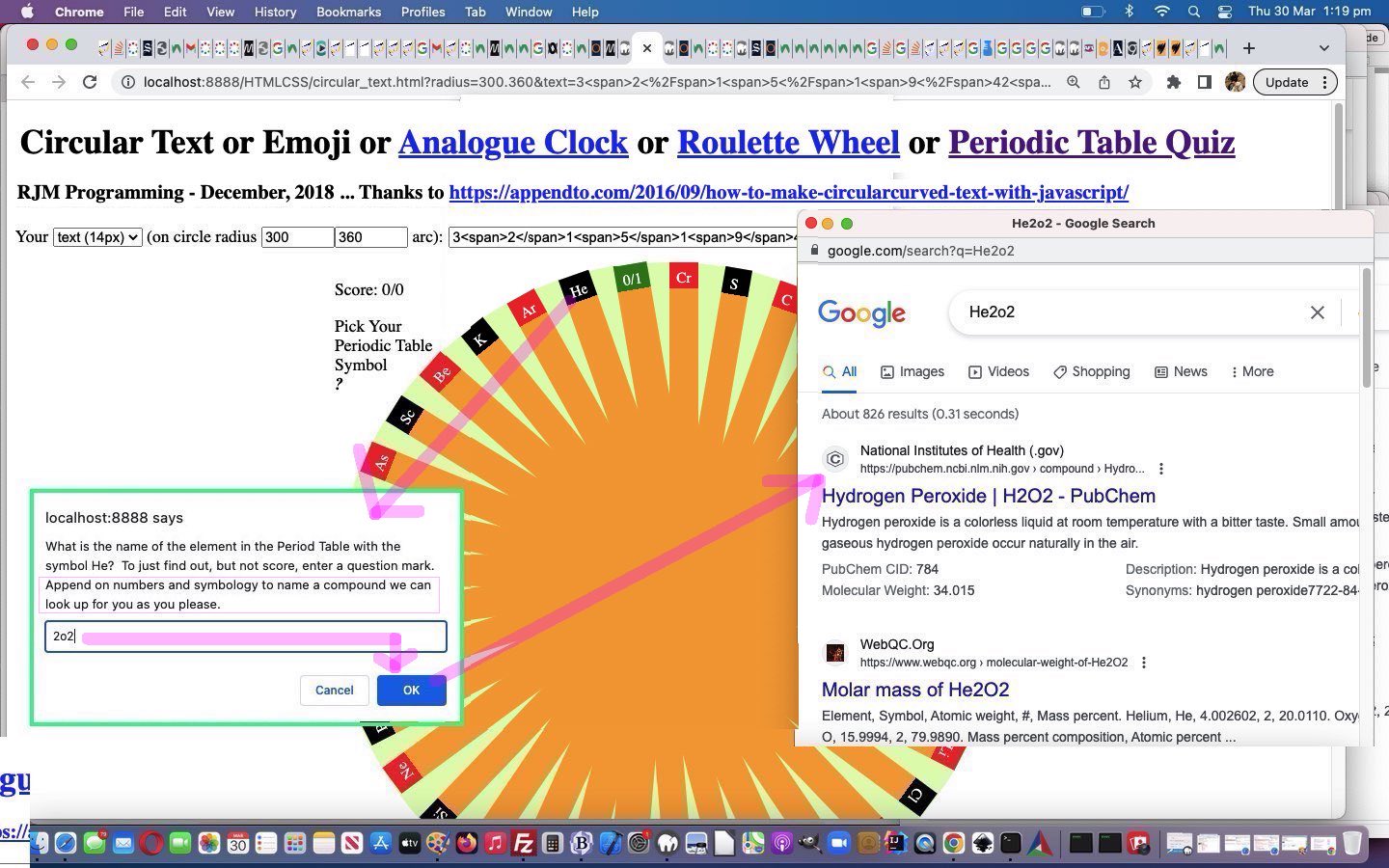
We had occasion to revisit Circular Text or Emoji Periodic Table Quiz Tutorial and it set us to wondering if you can just feed a chemical equation or formula into the Google search engine and …

  • find out good chemistry based information … Spoiler Alert: yes
  • even be set right that an inputted formula is probably inaccurate and a “nearby” known compound equation or formula is such and such … Spoiler Alert: yes

And so we added “dead end” but “non interfering” Javascript code, such code often working off window.prompt user interactive entry functionality, to add this feature into the existant “Periodic Table Quiz” functionality, as per


function huhd(dv) {
var formula='', nonformula='', wds=[], prevanswer='';
var answer='',ans='',wasih='';
if (isThirtySeven) {
if (dv.trim().length <= 2 && dv.indexOf('/') == -1) {
answer=prompt('What is the name of the element in the Period Table with the symbol ' + dv.trim() + '? To just find out, but not score, enter a question mark. Append on numbers and symbology to name a compound we can look up for you as you please.', '');
if (answer == null) { answer='' }
goes++;
wds=answer.split(' ');
prevanswer=answer;
answer=answer.replace(wds[eval(-1 + wds.length)], dv.trim() + wds[eval(-1 + wds.length)]).replace(/NaCl$/g, 'NaCl()').replace(/KBr$/g, 'KBr()').replace(/CsF$/g, 'CsF()').replace(/CdS$/g, 'CdS()').replace(/Nacl$/g, 'Nacl()').replace(/Kbr$/g, 'Kbr()').replace(/Csf$/g, 'Csf()').replace(/Cds$/g, 'Cds()').replace(/NaCL$/g, 'NaCL()').replace(/KBR$/g, 'KBR()').replace(dv.trim() + wds[eval(-1 + wds.length)], wds[eval(-1 + wds.length)]);
//alert(answer);
if (answer.replace('?','').trim() != '' && answer.replace('(','').replace(')','').replace('0','').replace('1','').replace('2','').replace('3','').replace('4','').replace('5','').replace('6','').replace('7','').replace('8','').replace('9','') != answer) {
nonformula=answer.split('0')[0].split('1')[0].split('2')[0].split('3')[0].split('4')[0].split('5')[0].split('6')[0].split('7')[0].split('8')[0].split('9')[0].split('()')[0];
//alert('nonformula=' + nonformula + ' dv=' + dv.trim());
if (prevanswer != answer || 8 == 8) {
formula=dv.trim() + answer.split(' ')[eval(-1 + answer.split(' ').length)]; //.split('()')[0];
answer=answer.replace(answer.split(' ')[eval(-1 + answer.split(' ').length)], '');
formula=formula.split('()')[0];
} else {
formula=dv.trim() + answer.substring(nonformula.length).split('()')[0];
answer=nonformula.trim();
}
//alert('formula=' + formula + ' dv=' + dv.trim());
window.open('//www.google.com/search?q=' + encodeURIComponent(formula), '_blank', 'top=50,left=50,width=600,height=600');
}

if (answer.trim() == '?') {
goes--;
answer='';
ans=document.head.innerHTML.replace(/\"/g,"'").split("'" + dv.trim() + ":")[1].split("'")[0];
}
if (document.head.innerHTML.toLowerCase().replace(/\"/g,"'").indexOf("'" + dv.trim().toLowerCase() + ":" + (answer + ans).toLowerCase() + "'") != -1) {
if (answer.trim() != '') { score++; }
wasih=lastois.innerHTML;
lastois.innerHTML='<font size=1><a title="Click here for Google search" target=_blank style="color:white;text-decoration:none;cursor:pointer;" href="https://www.google.com/search?q=' + encodeURIComponent(answer + ans) + '">' + answer + ans + '</a></font><br>' + wasih;
}
document.getElementById('pscore').innerHTML='Score: ' + score + '/' + goes;
document.getElementById('p36').innerHTML='' + score + '/' + goes;
}
userpicked='';
} else {
if (dv.trim() == '') {
if (userpicked != '') {
document.getElementById('mynum').innerHTML=userpicked;
} else {
document.getElementById('mynum').innerHTML='?';
}
} else if (dv.toLowerCase() == 'red' || dv.toLowerCase() == 'green' || dv.toLowerCase() == 'black') {
userpicked=dv.toLowerCase();
} else if (dv.substring(0,1) >= '0' && dv.substring(0,1) <= '9') {
var huhi=eval('' + dv);
if (huhi >= 0 && huhi <= 36) {
userpicked=dv;
document.getElementById('mynum').innerHTML=userpicked;
} else {
if (userpicked != '') {
document.getElementById('mynum').innerHTML=userpicked;
} else {
document.getElementById('mynum').innerHTML='?';
}
}
} else {
if (userpicked != '') {
document.getElementById('mynum').innerHTML=userpicked;
} else {
document.getElementById('mynum').innerHTML='?';
}
}
}
}

… in today’s changed Javascript circular_text.html‘s Periodic Table Quiz live run link for you to try the Periodic Table Quiz (now featuring new improved “Chemistry Compound Formula Wonder” prompting) part of the functionality yourself at a link up the top of the webpage.


Previous relevant Circular Text or Emoji Periodic Table Quiz Tutorial is shown below.
Circular Text or Emoji Periodic Table Quiz Tutorial

Circular Text or Emoji Periodic Table Quiz Tutorial

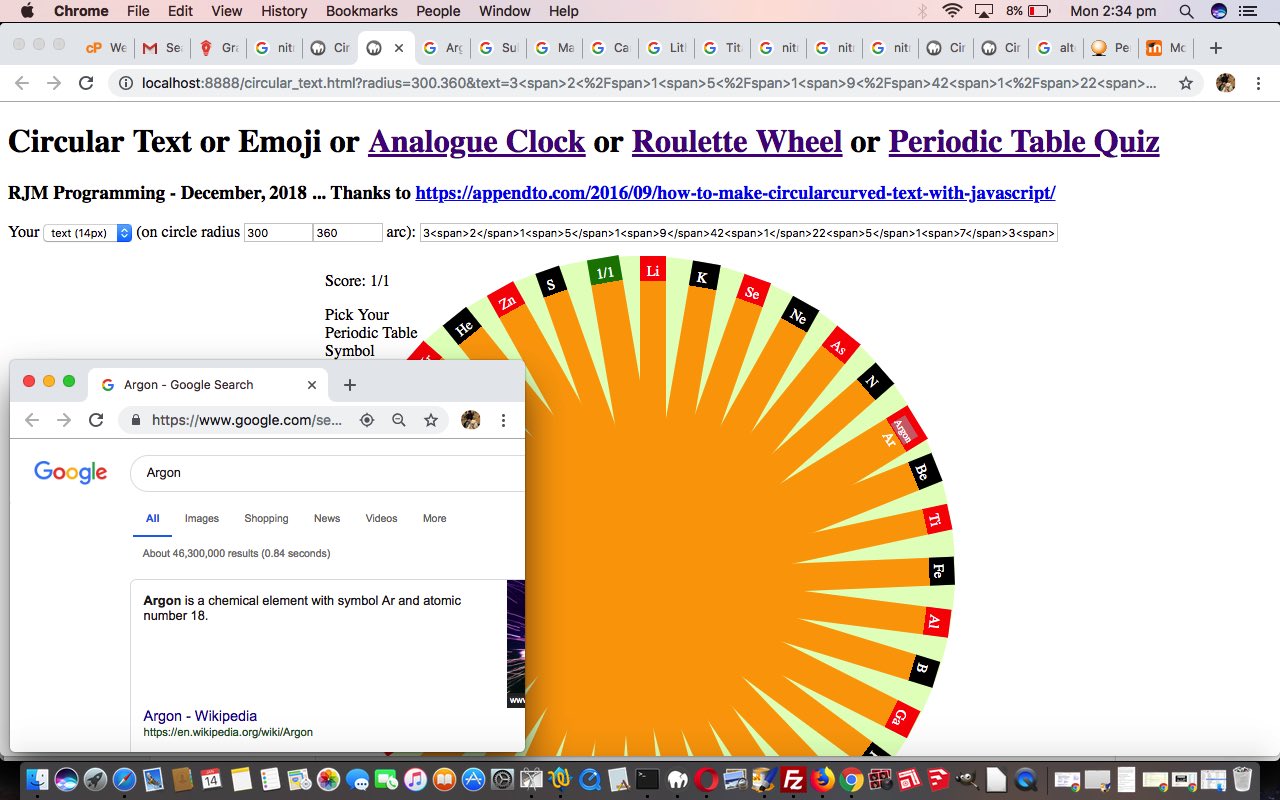
Meanwhile, back at Circular Text ideas we were wondering if we could add more interest to a quiz by making the circular ends to a similar wheel as the roulette wheel (as discussed with Circular Text or Emoji Roulette Animation Tutorial) be clickable as the user’s way to learn about some Periodic Table symbols and correspondent names.

We are forever wondering about ways to hide answers from users, for quizzes and games. Well, at least for those users not venturing to any Webpage -> View Source ideas, that is. Today’s sort of clunky, yet satisfying, way is to hide the Periodic Table element names, along with their symbols, in a single dimension array. Then we use that, scouring the whole <head> </head> using the DOM document.head.innerHTML reference approach, in the way below (and we warn that if you do not want help with the game avert your gaze below 1.734523417cm down the webpage)


var pts=['H:Hydrogen','He:Helium','Li:Lithium','Be:Beryllium','B:Boron','C:Carbon','N:Nitrogen','O:Oxygen','F:Fluorine','Ne:Neon','Na:Sodium','Mg:Magnesium','Al:Aluminium','Si:Silicon','P:Phosphorus','S:Sulphur','Cl:Chlorine','Ar:Argon','K:Potassium','Ca:Calcium','Sc:Scandium','Ti:Titanium','V:Vanadium','Cr:Chromium','Mn:Manganese','Fe:Iron','Co:Cobalt','Ni:Nickel','Cu:Copper','Zn:Zinc','Ga:Gallium','Ge:Germanium','As:Arsenic','Se:Selenium','Br:Bromine','Kr:Krypton'];

function huhd(dv) {
var answer='',ans='',wasih='';
if (isThirtySeven) { // Periodic Table Quiz logic
if (dv.trim().length <= 2 && dv.indexOf('/') == -1) {
answer=prompt('What is the name of the element in the Period Table with the symbol ' + dv.trim() + '? To just find out, but not score, enter a question mark.', '');
if (answer == null) { answer='' }
goes++;
if (answer == '?') {
answer='';
ans=document.head.innerHTML.replace(/\"/g,"'").split("'" + dv.trim() + ":")[1].split("'")[0];
}
if (document.head.innerHTML.toLowerCase().replace(/\"/g,"'").indexOf("'" + dv.trim().toLowerCase() + ":" + (answer + ans).toLowerCase() + "'") != -1) {
if (answer != '') { score++; }
wasih=lastois.innerHTML;
lastois.innerHTML='<font size=1><a title="Click here for Google search" target=_blank style="color:white;text-decoration:none;cursor:pointer;" href="https://www.google.com/search?q=' + encodeURIComponent(answer + ans) + '">' + answer + ans + '</a></font><br>' + wasih;
}
document.getElementById('pscore').innerHTML='Score: ' + score + '/' + goes;
document.getElementById('p36').innerHTML='' + score + '/' + goes;
}
userpicked='';
}
// rest for Roulette logic
}

… and the other way this array is used is to populate the content of the wheel outer rim, starting with the Roulette Wheel content as a template, via …


function reworked(intis) { // RE: pts array Period Table symbol/name quiz
// 3<span>2</span>1<span>5</span>1<span>9</span>42<span>1</span>22<span>5</span>1<span>7</span>3<span>4</span>62<span>7</span>1<span>3</span>3<span>6</span>1<span>1</span>3<span>0</span>82<span>3</span>1<span>0</span>52<span>4</span>1<span>6</span>3<span>3</span>12<span>0</span>1<span>4</span>3<span>1</span>92<span>2</span>1<span>8</span>2<span>9</span>72<span>8</span>1<span>2</span>3<span>5</span>32<span>6</span>0
var okayis=false, outtis=intis + '<span>/0</span>', sofar=',', iso=-1;
var outtisa='3<span>2</span>;1<span>5</span>;1<span>9</span>;4;2<span>1</span>;2;2<span>5</span>;1<span>7</span>;3<span>4</span>;6;2<span>7</span>;1<span>3</span>;3<span>6</span>;1<span>1</span>;3<span>0</span>;8;2<span>3</span>;1<span>0</span>;5;2<span>4</span>;1<span>6</span>;3<span>3</span>;1;2<span>0</span>;1<span>4</span>;3<span>1</span>;9;2<span>2</span>;1<span>8</span>;2<span>9</span>;7;2<span>8</span>;1<span>2</span>;3<span>5</span>;3;2<span>6</span>'.split(';'); //;0<span>/0</span>';
for (var i=0; i<pts.length; i++) {
okayis=false;
while (!okayis) {
iso=Math.floor(Math.random() * pts.length);
if (sofar.indexOf(',' + iso + ',') == -1) { okayis=true; sofar+='' + iso + ','; }
}
if (pts[iso].split(':')[0].length == 1) {
outtis=outtis.replace(outtisa[i], pts[iso].split(':')[0]);
} else {
outtis=outtis.replace(outtisa[i], pts[iso].split(':')[0].substring(0,1) + '<span>' + pts[iso].split(':')[0].substring(1) + '</span>');
}
}
return outtis;
}

… also illustrating our sofar variable oft used technique of appending to a delimited single string that is “indexOf”ed against to determine if an action has previously been taken, and, in this case here, not do it more than once.

Today’s changed HTML and CSS circular_text.html‘s live run link for you to try the Periodic Table Quiz part of the functionality yourself at a link up the top of the webpage.


Previous relevant Circular Text or Emoji Roulette Animation Tutorial is shown below.
Circular Text or Emoji Roulette Animation Tutorial

Circular Text or Emoji Roulette Animation Tutorial

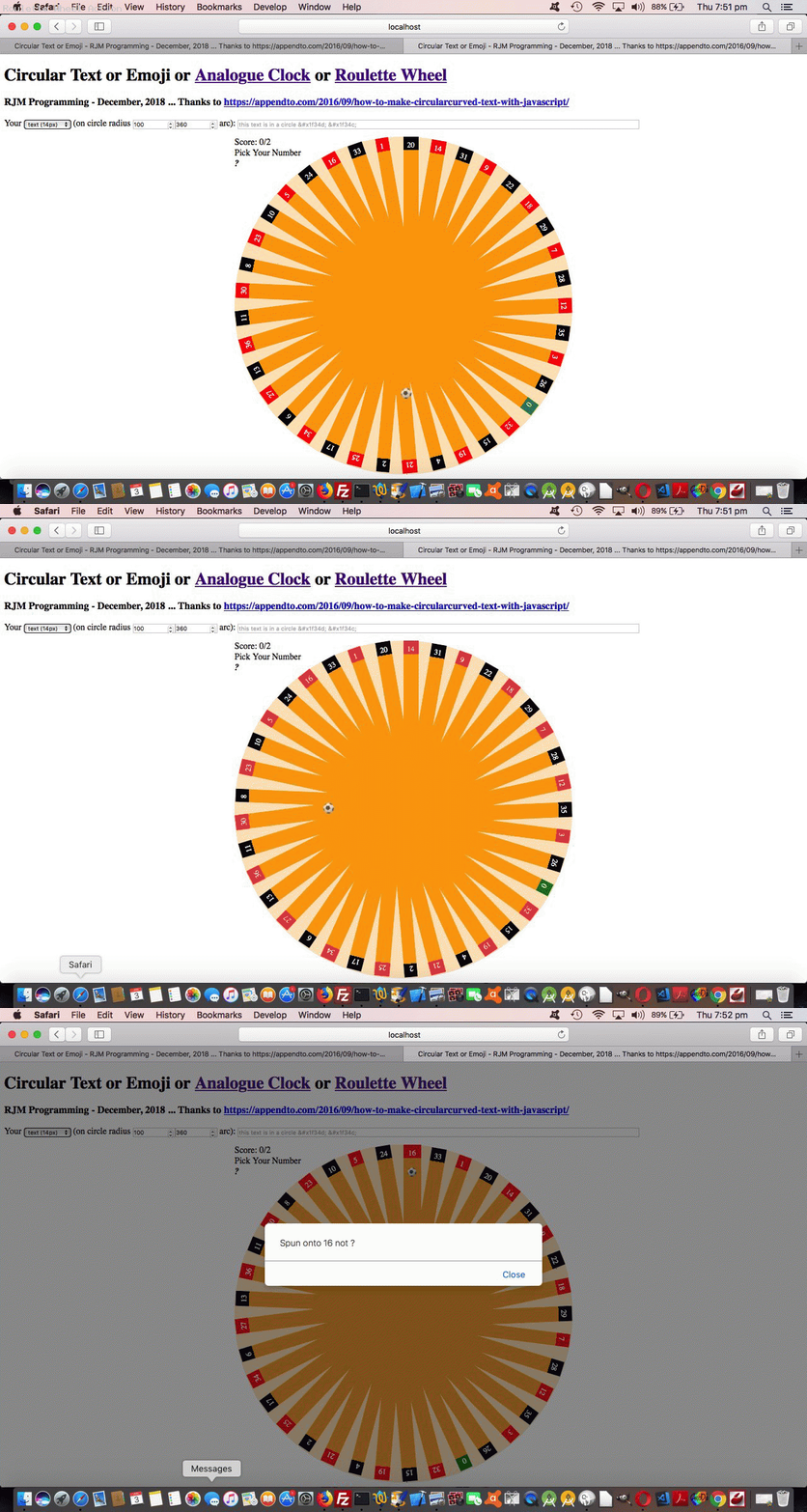
As we left off with the recent Circular Text or Emoji Roulette Game Tutorial we wanted to improve on the animation aspects to representing the roulette wheel ball, but still only involve …

… and it was this in orbit bit that daunted us most. That is, until we …

  • read the great advice of this link, thanks … and enjoyed the wonder of …
  • how dynamic and easy dynamic CSS styling can be simply by adding <style> </style> encased styling to the end of document.body.innerHTML … via …

    function animateonorbit(bid, ccl, cct, anrad, fhl) { // thanks to https://www.useragentman.com/blog/2013/03/03/animating-circular-paths-using-css3-transitions/
    var dba='<style> #' + bid + ' { display:block; top:' + cct + 'px; ';
    dba+=' left:' + ccl + 'px; position:absolute; -moz-border-radius: 12px; border-radius: 12px; ';
    dba+=' filter: alpha(opacity=80); -moz-opacity:0.8; -khtml-opacity: 0.8; opacity: 0.8; transform: rotate(45deg) translateX(' + anrad + 'px) rotate(-45deg); ';
    dba+=' animation:animateonorbit ' + fhl + 's linear infinite; -webkit-animation:animateonorbit ' + fhl + 's linear infinite; z-index:79; } ';
    dba+=' @keyframes animateonorbit { from { transform: rotate(0deg) translateX(' + anrad + 'px) rotate(0deg); } ';
    dba+=' to { transform: rotate(360deg) translateX(' + anrad + 'px) rotate(-360deg); } ';
    dba+=' @-webkit-keyframes animateonorbit { from { -webkit-transform: rotate(0deg) translateX(' + anrad + 'px) rotate(0deg); } ';
    dba+=' to { -webkit-transform: rotate(360deg) translateX(' + anrad + 'px) rotate(-360deg); } </style> ';
    document.body.innerHTML+=dba;
    lasto=document.getElementById(bid);
    document.getElementById(bid).style.display='block';
    }

Today’s changed HTML and CSS circular_text.html‘s live run link for you to try the Roulette Wheel (and its animated ball) part of the functionality yourself at a link up the top of the webpage.


Previous relevant Circular Text or Emoji Roulette Game Tutorial is shown below.
Circular Text or Emoji Roulette Game Tutorial

Circular Text or Emoji Roulette Game Tutorial

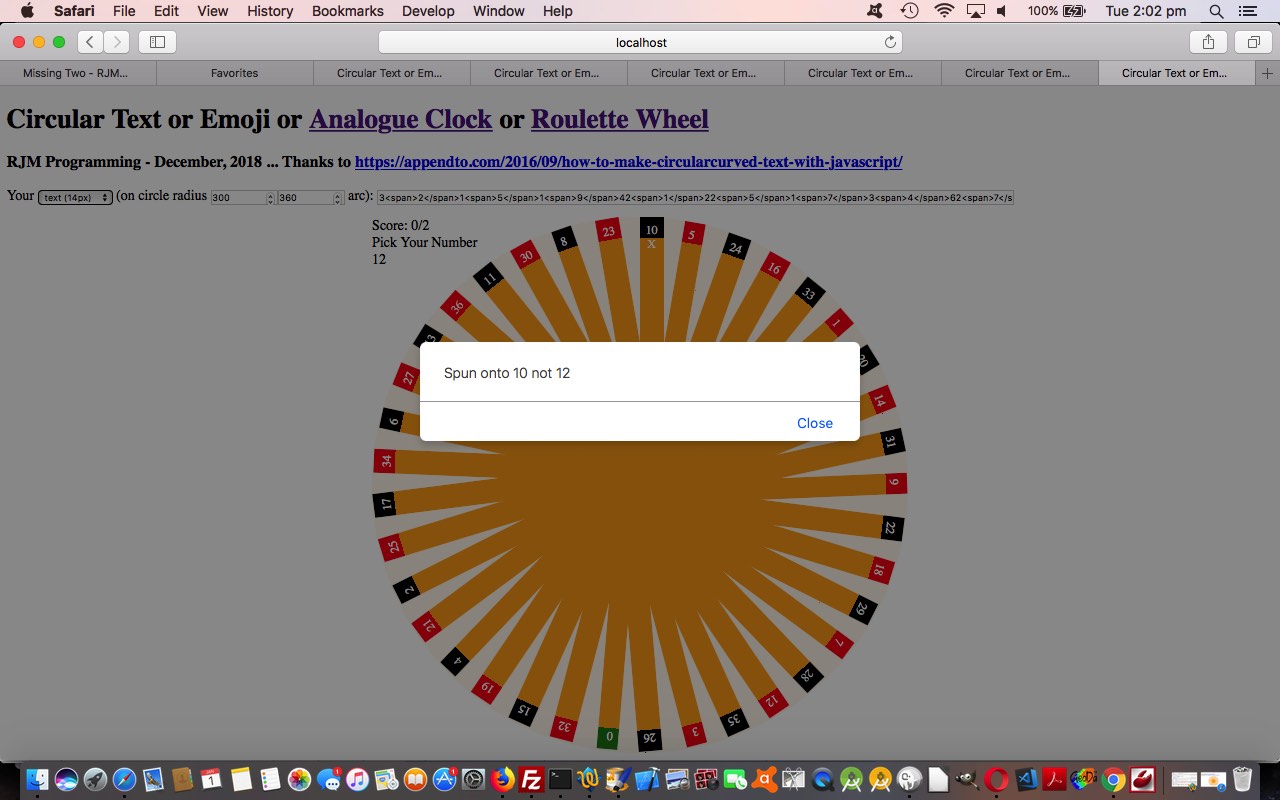
Extending the recent Circular Text or Emoji Onclick Tutorial circular text ideas, today we are starting out on a game that uses a Roulette Wheel as its basic web page component. To all those “graphically challenged” users, like me, we do not use any homegrown imagery of any sort, instead just use …

  • HTML basis of design …
  • CSS as …
    1. <head> </head> styling …

      <style>
      .roulettered { color:white; background:linear-gradient(to top,orange 92%,red 8%); }
      .rouletteblack { color:white; background:linear-gradient(to top,orange 92%,black 8%); }
      .roulettegreen { color:white; background:linear-gradient(to top,orange 92%,green 8%); }
      </style>
    2. inline HTML styling
  • Javascript DOM dynamic styling and animation (the roulette wheel is sent spinning via setTimeout Javascript timer logic)

… involving our original …

  • “circular text” as the numbers near the outer rim of the roulette wheel
  • background border-radius parts in the middle (‘atend’ element) as the ribbing bits that form the rest of the roulette wheel

… and, so far, the one ball emoji at the end of a user turn. This last bit is where we feel we shall work at more improvement.

Today’s changed HTML circular_text.html‘s live run link for you to try the Roulette Wheel part of the functionality yourself at a link up the top of the webpage. You can guess a number or red or black or green colours, and odds based scoring is applied.


Previous relevant Circular Text or Emoji Onclick Tutorial is shown below.
Circular Text or Emoji Onclick Tutorial

Circular Text or Emoji Onclick Tutorial

In this increasingly connected online world, it can be surprising when an image looking part of a webpage cannot be linked to. The unusual thing about emojis is their way to …

  • be part of the textual web armoury … yet …
  • look like an image

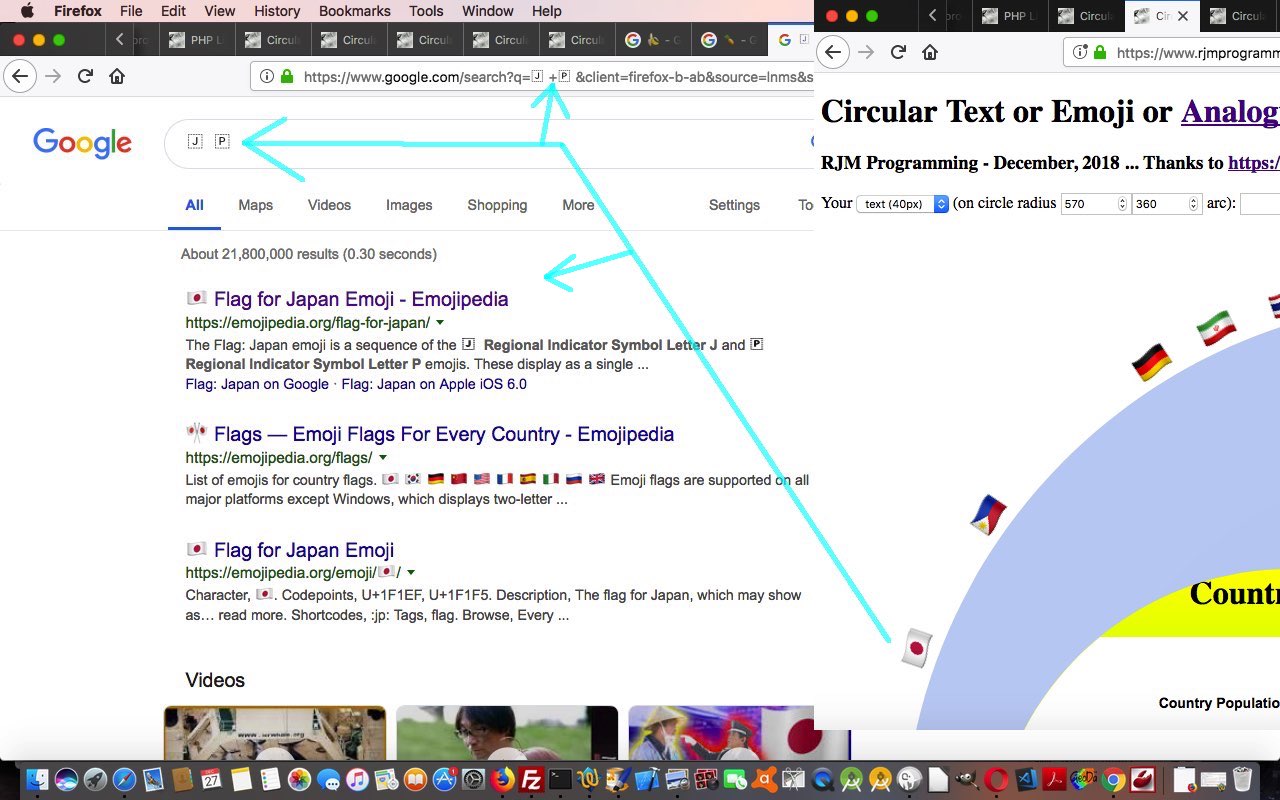
… and, as such, it would definitely not offend, maybe even “tickle pink” the user to have an emoji be linked to further information. In the case of the emojis featuring in yesterday’s Circular Text or Emojis Genericity Tutorial which are country flags (that are compound emojis) you can query the Google search engine with the contents of the Iemoji website webpages (such as Japan’s flag emoji one) with the right column data next to the “Decimal HTML Entity” left column. In fact, as we often urge our students, just copy this Decimal HTML Entity value straight up into the address bar, and your favourite search engine is likely to come up with a (in my case Google) search engine URL like …


https://www.google.com/search?client=firefox-b-ab&q=%26%23127471%3B+%26%23127477%3B

… getting you (emoji onclick event) links to some pretty pertinent information about Japan within seconds, let alone what you might find under the Images and/or Videos menu subsearches. Notice how integrated this is with the Google search engine webpages …

The Flag: Japan emoji is a sequence of the 🇯 Regional Indicator Symbol Letter J and 🇵 Regional Indicator Symbol Letter P emojis. These display as a single emoji on supported platforms.

… showing you how ISO 2-letter codes are linked to emoji country flag Decimal HTML Entity creation construction rules.

Today’s changed HTML circular_text.html‘s live run link for you to try yourself (or try the changed PHP circular_text.php‘s live run), then, features …

  • changed emoji linking, the one thing left to say about this being, that the “missing link” between text and link HTML elements can be that elements that start as text can be made to act like linked elements (later) via (definitely the first, and sometimes, but not today, the second) CSS styling (via inline HTML CSS style=””) …
    1. cursor:pointer;
    2. text-decoration:underline;

    … we make happen within the webpage’s Javascript (DOM) code

  • functionality to be able to increase or decease the circular text’s font size (that being the way to control an emoji size as well, that reminds you that emojis are text, just not that very small part of the text world with ascii codes less than 256)
  • a very subtle radial gradient background replaces the single colour background colour for the HTML ‘atend’ div element within the circular text as per

    if (document.getElementById('atend').innerHTML != '') { document.getElementById('atend').style.background='radial-gradient(circle,#c0d0f0,#c3d3f3)'; } //#c0d0f0'; } //'transparent';

Previous relevant Circular Text or Emojis Genericity Tutorial is shown below.
Circular Text or Emojis Genericity Tutorial

Circular Text or Emojis Genericity Tutorial

A major consideration in any “genericity” drive you have for your web applications is to allow for a large amount of user entered data, perhaps a surprising amount. If you offer a textbox to enter data, then a user may enter a hugely long, and perhaps valid, field. If we’d left it at the scenario of yesterday’s Circular Text or Emojis Analogue Clock Tutorial, though, we’d have been restricted to a textbox entry of about 800 characters for the rjmprogramming.com.au domain. In the first of the improvements below, then, we try to cater for this via …

  • for textbox entries that are long we now populate an HTML form method=POST action=circular_text.php where we intervene at appropriate places with the large data items … and today we also …
  • make sure compound emojis like the country flags work (where the great Iemoji website webpages such as Japan’s flag emoji one, become so useful) … and we test that out with a …
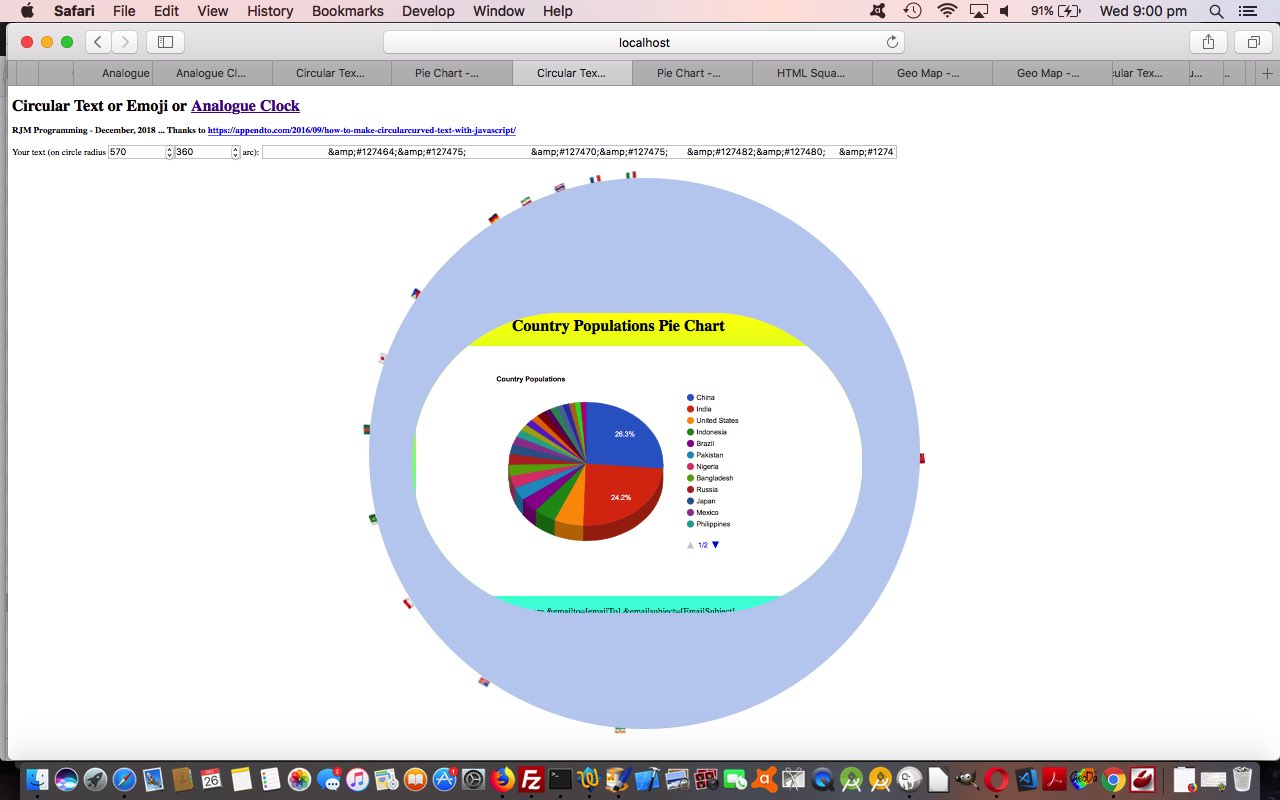
  • Google Chart Pie Chart content inside the circular text

… and an interesting thing happened with the “getting to work” of today’s textbox entry (for a radius value of 570) you can try …


                        &#127464;&#127475;                        &#127470;&#127475;       &#127482;&#127480;     &#127470;&#127465;     &#127463;&#127479;    &#127477;&#127472;    &#127475;&#127468;    &#127463;&#127465;    &#127479;&#127482;   &#127471;&#127477;   &#127474;&#127485;   &#127477;&#127469;  &#127483;&#127475;  &#127466;&#127481;  &#127465;&#127466;  &#127466;&#127468; &#127470;&#127479; &#127481;&#127479; &#127481;&#127469; &#127464;&#127465; &#127467;&#127479; &#127468;&#127463; &#127470;&#127481;<iframe frameborder=0 style=border-radius:600px;width:900px;height:600px;z-index:23;margin-left:87px;margin-top:270px; src=https://www.rjmprogramming.com.au/PHP/PieChart/pie_chart.php?title=%c2%a0%c2%a0%c2%a0%c2%a0%c2%a0%c2%a0%c2%a0%c2%a0%c2%a0%c2%a0%c2%a0%c2%a0%c2%a0%c2%a0%c2%a0%c2%a0%c2%a0%c2%a0%c2%a0%c2%a0%c2%a0%c2%a0%c2%a0%c2%a0Country%20Populations&onclick=y&task=Country&desc=Populations&data=,%20[~https;China,1347000000,India,1241000000,United%20States,312000000,Indonesia,238000000,Brazil,197000000,Pakistan,177000000,Nigeria,162000000,Bangladesh,151000000,Russia,143000000,Japan,128000000,Mexico,115000000,Philippines,96000000,Vietnam,88000000,Ethiopia,87000000,Germany,81800000,Egypt,82600000,Iran,78000000,Turkey,74000000,Thailand,69500000,Congo,67800000,France,63300000,United%20Kingdom,62700000,Italy,60800000~,100]#bitsatend></iframe>

… where the use of %c2%a0 creates whitespace but isn’t cleared by your normal trim functions, which is how we managed to get our Pie Chart title centralized enough not to be cut off by the HTML iframe border-radius applied to it. Cute, huh?!

Here is today’s changed circular_text.html‘s live run link for you to try yourself.


Previous relevant Circular Text or Emojis Analogue Clock Tutorial is shown below.
Circular Text or Emojis Analogue Clock Tutorial

Circular Text or Emojis Analogue Clock Tutorial

Often a good way to proceed to challenge genericity issues with a web application you think has potential to be more than it appears is to make it be the missing piece to another web application and interface to it. This is the scenario, today, putting together yesterday’s …

This interfacing match is great, as it fills in a gap, but there are a couple of things to overcome, those being …

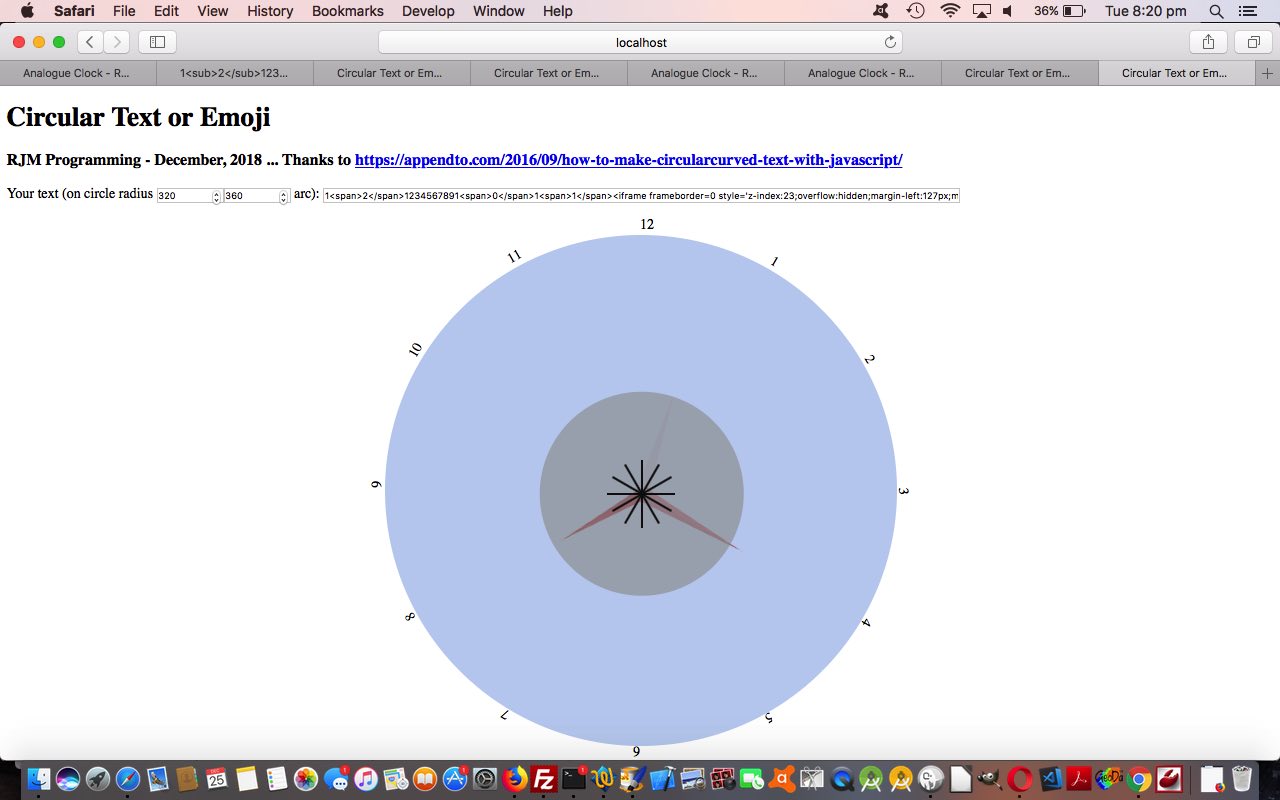
  1. allow for a circular text component consist of more than one character, and here we allow the user to put …

    1<span>2</span>

    … to show “12” for example
  2. allow for an element like the HTML iframe “child” element be the contents within a newly introduced HTML div element for today’s changed circular_text.html‘s live run placed into the … anyone, anyone? … yes, Franklin D. Roosevelt, that would be in the circle the circular text goes around, and we do that stylewise via (on the fly Javascript) code making use of the centrally justified circular text element (curiously causing rect.width and rect.height below to be zero) …


    var rect=document.getElementById('test').getBoundingClientRect();
    document.getElementById('atend').style.position='absolute';
    document.getElementById('atend').style.left=eval(-rad + 20 + rect.left) + 'px';
    document.getElementById('atend').style.top=eval(38 + rect.top) + 'px';
    document.getElementById('atend').style.width=eval(2 * rad - 38) + 'px';
    document.getElementById('atend').style.height=eval(2 * rad - 38) + 'px';
    document.getElementById('atend').style.borderRadius=eval(2 * rad - 28) + 'px';
    if (document.getElementById('atend').innerHTML != '') { document.getElementById('atend').style.backgroundColor='#c0d0f0'; } //'transparent';

    … and ahead of this our user entered data needed for the Analogue Clock has an HTML (child) iframe element part …


    1<span>2</span>1234567891<span>0</span>1<span>1</span><iframe scrolling=no frameborder=0 style='z-index:23;margin-left:127px;margin-top:130px;height:400px;' src=analogue_clock.htm#xbody></iframe>

    … that we figure, because it is HTML containing spaces in its non-innerHTML parts, is meant as content for that new ‘atend’ HTML div element located in the middle of the circular text, and created via the codeline reached in this scenario …


    function justinnertextish(intx, within) {
    var sone=1, tagis='', iit=0, less=false, ioffset=0;
    outx=intx;
    it=[];
    if (intx.indexOf('</') != -1) {
    outx="";
    for (iit=0; iit<intx.length; iit+=sone) {
    if (intx.substring(iit, eval(1 + iit)) == '<') {
    tagis=intx.substring(iit).substring(1).split('>')[0];
    less=false;
    if (tagis.indexOf(' ') != -1 || within) {
    less=true;
    document.getElementById('atend').innerHTML='<' + tagis + '>' + intx.substring(eval(iit + 2 + tagis.length)).split('>')[0] + '>';

    // etcetera etcetera etcetera

Got the time?


Previous relevant Circular Text or Emojis Primer Tutorial is shown below.
Circular Text or Emojis Primer Tutorial

Circular Text or Emojis Primer Tutorial

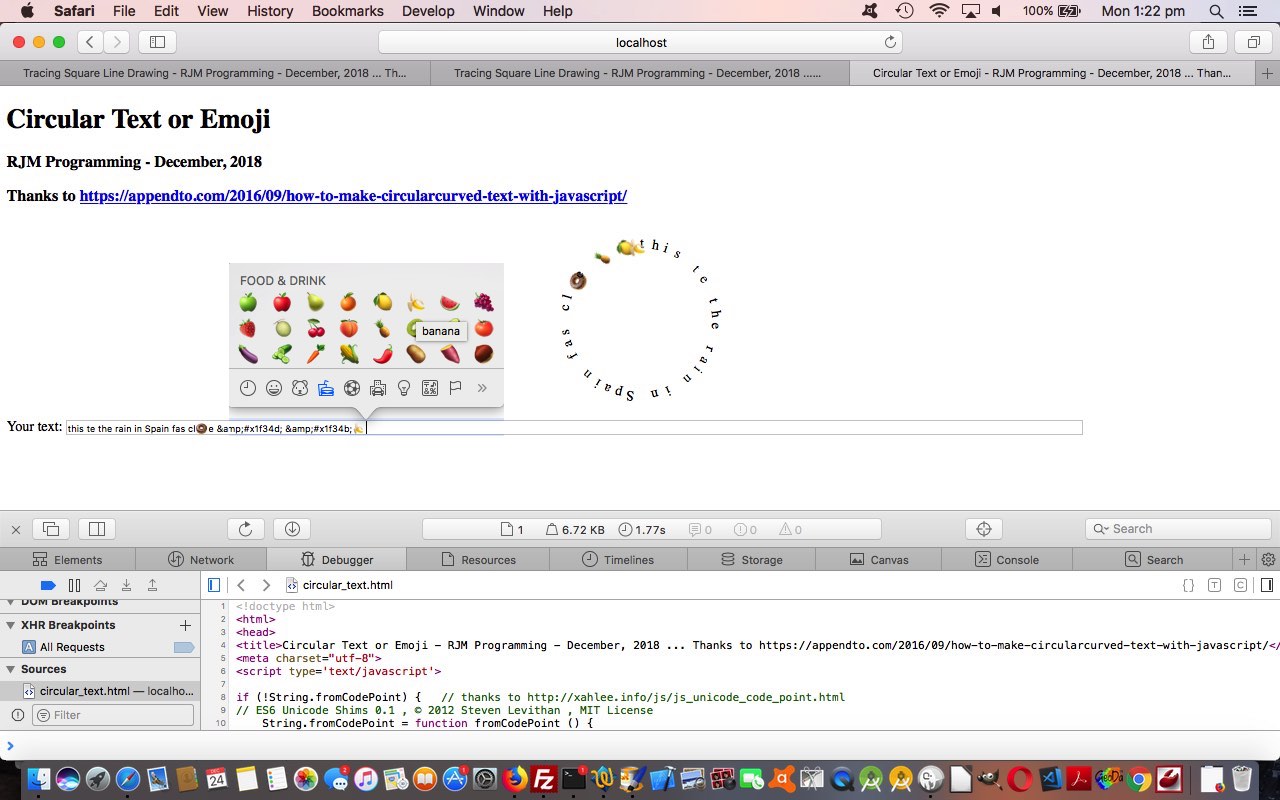
We’ve got a “proof of concept” tutorial for you today, because we got put onto an idea for something by How to Make Circular/Curved Text with JavaScript, thanks. We wanted to extend the logic of that …

  • ascii codes (of characters) less than 256, text handling … to, now, be able to handle …
  • emoji data (or that’s what we like to “nickname” it … sorry if this annoys, but it really concerns UTF-8 characters really

We resisted the Sushi Train Circuit Game Tutorial ideas, because it isn’t lunchtime, and opted to allow the user to enter their own text (including any emojis (available via Command-Control-Space menu here at Mac OS X) or via &#[CodePoint]; HTML Entity (decimal or hexidecimal (CodePoint)) entries (where we’d like you to put &amp; rather than just & if you are going to do this, and if you want to do this, but need tips on how you might approach this, please consult our previous Karaoke via YouTube API in Iframe Emoji Tutorial where we often start at good ol’ emojipedia).

Maybe there will be some sequels, but for the meantime you can examine the HTML and Javascript circular_text.html code (including more thank you links), that you can try for yourself at this live run link.

With that in mind, take a look at us creeping through the text characters you enter, and notice how an emoji will have two bytes in a row with ascii code greater than 255 …


var etxt=intxt.replace(/\&amp\;/g,'&').replace(/\;\&\#/g,',').split('&#'); // intxt is your text
var txt=[], zero=0; // changed elsewhere as well

var one=1;
for (kk=zero; kk<etxt[k].length; kk+=one) {
if (etxt[k].substring(kk, eval(1 + kk)).charCodeAt(0) > 255) { // emoji found
txt.push(String.fromCodePoint(eval('' + etxt[k].substring(kk).charCodeAt(0)),eval('' + etxt[k].substring(kk).substring(1).charCodeAt(0)) ));
one=2;
} else { // normal ascii text
txt.push(etxt[k].substring(kk, eval(1 + kk)));
one=1;
}
}
}
one=1;
zero=0;

You can also see this play out at WordPress 4.1.1’s Circular Text or Emojis Primer Tutorial.

If this was interesting you may be interested in this too.


If this was interesting you may be interested in this too.

If this was interesting you may be interested in this too.

If this was interesting you may be interested in this too.

If this was interesting you may be interested in this too.

If this was interesting you may be interested in this too.

If this was interesting you may be interested in this too.

If this was interesting you may be interested in this too.


If this was interesting you may be interested in this too.


If this was interesting you may be interested in this too.

Posted in eLearning, Event-Driven Programming, Tutorials | Tagged , , , , , , , , , , , , , , , , , , , , , , , , , , , | Leave a comment

Circular Text Button Tutorial

Circular Text Button Tutorial

Circular Text Button Tutorial

At the end of March we made functionality extensions to our Circular Text web application featuring in Chemistry Wonder Periodic Table Quiz Tutorial, but concerning today’s idea we wanted to explore, it comes more in line with the idea of …


web application tool

… involving the idea of incorporating circular text in the design and creation of a button.

Getting this going, we could imagine uses straight from today’s amended code ideas, but the original thought for all this stemmed from another integration idea that we’ll see what happens about into the near future.

We need to facilite additional optional pieces of information in addition to the already asked for …

  • font size (in px)
  • radius (in px)
  • arc (in degrees)
  • circular text … but, today, into that same “circular text” textbox (with the new placeholder advice) …

    this text is in a circle &#x1f34d; &#x1f34c; (Optionally | separate words and image URL and onclick URL)

    … allowing for new optional …

  • inner text (of the div element the circular text surrounds)
  • background image URL (background-repeat:no-repeat; and background-size:cover;)
  • onclick URL to navigate to

… to open up the possibility of showing a user constructed button with a look that can resemble a button and onclick logic that can help this button be useful to a user, in a dynamic way, as you can see with today’s animated GIF presentation, creating a button shown here or here or

Let’s see how the onload event logic changed below …


function onl() {
var factor=1.0;
var stt=0, stl=0;

var crad=location.search.split('radius=')[1] ? decodeURIComponent(location.search.split('radius=')[1].split('&')[0]) : '' + rad;
if (atendih != '' || atendim != '' || atendiu != '') {
//document.title='' + eval(eval(-0.5 * screen.width) + eval(crad / 2.0) - 30) + 'px';
//document.getElementById('mycontainer').style.marginLeft='' + eval(eval(-0.5 * screen.width) + eval(crad / 2.0) - 30) + 'px';
//document.title='' + eval(eval(-0.5 * window.innerWidth) + eval(crad / 2.0) - 30) + 'px';
var recta=document.getElementById('mycontainer').getBoundingClientRect();
if (1 == 1) {
//alert('' + recta.left);
document.getElementById('mycontainer').style.marginLeft='' + eval(eval(-0.5 * recta.width) + eval(crad * 1.0) - 30) + 'px';
} else {
document.getElementById('mycontainer').style.marginLeft='' + eval(eval(-0.5 * window.innerWidth) + eval(crad / 2.0) - 220) + 'px';
}
document.getElementById('mycontainer').style.marginTop='-40px';
if (atendih != '') { document.getElementById('atend').innerHTML='<br>' + atendih; }
if (atendim != '') {
//alert(atendim);
if (atendih.trim() != '') {
document.getElementById('atend').style.background="linear-gradient(rgba(255,255,255,0.5),rgba(255,255,255,0.5)),URL('" + atendim + "')";
} else {
document.getElementById('atend').style.background="URL('" + atendim + "')";
}
document.getElementById('atend').style.backgroundRepeat="no-repeat";
document.getElementById('atend').style.backgroundSize="cover";
}
if (atendiu != '') {
document.getElementById('atend').title = 'Click for ' + atendiu;
document.getElementById('atend').onclick = function() { window.open(atendiu, '_blank', 'top=50,left=50,width=600,height=600'); };
}
setTimeout(detvis, 5000);
} else {
document.getElementById('mydetails').open=true;
}


var notr=location.search.split('notr=')[1] ? (' ' + decodeURIComponent(location.search.split('notr=')[1].split('&')[0])) : '';
var textis=location.search.split('text=')[1] ? decodeURIComponent(location.search.split('text=')[1].split('&')[0]) : '';
if (textis == rw) { if (notr == '') { isRoulette=true; } else { isThirtySeven=true; } preitc=oncr + " class=\"roulettered\""; }
deg=location.search.split('degrees=')[1] ? eval(decodeURIComponent(location.search.split('degrees=')[1].split('&')[0])) : deg;
fs=location.search.split('fontsize=')[1] ? decodeURIComponent(location.search.split('fontsize=')[1].split('&')[0]) : fs;
if (crad != ('' + rad)) {
if (crad.indexOf('.') != -1) {
deg=eval(crad.split('.')[1]);
rad=eval(crad.split('.')[0]);
} else if (rad.indexOf('.') != -1) {
deg=eval(rad.split('.')[1]);
rad=eval(rad.split('.')[0]);
} else {
rad=eval(crad);
}
}
document.getElementById('iself').value='' + fs;
//alert(1);
if (('' + rad) != '100' || ('' + deg) != '360') { radbit='radius=' + encodeURIComponent('' + rad + '.' + deg) + '&'; document.getElementById('irad').value=('' + rad).split('.')[0]; document.getElementById('ideg').value='' + deg; }
if (textis == '') {
//alert(11);
circularText("this text is in a circle &#x1f34d; &#x1f34c; (Optionally | separate words and image URL and onclick URL)", rad, deg);
} else {
//document.getElementById('inp').value=textis; //.replace(/\&\#/g,'&#');
//alert(textis);
//alert(111);
circularText(textis, rad, deg);
document.getElementById('inp').value=textis.replace(/\&\#/g,'&#');
}
var rect=document.getElementById('test').getBoundingClientRect();
var twenty=20, thirtyeight=38, thirtyeight=38, twentyeight=28, four=4;
//alert(1111);
if (isRoulette || isThirtySeven) {
//alert('here');
twenty=-15;
thirtyeight=-30;
twentyeight=0;
four=-14;
} else if (window.self !== window.top && (atendih != '' || atendim != '' || atendiu != '')) {
//alert(11111);
twenty=25;
} //else {
//alert(98);
//}

//alert('' + rect.left + ',' + rect.top + ' ... ' + rect.width + ',' + rect.height);
document.getElementById('atend').style.position='absolute';
document.getElementById('atend').style.left=eval(factor * eval(-rad + (eval('' + twenty)) + rect.left)) + 'px';
stl=eval(factor * eval(-rad + (eval('' + twenty)) + rect.left));
//document.getElementById('atend').style.top=eval(38 + rect.top) + 'px';
//document.getElementById('atend').style.top=eval(98 + rect.top) + 'px'; // 14.34 32.? 54.98
document.getElementById('atend').style.top=eval(factor * eval(eval('' + fs) * 2 + (eval('' + four)) + eval('' + rect.top))) + 'px';
stt=eval(factor * eval(eval('' + fs) * 2 + (eval('' + four)) + eval('' + rect.top)));

document.getElementById('atend').style.width=eval(2 * rad - (eval('' + thirtyeight))) + 'px';
document.getElementById('atend').style.height=eval(2 * rad - (eval('' + thirtyeight))) + 'px';
//document.getElementById('atend').innerHTML='X';
document.getElementById('atend').style.borderRadius=eval(2 * rad - twentyeight) + 'px';
//if (document.getElementById('atend').innerHTML != '') { document.getElementById('atend').style.backgroundColor='#c0d0f0'; } //'transparent';
if (document.getElementById('atend').innerHTML != '' && atendim == '') {
document.getElementById('atend').style.background='radial-gradient(circle,#c0d0f0,#c3d3f3)';
} else if (isThirtySeven) {
document.getElementById('atend').style.backgroundColor='rgba(165,265,0,0.3)';
document.getElementById('atend').innerHTML='<p id=pscore>Score: ' + score + '/' + goes + '</p>Pick Your <br>Periodic Table <br>Symbol<br><i><b><div contenteditable=true onblur=huhd(this.innerHTML); onchange=huhd(this.innerHTML); id=mynum>?</div></b></i>';
//alert(76);
} else if (isRoulette) {
document.getElementById('atend').style.backgroundColor='rgba(265,165,0,0.3)';
document.getElementById('atend').innerHTML='Score: ' + score + '/' + goes + '<br>Pick Your Number<br><i><b><div contenteditable=true onblur=huhd(this.innerHTML); onchange=huhd(this.innerHTML); id=mynum>?</div></b></i>';
var ccl=Math.floor(eval(eval(-rad + (eval('' + twenty)) + rect.left) + eval(eval(2 * rad - (eval('' + thirtyeight))) / 2)));
var cct=Math.floor(eval(eval(eval('' + fs) * 2 + (eval('' + four)) + eval('' + rect.top)) + eval(eval(2 * rad - (eval('' + thirtyeight))) / 2)));
lasta=document.getElementById('myballdivtwo');
animateonorbit('myballdivtwo', ccl, cct, 150, 6);
var toccl=eval(180 + ccl);
var tocct=eval(180 + cct);
lasta=document.getElementById('myballdiv');
//animateonline('myballdiv', ccl, cct, toccl, tocct, 6);

} //#c0d0f0'; } //'transparent';
//document.getElementById('atend').style.display='none';
atendih='';
atendiu='';
atendim='';

}

… in today’s changed Javascript circular_text.html‘s live run link for you to try this new circular text button creating logic.


Previous relevant Chemistry Wonder Periodic Table Quiz Tutorial is shown below.

Chemistry Wonder Periodic Table Quiz Tutorial

Chemistry Wonder Periodic Table Quiz Tutorial

We had occasion to revisit Circular Text or Emoji Periodic Table Quiz Tutorial and it set us to wondering if you can just feed a chemical equation or formula into the Google search engine and …

  • find out good chemistry based information … Spoiler Alert: yes
  • even be set right that an inputted formula is probably inaccurate and a “nearby” known compound equation or formula is such and such … Spoiler Alert: yes

And so we added “dead end” but “non interfering” Javascript code, such code often working off window.prompt user interactive entry functionality, to add this feature into the existant “Periodic Table Quiz” functionality, as per


function huhd(dv) {
var formula='', nonformula='', wds=[], prevanswer='';
var answer='',ans='',wasih='';
if (isThirtySeven) {
if (dv.trim().length <= 2 && dv.indexOf('/') == -1) {
answer=prompt('What is the name of the element in the Period Table with the symbol ' + dv.trim() + '? To just find out, but not score, enter a question mark. Append on numbers and symbology to name a compound we can look up for you as you please.', '');
if (answer == null) { answer='' }
goes++;
wds=answer.split(' ');
prevanswer=answer;
answer=answer.replace(wds[eval(-1 + wds.length)], dv.trim() + wds[eval(-1 + wds.length)]).replace(/NaCl$/g, 'NaCl()').replace(/KBr$/g, 'KBr()').replace(/CsF$/g, 'CsF()').replace(/CdS$/g, 'CdS()').replace(/Nacl$/g, 'Nacl()').replace(/Kbr$/g, 'Kbr()').replace(/Csf$/g, 'Csf()').replace(/Cds$/g, 'Cds()').replace(/NaCL$/g, 'NaCL()').replace(/KBR$/g, 'KBR()').replace(dv.trim() + wds[eval(-1 + wds.length)], wds[eval(-1 + wds.length)]);
//alert(answer);
if (answer.replace('?','').trim() != '' && answer.replace('(','').replace(')','').replace('0','').replace('1','').replace('2','').replace('3','').replace('4','').replace('5','').replace('6','').replace('7','').replace('8','').replace('9','') != answer) {
nonformula=answer.split('0')[0].split('1')[0].split('2')[0].split('3')[0].split('4')[0].split('5')[0].split('6')[0].split('7')[0].split('8')[0].split('9')[0].split('()')[0];
//alert('nonformula=' + nonformula + ' dv=' + dv.trim());
if (prevanswer != answer || 8 == 8) {
formula=dv.trim() + answer.split(' ')[eval(-1 + answer.split(' ').length)]; //.split('()')[0];
answer=answer.replace(answer.split(' ')[eval(-1 + answer.split(' ').length)], '');
formula=formula.split('()')[0];
} else {
formula=dv.trim() + answer.substring(nonformula.length).split('()')[0];
answer=nonformula.trim();
}
//alert('formula=' + formula + ' dv=' + dv.trim());
window.open('//www.google.com/search?q=' + encodeURIComponent(formula), '_blank', 'top=50,left=50,width=600,height=600');
}

if (answer.trim() == '?') {
goes--;
answer='';
ans=document.head.innerHTML.replace(/\"/g,"'").split("'" + dv.trim() + ":")[1].split("'")[0];
}
if (document.head.innerHTML.toLowerCase().replace(/\"/g,"'").indexOf("'" + dv.trim().toLowerCase() + ":" + (answer + ans).toLowerCase() + "'") != -1) {
if (answer.trim() != '') { score++; }
wasih=lastois.innerHTML;
lastois.innerHTML='<font size=1><a title="Click here for Google search" target=_blank style="color:white;text-decoration:none;cursor:pointer;" href="https://www.google.com/search?q=' + encodeURIComponent(answer + ans) + '">' + answer + ans + '</a></font><br>' + wasih;
}
document.getElementById('pscore').innerHTML='Score: ' + score + '/' + goes;
document.getElementById('p36').innerHTML='' + score + '/' + goes;
}
userpicked='';
} else {
if (dv.trim() == '') {
if (userpicked != '') {
document.getElementById('mynum').innerHTML=userpicked;
} else {
document.getElementById('mynum').innerHTML='?';
}
} else if (dv.toLowerCase() == 'red' || dv.toLowerCase() == 'green' || dv.toLowerCase() == 'black') {
userpicked=dv.toLowerCase();
} else if (dv.substring(0,1) >= '0' && dv.substring(0,1) <= '9') {
var huhi=eval('' + dv);
if (huhi >= 0 && huhi <= 36) {
userpicked=dv;
document.getElementById('mynum').innerHTML=userpicked;
} else {
if (userpicked != '') {
document.getElementById('mynum').innerHTML=userpicked;
} else {
document.getElementById('mynum').innerHTML='?';
}
}
} else {
if (userpicked != '') {
document.getElementById('mynum').innerHTML=userpicked;
} else {
document.getElementById('mynum').innerHTML='?';
}
}
}
}

… in today’s changed Javascript circular_text.html‘s Periodic Table Quiz live run link for you to try the Periodic Table Quiz (now featuring new improved “Chemistry Compound Formula Wonder” prompting) part of the functionality yourself at a link up the top of the webpage.


Previous relevant Circular Text or Emoji Periodic Table Quiz Tutorial is shown below.

Circular Text or Emoji Periodic Table Quiz Tutorial

Circular Text or Emoji Periodic Table Quiz Tutorial

Meanwhile, back at Circular Text ideas we were wondering if we could add more interest to a quiz by making the circular ends to a similar wheel as the roulette wheel (as discussed with Circular Text or Emoji Roulette Animation Tutorial) be clickable as the user’s way to learn about some Periodic Table symbols and correspondent names.

We are forever wondering about ways to hide answers from users, for quizzes and games. Well, at least for those users not venturing to any Webpage -> View Source ideas, that is. Today’s sort of clunky, yet satisfying, way is to hide the Periodic Table element names, along with their symbols, in a single dimension array. Then we use that, scouring the whole <head> </head> using the DOM document.head.innerHTML reference approach, in the way below (and we warn that if you do not want help with the game avert your gaze below 1.734523417cm down the webpage)


var pts=['H:Hydrogen','He:Helium','Li:Lithium','Be:Beryllium','B:Boron','C:Carbon','N:Nitrogen','O:Oxygen','F:Fluorine','Ne:Neon','Na:Sodium','Mg:Magnesium','Al:Aluminium','Si:Silicon','P:Phosphorus','S:Sulphur','Cl:Chlorine','Ar:Argon','K:Potassium','Ca:Calcium','Sc:Scandium','Ti:Titanium','V:Vanadium','Cr:Chromium','Mn:Manganese','Fe:Iron','Co:Cobalt','Ni:Nickel','Cu:Copper','Zn:Zinc','Ga:Gallium','Ge:Germanium','As:Arsenic','Se:Selenium','Br:Bromine','Kr:Krypton'];

function huhd(dv) {
var answer='',ans='',wasih='';
if (isThirtySeven) { // Periodic Table Quiz logic
if (dv.trim().length <= 2 && dv.indexOf('/') == -1) {
answer=prompt('What is the name of the element in the Period Table with the symbol ' + dv.trim() + '? To just find out, but not score, enter a question mark.', '');
if (answer == null) { answer='' }
goes++;
if (answer == '?') {
answer='';
ans=document.head.innerHTML.replace(/\"/g,"'").split("'" + dv.trim() + ":")[1].split("'")[0];
}
if (document.head.innerHTML.toLowerCase().replace(/\"/g,"'").indexOf("'" + dv.trim().toLowerCase() + ":" + (answer + ans).toLowerCase() + "'") != -1) {
if (answer != '') { score++; }
wasih=lastois.innerHTML;
lastois.innerHTML='<font size=1><a title="Click here for Google search" target=_blank style="color:white;text-decoration:none;cursor:pointer;" href="https://www.google.com/search?q=' + encodeURIComponent(answer + ans) + '">' + answer + ans + '</a></font><br>' + wasih;
}
document.getElementById('pscore').innerHTML='Score: ' + score + '/' + goes;
document.getElementById('p36').innerHTML='' + score + '/' + goes;
}
userpicked='';
}
// rest for Roulette logic
}

… and the other way this array is used is to populate the content of the wheel outer rim, starting with the Roulette Wheel content as a template, via …


function reworked(intis) { // RE: pts array Period Table symbol/name quiz
// 3<span>2</span>1<span>5</span>1<span>9</span>42<span>1</span>22<span>5</span>1<span>7</span>3<span>4</span>62<span>7</span>1<span>3</span>3<span>6</span>1<span>1</span>3<span>0</span>82<span>3</span>1<span>0</span>52<span>4</span>1<span>6</span>3<span>3</span>12<span>0</span>1<span>4</span>3<span>1</span>92<span>2</span>1<span>8</span>2<span>9</span>72<span>8</span>1<span>2</span>3<span>5</span>32<span>6</span>0
var okayis=false, outtis=intis + '<span>/0</span>', sofar=',', iso=-1;
var outtisa='3<span>2</span>;1<span>5</span>;1<span>9</span>;4;2<span>1</span>;2;2<span>5</span>;1<span>7</span>;3<span>4</span>;6;2<span>7</span>;1<span>3</span>;3<span>6</span>;1<span>1</span>;3<span>0</span>;8;2<span>3</span>;1<span>0</span>;5;2<span>4</span>;1<span>6</span>;3<span>3</span>;1;2<span>0</span>;1<span>4</span>;3<span>1</span>;9;2<span>2</span>;1<span>8</span>;2<span>9</span>;7;2<span>8</span>;1<span>2</span>;3<span>5</span>;3;2<span>6</span>'.split(';'); //;0<span>/0</span>';
for (var i=0; i<pts.length; i++) {
okayis=false;
while (!okayis) {
iso=Math.floor(Math.random() * pts.length);
if (sofar.indexOf(',' + iso + ',') == -1) { okayis=true; sofar+='' + iso + ','; }
}
if (pts[iso].split(':')[0].length == 1) {
outtis=outtis.replace(outtisa[i], pts[iso].split(':')[0]);
} else {
outtis=outtis.replace(outtisa[i], pts[iso].split(':')[0].substring(0,1) + '<span>' + pts[iso].split(':')[0].substring(1) + '</span>');
}
}
return outtis;
}

… also illustrating our sofar variable oft used technique of appending to a delimited single string that is “indexOf”ed against to determine if an action has previously been taken, and, in this case here, not do it more than once.

Today’s changed HTML and CSS circular_text.html‘s live run link for you to try the Periodic Table Quiz part of the functionality yourself at a link up the top of the webpage.


Previous relevant Circular Text or Emoji Roulette Animation Tutorial is shown below.

Circular Text or Emoji Roulette Animation Tutorial

Circular Text or Emoji Roulette Animation Tutorial

As we left off with the recent Circular Text or Emoji Roulette Game Tutorial we wanted to improve on the animation aspects to representing the roulette wheel ball, but still only involve …

… and it was this in orbit bit that daunted us most. That is, until we …

  • read the great advice of this link, thanks … and enjoyed the wonder of …
  • how dynamic and easy dynamic CSS styling can be simply by adding <style> </style> encased styling to the end of document.body.innerHTML … via …

    function animateonorbit(bid, ccl, cct, anrad, fhl) { // thanks to https://www.useragentman.com/blog/2013/03/03/animating-circular-paths-using-css3-transitions/
    var dba='<style> #' + bid + ' { display:block; top:' + cct + 'px; ';
    dba+=' left:' + ccl + 'px; position:absolute; -moz-border-radius: 12px; border-radius: 12px; ';
    dba+=' filter: alpha(opacity=80); -moz-opacity:0.8; -khtml-opacity: 0.8; opacity: 0.8; transform: rotate(45deg) translateX(' + anrad + 'px) rotate(-45deg); ';
    dba+=' animation:animateonorbit ' + fhl + 's linear infinite; -webkit-animation:animateonorbit ' + fhl + 's linear infinite; z-index:79; } ';
    dba+=' @keyframes animateonorbit { from { transform: rotate(0deg) translateX(' + anrad + 'px) rotate(0deg); } ';
    dba+=' to { transform: rotate(360deg) translateX(' + anrad + 'px) rotate(-360deg); } ';
    dba+=' @-webkit-keyframes animateonorbit { from { -webkit-transform: rotate(0deg) translateX(' + anrad + 'px) rotate(0deg); } ';
    dba+=' to { -webkit-transform: rotate(360deg) translateX(' + anrad + 'px) rotate(-360deg); } </style> ';
    document.body.innerHTML+=dba;
    lasto=document.getElementById(bid);
    document.getElementById(bid).style.display='block';
    }

Today’s changed HTML and CSS circular_text.html‘s live run link for you to try the Roulette Wheel (and its animated ball) part of the functionality yourself at a link up the top of the webpage.


Previous relevant Circular Text or Emoji Roulette Game Tutorial is shown below.

Circular Text or Emoji Roulette Game Tutorial

Circular Text or Emoji Roulette Game Tutorial

Extending the recent Circular Text or Emoji Onclick Tutorial circular text ideas, today we are starting out on a game that uses a Roulette Wheel as its basic web page component. To all those “graphically challenged” users, like me, we do not use any homegrown imagery of any sort, instead just use …

  • HTML basis of design …
  • CSS as …
    1. <head> </head> styling …

      <style>
      .roulettered { color:white; background:linear-gradient(to top,orange 92%,red 8%); }
      .rouletteblack { color:white; background:linear-gradient(to top,orange 92%,black 8%); }
      .roulettegreen { color:white; background:linear-gradient(to top,orange 92%,green 8%); }
      </style>
    2. inline HTML styling
  • Javascript DOM dynamic styling and animation (the roulette wheel is sent spinning via setTimeout Javascript timer logic)

… involving our original …

  • “circular text” as the numbers near the outer rim of the roulette wheel
  • background border-radius parts in the middle (‘atend’ element) as the ribbing bits that form the rest of the roulette wheel

… and, so far, the one ball emoji at the end of a user turn. This last bit is where we feel we shall work at more improvement.

Today’s changed HTML circular_text.html‘s live run link for you to try the Roulette Wheel part of the functionality yourself at a link up the top of the webpage. You can guess a number or red or black or green colours, and odds based scoring is applied.


Previous relevant Circular Text or Emoji Onclick Tutorial is shown below.

Circular Text or Emoji Onclick Tutorial

Circular Text or Emoji Onclick Tutorial

In this increasingly connected online world, it can be surprising when an image looking part of a webpage cannot be linked to. The unusual thing about emojis is their way to …

  • be part of the textual web armoury … yet …
  • look like an image

… and, as such, it would definitely not offend, maybe even “tickle pink” the user to have an emoji be linked to further information. In the case of the emojis featuring in yesterday’s Circular Text or Emojis Genericity Tutorial which are country flags (that are compound emojis) you can query the Google search engine with the contents of the Iemoji website webpages (such as Japan’s flag emoji one) with the right column data next to the “Decimal HTML Entity” left column. In fact, as we often urge our students, just copy this Decimal HTML Entity value straight up into the address bar, and your favourite search engine is likely to come up with a (in my case Google) search engine URL like …


https://www.google.com/search?client=firefox-b-ab&q=%26%23127471%3B+%26%23127477%3B

… getting you (emoji onclick event) links to some pretty pertinent information about Japan within seconds, let alone what you might find under the Images and/or Videos menu subsearches. Notice how integrated this is with the Google search engine webpages …

The Flag: Japan emoji is a sequence of the 🇯 Regional Indicator Symbol Letter J and 🇵 Regional Indicator Symbol Letter P emojis. These display as a single emoji on supported platforms.

… showing you how ISO 2-letter codes are linked to emoji country flag Decimal HTML Entity creation construction rules.

Today’s changed HTML circular_text.html‘s live run link for you to try yourself (or try the changed PHP circular_text.php‘s live run), then, features …

  • changed emoji linking, the one thing left to say about this being, that the “missing link” between text and link HTML elements can be that elements that start as text can be made to act like linked elements (later) via (definitely the first, and sometimes, but not today, the second) CSS styling (via inline HTML CSS style=””) …
    1. cursor:pointer;
    2. text-decoration:underline;

    … we make happen within the webpage’s Javascript (DOM) code

  • functionality to be able to increase or decease the circular text’s font size (that being the way to control an emoji size as well, that reminds you that emojis are text, just not that very small part of the text world with ascii codes less than 256)
  • a very subtle radial gradient background replaces the single colour background colour for the HTML ‘atend’ div element within the circular text as per

    if (document.getElementById('atend').innerHTML != '') { document.getElementById('atend').style.background='radial-gradient(circle,#c0d0f0,#c3d3f3)'; } //#c0d0f0'; } //'transparent';

Previous relevant Circular Text or Emojis Genericity Tutorial is shown below.

Circular Text or Emojis Genericity Tutorial

Circular Text or Emojis Genericity Tutorial

A major consideration in any “genericity” drive you have for your web applications is to allow for a large amount of user entered data, perhaps a surprising amount. If you offer a textbox to enter data, then a user may enter a hugely long, and perhaps valid, field. If we’d left it at the scenario of yesterday’s Circular Text or Emojis Analogue Clock Tutorial, though, we’d have been restricted to a textbox entry of about 800 characters for the rjmprogramming.com.au domain. In the first of the improvements below, then, we try to cater for this via …

  • for textbox entries that are long we now populate an HTML form method=POST action=circular_text.php where we intervene at appropriate places with the large data items … and today we also …
  • make sure compound emojis like the country flags work (where the great Iemoji website webpages such as Japan’s flag emoji one, become so useful) … and we test that out with a …
  • Google Chart Pie Chart content inside the circular text

… and an interesting thing happened with the “getting to work” of today’s textbox entry (for a radius value of 570) you can try …


                        &#127464;&#127475;                        &#127470;&#127475;       &#127482;&#127480;     &#127470;&#127465;     &#127463;&#127479;    &#127477;&#127472;    &#127475;&#127468;    &#127463;&#127465;    &#127479;&#127482;   &#127471;&#127477;   &#127474;&#127485;   &#127477;&#127469;  &#127483;&#127475;  &#127466;&#127481;  &#127465;&#127466;  &#127466;&#127468; &#127470;&#127479; &#127481;&#127479; &#127481;&#127469; &#127464;&#127465; &#127467;&#127479; &#127468;&#127463; &#127470;&#127481;<iframe frameborder=0 style=border-radius:600px;width:900px;height:600px;z-index:23;margin-left:87px;margin-top:270px; src=https://www.rjmprogramming.com.au/PHP/PieChart/pie_chart.php?title=%c2%a0%c2%a0%c2%a0%c2%a0%c2%a0%c2%a0%c2%a0%c2%a0%c2%a0%c2%a0%c2%a0%c2%a0%c2%a0%c2%a0%c2%a0%c2%a0%c2%a0%c2%a0%c2%a0%c2%a0%c2%a0%c2%a0%c2%a0%c2%a0Country%20Populations&onclick=y&task=Country&desc=Populations&data=,%20[~https;China,1347000000,India,1241000000,United%20States,312000000,Indonesia,238000000,Brazil,197000000,Pakistan,177000000,Nigeria,162000000,Bangladesh,151000000,Russia,143000000,Japan,128000000,Mexico,115000000,Philippines,96000000,Vietnam,88000000,Ethiopia,87000000,Germany,81800000,Egypt,82600000,Iran,78000000,Turkey,74000000,Thailand,69500000,Congo,67800000,France,63300000,United%20Kingdom,62700000,Italy,60800000~,100]#bitsatend></iframe>

… where the use of %c2%a0 creates whitespace but isn’t cleared by your normal trim functions, which is how we managed to get our Pie Chart title centralized enough not to be cut off by the HTML iframe border-radius applied to it. Cute, huh?!

Here is today’s changed circular_text.html‘s live run link for you to try yourself.


Previous relevant Circular Text or Emojis Analogue Clock Tutorial is shown below.

Circular Text or Emojis Analogue Clock Tutorial

Circular Text or Emojis Analogue Clock Tutorial

Often a good way to proceed to challenge genericity issues with a web application you think has potential to be more than it appears is to make it be the missing piece to another web application and interface to it. This is the scenario, today, putting together yesterday’s …

This interfacing match is great, as it fills in a gap, but there are a couple of things to overcome, those being …

  1. allow for a circular text component consist of more than one character, and here we allow the user to put …

    1<span>2</span>

    … to show “12” for example
  2. allow for an element like the HTML iframe “child” element be the contents within a newly introduced HTML div element for today’s changed circular_text.html‘s live run placed into the … anyone, anyone? … yes, Franklin D. Roosevelt, that would be in the circle the circular text goes around, and we do that stylewise via (on the fly Javascript) code making use of the centrally justified circular text element (curiously causing rect.width and rect.height below to be zero) …


    var rect=document.getElementById('test').getBoundingClientRect();
    document.getElementById('atend').style.position='absolute';
    document.getElementById('atend').style.left=eval(-rad + 20 + rect.left) + 'px';
    document.getElementById('atend').style.top=eval(38 + rect.top) + 'px';
    document.getElementById('atend').style.width=eval(2 * rad - 38) + 'px';
    document.getElementById('atend').style.height=eval(2 * rad - 38) + 'px';
    document.getElementById('atend').style.borderRadius=eval(2 * rad - 28) + 'px';
    if (document.getElementById('atend').innerHTML != '') { document.getElementById('atend').style.backgroundColor='#c0d0f0'; } //'transparent';

    … and ahead of this our user entered data needed for the Analogue Clock has an HTML (child) iframe element part …


    1<span>2</span>1234567891<span>0</span>1<span>1</span><iframe scrolling=no frameborder=0 style='z-index:23;margin-left:127px;margin-top:130px;height:400px;' src=analogue_clock.htm#xbody></iframe>

    … that we figure, because it is HTML containing spaces in its non-innerHTML parts, is meant as content for that new ‘atend’ HTML div element located in the middle of the circular text, and created via the codeline reached in this scenario …


    function justinnertextish(intx, within) {
    var sone=1, tagis='', iit=0, less=false, ioffset=0;
    outx=intx;
    it=[];
    if (intx.indexOf('</') != -1) {
    outx="";
    for (iit=0; iit<intx.length; iit+=sone) {
    if (intx.substring(iit, eval(1 + iit)) == '<') {
    tagis=intx.substring(iit).substring(1).split('>')[0];
    less=false;
    if (tagis.indexOf(' ') != -1 || within) {
    less=true;
    document.getElementById('atend').innerHTML='<' + tagis + '>' + intx.substring(eval(iit + 2 + tagis.length)).split('>')[0] + '>';

    // etcetera etcetera etcetera

Got the time?


Previous relevant Circular Text or Emojis Primer Tutorial is shown below.

Circular Text or Emojis Primer Tutorial

Circular Text or Emojis Primer Tutorial

We’ve got a “proof of concept” tutorial for you today, because we got put onto an idea for something by How to Make Circular/Curved Text with JavaScript, thanks. We wanted to extend the logic of that …

  • ascii codes (of characters) less than 256, text handling … to, now, be able to handle …
  • emoji data (or that’s what we like to “nickname” it … sorry if this annoys, but it really concerns UTF-8 characters really

We resisted the Sushi Train Circuit Game Tutorial ideas, because it isn’t lunchtime, and opted to allow the user to enter their own text (including any emojis (available via Command-Control-Space menu here at Mac OS X) or via &#[CodePoint]; HTML Entity (decimal or hexidecimal (CodePoint)) entries (where we’d like you to put &amp; rather than just & if you are going to do this, and if you want to do this, but need tips on how you might approach this, please consult our previous Karaoke via YouTube API in Iframe Emoji Tutorial where we often start at good ol’ emojipedia).

Maybe there will be some sequels, but for the meantime you can examine the HTML and Javascript circular_text.html code (including more thank you links), that you can try for yourself at this live run link.

With that in mind, take a look at us creeping through the text characters you enter, and notice how an emoji will have two bytes in a row with ascii code greater than 255 …


var etxt=intxt.replace(/\&amp\;/g,'&').replace(/\;\&\#/g,',').split('&#'); // intxt is your text
var txt=[], zero=0; // changed elsewhere as well

var one=1;
for (kk=zero; kk<etxt[k].length; kk+=one) {
if (etxt[k].substring(kk, eval(1 + kk)).charCodeAt(0) > 255) { // emoji found
txt.push(String.fromCodePoint(eval('' + etxt[k].substring(kk).charCodeAt(0)),eval('' + etxt[k].substring(kk).substring(1).charCodeAt(0)) ));
one=2;
} else { // normal ascii text
txt.push(etxt[k].substring(kk, eval(1 + kk)));
one=1;
}
}
}
one=1;
zero=0;

You can also see this play out at WordPress 4.1.1’s Circular Text or Emojis Primer Tutorial.

If this was interesting you may be interested in this too.


If this was interesting you may be interested in this too.


If this was interesting you may be interested in this too.


If this was interesting you may be interested in this too.


If this was interesting you may be interested in this too.


If this was interesting you may be interested in this too.


If this was interesting you may be interested in this too.


If this was interesting you may be interested in this too.


If this was interesting you may be interested in this too.

Posted in eLearning, Event-Driven Programming, Tutorials | Tagged , , , , , , , , , , , , , , , , , , , , , , | Leave a comment

Country Data Emoji Buttons Tutorial

Country Data Emoji Buttons Tutorial

Country Data Emoji Buttons Tutorial

Today we incorporate “cow.txt” URL data items into the functionality of our Country Data web application, on top of the progress up to yesterday’s Country Data Long Hover Tutorial.

We’ve decided to present these as …


Emoji Button Links

… a term we use because …

  • the look is a bit like a button, courtesy of the artistry of the emoji (which is really text, to a webpage … just ask one?!)
  • the HTML is in the form of an “a” link

All simple, huh?! But there’s the issue, we found, with the URL relevance, on occasions. So we funnel the proposed URL through PHP file_get_contents to determine whether we …

  • window.open the actual URL … best option, or …
  • window.open the contents of a successful file_get_contents … not so good …
  • hide the emoji button for URLs that are not suitable

… which you can see happening in the changed country_data.html Country Data web application start below, that, now, may navigate you to “the how we got there” PHP code Google Translate friendly version for your perusal.


Previous relevant Country Data Long Hover Tutorial is shown below.

Country Data Long Hover Tutorial

Country Data Long Hover Tutorial

Ever since the work of Country Data Google Translate Tutorial before yesterday’s Country Data Conduits Tutorial we’ve been keen to …

  • add to existing Wikipedia links off the SVG buttons of the Google Geo Charts that are presented in English … with, today …
  • allowing for Wikipedia links presented in the selected Google Translate translation language of choice associated with the Country dropdowns and Capital City table cell

But, the question for us was, how best to design that “association”? We decided a “long hover” approach could do, and we intervened, event wise, at …

Non mobile Mobile Interest in 8 seconds time? ( ie. “long hover” on non-mobile or “long hold” on mobile )
onmouseover ontouchstart Yes
onmouseoout ontouchend No

… as per Javascript event code call (for dropdown example) …


onmouseover='lhw(this,this.innerHTML,1);' onmouseout='lhw(this,this.innerHTML,0);' ontouchstart='lhw(this,this.innerHTML,1);' ontouchend='lhw(this,this.innerHTML,0);'

… which dovetails with event Javascript code logic …


var wow=null, dolwiki=false, wikil='';

function trylwiki() {
if (dolwiki) {
dolwiki=false;
if (wikil.trim() != '') {
if (wow) {
if (!wow.closed) { wow.close(); wow=null; }
}
wow=window.open(wikil, '_blank', 'top=50,left=50,height=600,width=600');
wikil='';
}
}
}

function lhw(sio, cwords, conoff) {
if (conoff == 0) {
dolwiki=false;
} else {
if (cwords.trim() != '') {
dolwiki=true;
var lpre=document.getElementById('cname').value.split(' ')[0].toLowerCase();
var lsuf=encodeURIComponent(document.getElementById('ccode').value.split(' ' + orflag(lpre.toUpperCase()))[0].split(' (')[0].replace(/\ /g,'_'));
lpre=document.getElementById('lang').value.toLowerCase().trim().replace(/^4$/g, 'en').replace(/^8$/g, 'fr').replace(/^15$/g, 'es').replace(/^17$/g, 'ru').replace(/^29$/g, 'it').replace(/^32$/g, 'et');
if (lpre.trim() == '') { lpre='en'; }
if (('' + sio.id) == 'tdcapital') {
lsuf=encodeURIComponent(cwords.replace(/\ /g,'_'))
}
wikil='//' + lpre + '.wikipedia.org/wiki/' + lsuf;
setTimeout(trylwiki, 8000);
}
}
}

… working with new title attribute data, at least displayed for non-mobile, like …


title='Long hover over Country selection here opens language code specific Wikipedia information'

… in the changed country_data.html Country Data web application start below, that, now, may navigate you to “the how we got there” PHP code Google Translate friendly version for your perusal.


Previous relevant Country Data Conduits Tutorial is shown below.

Country Data Conduits Tutorial

Country Data Conduits Tutorial

The data flows surrounding the use of “cow.txt” in yesterday’s Country Data Google Translate Tutorial take a variety of forms …

  • country data is selected via dropdowns, so we have arranged those dropdowns to contain a variety of global data attributes
    1. data-mapurl … is populated with a Google Chart Map Chart URL (derived via fields in “cow.txt”)
    2. data-geourl … is populated with a Google Chart Geo Chart URL (derived via fields in “cow.txt”)
    3. data-langlist … is populated with country Language Code list (as a field in “cow.txt”)
    4. data-it … helps us link Country Names with Country Codes (derived from “cow.txt”)
    5. whole series of data-capital prefixing global data attributes describing Capital City Names in a variety of languages (directly from “cow.txt” fields)

    … and today those dropdowns are also given a …

  • title attribute …
    1. containing Population and Population Year and Area (out of “cow.txt”) and Population Density we calculate … that …
    2. at least for non-mobile platforms this information above will display when hovering over the dropdowns

… which begs the question …


For a dropdown onchange event (passing in this to variable iso) how could you reference global data attribute data-mapurl for example?

… try …


var theurlformapchartis = iso.options[iso.selectedIndex].getAttribute('data-mapurl');

… showing you how lots of the dynamics of the web application can launch themselves from dropdown onchange event Javascript functions.

Bit like XML for (albeit kludgy) data usefulness, don’t you think?

Yet again, try this, in the changed country_data.html Country Data web application start below, that, now, may navigate you to “the how we got there” PHP code Google Translate friendly version for your perusal.


Previous relevant Country Data Google Translate Tutorial is shown below.

Country Data Google Translate Tutorial

Country Data Google Translate Tutorial

The …

  • “cow.txt” in an HTML iframe arrangement
  • limits to Google Translate timings related to Javascript DOM (element populating in particular) can result in half done translations

… within yesterday’s Country Data Geodata Tutorial‘s web application’s design has had us needing to involve PHP into the mix as we try to add “cow.txt” derived country language codes of interest into the Google Translate friendly thanks functionality of our recent and ongoing Country Data web application.

We get help from another language code lookup source, thanks, today, we allow for Language Code presentations that are not just a pretty unfriendly code, only.

Let’s see an example of a Google Translate URL …


https://www-rjmprogramming-com-au.translate.goog/HTMLCSS/country_data/?_x_tr_sl=en&_x_tr_hl=en-GB&_x_tr_pto=nui&_x_tr_tl=ru&_x_tr_pto=wapp&data_cc=AR&amgt=y

… with the following characteristics …

  • an RJM Programming PHP URL equivalent is mapped to a Google Translate one … via …
    1. dot ( ie . ) parts of domain name are replaced by minus ( ie )
    2. straight after domain name .translate.goog is placed
  • &_x_tr_tl= GET argument ( eg &_x_tr_tl=ru means translate from “?_x_tr_sl=en” English to Russian )
  • &data_cc= GET argument is an inhouse construct (yes, you can append your own GET arguments and use a “top.location.href” approach to updating a Google Translate URL ) ( eg &data_cc=AR means display “cow.txt” data relating to Country Code AR which is Argentina )

We use a special blank language code to revert back to an RJM Programming URL from a Google Translate URL using language code EN which is English. Otherwise, once within a Google Translate URL the user generally stays there.

This Google Translate approach does a much more thorough translation job of all the “cow.txt” derived data above the “geodata” HTML mapping iframes, allowing …

  • Country names
  • Capital City names

… be translated into many languages that “cow.txt” is not designed to address.

Of particular importance, now, in the revised code, is the use made of the global HTML element attribute “translate”

The translate attribute specifies whether the content of an element should be translated or not.

… and we use translate=”no” for data “code” elements and translate=”yes” for data “display text (of that code)” elements, so as to Internationalize what this web application is capable of.

Again, try this, in the changed country_data.html Country Data web application start below, that, now, may navigate you to “the how we got there” PHP code Google Translate friendly version for your perusal.


Previous relevant Country Data Geodata Tutorial is shown below.

Country Data Geodata Tutorial

Country Data Geodata Tutorial

We started Country Data Primer Tutorial‘s perusal of the …

great Open Licence data source concerning a country data “cow.txt” flat file with semicolon column separators, thanks to the heads up at this great link

… start to our endeavours without referencing “geodata”. But there is “geodata” in “cow.txt”, and so it behoves us to represent that in a … in a … anyone, anyone? Yes, Anaximander, son of Praxiadesor is that Praximander, son of Anaxiades … please, in future, can you separate or one of you take the town drain home … we can plot positions on a map.

How about one of Google’s Charts, such as …

… so that the user can see “where” in the world the Country (and its Capital) are located?

Try this, in the changed country_data.html Country Data web application start below.


Previous relevant Country Data Primer Tutorial is shown below.

Country Data Primer Tutorial

Country Data Primer Tutorial

The other day we came upon a great Open Licence data source concerning a country data “cow.txt” flat file with semicolon column separators, thanks to the heads up at this great link.

With today’s blog posting we start out writing a Javascript and HTML web application using “cow.txt” hosted in an HTML iframe element arrangement, and relying on its “onload” event Javascript language …


function checkif(iois, four) {
var aconto = (iois.contentWindow || iois.contentDocument);
if (aconto != null) {
if (aconto.document) { aconto = aconto.document; }
if (aconto.body != null) {
if (origihcode == '') {
origihcode=document.getElementById('ccode').innerHTML;
origihname=document.getElementById('cname').innerHTML;
} else {
document.getElementById('ccode').innerHTML=origihcode;
document.getElementById('cname').innerHTML=origihname;
}
var cols=[];
var lines=aconto.body.innerText.split(String.fromCharCode(10));
document.getElementById('tdcapital').innerHTML='';
for (var i=0; i<lines.length; i++) {
cols=lines[i].split(';');
if (eval('' + lines[i].length) > 3 && eval('' + cols[0].length) == 2 && eval('' + cols.length) > eval('' + four)) {
if (prevval != '' && prevval.indexOf(orflag(cols[0])) != -1) {
var ihis='<option data-capital="' + cols[36].trim() + '" data-capital4="' + cols[36].trim() + '" data-capital8="' + cols[39].trim() + '" data-capital15="' + cols[40].trim() + '" data-capital17="' + cols[41].trim() + '" data-capital32="' + cols[42].trim() + '" data-capital29="' + cols[36].trim() + '" value="' + cols[0] + ' ' + orflag(cols[0]) + '" selected>' + (cols[eval('' + four)].trim() == '' ? cols[4] : cols[eval('' + four)]) + ' ' + orflag(cols[0]) + '</option>';
document.getElementById('cname').innerHTML+=ihis;
document.getElementById('ccode').innerHTML+='<option data-capital="' + cols[36].trim() + '" data-capital4="' + cols[36].trim() + '" data-capital8="' + cols[39].trim() + '" data-capital15="' + cols[40].trim() + '" data-capital17="' + cols[41].trim() + '" data-capital32="' + cols[42].trim() + '" data-capital29="' + cols[36].trim() + '" value="' + (cols[eval('' + four)].trim() == '' ? cols[4] : cols[eval('' + four)]) + ' ' + orflag(cols[0]) + '" selected>' + cols[0] + ' ' + orflag(cols[0]) + '</option>';
document.getElementById('tdcapital').innerHTML=(('' + ihis.split(' data-capital' + document.getElementById('lang').value + '="')[1].split('"')[0].trim()) == '' ? ('' + ihis.split(' data-capital' + '="')[1].split('"')[0].trim()) : ('' + ihis.split(' data-capital' + document.getElementById('lang').value + '="')[1].split('"')[0].trim()) );
} else {
document.getElementById('cname').innerHTML+='<option data-capital="' + cols[36].trim() + '" data-capital4="' + cols[36].trim() + '" data-capital8="' + cols[39].trim() + '" data-capital15="' + cols[40].trim() + '" data-capital17="' + cols[41].trim() + '" data-capital32="' + cols[42].trim() + '" data-capital29="' + cols[36].trim() + '" value="' + cols[0] + ' ' + orflag(cols[0]) + '">' + (cols[eval('' + four)].trim() == '' ? cols[4] : cols[eval('' + four)]) + ' ' + orflag(cols[0]) + '</option>';
document.getElementById('ccode').innerHTML+='<option data-capital="' + cols[36].trim() + '" data-capital4="' + cols[36].trim() + '" data-capital8="' + cols[39].trim() + '" data-capital15="' + cols[40].trim() + '" data-capital17="' + cols[41].trim() + '" data-capital32="' + cols[42].trim() + '" data-capital29="' + cols[36].trim() + '" value="' + (cols[eval('' + four)].trim() == '' ? cols[4] : cols[eval('' + four)]) + ' ' + orflag(cols[0]) + '">' + cols[0] + ' ' + orflag(cols[0]) + '</option>';
}
}
}
}
}
prevval='';
}

… that dovetails with HTML …


<iframe style=display:none; id=myif onload=checkif(this,document.getElementById('lang').value); src='/cow.txt'></iframe>

… and imagine we’ll extend its functionality into the near future, onto its proof of concept country_data.html Country Data web application start …

We hope you hang about for the ride?!

If this was interesting you may be interested in this too.


If this was interesting you may be interested in this too.


If this was interesting you may be interested in this too.


If this was interesting you may be interested in this too.


If this was interesting you may be interested in this too.


If this was interesting you may be interested in this too.

Posted in eLearning, Event-Driven Programming, Tutorials | Tagged , , , , , , , , , , , , , , , , , , , , , , , , , , , , , , , , , , , , , , , , , , , , , , | Leave a comment

Country Data Long Hover Tutorial

Country Data Long Hover Tutorial

Country Data Long Hover Tutorial

Ever since the work of Country Data Google Translate Tutorial before yesterday’s Country Data Conduits Tutorial we’ve been keen to …

  • add to existing Wikipedia links off the SVG buttons of the Google Geo Charts that are presented in English … with, today …
  • allowing for Wikipedia links presented in the selected Google Translate translation language of choice associated with the Country dropdowns and Capital City table cell

But, the question for us was, how best to design that “association”? We decided a “long hover” approach could do, and we intervened, event wise, at …

Non mobile Mobile Interest in 8 seconds time? ( ie. “long hover” on non-mobile or “long hold” on mobile )
onmouseover ontouchstart Yes
onmouseoout ontouchend No

… as per Javascript event code call (for dropdown example) …


onmouseover='lhw(this,this.innerHTML,1);' onmouseout='lhw(this,this.innerHTML,0);' ontouchstart='lhw(this,this.innerHTML,1);' ontouchend='lhw(this,this.innerHTML,0);'

… which dovetails with event Javascript code logic …


var wow=null, dolwiki=false, wikil='';

function trylwiki() {
if (dolwiki) {
dolwiki=false;
if (wikil.trim() != '') {
if (wow) {
if (!wow.closed) { wow.close(); wow=null; }
}
wow=window.open(wikil, '_blank', 'top=50,left=50,height=600,width=600');
wikil='';
}
}
}

function lhw(sio, cwords, conoff) {
if (conoff == 0) {
dolwiki=false;
} else {
if (cwords.trim() != '') {
dolwiki=true;
var lpre=document.getElementById('cname').value.split(' ')[0].toLowerCase();
var lsuf=encodeURIComponent(document.getElementById('ccode').value.split(' ' + orflag(lpre.toUpperCase()))[0].split(' (')[0].replace(/\ /g,'_'));
lpre=document.getElementById('lang').value.toLowerCase().trim().replace(/^4$/g, 'en').replace(/^8$/g, 'fr').replace(/^15$/g, 'es').replace(/^17$/g, 'ru').replace(/^29$/g, 'it').replace(/^32$/g, 'et');
if (lpre.trim() == '') { lpre='en'; }
if (('' + sio.id) == 'tdcapital') {
lsuf=encodeURIComponent(cwords.replace(/\ /g,'_'))
}
wikil='//' + lpre + '.wikipedia.org/wiki/' + lsuf;
setTimeout(trylwiki, 8000);
}
}
}

… working with new title attribute data, at least displayed for non-mobile, like …


title='Long hover over Country selection here opens language code specific Wikipedia information'

… in the changed country_data.html Country Data web application start below, that, now, may navigate you to “the how we got there” PHP code Google Translate friendly version for your perusal.


Previous relevant Country Data Conduits Tutorial is shown below.

Country Data Conduits Tutorial

Country Data Conduits Tutorial

The data flows surrounding the use of “cow.txt” in yesterday’s Country Data Google Translate Tutorial take a variety of forms …

  • country data is selected via dropdowns, so we have arranged those dropdowns to contain a variety of global data attributes
    1. data-mapurl … is populated with a Google Chart Map Chart URL (derived via fields in “cow.txt”)
    2. data-geourl … is populated with a Google Chart Geo Chart URL (derived via fields in “cow.txt”)
    3. data-langlist … is populated with country Language Code list (as a field in “cow.txt”)
    4. data-it … helps us link Country Names with Country Codes (derived from “cow.txt”)
    5. whole series of data-capital prefixing global data attributes describing Capital City Names in a variety of languages (directly from “cow.txt” fields)

    … and today those dropdowns are also given a …

  • title attribute …
    1. containing Population and Population Year and Area (out of “cow.txt”) and Population Density we calculate … that …
    2. at least for non-mobile platforms this information above will display when hovering over the dropdowns

… which begs the question …


For a dropdown onchange event (passing in this to variable iso) how could you reference global data attribute data-mapurl for example?

… try …


var theurlformapchartis = iso.options[iso.selectedIndex].getAttribute('data-mapurl');

… showing you how lots of the dynamics of the web application can launch themselves from dropdown onchange event Javascript functions.

Bit like XML for (albeit kludgy) data usefulness, don’t you think?

Yet again, try this, in the changed country_data.html Country Data web application start below, that, now, may navigate you to “the how we got there” PHP code Google Translate friendly version for your perusal.


Previous relevant Country Data Google Translate Tutorial is shown below.

Country Data Google Translate Tutorial

Country Data Google Translate Tutorial

The …

  • “cow.txt” in an HTML iframe arrangement
  • limits to Google Translate timings related to Javascript DOM (element populating in particular) can result in half done translations

… within yesterday’s Country Data Geodata Tutorial‘s web application’s design has had us needing to involve PHP into the mix as we try to add “cow.txt” derived country language codes of interest into the Google Translate friendly thanks functionality of our recent and ongoing Country Data web application.

We get help from another language code lookup source, thanks, today, we allow for Language Code presentations that are not just a pretty unfriendly code, only.

Let’s see an example of a Google Translate URL …


https://www-rjmprogramming-com-au.translate.goog/HTMLCSS/country_data/?_x_tr_sl=en&_x_tr_hl=en-GB&_x_tr_pto=nui&_x_tr_tl=ru&_x_tr_pto=wapp&data_cc=AR&amgt=y

… with the following characteristics …

  • an RJM Programming PHP URL equivalent is mapped to a Google Translate one … via …
    1. dot ( ie . ) parts of domain name are replaced by minus ( ie )
    2. straight after domain name .translate.goog is placed
  • &_x_tr_tl= GET argument ( eg &_x_tr_tl=ru means translate from “?_x_tr_sl=en” English to Russian )
  • &data_cc= GET argument is an inhouse construct (yes, you can append your own GET arguments and use a “top.location.href” approach to updating a Google Translate URL ) ( eg &data_cc=AR means display “cow.txt” data relating to Country Code AR which is Argentina )

We use a special blank language code to revert back to an RJM Programming URL from a Google Translate URL using language code EN which is English. Otherwise, once within a Google Translate URL the user generally stays there.

This Google Translate approach does a much more thorough translation job of all the “cow.txt” derived data above the “geodata” HTML mapping iframes, allowing …

  • Country names
  • Capital City names

… be translated into many languages that “cow.txt” is not designed to address.

Of particular importance, now, in the revised code, is the use made of the global HTML element attribute “translate”

The translate attribute specifies whether the content of an element should be translated or not.

… and we use translate=”no” for data “code” elements and translate=”yes” for data “display text (of that code)” elements, so as to Internationalize what this web application is capable of.

Again, try this, in the changed country_data.html Country Data web application start below, that, now, may navigate you to “the how we got there” PHP code Google Translate friendly version for your perusal.


Previous relevant Country Data Geodata Tutorial is shown below.

Country Data Geodata Tutorial

Country Data Geodata Tutorial

We started Country Data Primer Tutorial‘s perusal of the …

great Open Licence data source concerning a country data “cow.txt” flat file with semicolon column separators, thanks to the heads up at this great link

… start to our endeavours without referencing “geodata”. But there is “geodata” in “cow.txt”, and so it behoves us to represent that in a … in a … anyone, anyone? Yes, Anaximander, son of Praxiadesor is that Praximander, son of Anaxiades … please, in future, can you separate or one of you take the town drain home … we can plot positions on a map.

How about one of Google’s Charts, such as …

… so that the user can see “where” in the world the Country (and its Capital) are located?

Try this, in the changed country_data.html Country Data web application start below.


Previous relevant Country Data Primer Tutorial is shown below.

Country Data Primer Tutorial

Country Data Primer Tutorial

The other day we came upon a great Open Licence data source concerning a country data “cow.txt” flat file with semicolon column separators, thanks to the heads up at this great link.

With today’s blog posting we start out writing a Javascript and HTML web application using “cow.txt” hosted in an HTML iframe element arrangement, and relying on its “onload” event Javascript language …


function checkif(iois, four) {
var aconto = (iois.contentWindow || iois.contentDocument);
if (aconto != null) {
if (aconto.document) { aconto = aconto.document; }
if (aconto.body != null) {
if (origihcode == '') {
origihcode=document.getElementById('ccode').innerHTML;
origihname=document.getElementById('cname').innerHTML;
} else {
document.getElementById('ccode').innerHTML=origihcode;
document.getElementById('cname').innerHTML=origihname;
}
var cols=[];
var lines=aconto.body.innerText.split(String.fromCharCode(10));
document.getElementById('tdcapital').innerHTML='';
for (var i=0; i<lines.length; i++) {
cols=lines[i].split(';');
if (eval('' + lines[i].length) > 3 && eval('' + cols[0].length) == 2 && eval('' + cols.length) > eval('' + four)) {
if (prevval != '' && prevval.indexOf(orflag(cols[0])) != -1) {
var ihis='<option data-capital="' + cols[36].trim() + '" data-capital4="' + cols[36].trim() + '" data-capital8="' + cols[39].trim() + '" data-capital15="' + cols[40].trim() + '" data-capital17="' + cols[41].trim() + '" data-capital32="' + cols[42].trim() + '" data-capital29="' + cols[36].trim() + '" value="' + cols[0] + ' ' + orflag(cols[0]) + '" selected>' + (cols[eval('' + four)].trim() == '' ? cols[4] : cols[eval('' + four)]) + ' ' + orflag(cols[0]) + '</option>';
document.getElementById('cname').innerHTML+=ihis;
document.getElementById('ccode').innerHTML+='<option data-capital="' + cols[36].trim() + '" data-capital4="' + cols[36].trim() + '" data-capital8="' + cols[39].trim() + '" data-capital15="' + cols[40].trim() + '" data-capital17="' + cols[41].trim() + '" data-capital32="' + cols[42].trim() + '" data-capital29="' + cols[36].trim() + '" value="' + (cols[eval('' + four)].trim() == '' ? cols[4] : cols[eval('' + four)]) + ' ' + orflag(cols[0]) + '" selected>' + cols[0] + ' ' + orflag(cols[0]) + '</option>';
document.getElementById('tdcapital').innerHTML=(('' + ihis.split(' data-capital' + document.getElementById('lang').value + '="')[1].split('"')[0].trim()) == '' ? ('' + ihis.split(' data-capital' + '="')[1].split('"')[0].trim()) : ('' + ihis.split(' data-capital' + document.getElementById('lang').value + '="')[1].split('"')[0].trim()) );
} else {
document.getElementById('cname').innerHTML+='<option data-capital="' + cols[36].trim() + '" data-capital4="' + cols[36].trim() + '" data-capital8="' + cols[39].trim() + '" data-capital15="' + cols[40].trim() + '" data-capital17="' + cols[41].trim() + '" data-capital32="' + cols[42].trim() + '" data-capital29="' + cols[36].trim() + '" value="' + cols[0] + ' ' + orflag(cols[0]) + '">' + (cols[eval('' + four)].trim() == '' ? cols[4] : cols[eval('' + four)]) + ' ' + orflag(cols[0]) + '</option>';
document.getElementById('ccode').innerHTML+='<option data-capital="' + cols[36].trim() + '" data-capital4="' + cols[36].trim() + '" data-capital8="' + cols[39].trim() + '" data-capital15="' + cols[40].trim() + '" data-capital17="' + cols[41].trim() + '" data-capital32="' + cols[42].trim() + '" data-capital29="' + cols[36].trim() + '" value="' + (cols[eval('' + four)].trim() == '' ? cols[4] : cols[eval('' + four)]) + ' ' + orflag(cols[0]) + '">' + cols[0] + ' ' + orflag(cols[0]) + '</option>';
}
}
}
}
}
prevval='';
}

… that dovetails with HTML …


<iframe style=display:none; id=myif onload=checkif(this,document.getElementById('lang').value); src='/cow.txt'></iframe>

… and imagine we’ll extend its functionality into the near future, onto its proof of concept country_data.html Country Data web application start …

We hope you hang about for the ride?!

If this was interesting you may be interested in this too.


If this was interesting you may be interested in this too.


If this was interesting you may be interested in this too.


If this was interesting you may be interested in this too.


If this was interesting you may be interested in this too.

Posted in eLearning, Event-Driven Programming, Tutorials | Tagged , , , , , , , , , , , , , , , , , , , , , , , , , , , , , , , , , , , , , , , , | Leave a comment

Country Data Conduits Tutorial

Country Data Conduits Tutorial

Country Data Conduits Tutorial

The data flows surrounding the use of “cow.txt” in yesterday’s Country Data Google Translate Tutorial take a variety of forms …

  • country data is selected via dropdowns, so we have arranged those dropdowns to contain a variety of global data attributes
    1. data-mapurl … is populated with a Google Chart Map Chart URL (derived via fields in “cow.txt”)
    2. data-geourl … is populated with a Google Chart Geo Chart URL (derived via fields in “cow.txt”)
    3. data-langlist … is populated with country Language Code list (as a field in “cow.txt”)
    4. data-it … helps us link Country Names with Country Codes (derived from “cow.txt”)
    5. whole series of data-capital prefixing global data attributes describing Capital City Names in a variety of languages (directly from “cow.txt” fields)

    … and today those dropdowns are also given a …

  • title attribute …
    1. containing Population and Population Year and Area (out of “cow.txt”) and Population Density we calculate … that …
    2. at least for non-mobile platforms this information above will display when hovering over the dropdowns

… which begs the question …


For a dropdown onchange event (passing in this to variable iso) how could you reference global data attribute data-mapurl for example?

… try …


var theurlformapchartis = iso.options[iso.selectedIndex].getAttribute('data-mapurl');

… showing you how lots of the dynamics of the web application can launch themselves from dropdown onchange event Javascript functions.

Bit like XML for (albeit kludgy) data usefulness, don’t you think?

Yet again, try this, in the changed country_data.html Country Data web application start below, that, now, may navigate you to “the how we got there” PHP code Google Translate friendly version for your perusal.


Previous relevant Country Data Google Translate Tutorial is shown below.

Country Data Google Translate Tutorial

Country Data Google Translate Tutorial

The …

  • “cow.txt” in an HTML iframe arrangement
  • limits to Google Translate timings related to Javascript DOM (element populating in particular) can result in half done translations

… within yesterday’s Country Data Geodata Tutorial‘s web application’s design has had us needing to involve PHP into the mix as we try to add “cow.txt” derived country language codes of interest into the Google Translate friendly thanks functionality of our recent and ongoing Country Data web application.

We get help from another language code lookup source, thanks, today, we allow for Language Code presentations that are not just a pretty unfriendly code, only.

Let’s see an example of a Google Translate URL …


https://www-rjmprogramming-com-au.translate.goog/HTMLCSS/country_data/?_x_tr_sl=en&_x_tr_hl=en-GB&_x_tr_pto=nui&_x_tr_tl=ru&_x_tr_pto=wapp&data_cc=AR&amgt=y

… with the following characteristics …

  • an RJM Programming PHP URL equivalent is mapped to a Google Translate one … via …
    1. dot ( ie . ) parts of domain name are replaced by minus ( ie )
    2. straight after domain name .translate.goog is placed
  • &_x_tr_tl= GET argument ( eg &_x_tr_tl=ru means translate from “?_x_tr_sl=en” English to Russian )
  • &data_cc= GET argument is an inhouse construct (yes, you can append your own GET arguments and use a “top.location.href” approach to updating a Google Translate URL ) ( eg &data_cc=AR means display “cow.txt” data relating to Country Code AR which is Argentina )

We use a special blank language code to revert back to an RJM Programming URL from a Google Translate URL using language code EN which is English. Otherwise, once within a Google Translate URL the user generally stays there.

This Google Translate approach does a much more thorough translation job of all the “cow.txt” derived data above the “geodata” HTML mapping iframes, allowing …

  • Country names
  • Capital City names

… be translated into many languages that “cow.txt” is not designed to address.

Of particular importance, now, in the revised code, is the use made of the global HTML element attribute “translate”

The translate attribute specifies whether the content of an element should be translated or not.

… and we use translate=”no” for data “code” elements and translate=”yes” for data “display text (of that code)” elements, so as to Internationalize what this web application is capable of.

Again, try this, in the changed country_data.html Country Data web application start below, that, now, may navigate you to “the how we got there” PHP code Google Translate friendly version for your perusal.


Previous relevant Country Data Geodata Tutorial is shown below.

Country Data Geodata Tutorial

Country Data Geodata Tutorial

We started Country Data Primer Tutorial‘s perusal of the …

great Open Licence data source concerning a country data “cow.txt” flat file with semicolon column separators, thanks to the heads up at this great link

… start to our endeavours without referencing “geodata”. But there is “geodata” in “cow.txt”, and so it behoves us to represent that in a … in a … anyone, anyone? Yes, Anaximander, son of Praxiadesor is that Praximander, son of Anaxiades … please, in future, can you separate or one of you take the town drain home … we can plot positions on a map.

How about one of Google’s Charts, such as …

… so that the user can see “where” in the world the Country (and its Capital) are located?

Try this, in the changed country_data.html Country Data web application start below.


Previous relevant Country Data Primer Tutorial is shown below.

Country Data Primer Tutorial

Country Data Primer Tutorial

The other day we came upon a great Open Licence data source concerning a country data “cow.txt” flat file with semicolon column separators, thanks to the heads up at this great link.

With today’s blog posting we start out writing a Javascript and HTML web application using “cow.txt” hosted in an HTML iframe element arrangement, and relying on its “onload” event Javascript language …


function checkif(iois, four) {
var aconto = (iois.contentWindow || iois.contentDocument);
if (aconto != null) {
if (aconto.document) { aconto = aconto.document; }
if (aconto.body != null) {
if (origihcode == '') {
origihcode=document.getElementById('ccode').innerHTML;
origihname=document.getElementById('cname').innerHTML;
} else {
document.getElementById('ccode').innerHTML=origihcode;
document.getElementById('cname').innerHTML=origihname;
}
var cols=[];
var lines=aconto.body.innerText.split(String.fromCharCode(10));
document.getElementById('tdcapital').innerHTML='';
for (var i=0; i<lines.length; i++) {
cols=lines[i].split(';');
if (eval('' + lines[i].length) > 3 && eval('' + cols[0].length) == 2 && eval('' + cols.length) > eval('' + four)) {
if (prevval != '' && prevval.indexOf(orflag(cols[0])) != -1) {
var ihis='<option data-capital="' + cols[36].trim() + '" data-capital4="' + cols[36].trim() + '" data-capital8="' + cols[39].trim() + '" data-capital15="' + cols[40].trim() + '" data-capital17="' + cols[41].trim() + '" data-capital32="' + cols[42].trim() + '" data-capital29="' + cols[36].trim() + '" value="' + cols[0] + ' ' + orflag(cols[0]) + '" selected>' + (cols[eval('' + four)].trim() == '' ? cols[4] : cols[eval('' + four)]) + ' ' + orflag(cols[0]) + '</option>';
document.getElementById('cname').innerHTML+=ihis;
document.getElementById('ccode').innerHTML+='<option data-capital="' + cols[36].trim() + '" data-capital4="' + cols[36].trim() + '" data-capital8="' + cols[39].trim() + '" data-capital15="' + cols[40].trim() + '" data-capital17="' + cols[41].trim() + '" data-capital32="' + cols[42].trim() + '" data-capital29="' + cols[36].trim() + '" value="' + (cols[eval('' + four)].trim() == '' ? cols[4] : cols[eval('' + four)]) + ' ' + orflag(cols[0]) + '" selected>' + cols[0] + ' ' + orflag(cols[0]) + '</option>';
document.getElementById('tdcapital').innerHTML=(('' + ihis.split(' data-capital' + document.getElementById('lang').value + '="')[1].split('"')[0].trim()) == '' ? ('' + ihis.split(' data-capital' + '="')[1].split('"')[0].trim()) : ('' + ihis.split(' data-capital' + document.getElementById('lang').value + '="')[1].split('"')[0].trim()) );
} else {
document.getElementById('cname').innerHTML+='<option data-capital="' + cols[36].trim() + '" data-capital4="' + cols[36].trim() + '" data-capital8="' + cols[39].trim() + '" data-capital15="' + cols[40].trim() + '" data-capital17="' + cols[41].trim() + '" data-capital32="' + cols[42].trim() + '" data-capital29="' + cols[36].trim() + '" value="' + cols[0] + ' ' + orflag(cols[0]) + '">' + (cols[eval('' + four)].trim() == '' ? cols[4] : cols[eval('' + four)]) + ' ' + orflag(cols[0]) + '</option>';
document.getElementById('ccode').innerHTML+='<option data-capital="' + cols[36].trim() + '" data-capital4="' + cols[36].trim() + '" data-capital8="' + cols[39].trim() + '" data-capital15="' + cols[40].trim() + '" data-capital17="' + cols[41].trim() + '" data-capital32="' + cols[42].trim() + '" data-capital29="' + cols[36].trim() + '" value="' + (cols[eval('' + four)].trim() == '' ? cols[4] : cols[eval('' + four)]) + ' ' + orflag(cols[0]) + '">' + cols[0] + ' ' + orflag(cols[0]) + '</option>';
}
}
}
}
}
prevval='';
}

… that dovetails with HTML …


<iframe style=display:none; id=myif onload=checkif(this,document.getElementById('lang').value); src='/cow.txt'></iframe>

… and imagine we’ll extend its functionality into the near future, onto its proof of concept country_data.html Country Data web application start …

We hope you hang about for the ride?!

If this was interesting you may be interested in this too.


If this was interesting you may be interested in this too.


If this was interesting you may be interested in this too.


If this was interesting you may be interested in this too.

Posted in eLearning, Event-Driven Programming, Tutorials | Tagged , , , , , , , , , , , , , , , , , , , , , , , , , , , , , , , , , , | Leave a comment

Country Data Google Translate Tutorial

Country Data Google Translate Tutorial

Country Data Google Translate Tutorial

The …

  • “cow.txt” in an HTML iframe arrangement
  • limits to Google Translate timings related to Javascript DOM (element populating in particular) can result in half done translations

… within yesterday’s Country Data Geodata Tutorial‘s web application’s design has had us needing to involve PHP into the mix as we try to add “cow.txt” derived country language codes of interest into the Google Translate friendly thanks functionality of our recent and ongoing Country Data web application.

We get help from another language code lookup source, thanks, today, we allow for Language Code presentations that are not just a pretty unfriendly code, only.

Let’s see an example of a Google Translate URL …


https://www-rjmprogramming-com-au.translate.goog/HTMLCSS/country_data/?_x_tr_sl=en&_x_tr_hl=en-GB&_x_tr_pto=nui&_x_tr_tl=ru&_x_tr_pto=wapp&data_cc=AR&amgt=y

… with the following characteristics …

  • an RJM Programming PHP URL equivalent is mapped to a Google Translate one … via …
    1. dot ( ie . ) parts of domain name are replaced by minus ( ie )
    2. straight after domain name .translate.goog is placed
  • &_x_tr_tl= GET argument ( eg &_x_tr_tl=ru means translate from “?_x_tr_sl=en” English to Russian )
  • &data_cc= GET argument is an inhouse construct (yes, you can append your own GET arguments and use a “top.location.href” approach to updating a Google Translate URL ) ( eg &data_cc=AR means display “cow.txt” data relating to Country Code AR which is Argentina )

We use a special blank language code to revert back to an RJM Programming URL from a Google Translate URL using language code EN which is English. Otherwise, once within a Google Translate URL the user generally stays there.

This Google Translate approach does a much more thorough translation job of all the “cow.txt” derived data above the “geodata” HTML mapping iframes, allowing …

  • Country names
  • Capital City names

… be translated into many languages that “cow.txt” is not designed to address.

Of particular importance, now, in the revised code, is the use made of the global HTML element attribute “translate”

The translate attribute specifies whether the content of an element should be translated or not.

… and we use translate=”no” for data “code” elements and translate=”yes” for data “display text (of that code)” elements, so as to Internationalize what this web application is capable of.

Again, try this, in the changed country_data.html Country Data web application start below, that, now, may navigate you to “the how we got there” PHP code Google Translate friendly version for your perusal.


Previous relevant Country Data Geodata Tutorial is shown below.

Country Data Geodata Tutorial

Country Data Geodata Tutorial

We started Country Data Primer Tutorial‘s perusal of the …

great Open Licence data source concerning a country data “cow.txt” flat file with semicolon column separators, thanks to the heads up at this great link

… start to our endeavours without referencing “geodata”. But there is “geodata” in “cow.txt”, and so it behoves us to represent that in a … in a … anyone, anyone? Yes, Anaximander, son of Praxiadesor is that Praximander, son of Anaxiades … please, in future, can you separate or one of you take the town drain home … we can plot positions on a map.

How about one of Google’s Charts, such as …

… so that the user can see “where” in the world the Country (and its Capital) are located?

Try this, in the changed country_data.html Country Data web application start below.


Previous relevant Country Data Primer Tutorial is shown below.

Country Data Primer Tutorial

Country Data Primer Tutorial

The other day we came upon a great Open Licence data source concerning a country data “cow.txt” flat file with semicolon column separators, thanks to the heads up at this great link.

With today’s blog posting we start out writing a Javascript and HTML web application using “cow.txt” hosted in an HTML iframe element arrangement, and relying on its “onload” event Javascript language …


function checkif(iois, four) {
var aconto = (iois.contentWindow || iois.contentDocument);
if (aconto != null) {
if (aconto.document) { aconto = aconto.document; }
if (aconto.body != null) {
if (origihcode == '') {
origihcode=document.getElementById('ccode').innerHTML;
origihname=document.getElementById('cname').innerHTML;
} else {
document.getElementById('ccode').innerHTML=origihcode;
document.getElementById('cname').innerHTML=origihname;
}
var cols=[];
var lines=aconto.body.innerText.split(String.fromCharCode(10));
document.getElementById('tdcapital').innerHTML='';
for (var i=0; i<lines.length; i++) {
cols=lines[i].split(';');
if (eval('' + lines[i].length) > 3 && eval('' + cols[0].length) == 2 && eval('' + cols.length) > eval('' + four)) {
if (prevval != '' && prevval.indexOf(orflag(cols[0])) != -1) {
var ihis='<option data-capital="' + cols[36].trim() + '" data-capital4="' + cols[36].trim() + '" data-capital8="' + cols[39].trim() + '" data-capital15="' + cols[40].trim() + '" data-capital17="' + cols[41].trim() + '" data-capital32="' + cols[42].trim() + '" data-capital29="' + cols[36].trim() + '" value="' + cols[0] + ' ' + orflag(cols[0]) + '" selected>' + (cols[eval('' + four)].trim() == '' ? cols[4] : cols[eval('' + four)]) + ' ' + orflag(cols[0]) + '</option>';
document.getElementById('cname').innerHTML+=ihis;
document.getElementById('ccode').innerHTML+='<option data-capital="' + cols[36].trim() + '" data-capital4="' + cols[36].trim() + '" data-capital8="' + cols[39].trim() + '" data-capital15="' + cols[40].trim() + '" data-capital17="' + cols[41].trim() + '" data-capital32="' + cols[42].trim() + '" data-capital29="' + cols[36].trim() + '" value="' + (cols[eval('' + four)].trim() == '' ? cols[4] : cols[eval('' + four)]) + ' ' + orflag(cols[0]) + '" selected>' + cols[0] + ' ' + orflag(cols[0]) + '</option>';
document.getElementById('tdcapital').innerHTML=(('' + ihis.split(' data-capital' + document.getElementById('lang').value + '="')[1].split('"')[0].trim()) == '' ? ('' + ihis.split(' data-capital' + '="')[1].split('"')[0].trim()) : ('' + ihis.split(' data-capital' + document.getElementById('lang').value + '="')[1].split('"')[0].trim()) );
} else {
document.getElementById('cname').innerHTML+='<option data-capital="' + cols[36].trim() + '" data-capital4="' + cols[36].trim() + '" data-capital8="' + cols[39].trim() + '" data-capital15="' + cols[40].trim() + '" data-capital17="' + cols[41].trim() + '" data-capital32="' + cols[42].trim() + '" data-capital29="' + cols[36].trim() + '" value="' + cols[0] + ' ' + orflag(cols[0]) + '">' + (cols[eval('' + four)].trim() == '' ? cols[4] : cols[eval('' + four)]) + ' ' + orflag(cols[0]) + '</option>';
document.getElementById('ccode').innerHTML+='<option data-capital="' + cols[36].trim() + '" data-capital4="' + cols[36].trim() + '" data-capital8="' + cols[39].trim() + '" data-capital15="' + cols[40].trim() + '" data-capital17="' + cols[41].trim() + '" data-capital32="' + cols[42].trim() + '" data-capital29="' + cols[36].trim() + '" value="' + (cols[eval('' + four)].trim() == '' ? cols[4] : cols[eval('' + four)]) + ' ' + orflag(cols[0]) + '">' + cols[0] + ' ' + orflag(cols[0]) + '</option>';
}
}
}
}
}
prevval='';
}

… that dovetails with HTML …


<iframe style=display:none; id=myif onload=checkif(this,document.getElementById('lang').value); src='/cow.txt'></iframe>

… and imagine we’ll extend its functionality into the near future, onto its proof of concept country_data.html Country Data web application start …

We hope you hang about for the ride?!

If this was interesting you may be interested in this too.


If this was interesting you may be interested in this too.


If this was interesting you may be interested in this too.

Posted in eLearning, Event-Driven Programming, Tutorials | Tagged , , , , , , , , , , , , , , , , , , , , , , , , , , , , | Leave a comment

Country Data Geodata Tutorial

Country Data Geodata Tutorial

Country Data Geodata Tutorial

We started Country Data Primer Tutorial‘s perusal of the …

great Open Licence data source concerning a country data “cow.txt” flat file with semicolon column separators, thanks to the heads up at this great link

… start to our endeavours without referencing “geodata”. But there is “geodata” in “cow.txt”, and so it behoves us to represent that in a … in a … anyone, anyone? Yes, Anaximander, son of Praxiadesor is that Praximander, son of Anaxiades … please, in future, can you separate or one of you take the town drain home … we can plot positions on a map.

How about one of Google’s Charts, such as …

… so that the user can see “where” in the world the Country (and its Capital) are located?

Try this, in the changed country_data.html Country Data web application start below.


Previous relevant Country Data Primer Tutorial is shown below.

Country Data Primer Tutorial

Country Data Primer Tutorial

The other day we came upon a great Open Licence data source concerning a country data “cow.txt” flat file with semicolon column separators, thanks to the heads up at this great link.

With today’s blog posting we start out writing a Javascript and HTML web application using “cow.txt” hosted in an HTML iframe element arrangement, and relying on its “onload” event Javascript language …


function checkif(iois, four) {
var aconto = (iois.contentWindow || iois.contentDocument);
if (aconto != null) {
if (aconto.document) { aconto = aconto.document; }
if (aconto.body != null) {
if (origihcode == '') {
origihcode=document.getElementById('ccode').innerHTML;
origihname=document.getElementById('cname').innerHTML;
} else {
document.getElementById('ccode').innerHTML=origihcode;
document.getElementById('cname').innerHTML=origihname;
}
var cols=[];
var lines=aconto.body.innerText.split(String.fromCharCode(10));
document.getElementById('tdcapital').innerHTML='';
for (var i=0; i<lines.length; i++) {
cols=lines[i].split(';');
if (eval('' + lines[i].length) > 3 && eval('' + cols[0].length) == 2 && eval('' + cols.length) > eval('' + four)) {
if (prevval != '' && prevval.indexOf(orflag(cols[0])) != -1) {
var ihis='<option data-capital="' + cols[36].trim() + '" data-capital4="' + cols[36].trim() + '" data-capital8="' + cols[39].trim() + '" data-capital15="' + cols[40].trim() + '" data-capital17="' + cols[41].trim() + '" data-capital32="' + cols[42].trim() + '" data-capital29="' + cols[36].trim() + '" value="' + cols[0] + ' ' + orflag(cols[0]) + '" selected>' + (cols[eval('' + four)].trim() == '' ? cols[4] : cols[eval('' + four)]) + ' ' + orflag(cols[0]) + '</option>';
document.getElementById('cname').innerHTML+=ihis;
document.getElementById('ccode').innerHTML+='<option data-capital="' + cols[36].trim() + '" data-capital4="' + cols[36].trim() + '" data-capital8="' + cols[39].trim() + '" data-capital15="' + cols[40].trim() + '" data-capital17="' + cols[41].trim() + '" data-capital32="' + cols[42].trim() + '" data-capital29="' + cols[36].trim() + '" value="' + (cols[eval('' + four)].trim() == '' ? cols[4] : cols[eval('' + four)]) + ' ' + orflag(cols[0]) + '" selected>' + cols[0] + ' ' + orflag(cols[0]) + '</option>';
document.getElementById('tdcapital').innerHTML=(('' + ihis.split(' data-capital' + document.getElementById('lang').value + '="')[1].split('"')[0].trim()) == '' ? ('' + ihis.split(' data-capital' + '="')[1].split('"')[0].trim()) : ('' + ihis.split(' data-capital' + document.getElementById('lang').value + '="')[1].split('"')[0].trim()) );
} else {
document.getElementById('cname').innerHTML+='<option data-capital="' + cols[36].trim() + '" data-capital4="' + cols[36].trim() + '" data-capital8="' + cols[39].trim() + '" data-capital15="' + cols[40].trim() + '" data-capital17="' + cols[41].trim() + '" data-capital32="' + cols[42].trim() + '" data-capital29="' + cols[36].trim() + '" value="' + cols[0] + ' ' + orflag(cols[0]) + '">' + (cols[eval('' + four)].trim() == '' ? cols[4] : cols[eval('' + four)]) + ' ' + orflag(cols[0]) + '</option>';
document.getElementById('ccode').innerHTML+='<option data-capital="' + cols[36].trim() + '" data-capital4="' + cols[36].trim() + '" data-capital8="' + cols[39].trim() + '" data-capital15="' + cols[40].trim() + '" data-capital17="' + cols[41].trim() + '" data-capital32="' + cols[42].trim() + '" data-capital29="' + cols[36].trim() + '" value="' + (cols[eval('' + four)].trim() == '' ? cols[4] : cols[eval('' + four)]) + ' ' + orflag(cols[0]) + '">' + cols[0] + ' ' + orflag(cols[0]) + '</option>';
}
}
}
}
}
prevval='';
}

… that dovetails with HTML …


<iframe style=display:none; id=myif onload=checkif(this,document.getElementById('lang').value); src='/cow.txt'></iframe>

… and imagine we’ll extend its functionality into the near future, onto its proof of concept country_data.html Country Data web application start …

We hope you hang about for the ride?!

If this was interesting you may be interested in this too.


If this was interesting you may be interested in this too.

Posted in eLearning, Event-Driven Programming, Tutorials | Tagged , , , , , , , , , , , , , , , , , , , | Leave a comment

Country Data Primer Tutorial

Country Data Primer Tutorial

Country Data Primer Tutorial

The other day we came upon a great Open Licence data source concerning a country data “cow.txt” flat file with semicolon column separators, thanks to the heads up at this great link.

With today’s blog posting we start out writing a Javascript and HTML web application using “cow.txt” hosted in an HTML iframe element arrangement, and relying on its “onload” event Javascript language …


function checkif(iois, four) {
var aconto = (iois.contentWindow || iois.contentDocument);
if (aconto != null) {
if (aconto.document) { aconto = aconto.document; }
if (aconto.body != null) {
if (origihcode == '') {
origihcode=document.getElementById('ccode').innerHTML;
origihname=document.getElementById('cname').innerHTML;
} else {
document.getElementById('ccode').innerHTML=origihcode;
document.getElementById('cname').innerHTML=origihname;
}
var cols=[];
var lines=aconto.body.innerText.split(String.fromCharCode(10));
document.getElementById('tdcapital').innerHTML='';
for (var i=0; i<lines.length; i++) {
cols=lines[i].split(';');
if (eval('' + lines[i].length) > 3 && eval('' + cols[0].length) == 2 && eval('' + cols.length) > eval('' + four)) {
if (prevval != '' && prevval.indexOf(orflag(cols[0])) != -1) {
var ihis='<option data-capital="' + cols[36].trim() + '" data-capital4="' + cols[36].trim() + '" data-capital8="' + cols[39].trim() + '" data-capital15="' + cols[40].trim() + '" data-capital17="' + cols[41].trim() + '" data-capital32="' + cols[42].trim() + '" data-capital29="' + cols[36].trim() + '" value="' + cols[0] + ' ' + orflag(cols[0]) + '" selected>' + (cols[eval('' + four)].trim() == '' ? cols[4] : cols[eval('' + four)]) + ' ' + orflag(cols[0]) + '</option>';
document.getElementById('cname').innerHTML+=ihis;
document.getElementById('ccode').innerHTML+='<option data-capital="' + cols[36].trim() + '" data-capital4="' + cols[36].trim() + '" data-capital8="' + cols[39].trim() + '" data-capital15="' + cols[40].trim() + '" data-capital17="' + cols[41].trim() + '" data-capital32="' + cols[42].trim() + '" data-capital29="' + cols[36].trim() + '" value="' + (cols[eval('' + four)].trim() == '' ? cols[4] : cols[eval('' + four)]) + ' ' + orflag(cols[0]) + '" selected>' + cols[0] + ' ' + orflag(cols[0]) + '</option>';
document.getElementById('tdcapital').innerHTML=(('' + ihis.split(' data-capital' + document.getElementById('lang').value + '="')[1].split('"')[0].trim()) == '' ? ('' + ihis.split(' data-capital' + '="')[1].split('"')[0].trim()) : ('' + ihis.split(' data-capital' + document.getElementById('lang').value + '="')[1].split('"')[0].trim()) );
} else {
document.getElementById('cname').innerHTML+='<option data-capital="' + cols[36].trim() + '" data-capital4="' + cols[36].trim() + '" data-capital8="' + cols[39].trim() + '" data-capital15="' + cols[40].trim() + '" data-capital17="' + cols[41].trim() + '" data-capital32="' + cols[42].trim() + '" data-capital29="' + cols[36].trim() + '" value="' + cols[0] + ' ' + orflag(cols[0]) + '">' + (cols[eval('' + four)].trim() == '' ? cols[4] : cols[eval('' + four)]) + ' ' + orflag(cols[0]) + '</option>';
document.getElementById('ccode').innerHTML+='<option data-capital="' + cols[36].trim() + '" data-capital4="' + cols[36].trim() + '" data-capital8="' + cols[39].trim() + '" data-capital15="' + cols[40].trim() + '" data-capital17="' + cols[41].trim() + '" data-capital32="' + cols[42].trim() + '" data-capital29="' + cols[36].trim() + '" value="' + (cols[eval('' + four)].trim() == '' ? cols[4] : cols[eval('' + four)]) + ' ' + orflag(cols[0]) + '">' + cols[0] + ' ' + orflag(cols[0]) + '</option>';
}
}
}
}
}
prevval='';
}

… that dovetails with HTML …


<iframe style=display:none; id=myif onload=checkif(this,document.getElementById('lang').value); src='/cow.txt'></iframe>

… and imagine we’ll extend its functionality into the near future, onto its proof of concept country_data.html Country Data web application start …

We hope you hang about for the ride?!

If this was interesting you may be interested in this too.

Posted in eLearning, Event-Driven Programming, Tutorials | Tagged , , , , , , , , , , , | Leave a comment