Earth Scanner Linear Gradient Leg Tutorial
Onto yesterday’s Earth Scanner Question Delimiter Tutorial‘s progress, today, we have …
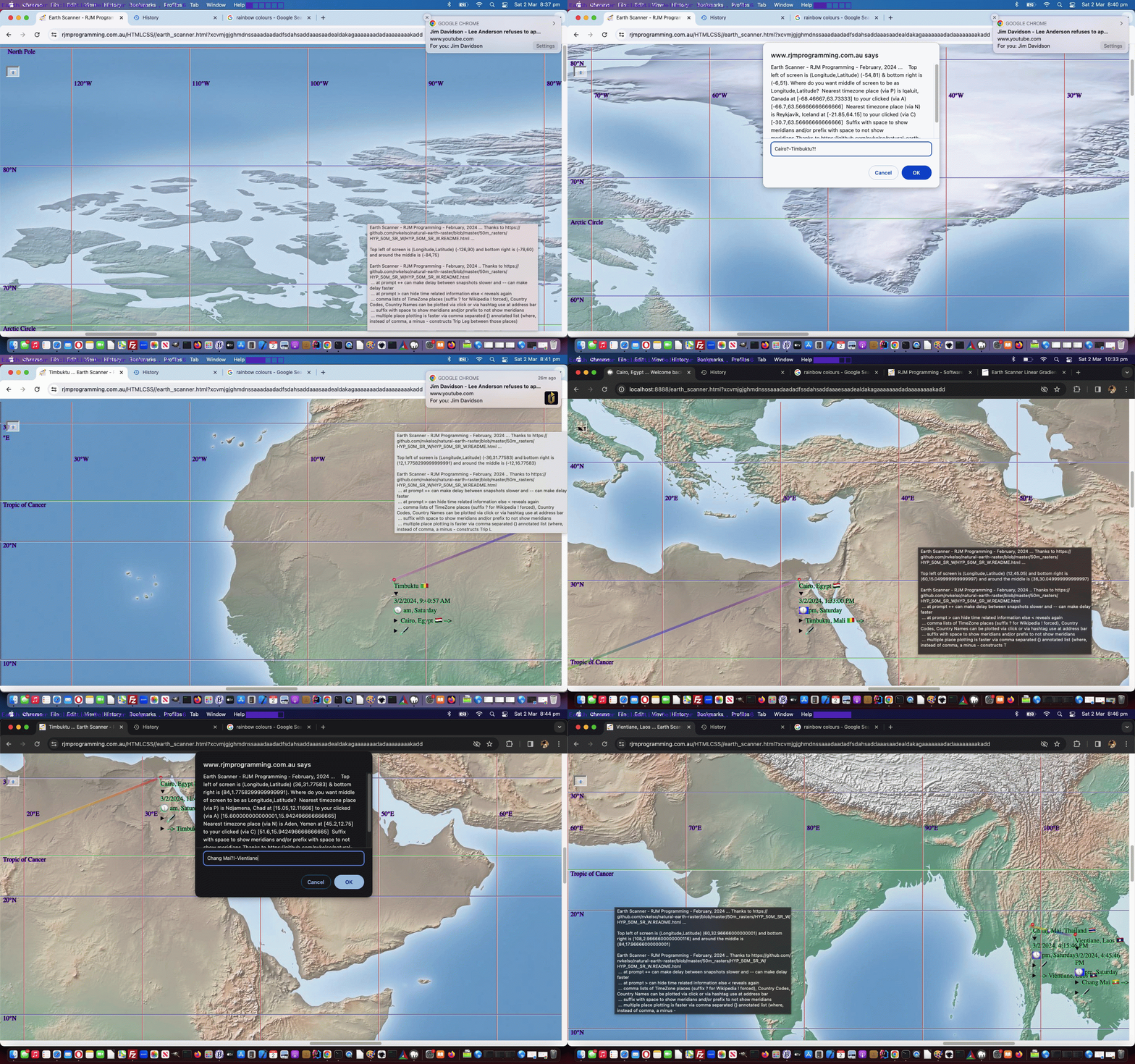
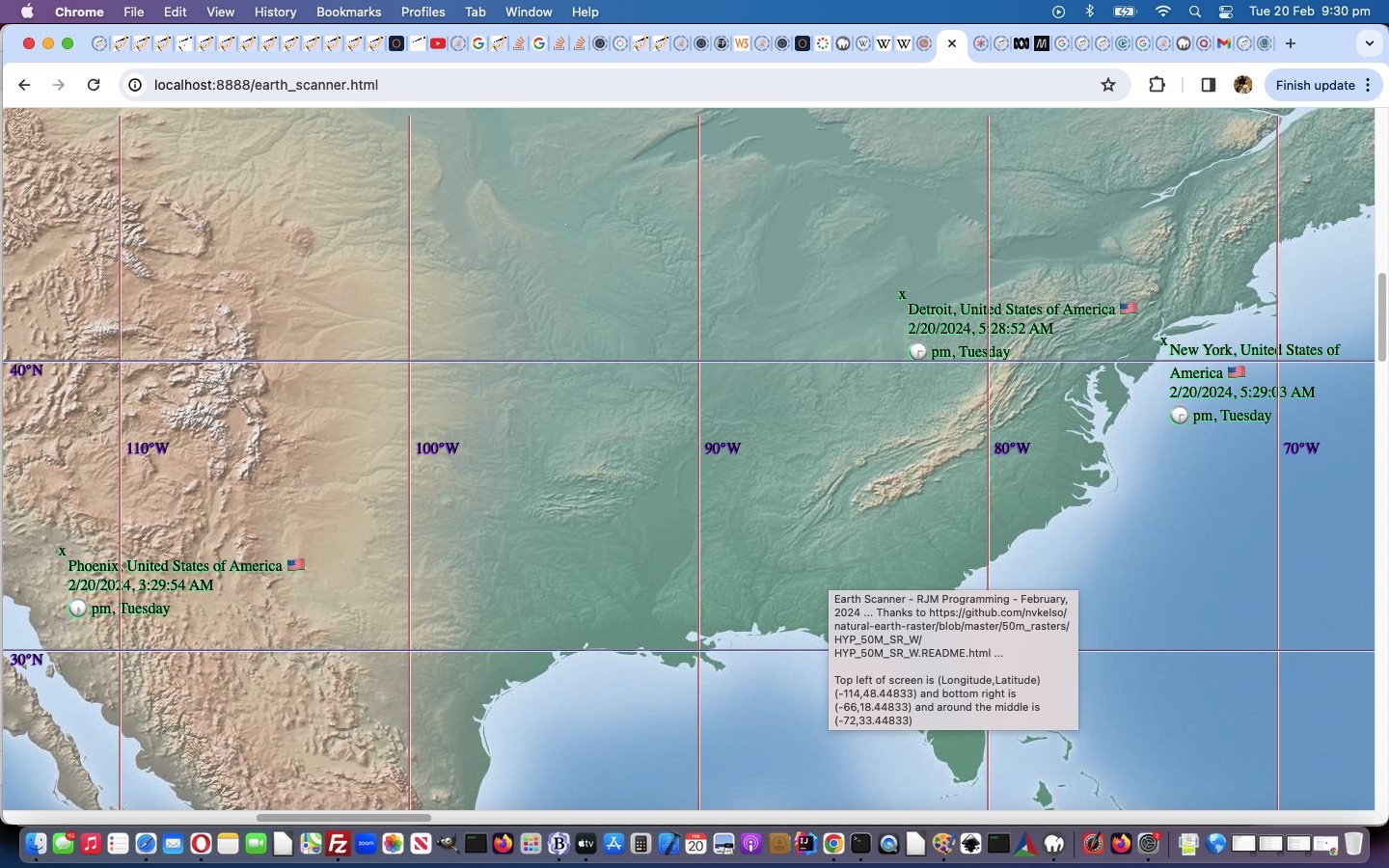
- a linear gradient applied to the trip leg plotting … for …
- colour
- direction
… purposes …
<style>
hr.hrright {

  background-image: linear-gradient(to right, red, orange, yellow, green, blue, indigo, violet);

}


hr.hrleft {

  background-image: linear-gradient(to left, red, orange, yellow, green, blue, indigo, violet);

}
</style>
… and … - code for a new placename suffix delimiter …
!
… (in addition to “?”) to force the Wikipedia interpretation of geodata for a placename entered by the user … the orgainizing Javascript function now looking like …
  function dountilnoquestion() {

      var ibap=0, bap=[];

      caret='^';

      //document.title=gdefv;

    console.log('gdefv=' + gdefv);

      if (gdefv.trim() != gdefv.trim().replace(/\?$/g,'') || gdefv.indexOf('!?') != -1 || gdefv.indexOf('?!') != -1 || gdefv.indexOf('?{') != -1 || gdefv.indexOf('?,') != -1 || gdefv.indexOf('?-') != -1) {

        bap=gdefv.split('{');

        for (ibap=1; ibap<bap.length; ibap++) {

           if (bap[ibap].split('}')[0].indexOf('?') != -1) {

              gdefv=gdefv.replace(bap[ibap], bap[ibap].replace(/\?/g, '%3f'));

           }

        }

    //alert('gdefv=' + gdefv);

    // Alice Springs|133.87000|_23.70000^-Sydney?!

        curgdefv=gdefv.split('?')[0].split(',')[eval(-1 + gdefv.split('?')[0].split(',').length)].trim().replace(/^\[/g,'');

      //alert('Curgdefv=' + curgdefv);

        curgdefv=curgdefv.split('^')[eval(-1 + curgdefv.split('^').length)].replace(/^\-/g,'');

      //alert('curGdefv=' + curgdefv);

        if (curgdefv != curgdefv.replace(/\!$/g,'')) {

          caret='^ ';

          gdefv=gdefv.replace(curgdefv, curgdefv.replace(/\!$/g,''));

      //alert('1:' + gdefv);

          curgdefv=curgdefv.replace(/\!$/g,'');

        } else if (gdefv.indexOf(curgdefv + '?!') != -1) {

          caret='^ ';

          gdefv=gdefv.replace(curgdefv + '?!', curgdefv + '?');

      //alert('2:' + gdefv);

          curgdefv=curgdefv;

        }

        if (caret == '^ ' && yourtzlist.toLowerCase().indexOf('/' + curgdefv.toLowerCase().replace(/\ /g,'_') + '<') == -1) {

          caret='^';

        }

      }


      //alert('*' + caret + '*');


      if (caret == '^') {


      if (yourtzlist.toLowerCase().indexOf('/' + curgdefv.toLowerCase().replace(/\ /g,'_') + '<') != -1) {

      gdefv=gdefv.replace(curgdefv + '?', curgdefv + '^');

      if (gdefv.indexOf('?') == -1) {

      gdefv=gdefv.replace(/\^/g, '').replace(/\%3f/g, '?');

        //alert('gdefv=' + gdefv);

      scmok=true;

       movesallowed=true;

       gmovesallowed=true;

       five=5;

       gfive=5;

      document.getElementById('myimg').click(); //scmove();

      } else {

      setTimeout(dountilnoquestion, 1000);

      }

      } else {

      //alert('curgdefv=' + curgdefv);

      document.getElementById('placegeo').value=' ';

      document.getElementById('wif').src='/PHP/fgc/index.php?placegeo=' + encodeURIComponent(curgdefv.replace(/\ \(/g,', ').replace(/\)$/g,'')).replace(/\%20/g,'_');

      }


      } else if (caret == '^ ') {


      if (caret == '^' && yourtzlist.toLowerCase().indexOf('/' + curgdefv.toLowerCase().replace(/\ /g,'_') + '<') != -1) {

      gdefv=gdefv.replace(curgdefv + '?', curgdefv + '^');

      if (gdefv.indexOf('?') == -1) {

      gdefv=gdefv.replace(/\^/g, '').replace(/\%3f/g, '?');

        //alert('gdefv=' + gdefv);

      scmok=true;

       movesallowed=true;

       gmovesallowed=true;

       five=5;

       gfive=5;

      document.getElementById('myimg').click(); //scmove();

      } else {

      setTimeout(dountilnoquestion, 1000);

      }

      } else {

      //alert('curgdefv=' + curgdefv);

      document.getElementById('placegeo').value=' ';

      document.getElementById('wif').src='/PHP/fgc/index.php?placegeo=' + encodeURIComponent(curgdefv.replace(/\ \(/g,', ').replace(/\)$/g,'')).replace(/\%20/g,'_');

      }


      }

  }
… in the changed fifteenth draft of the Earth Scanner web application for you to retry.
Previous relevant Earth Scanner Question Delimiter Tutorial is shown below.
Earth Scanner Question Delimiter Tutorial
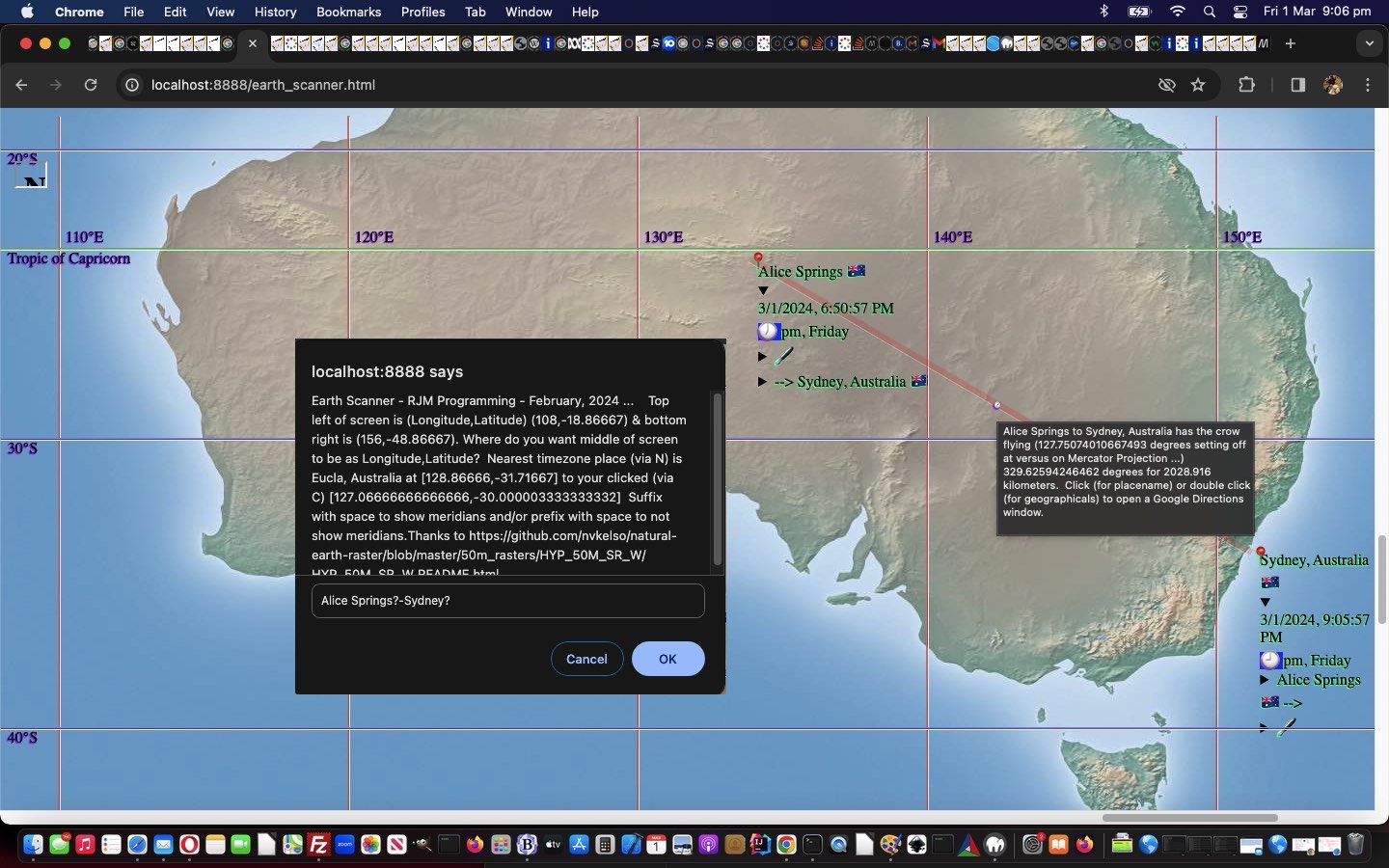
We’re adding another delimiter to those discussed in yesterday’s Earth Scanner Delimitation Tutorial, and it’s a doozy …
?
… (just quietly for now while we test for another day) … placed after a placename will …
- first check if a TimeZone placename, and use that PHP timezone longitude and latitude should it find that to be the case … else …
- will look to Wikipedia, thanks, for help, as available …
… for improvements on two fronts …
- a lot of us don’t know every timezone placename (but we expect you to know from tomorrow about 3?) …
- Wikipedia has tons of useful geodata on lots of places brought into the Earth Scanner realms via this change …
 function coordit(xiois) {

       var xaconto = (xiois.contentWindow || xiois.contentDocument);

       if (xaconto != null) {

       try {

       if (xaconto.document) { xaconto = xaconto.document; }

       if (xaconto.body.innerHTML.indexOf('>Coordinates') != -1) {

        var subpart=xaconto.body.innerHTML.split('>Coordinates')[1];

        latdeg=-999;

        longdeg=-999;

        latmin=0;

        longmin=0;

        latsec=0;

        longsec=0;

        sparelat='';

        sparelong='';

        if (subpart.indexOf('"latitude"') != -1 && subpart.indexOf('"longitude"') != -1) {

          latdeg=subpart.split('"latitude"')[1].split('>')[1].split("°")[0].split('<')[0];

          sparelat=subpart.split('"latitude"')[1].split('>')[1].split('<')[0].slice(-1);

          latmin=subpart.split('"latitude"')[1].split('>')[1].split('<')[0].substring(eval(1 + eval('' + latdeg.length))).split("′")[0].split(sparelat)[0].split('<')[0];

          if (sparelat == 'S') {  latdeg=eval(eval(eval(-1 * latmin) / 60) - latdeg); } else { latdeg+=eval(eval('' + latmin) / 60) }


          longdeg=subpart.split('"longitude"')[1].split('>')[1].split("°")[0].split('<')[0];

          sparelong=subpart.split('"longitude"')[1].split('>')[1].split('<')[0].slice(-1);

          longmin=subpart.split('"longitude"')[1].split('>')[1].split('<')[0].substring(eval(1 + eval('' + longdeg.length))).split("′")[0].split(sparelong)[0].split('<')[0];

          if (sparelong == 'W') {  longdeg=eval(eval(eval(-1 * longmin) / 60) - longdeg); } else { longdeg+=eval(eval('' + longmin) / 60) }


      if (gdefv.indexOf(curgdefv + '?') != -1) {

        gdefv=gdefv.replace(curgdefv + '?', curgdefv + ('|' + longdeg).replace('|-','|_') +  + ('|' + latdeg).replace('|-','|_') + '^');

        dountilnoquestion();

      }


         return true;


        } else if (('' + document.getElementById('placegeo').value).trim().indexOf(',') != -1) {

          latdeg=document.getElementById('placegeo').value.split(',')[eval(-2 + document.getElementById('placegeo').value.split(',').length)];

          longdeg=document.getElementById('placegeo').value.split(',')[eval(-1 + document.getElementById('placegeo').value.split(',').length)];


      if (gdefv.indexOf(curgdefv + '?') != -1) {

        gdefv=gdefv.replace(curgdefv + '?', curgdefv + ('|' + longdeg).replace('|-','|_') + ('|' + latdeg).replace('|-','|_') + '^');

        dountilnoquestion();

      }


         return true;

        }


       } else {


       if (('' + document.getElementById('placegeo').value).trim().indexOf(',') != -1) {

         latdeg=document.getElementById('placegeo').value.split(',')[eval(-2 + document.getElementById('placegeo').value.split(',').length)];

         longdeg=document.getElementById('placegeo').value.split(',')[eval(-1 + document.getElementById('placegeo').value.split(',').length)];


      if (gdefv.indexOf(curgdefv + '?') != -1) {

        gdefv=gdefv.replace(curgdefv + '?', curgdefv + ('|' + longdeg).replace('|-','|_') + ('|' + latdeg).replace('|-','|_') + '^');

        dountilnoquestion();

      }

      } else {

      if (gdefv.indexOf(curgdefv + '?') != -1) {

        gdefv=gdefv.replace(curgdefv + '?', curgdefv + '^');

        dountilnoquestion();

      }

      }


       }

       } catch(hgjg) {  }

       }

         return true;

  }
… in a changed fourteenth draft of the Earth Scanner web application for you to retry.
Previous relevant Earth Scanner Delimitation Tutorial is shown below.
Earth Scanner Delimitation Tutorial
A lot of the data aspects to our latest Earth Scanner web application have relied on …
- user reliability … and …
- delimitation rules … less stringent for …
- timezone places
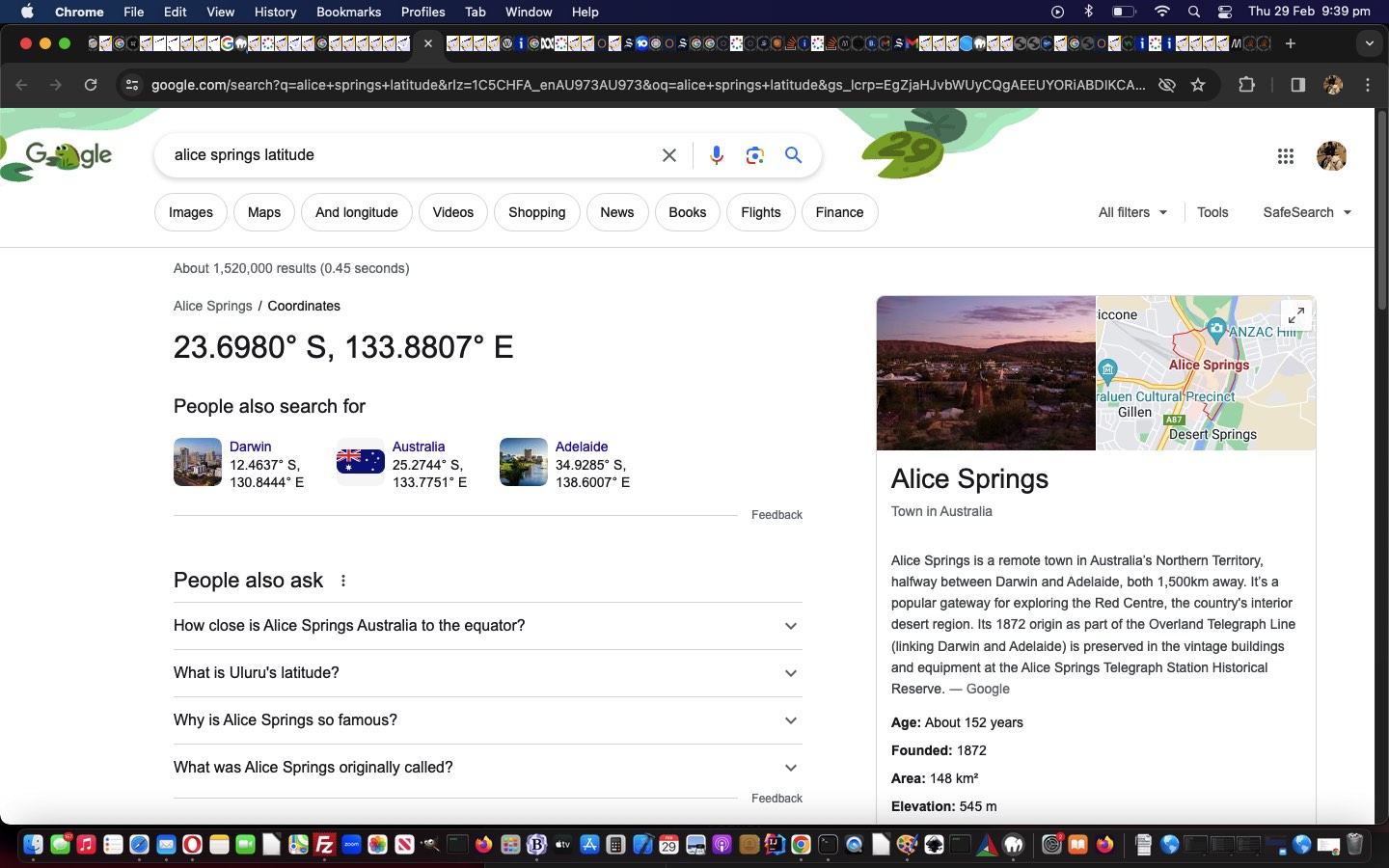
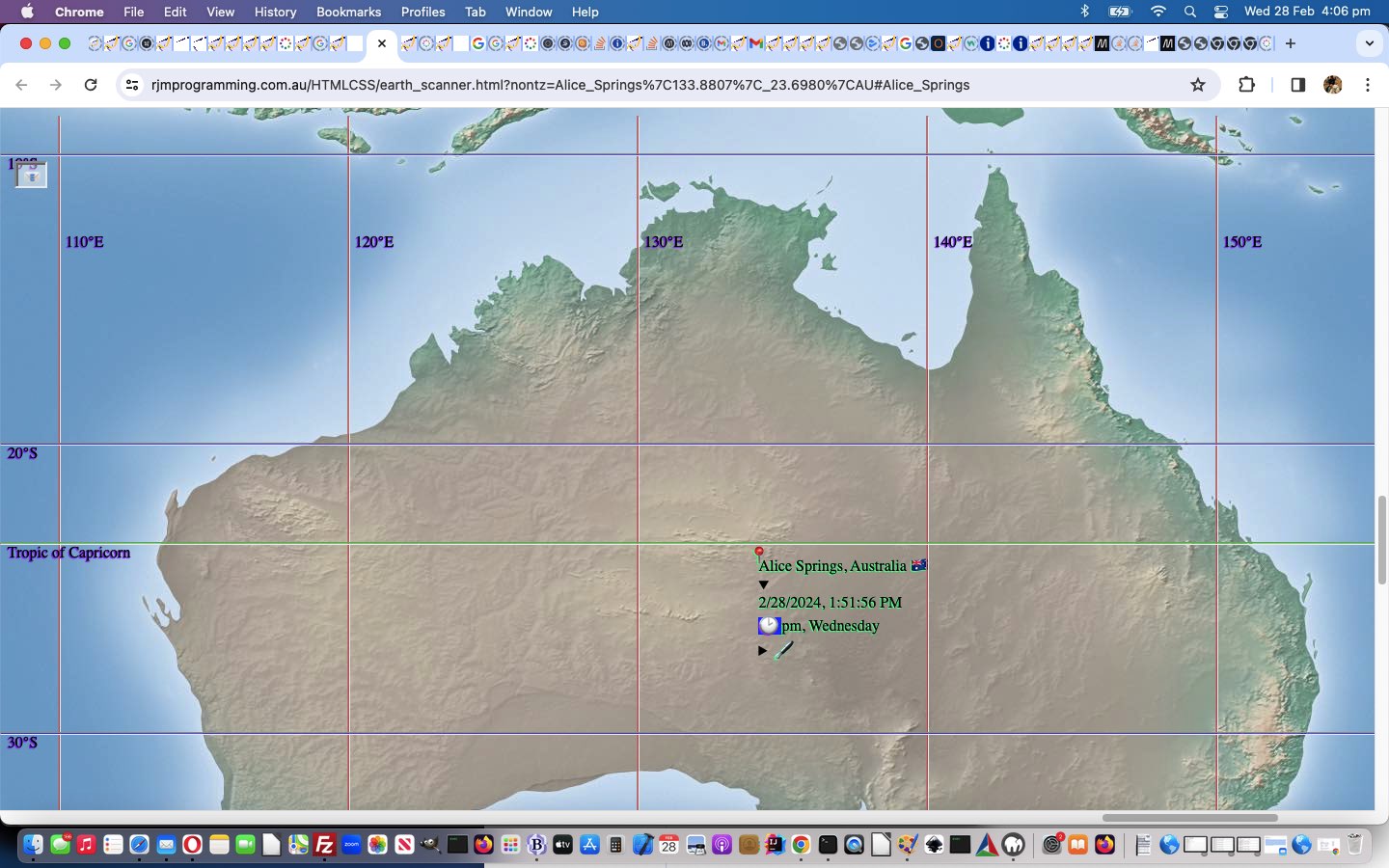
Of course, we’d really like to automate more, but because we are not the repository of place geographicals data regarding placenames, except via PHP TimeZone derived ones, thanks, we don’t envisage a time with this web application, where for most places (which are not timezone places) that the user wants to specify and plot and perhaps form part of an itinerary schedule, they will be specifying longitude and latitude data. That is asking a bit of the user, as a lot of us will forget the order of these, and so of the two new data format syntaxes accepted, as of today, for examples regarding Alice Springs …
- Alice Springs 23.6980° S, 133.8807° E
… as with this link - Alice Springs|133.8807|-23.6980
… as with this link
… the former of which, can have latitude and longitude order flexible, and determined via those N or S and W or E directionals, and we just copy off the Google webpage their presented syntax after the placename, optionally followed by a space.
We mention the second syntax above as the basis for our hashtagging inhouse logic, helping as a conduit towards communications for other parties.
Believe it or not with these nuances, at least for us, with the architecture of this Earth Scanner, is far from trivial, and it represents a salutary lesson regarding delimitation. It is best to have only one role for particular delimiter usage within your web application. It was overcomable for us, via context, to have in the Earth Scanner …
- a minus “-” delimiter can be
- a negative aspect to latitude or longitude
- be a trip leg delimiter
- can be a character in a place name … and we hope we’ve covered off that it …
- can be a character in a country name
- a comma “,” delimiter can be
- a separator of latitude or longitude or placename in some syntaxes
- a separator between placename and country name or country code
- a separator between some place plus geographicals syntaxes
… but life would have been easier with a one to one relationship between delimiter and role.
And so, further to yesterday’s Earth Scanner Placements Tutorial we have a changed thirteenth draft of the Earth Scanner web application for you to retry.
Previous relevant Earth Scanner Placements Tutorial is shown below.
Earth Scanner Placements Tutorial
You see that little play on words in today’s title, using …
Placements
? Where we meant “the specification, by placename, of latitude and longitude for a user defined place”? And so we decided not to give this blog posting the title …
Earth Scanner the specification, by placename, of latitude and longitude for a user defined place Tutorial
… because … cough, cough … that’s us …
- succinct …
- unable to find the place mats … tee hee … but …
- ready to be “agile in place“
Let’s go over the backstory. With our current Earth Scanner project, as far as placenames go, without a latitude or longitude specification, it’s best worked, so far, ever since Earth Scanner TimeZone Tutorial, with those placenames being TimeZone placenames, because …
PHP inspired TimeZone place lookup logic within the Javascript code
… were a freely available resource for us. But the users using our Earth Scanner are also a resource, and can supply prompt window entries such as …
|
… or … … equivalent in this case regarding real mantissa … remember rules? |
|
… which now, further to yesterday’s Earth Scanner Itinerary Collaboration Tutorial, has the effect of …
- plotting Alice Springs position on world map and scroll to see it, for a while … as well as …
- prime any underlying sharing and collaboration logic … now using …
- get ? and & arguments (hopefully not too many) … passed on to …
- recipients, in communications, via the user clicking that top left relatively new 📧 sharing and collaboration button … to send a communication containing the URL …
-
… to a recipient …
- who should see what you see if you and they have clicked these appropriate links
This allows places other than TimeZone places be fully functional components in the logic for plotting and annotations and trip planning and itinerary construction purposes in our latest twelfth draft Earth Scanner web application.
Did you know?
As well as mantissa “kludge” we enjoy a good anti-dot . “kludge” every now and then. In a couple of “if” statements we now have …
if (eval('' + ('' + locans.trim()).length) >= 3 && ('' + locans).indexOf(',') == -1 && yourtzlist.indexOf('/' + ('' + locans.trim()).replace(/\ /g,'_') + '<') != -1) {
 // code logic here
}
... modifications, so that ...
  var yourtzlist="<option value=\"GMT\" data-geo=\"51.4934,0.0098,GMT,GB,+0\">GMT</option><option value=\"Africa/Abidjan\" data-geo=\"5.31666,-4.03334,GMT,CI,+0\">Africa/Abidjan</option> ... blah blah blah ...";

 var eventualyourtzlist=yourtzlist; // is appended with non TimeZone entries found, that follow ...

 var realtz=true;


  function retyour(propis) {

    if (!realtz) {

      return eventualyourtzlist;

    }

    return yourtzlist;

  }


  function yourtzlistindexOf(proposedplace) {

    if (yourtzlist.indexOf(proposedplace) != -1) {

      realtz=true;

      return yourtzlist.indexOf(proposedplace);

    } else if (eventualyourtzlist.indexOf(proposedplace) != -1) {

      realtz=false;

      return eventualyourtzlist.indexOf(proposedplace);

    } else {

      realtz=true;

    }

    return yourtzlist.indexOf(proposedplace);

  }
... can help out.
Previous relevant Earth Scanner Itinerary Collaboration Tutorial is shown below.
Earth Scanner Itinerary Collaboration Tutorial
It might be just us, but around here, we give ourselves a "leave pass", talking about ...
- sharing ... much more than ...
- collaborating
... because we see collaboration, as much to do with at least two parties being able to adjust a "thaing", whatever that may be, and we see sharing as maybe that, but also could be just edicts from above, broadcast out, with no meaningful active input from the people being sent the communication. And you see, this all comes about, because, as programmers, it's much easier to code for sharing ... it makes us look good?!
Up to yesterday, we would have to classify our efforts with our latest Earth Scanner project, in the realms of "Trip Itinerary" communications, as just being sharing, but where we said, yesterday ...
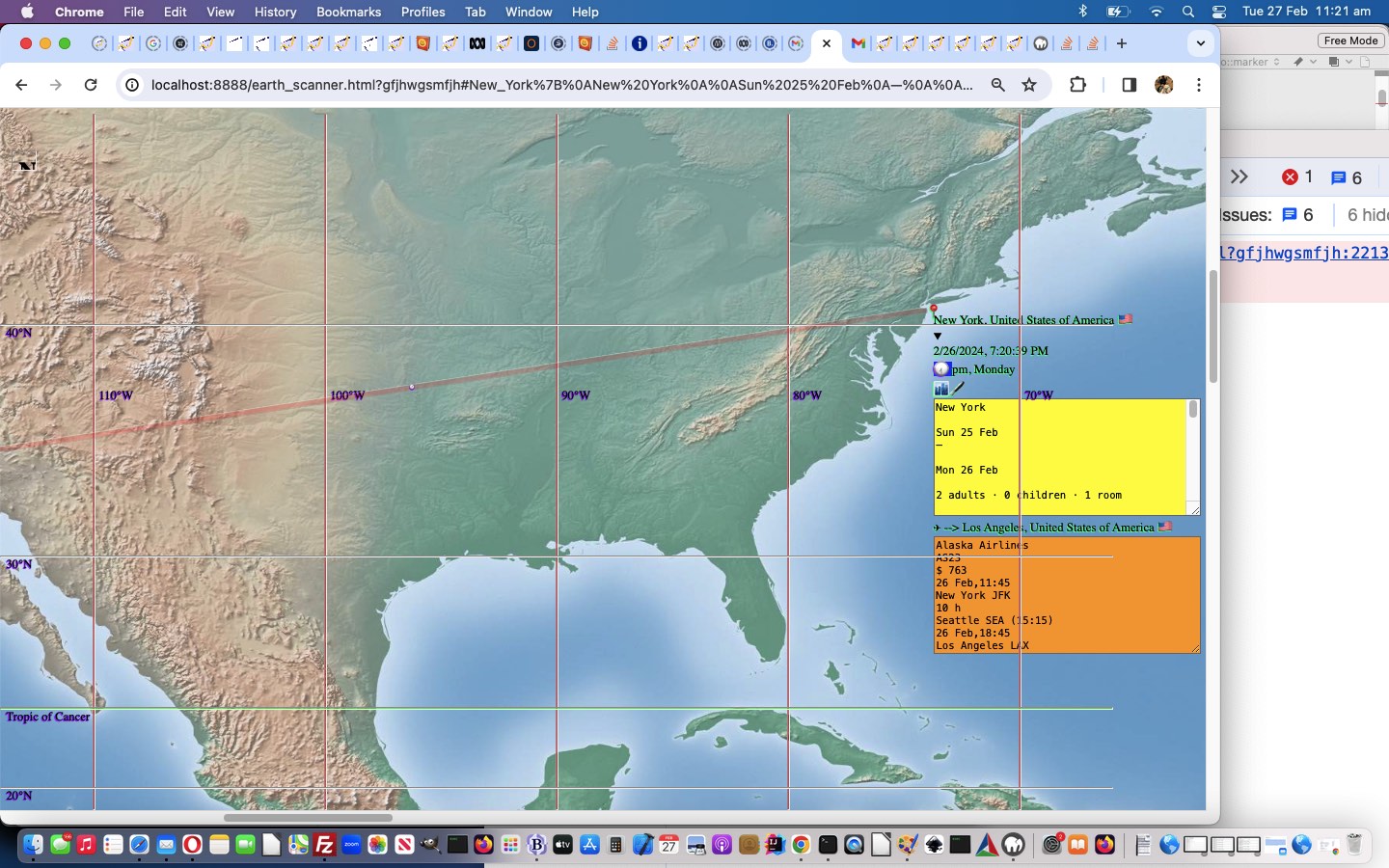
Well, it means a person travelling, could share their itinerary with someone, or have a collaborator fill in the gaps perhaps, and the context of it all can be shown on an interactive map.
... that "perhaps" was all there was, really, yesterday. But, today, we've had time to think of ways forward, and realized ...
- off plotted (perhaps TimeZone) places ... we could add ...
- revealed (ie. details/summary based) ...
- trip leg from annotation
- this place annotation
- trip leg to annotation
... textarea element(s) at which a collaborator becomes capable of adding itinerary detail and/or changing itinerary detail ...
function panno(bec, idx) {
if (plotanno[idx] != bec.replace(/\`/g, '"')) {
plotanno[idx]=bec.replace(/\`/g, '"').replace(/\{/g, '[').replace(/\}/g, ']');
newhashit();
}
}
function lganno(bec, idx) {
if (legsanno[idx] != bec.replace(/\`/g, '"')) {
legsanno[idx]=bec.replace(/\`/g, '"').replace(/\{/g, '[').replace(/\}/g, ']');
newhashit();
}
}
function doplotplace(ipl, maybeg) {
var jpl=0, detbegin='', detend='', nearend='', textras='', legend='', prelegend='', ileg=0;
var thisclock='', nonclock='', aclocl='', thatplace='', utzdate=null, tzDate=null, xdiff=0, xdate1=null;
if (!reveal) {
detbegin='<details onclick="reveal=!reveal;"><summary></summary>';
detend='</details>';
} else {
detbegin='<details open onclick="reveal=!reveal;"><summary>';
detend='</summary></details>';
}
if (plotcc[ipl].trim() && plottz[ipl].trim() != '') { // && plotplace[ipl].indexOf(':') == -1) {
//alert(plotplace[ipl]);
//alert(plotct[ipl]);
//alert(plotemj[ipl]);
if (maybeg == 'g') {
for (ileg=0; ileg<legs.length; ileg++) {
if (('~' + legs[ileg] + '~').indexOf('~' + ipl + '.') != -1) {
jpl=eval(('~' + legs[ileg] + '~').split('~' + ipl + '.')[1].split('~')[0]);
legend+='<details onclick="event.stopPropagation();" title="Annotations for Leg from ' + plotplace[ipl].replace(/\_/g,' ') + ' ' + orflag(plotcc[ipl]) + ' to ' + plotplace[jpl].replace(/\_/g,' ') + ' ' + orflag(plotcc[jpl]) + ' ..."><summary class=lanno> --> ' + plotplace[jpl].replace(/\_/g,' ') + ' ' + orflag(plotcc[jpl]) + '</summary><textarea class=txleg onclick="event.stopPropagation();" rows=9 cols=40 onblur="lganno(this.value,' + ileg + ');">' + legsanno[ileg].replace(/\"/g,'`') + '</textarea></details>';
}
if (('~' + legs[ileg] + '~').indexOf('.' + ipl + '~') != -1) {
jpl=eval(('~' + legs[ileg] + '~').split('.' + ipl + '~')[0].split('~')[1]);
prelegend+='<details onclick="event.stopPropagation();" title="Annotations for Leg from ' + plotplace[jpl].replace(/\_/g,' ') + ' ' + orflag(plotcc[jpl]) + ' to ' + plotplace[ipl].replace(/\_/g,' ') + ' ' + orflag(plotcc[ipl]) + ' ..."><summary class=lanno>' + plotplace[jpl].replace(/\_/g,' ') + ' ' + orflag(plotcc[jpl]) + ' --></summary><textarea class=txleg onclick="event.stopPropagation();" rows=9 cols=40 onblur="lganno(this.value,' + ileg + ');">' + legsanno[ileg].replace(/\"/g,'`') + '</textarea></details>';
}
}
if (bmeridian.indexOf(' id="div' + plotlong[ipl] + plotlat[ipl] + '"') != -1) {
textras=bmeridian.split(' id="div' + plotlong[ipl] + plotlat[ipl] + '"')[1].split('>')[0].replace(/\"$/g, String.fromCharCode(10) + plotanno[ipl].replace(/\"/g,'`') + '"');
} else {
textras=' title="' + plotanno[ipl].replace(/\"/g,'`') + '"';
}
nearend='<div id="div' + plotlong[ipl] + plotlat[ipl] + '"' + textras + '>' + prelegend + '<details onclick="event.stopPropagation();" title="Annotations for ' + plotplace[ipl].replace(/\_/g,' ') + ' ' + orflag(plotcc[ipl]) + ' ..."><summary class=panno>🖋</summary><textarea class=txplc onclick="event.stopPropagation();" rows=9 cols=40 onblur="panno(this.value,' + ipl + ');">' + plotanno[ipl].replace(/\"/g,'`') + '</textarea></details>' + legend + '</div>';
thatplace=plottz[ipl];
utzdate=new Date();
tzDate = new Date(utzdate.toLocaleString('en-US', { timeZone: thatplace.replace('GMT','UTC').replace(/\ /g,'_') }));
xdiff = Math.abs(tzDate.getTime() - gutcDate.getTime()) / 3600000;
xdate1=new Date().toLocaleString("en-US", { timeZone: thatplace.replace('GMT','UTC').replace(/\ /g,'_') });
if (xdiff > 0 && (eval('' + utzdate.getDay()) == 0 && eval('' + tzDate.getDay()) == 6 || eval('' + utzdate.getDay()) > eval('' + tzDate.getDay()))) {
xdiff=-xdiff;
}
xextraemj=',' + clockit('' + xdiff);
plotct[ipl]=('' + xdate1);
plotemj[ipl]=(clockit('' + xdiff));
}
if (plotemj[ipl].indexOf('pm') != -1) {
aclock=plotemj[ipl].split('pm')[0];
nonclock=plotemj[ipl].split(aclock)[1];
thisclock='<span class=pm>' + aclock + '</span>';
return plotplace[ipl] + ' ' + orflag(plotcc[ipl]) + detbegin + '<br>' + plotct[ipl] + '<br>' + thisclock + nonclock + nearend + detend;
}
return plotplace[ipl] + ' ' + orflag(plotcc[ipl]) + detbegin + '<br>' + plotct[ipl] + '<br>' + plotemj[ipl] + nearend + detend;
}
return plotplace[ipl];
}
... (happily now not needing to know the "behind the scenes" delimitation is {} ... in fact we map to [] here if a user uses these characters in a textarea element) ... then ... - resend to other collaborator the ideas for further collaborations the other way around ... purrrrrrrrrhaps?
... improving on yesterday's Earth Scanner Sharing Itinerary Detail Tutorial with our latest eleventh draft (dedicated to "Legs XI") Earth Scanner web application, we hope.
Previous relevant Earth Scanner Sharing Itinerary Detail Tutorial is shown below.
Earth Scanner Sharing Itinerary Detail Tutorial
Further to yesterday's Earth Scanner Sharing Tutorial, today, we were ...
- more than half expecting that for web browsers where navigator.canShare comes up with true (eg. Safari), supporting the Web Share API on a https:// protocol, we'd be saying for our tests involving faux itineraries (with much more than a thousand characters) being processed via a ...
Have most of the data be stored in the hash part of the "URL"
... approach, that it worked back with our latest tenth draft Earth Scanner web application incarnation, but ...
- we weren't expecting to be saying that web browsers where navigator.canShare comes up with false (eg. Google Chrome), not supporting the Web Share API, we'd be saying for our tests involving faux itineraries (with much more than a thousand characters) being processed via a ...
Have most of the data be stored in the hash part of the "URL"
... approach, that it worked back with our latest Earth Scanner incarnation, but it did!
The thing to note is that the data should be hashtagged, rather than formed into ? and & "get" arguments which end up with a web server somewhere. This also means a serverside language, such as PHP (where we'd often be involving HTML form method=POST scenarios by now), may never be needed with this Earth Scanner project we are currently engaged in, and we do prefer to talk just HTML and Javascript and CSS to be able to share code with more readers out there. Hashtagging is purely client side work. Guess we'd never tried any "a" "mailto:" URLs of huge length, mainly taken up by hashtagging data?! Anyway, we are very pleased, and still think the Web Share API logic is worth keeping in, because of all the sharing options other than email presented, when this API is in full swing.
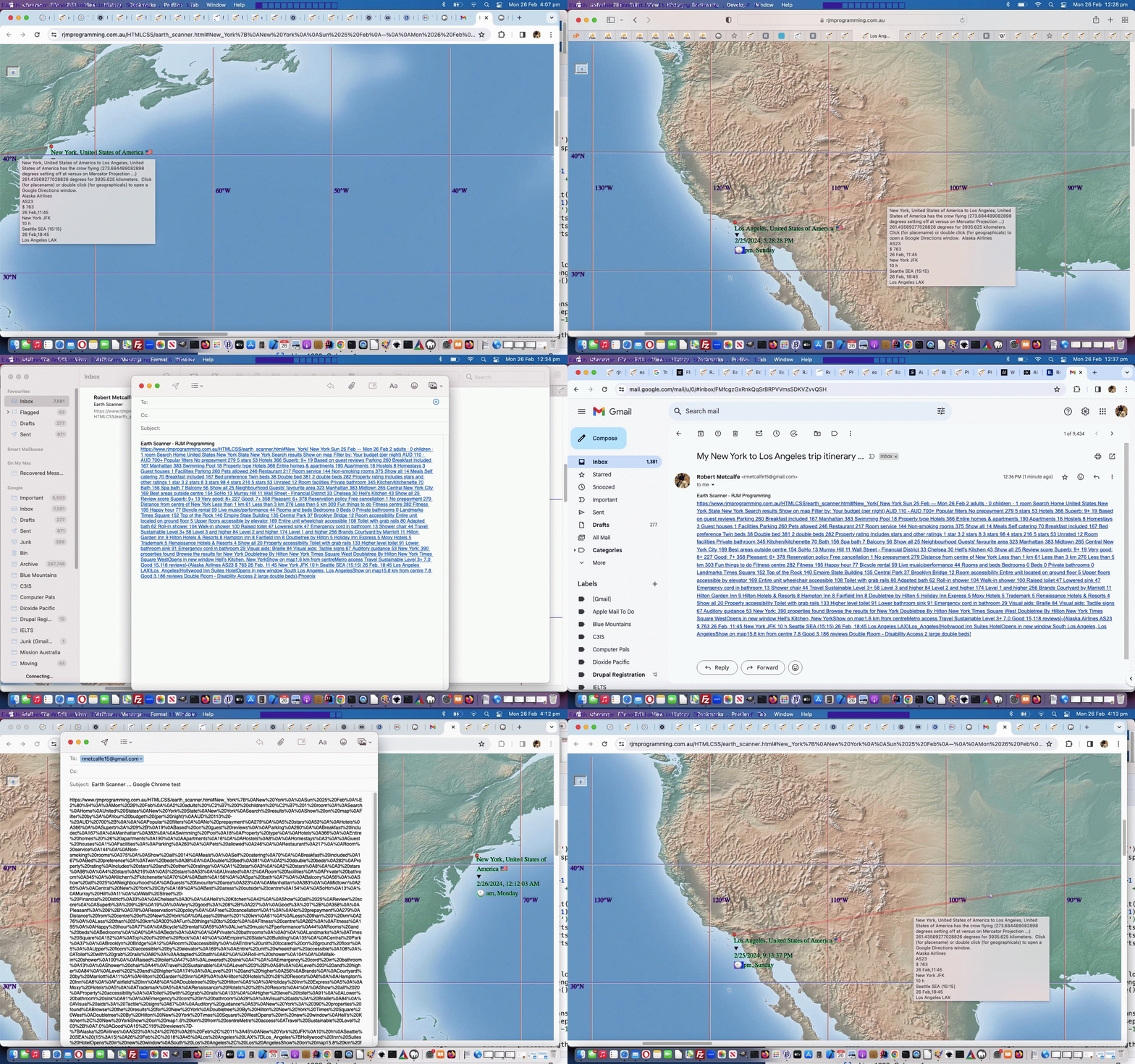
And what is the point here? Well, it means a person travelling, could share their itinerary with someone, or have a collaborator fill in the gaps perhaps, and the context of it all can be shown on an interactive map. They could base a trip leg on the paradigm (using the Earth Scanner click prompt window) ...
TimezonePlaceFrom{eg. accomodation details, dates of stay, meeting details}-{eg. flight or road or rail or walking or sailing trip details, timezone issues}TimezonePlaceTo{eg. accomodation details, dates of stay, meeting details}
... model, where {} are the Earth Scanner's annotation delimiters (we'd really like you to avoid within your annotations). So far?!
Stop Press
As Hunters and Collectors asked ...
Do you see what I see?
... well, this is what we saw making today's tutorial's animated GIF presentation ... and so ... Do you see what I see?
Previous relevant Earth Scanner Sharing Tutorial is shown below.
Earth Scanner Sharing Tutorial
Another day, another API interfacing with our Earth Scanner web application from yesterday's Earth Scanner Window Focus Tutorial.
This time around, it is the turn of Web Share API to help us with our aim to introduce some ...
- email ... and/or ...
- SMS
... sharing logic into play. When "sharing" is talked about at this blog, we do not always resort to interfacing to the Web Share API. Even so, when it works, this Web Share API works very usefully, but does not work everywhere. So why the interest today, even so? Well, we have more testing to know for sure, so that answer will be for tomorrow.
Where navigator.canShare comes up with false we fall through to the usual ...
- email via "a" "mailto:" link usage ... and/or ...
- SMS via "a" "sms:" link usage
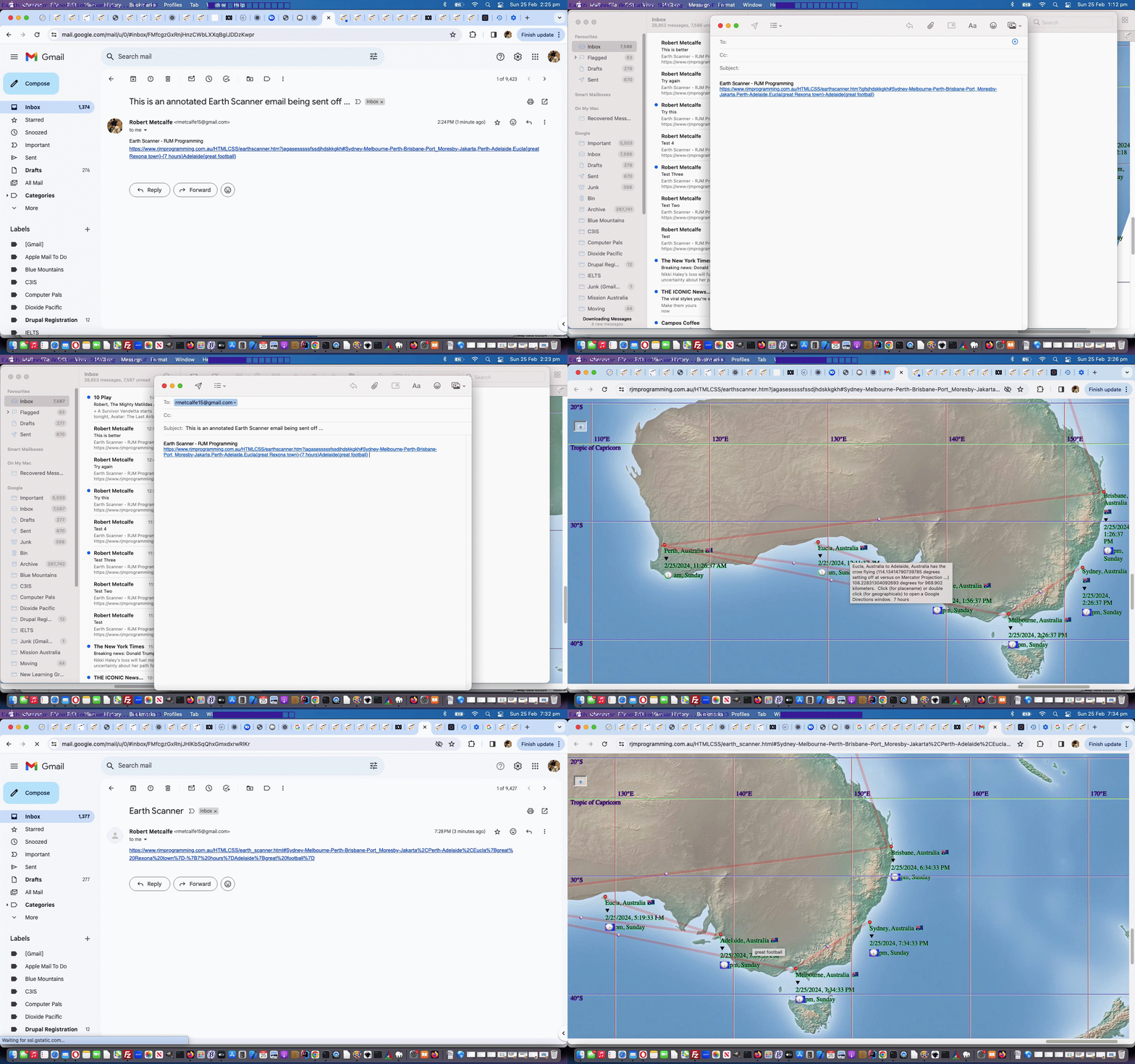
... methodologies, feeding off the {} delimited annotations the user can now apply behind ...
- placenames (best with timezone places)
- leg delimiters ... to or - or from
... you can see us using in today's animated GIF presentation. Why not just use this methodology everywhere? Well, we have more testing to know for sure, so that answer will be for tomorrow.
Reading this, feel free to try our changed ninth draft Earth Scanner web application, it now having a new "create a hashtag part to the email/SMS URL" (taking into account the newly populated plotanno[] and legsanno[] arrays) function, as per ...
  function newhashit() {

    var newh='#', legi=0, interim='';

    if (document.getElementById('sdurl')) {

      var washash='';

      if (document.getElementById('sdurl').value.indexOf('#') != -1) {

        washash='#' + document.getElementById('sdurl').value.split('#')[1];

      }

      for (var ii=0; ii<plotplace.length; ii++) {

        if ((plotplace[ii] + ' ').toUpperCase().substring(0,1) >= 'A' && (plotplace[ii] + ' ').toUpperCase().substring(0,1) <= 'Z') {

           if (newh == '#') {

             if (plotanno[ii].trim() != '') {

               newh+=encodeURIComponent(plotplace[ii].replace(/\ /g,'_').split(',_')[0] + '{' + plotanno[ii] + '}');

             } else if (legc.indexOf(',' + eval(-1 + ii) + '.' + eval(0 + ii) + ',') != -1) {

               legi=legs.indexOf('' + eval(-1 + ii) + '.' + eval(0 + ii) + '');

               if (legi == -1) {

               newh+=encodeURIComponent('-') + encodeURIComponent(plotplace[ii].replace(/\ /g,'_').split(',_')[0]);

               } else if (legsanno[legi].trim() != '') {

               newh+=encodeURIComponent('-{' + legsanno[legi] + '}') + encodeURIComponent(plotplace[ii].replace(/\ /g,'_').split(',_')[0]);

               } else {

               newh+=encodeURIComponent('-') + encodeURIComponent(plotplace[ii].replace(/\ /g,'_').split(',_')[0]);

               }

             } else {

               newh+=encodeURIComponent(',') + encodeURIComponent(plotplace[ii].replace(/\ /g,'_').split(',_')[0]);

             }

           } else if (plotplace[ii].trim() != '') {

             interim=encodeURIComponent(plotplace[ii].replace(/\ /g,'_').split(',_')[0]);

             if (plotanno[ii].trim() != '') {

               interim=encodeURIComponent(plotplace[ii].replace(/\ /g,'_').split(',_')[0] + '{' + plotanno[ii] + '}');

             }

             if (legc.indexOf(',' + eval(-1 + ii) + '.' + eval(0 + ii) + ',') != -1) {

               legi=legs.indexOf('' + eval(-1 + ii) + '.' + eval(0 + ii) + '');

               if (legi == -1) {

               newh+=encodeURIComponent('-') + interim;

               } else if (legsanno[legi].trim() != '') {

               newh+=encodeURIComponent('-{' + legsanno[legi] + '}') + interim;

               } else {

               newh+=encodeURIComponent('-') + interim;

               }

             } else {

               newh+=encodeURIComponent(',') + interim;

             }

           }

        }

      }

      if (newh != lasthcalc && newh != '#' && newh != washash) {

        document.getElementById('sdurl').value=document.getElementById('sdurl').value.split('#')[0] + '#' + newh.substring(1).replace(/^\%2C/g,'');

        lasthcalc=newh;

      }

    }

  }
... and helped out by ...
- the changed HTML and Javascript web_share_api_test.html Web Share API supervisor web application ... helped out by ...
- today's changed web_share_api_test.js external Javascript
Previous relevant Earth Scanner Window Focus Tutorial is shown below.
Earth Scanner Window Focus Tutorial
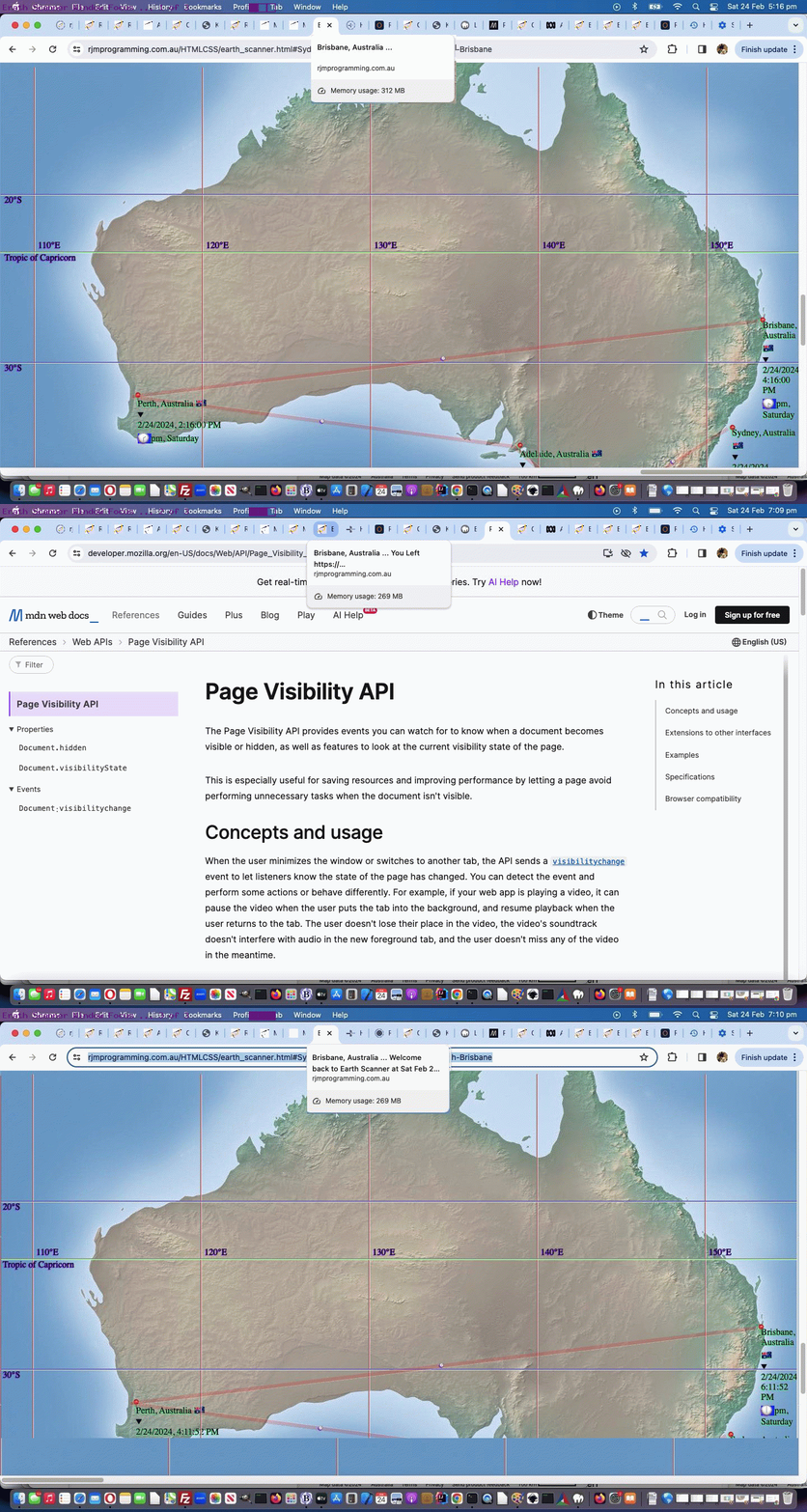
The Page Visibility API has opened up possibilities from within Javascript, to monitor the toing and froing to and/or from your web applications in the modern web browsers. We think the Earth Scanner web application of yesterday's Making of Earth Scanner Legs Tutorial could benefit from some Page Visibility API Javascript logic, and where we tend to inform the user is with ...
- document.title (as displayed on the web browser tab, of relevance) ... showing ...
- Page Visibility API findings ... perhaps involving ...
- date timestamps
And how, practically, in our changed eighth draft Earth Scanner web application, did we act should we make the discovery, with this Page Visibility API code ...
 var firstopn=true;

 var gmovesallowed=movesallowed, gfive=five;

 var playing=false, restart=false;


  function myFunction(opening) {

    if (opening) {

      document.body.style.backgroundColor='lightgreen';

      if (!playing && restart) {

        //document.title='Restarting video play at ' + document.URL + ' at ' + ('' + new Date()) + '.';

        if (firstopn && eval('' + plotplace.length) > 0) {

          if (plotplace[eval(-1 + plotplace.length)].trim() != '') {

           lastdtplace='' + plotplace[eval(-1 + plotplace.length)];

           document.title='' + plotplace[eval(-1 + plotplace.length)] + ' ... ';

          }

        }

        movesallowed=gmovesallowed; five=gfive; //document.getElementById('main-video').play();

        playing=true;

      } else {

        //alert('2:' + document.title);

        movesallowed=gmovesallowed; five=gfive; //document.getElementById('main-video').play();

        document.title=(document.title + ' ... ').split(' ... ')[0] + ' ... ' + 'Welcome back to Earth Scanner at ' + ('' + new Date()) + '.';

      }

      restart=false;

    } else {

      document.body.style.backgroundColor='yellow';

      if (playing) {

        movesallowed=false; five=0; // document.getElementById('main-video').pause();

        playing=false;

        restart=true;

        document.title=(document.title + ' ... ').split(' ... ')[0] + ' ... ' + 'Paused Earth Scanner at ' + ('' + new Date()) + '.';

      } else {

        //alert('0:' + document.title);

        movesallowed=false; five=0; // document.getElementById('main-video').pause();

        document.title=(document.title + ' ... ').split(' ... ')[0] + ' ... ' + 'You left Earth Scanner at ' + ('' + new Date()) + '.';

      }

    }

    //alert(0);

    firstopn=false;

  }


  function myCloseFunction() {

    if (document.visibilityState === "hidden") {

      if (playing) {

        movesallowed=false; five=0; // document.getElementById('main-video').pause();

        playing=false;

        restart=true;

        document.title=(document.title + ' ... ').split(' ... ')[0] + ' ... ' + 'Paused Earth Scanner at ' + ('' + new Date()) + '.';

      } else {

        //alert('1:' + document.title);

        movesallowed=false; five=0; // document.getElementById('main-video').pause();

        document.title=(document.title + ' ... ').split(' ... ')[0] + ' ... ' + 'You Left Earth Scanner at ' + ('' + new Date()) + '.';

      }

      document.body.style.backgroundColor='yellow';

    } else {

      myFunction(true);

    }

  }


  //

  // and down after the document.write() ... remember "no body" ... sort of "just javascript" ...

  //

  document.onvisibilitychange = function() {

    if (document.visibilityState === "hidden") {

      document.title=(document.title + ' ... ').split(' ... ')[0] + ' ... ' + 'You Left ' + document.URL + ' At ' + ('' + new Date()) + '.'

      document.body.style.backgroundColor='yellow';

      if (playing) {

        movesallowed=false; five=0; // document.getElementById('main-video').pause();

        playing=false;

        restart=true;

        document.title=(document.title + ' ... ').split(' ... ')[0] + ' ... ' + 'Paused URL at ' + document.URL + ' at ' + ('' + new Date()) + '.';

      } else {

        movesallowed=false; five=0; // document.getElementById('main-video').pause();

        document.title=(document.title + ' ... ').split(' ... ')[0] + ' ... ' + 'You Left ' + document.URL + ' At ' + ('' + new Date()) + '.';

      }

    } else {

      myFunction(true);

    }

  };


  document.onpagehide = function() {

    if (document.visibilityState === "hidden") {

      document.title=(document.title + ' ... ').split(' ... ')[0] + ' ... ' + 'You Left Earth Scanner at ' + ('' + new Date()) + '.';

      document.body.style.backgroundColor='yellow';

      if (playing) {

        movesallowed=false; five=0; // document.getElementById('main-video').pause();

        playing=false;

        restart=true;

        document.title=(document.title + ' ... ').split(' ... ')[0] + ' ... ' + 'Paused Earth Scanner at ' + ('' + new Date()) + '.';

      }

      movesallowed=false; five=0; // document.getElementById('main-video').pause();

    } else {

      myFunction(true);

    }

  };


  document.body.onvisibilityChange=function() { myCloseFunction(); };

  document.body.onpageHide=function() { myFunction(false); };

  document.body.onpageShow=function() { myFunction(true); };
... that a user has been distracted from the unmissable moments of Earth Scanner usage , heaven forbid? We try to slow it down, so that when they come back , praise be, things have not moved on to irrelevance, as often.
If all this sounds familiar, perhaps you were reading Applying Onpageshow and Onpagehide and Onvisibilitychange Events Tutorial when we were last talking about this excellent feature, when we were applying it to the playing or pausing of videos. Of particular relevance might be ...
- onpageshow (at same time as document.body onload event) … opening … versus … closing …
- onpagehide (we had little success with this event) … and we had more success with …
- onvisibilitychange (in conjunction with document.visibilityState === “hidden” we succeeded)
Previous relevant Making of Earth Scanner Legs Tutorial is shown below.
Making of Earth Scanner Legs Tutorial
Quite often within the I.T. wooooorrrrrllllddd it is when we have an idea that is ...
Just a Bit of Fun
... more than likely ...
- this is code for ... it will end up being difficult to achieve ... and in that same way ...
- often you'll learn a lot trying to make it happen
What we wanted regarding yesterday's Earth Scanner Legs Tutorial blog posting initial draft, where we had ...
... in HTML code ...
<code><a target=_blank id=ahash style='display:inline-block;' href="https://www.rjmprogramming.com.au/HTMLCSS/earth_scanner.html#New%20York-Los%20Angeles">New York-Los Angeles</a></code>
... we really wanted to prefix some content that ...
- showed as ... #
- on hover showed ... 🎶 ... for the heads up that a click might play ...
- Patsy Gallant's From New York to LA via YouTube ... initially envisaging just audio ... but the Google Chrome web browser, at least (while others are good too) is far better than this ...
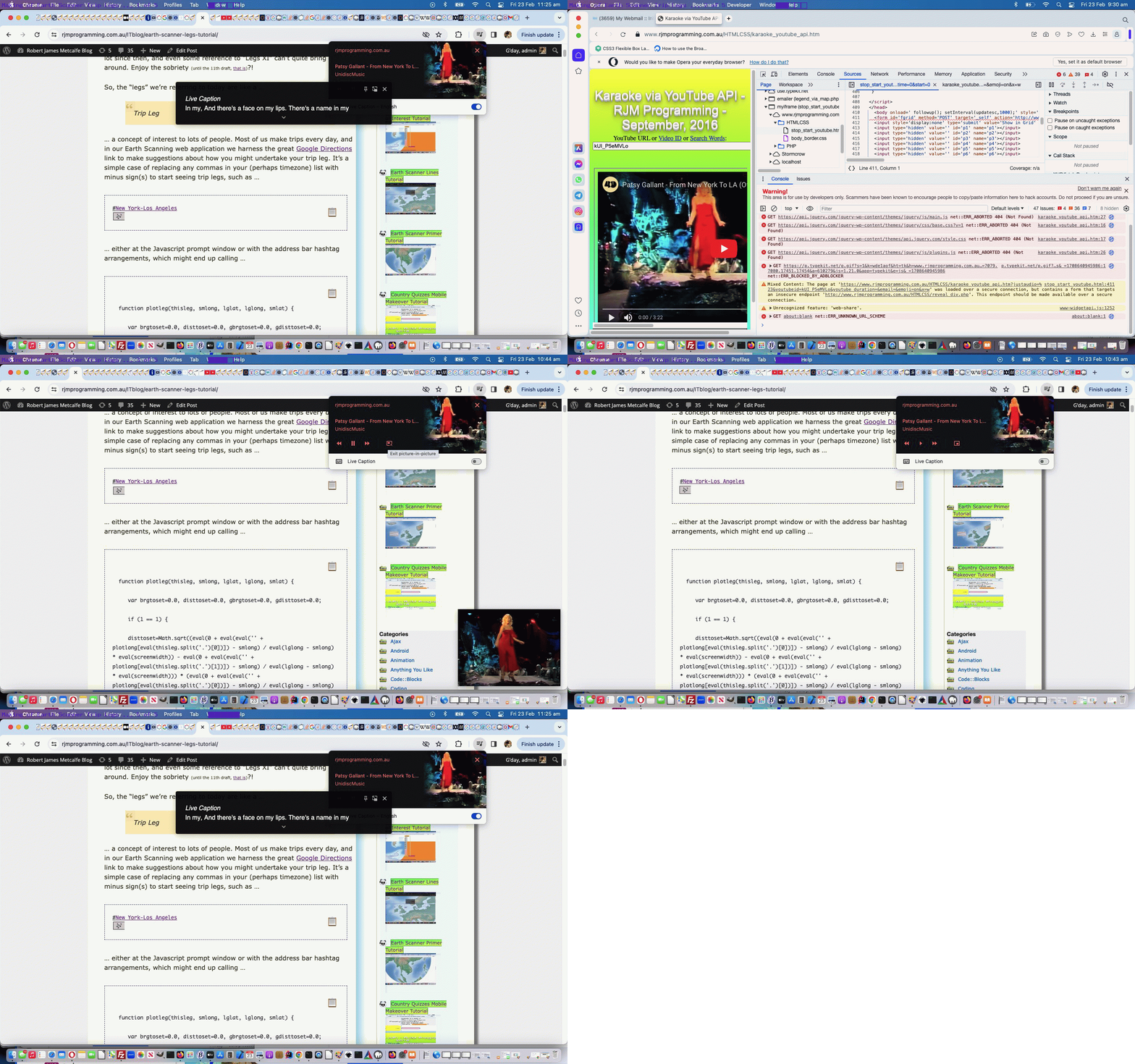
We expected mobile might be different, and yes, we achieved less here, but we could open a popup the user can click a play button regarding. With non-mobile, if your browser allows the "autoplay" feature for the "rjmprogramming.com.au" domain, you only need to click the "#" link to hear Patsy sing the song once over. But there's more with Google Chrome, at least, supplying a "right of address bar" up the top "musical notes" button leading to ...
- usual video and/or audio media controls ...
- "In Picture" playing of the YouTube video behind the audio ... and/or ...
- "Live Captions" for that "Karaoke Feel"
... and so, that was all a pleasant surprise for us, because, of course, there were "Internal Use Only" issues. We'd not noticed a "Mixed Content" call we were making in amongst our "YouTube Video Interfacing Karaoke Style Play" web application code in the changed stop_start_youtube.html helper of the changed karaoke_youtube_api.htm inhouse YouTube video interfacer, and we needed to add in logic for the use of a new "justaudio" argument.
That's one part of the equation, and the other was back at the blog posting "code" element coding, as below, where its HTML innards became ...
<code><span id=shash data-cp=127926 onmouseover="if (this.title == 'Might play music ...') { this.title=String.fromCodePoint(127926); setInterval(function() { if (document.getElementById('shash').innerHTML.indexOf('<') == -1) {  if (eval('' + event.target.getAttribute('data-cp')) == 35) { document.getElementById('shash').innerHTML=String.fromCharCode(eval('' + document.getElementById('shash').getAttribute('data-cp'))); document.getElementById('shash').setAttribute('data-cp','127926'); } else { document.getElementById('shash').innerHTML=String.fromCodePoint(eval('' + document.getElementById('shash').getAttribute('data-cp')));  document.getElementById('shash').setAttribute('data-cp','35');  } } }, 5000); }" title='Might play music ...' style=display:inline-block;cursor:pointer;text-decoration:underline; onclick="this.innerHTML+='<iframe style=display:inline-block;width:50px;height:50px;display:none; src=//www.rjmprogramming.com.au/HTMLCSS/karaoke_youtube_api.htm?justaudio=%23&youtubeid=kUI_P5eMVLo&youtube_duration=&email=&emoji=on>#</iframe>'; if (navigator.userAgent.match(/Android|BlackBerry|iPhone|iPad|iPod|Opera Mini|IEMobile/i)) { document.getElementById('ahash').click(); window.open('//www.rjmprogramming.com.au/HTMLCSS/karaoke_youtube_api.htm?youtubeid=kUI_P5eMVLo&youtube_duration=202.221&email=&email=&emoji=on&c0=on&i0=0&j0=202.221&i1=&j1=&i2=&j2=&i3=&j3=&i4=&j4=&i5=&j5=&i6=&j6=&i7=&j7=&i8=&j8=&i9=&j9=&i10=&j10=&i11=&j11=&i12=&j12=&i13=&j13=&i14=&j14=&i15=&j15=&i16=&j16=&i17=&j17=&i18=&j18=&i19=&j19=&i20=&j20=&i21=&j21=&i22=&j22=&i23=&j23=&i24=&j24=&i25=&j25=&i26=&j26=&i27=&j27=&i28=&j28=&i29=&j29=','_blank','top=50,left=50,width=800,height=800'); } ">#</span><a target=_blank id=ahash style='display:inline-block;'  href="https://www.rjmprogramming.com.au/HTMLCSS/earth_scanner.html#New%20York-Los%20Angeles">New York-Los Angeles</a>

</code>
Happy listening ... etcetera, etcetera, etcetera!
Previous relevant Earth Scanner Legs Tutorial is shown below.
Earth Scanner Legs Tutorial
Of course, yes, there's a part of me that hoped today's tutorial in its thread of related blog postings, would line up with the 11th draft of our Earth Scanner web application of yesterday's Earth Scanner Hashtag Lists Tutorial, and then we could have made some lame joke about "Legs 11", but we've grown up a lot since then, and even some reference to "Legs XI" can't quite bring us around. Enjoy the sobriety (until the 11th draft, that is)?!
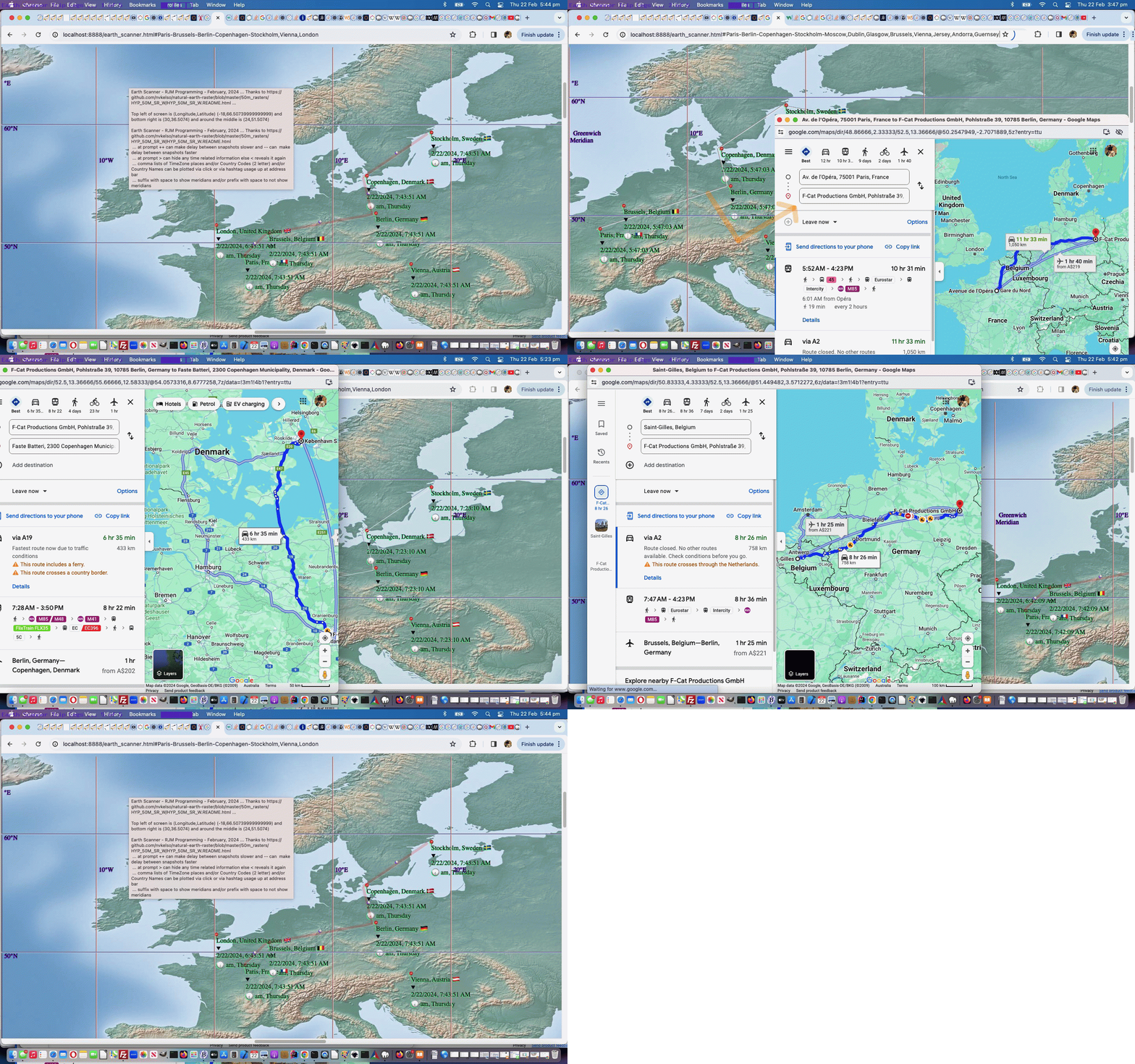
So, the "legs" we're referring to today are like a ...
Trip Leg
... a concept of interest to lots of people. Most of us make trips every day, and in our Earth Scanning web application we harness the great Google Directions link to make suggestions about how you might undertake your trip leg. It's a simple case of replacing any commas in your (perhaps timezone) list with minus sign(s) to start seeing trip legs, such as ...
... either at the Javascript prompt window or with the address bar hashtag arrangements, which might end up calling ...
function plotleg(thisleg, smlong, lglat, lglong, smlat) {
var brgtoset=0.0, disttoset=0.0, gbrgtoset=0.0, gdisttoset=0.0;
if (1 == 1) {
disttoset=Math.sqrt((eval(0 + eval(eval('' + plotlong[eval(thisleg.split('.')[0])]) - smlong) / eval(lglong - smlong) * eval(screenwidth)) - eval(0 + eval(eval('' + plotlong[eval(thisleg.split('.')[1])]) - smlong) / eval(lglong - smlong) * eval(screenwidth))) * (eval(0 + eval(eval('' + plotlong[eval(thisleg.split('.')[0])]) - smlong) / eval(lglong - smlong) * eval(screenwidth)) - eval(0 + eval(eval('' + plotlong[eval(thisleg.split('.')[1])]) - smlong) / eval(lglong - smlong) * eval(screenwidth))) + (eval(0 + eval(eval(lglat - eval('' + plotlat[eval(thisleg.split('.')[0])])) / eval(lglat - smlat) * eval(screenheight))) - eval(0 + eval(eval(lglat - eval('' + plotlat[eval(thisleg.split('.')[1])])) / eval(lglat - smlat) * eval(screenheight)))) * (eval(0 + eval(eval(lglat - eval('' + plotlat[eval(thisleg.split('.')[0])])) / eval(lglat - smlat) * eval(screenheight))) - eval(0 + eval(eval(lglat - eval('' + plotlat[eval(thisleg.split('.')[1])])) / eval(lglat - smlat) * eval(screenheight)))));
}
gdisttoset=great_circle_distance(plotlat[eval(thisleg.split('.')[0])], plotlong[eval(thisleg.split('.')[0])], plotlat[eval(thisleg.split('.')[1])], plotlong[eval(thisleg.split('.')[1])]);
gdisttoset=great_circle_distance(plotlat[eval(thisleg.split('.')[0])], plotlong[eval(thisleg.split('.')[0])], plotlat[eval(thisleg.split('.')[1])], plotlong[eval(thisleg.split('.')[1])]);
var meanlong=eval(0 + eval(eval('' + plotlong[eval(thisleg.split('.')[0])]) - smlong) / eval(lglong - smlong) * eval(screenwidth));
var meanlat=eval(0 + eval(eval(lglat - eval('' + plotlat[eval(thisleg.split('.')[0])])) / eval(lglat - smlat) * eval(screenheight)));
brgtoset=Math.atan2(eval(0 + eval(eval(lglat - eval('' + plotlat[eval(thisleg.split('.')[1])])) / eval(lglat - smlat) * eval(screenheight))) - meanlat, eval(0 + eval(eval('' + plotlong[eval(thisleg.split('.')[1])]) - smlong) / eval(lglong - smlong) * eval(screenwidth)) - meanlong) * 180 / Math.PI;
meanlong+=eval(0 + eval(eval('' + plotlong[eval(thisleg.split('.')[1])]) - smlong) / eval(lglong - smlong) * eval(screenwidth))
meanlong/=2.0;
meanlat+=eval(0 + eval(eval(lglat - eval('' + plotlat[eval(thisleg.split('.')[1])])) / eval(lglat - smlat) * eval(screenheight)));
meanlat/=2.0;
console.log(thisleg + ' ' + brgtoset + ' ' + thisleg + ' ... ' + plotlat[eval(thisleg.split('.')[0])] + ',' + plotlong[eval(thisleg.split('.')[0])] + ' to ' + plotlat[eval(thisleg.split('.')[1])] + ',' + plotlong[eval(thisleg.split('.')[1])]);
bmeridian+='<hr onclick="event.stopPropagation(); canlooknow=false; clearwo(); wo=window.open(' + "'//www.google.com/maps/dir/" + encodeURIComponent(plotplace[eval(thisleg.split('.')[0])]) + '/' + encodeURIComponent(plotplace[eval(thisleg.split('.')[1])]) + "#In a minute we will start moving the map again','_blank','top=50,left=50,width=1000,height=900')" + '; canlooknow=true; " ondblclick="event.stopPropagation(); canlooknow=false; clearwo(); wo=window.open(' + "'//www.google.com/maps/dir/" + plotlat[eval(thisleg.split('.')[0])] + ',' + plotlong[eval(thisleg.split('.')[0])] + '/' + plotlat[eval(thisleg.split('.')[1])] + ',' + plotlong[eval(thisleg.split('.')[1])] + "#In a minute we will start moving the map again','_blank','top=50,left=50,width=1000,height=900')" + '; canlooknow=true; " title="' + plotplace[eval(thisleg.split('.')[0])] + ' to ' + plotplace[eval(thisleg.split('.')[1])] + ' has the crow flying (' + gbrgtoset + ' degrees setting off at versus on Mercator Projection ...) ' + eval(eval(brgtoset + 450) % 360) + ' degrees for ' + eval(gdisttoset / 1000.0) + ' kilometers. Click (for placename) or double click (for geographicals) to open a Google Directions window." class=leg style="transform:rotate(' + eval(eval('' + brgtoset) - 0) + 'deg);z-index:975;opacity:0.3;position:fixed;top:' +
meanlat +
'px;left:' +
eval(meanlong - disttoset / 2) +
'px;background-color:rgba(255,0,0,0.5);width:' + disttoset + 'px;height:6px;"></hr><span onclick="event.stopPropagation(); canlooknow=false; clearwo(); wo=window.open(' + "'//www.google.com/maps/dir/" + encodeURIComponent(plotplace[eval(thisleg.split('.')[0])]) + '/' + encodeURIComponent(plotplace[eval(thisleg.split('.')[1])]) + "#In a minute we will start moving the map again','_blank','top=50,left=50,width=1000,height=900')" + '; canlooknow=true; " ondblclick="event.stopPropagation(); canlooknow=false; clearwo(); wo=window.open(' + "'//www.google.com/maps/dir/" + plotlat[eval(thisleg.split('.')[0])] + ',' + plotlong[eval(thisleg.split('.')[0])] + '/' + plotlat[eval(thisleg.split('.')[1])] + ',' + plotlong[eval(thisleg.split('.')[1])] + "#In a minute we will start moving the map again','_blank','top=50,left=50,width=1000,height=900')" + '; canlooknow=true; " title="' + plotplace[eval(thisleg.split('.')[0])] + ' to ' + plotplace[eval(thisleg.split('.')[1])] + ' has the crow flying (' + gbrgtoset + ' degrees setting off at versus on Mercator Projection ...) ' + eval(eval(360 - brgtoset) % 360) + ' degrees for ' + eval(gdisttoset / 1000.0) + ' kilometers. Click (for placename) or double click (for geographicals) to open a Google Directions window." class=leg style="cursor:pointer;font-size:6px;z-index:976;margin-top:6px;margin-left:-6px;position:fixed;top:' + meanlat + 'px;left:' + meanlong + 'px;">🧭</span>';
if (ofive == fivethousand) {
fivethousand*=10;
setTimeout(callintoplay, 5000);
}
}
... and putting this into play we realized we should slow down animations to give users a chance to consider whether they want to "drill down" into finding out more about the "trip legs" as user defined.
This happens in our changed seventh (boo hoo) draft Earth Scanner web application.
Previous relevant Earth Scanner Hashtag Lists Tutorial is shown below.
Earth Scanner Hashtag Lists Tutorial
Before yesterday's Earth Scanner TimeZone Tutorial, when we presented Earth Scanner Places Tutorial we intimated with ...
... and into the future we have another idea regarding how this operates.
... that we might offer another way for the driver of our latest Earth Scanner web application ...
- not only depend on a webpage click event Javascript prompt window means by which to control proceedings, including newly coded for comma separated list logic support ... but, also, as of today, after proving it could work (because we can't remember ever depending this much on a "hashtag on the address bar" arrangement, in the past, before) ...
- but also allow similar functionality using hashtags on the address bar of the web browser, and able to be changed dynamically (ie. in real time) by the user, as required ...
    if (prevhash != decodeURIComponent(('' + location.hash).replace(/^null$/g,'').replace(/^undefined$/g,'').replace(/^\#/g,''))) {

       thishash=decodeURIComponent(('' + location.hash).replace(/^null$/g,'').replace(/^undefined$/g,'').replace(/^\#/g,'')); //.trim();

       for (var iop=0; iop<plotplace.length; iop++) {

          thishash=thishash.replace(plotplace[iop], '');

       }

       var thishs=thishash.replace(/\ to\ /g,',').trim().split(',');

       if (thishs[0].trim() != '') {

          for (var ipo=0; ipo<thishs.length; ipo++) {

             if (newlist == '') {

               nlist=thishs[ipo].replace(/\+/g,'').trim(); //.trim();

               newlist=thishs[ipo].replace(/\+/g,''); //.trim();

               prefnew=thishs[ipo].replace(/\+/g,' ').split(nlist)[0];

               if (eval(1 + ipo) == eval('' + thishs.length) && thishs[ipo].replace(/\+/g,' ') != (prefnew + newlist)) {

               //alert(98);

                suffnew=thishs[ipo].replace(/\+/g,' ').split(newlist)[1];

               }

             } else {

               nlist=thishs[ipo].replace(/\+/g,'').trim(); //.trim();

               newlist+=',' + nlist; //.trim();

               if (eval(1 + ipo) == eval('' + thishs.length) && thishs[ipo].replace(/\+/g,' ') != nlist) {

                suffnew=thishs[ipo].replace(/\+/g,' ').split(nlist)[1];

               }

             }

          }

       }

       prevhash=decodeURIComponent(('' + location.hash).replace(/^null$/g,'').replace(/^undefined$/g,'').replace(/^\#/g,'')); //.trim();

       if (newlist != '') {

         //alert('newlist=' + newlist + '|');

         gdefv=prefnew + newlist + suffnew;

         //alert(gdefv + '!');

         if (1 == 1) {

         askfor=gdefv;

         if (1 == 7 && ('' + askfor).replace('(','').replace(')','').replace('[','').replace(']','').indexOf(',') != -1) {

         ameridian='';

         acircleoflatitude='';

         enforcedlong=false;

         enforcedxp=-999;

         }

         document.getElementById('myimg').click();

         gdefv='';

         setTimeout(scmove, fivethousand);

         return null;

         } else {

         ourprompt(null,'Earth Scanner - RJM Programming - February, 2024 ... ' + String.fromCharCode(10) + 'Thanks to https://github.com/nvkelso/natural-earth-raster/blob/master/50m_rasters/HYP_50M_SR_W/HYP_50M_SR_W.README.html ... ' + String.fromCharCode(10) + 'Currently top left of screen is (Longitude,Latitude) ' + '(' + eval(-180 + xp * 360 / 100) + ',' + eval(90 - yp * 180 / 100) + ') and bottom right is (' + eval(-180 + screenlong + xp * 360 / 100) + ',' + eval(90 - screenlat - yp * 180 / 100) + ') and around the middle is (' + eval(-180 + eval(screenlong / 2) + xp * 360 / 100) + ',' + eval(90 - eval(screenlat / 2) - yp * 180 / 100) + ').' + String.fromCharCode(10) + 'Where do you want middle of screen to be in terms of Longitude,Latitude?  Suffix with space to show meridians and/or prefix with space to not show meridians.', newlist);

         }

       }

    }
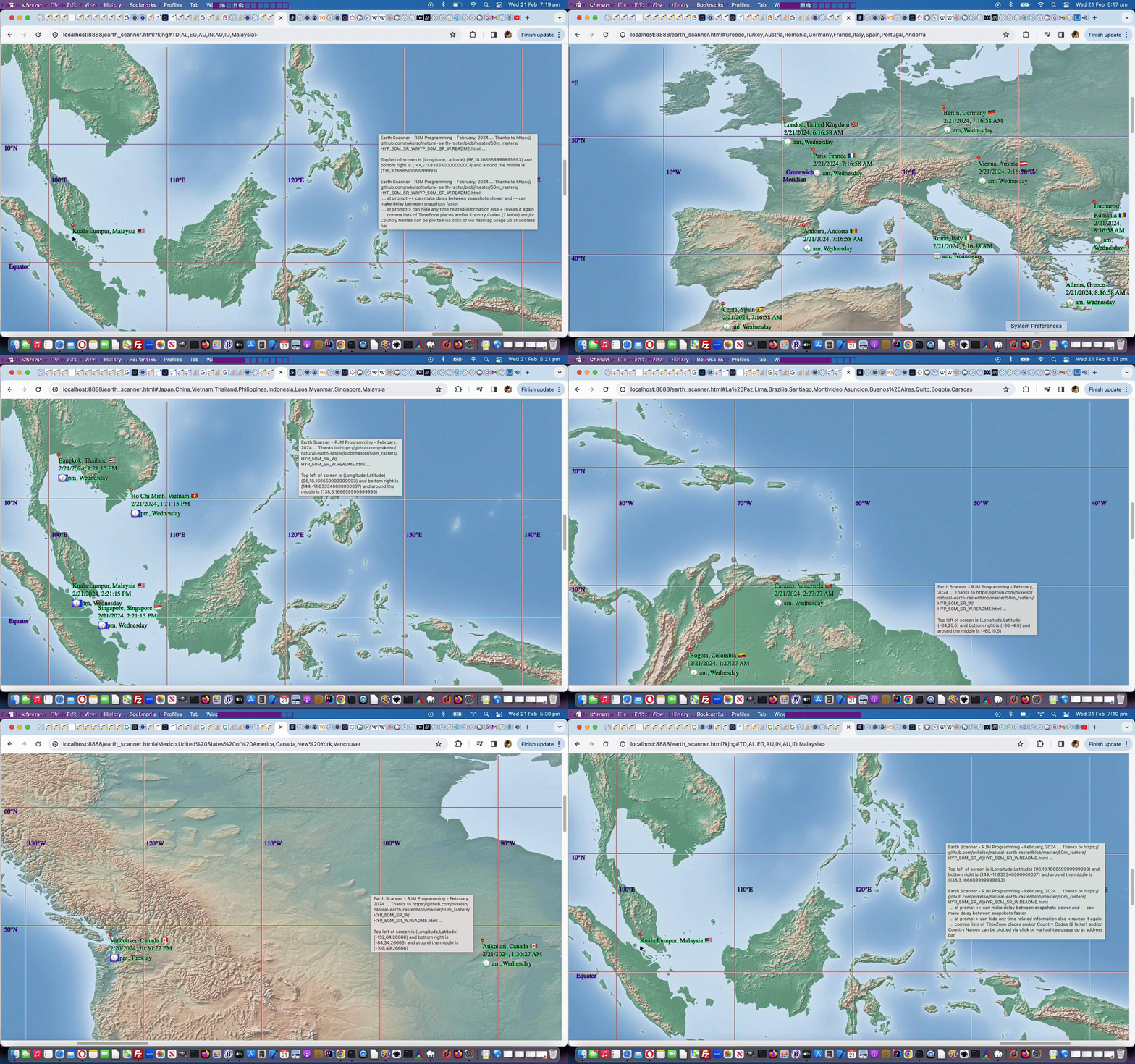
And we did find this an easy way to build up a sizeable number of plotted places, in quick time, entered as ...
- the "P" and "N' and "A" and "C" shortcuts (near to where the user clicked) ways
- timezone place name(s)
- country name(s)
- country code(s)
- [longitude,latitude,placename]
- [longitude,latitude]
- longitude,latitude,placename
- longitude,latitude (with some form of mantissa)
... methodologies to end up with at least a pin (📍) emoji plotted, as well as the "longitude,latitude (with no form of mantissa)" way to just move the map to that position with no plotting taking place.
But now that we have a few "data players" in the mix, there'll be users out there that do not want to see it all, perhaps ... and so, now "the blurb" goes, for user entries, in either of these modes of use ...
... at prompt ++ can make delay between snapshots slower and -- can make delay between snapshots faster
... at prompt > can hide any time related information else < reveals it again
... comma lists of TimeZone places and/or Country Codes (2 letter) and/or Country Names can be plotted via click or via hashtag usage up at address bar
... suffix with space to show meridians and/or prefix with space to not show meridians
... in our changed sixth draft Earth Scanner web application.
Previous relevant Earth Scanner TimeZone Tutorial is shown below.
Earth Scanner TimeZone Tutorial
Take a look at the word ...
TimeZone
... as a concept newly introduced into the Earth Scanner web application workings, as explained in yesterday's Earth Scanner Places Tutorial.
It's got a "where" word part "Zone" fitting in with our "where of life" ideas up to now, but it also has got "Time" as a new "when of life" word part of the whole idea of TimeZones we'd like to start exploring today. Yes, TimeZones are very useful to have "where" meet "when" ... the Opera Bar would be nice, we think.
We now have ...
  function ourprompt(e, blurb, defv) {

       var locans=null, ijk=0, extras='',thatplace='', utzdate, tzDate, xdate1, xextratztime, xextraemj, xdiff;

       if (eval(uc_iso_country_codes.length) == 0) {

          for (ijk=0; ijk<iso_country_codes.length; ijk++) {

            uc_iso_country_codes.push(iso_country_codes[ijk].toUpperCase());

          }

       }

       e = e || window.event;

       e.preventDefault();

       if (e.touches) {

       if (e.touches[0].pageX) {

       xinxy.push(eval(e.touches[0].pageX + document.body.scrollLeft * 0) * 1);

       yinxy.push(eval(e.touches[0].pageY + document.body.scrollTop * 0) * 1);

       } else {

       xinxy.push(eval(e.touches[0].clientX + document.body.scrollLeft * 0) * 1);

       yinxy.push(eval(e.touches[0].clientY + document.body.scrollTop * 0) * 1);

       }

       } else if (e.clientX || e.clientY) {

        xinxy.push(e.clientX + document.body.scrollLeft * 0);

        yinxy.push(e.clientY + document.body.scrollTop * 0);

       } else {

        xinxy.push(e.pageX + document.body.scrollLeft * 0);

        yinxy.push(e.pageY + document.body.scrollTop * 0);

       }

       var llsa=blurb.split(') (')[1];

       //alert(blurb + ' ... ' + llsa);

       tllg=eval(llsa.split(',')[0]);

       tlla=eval(llsa.split(',')[1].split(')')[0]);

       brlg=eval(llsa.split('(')[1].split(',')[0]);

       brla=eval(llsa.split('(')[1].split(',')[1].split(')')[0]);

       thislong=eval(tllg + eval(eval(xinxy[eval(-1 + xinxy.length)] / screenwidth) * eval(screenlong)));

       thislat=eval(tlla - eval(eval(yinxy[eval(-1 + yinxy.length)] / screenheight) * eval(screenlat)));

       var nearbyfour=retnearest(thislong, thislat);

       var aatm='youllneverfindthis';

       var bbtm=String.fromCharCode(9);

       if (blurb.indexOf('Thanks to ') != -1) {

         if (blurb.split('Thanks to ')[1].indexOf(' ...') != -1) {

           bbtm='Thanks to ' + blurb.split('Thanks to ')[1].split(' ...')[0] + ' ...';

         }

       }

       if (blurb.indexOf(' and around the middle ') != -1) {

         aatm=' and around the middle ' + blurb.split(' and around the middle ')[1].split(')')[0] + ')';

       }

       var ourblurb=(blurb.replace(bbtm,'').replace('Currently top ','Top ').replace(' in terms of ',' as ').replace(aatm, '').replace(/\ and\ /g,' & ').replace('? ', '? ' + ' Nearest timezone place (via N) is ' + nearbyfour.split('|')[3] + ' at [' + nearbyfour.split('|')[0] + ',' + nearbyfour.split('|')[1] + '] to your clicked (via C) [' + thislong + ',' + thislat + '] ') + bbtm.replace(String.fromCharCode(9),'')).replace(String.fromCharCode(10),' ').replace(String.fromCharCode(10),' ').replace(String.fromCharCode(10),' ').replace(String.fromCharCode(10),' ');

       if (prevf.indexOf(',') != -1) {

         if (Math.abs(eval(prevf.split(',')[0]) - tllg) <= 0.5) {

         prevf='' + prevone + ',' + prevtwo + ',' + prevthree + ',' + prevfour;

         }

         if (Math.abs(eval(prevf.split(',')[0]) - tllg) > 0.5) {

       tllg=eval(prevf.split(',')[0]);

       tlla=eval(prevf.split(',')[1]);

       brlg=eval(prevf.split(',')[2]);

       brla=eval(prevf.split(',')[3]);

       var sthislong=eval(tllg + eval(eval(xinxy[eval(-1 + xinxy.length)] / screenwidth) * eval(screenlong)));

       var sthislat=eval(tlla - eval(eval(yinxy[eval(-1 + yinxy.length)] / screenheight) * eval(screenlat)));

       var snearbyfour=retnearest(sthislong, sthislat);

          //alert(ourblurb + ' ' + prevf + ' vs ' + tllg + ' ... ' + Math.abs(eval(prevf.split(',')[0]) - tllg));

       ourblurb=ourblurb.replace('? ', '? ' + ' Nearest timezone place (via P) is ' + snearbyfour.split('|')[3] + ' at [' + snearbyfour.split('|')[0] + ',' + snearbyfour.split('|')[1] + '] to your clicked (via A) [' + sthislong + ',' + sthislat + '] ');

         }

        locans=prompt(ourblurb, defv);

       }

       if (locans != null) {

         if (locans.toUpperCase().trim() == 'N') {

           locans=locans.toUpperCase().replace('N', '[' + nearbyfour.split('|')[0] + ',' + nearbyfour.split('|')[1] + ']');

           plotplace.push(nearbyfour.split('|')[3]);

           plotcc.push(nearbyfour.split('|')[2]);

           plotlong.push(nearbyfour.split('|')[0]);

           plotlat.push(nearbyfour.split('|')[1]);

           if (eval('' + nearbyfour.length) > 4) {


           plottz.push(nearbyfour.split('|')[4]);

           plotct.push(nearbyfour.split('|')[5]);

           plotemj.push(nearbyfour.split('|')[6]);


           } else {

           plottz.push('');

           plotct.push('');

           plotemj.push('');

           }

         } else if (locans.toUpperCase().trim() == 'C') {

           thisplace=' ';

           locans=locans.toUpperCase().replace('C', '[' + thislong + ',' + thislat + ']');

           plotplace.push('');

           plotcc.push(nearbyfour.split('|')[2]);

           plotlong.push(thislong);

           plotlat.push(thislat);

           plotct.push('');

           plotemj.push('');

           plottz.push('');

         } else if (locans.toUpperCase().trim() == 'P') {

           locans=locans.toUpperCase().replace('P', '[' + snearbyfour.split('|')[0] + ',' + snearbyfour.split('|')[1] + ']');

           plotplace.push(snearbyfour.split('|')[3]);

           plotcc.push(snearbyfour.split('|')[2]);

           plotlong.push(snearbyfour.split('|')[0]);

           plotlat.push(snearbyfour.split('|')[1]);

           if (eval('' + nearbyfour.length) > 4) {


           plottz.push(nearbyfour.split('|')[4]);

           plotct.push(nearbyfour.split('|')[5]);

           plotemj.push(nearbyfour.split('|')[6]);


           } else {

           plottz.push('');

           plotct.push('');

           plotemj.push('');

           }

         } else if (locans.toUpperCase().trim() == 'A') {

           thisplace='   ';

           locans=locans.toUpperCase().replace('A', '[' + sthislong + ',' + sthislat + ']');

           plotplace.push('');

           plotcc.push(snearbyfour.split('|')[2]);

           plotlong.push(sthislong);

           plotlat.push(sthislat);

           plotct.push('');

           plotemj.push('');

           plottz.push('');

         } else if (eval('' + ('' + locans.trim()).length) >= 3 && ('' + locans).indexOf(',') == -1 && yourtzlist.indexOf('/' + ('' + locans.trim()).replace(/\ /g,'_') + '<') != -1) {

           thisplace=yourtzlist.split('/' + ('' + locans.trim()).replace(/\ /g,'_') + '<')[0].split(' data-geo="')[eval(-1 + yourtzlist.split('/' + ('' + locans.trim()).replace(/\ /g,'_') + '<')[0].split(' data-geo="').length)];

   //alert(thisplace);


           udate=new Date();

           utcDate = new Date(udate.toLocaleString('en-US', { timeZone: 'UTC' }));


           thatplace=thisplace.split('>')[1].split('<')[0].replace('GMT','UTC') + '/' + locans;

    //alert(thatplace);

          utzdate=new Date();

           tzDate = new Date(utzdate.toLocaleString('en-US', { timeZone: thatplace.replace('GMT','UTC').replace(/\ /g,'_') }));

           extratz=',' + thatplace; //.split('/')[eval(-1 + iplacesarr[jk].split('>')[1].split('<')[0].replace('GMT','Europe/London').split('/').length)].replace(/\_/g,' ');

           xdate1=new Date().toLocaleString("en-US", { timeZone: thatplace.replace('GMT','UTC').replace(/\ /g,'_') });

           xextratztime=(',' + xdate1);

           plottz.push(thatplace);

           thatplace=thatplace.replace('GMT','Europe/London').split('/')[eval(-1 + thatplace.replace('GMT','Europe/London').split('/').length)].replace(/\_/g,' ');

           xdiff = Math.abs(tzDate.getTime() - utcDate.getTime()) / 3600000;

           xextraemj=',' + clockit('' + xdiff);

           plotct.push('' + xdate1);

           plotemj.push(clockit('' + xdiff));


           plotplace.push(yourtzlist.split(thisplace.split('>')[0] + '>')[1].split('<')[0].replace('GMT','Europe/London').split('/')[eval(-1 + yourtzlist.split(thisplace.split('>')[0] + '>')[1].split('<')[0].replace('GMT','Europe/London').split('/').length)].replace(/\_/g,' '));

           plotlong.push((thisplace.split(',')[1]));

           plotlat.push((thisplace.split(',')[0]));

           plotcc.push(thisplace.split(',')[3]);

     if (thisplace.split(',')[3] != '') {

         for (ijk=0; ijk<iso_country_codes.length; ijk+=2) {

           if (iso_country_codes[ijk].toUpperCase() == thisplace.split(',')[3].toUpperCase()) {

             extras=', ' + iso_country_codes[eval(1 + ijk)];

             plotplace[eval(-1 + plotplace.length)]+=extras;

             extras='';

           }

         }

     }

     //alert(extras + ' ... ' + locans);

           locans=locans.replace(locans.trim(), '[' + thisplace.split(',')[1] + ',' + thisplace.split(',')[0] + ',' + plotplace[eval(-1 + plotplace.length)] + extras + ']');

     //alert(locans);

           thisplace='   ';

         } else if (eval('' + ('' + locans.trim()).length) >= 3 && ('' + locans).indexOf(',') == -1 && yourtzlist.toUpperCase().indexOf('/' + ('' + locans.trim()).toUpperCase().replace(/\ /g,'_') + '<') != -1) {

           thisplace=yourtzlist.toUpperCase().split('/' + ('' + locans.trim()).toUpperCase().replace(/\ /g,'_') + '<')[0].split(' DATA-GEO="')[eval(-1 + yourtzlist.toUpperCase().split('/' + ('' + locans.trim()).toUpperCase().replace(/\ /g,'_') + '<')[0].split(' DATA-GEO="').length)];

   //alert(thisplace);

           udate=new Date();

           utcDate = new Date(udate.toLocaleString('en-US', { timeZone: 'UTC' }));


           thatplace=thisplace.split('>')[1].split('<')[0].replace('GMT','UTC') + '/' + locans;

           utzdate=new Date();

           tzDate = new Date(utzdate.toLocaleString('en-US', { timeZone: thatplace.replace('GMT','UTC').replace(/\ /g,'_') }));

           extratz=',' + thatplace; //.split('/')[eval(-1 + iplacesarr[jk].split('>')[1].split('<')[0].replace('GMT','Europe/London').split('/').length)].replace(/\_/g,' ');

           xdate1=new Date().toLocaleString("en-US", { timeZone: thatplace.replace('GMT','UTC') });

           xextratztime=(',' + xdate1);

           plottz.push(thatplace);

           thatplace=thatplace.replace('GMT','Europe/London').split('/')[eval(-1 + thatplace.replace('GMT','Europe/London').split('/').length)].replace(/\_/g,' ');

           xdiff = Math.abs(tzDate.getTime() - utcDate.getTime()) / 3600000;

           xextraemj=',' + clockit('' + xdiff);

           plotct.push('' + xdate1);

           plotemj.push(clockit('' + xdiff));


           plotplace.push(yourtzlist.split(thisplace.split('>')[0] + '>')[1].split('<')[0].replace('GMT','Europe/London').split('/')[eval(-1 + yourtzlist.split(thisplace.split('>')[0] + '>')[1].split('<')[0].replace('GMT','Europe/London').split('/').length)].replace(/\_/g,' '));

           plotlong.push((thisplace.split(',')[1]));

           plotlat.push((thisplace.split(',')[0]));

           plotcc.push(thisplace.split(',')[3]);

     if (thisplace.split(',')[3] != '') {

         for (ijk=0; ijk<iso_country_codes.length; ijk+=2) {

           if (iso_country_codes[ijk].toUpperCase() == thisplace.split(',')[3].toUpperCase()) {

             extras=', ' + iso_country_codes[eval(1 + ijk)];

             plotplace[eval(-1 + plotplace.length)]+=extras;

             extras='';

           }

         }

     }

     //alert(extras + ' ... ' + locans);

           locans=locans.replace(locans.trim(), '[' + thisplace.split(',')[1] + ',' + thisplace.split(',')[0] + ',' + plotplace[eval(-1 + plotplace.length)] + extras + ']');

     //alert(locans);

           thisplace='   ';

         } else if (eval('' + ('' + locans.trim()).length) == 2 && ('' + locans).indexOf(',') == -1 && yourtzlist.indexOf(',' + ('' + locans.trim()).toUpperCase() + ',') != -1) {

           thisplace=yourtzlist.split(',' + ('' + locans.trim()).toUpperCase() + ',')[0].split(' data-geo="')[eval(-1 + yourtzlist.split(',' + ('' + locans.trim()).toUpperCase() + ',')[0].split(' data-geo="').length)];


           thatplace=yourtzlist.split(',' + ('' + locans.trim()).toUpperCase() + ',')[1].split('>')[1].split('<')[0].replace('GMT','UTC');

           utzdate=new Date();

           tzDate = new Date(utzdate.toLocaleString('en-US', { timeZone: thatplace.replace('GMT','UTC').replace(/\ /g,'_') }));

           extratz=',' + thatplace; //.split('/')[eval(-1 + iplacesarr[jk].split('>')[1].split('<')[0].replace('GMT','Europe/London').split('/').length)].replace(/\_/g,' ');

           xdate1=new Date().toLocaleString("en-US", { timeZone: thatplace.replace('GMT','UTC').replace(/\ /g,'_') });

           xextratztime=(',' + xdate1);

           plottz.push(thatplace);

           thatplace=thatplace.replace('GMT','Europe/London').split('/')[eval(-1 + thatplace.replace('GMT','Europe/London').split('/').length)].replace(/\_/g,' ');

           xdiff = Math.abs(tzDate.getTime() - utzdate.getTime()) / 3600000;

           xextraemj=',' + clockit('' + xdiff);

           plotct.push('' + xdate1);

           plotemj.push(clockit('' + xdiff));


           plotplace.push(yourtzlist.split(',' + ('' + locans.trim()).toUpperCase() + ',')[1].split('>')[1].split('<')[0].replace('GMT','Europe/London').split('/')[eval(-1 + yourtzlist.split(',' + ('' + locans.trim()).toUpperCase() + ',')[1].split('>')[1].split('<')[0].replace('GMT','Europe/London').split('/').length)].replace(/\_/g,' '));

           plotlong.push((thisplace.split(',')[1]));

           plotlat.push((thisplace.split(',')[0]));

           plotcc.push(locans.trim());

     if (locans != '') {

         for (ijk=0; ijk<iso_country_codes.length; ijk+=2) {

           if (iso_country_codes[ijk].toUpperCase() == locans.trim().toUpperCase()) {

             extras=', ' + iso_country_codes[eval(1 + ijk)];

             plotplace[eval(-1 + plotplace.length)]+=extras;

             extras='';

           }

         }

     }

           locans=locans.replace(locans.trim(), '[' + thisplace.split(',')[1] + ',' + thisplace.split(',')[0] + ',' + plotplace[eval(-1 + plotplace.length)] + extras + ']');

           thisplace='   ';

         } else if (eval('' + ('' + locans.trim()).length) >= 3 && ('' + locans).indexOf(',') == -1 && iso_country_codes.indexOf(locans.trim()) != -1) {

   //alert(iso_country_codes[eval(-1 + eval('' + iso_country_codes.indexOf(locans.trim())))].toUpperCase());

           if (yourtzlist.indexOf(',' + ('' + iso_country_codes[eval(-1 + eval('' + iso_country_codes.indexOf(locans.trim())))].toUpperCase()) + ',') != -1) {

           locans=locans.replace(locans.trim(), '' + iso_country_codes[eval(-1 + eval('' + iso_country_codes.indexOf(locans.trim())))]);

           thisplace=yourtzlist.split(',' + ('' + locans.trim()).toUpperCase() + ',')[0].split(' data-geo="')[eval(-1 + yourtzlist.split(',' + ('' + locans.trim()).toUpperCase() + ',')[0].split(' data-geo="').length)];


           //alert('thisplace=' + thisplace + ' and thatplace=' + thatplace);

           thatplace=yourtzlist.split(thisplace)[1].split('>')[1].split('<')[0].replace('GMT','UTC');

           //alert('thisplace=' + thisplace + ' and thatplace=' + thatplace);

           utzdate=new Date();

           tzDate = new Date(utzdate.toLocaleString('en-US', { timeZone: thatplace.replace('GMT','UTC').replace(/\ /g,'_') }));

           extratz=',' + thatplace; //.split('/')[eval(-1 + iplacesarr[jk].split('>')[1].split('<')[0].replace('GMT','Europe/London').split('/').length)].replace(/\_/g,' ');

           xdate1=new Date().toLocaleString("en-US", { timeZone: thatplace.replace('GMT','UTC').replace(/\ /g,'_') });

           xextratztime=(',' + xdate1);

           plottz.push(thatplace);

           thatplace=thatplace.replace('GMT','Europe/London').split('/')[eval(-1 + thatplace.replace('GMT','Europe/London').split('/').length)].replace(/\_/g,' ');

           xdiff = Math.abs(tzDate.getTime() - utzdate.getTime()) / 3600000;

           xextraemj=',' + clockit('' + xdiff);

           plotct.push('' + xdate1);

           plotemj.push(clockit('' + xdiff));


           plotplace.push(yourtzlist.split(',' + ('' + locans.trim()).toUpperCase() + ',')[1].split('>')[1].split('<')[0].replace('GMT','Europe/London').split('/')[eval(-1 + yourtzlist.split(',' + ('' + locans.trim()).toUpperCase() + ',')[1].split('>')[1].split('<')[0].replace('GMT','Europe/London').split('/').length)].replace(/\_/g,' '));

           plotlong.push((thisplace.split(',')[1]));

           plotlat.push((thisplace.split(',')[0]));

           plotcc.push(locans.trim());

     if (locans != '') {

         for (ijk=0; ijk<iso_country_codes.length; ijk+=2) {

           if (iso_country_codes[ijk].toUpperCase() == locans.trim().toUpperCase()) {

             extras=', ' + iso_country_codes[eval(1 + ijk)];

             plotplace[eval(-1 + plotplace.length)]+=extras;

             extras='';

           }

         }

     }

           locans=locans.replace(locans.trim(), '[' + thisplace.split(',')[1] + ',' + thisplace.split(',')[0] + ',' + plotplace[eval(-1 + plotplace.length)] + extras + ']');

           thisplace='   ';

           } else if (locans.trim() != '' && locans.trim() != locans) {

           locans=locans.replace(locans.trim(), '');

         } else {

           locans=null;

         }

         } else if (eval('' + ('' + locans.trim()).length) >= 3 && ('' + locans).indexOf(',') == -1 && uc_iso_country_codes.indexOf(locans.trim().toUpperCase()) != -1) {

   //alert(iso_country_codes[eval(-1 + eval('' + uc_iso_country_codes.indexOf(locans.trim())))].toUpperCase());

           if (yourtzlist.indexOf(',' + iso_country_codes[eval(-1 + uc_iso_country_codes.indexOf(locans.trim().toUpperCase()))].toUpperCase() + ',') != -1) {

           locans=locans.replace(locans.trim(), '' + iso_country_codes[eval(-1 + eval('' + uc_iso_country_codes.indexOf(locans.trim().toUpperCase())))]);

           thisplace=yourtzlist.split(',' + ('' + locans.trim()).toUpperCase() + ',')[0].split(' data-geo="')[eval(-1 + yourtzlist.split(',' + ('' + locans.trim()).toUpperCase() + ',')[0].split(' data-geo="').length)];


           thatplace=thisplace.split('>')[1].split('<')[0].replace('GMT','UTC');

           utzdate=new Date();

           tzDate = new Date(utzdate.toLocaleString('en-US', { timeZone: thatplace.replace('GMT','UTC').replace(/\ /g,'_') }));

           extratz=',' + thatplace; //.split('/')[eval(-1 + iplacesarr[jk].split('>')[1].split('<')[0].replace('GMT','Europe/London').split('/').length)].replace(/\_/g,' ');

           xdate1=new Date().toLocaleString("en-US", { timeZone: thatplace.replace('GMT','UTC').replace(/\ /g,'_') });

           xextratztime=(',' + xdate1);

           plottz.push(thatplace);

           thatplace=thatplace.replace('GMT','Europe/London').split('/')[eval(-1 + thatplace.replace('GMT','Europe/London').split('/').length)].replace(/\_/g,' ');

           xdiff = Math.abs(tzDate.getTime() - utzdate.getTime()) / 3600000;

           xextraemj=',' + clockit('' + xdiff);

           plotct.push('' + xdate1);

           plotemj.push(clockit('' + xdiff));


           plotplace.push(yourtzlist.split(',' + ('' + locans.trim()).toUpperCase() + ',')[1].split('>')[1].split('<')[0].replace('GMT','Europe/London').split('/')[eval(-1 + yourtzlist.split(',' + ('' + locans.trim()).toUpperCase() + ',')[1].split('>')[1].split('<')[0].replace('GMT','Europe/London').split('/').length)].replace(/\_/g,' '));

           plotlong.push((thisplace.split(',')[1]));

           plotlat.push((thisplace.split(',')[0]));

           plotcc.push(locans.trim());

     if (locans != '') {

         for (ijk=0; ijk<iso_country_codes.length; ijk+=2) {

           if (iso_country_codes[ijk].toUpperCase() == locans.trim().toUpperCase()) {

             extras=', ' + iso_country_codes[eval(1 + ijk)];

             plotplace[eval(-1 + plotplace.length)]+=extras;

             extras='';

           }

         }

     }

           locans=locans.replace(locans.trim(), '[' + thisplace.split(',')[1] + ',' + thisplace.split(',')[0] + ',' + plotplace[eval(-1 + plotplace.length)] + extras + ']');

           thisplace='   ';

           } else if (locans.trim() != '' && locans.trim() != locans) {

           locans=locans.replace(locans.trim(), '');

         } else {

           locans=null;

         }

         } else if (('' + locans).indexOf(',') != -1 && ('' + locans).indexOf('[') != -1) {

           thisplace='  ';

           if (eval('' + locans.replace('(','').replace(')','').replace('[','').replace(']','').split(',').length) > 2) {

           plotplace.push(locans.replace(locans.split(',')[0] + ',' + locans.split(',')[1] + ',', '').replace('(','').replace(')','').replace('[','').replace(']',''));

           thisplace=locans.replace(locans.split(',')[0] + ',' + locans.split(',')[1] + ',', '').replace('(','').replace(')','').replace('[','').replace(']','') + ' ';

           } else {

           plotplace.push('');

           }

           plotcc.push('');

           plotlong.push(locans.replace('(','').replace(')','').replace('[','').replace(']','').split(',')[0]);

           plotlat.push(locans.replace('(','').replace(')','').replace('[','').replace(']','').split(',')[1]);

           plotct.push('');

           plotemj.push('');

           plottz.push('');

         } else if (('' + locans).indexOf(',') != -1 && ('' + locans).indexOf('.') != -1) {

           thisplace='   ';

           if (eval('' + locans.replace('(','').replace(')','').replace('[','').replace(']','').split(',').length) > 2) {

           plotplace.push(locans.replace(locans.split(',')[0] + ',' + locans.split(',')[1] + ',', '').replace('(','').replace(')','').replace('[','').replace(']',''));

           thisplace=locans.replace(locans.split(',')[0] + ',' + locans.split(',')[1] + ',', '').replace('(','').replace(')','').replace('[','').replace(']','') + '  ';

           } else {

           plotplace.push('');

           }

           plotcc.push('');

           plotlong.push(locans.replace('(','').replace(')','').replace('[','').replace(']','').split(',')[0]);

           plotlat.push(locans.replace('(','').replace(')','').replace('[','').replace(']','').split(',')[1]);

           plotct.push('');

           plotemj.push('');

           plottz.push('');

         } else if (locans.trim() != '' && locans.trim() != locans) {

           locans=locans.replace(locans.trim(), '');

         } else {

           locans=null;

         }

       }


       movesallowed=true;

       return locans;

  }


  function orflag(thiscc) {

      var ccchar='', ccsuff='';

      var lri='ABCDEFGHIJKLMNOPQRSTUVWXYZ';

      var dri=['127462','127463','127464','127465','127466','127467','127468','127469','127470','127471','127472','127473','127474','127475','127476','127477','127478','127479','127480','127481','127482','127483','127484','127485','127486','127487'];

      for (var iccsuff=0; iccsuff<thiscc.length; iccsuff++) {

        ccchar=thiscc.substring(iccsuff, eval(1 + eval('' + iccsuff))).toUpperCase();

        ccsuff+=String.fromCodePoint(eval('' + dri[eval('' + lri.indexOf(ccchar))])); //'&#' + dri[eval('' + lri.indexOf(ccchar))] + ';';

      }

      return ccsuff;

  }
... referencing three new when "collectables" ...
- var plottz=[]; // contains a TimeZone name
- var plotct=[]; // contains a current datetime timestamp
- var plotemj=[]; // contains a current datetime clockemoji of nearest relevance
... now used in an amended plotting span element innerHTML (used to be plotplace[iplot]) "wrapper" (now using doplotplace(iplot)) ...
  function doplotplace(ipl) {

    if (plotcc[ipl].trim() && plottz[ipl].trim() != '') {

      return plotplace[ipl] + ' ' + orflag(plotcc[ipl]) + '
' + plotct[ipl] + '
' + plotemj[ipl];

    }

    return plotplace[ipl];

  }
... in our changed fifth draft Earth Scanner web application.
Previous relevant Earth Scanner Places Tutorial is shown below.
Earth Scanner Places Tutorial
So far, with our Earth Scanner web application from the day before yesterday's Earth Scanner Lines Tutorial, it had a pretty passive modus operandi. On a plane or on television or some other "just watching" scenario that suits, but we'd like to offer more regarding value adding ...
- new Place plotting functionality that the user has real-time control over via onclick logic reaching a ...
- Javascript prompt window
... and into the future we have another idea regarding how this operates.
So today, though, we change how that Javascript prompt window's "blurb" is constructed, and how the user answer is analyzed, because, today, we've added in ...
PHP inspired TimeZone place lookup logic within the Javascript code
Of course not all places are TimeZone places, and we'll see how that goes into the future?!
We funnelled the Javascript prompt window logic into a new "wrapper style" Javascript inhouse function ...
  function ourprompt(e, blurb, defv) {

       var locans=null, ijk=0, extras='';

       if (eval(uc_iso_country_codes.length) == 0) {

          for (ijk=0; ijk<iso_country_codes.length; ijk++) {

            uc_iso_country_codes.push(iso_country_codes[ijk].toUpperCase());

          }

       }

       e = e || window.event;

       e.preventDefault();

       if (e.touches) {

       if (e.touches[0].pageX) {

       xinxy.push(eval(e.touches[0].pageX + document.body.scrollLeft * 0) * 1);

       yinxy.push(eval(e.touches[0].pageY + document.body.scrollTop * 0) * 1);

       } else {

       xinxy.push(eval(e.touches[0].clientX + document.body.scrollLeft * 0) * 1);

       yinxy.push(eval(e.touches[0].clientY + document.body.scrollTop * 0) * 1);

       }

       } else if (e.clientX || e.clientY) {

        xinxy.push(e.clientX + document.body.scrollLeft * 0);

        yinxy.push(e.clientY + document.body.scrollTop * 0);

       } else {

        xinxy.push(e.pageX + document.body.scrollLeft * 0);

        yinxy.push(e.pageY + document.body.scrollTop * 0);

       }

       var llsa=blurb.split(') (')[1];

       //alert(blurb + ' ... ' + llsa);

       tllg=eval(llsa.split(',')[0]);

       tlla=eval(llsa.split(',')[1].split(')')[0]);

       brlg=eval(llsa.split('(')[1].split(',')[0]);

       brla=eval(llsa.split('(')[1].split(',')[1].split(')')[0]);

       thislong=eval(tllg + eval(eval(xinxy[eval(-1 + xinxy.length)] / screenwidth) * eval(screenlong)));

       thislat=eval(tlla - eval(eval(yinxy[eval(-1 + yinxy.length)] / screenheight) * eval(screenlat)));

       var nearbyfour=retnearest(thislong, thislat);

       var aatm='youllneverfindthis';

       var bbtm=String.fromCharCode(9);

       if (blurb.indexOf('Thanks to ') != -1) {

         if (blurb.split('Thanks to ')[1].indexOf(' ...') != -1) {

           bbtm='Thanks to ' + blurb.split('Thanks to ')[1].split(' ...')[0] + ' ...';

         }

       }

       if (blurb.indexOf(' and around the middle ') != -1) {

         aatm=' and around the middle ' + blurb.split(' and around the middle ')[1].split(')')[0] + ')';

       }

       var ourblurb=(blurb.replace(bbtm,'').replace('Currently top ','Top ').replace(' in terms of ',' as ').replace(aatm, '').replace(/\ and\ /g,' & ').replace('? ', '? ' + ' Nearest timezone place (via N) is ' + nearbyfour.split('|')[3] + ' at [' + nearbyfour.split('|')[0] + ',' + nearbyfour.split('|')[1] + '] to your clicked (via C) [' + thislong + ',' + thislat + '] ') + bbtm.replace(String.fromCharCode(9),'')).replace(String.fromCharCode(10),' ').replace(String.fromCharCode(10),' ').replace(String.fromCharCode(10),' ').replace(String.fromCharCode(10),' ');

       if (prevf.indexOf(',') != -1) {

         if (Math.abs(eval(prevf.split(',')[0]) - tllg) <= 0.5) {

         prevf='' + prevone + ',' + prevtwo + ',' + prevthree + ',' + prevfour;

         }

         if (Math.abs(eval(prevf.split(',')[0]) - tllg) > 0.5) {

       tllg=eval(prevf.split(',')[0]);

       tlla=eval(prevf.split(',')[1]);

       brlg=eval(prevf.split(',')[2]);

       brla=eval(prevf.split(',')[3]);

       var sthislong=eval(tllg + eval(eval(xinxy[eval(-1 + xinxy.length)] / screenwidth) * eval(screenlong)));

       var sthislat=eval(tlla - eval(eval(yinxy[eval(-1 + yinxy.length)] / screenheight) * eval(screenlat)));

       var snearbyfour=retnearest(sthislong, sthislat);

          //alert(ourblurb + ' ' + prevf + ' vs ' + tllg + ' ... ' + Math.abs(eval(prevf.split(',')[0]) - tllg));

       ourblurb=ourblurb.replace('? ', '? ' + ' Nearest timezone place (via P) is ' + snearbyfour.split('|')[3] + ' at [' + snearbyfour.split('|')[0] + ',' + snearbyfour.split('|')[1] + '] to your clicked (via A) [' + sthislong + ',' + sthislat + '] ');

         }

        locans=prompt(ourblurb, defv);

       }

       if (locans != null) {

         if (locans.toUpperCase().trim() == 'N') {

           locans=locans.toUpperCase().replace('N', '[' + nearbyfour.split('|')[0] + ',' + nearbyfour.split('|')[1] + ']');

           plotplace.push(nearbyfour.split('|')[3]);

           plotcc.push(nearbyfour.split('|')[2]);

           plotlong.push(nearbyfour.split('|')[0]);

           plotlat.push(nearbyfour.split('|')[1]);

         } else if (locans.toUpperCase().trim() == 'C') {

           thisplace=' ';

           locans=locans.toUpperCase().replace('C', '[' + thislong + ',' + thislat + ']');

           plotplace.push('');

           plotcc.push(nearbyfour.split('|')[2]);

           plotlong.push(thislong);

           plotlat.push(thislat);

         } else if (locans.toUpperCase().trim() == 'P') {

           locans=locans.toUpperCase().replace('P', '[' + snearbyfour.split('|')[0] + ',' + snearbyfour.split('|')[1] + ']');

           plotplace.push(snearbyfour.split('|')[3]);

           plotcc.push(snearbyfour.split('|')[2]);

           plotlong.push(snearbyfour.split('|')[0]);

           plotlat.push(snearbyfour.split('|')[1]);

         } else if (locans.toUpperCase().trim() == 'A') {

           thisplace='   ';

           locans=locans.toUpperCase().replace('A', '[' + sthislong + ',' + sthislat + ']');

           plotplace.push('');

           plotcc.push(snearbyfour.split('|')[2]);

           plotlong.push(sthislong);

           plotlat.push(sthislat);

         } else if (eval('' + ('' + locans.trim()).length) >= 3 && ('' + locans).indexOf(',') == -1 && yourtzlist.toUpperCase().indexOf('/' + ('' + locans.trim()).toUpperCase().replace(/\ /g,'_') + '<') != -1) {

           thisplace=yourtzlist.toUpperCase().split('/' + ('' + locans.trim()).toUpperCase().replace(/\ /g,'_') + '<')[0].split(' DATA-GEO="')[eval(-1 + yourtzlist.toUpperCase().split('/' + ('' + locans.trim()).toUpperCase().replace(/\ /g,'_') + '<')[0].split(' DATA-GEO="').length)];

   //alert(thisplace);

           plotplace.push(yourtzlist.split(thisplace.split('>')[0] + '>')[1].split('<')[0].replace('GMT','Europe/London').split('/')[eval(-1 + yourtzlist.split(thisplace.split('>')[0] + '>')[1].split('<')[0].replace('GMT','Europe/London').split('/').length)].replace(/\_/g,' '));

           plotlong.push((thisplace.split(',')[1]));

           plotlat.push((thisplace.split(',')[0]));

           plotcc.push(thisplace.split(',')[3]);

     if (thisplace.split(',')[3] != '') {

         for (ijk=0; ijk<iso_country_codes.length; ijk+=2) {

           if (iso_country_codes[ijk].toUpperCase() == thisplace.split(',')[3].toUpperCase()) {

             extras=', ' + iso_country_codes[eval(1 + ijk)];

             plotplace[eval(-1 + plotplace.length)]+=extras;

             extras='';

           }

         }

     }

     //alert(extras + ' ... ' + locans);

           locans=locans.replace(locans.trim(), '[' + thisplace.split(',')[1] + ',' + thisplace.split(',')[0] + ',' + plotplace[eval(-1 + plotplace.length)] + extras + ']');

     //alert(locans);

           thisplace='   ';

         } else if (eval('' + ('' + locans.trim()).length) == 2 && ('' + locans).indexOf(',') == -1 && yourtzlist.indexOf(',' + ('' + locans.trim()).toUpperCase() + ',') != -1) {

           thisplace=yourtzlist.split(',' + ('' + locans.trim()).toUpperCase() + ',')[0].split(' data-geo="')[eval(-1 + yourtzlist.split(',' + ('' + locans.trim()).toUpperCase() + ',')[0].split(' data-geo="').length)];

           plotplace.push(yourtzlist.split(',' + ('' + locans.trim()).toUpperCase() + ',')[1].split('>')[1].split('<')[0].replace('GMT','Europe/London').split('/')[eval(-1 + yourtzlist.split(',' + ('' + locans.trim()).toUpperCase() + ',')[1].split('>')[1].split('<')[0].replace('GMT','Europe/London').split('/').length)].replace(/\_/g,' '));

           plotlong.push((thisplace.split(',')[1]));

           plotlat.push((thisplace.split(',')[0]));

           plotcc.push(locans.trim());

     if (locans != '') {

         for (ijk=0; ijk<iso_country_codes.length; ijk+=2) {

           if (iso_country_codes[ijk].toUpperCase() == locans.trim().toUpperCase()) {

             extras=', ' + iso_country_codes[eval(1 + ijk)];

             plotplace[eval(-1 + plotplace.length)]+=extras;

             extras='';

           }

         }

     }

           locans=locans.replace(locans.trim(), '[' + thisplace.split(',')[1] + ',' + thisplace.split(',')[0] + ',' + plotplace[eval(-1 + plotplace.length)] + extras + ']');

           thisplace='   ';

         } else if (eval('' + ('' + locans.trim()).length) >= 3 && ('' + locans).indexOf(',') == -1 && iso_country_codes.indexOf(locans.trim()) != -1) {

   //alert(iso_country_codes[eval(-1 + eval('' + iso_country_codes.indexOf(locans.trim())))].toUpperCase());

           if (yourtzlist.indexOf(',' + ('' + iso_country_codes[eval(-1 + eval('' + iso_country_codes.indexOf(locans.trim())))].toUpperCase()) + ',') != -1) {

           locans=locans.replace(locans.trim(), '' + iso_country_codes[eval(-1 + eval('' + iso_country_codes.indexOf(locans.trim())))]);

           thisplace=yourtzlist.split(',' + ('' + locans.trim()).toUpperCase() + ',')[0].split(' data-geo="')[eval(-1 + yourtzlist.split(',' + ('' + locans.trim()).toUpperCase() + ',')[0].split(' data-geo="').length)];

           plotplace.push(yourtzlist.split(',' + ('' + locans.trim()).toUpperCase() + ',')[1].split('>')[1].split('<')[0].replace('GMT','Europe/London').split('/')[eval(-1 + yourtzlist.split(',' + ('' + locans.trim()).toUpperCase() + ',')[1].split('>')[1].split('<')[0].replace('GMT','Europe/London').split('/').length)].replace(/\_/g,' '));

           plotlong.push((thisplace.split(',')[1]));

           plotlat.push((thisplace.split(',')[0]));

           plotcc.push(locans.trim());

     if (locans != '') {

         for (ijk=0; ijk<iso_country_codes.length; ijk+=2) {

           if (iso_country_codes[ijk].toUpperCase() == locans.trim().toUpperCase()) {

             extras=', ' + iso_country_codes[eval(1 + ijk)];

             plotplace[eval(-1 + plotplace.length)]+=extras;

             extras='';

           }

         }

     }

           locans=locans.replace(locans.trim(), '[' + thisplace.split(',')[1] + ',' + thisplace.split(',')[0] + ',' + plotplace[eval(-1 + plotplace.length)] + extras + ']');

           thisplace='   ';

           } else if (locans.trim() != '' && locans.trim() != locans) {

           locans=locans.replace(locans.trim(), '');

         } else {

           locans=null;

         }

         } else if (eval('' + ('' + locans.trim()).length) >= 3 && ('' + locans).indexOf(',') == -1 && uc_iso_country_codes.indexOf(locans.trim().toUpperCase()) != -1) {

   //alert(iso_country_codes[eval(-1 + eval('' + uc_iso_country_codes.indexOf(locans.trim())))].toUpperCase());

           if (yourtzlist.indexOf(',' + iso_country_codes[eval(-1 + uc_iso_country_codes.indexOf(locans.trim().toUpperCase()))].toUpperCase() + ',') != -1) {

           locans=locans.replace(locans.trim(), '' + iso_country_codes[eval(-1 + eval('' + uc_iso_country_codes.indexOf(locans.trim().toUpperCase())))]);

           thisplace=yourtzlist.split(',' + ('' + locans.trim()).toUpperCase() + ',')[0].split(' data-geo="')[eval(-1 + yourtzlist.split(',' + ('' + locans.trim()).toUpperCase() + ',')[0].split(' data-geo="').length)];

           plotplace.push(yourtzlist.split(',' + ('' + locans.trim()).toUpperCase() + ',')[1].split('>')[1].split('<')[0].replace('GMT','Europe/London').split('/')[eval(-1 + yourtzlist.split(',' + ('' + locans.trim()).toUpperCase() + ',')[1].split('>')[1].split('<')[0].replace('GMT','Europe/London').split('/').length)].replace(/\_/g,' '));

           plotlong.push((thisplace.split(',')[1]));

           plotlat.push((thisplace.split(',')[0]));

           plotcc.push(locans.trim());

     if (locans != '') {

         for (ijk=0; ijk<iso_country_codes.length; ijk+=2) {

           if (iso_country_codes[ijk].toUpperCase() == locans.trim().toUpperCase()) {

             extras=', ' + iso_country_codes[eval(1 + ijk)];

             plotplace[eval(-1 + plotplace.length)]+=extras;

             extras='';

           }

         }

     }

           locans=locans.replace(locans.trim(), '[' + thisplace.split(',')[1] + ',' + thisplace.split(',')[0] + ',' + plotplace[eval(-1 + plotplace.length)] + extras + ']');

           thisplace='   ';

           } else if (locans.trim() != '' && locans.trim() != locans) {

           locans=locans.replace(locans.trim(), '');

         } else {

           locans=null;

         }

         } else if (('' + locans).indexOf(',') != -1 && ('' + locans).indexOf('[') != -1) {

           thisplace='  ';

           if (eval('' + locans.replace('(','').replace(')','').replace('[','').replace(']','').split(',').length) > 2) {

           plotplace.push(locans.replace(locans.split(',')[0] + ',' + locans.split(',')[1] + ',', '').replace('(','').replace(')','').replace('[','').replace(']',''));

           thisplace=locans.replace(locans.split(',')[0] + ',' + locans.split(',')[1] + ',', '').replace('(','').replace(')','').replace('[','').replace(']','') + ' ';

           } else {

           plotplace.push('');

           }

           plotcc.push('');

           plotlong.push(locans.replace('(','').replace(')','').replace('[','').replace(']','').split(',')[0]);

           plotlat.push(locans.replace('(','').replace(')','').replace('[','').replace(']','').split(',')[1]);

         } else if (('' + locans).indexOf(',') != -1 && ('' + locans).indexOf('.') != -1) {

           thisplace='   ';

           if (eval('' + locans.replace('(','').replace(')','').replace('[','').replace(']','').split(',').length) > 2) {

           plotplace.push(locans.replace(locans.split(',')[0] + ',' + locans.split(',')[1] + ',', '').replace('(','').replace(')','').replace('[','').replace(']',''));

           thisplace=locans.replace(locans.split(',')[0] + ',' + locans.split(',')[1] + ',', '').replace('(','').replace(')','').replace('[','').replace(']','') + '  ';

           } else {

           plotplace.push('');

           }

           plotcc.push('');

           plotlong.push(locans.replace('(','').replace(')','').replace('[','').replace(']','').split(',')[0]);

           plotlat.push(locans.replace('(','').replace(')','').replace('[','').replace(']','').split(',')[1]);

         } else if (locans.trim() != '' && locans.trim() != locans) {

           locans=locans.replace(locans.trim(), '');

         } else {

           locans=null;

         }

       }


       movesallowed=true;

       return locans;

  }
... as the best way to get into how this happens in Earth Scanner Primer Tutorial, in our changed fourth draft Earth Scanner web application.
Previous relevant Earth Scanner Lines Tutorial is shown below.
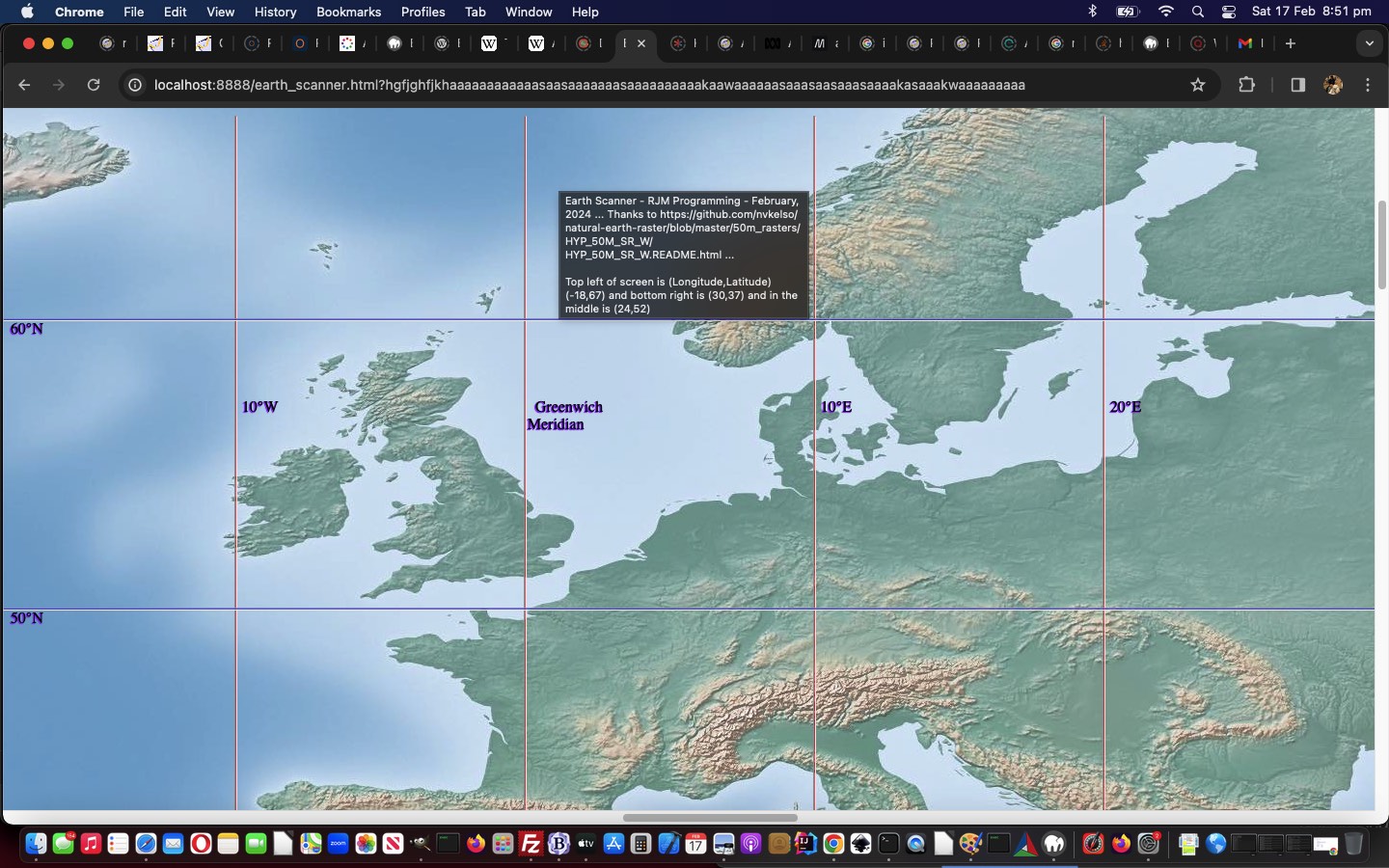
Earth Scanner Lines Tutorial
Not everybody is a geography buff. But I'd say more people attended primary school than are geography buffs. And those people may have seen World Maps on the wall, and they were often Mercator Projection maps featuring the usual country and sea boundaries, as well as useful reference lines ...
- lines of latitude, including, in between top "North Pole" 90° N and "South Pole" 90° S bottom ...
- Arctic Circle 66° 34' N
- Tropic of Cancer 23° 26' N
- Equator 0°
- Tropic of Capricorn 23° 26' S
- Antarctic Circle 66° 34' S
- meridians of longitude (only the Equator above, is as long as ... and in the "Go Figure, Mercator" realms, the North Pole and South Pole are each of zero length, in "non-projection land"), including ...
- Greenwich Meridian 0°
- International Date Line 180° (but in practice, broken up so as not to confuse regarding timezones for some Pacific island countries)
... that become useful as you scan your way around Earth, further to yesterday's Earth Scanner Primer Tutorial, in our changed second draft Earth Scanner web application.
Stop Press
Couple of points to note ...
- the linework is just hr (Horizontal rule) elements, which are not the challenge either horizontally or vertically, regarding linework, that any diagonality brings ...
- the matter of screen width and screen height, which we need to know precisely for the work above, can be more involved to calculate on mobile platforms ... we ended up, with great help from this useful link, with this Javascript code ...
  var screenwidth=screen.width, screenheight=screen.height;


  var wasthisso='';

  if (navigator.userAgent.match(/Android|BlackBerry|iPhone|iPad|iPod|Opera Mini|IEMobile/i)) {

  try {

  wasthisso=('' + window.orientation).replace(/^0$/g, 'portrait'); //"portrait";

  } catch (ehgfg) {

  wasthisso='';

  }

  if (wasthisso == '') {

  try {

  wasthisso='' + screen.orientation.type; //"portrait";

  } catch (hgfg) {

  wasthisso=('' + window.orientation).replace(/^0$/g, 'portrait'); //"portrait";

  }

  }

  //alert(wasthisso);

  var hdone=false;

  if (wasthisso.indexOf('ortrait') != -1) { // thanks to https://stackoverflow.com/questions/50690191/window-innerheight-returning-wrong-value-in-ios-11

    if (eval('0' + document.documentElement.clientWidth) >= eval('0' + window.innerWidth)) {

    screenwidth=eval('' + document.documentElement.clientWidth);

    screenheight=eval('' + document.documentElement.clientHeight);

    hdone=true;

    } else {

    screenwidth=window.innerWidth;

    }

    if (!hdone) {

    if (eval('0' + document.documentElement.clientHeight) > eval('0' + window.innerHeight)) {

    screenheight=eval('' + document.documentElement.clientHeight);

    } else {

    screenheight=window.innerHeight;

    }

    }

  } else {

    if (eval('0' + document.documentElement.clientWidth) >= eval('0' + window.innerHeight)) {

    screenwidth=eval('' + document.documentElement.clientWidth);

    screenheight=eval('' + document.documentElement.clientHeight);

    hdone=true;

    } else {

    screenwidth=window.innerHeight;

    }

    if (!hdone) {

    if (eval('0' + document.documentElement.clientHeight) > eval('0' + window.innerWidth)) {

    screenheight=eval('' + document.documentElement.clientHeight);

    } else {

    screenheight=window.innerWidth;

    }

    }

  }

 // alert(wasthisso + ' ' + screenwidth + 'x' + screenheight);

            if (1 == 6) {

            documentURL=documentURL + '&nolines=y';

            if (documentURL.indexOf('.html') != -1) {

              location.href=document.URL.replace('.html','.htm');

            }

            }

  }
... in Earth Scanner Primer Tutorial, in our changed third draft Earth Scanner web application
Previous relevant Earth Scanner Primer Tutorial is shown below.
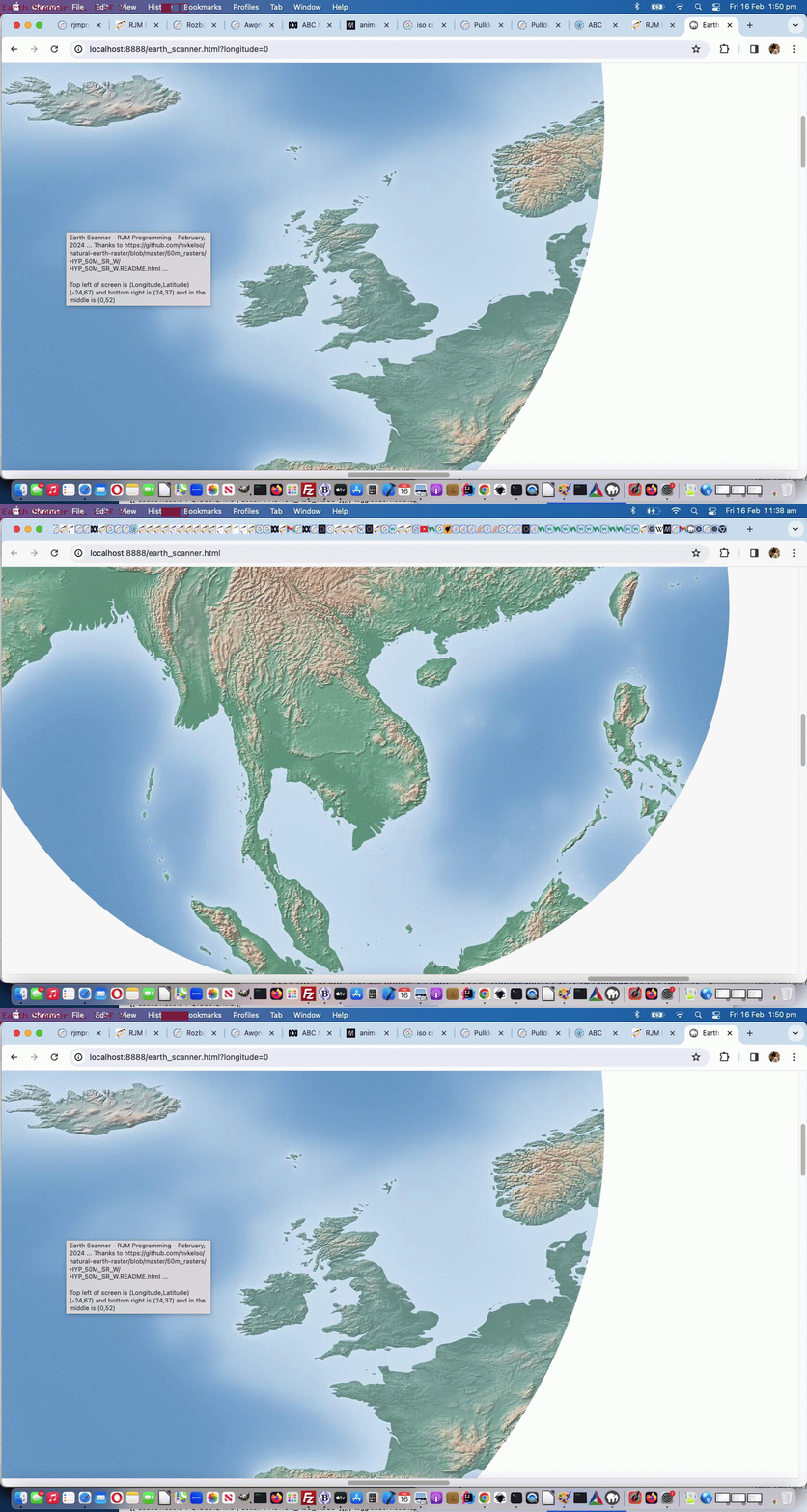
Earth Scanner Primer Tutorial
Today we've got for you a tutorial that takes bits and pieces from ...
- "Just Javascript" (ie. no body element to speak of as you begin) ... ref: Just Javascript Card Game iPhone Debugging Tutorial
- "CSS Property clip-path" ... ref: Region Picker Area of Interest
- "GeoJson" especially regarding reverse engineering on the Mercator projection ... ref: Google Chart Image Chart Map Chart GeoJson Onclick Tutorial
- "One Image Website" regarding scrolling and images bigger than screen ... ref: One Image Website Scrolling Position Fix Tutorial
- "CSS keyframes Animation" ... ref: CSS Grid Column Animation Tutorial
... so as to create a new "Earth Scanner" web application in what we like to think of as "the where of life" realms.
In essence this Earth Scanner is pretty simple, so below you can see a first draft, "holus bolus" ...
<html>

<head>

<title>Earth Scanner - RJM Programming - February, 2024 ... Thanks to https://github.com/nvkelso/natural-earth-raster/blob/master/50m_rasters/HYP_50M_SR_W/HYP_50M_SR_W.README.html</title>

<style>

 #myimg {

   clip-path: circle(2% at 800px 700px);

   animation:mymove 5s infinite;

   -webkit-animation:mymove 5s infinite; /* Safari and Chrome */

}


@keyframes mymove

{

  0%   { clip-path: circle(2% at 0px 0px) }

  100% { clip-path: circle(16% at 140px 140px) }

}


@-webkit-keyframes mymove /* Safari and Chrome */

{

  0%   { clip-path: circle(2% at 0px 0px) }

  100% { clip-path: circle(16% at 140px 140px) }

}

</style>

<script type=text/javascript>

// Deemed unnecessary is ...

//  7%   { clip-path: circle(3% at 10px 10px) }

//  14%  { clip-path: circle(4% at 20px 20px) }

//  21%  { clip-path: circle(5% at 30px 30px) }

//  28%  { clip-path: circle(6% at 40px 40px) }

//  35%  { clip-path: circle(7% at 50px 50px) }

//  42%  { clip-path: circle(8% at 60px 60px) }

//  50%  { clip-path: circle(9% at 70px 70px) }

//  57%  { clip-path: circle(10% at 80px 80px) }

//  64%  { clip-path: circle(11% at 90px 90px) }

//  71%  { clip-path: circle(12% at 100px 100px) }

//  78%  { clip-path: circle(13% at 110px 110px) }

//  85%  { clip-path: circle(14% at 120px 120px) }

//  93%  { clip-path: circle(15% at 130px 130px) }


  var xp=0, yp=0, num=0;

  var fixkeys='<style> #myimg {  animation:mymove 5s infinite; -webkit-animation:mymove 5s infinite; } @keyframes mymove' + document.head.innerHTML.split('@keyframes mymove')[1].split('</style>')[0] + ' </style>';

  var screenlong=-9, screenlat=-9, askfor=null, enforcedlong=false, enforcedxp=-999;


  function scmove() {

    var longforce='-999', latforce='-999';

    if (screenlong < 0) {

      screenlong=eval(360 * screen.width / document.getElementById('myimg').width);

      screenlat=eval(180 * screen.height / document.getElementById('myimg').height);

      document.getElementById('myimg').onclick=function() {  askfor=prompt('Earth Scanner - RJM Programming - February, 2024 ... ' + String.fromCharCode(10) + 'Thanks to https://github.com/nvkelso/natural-earth-raster/blob/master/50m_rasters/HYP_50M_SR_W/HYP_50M_SR_W.README.html ... ' + String.fromCharCode(10) + 'Currently top left of screen is (Longitude,Latitude) ' + '(' + eval(-180 + xp * 360 / 100) + ',' + eval(90 - yp * 180 / 100) + ') and bottom right is (' + eval(-180 + screenlong + xp * 360 / 100) + ',' + eval(90 - screenlat - yp * 180 / 100) + ') and in the middle is (' + eval(-180 + eval(screenlong / 2) + xp * 360 / 100) + ',' + eval(90 - eval(screenlat / 2) - yp * 180 / 100) + ').' + String.fromCharCode(10) + 'Where do you want middle of screen to be in terms of Longitude,Latitude?', ''); };

    }

    //document.title="window.scrollTo(" + eval(xp * eval('' + document.getElementById('myimg').width) / 100) + "," + eval(yp * eval('' + document.getElementById('myimg').height) / 100) + ")";

    if (askfor != null) {

       if (askfor.replace('(','').replace(')','').indexOf(',') != -1) {

         longforce=askfor.replace('(','').replace(')','').split(',')[0];

         latforce=askfor.replace('(','').replace(')','').split(',')[1];

       } else if (askfor.replace('(','').replace(')','').indexOf(' ') != -1) {

         longforce=askfor.replace('(','').replace(')','').split(' ')[0];

         latforce=askfor.replace('(','').replace(')','').split(' ')[1];

       }

       //xp = eval(((eval(eval('' + longforce) + 180) / 360) * eval('' + document.getElementById('myimg').width) / 100) - 0 * eval(eval(screenlong / 720) * eval('' + document.getElementById('myimg').width) / 100));

       //yp = eval(((eval(90 - eval('' + latforce)) / 180) * eval('' + document.getElementById('myimg').height) / 100) + 0 * eval(eval(screenlat / 360) * eval('' + document.getElementById('myimg').height) / 100));

       xp = eval(eval(eval('' + longforce) - screenlong / 2 + 180) / 3.60); // * eval('' + document.getElementById('myimg').width) / 100) - 0 * eval(eval(screenlong / 720) * eval('' + document.getElementById('myimg').width) / 100));

       yp = eval(eval(90 - eval('' + latforce) - screenlat / 2) / 1.80); // * eval('' + document.getElementById('myimg').height) / 100) + 0 * eval(eval(screenlat / 360) * eval('' + document.getElementById('myimg').height) / 100));

       //alert('' + xp + ',' + yp + ' ... ' + "window.scrollTo(" + eval(xp * eval('' + document.getElementById('myimg').width) / 100) + "," + eval(yp * eval('' + document.getElementById('myimg').height) / 100) + ")");

       askfor=null;

       if (enforcedlong) {

          enforcedlong=false;

          enforcedxp=xp;

          //alert(xp + ' or ' + enforcedxp);

       }

    }

    eval("window.scrollTo(" + eval((enforcedxp > -990 ? enforcedxp : xp) * eval('' + document.getElementById('myimg').width) / 100) + "," + eval(yp * eval('' + document.getElementById('myimg').height) / 100) + ")");

    document.getElementById('myimg').title='Earth Scanner - RJM Programming - February, 2024 ... ' + 'Thanks to https://github.com/nvkelso/natural-earth-raster/blob/master/50m_rasters/HYP_50M_SR_W/HYP_50M_SR_W.README.html ... ' + String.fromCharCode(10) + String.fromCharCode(10) + 'Top left of screen is (Longitude,Latitude) ' + '(' + eval(-180 + (enforcedxp > -990 ? enforcedxp : xp) * 360 / 100) + ',' + eval(90 - yp * 180 / 100) + ') and bottom right is (' + eval(-180 + screenlong + (enforcedxp > -990 ? enforcedxp : xp) * 360 / 100) + ',' + eval(90 - screenlat - yp * 180 / 100) + ') and in the middle is (' + eval(-180 + eval(screenlong / 2) + (enforcedxp > -990 ? enforcedxp : xp) * 360 / 100) + ',' + eval(90 - eval(screenlat / 2) - yp * 180 / 100) + ')';

    document.title=document.getElementById('myimg').title; //'Top left of screen is (Longitude,Latitude) ' + '(' + eval(-180 + xp * 360 / 100) + ',' + eval(90 - yp * 180 / 100) + ') and bottom right is (' + eval(-180 + screenlong + (enforcedxp > -990 ? enforcedxp : xp) * 360 / 100) + ',' + eval(90 - screenlat - yp * 180 / 100) + ') and in the middle is (' + eval(-180 + eval(screenlong / 2) + (enforcedxp > -990 ? enforcedxp : xp) * 360 / 100) + ',' + eval(90 - eval(screenlat / 2) - yp * 180 / 100) + ')';

    if (xp < 95) {

      xp+=5;

    } else if (yp >= 95 && xp >= 95) {

      enforcedxp=-999;

      xp=0;

      yp=0;

    } else {

      yp+=5;

      xp=0;

    }

    var xdiff=eval((enforcedxp > -990 ? enforcedxp : xp) * eval('' + document.getElementById('myimg').width) / 100);

    var ydiff=eval(yp * eval('' + document.getElementById('myimg').height) / 100);

    var startkeys=fixkeys;

    var coords=fixkeys.split('px');

    for (var ic=0; ic<coords.length; ic+=2) {

      if (coords[ic].split(' ')[eval(-1 + coords[ic].split(' ').length)].indexOf('<') == -1) {

      //alert('' + xdiff + ',' + ydiff+ ',' + coords[ic].split(' ')[eval(-1 + coords[ic].split(' ').length)]);

      startkeys=startkeys.replace(' ' + coords[ic].split(' ')[eval(-1 + coords[ic].split(' ').length)] + 'px', ' ' + eval(xdiff + eval('' + coords[ic].split(' ')[eval(-1 + coords[ic].split(' ').length)])) + 'px');

      startkeys=startkeys.replace(' ' + coords[eval(1 + ic)].split(' ')[eval(-1 + coords[eval(1 + ic)].split(' ').length)] + 'px', ' ' + eval(ydiff + eval('' + coords[eval(1 + ic)].split(' ')[eval(-1 + coords[eval(1 + ic)].split(' ').length)])) + 'px');

      }

    }

    //alert(startkeys);

    document.getElementById('dstyle').innerHTML=startkeys; //.replace(/mymove/g, 'mymove' + num);

    num++;

  }


  setInterval(scmove, 5000);

  document.write("<img src='/HTMLCSS/HYP_50M_SR_W.jpg' id=myimg></img><div id=dstyle></div>");

  var latis=location.search.split('latitude=')[1] ? decodeURIComponent(location.search.split('latitude=')[1].split('&')[0]) : '';

  var longis=location.search.split('longitude=')[1] ? decodeURIComponent(location.search.split('longitude=')[1].split('&')[0]) : '';

  if (latis != '' && longis != '') {

    askfor='' + longis + ',' + latis;

  } else if (latis != '') {

    askfor='-168,' + latis;

  } else if (longis != '') {

    enforcedlong=true;

    askfor='' + longis + ',70';

  }

</script>

</head>

<body>

</body>

</html>
... with great thanks to this great resource as the crucial image in our first draft Earth Scanner web application.
Please note using it, it does have onclick logic to specify ...
- your own (longitude, latitude) to send the middle of the screen's content to
- at the address bar ...
https://www.rjmprogramming.com.au/HTMLCSS/earth_scanner.html?latitude=-33&longitude=151# Can center you around Sydney Australia

https://www.rjmprogramming.com.au/HTMLCSS/earth_scanner.html?latitude=0# Can take you, first up, on a tour around the equator in the middle of the screen

https://www.rjmprogramming.com.au/HTMLCSS/earth_scanner.html?longitude=0# Can take you, first up, on a tour down the zero meridian of longitude past London's Greenwich in the middle of the screen
If this was interesting you may be interested in this too.
If this was interesting you may be interested in this too.
If this was interesting you may be interested in this too.
If this was interesting you may be interested in this too.
If this was interesting you may be interested in this too.
If this was interesting you may be interested in this too.
If this was interesting you may be interested in this too.
If this was interesting you may be interested in this too.
If this was interesting you may be interested in this too.
If this was interesting you may be interested in this too.
If this was interesting you may be interested in this too.
If this was interesting you may be interested in this too.
If this was interesting you may be interested in this too.
If this was interesting you may be interested in this too.
If this was interesting you may be interested in this too.

