
XML Public Data Genericization Field Names Tutorial

XML Public Data Genericization Field Names Tutorial

XML Public Data Genericization Field Names Tutorial

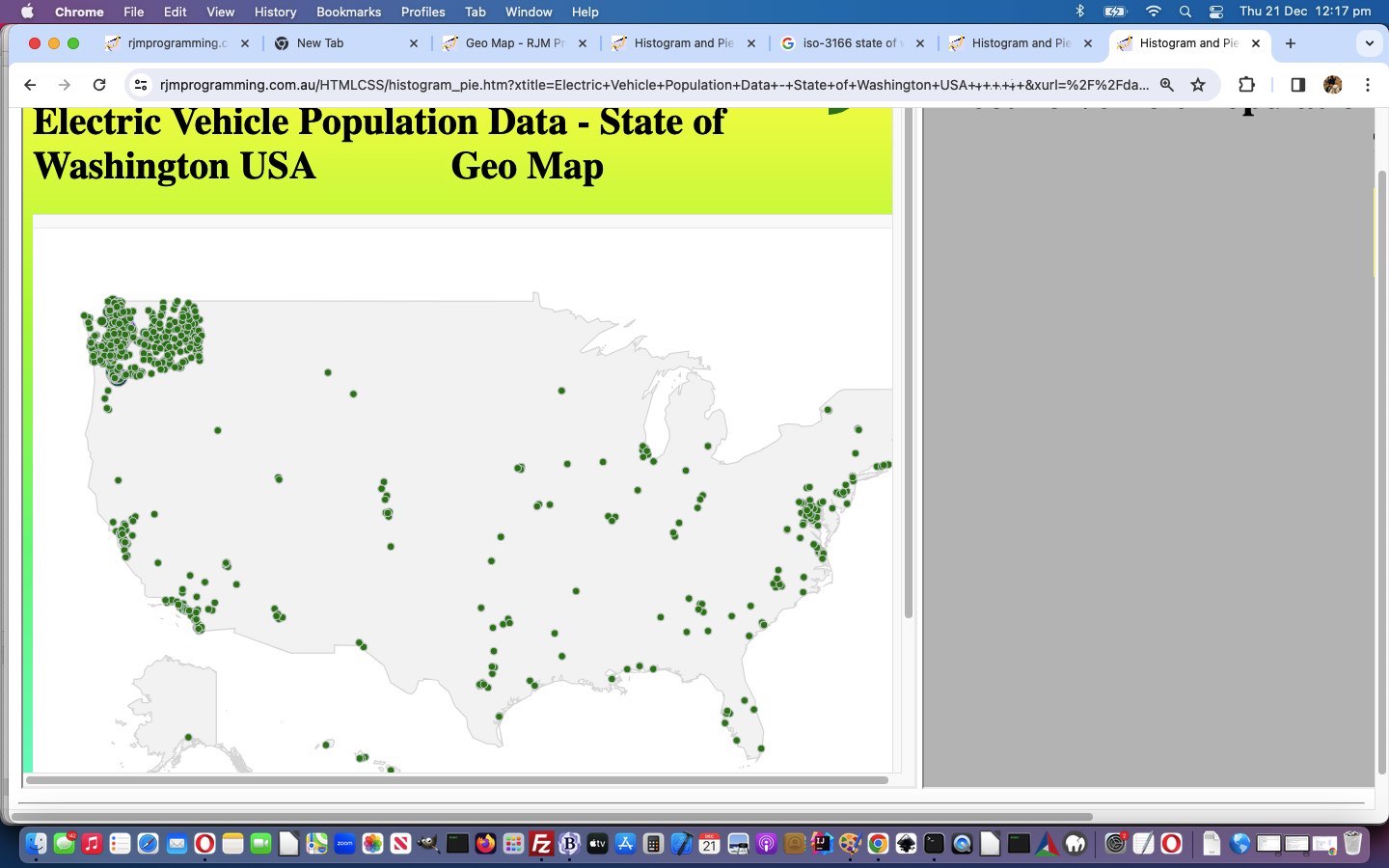
We come at improvements to the functionality of yesterday’s XML Public Data Genericization XPath Tutorial‘s XML Public Data Google Charts Display web application from two angles …

  • we allow for an “early days” Geocoding data Google Chart Geo Chart display option … “early days” because we took advantage of some obvious conditions (ie. within data a POINT (longitude latitude) data format was being used) in the data we tested with, but “data being data” am sure we need to test more XML data here … and …
  • we add in an XML data field name dropdown the user can use to tailor what fields comprise what they are interested in (using Ajax laced Javascript code below) …

    function stateChanged() {
    if (myxhr.readyState == 4) {
    if (myxhr.status == 200) {
    var fns=myxhr.responseText.split('"fieldName" : "');
    for (var ifns=1; ifns<fns.length; ifns++) {
    if (ifns == 1) {
    arrflds=[];
    fieldsel='  or  <select onchange=addfieldname(this); id=myfldsel><option id=myfldselopt value="">Optionally display selected field name(s) value(s) ...</option></select>';
    }
    if (fns[ifns].indexOf(':@') != 0 && fns[ifns].trim() != '') {
    arrflds.push(fns[ifns].split('"')[0]);
    fieldsel=fieldsel.replace('</select>', '<option value="' + fns[ifns].split('"')[0] + '">' + fns[ifns].split('"')[0] + '</option></select>');
    }
    }
    if (document.getElementById('spanflds')) {
    document.getElementById('spanflds').innerHTML=fieldsel;
    }
    }
    }
    }

    var xurlis=location.search.split('xurl=')[1] ? decodeURIComponent(location.search.split('xurl=')[1].split('&')[0]).replace(/\+/g,' ') : "//data.ny.gov/api/views/d6yy-54nr/rows.xml";

    var arrflds=[];
    var myxhr = new XMLHttpRequest();
    myxhr.open('GET', xurlis.replace('/' + xurlis.split('/')[eval(-1 + xurlis.split('/').length)], '/'), true);
    myxhr.responseType = "text";
    myxhr.onreadystatechange=stateChanged;
    myxhr.send(null);

    … to pass onto the Google Chart displays

… in histogram_pie.html with this link there for you to try it out for yourself.


Previous relevant XML Public Data Genericization XPath Tutorial is shown below.
XML Public Data Genericization XPath Tutorial

XML Public Data Genericization XPath Tutorial

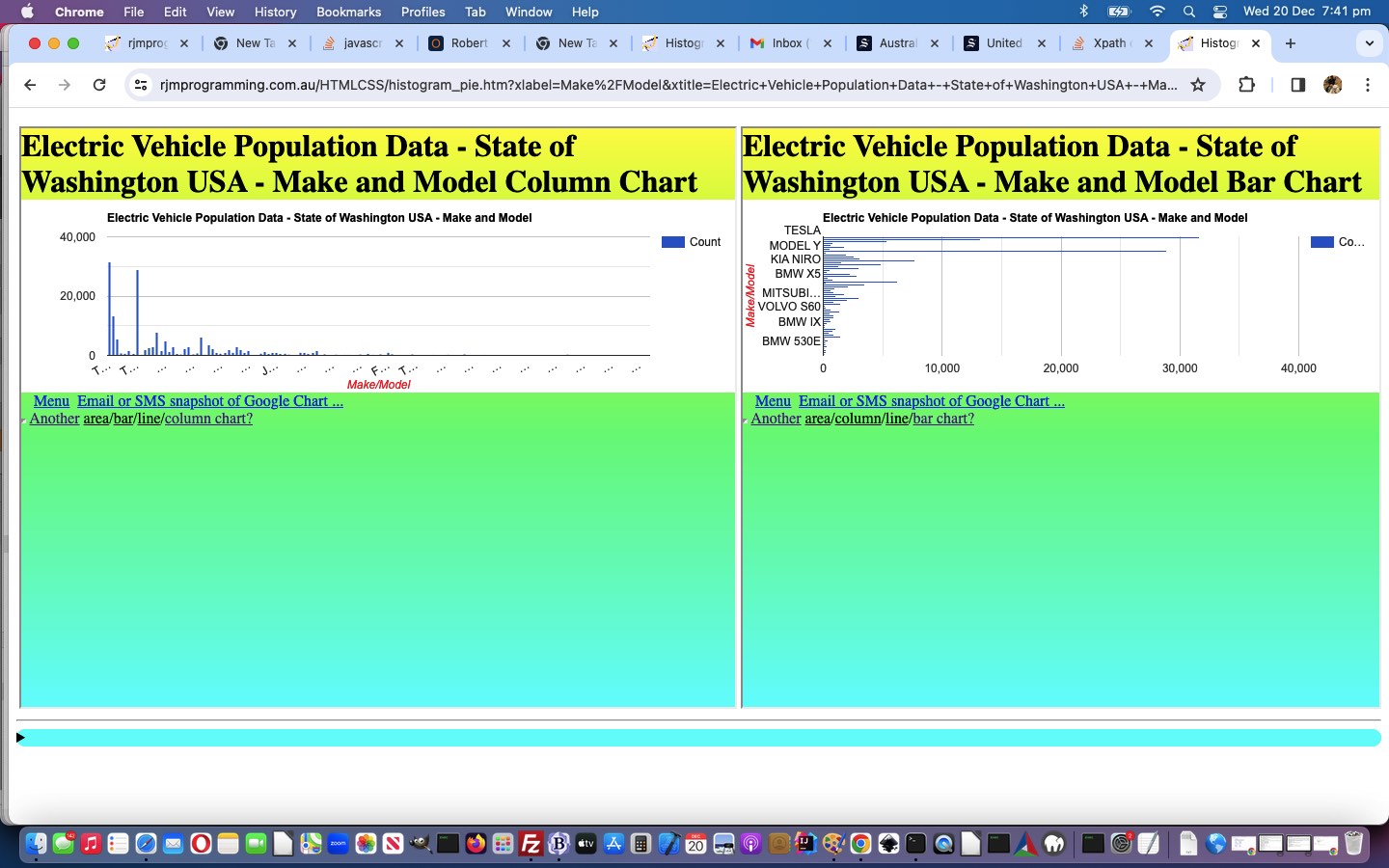
You might have gathered from our current blog posting thread that XML XPath usage can be a bit of an art form. As such, we’ve had a day of XPath tweaking, such that an XML XPath path like …

Be prompted (thanks to this useful link) Concatenate two fields into one (thanks to this useful link)

/response/row/row/child::*

/response/row/row/*[self::make or self::model]

… ideas may interest some people reading this blog posting, we’re hoping.

This also got us to consider using Google Chart

  • Column Chart
  • Bar Chart

… to output findings when the user is deciding to deploy some of these ideas, extending the work of yesterday’s XML Public Data Genericization Sharing Tutorial with respect to the changed new version of our histogram_pie.html arrangement with this link.


Previous relevant XML Public Data Genericization Sharing Tutorial is shown below.
XML Public Data Genericization Sharing Tutorial

XML Public Data Genericization Sharing Tutorial

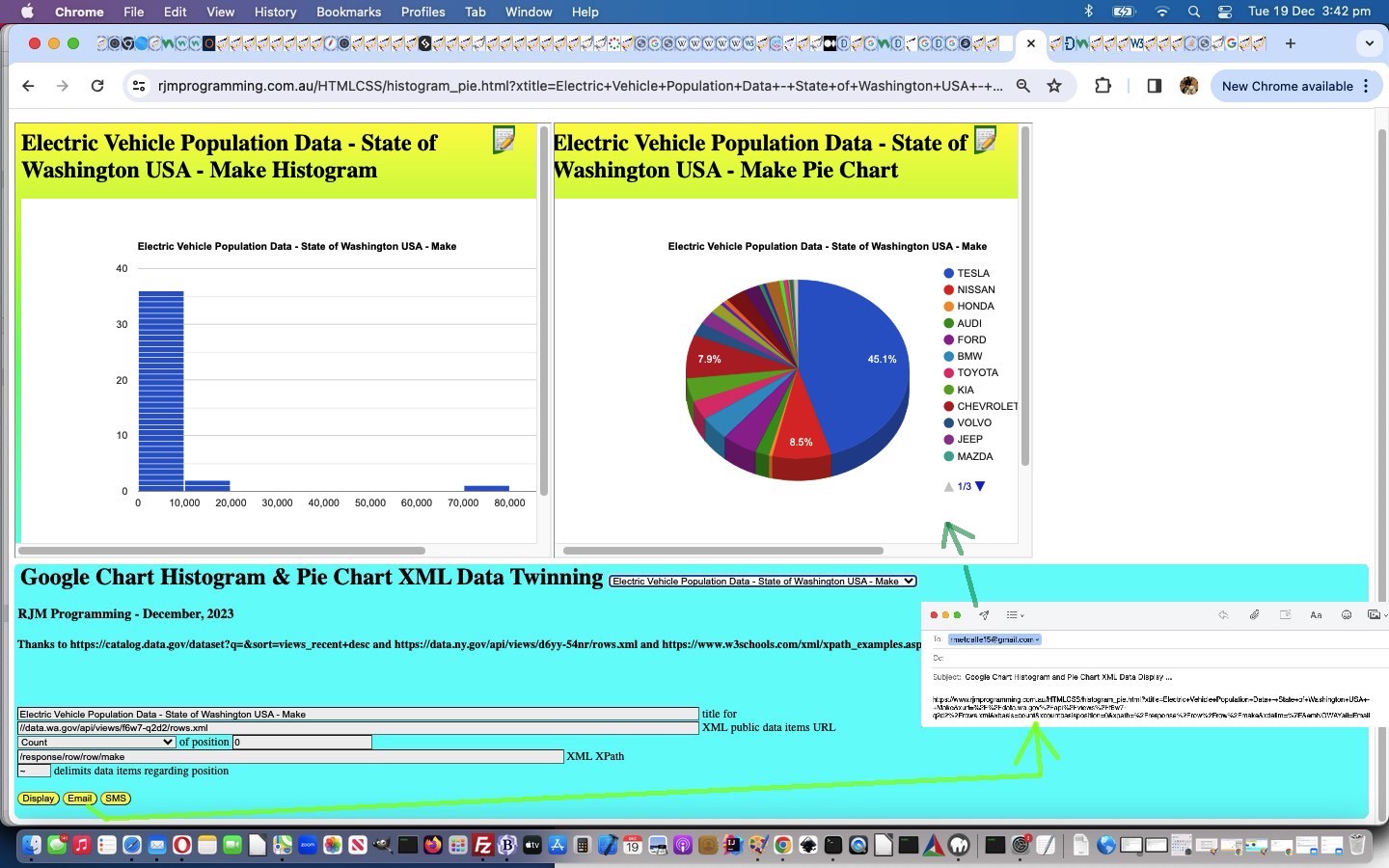
It can be some job to decouple hardcopy “particulars” of a web application “starting scenario” to “the ultimate genericization solution”, and, of course, often it is futile to try. But, further to yesterday’s Powerball Number Pick XML Genericization Tutorial start on this, the “two elephants in the room” remaining beyond their welcome, would have to be …

  • twinning Google Chart Histograms and Pie Charts … as the only output means … and …
  • XML … as the only input data format

… since …

  • there are many other chart types … and …
  • there are many other data formats … as a peruse of USA’s data.gov will undoubtedly show you

That second “XML” decoupling, of course, to many a programmer (but maybe so ho hum to non-programmers) “turns their wooooooorrrrrrrllllllllddddd upside down” (and nobody wants to be confronted by a “dddddllllllllrrrrrrrooooooow” on the loose), while we can imagine, fairly easily, starting to incorporate other apt Google Chart types into the mix. But we have to walk before we run, or even amble. And so, today, along with …

  • sharing (via email or SMS, covered by adding two new relevant form buttons with type=submit) code …

    var xsmsis=location.search.split('sms=')[1] ? decodeURIComponent(location.search.split('sms=')[1].split('&')[0]).replace(/\+/g,' ').replace(/^SMS$/g, '') : "";
    var xemailis=location.search.split('email=')[1] ? decodeURIComponent(location.search.split('email=')[1].split('&')[0]).replace(/\+/g,' ').replace(/^Email$/g, ' ') : (document.URL.indexOf('email=') != -1 ? " " : "");

    if (xsmsis.trim() != '' && xsmsis.replace(/\,/g,'').trim().replace(/0/g,'').replace(/1/g,'').replace(/2/g,'').replace(/3/g,'').replace(/4/g,'').replace(/5/g,'').replace(/6/g,'').replace(/7/g,'').replace(/8/g,'').replace(/9/g,'') == '') {
    aso = document.createElement("a");
    document.body.appendChild(aso);
    aso.style = "display: none";
    aso.href = 'sms:' + xsmsis + '&body=' + encodeURIComponent(document.URL.replace('&email=', '&emNOWAYail=').replace('&sms=', '&smNOWAYs='));
    aso.click();
    setTimeout(() => {
    document.body.removeChild(aso);
    }, 100);
    }

    if (xemailis != '') {
    aeo = document.createElement("a");
    document.body.appendChild(aeo);
    aeo.style = "display: none";
    aeo.href = 'mailto:' + xemailis.trim() + '?subject=Google%20Chart%20Histogram%20and%20Pie%20Chart%20XML%20Data%20Display%20...&body=' + encodeURIComponent(document.URL.replace('&email=', '&emNOWAYail=').replace('&sms=', '&smNOWAYs='));
    aeo.click();
    setTimeout(() => {
    document.body.removeChild(aeo);
    }, 100);
    }

    … we …
  • introduce an “Ideas …” dropdown … with its onchange event logic below …

    function populate(selo) {
    if (selo.value.trim() != '') {
    var pts=selo.value.split('#');
    for (var ipts=0; ipts case 0:
    document.getElementById('xurl').value=pts[ipts];
    if (pts[ipts].indexOf('//data.ny.gov/api/views/d6yy-54nr/rows.xml') == -1) {
    document.getElementById('xbasis').value='count';
    document.getElementById('xcountbasisposition').value='0';
    document.getElementById('xcountbasisposition').type='number';
    }
    break;

    case 1:
    document.getElementById('xpath').value=pts[ipts];
    break;

    case 2:
    document.getElementById('xtitle').value=pts[ipts];
    break;

    case 3:
    document.getElementById('xdelim').value=pts[ipts].replace('+',' ');
    break;

    case 3:
    document.getElementById('xbasis').value=pts[ipts].replace('+',' ');
    break;

    default:
    break;

    }
    }

    }

    }

    … where we help the user fill out those tricky “form textbox asks” for data sets with topics of interest

… and we hope by experimenting along these lines of thought, we’ll chip away at it, and make some other Google Chart types come into play, into the future, with this current Public XML Data URL Based web application we have going.

And so, feel free to try the changed new version of our histogram_pie.html arrangement with this link.


Previous relevant Powerball Number Pick XML Genericization Tutorial is shown below.
Powerball Number Pick XML Genericization Tutorial

Powerball Number Pick XML Genericization Tutorial

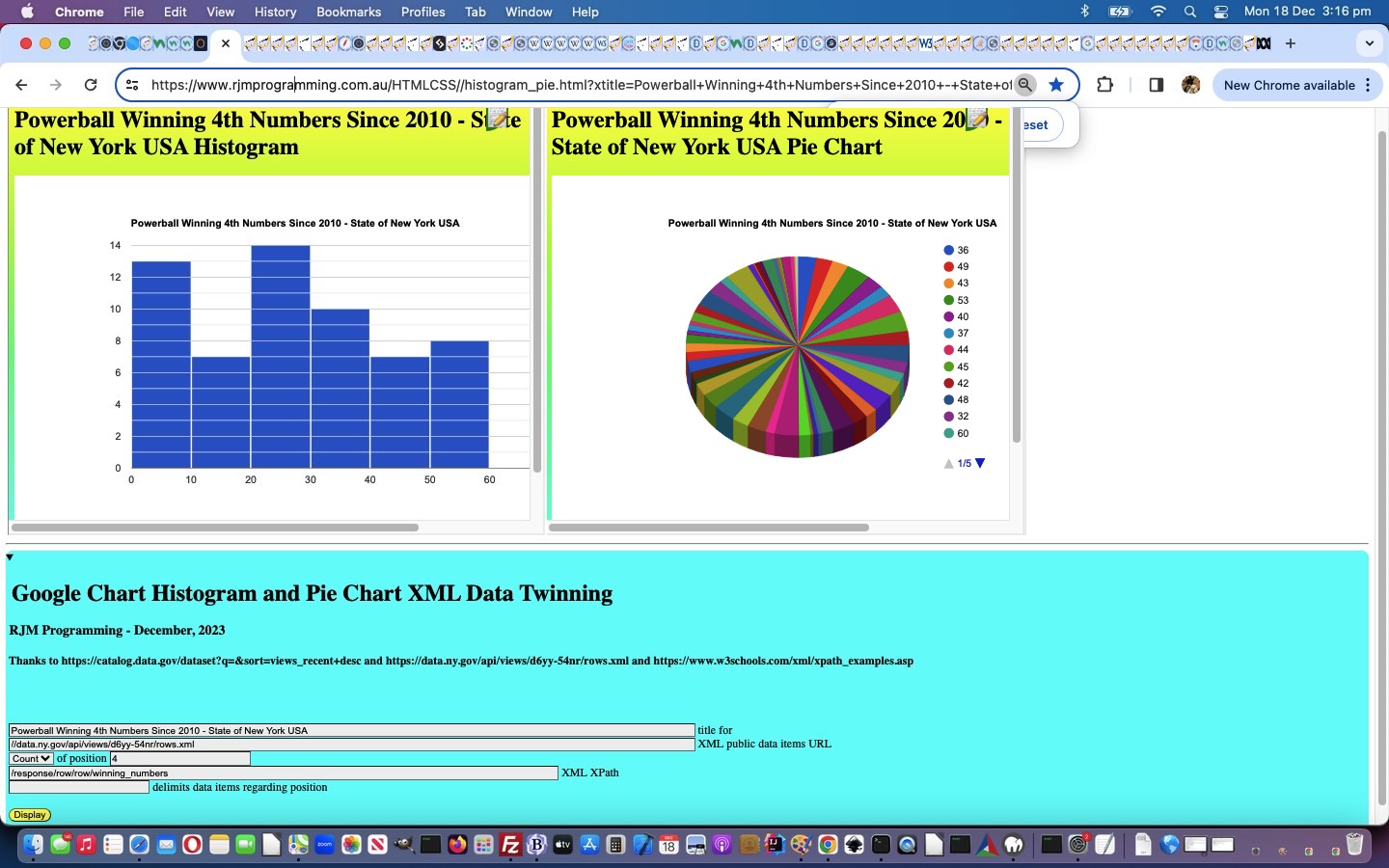
There have been many projects where we start with hardcoded wording involved in the webpage, and then to move on, we parameterize (or genericize) those hardcodings via …

  • HTML form … user data collection …
  • gathered together via a method=GET form into an “argument rich” follow up URL navigation … calling the same webpage …
  • and displaying results according to those user defined HTML form inputs

Yesterday’s Powerball Number Pick Counts XML Tutorial project is no different. We saw that potential hardcodings were to do with …

  • chart title
  • XML data public URL
  • XML XPath
  • data delimiter

… and then we stopped and thought a bit about “value adding”. Was “Count” as a “measure basis” the only “measure basis” of any relevance for the Histograms and Pie Charts? In the end we continued …

  • Count … as the default “measure basis” … to which we added (all reducing a set of numbers to one representative value in the case of Powerball Winning Numbers, at least) …
  • Count of an ordinal position according to the data delimiter and the data itself (doh!)
  • Mean (if numerical)
  • Median (if numerical)
  • Mode (if numerical)
  • Sum (if numerical)
  • Range (if numerical)
  • Standard Deviation (if numerical)

… could all be “value add” evaluations a user might find interesting, even just playing around with the Powerball NY US 2010 XML data.

See how we got to our more generic HTML and Javascript histogram_pie.html arrangement with this link.


Previous relevant Powerball Number Pick Counts XML Tutorial is shown below.
Powerball Number Pick Counts XML Tutorial

Powerball Number Pick Counts XML Tutorial

We’re starting a …

  • public data source … repository based …
  • XMLdata based …
  • Ajax … driven (and thanks to W3Schools here, for the XML XPath basis in code) …
  • clientside web application … outputting, in this first draft (which is very “bare bones”), as outputs …
  • Google Charts
    1. Histogram Chart
    2. Pie Chart

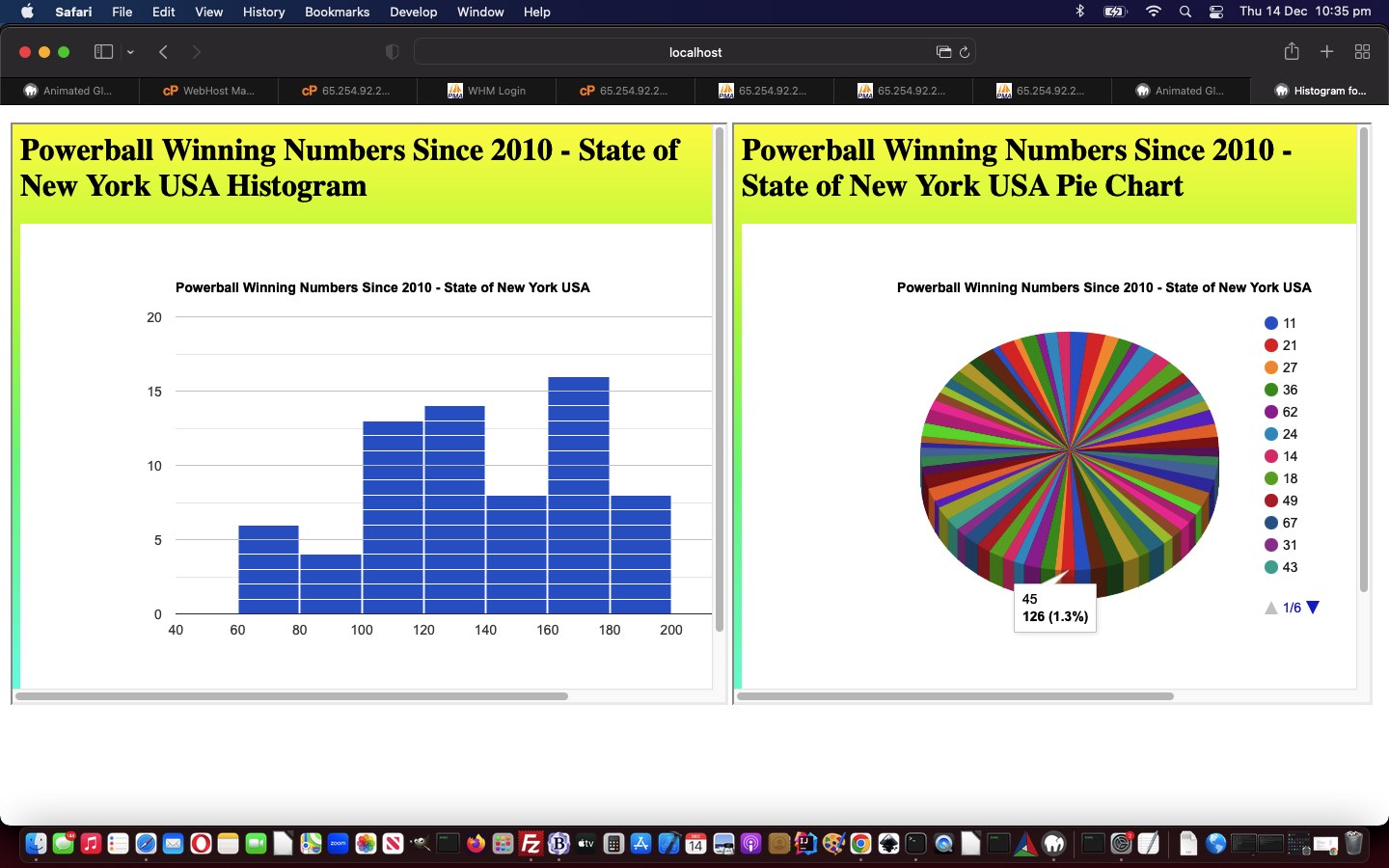
… new powerball_us_ny_winning_numbers_since_21010.html web application project today. Why those two charts? Well, they give different views of built up data pairings, involving two data members, one “subject item” (which today, happens to be numerical, but does not have to be) and the other numerical data item having a relationship with that “subject item” as a measure, in today’s case that being a count of …


New York State, US Powerball Number Pick Counts since 2010

Yes, you can glean many things from the public online data resources out there, today’s one for us coming from the US Governmental data.gov … thanks all around.

In the code, what is the crucial single codeline, at least for us? It’s


var datasofar='', nums=[], ij=0, jk=0;
var xhttp = new XMLHttpRequest();
xhttp.onreadystatechange = function() {
if (this.readyState == 4 && this.status == 200) {
showResult(xhttp.responseXML);
}
};
xhttp.open("GET", "//data.ny.gov/api/views/d6yy-54nr/rows.xml", true);
xhttp.send();

function showResult(xml) {
var txt = "";


path = "/response/row/row/winning_numbers"


if (xml.evaluate) {
var nodes = xml.evaluate(path, xml, null, XPathResult.ANY_TYPE, null);
var result = nodes.iterateNext();
while (result) {
txt += result.childNodes[0].nodeValue + "<br>";
nums=('' + result.childNodes[0].nodeValue).split(' ');
for (ii=0; ii<nums.length; ii++) {
if (datasofar.indexOf(',[~' + nums[ii] + '~,') == -1) {
datasofar+=',[~' + nums[ii] + '~,1]';
} else {
jk=eval(datasofar.split(',[~' + nums[ii] + '~,')[1].split(']')[0]);
datasofar=datasofar.replace(',[~' + nums[ii] + '~,' + jk + ']', ',[~' + nums[ii] + '~,' + eval(1 + jk) + ']');
}
}
result = nodes.iterateNext();
}
// Code For Internet Explorer
} else if (window.ActiveXObject || xhttp.responseType == "msxml-document") {
xml.setProperty("SelectionLanguage", "XPath");
nodes = xml.selectNodes(path);
for (i = 0; i < nodes.length; i++) {
txt += nodes[i].childNodes[0].nodeValue + "<br>";
nums=('' + nodes[i].childNodes[0].nodeValue).split(' ');
for (ii=0; ii<nums.length; ii++) {
if (datasofar.indexOf(',[~' + nums[ii] + '~,') == -1) {
datasofar+=',[~' + nums[ii] + '~,1]';
} else {
jk=eval(datasofar.split(',[~' + nums[ii] + '~,')[1].split(']')[0]);
datasofar=datasofar.replace(',[~' + nums[ii] + '~,' + jk + ']', ',[~' + nums[ii] + '~,' + eval(1 + jk) + ']');
}
}
}
}
//document.getElementById("demo").innerHTML = txt;
var proposed=document.getElementById('myi').src.split('&data=')[0] + '&data=' + datasofar;
if (eval('' + proposed.length) < 850) {
document.getElementById('myi').src=document.getElementById('myi').src.split('&data=')[0] + '&data=' + datasofar;
document.getElementById('mpi').src=document.getElementById('mpi').src.split('&data=')[0] + '&data=' + datasofar.replace(/\]\,\[/g, ']%20,%20[').replace(',[', ',%20[');
} else {
document.getElementById('data').value=datasofar;
document.getElementById('mybut').click();
document.getElementById('datap').value=datasofar.replace(/\]\,\[/g, '] , [').replace(',[', ', ['); // ,%20[~45~,23]%20,%20[~
document.getElementById('mybutp').click();
}
document.getElementById('myi').style.display='block';
document.getElementById('mpi').style.display='block';
}


<response>
<row>
<row _id="row-nx2r_usun.g52b" _uuid="00000000-0000-0000-9D99-B9EA775FDC5E" _position="0" _address="https://data.ny.gov/resource/d6yy-54nr/row-nx2r_usun.g52b">
<draw_date>2020-09-26T00:00:00</draw_date>
<winning_numbers>11 21 27 36 62 24</winning_numbers>
<multiplier>3</multiplier>
</row>
<row _id="row-e8ru_54jr.pm4v" _uuid="00000000-0000-0000-43B5-52ACB7706E11" _position="0" _address="https://data.ny.gov/resource/d6yy-54nr/row-e8ru_54jr.pm4v">
<draw_date>2020-09-30T00:00:00</draw_date>
<winning_numbers>14 18 36 49 67 18</winning_numbers>
<multiplier>2</multiplier>
</row>
<row _id="row-tq8m.jys2~s8vu" _uuid="00000000-0000-0000-A5B2-0AAE86635EA3" _position="0" _address="https://data.ny.gov/resource/d6yy-54nr/row-tq8m.jys2~s8vu">
<draw_date>2020-10-03T00:00:00</draw_date>
<winning_numbers>18 31 36 43 47 20</winning_numbers>
<multiplier>2</multiplier>
</row>
<row _id="row-fyha_3jj2-8cdk" _uuid="00000000-0000-0000-8755-E68E26427D31" _position="0" _address="https://data.ny.gov/resource/d6yy-54nr/row-fyha_3jj2-8cdk">
<draw_date>2020-10-07T00:00:00</draw_date>
<winning_numbers>06 24 30 53 56 19</winning_numbers>
<multiplier>2</multiplier>
</row>
<row _id="row-t7k7-dhjv-h47w" _uuid="00000000-0000-0000-EF27-CF03FBB38022" _position="0" _address="https://data.ny.gov/resource/d6yy-54nr/row-t7k7-dhjv-h47w">
<draw_date>2020-10-10T00:00:00</draw_date>
<winning_numbers>05 18 23 40 50 18</winning_numbers>
<multiplier>3</multiplier>
</row>
// many more rows here
// end of many more rows
</row>
</response>

… this codeline’s “slicing through complexity” cut through, perfectly suited to the XML data scenario above, presenting those Google Chart displays, as the end result.

If this was interesting you may be interested in this too.


If this was interesting you may be interested in this too.

If this was interesting you may be interested in this too.

If this was interesting you may be interested in this too.

If this was interesting you may be interested in this too.
Posted in eLearning, Event-Driven Programming, Tutorials | Tagged , , , , , , , , , , , , , , , , , , , , , , , , , , , , , , , , , , , , , , , , , , , , , , , , , , , | Leave a comment

XML Public Data Genericization XPath Tutorial

XML Public Data Genericization XPath Tutorial

XML Public Data Genericization XPath Tutorial

You might have gathered from our current blog posting thread that XML XPath usage can be a bit of an art form. As such, we’ve had a day of XPath tweaking, such that an XML XPath path like …

Be prompted (thanks to this useful link) Concatenate two fields into one (thanks to this useful link)

/response/row/row/child::*

/response/row/row/*[self::make or self::model]

… ideas may interest some people reading this blog posting, we’re hoping.

This also got us to consider using Google Chart

  • Column Chart
  • Bar Chart

… to output findings when the user is deciding to deploy some of these ideas, extending the work of yesterday’s XML Public Data Genericization Sharing Tutorial with respect to the changed new version of our histogram_pie.html arrangement with this link.


Previous relevant XML Public Data Genericization Sharing Tutorial is shown below.

XML Public Data Genericization Sharing Tutorial

XML Public Data Genericization Sharing Tutorial

It can be some job to decouple hardcopy “particulars” of a web application “starting scenario” to “the ultimate genericization solution”, and, of course, often it is futile to try. But, further to yesterday’s Powerball Number Pick XML Genericization Tutorial start on this, the “two elephants in the room” remaining beyond their welcome, would have to be …

  • twinning Google Chart Histograms and Pie Charts … as the only output means … and …
  • XML … as the only input data format

… since …

  • there are many other chart types … and …
  • there are many other data formats … as a peruse of USA’s data.gov will undoubtedly show you

That second “XML” decoupling, of course, to many a programmer (but maybe so ho hum to non-programmers) “turns their wooooooorrrrrrrllllllllddddd upside down” (and nobody wants to be confronted by a “dddddllllllllrrrrrrrooooooow” on the loose), while we can imagine, fairly easily, starting to incorporate other apt Google Chart types into the mix. But we have to walk before we run, or even amble. And so, today, along with …

  • sharing (via email or SMS, covered by adding two new relevant form buttons with type=submit) code …

    var xsmsis=location.search.split('sms=')[1] ? decodeURIComponent(location.search.split('sms=')[1].split('&')[0]).replace(/\+/g,' ').replace(/^SMS$/g, '') : "";
    var xemailis=location.search.split('email=')[1] ? decodeURIComponent(location.search.split('email=')[1].split('&')[0]).replace(/\+/g,' ').replace(/^Email$/g, ' ') : (document.URL.indexOf('email=') != -1 ? " " : "");

    if (xsmsis.trim() != '' && xsmsis.replace(/\,/g,'').trim().replace(/0/g,'').replace(/1/g,'').replace(/2/g,'').replace(/3/g,'').replace(/4/g,'').replace(/5/g,'').replace(/6/g,'').replace(/7/g,'').replace(/8/g,'').replace(/9/g,'') == '') {
    aso = document.createElement("a");
    document.body.appendChild(aso);
    aso.style = "display: none";
    aso.href = 'sms:' + xsmsis + '&body=' + encodeURIComponent(document.URL.replace('&email=', '&emNOWAYail=').replace('&sms=', '&smNOWAYs='));
    aso.click();
    setTimeout(() => {
    document.body.removeChild(aso);
    }, 100);
    }

    if (xemailis != '') {
    aeo = document.createElement("a");
    document.body.appendChild(aeo);
    aeo.style = "display: none";
    aeo.href = 'mailto:' + xemailis.trim() + '?subject=Google%20Chart%20Histogram%20and%20Pie%20Chart%20XML%20Data%20Display%20...&body=' + encodeURIComponent(document.URL.replace('&email=', '&emNOWAYail=').replace('&sms=', '&smNOWAYs='));
    aeo.click();
    setTimeout(() => {
    document.body.removeChild(aeo);
    }, 100);
    }

    … we …
  • introduce an “Ideas …” dropdown … with its onchange event logic below …

    function populate(selo) {
    if (selo.value.trim() != '') {
    var pts=selo.value.split('#');
    for (var ipts=0; ipts case 0:
    document.getElementById('xurl').value=pts[ipts];
    if (pts[ipts].indexOf('//data.ny.gov/api/views/d6yy-54nr/rows.xml') == -1) {
    document.getElementById('xbasis').value='count';
    document.getElementById('xcountbasisposition').value='0';
    document.getElementById('xcountbasisposition').type='number';
    }
    break;

    case 1:
    document.getElementById('xpath').value=pts[ipts];
    break;

    case 2:
    document.getElementById('xtitle').value=pts[ipts];
    break;

    case 3:
    document.getElementById('xdelim').value=pts[ipts].replace('+',' ');
    break;

    case 3:
    document.getElementById('xbasis').value=pts[ipts].replace('+',' ');
    break;

    default:
    break;

    }
    }

    }

    }

    … where we help the user fill out those tricky “form textbox asks” for data sets with topics of interest

… and we hope by experimenting along these lines of thought, we’ll chip away at it, and make some other Google Chart types come into play, into the future, with this current Public XML Data URL Based web application we have going.

And so, feel free to try the changed new version of our histogram_pie.html arrangement with this link.


Previous relevant Powerball Number Pick XML Genericization Tutorial is shown below.

Powerball Number Pick XML Genericization Tutorial

Powerball Number Pick XML Genericization Tutorial

There have been many projects where we start with hardcoded wording involved in the webpage, and then to move on, we parameterize (or genericize) those hardcodings via …

  • HTML form … user data collection …
  • gathered together via a method=GET form into an “argument rich” follow up URL navigation … calling the same webpage …
  • and displaying results according to those user defined HTML form inputs

Yesterday’s Powerball Number Pick Counts XML Tutorial project is no different. We saw that potential hardcodings were to do with …

  • chart title
  • XML data public URL
  • XML XPath
  • data delimiter

… and then we stopped and thought a bit about “value adding”. Was “Count” as a “measure basis” the only “measure basis” of any relevance for the Histograms and Pie Charts? In the end we continued …

  • Count … as the default “measure basis” … to which we added (all reducing a set of numbers to one representative value in the case of Powerball Winning Numbers, at least) …
  • Count of an ordinal position according to the data delimiter and the data itself (doh!)
  • Mean (if numerical)
  • Median (if numerical)
  • Mode (if numerical)
  • Sum (if numerical)
  • Range (if numerical)
  • Standard Deviation (if numerical)

… could all be “value add” evaluations a user might find interesting, even just playing around with the Powerball NY US 2010 XML data.

See how we got to our more generic HTML and Javascript histogram_pie.html arrangement with this link.


Previous relevant Powerball Number Pick Counts XML Tutorial is shown below.

Powerball Number Pick Counts XML Tutorial

Powerball Number Pick Counts XML Tutorial

We’re starting a …

  • public data source … repository based …
  • XMLdata based …
  • Ajax … driven (and thanks to W3Schools here, for the XML XPath basis in code) …
  • clientside web application … outputting, in this first draft (which is very “bare bones”), as outputs …
  • Google Charts
    1. Histogram Chart
    2. Pie Chart

… new powerball_us_ny_winning_numbers_since_21010.html web application project today. Why those two charts? Well, they give different views of built up data pairings, involving two data members, one “subject item” (which today, happens to be numerical, but does not have to be) and the other numerical data item having a relationship with that “subject item” as a measure, in today’s case that being a count of …


New York State, US Powerball Number Pick Counts since 2010

Yes, you can glean many things from the public online data resources out there, today’s one for us coming from the US Governmental data.gov … thanks all around.

In the code, what is the crucial single codeline, at least for us? It’s


var datasofar='', nums=[], ij=0, jk=0;
var xhttp = new XMLHttpRequest();
xhttp.onreadystatechange = function() {
if (this.readyState == 4 && this.status == 200) {
showResult(xhttp.responseXML);
}
};
xhttp.open("GET", "//data.ny.gov/api/views/d6yy-54nr/rows.xml", true);
xhttp.send();

function showResult(xml) {
var txt = "";


path = "/response/row/row/winning_numbers"


if (xml.evaluate) {
var nodes = xml.evaluate(path, xml, null, XPathResult.ANY_TYPE, null);
var result = nodes.iterateNext();
while (result) {
txt += result.childNodes[0].nodeValue + "<br>";
nums=('' + result.childNodes[0].nodeValue).split(' ');
for (ii=0; ii<nums.length; ii++) {
if (datasofar.indexOf(',[~' + nums[ii] + '~,') == -1) {
datasofar+=',[~' + nums[ii] + '~,1]';
} else {
jk=eval(datasofar.split(',[~' + nums[ii] + '~,')[1].split(']')[0]);
datasofar=datasofar.replace(',[~' + nums[ii] + '~,' + jk + ']', ',[~' + nums[ii] + '~,' + eval(1 + jk) + ']');
}
}
result = nodes.iterateNext();
}
// Code For Internet Explorer
} else if (window.ActiveXObject || xhttp.responseType == "msxml-document") {
xml.setProperty("SelectionLanguage", "XPath");
nodes = xml.selectNodes(path);
for (i = 0; i < nodes.length; i++) {
txt += nodes[i].childNodes[0].nodeValue + "<br>";
nums=('' + nodes[i].childNodes[0].nodeValue).split(' ');
for (ii=0; ii<nums.length; ii++) {
if (datasofar.indexOf(',[~' + nums[ii] + '~,') == -1) {
datasofar+=',[~' + nums[ii] + '~,1]';
} else {
jk=eval(datasofar.split(',[~' + nums[ii] + '~,')[1].split(']')[0]);
datasofar=datasofar.replace(',[~' + nums[ii] + '~,' + jk + ']', ',[~' + nums[ii] + '~,' + eval(1 + jk) + ']');
}
}
}
}
//document.getElementById("demo").innerHTML = txt;
var proposed=document.getElementById('myi').src.split('&data=')[0] + '&data=' + datasofar;
if (eval('' + proposed.length) < 850) {
document.getElementById('myi').src=document.getElementById('myi').src.split('&data=')[0] + '&data=' + datasofar;
document.getElementById('mpi').src=document.getElementById('mpi').src.split('&data=')[0] + '&data=' + datasofar.replace(/\]\,\[/g, ']%20,%20[').replace(',[', ',%20[');
} else {
document.getElementById('data').value=datasofar;
document.getElementById('mybut').click();
document.getElementById('datap').value=datasofar.replace(/\]\,\[/g, '] , [').replace(',[', ', ['); // ,%20[~45~,23]%20,%20[~
document.getElementById('mybutp').click();
}
document.getElementById('myi').style.display='block';
document.getElementById('mpi').style.display='block';
}


<response>
<row>
<row _id="row-nx2r_usun.g52b" _uuid="00000000-0000-0000-9D99-B9EA775FDC5E" _position="0" _address="https://data.ny.gov/resource/d6yy-54nr/row-nx2r_usun.g52b">
<draw_date>2020-09-26T00:00:00</draw_date>
<winning_numbers>11 21 27 36 62 24</winning_numbers>
<multiplier>3</multiplier>
</row>
<row _id="row-e8ru_54jr.pm4v" _uuid="00000000-0000-0000-43B5-52ACB7706E11" _position="0" _address="https://data.ny.gov/resource/d6yy-54nr/row-e8ru_54jr.pm4v">
<draw_date>2020-09-30T00:00:00</draw_date>
<winning_numbers>14 18 36 49 67 18</winning_numbers>
<multiplier>2</multiplier>
</row>
<row _id="row-tq8m.jys2~s8vu" _uuid="00000000-0000-0000-A5B2-0AAE86635EA3" _position="0" _address="https://data.ny.gov/resource/d6yy-54nr/row-tq8m.jys2~s8vu">
<draw_date>2020-10-03T00:00:00</draw_date>
<winning_numbers>18 31 36 43 47 20</winning_numbers>
<multiplier>2</multiplier>
</row>
<row _id="row-fyha_3jj2-8cdk" _uuid="00000000-0000-0000-8755-E68E26427D31" _position="0" _address="https://data.ny.gov/resource/d6yy-54nr/row-fyha_3jj2-8cdk">
<draw_date>2020-10-07T00:00:00</draw_date>
<winning_numbers>06 24 30 53 56 19</winning_numbers>
<multiplier>2</multiplier>
</row>
<row _id="row-t7k7-dhjv-h47w" _uuid="00000000-0000-0000-EF27-CF03FBB38022" _position="0" _address="https://data.ny.gov/resource/d6yy-54nr/row-t7k7-dhjv-h47w">
<draw_date>2020-10-10T00:00:00</draw_date>
<winning_numbers>05 18 23 40 50 18</winning_numbers>
<multiplier>3</multiplier>
</row>
// many more rows here
// end of many more rows
</row>
</response>

… this codeline’s “slicing through complexity” cut through, perfectly suited to the XML data scenario above, presenting those Google Chart displays, as the end result.

If this was interesting you may be interested in this too.


If this was interesting you may be interested in this too.


If this was interesting you may be interested in this too.


If this was interesting you may be interested in this too.

Posted in eLearning, Event-Driven Programming, Tutorials | Tagged , , , , , , , , , , , , , , , , , , , , , , , , , , , , , , , , , , , , , , , , , , , , , | Leave a comment

XML Public Data Genericization Sharing Tutorial

XML Public Data Genericization Sharing Tutorial

XML Public Data Genericization Sharing Tutorial

It can be some job to decouple hardcopy “particulars” of a web application “starting scenario” to “the ultimate genericization solution”, and, of course, often it is futile to try. But, further to yesterday’s Powerball Number Pick XML Genericization Tutorial start on this, the “two elephants in the room” remaining beyond their welcome, would have to be …

  • twinning Google Chart Histograms and Pie Charts … as the only output means … and …
  • XML … as the only input data format

… since …

  • there are many other chart types … and …
  • there are many other data formats … as a peruse of USA’s data.gov will undoubtedly show you

That second “XML” decoupling, of course, to many a programmer (but maybe so ho hum to non-programmers) “turns their wooooooorrrrrrrllllllllddddd upside down” (and nobody wants to be confronted by a “dddddllllllllrrrrrrrooooooow” on the loose), while we can imagine, fairly easily, starting to incorporate other apt Google Chart types into the mix. But we have to walk before we run, or even amble. And so, today, along with …

  • sharing (via email or SMS, covered by adding two new relevant form buttons with type=submit) code …

    var xsmsis=location.search.split('sms=')[1] ? decodeURIComponent(location.search.split('sms=')[1].split('&')[0]).replace(/\+/g,' ').replace(/^SMS$/g, '') : "";
    var xemailis=location.search.split('email=')[1] ? decodeURIComponent(location.search.split('email=')[1].split('&')[0]).replace(/\+/g,' ').replace(/^Email$/g, ' ') : (document.URL.indexOf('email=') != -1 ? " " : "");

    if (xsmsis.trim() != '' && xsmsis.replace(/\,/g,'').trim().replace(/0/g,'').replace(/1/g,'').replace(/2/g,'').replace(/3/g,'').replace(/4/g,'').replace(/5/g,'').replace(/6/g,'').replace(/7/g,'').replace(/8/g,'').replace(/9/g,'') == '') {
    aso = document.createElement("a");
    document.body.appendChild(aso);
    aso.style = "display: none";
    aso.href = 'sms:' + xsmsis + '&body=' + encodeURIComponent(document.URL.replace('&email=', '&emNOWAYail=').replace('&sms=', '&smNOWAYs='));
    aso.click();
    setTimeout(() => {
    document.body.removeChild(aso);
    }, 100);
    }

    if (xemailis != '') {
    aeo = document.createElement("a");
    document.body.appendChild(aeo);
    aeo.style = "display: none";
    aeo.href = 'mailto:' + xemailis.trim() + '?subject=Google%20Chart%20Histogram%20and%20Pie%20Chart%20XML%20Data%20Display%20...&body=' + encodeURIComponent(document.URL.replace('&email=', '&emNOWAYail=').replace('&sms=', '&smNOWAYs='));
    aeo.click();
    setTimeout(() => {
    document.body.removeChild(aeo);
    }, 100);
    }

    … we …
  • introduce an “Ideas …” dropdown … with its onchange event logic below …

    function populate(selo) {
    if (selo.value.trim() != '') {
    var pts=selo.value.split('#');
    for (var ipts=0; ipts case 0:
    document.getElementById('xurl').value=pts[ipts];
    if (pts[ipts].indexOf('//data.ny.gov/api/views/d6yy-54nr/rows.xml') == -1) {
    document.getElementById('xbasis').value='count';
    document.getElementById('xcountbasisposition').value='0';
    document.getElementById('xcountbasisposition').type='number';
    }
    break;

    case 1:
    document.getElementById('xpath').value=pts[ipts];
    break;

    case 2:
    document.getElementById('xtitle').value=pts[ipts];
    break;

    case 3:
    document.getElementById('xdelim').value=pts[ipts].replace('+',' ');
    break;

    case 3:
    document.getElementById('xbasis').value=pts[ipts].replace('+',' ');
    break;

    default:
    break;

    }
    }

    }

    }

    … where we help the user fill out those tricky “form textbox asks” for data sets with topics of interest

… and we hope by experimenting along these lines of thought, we’ll chip away at it, and make some other Google Chart types come into play, into the future, with this current Public XML Data URL Based web application we have going.

And so, feel free to try the changed new version of our histogram_pie.html arrangement with this link.


Previous relevant Powerball Number Pick XML Genericization Tutorial is shown below.

Powerball Number Pick XML Genericization Tutorial

Powerball Number Pick XML Genericization Tutorial

There have been many projects where we start with hardcoded wording involved in the webpage, and then to move on, we parameterize (or genericize) those hardcodings via …

  • HTML form … user data collection …
  • gathered together via a method=GET form into an “argument rich” follow up URL navigation … calling the same webpage …
  • and displaying results according to those user defined HTML form inputs

Yesterday’s Powerball Number Pick Counts XML Tutorial project is no different. We saw that potential hardcodings were to do with …

  • chart title
  • XML data public URL
  • XML XPath
  • data delimiter

… and then we stopped and thought a bit about “value adding”. Was “Count” as a “measure basis” the only “measure basis” of any relevance for the Histograms and Pie Charts? In the end we continued …

  • Count … as the default “measure basis” … to which we added (all reducing a set of numbers to one representative value in the case of Powerball Winning Numbers, at least) …
  • Count of an ordinal position according to the data delimiter and the data itself (doh!)
  • Mean (if numerical)
  • Median (if numerical)
  • Mode (if numerical)
  • Sum (if numerical)
  • Range (if numerical)
  • Standard Deviation (if numerical)

… could all be “value add” evaluations a user might find interesting, even just playing around with the Powerball NY US 2010 XML data.

See how we got to our more generic HTML and Javascript histogram_pie.html arrangement with this link.


Previous relevant Powerball Number Pick Counts XML Tutorial is shown below.

Powerball Number Pick Counts XML Tutorial

Powerball Number Pick Counts XML Tutorial

We’re starting a …

  • public data source … repository based …
  • XMLdata based …
  • Ajax … driven (and thanks to W3Schools here, for the XML XPath basis in code) …
  • clientside web application … outputting, in this first draft (which is very “bare bones”), as outputs …
  • Google Charts
    1. Histogram Chart
    2. Pie Chart

… new powerball_us_ny_winning_numbers_since_21010.html web application project today. Why those two charts? Well, they give different views of built up data pairings, involving two data members, one “subject item” (which today, happens to be numerical, but does not have to be) and the other numerical data item having a relationship with that “subject item” as a measure, in today’s case that being a count of …


New York State, US Powerball Number Pick Counts since 2010

Yes, you can glean many things from the public online data resources out there, today’s one for us coming from the US Governmental data.gov … thanks all around.

In the code, what is the crucial single codeline, at least for us? It’s


var datasofar='', nums=[], ij=0, jk=0;
var xhttp = new XMLHttpRequest();
xhttp.onreadystatechange = function() {
if (this.readyState == 4 && this.status == 200) {
showResult(xhttp.responseXML);
}
};
xhttp.open("GET", "//data.ny.gov/api/views/d6yy-54nr/rows.xml", true);
xhttp.send();

function showResult(xml) {
var txt = "";


path = "/response/row/row/winning_numbers"


if (xml.evaluate) {
var nodes = xml.evaluate(path, xml, null, XPathResult.ANY_TYPE, null);
var result = nodes.iterateNext();
while (result) {
txt += result.childNodes[0].nodeValue + "<br>";
nums=('' + result.childNodes[0].nodeValue).split(' ');
for (ii=0; ii<nums.length; ii++) {
if (datasofar.indexOf(',[~' + nums[ii] + '~,') == -1) {
datasofar+=',[~' + nums[ii] + '~,1]';
} else {
jk=eval(datasofar.split(',[~' + nums[ii] + '~,')[1].split(']')[0]);
datasofar=datasofar.replace(',[~' + nums[ii] + '~,' + jk + ']', ',[~' + nums[ii] + '~,' + eval(1 + jk) + ']');
}
}
result = nodes.iterateNext();
}
// Code For Internet Explorer
} else if (window.ActiveXObject || xhttp.responseType == "msxml-document") {
xml.setProperty("SelectionLanguage", "XPath");
nodes = xml.selectNodes(path);
for (i = 0; i < nodes.length; i++) {
txt += nodes[i].childNodes[0].nodeValue + "<br>";
nums=('' + nodes[i].childNodes[0].nodeValue).split(' ');
for (ii=0; ii<nums.length; ii++) {
if (datasofar.indexOf(',[~' + nums[ii] + '~,') == -1) {
datasofar+=',[~' + nums[ii] + '~,1]';
} else {
jk=eval(datasofar.split(',[~' + nums[ii] + '~,')[1].split(']')[0]);
datasofar=datasofar.replace(',[~' + nums[ii] + '~,' + jk + ']', ',[~' + nums[ii] + '~,' + eval(1 + jk) + ']');
}
}
}
}
//document.getElementById("demo").innerHTML = txt;
var proposed=document.getElementById('myi').src.split('&data=')[0] + '&data=' + datasofar;
if (eval('' + proposed.length) < 850) {
document.getElementById('myi').src=document.getElementById('myi').src.split('&data=')[0] + '&data=' + datasofar;
document.getElementById('mpi').src=document.getElementById('mpi').src.split('&data=')[0] + '&data=' + datasofar.replace(/\]\,\[/g, ']%20,%20[').replace(',[', ',%20[');
} else {
document.getElementById('data').value=datasofar;
document.getElementById('mybut').click();
document.getElementById('datap').value=datasofar.replace(/\]\,\[/g, '] , [').replace(',[', ', ['); // ,%20[~45~,23]%20,%20[~
document.getElementById('mybutp').click();
}
document.getElementById('myi').style.display='block';
document.getElementById('mpi').style.display='block';
}


<response>
<row>
<row _id="row-nx2r_usun.g52b" _uuid="00000000-0000-0000-9D99-B9EA775FDC5E" _position="0" _address="https://data.ny.gov/resource/d6yy-54nr/row-nx2r_usun.g52b">
<draw_date>2020-09-26T00:00:00</draw_date>
<winning_numbers>11 21 27 36 62 24</winning_numbers>
<multiplier>3</multiplier>
</row>
<row _id="row-e8ru_54jr.pm4v" _uuid="00000000-0000-0000-43B5-52ACB7706E11" _position="0" _address="https://data.ny.gov/resource/d6yy-54nr/row-e8ru_54jr.pm4v">
<draw_date>2020-09-30T00:00:00</draw_date>
<winning_numbers>14 18 36 49 67 18</winning_numbers>
<multiplier>2</multiplier>
</row>
<row _id="row-tq8m.jys2~s8vu" _uuid="00000000-0000-0000-A5B2-0AAE86635EA3" _position="0" _address="https://data.ny.gov/resource/d6yy-54nr/row-tq8m.jys2~s8vu">
<draw_date>2020-10-03T00:00:00</draw_date>
<winning_numbers>18 31 36 43 47 20</winning_numbers>
<multiplier>2</multiplier>
</row>
<row _id="row-fyha_3jj2-8cdk" _uuid="00000000-0000-0000-8755-E68E26427D31" _position="0" _address="https://data.ny.gov/resource/d6yy-54nr/row-fyha_3jj2-8cdk">
<draw_date>2020-10-07T00:00:00</draw_date>
<winning_numbers>06 24 30 53 56 19</winning_numbers>
<multiplier>2</multiplier>
</row>
<row _id="row-t7k7-dhjv-h47w" _uuid="00000000-0000-0000-EF27-CF03FBB38022" _position="0" _address="https://data.ny.gov/resource/d6yy-54nr/row-t7k7-dhjv-h47w">
<draw_date>2020-10-10T00:00:00</draw_date>
<winning_numbers>05 18 23 40 50 18</winning_numbers>
<multiplier>3</multiplier>
</row>
// many more rows here
// end of many more rows
</row>
</response>

… this codeline’s “slicing through complexity” cut through, perfectly suited to the XML data scenario above, presenting those Google Chart displays, as the end result.

If this was interesting you may be interested in this too.


If this was interesting you may be interested in this too.


If this was interesting you may be interested in this too.

Posted in eLearning, Event-Driven Programming, Tutorials | Tagged , , , , , , , , , , , , , , , , , , , , , , , , , , , , , , , , , , , , , , , , | Leave a comment

Powerball Number Pick XML Genericization Tutorial

Powerball Number Pick XML Genericization Tutorial

Powerball Number Pick XML Genericization Tutorial

There have been many projects where we start with hardcoded wording involved in the webpage, and then to move on, we parameterize (or genericize) those hardcodings via …

  • HTML form … user data collection …
  • gathered together via a method=GET form into an “argument rich” follow up URL navigation … calling the same webpage …
  • and displaying results according to those user defined HTML form inputs

Yesterday’s Powerball Number Pick Counts XML Tutorial project is no different. We saw that potential hardcodings were to do with …

  • chart title
  • XML data public URL
  • XML XPath
  • data delimiter

… and then we stopped and thought a bit about “value adding”. Was “Count” as a “measure basis” the only “measure basis” of any relevance for the Histograms and Pie Charts? In the end we continued …

  • Count … as the default “measure basis” … to which we added (all reducing a set of numbers to one representative value in the case of Powerball Winning Numbers, at least) …
  • Count of an ordinal position according to the data delimiter and the data itself (doh!)
  • Mean (if numerical)
  • Median (if numerical)
  • Mode (if numerical)
  • Sum (if numerical)
  • Range (if numerical)
  • Standard Deviation (if numerical)

… could all be “value add” evaluations a user might find interesting, even just playing around with the Powerball NY US 2010 XML data.

See how we got to our more generic HTML and Javascript histogram_pie.html arrangement with this link.


Previous relevant Powerball Number Pick Counts XML Tutorial is shown below.

Powerball Number Pick Counts XML Tutorial

Powerball Number Pick Counts XML Tutorial

We’re starting a …

  • public data source … repository based …
  • XMLdata based …
  • Ajax … driven (and thanks to W3Schools here, for the XML XPath basis in code) …
  • clientside web application … outputting, in this first draft (which is very “bare bones”), as outputs …
  • Google Charts
    1. Histogram Chart
    2. Pie Chart

… new powerball_us_ny_winning_numbers_since_21010.html web application project today. Why those two charts? Well, they give different views of built up data pairings, involving two data members, one “subject item” (which today, happens to be numerical, but does not have to be) and the other numerical data item having a relationship with that “subject item” as a measure, in today’s case that being a count of …


New York State, US Powerball Number Pick Counts since 2010

Yes, you can glean many things from the public online data resources out there, today’s one for us coming from the US Governmental data.gov … thanks all around.

In the code, what is the crucial single codeline, at least for us? It’s


var datasofar='', nums=[], ij=0, jk=0;
var xhttp = new XMLHttpRequest();
xhttp.onreadystatechange = function() {
if (this.readyState == 4 && this.status == 200) {
showResult(xhttp.responseXML);
}
};
xhttp.open("GET", "//data.ny.gov/api/views/d6yy-54nr/rows.xml", true);
xhttp.send();

function showResult(xml) {
var txt = "";


path = "/response/row/row/winning_numbers"


if (xml.evaluate) {
var nodes = xml.evaluate(path, xml, null, XPathResult.ANY_TYPE, null);
var result = nodes.iterateNext();
while (result) {
txt += result.childNodes[0].nodeValue + "<br>";
nums=('' + result.childNodes[0].nodeValue).split(' ');
for (ii=0; ii<nums.length; ii++) {
if (datasofar.indexOf(',[~' + nums[ii] + '~,') == -1) {
datasofar+=',[~' + nums[ii] + '~,1]';
} else {
jk=eval(datasofar.split(',[~' + nums[ii] + '~,')[1].split(']')[0]);
datasofar=datasofar.replace(',[~' + nums[ii] + '~,' + jk + ']', ',[~' + nums[ii] + '~,' + eval(1 + jk) + ']');
}
}
result = nodes.iterateNext();
}
// Code For Internet Explorer
} else if (window.ActiveXObject || xhttp.responseType == "msxml-document") {
xml.setProperty("SelectionLanguage", "XPath");
nodes = xml.selectNodes(path);
for (i = 0; i < nodes.length; i++) {
txt += nodes[i].childNodes[0].nodeValue + "<br>";
nums=('' + nodes[i].childNodes[0].nodeValue).split(' ');
for (ii=0; ii<nums.length; ii++) {
if (datasofar.indexOf(',[~' + nums[ii] + '~,') == -1) {
datasofar+=',[~' + nums[ii] + '~,1]';
} else {
jk=eval(datasofar.split(',[~' + nums[ii] + '~,')[1].split(']')[0]);
datasofar=datasofar.replace(',[~' + nums[ii] + '~,' + jk + ']', ',[~' + nums[ii] + '~,' + eval(1 + jk) + ']');
}
}
}
}
//document.getElementById("demo").innerHTML = txt;
var proposed=document.getElementById('myi').src.split('&data=')[0] + '&data=' + datasofar;
if (eval('' + proposed.length) < 850) {
document.getElementById('myi').src=document.getElementById('myi').src.split('&data=')[0] + '&data=' + datasofar;
document.getElementById('mpi').src=document.getElementById('mpi').src.split('&data=')[0] + '&data=' + datasofar.replace(/\]\,\[/g, ']%20,%20[').replace(',[', ',%20[');
} else {
document.getElementById('data').value=datasofar;
document.getElementById('mybut').click();
document.getElementById('datap').value=datasofar.replace(/\]\,\[/g, '] , [').replace(',[', ', ['); // ,%20[~45~,23]%20,%20[~
document.getElementById('mybutp').click();
}
document.getElementById('myi').style.display='block';
document.getElementById('mpi').style.display='block';
}


<response>
<row>
<row _id="row-nx2r_usun.g52b" _uuid="00000000-0000-0000-9D99-B9EA775FDC5E" _position="0" _address="https://data.ny.gov/resource/d6yy-54nr/row-nx2r_usun.g52b">
<draw_date>2020-09-26T00:00:00</draw_date>
<winning_numbers>11 21 27 36 62 24</winning_numbers>
<multiplier>3</multiplier>
</row>
<row _id="row-e8ru_54jr.pm4v" _uuid="00000000-0000-0000-43B5-52ACB7706E11" _position="0" _address="https://data.ny.gov/resource/d6yy-54nr/row-e8ru_54jr.pm4v">
<draw_date>2020-09-30T00:00:00</draw_date>
<winning_numbers>14 18 36 49 67 18</winning_numbers>
<multiplier>2</multiplier>
</row>
<row _id="row-tq8m.jys2~s8vu" _uuid="00000000-0000-0000-A5B2-0AAE86635EA3" _position="0" _address="https://data.ny.gov/resource/d6yy-54nr/row-tq8m.jys2~s8vu">
<draw_date>2020-10-03T00:00:00</draw_date>
<winning_numbers>18 31 36 43 47 20</winning_numbers>
<multiplier>2</multiplier>
</row>
<row _id="row-fyha_3jj2-8cdk" _uuid="00000000-0000-0000-8755-E68E26427D31" _position="0" _address="https://data.ny.gov/resource/d6yy-54nr/row-fyha_3jj2-8cdk">
<draw_date>2020-10-07T00:00:00</draw_date>
<winning_numbers>06 24 30 53 56 19</winning_numbers>
<multiplier>2</multiplier>
</row>
<row _id="row-t7k7-dhjv-h47w" _uuid="00000000-0000-0000-EF27-CF03FBB38022" _position="0" _address="https://data.ny.gov/resource/d6yy-54nr/row-t7k7-dhjv-h47w">
<draw_date>2020-10-10T00:00:00</draw_date>
<winning_numbers>05 18 23 40 50 18</winning_numbers>
<multiplier>3</multiplier>
</row>
// many more rows here
// end of many more rows
</row>
</response>

… this codeline’s “slicing through complexity” cut through, perfectly suited to the XML data scenario above, presenting those Google Chart displays, as the end result.

If this was interesting you may be interested in this too.


If this was interesting you may be interested in this too.

Posted in eLearning, Tutorials | Tagged , , , , , , , , , , , , , , , , , , , , , , , , , , , , , , , , , | Leave a comment

Powerball Number Pick Counts XML Tutorial

Powerball Number Pick Counts XML Tutorial

Powerball Number Pick Counts XML Tutorial

We’re starting a …

  • public data source … repository based …
  • XMLdata based …
  • Ajax … driven (and thanks to W3Schools here, for the XML XPath basis in code) …
  • clientside web application … outputting, in this first draft (which is very “bare bones”), as outputs …
  • Google Charts
    1. Histogram Chart
    2. Pie Chart

… new powerball_us_ny_winning_numbers_since_21010.html web application project today. Why those two charts? Well, they give different views of built up data pairings, involving two data members, one “subject item” (which today, happens to be numerical, but does not have to be) and the other numerical data item having a relationship with that “subject item” as a measure, in today’s case that being a count of …


New York State, US Powerball Number Pick Counts since 2010

Yes, you can glean many things from the public online data resources out there, today’s one for us coming from the US Governmental data.gov … thanks all around.

In the code, what is the crucial single codeline, at least for us? It’s


var datasofar='', nums=[], ij=0, jk=0;
var xhttp = new XMLHttpRequest();
xhttp.onreadystatechange = function() {
if (this.readyState == 4 && this.status == 200) {
showResult(xhttp.responseXML);
}
};
xhttp.open("GET", "//data.ny.gov/api/views/d6yy-54nr/rows.xml", true);
xhttp.send();

function showResult(xml) {
var txt = "";


path = "/response/row/row/winning_numbers"


if (xml.evaluate) {
var nodes = xml.evaluate(path, xml, null, XPathResult.ANY_TYPE, null);
var result = nodes.iterateNext();
while (result) {
txt += result.childNodes[0].nodeValue + "<br>";
nums=('' + result.childNodes[0].nodeValue).split(' ');
for (ii=0; ii<nums.length; ii++) {
if (datasofar.indexOf(',[~' + nums[ii] + '~,') == -1) {
datasofar+=',[~' + nums[ii] + '~,1]';
} else {
jk=eval(datasofar.split(',[~' + nums[ii] + '~,')[1].split(']')[0]);
datasofar=datasofar.replace(',[~' + nums[ii] + '~,' + jk + ']', ',[~' + nums[ii] + '~,' + eval(1 + jk) + ']');
}
}
result = nodes.iterateNext();
}
// Code For Internet Explorer
} else if (window.ActiveXObject || xhttp.responseType == "msxml-document") {
xml.setProperty("SelectionLanguage", "XPath");
nodes = xml.selectNodes(path);
for (i = 0; i < nodes.length; i++) {
txt += nodes[i].childNodes[0].nodeValue + "<br>";
nums=('' + nodes[i].childNodes[0].nodeValue).split(' ');
for (ii=0; ii<nums.length; ii++) {
if (datasofar.indexOf(',[~' + nums[ii] + '~,') == -1) {
datasofar+=',[~' + nums[ii] + '~,1]';
} else {
jk=eval(datasofar.split(',[~' + nums[ii] + '~,')[1].split(']')[0]);
datasofar=datasofar.replace(',[~' + nums[ii] + '~,' + jk + ']', ',[~' + nums[ii] + '~,' + eval(1 + jk) + ']');
}
}
}
}
//document.getElementById("demo").innerHTML = txt;
var proposed=document.getElementById('myi').src.split('&data=')[0] + '&data=' + datasofar;
if (eval('' + proposed.length) < 850) {
document.getElementById('myi').src=document.getElementById('myi').src.split('&data=')[0] + '&data=' + datasofar;
document.getElementById('mpi').src=document.getElementById('mpi').src.split('&data=')[0] + '&data=' + datasofar.replace(/\]\,\[/g, ']%20,%20[').replace(',[', ',%20[');
} else {
document.getElementById('data').value=datasofar;
document.getElementById('mybut').click();
document.getElementById('datap').value=datasofar.replace(/\]\,\[/g, '] , [').replace(',[', ', ['); // ,%20[~45~,23]%20,%20[~
document.getElementById('mybutp').click();
}
document.getElementById('myi').style.display='block';
document.getElementById('mpi').style.display='block';
}


<response>
<row>
<row _id="row-nx2r_usun.g52b" _uuid="00000000-0000-0000-9D99-B9EA775FDC5E" _position="0" _address="https://data.ny.gov/resource/d6yy-54nr/row-nx2r_usun.g52b">
<draw_date>2020-09-26T00:00:00</draw_date>
<winning_numbers>11 21 27 36 62 24</winning_numbers>
<multiplier>3</multiplier>
</row>
<row _id="row-e8ru_54jr.pm4v" _uuid="00000000-0000-0000-43B5-52ACB7706E11" _position="0" _address="https://data.ny.gov/resource/d6yy-54nr/row-e8ru_54jr.pm4v">
<draw_date>2020-09-30T00:00:00</draw_date>
<winning_numbers>14 18 36 49 67 18</winning_numbers>
<multiplier>2</multiplier>
</row>
<row _id="row-tq8m.jys2~s8vu" _uuid="00000000-0000-0000-A5B2-0AAE86635EA3" _position="0" _address="https://data.ny.gov/resource/d6yy-54nr/row-tq8m.jys2~s8vu">
<draw_date>2020-10-03T00:00:00</draw_date>
<winning_numbers>18 31 36 43 47 20</winning_numbers>
<multiplier>2</multiplier>
</row>
<row _id="row-fyha_3jj2-8cdk" _uuid="00000000-0000-0000-8755-E68E26427D31" _position="0" _address="https://data.ny.gov/resource/d6yy-54nr/row-fyha_3jj2-8cdk">
<draw_date>2020-10-07T00:00:00</draw_date>
<winning_numbers>06 24 30 53 56 19</winning_numbers>
<multiplier>2</multiplier>
</row>
<row _id="row-t7k7-dhjv-h47w" _uuid="00000000-0000-0000-EF27-CF03FBB38022" _position="0" _address="https://data.ny.gov/resource/d6yy-54nr/row-t7k7-dhjv-h47w">
<draw_date>2020-10-10T00:00:00</draw_date>
<winning_numbers>05 18 23 40 50 18</winning_numbers>
<multiplier>3</multiplier>
</row>
// many more rows here
// end of many more rows
</row>
</response>

… this codeline’s “slicing through complexity” cut through, perfectly suited to the XML data scenario above, presenting those Google Chart displays, as the end result.

If this was interesting you may be interested in this too.

Posted in Ajax, eLearning, Tutorials | Tagged , , , , , , , , , , , , , , , , , , , | Leave a comment

Angled Text Tool External Javascript Tutorial

Angled Text Tool External Javascript Tutorial

Angled Text Tool External Javascript Tutorial

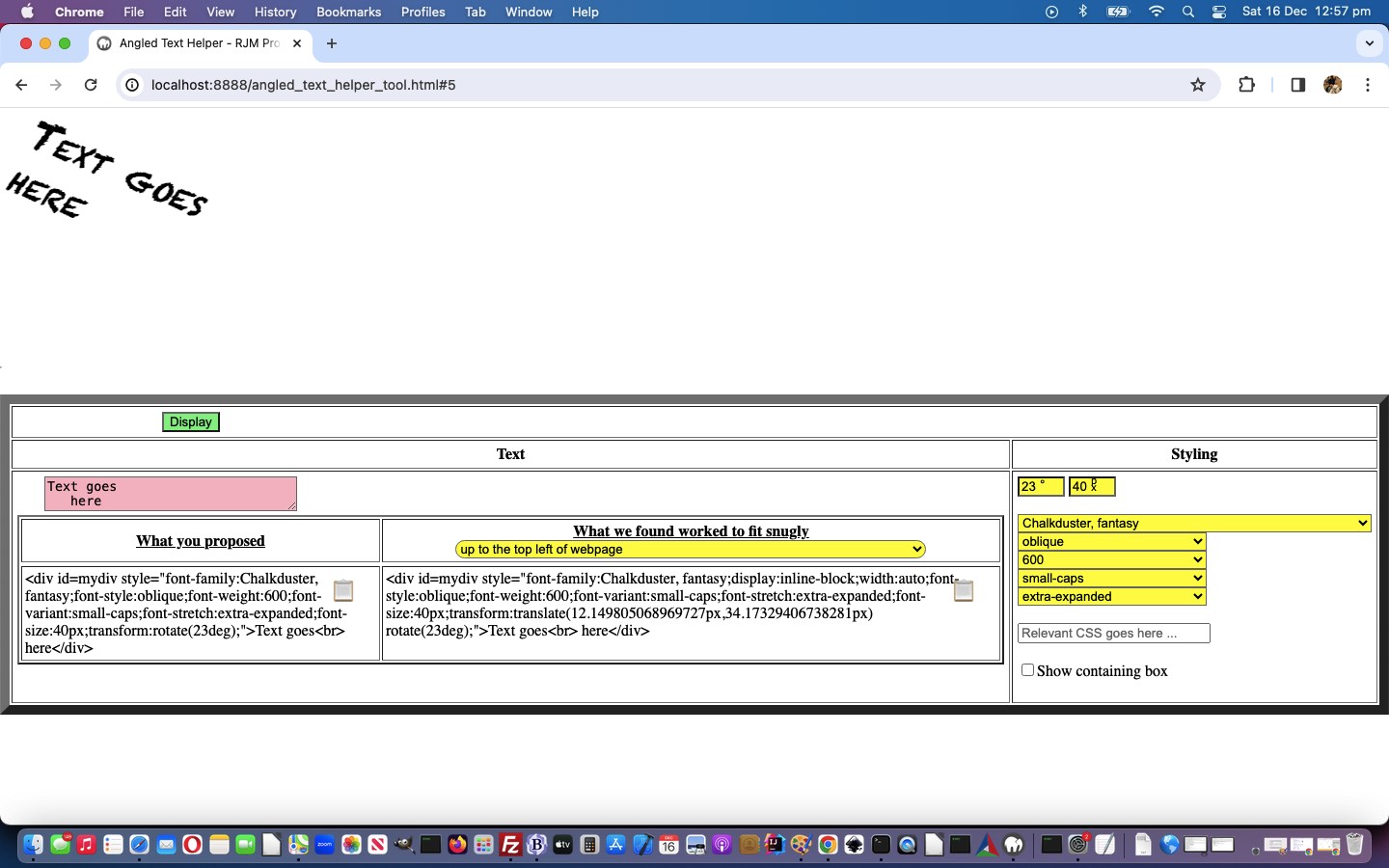
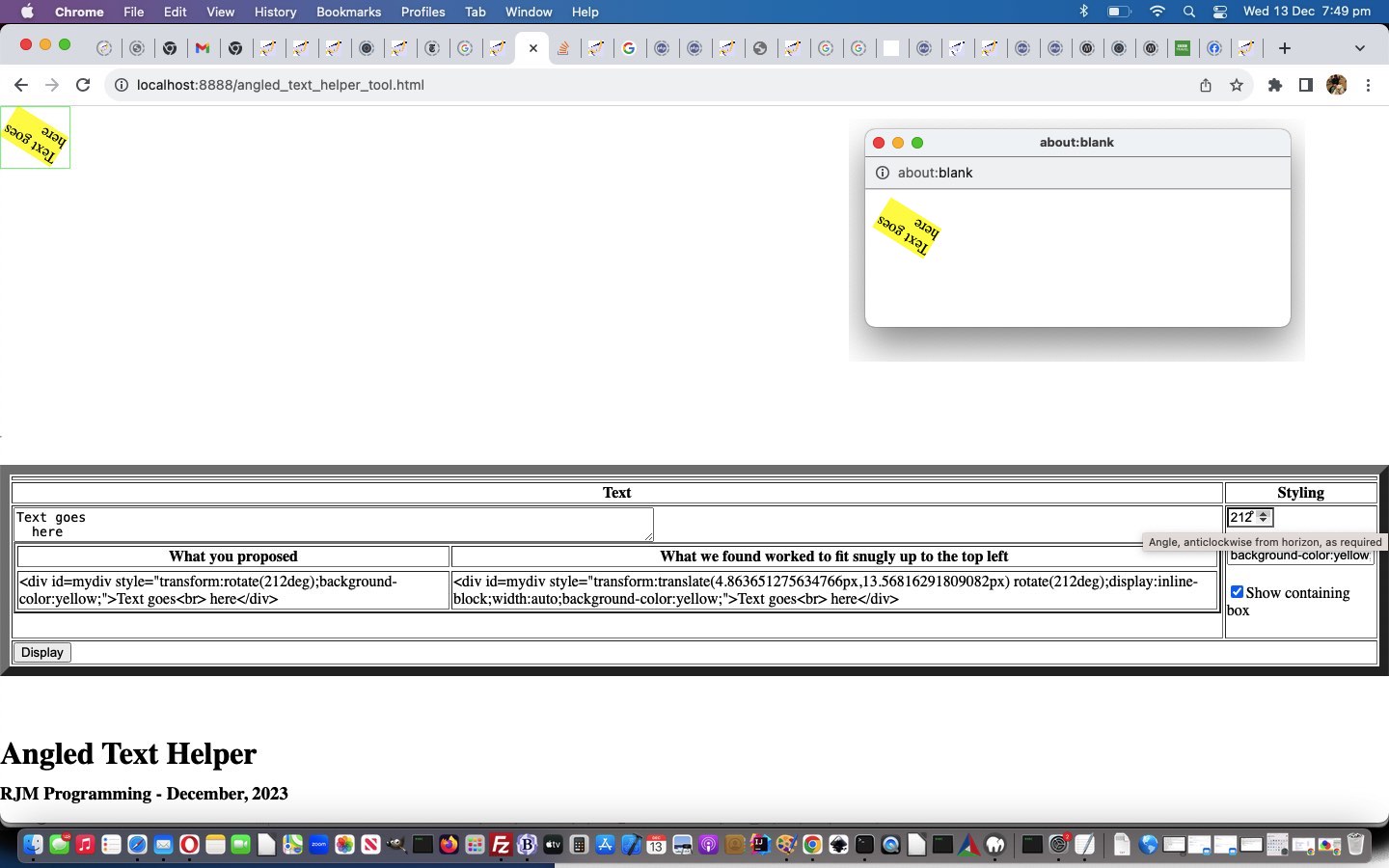
Today, further to yesterday’s Angled Text Tool Clipboard Tutorial, we have our Angled Text Helper web application “tool” calling on a “tool’s subtool”, giving new meaning to our web application being “on the tools” today, for more granular text element defining purposes. For us, coding wise, this amounts to …

  • external Javascript …
  • optional functionality …
  • will not fail if not there

… and the calling of these optional …

  • Font Family
  • Font Style
  • Font Weight
  • Font Variant
  • Font Stretch

… definitions used a calling technique we can not recall ever using, exactly, before. We often don’t involve “hashtag” navigation more than to position the reader’s position within a webpage, but today, we used “hashtag” navigation really usefully, so that the one external Javascript code file can be called in a variety of ways by the parent …


<script type='text/javascript' src='/font_family.js?idfamily=spanff' defer></script>
<script type='text/javascript' src='/font_family.js?idstyle=spanfs' defer></script>
<script type='text/javascript' src='/font_family.js?idweight=spanfw' defer></script>
<script type='text/javascript' src='/font_family.js?idvariant=spanfv' defer></script>
<script type='text/javascript' src='/font_family.js?idstretch=spansf' defer></script>

… and create individual working dropdowns for each of the five (additional and optional) Text definition categories, the order managed by …


// font_family.js
// Place a font family/style/weight/variant/stretch dropdown into element ID called upon, or appended to document.body
// RJM Programming
// December, 2023
// Thanks to https://www.w3.org/Style/Examples/007/fonts.en.html

var conceptfont='family';
var theidff='';
var proposedidff='';

var ffindex=0;
if (('' + location.hash).replace('#','') != '') {
ffindex=eval(('' + location.hash).replace('#',''));
}


if (document.head.innerHTML.indexOf('fon' + 't_fam' + 'ily.js?i' + 'd') != -1) {
proposedidff=document.head.innerHTML.split('fon' + 't_fam' + 'ily.js?i' + 'd')[eval(1 + ffindex)].split('=')[0];
theidff=document.head.innerHTML.split('fon' + 't_fam' + 'ily.js?i' + 'd' + proposedidff + '=')[1].split('&')[0].split('#')[0].split('"')[0].split("'")[0].split('>')[0];
if (proposedidff != '') { conceptfont=proposedidff; }
}

location.href='#' + eval(1 + ffindex);

// rest of external Javascript subtool code follows ...

those “hashtag” navigation manipulations, the content helped out by that brilliant https://www.w3.org/Style/Examples/007/fonts.en.html resource, thanks.

Where do we more and more these days call our external Javascript from? We place them in our Apache web server’s Document Root folder, as “the genericized” font_family.js is placed, and that way a URL as simple as …


/font_family.js?idfamily=spanff

… hosted on our web server (or from another web server /www.rjmprogramming.com.au/font_family.js?idfamily=spanff variant of call might do the trick), will, as permitted, “do it’s stuff”, without Mixed Content web browser issues.

We’re biassed, but we think you should re-try the changed “fourth draft” Angled Text Helper Tool, perhaps below.


Previous relevant Angled Text Tool Clipboard Tutorial is shown below.

Angled Text Tool Clipboard Tutorial

Angled Text Tool Clipboard Tutorial

We started feeling that yesterday’s Angled Text Tool Context Tutorial‘s progress was starting to feel like a web application that was a “tool”. But something was missing. It wasn’t friendly enough to a serious user, the ones tempted to try it out and persevere, to see whether it could help them out … ie. being used as a “tool”. And so we added some new Javascript …


function fallbackCopyTextToClipboard(text) { // thanks to <a target="_blank" title="https://stackoverflow.com/questions/400212/how-do-i-copy-to-the-clipboard-in-javascript" href="https://stackoverflow.com/questions/400212/how-do-i-copy-to-the-clipboard-in-javascript">https://stackoverflow.com/questions/400212/how-do-i-copy-to-the-clipboard-in-javascript</a>
var textArea = document.createElement("textarea");
//alert(text);
textArea.value = text;

// Avoid scrolling to bottom
textArea.style.top = "0";
textArea.style.left = "0";
textArea.style.position = "fixed";

document.body.appendChild(textArea);
textArea.focus();
textArea.select();

try {
var successful = document.execCommand('copy');
var msg = successful ? 'successful' : 'unsuccessful';
console.log('Fallback: Copying text command was ' + msg);
} catch (err) {
console.error('Fallback: Oops, unable to copy', err);
}

document.body.removeChild(textArea);
}

function copyTextToClipboard(text) { // thanks to <a target="_blank" title="https://stackoverflow.com/questions/400212/how-do-i-copy-to-the-clipboard-in-javascript" href="https://stackoverflow.com/questions/400212/how-do-i-copy-to-the-clipboard-in-javascript">https://stackoverflow.com/questions/400212/how-do-i-copy-to-the-clipboard-in-javascript</a>
//alert('text=' + text);
if (!navigator.clipboard) {
fallbackCopyTextToClipboard(text);
return;
}
navigator.clipboard.writeText(text).then(function() {
console.log('Async: Copying to clipboard was successful!');
}, function(err) {
console.error('Async: Could not copy text: ', err);
});
}

function nifotherthanfont(cii) {
return decodeURIComponent(cii);
}

function ifotherthanfont(cii) {
var newcii=cii, allokay=true, ncs=[], incs=0;
if (cii.indexOf('</font>') != -1 || cii.indexOf('</FONT>') != -1) {
ncs=cii.split('</');
for (incs=1; incs<ncs.length; incs++) {
if (ncs[incs].toLowerCase().indexOf('font') != 0) { allokay=false; }
}
if (!allokay || 1 == 1) {
ncs=cii.split('<font');
for (incs=1; incs<ncs.length; incs++) {
newcii=newcii.replace('<font' + ncs[incs].split('>')[0] + '>', '');
newcii=newcii.replace('</font>', '');
}
ncs=cii.split('<FONT');
for (incs=1; incs<ncs.length; incs++) {
newcii=newcii.replace('<FONT' + ncs[incs].split('>')[0] + '>', '');
newcii=newcii.replace('</FONT>', '');
}
}
}
return newcii;
}

function codecopying(mode) {
var rectcos=null, icn=0, okpast=false;
var eletype='td';
if (mode != '') {
eletype=document.getElementById(mode).outerHTML.substring(1).split(' ')[0].split('>')[0];
}
var cos=document.getElementsByTagName(eletype); //'code'
for (var ico=0; ico<cos.length; ico++) {
if (cos[ico].id == 'is' || cos[ico].id == 'was' || (cos[ico].id == mode && mode != '')) {
if (mode == '') {
rectcos=cos[ico].getBoundingClientRect();
document.getElementById('dcode').innerHTML+='<span data-fword="' + encodeURIComponent(ifotherthanfont(cos[ico].innerHTML.replace(/\&lt\;/g,'<').replace(/\&gt\;/g,'>')).substring(0)) + '" onclick="codecopying(this.id);" title="Copy unadorned HTML code to clipboard buffer" id=scd' + ico + ' style="position:absolute;z-index:56;left:' + eval(-50 + eval('' + rectcos.right)) + 'px;top:' + eval(10 + eval('' + rectcos.top)) + 'px;font-size:24px;"></span>';
} else if (1 == 1) {
document.getElementById(mode).style.border='1px dashed pink';
copyTextToClipboard(nifotherthanfont(document.getElementById(mode).getAttribute('data-fword')).replace(/\&amp\;nbsp\;/g, '&nbsp;').replace(/\&amp\;\#/g, '&#').replace(/ \&amp\;\;/g, ' &;').replace(/\<br\>/g, '').replace(/\&amp;lt\;/g, '<').replace(/\&amp;gt\;/g, '>').trim());
okpast=false;
}
}
}
}

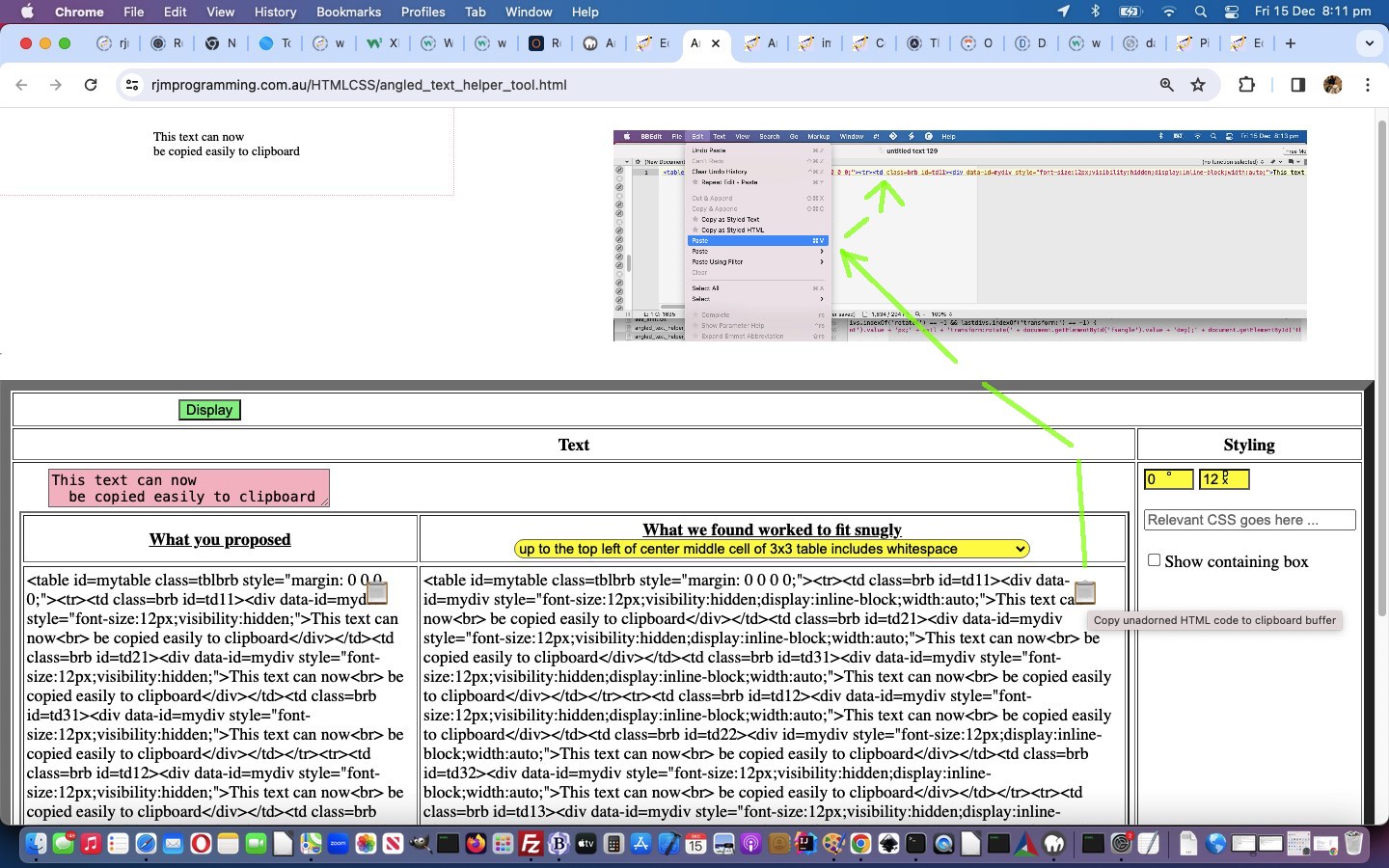
Does this code seem familiar to you? It might be because we tried this “Being able to Copy Code to the Clipboard Here with the Blog You are Reading” when we published WordPress Blog Code Element Clipboard Copy Primer Tutorial back in February. The code above is very similar, but some differences are …

  • we make the codecopying(”); call each time the Display button is pressed, rather than once on the Blog document “onload” event
  • within that codecopying function the logic can be simpler, as we store the whole HTML code snippet of relevance to the “slapped over” span element’s “data-fword” global data attribute each time, and so just regurgitate that whole global data attribute when asked to copy code to the clipboard as a user clicks an “emoji span button” near HTML code of interest
  • there are no <FONT></FONT> colour coding embellishments to worry about

Copying this way from our “tool” web application and into your HTML code text editor could be a way to save heaps of coding time, we’re hoping.

Maybe you want to try it in the changed “third draft” Angled Text Helper Tool.


Previous relevant Angled Text Tool Context Tutorial is shown below.

Angled Text Tool Context Tutorial

Angled Text Tool Context Tutorial

You only have to go about trying to solve a web application issue, often ending up at advice from the wonderful StackOverflow website, to realize the “context” of a problem is often the issue. There are so many different “takes” to how to go about the craft, it can be daunting. As such, today, to improve on yesterday’s Angled Text Tool Primer Tutorial‘s start to our Angled Text Helper Tool, we work at more “context” for the destination of the Angled Text, so that …

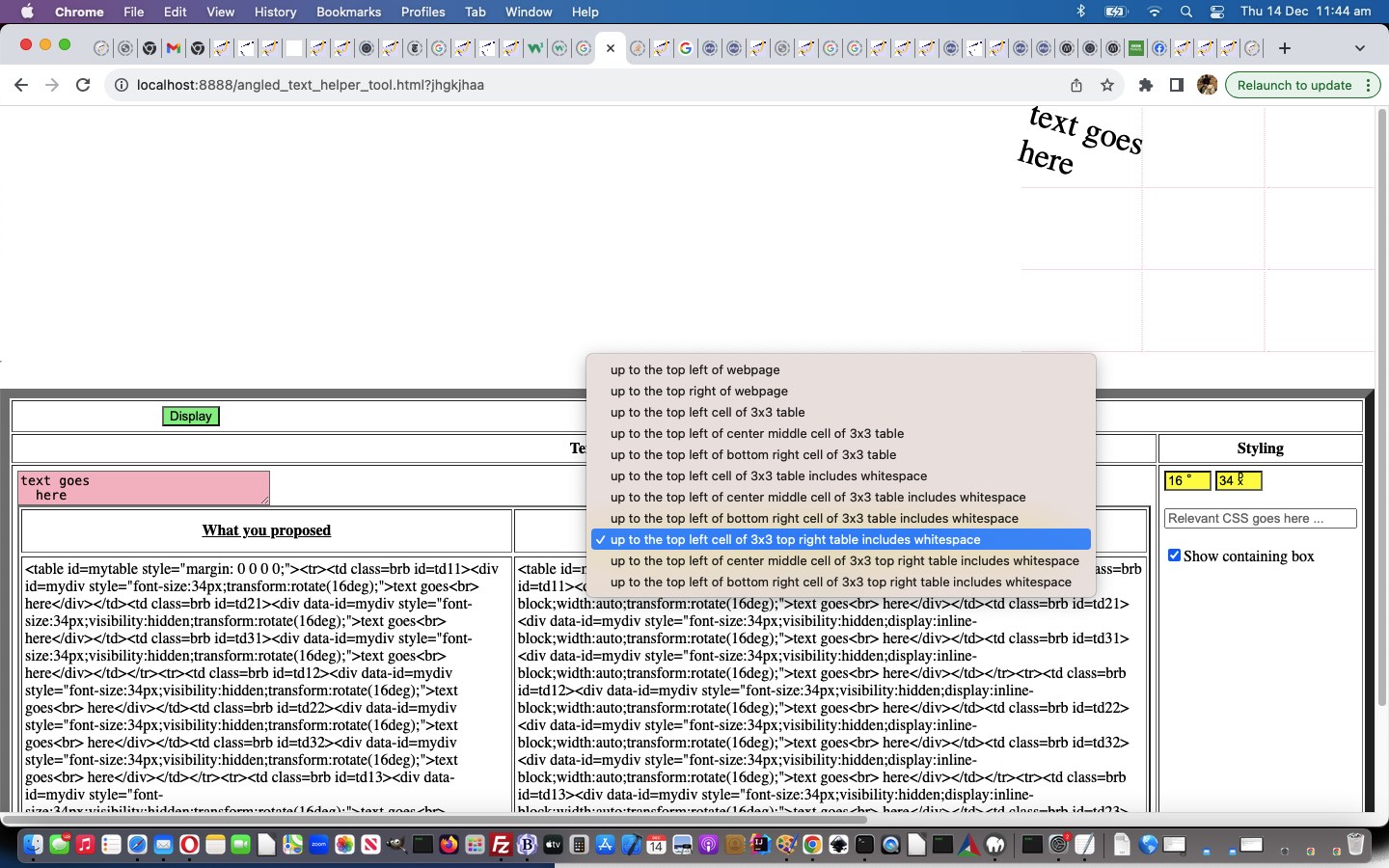
  • yesterday’s “top left of screen” … is now joined by today’s added …
  • “top right of screen” … and …
  • 3×3 table cell nestings for top left and middle center and bottom right cells positioned to the top left without or with white spacing (of non-selected cells) … and …
  • 3×3 table cell nestings for top left and middle center and bottom right cells positioned to the top right with cell white spacing

… and add a text font size numerical textbox as another variable mixed in to the functionality of the changed “second draft” Angled Text Helper Tool you might want to try below …


Previous relevant Angled Text Tool Primer Tutorial is shown below.

Angled Text Tool Primer Tutorial

Angled Text Tool Primer Tutorial

Buoyed by our new found confidence in [element].getBoundingClientRect() when dealing with rotated text, in the clientside Javascript realm of proceedings, as we talked about with yesterday’s Google Chart Image Chart Angled Text Annotation Tutorial, today, we’re writing a new, and so far pretty simple …


Angled Text Helper Tool

… and we’re hoping over time, perhaps it can deserve that moniker “tool” for some readers and users out there! We hope so.

What’s hard about angled text, leaving aside any “trying to fit in with PHP GD imagettftext interfacing”? For us, it’s that rotations, by default, happen in the middle of text, but that “middle of text” is not a data point collected naturally for an HTML element ( though is derivable, again, via [element].getBoundingClientRect() ) meaning …

  • for angled text it is hard to “sidle up” to something easily … and …
  • for angled text it is hard to “snugly fit it in” within a containing something easily

Our proof of concept Angled Text Tool throws it to the user to try to fit some rotated text snugly up into the top left corner of a webpage, supplying their own editable CSS, onto a raw HTML div element, where what is asked, so far, is …

  • text itself … in a textarea element
  • clockwise angle from horizontal in degrees angle … in an input type=number textbox …
  • user CSS … to be applied to said HTML div … in a textbox …
  • checkbox for whether to display a finishing “bounding box”

Simple premise, but see how you go, trying our “proof of concept” “first draft” HTML and Javascript and CSS “would be” tool.

If this was interesting you may be interested in this too.


If this was interesting you may be interested in this too.


If this was interesting you may be interested in this too.


If this was interesting you may be interested in this too.

Posted in eLearning, Event-Driven Programming, Software, Tutorials | Tagged , , , , , , , , , , , , , , , , , , , , , , , , , , , , , , , , , , , , , , , , , , , , , , , | Leave a comment

Angled Text Tool Clipboard Tutorial

Angled Text Tool Clipboard Tutorial

Angled Text Tool Clipboard Tutorial

We started feeling that yesterday’s Angled Text Tool Context Tutorial‘s progress was starting to feel like a web application that was a “tool”. But something was missing. It wasn’t friendly enough to a serious user, the ones tempted to try it out and persevere, to see whether it could help them out … ie. being used as a “tool”. And so we added some new Javascript …


function fallbackCopyTextToClipboard(text) { // thanks to <a target="_blank" title="https://stackoverflow.com/questions/400212/how-do-i-copy-to-the-clipboard-in-javascript" href="https://stackoverflow.com/questions/400212/how-do-i-copy-to-the-clipboard-in-javascript">https://stackoverflow.com/questions/400212/how-do-i-copy-to-the-clipboard-in-javascript</a>
var textArea = document.createElement("textarea");
//alert(text);
textArea.value = text;

// Avoid scrolling to bottom
textArea.style.top = "0";
textArea.style.left = "0";
textArea.style.position = "fixed";

document.body.appendChild(textArea);
textArea.focus();
textArea.select();

try {
var successful = document.execCommand('copy');
var msg = successful ? 'successful' : 'unsuccessful';
console.log('Fallback: Copying text command was ' + msg);
} catch (err) {
console.error('Fallback: Oops, unable to copy', err);
}

document.body.removeChild(textArea);
}

function copyTextToClipboard(text) { // thanks to <a target="_blank" title="https://stackoverflow.com/questions/400212/how-do-i-copy-to-the-clipboard-in-javascript" href="https://stackoverflow.com/questions/400212/how-do-i-copy-to-the-clipboard-in-javascript">https://stackoverflow.com/questions/400212/how-do-i-copy-to-the-clipboard-in-javascript</a>
//alert('text=' + text);
if (!navigator.clipboard) {
fallbackCopyTextToClipboard(text);
return;
}
navigator.clipboard.writeText(text).then(function() {
console.log('Async: Copying to clipboard was successful!');
}, function(err) {
console.error('Async: Could not copy text: ', err);
});
}

function nifotherthanfont(cii) {
return decodeURIComponent(cii);
}

function ifotherthanfont(cii) {
var newcii=cii, allokay=true, ncs=[], incs=0;
if (cii.indexOf('</font>') != -1 || cii.indexOf('</FONT>') != -1) {
ncs=cii.split('</');
for (incs=1; incs<ncs.length; incs++) {
if (ncs[incs].toLowerCase().indexOf('font') != 0) { allokay=false; }
}
if (!allokay || 1 == 1) {
ncs=cii.split('<font');
for (incs=1; incs<ncs.length; incs++) {
newcii=newcii.replace('<font' + ncs[incs].split('>')[0] + '>', '');
newcii=newcii.replace('</font>', '');
}
ncs=cii.split('<FONT');
for (incs=1; incs<ncs.length; incs++) {
newcii=newcii.replace('<FONT' + ncs[incs].split('>')[0] + '>', '');
newcii=newcii.replace('</FONT>', '');
}
}
}
return newcii;
}

function codecopying(mode) {
var rectcos=null, icn=0, okpast=false;
var eletype='td';
if (mode != '') {
eletype=document.getElementById(mode).outerHTML.substring(1).split(' ')[0].split('>')[0];
}
var cos=document.getElementsByTagName(eletype); //'code'
for (var ico=0; ico<cos.length; ico++) {
if (cos[ico].id == 'is' || cos[ico].id == 'was' || (cos[ico].id == mode && mode != '')) {
if (mode == '') {
rectcos=cos[ico].getBoundingClientRect();
document.getElementById('dcode').innerHTML+='<span data-fword="' + encodeURIComponent(ifotherthanfont(cos[ico].innerHTML.replace(/\&lt\;/g,'<').replace(/\&gt\;/g,'>')).substring(0)) + '" onclick="codecopying(this.id);" title="Copy unadorned HTML code to clipboard buffer" id=scd' + ico + ' style="position:absolute;z-index:56;left:' + eval(-50 + eval('' + rectcos.right)) + 'px;top:' + eval(10 + eval('' + rectcos.top)) + 'px;font-size:24px;"></span>';
} else if (1 == 1) {
document.getElementById(mode).style.border='1px dashed pink';
copyTextToClipboard(nifotherthanfont(document.getElementById(mode).getAttribute('data-fword')).replace(/\&amp\;nbsp\;/g, '&nbsp;').replace(/\&amp\;\#/g, '&#').replace(/ \&amp\;\;/g, ' &;').replace(/\<br\>/g, '').replace(/\&amp;lt\;/g, '<').replace(/\&amp;gt\;/g, '>').trim());
okpast=false;
}
}
}
}

Does this code seem familiar to you? It might be because we tried this “Being able to Copy Code to the Clipboard Here with the Blog You are Reading” when we published WordPress Blog Code Element Clipboard Copy Primer Tutorial back in February. The code above is very similar, but some differences are …

  • we make the codecopying(”); call each time the Display button is pressed, rather than once on the Blog document “onload” event
  • within that codecopying function the logic can be simpler, as we store the whole HTML code snippet of relevance to the “slapped over” span element’s “data-fword” global data attribute each time, and so just regurgitate that whole global data attribute when asked to copy code to the clipboard as a user clicks an “emoji span button” near HTML code of interest
  • there are no <FONT></FONT> colour coding embellishments to worry about

Copying this way from our “tool” web application and into your HTML code text editor could be a way to save heaps of coding time, we’re hoping.

Maybe you want to try it in the changed “third draft” Angled Text Helper Tool.


Previous relevant Angled Text Tool Context Tutorial is shown below.

Angled Text Tool Context Tutorial

Angled Text Tool Context Tutorial

You only have to go about trying to solve a web application issue, often ending up at advice from the wonderful StackOverflow website, to realize the “context” of a problem is often the issue. There are so many different “takes” to how to go about the craft, it can be daunting. As such, today, to improve on yesterday’s Angled Text Tool Primer Tutorial‘s start to our Angled Text Helper Tool, we work at more “context” for the destination of the Angled Text, so that …

  • yesterday’s “top left of screen” … is now joined by today’s added …
  • “top right of screen” … and …
  • 3×3 table cell nestings for top left and middle center and bottom right cells positioned to the top left without or with white spacing (of non-selected cells) … and …
  • 3×3 table cell nestings for top left and middle center and bottom right cells positioned to the top right with cell white spacing

… and add a text font size numerical textbox as another variable mixed in to the functionality of the changed “second draft” Angled Text Helper Tool you might want to try below …


Previous relevant Angled Text Tool Primer Tutorial is shown below.

Angled Text Tool Primer Tutorial

Angled Text Tool Primer Tutorial

Buoyed by our new found confidence in [element].getBoundingClientRect() when dealing with rotated text, in the clientside Javascript realm of proceedings, as we talked about with yesterday’s Google Chart Image Chart Angled Text Annotation Tutorial, today, we’re writing a new, and so far pretty simple …


Angled Text Helper Tool

… and we’re hoping over time, perhaps it can deserve that moniker “tool” for some readers and users out there! We hope so.

What’s hard about angled text, leaving aside any “trying to fit in with PHP GD imagettftext interfacing”? For us, it’s that rotations, by default, happen in the middle of text, but that “middle of text” is not a data point collected naturally for an HTML element ( though is derivable, again, via [element].getBoundingClientRect() ) meaning …

  • for angled text it is hard to “sidle up” to something easily … and …
  • for angled text it is hard to “snugly fit it in” within a containing something easily

Our proof of concept Angled Text Tool throws it to the user to try to fit some rotated text snugly up into the top left corner of a webpage, supplying their own editable CSS, onto a raw HTML div element, where what is asked, so far, is …

  • text itself … in a textarea element
  • clockwise angle from horizontal in degrees angle … in an input type=number textbox …
  • user CSS … to be applied to said HTML div … in a textbox …
  • checkbox for whether to display a finishing “bounding box”

Simple premise, but see how you go, trying our “proof of concept” “first draft” HTML and Javascript and CSS “would be” tool.

If this was interesting you may be interested in this too.


If this was interesting you may be interested in this too.


If this was interesting you may be interested in this too.

Posted in eLearning, Event-Driven Programming, Tutorials | Tagged , , , , , , , , , , , , , , , , , , , , , , , , , , , | Leave a comment

Angled Text Tool Context Tutorial

Angled Text Tool Context Tutorial

Angled Text Tool Context Tutorial

You only have to go about trying to solve a web application issue, often ending up at advice from the wonderful StackOverflow website, to realize the “context” of a problem is often the issue. There are so many different “takes” to how to go about the craft, it can be daunting. As such, today, to improve on yesterday’s Angled Text Tool Primer Tutorial‘s start to our Angled Text Helper Tool, we work at more “context” for the destination of the Angled Text, so that …

  • yesterday’s “top left of screen” … is now joined by today’s added …
  • “top right of screen” … and …
  • 3×3 table cell nestings for top left and middle center and bottom right cells positioned to the top left without or with white spacing (of non-selected cells) … and …
  • 3×3 table cell nestings for top left and middle center and bottom right cells positioned to the top right with cell white spacing

… and add a text font size numerical textbox as another variable mixed in to the functionality of the changed “second draft” Angled Text Helper Tool you might want to try below …


Previous relevant Angled Text Tool Primer Tutorial is shown below.

Angled Text Tool Primer Tutorial

Angled Text Tool Primer Tutorial

Buoyed by our new found confidence in [element].getBoundingClientRect() when dealing with rotated text, in the clientside Javascript realm of proceedings, as we talked about with yesterday’s Google Chart Image Chart Angled Text Annotation Tutorial, today, we’re writing a new, and so far pretty simple …


Angled Text Helper Tool

… and we’re hoping over time, perhaps it can deserve that moniker “tool” for some readers and users out there! We hope so.

What’s hard about angled text, leaving aside any “trying to fit in with PHP GD imagettftext interfacing”? For us, it’s that rotations, by default, happen in the middle of text, but that “middle of text” is not a data point collected naturally for an HTML element ( though is derivable, again, via [element].getBoundingClientRect() ) meaning …

  • for angled text it is hard to “sidle up” to something easily … and …
  • for angled text it is hard to “snugly fit it in” within a containing something easily

Our proof of concept Angled Text Tool throws it to the user to try to fit some rotated text snugly up into the top left corner of a webpage, supplying their own editable CSS, onto a raw HTML div element, where what is asked, so far, is …

  • text itself … in a textarea element
  • clockwise angle from horizontal in degrees angle … in an input type=number textbox …
  • user CSS … to be applied to said HTML div … in a textbox …
  • checkbox for whether to display a finishing “bounding box”

Simple premise, but see how you go, trying our “proof of concept” “first draft” HTML and Javascript and CSS “would be” tool.

If this was interesting you may be interested in this too.


If this was interesting you may be interested in this too.

Posted in eLearning, Event-Driven Programming, Tutorials | Tagged , , , , , , , , , , , , , , , , , , , , | Leave a comment