Diagonal Element Nesting Analogue Clock Tutorial
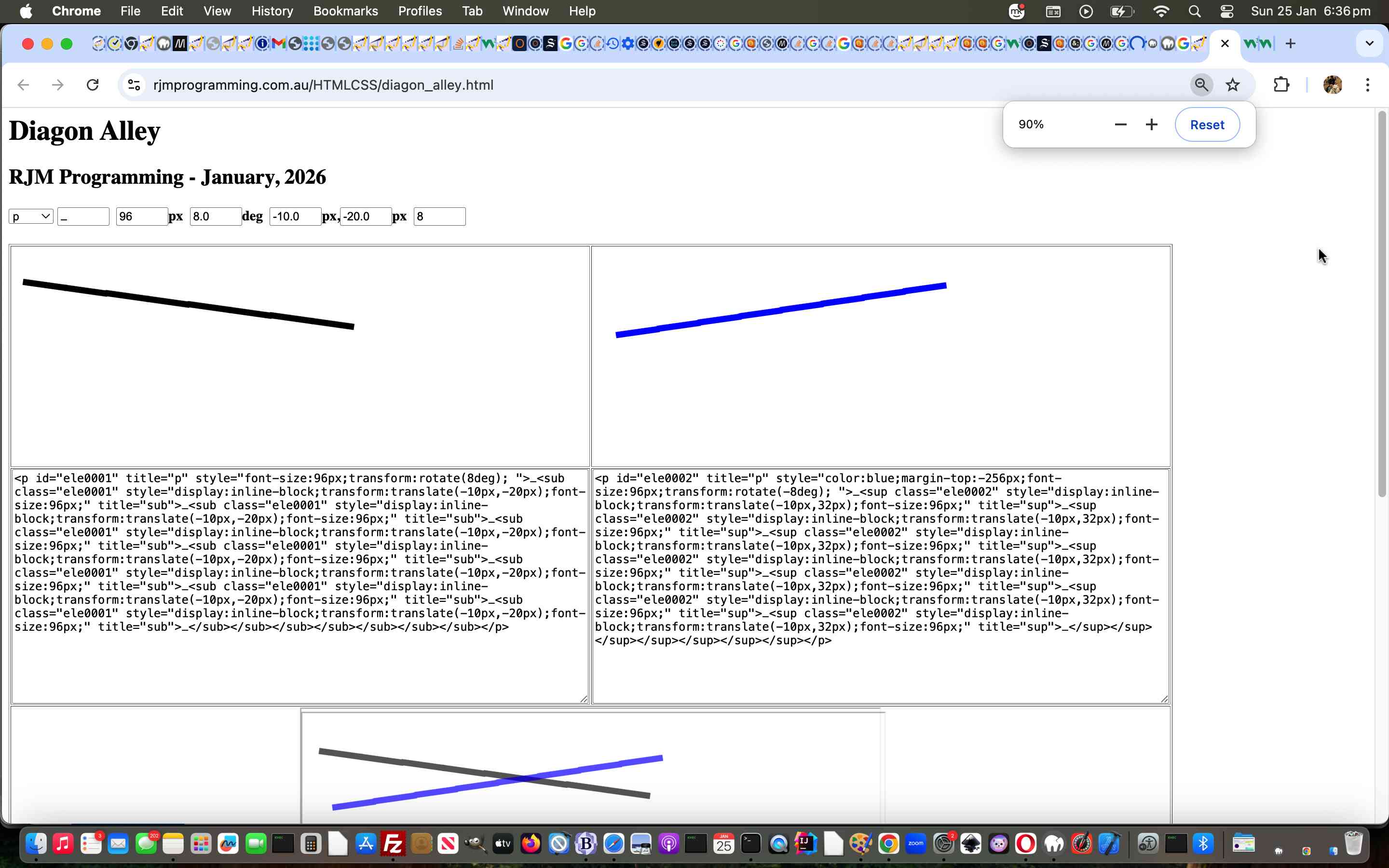
Those two diagonal lines produced in yesterday’s Diagonal Element Nesting Tutorial made us wonder …
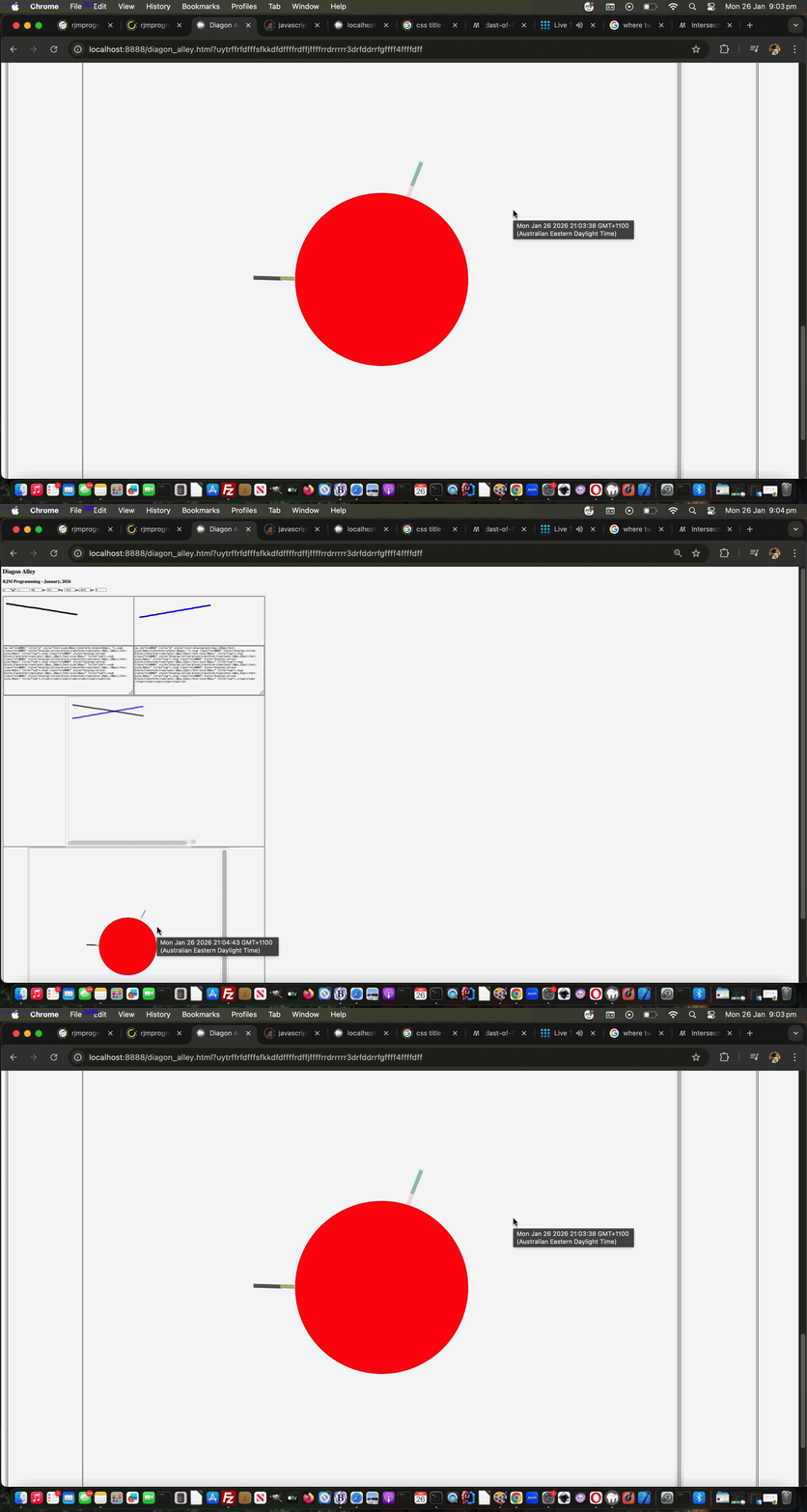
What can you build with controlled rotation and involving two diagonal elements?
… and, of course, your Local Time Analogue Clock with it’s hour hand and minute hand is an example. And so we set forth creating that, featuring new Javascript …
 function andthen() {

   var tds=document.getElementsByTagName('td');

   ourtwo=1;

   for (var itds=0; itds<tds.length; itds++) {

     if (('' + tds[itds].id).indexOf('cell') == 0) {

      if (eval('' + tds[itds].innerText.length) < 7) {

       //alert(tds[0].innerHTML.split('rotate(')[1].split('deg')[0]);

       var zx=(tds[0].innerHTML.replace(/sub/g,'sup').replace('rotate(' + tds[0].innerHTML.split('rotate(')[1].split('deg')[0],'rotate(' + eval(360 - ten)).replace('rotate(' + tds[0].innerHTML.split('rotate(')[1].split('deg')[0],'rotate(' + eval(360 - ten)).replace('rotate(' + tds[0].innerHTML.split('rotate(')[1].split('deg')[0],'rotate(' + eval(360 - ten)).replace('rotate(' + tds[0].innerHTML.split('rotate(')[1].split('deg')[0],'rotate(' + eval(360 - ten)));

       ten=eval(-1 * ten);

       ourtwo=itds;

       tds[itds].innerHTML=tds[0].innerHTML.replace(' style="',' style="color:blue;margin-top:-256px;').replace(/0001/g,'0002').replace(/sub/g,'sup').replace('rotate(' + tds[0].innerHTML.split('rotate(')[1].split('deg')[0],'rotate(' + eval(ten)).replace(/\,\-20px/g,',32px');

       document.getElementById(('' + tds[itds].id).replace('cell','ecll')).innerHTML='<textarea rows=17 cols=80 id=' + ('' + tds[itds].id).replace('cell','taecll') + ' onblur=tait(this); style=width=100%;>' + document.getElementById('cell' + ('0000' + curcellnum).slice(-4)).innerHTML.replace(' style="',' style="color:blue;margin-top:-256px;').replace(/0001/g,'0002').replace(/sub/g,'sup').replace('rotate(' + tds[0].innerHTML.split('rotate(')[1].split('deg')[0],'rotate(' + eval(ten)).replace(/\,\-20px/g,',32px') + '</textarea>';

      } else {

       tds[itds].innerHTML=tds[itds].innerHTML.replace(/background\-color\:\ pink\;/g, 'background-color: white;').replace(/background\-color\:pink\;/g, 'background-color:white;');

       document.getElementById(('' + tds[itds].id).replace('cell','ecll')).innerHTML='<textarea rows=17 cols=80 id=' + ('' + tds[itds].id).replace('cell','taecll') + ' onblur=tait(this); style=width=100%;>' + document.getElementById('cell' + ('0000' + curcellnum).slice(-4)).innerHTML + '</textarea>';

      }

     }

   }

   var recto=document.getElementById('fibothone').getBoundingClientRect();

   //document.getElementById('fibothtwo').style.position='absolute';

   //document.getElementById('fibothtwo').style.left='' + recto.left + 'px';

   //document.getElementById('fibothtwo').style.top='' + recto.top + 'px';

   //document.getElementById('fibothtwo').style.width='' + recto.width + 'px';

   //document.getElementById('fibothtwo').style.height='' + recto.height + 'px';

   document.getElementById('ifbothone').srcdoc=maybeclock(tds[0].innerHTML.replace(' style="', ' style="margin-top:0px;margin-left:0px;'));

   document.getElementById('ifbothtwo').srcdoc=tds[ourtwo].innerHTML;

   recto=document.getElementById('ifbothone').getBoundingClientRect();

   document.getElementById('ifbothtwo').style.position='absolute';

   document.getElementById('ifbothtwo').style.left='' + recto.left + 'px';

   document.getElementById('ifbothtwo').style.top='' + recto.top + 'px';

   document.getElementById('ifbothtwo').style.width='' + recto.width + 'px';

   document.getElementById('ifbothtwo').style.height='' + recto.height + 'px';

   recto=document.getElementById('fibothone').getBoundingClientRect();

   document.getElementById('fibothtwo').style.position='absolute';

   document.getElementById('fibothtwo').style.left='' + recto.left + 'px';

   document.getElementById('fibothtwo').style.top='' + recto.top + 'px';

   document.getElementById('fibothtwo').style.width='' + recto.width + 'px';

   document.getElementById('fibothtwo').style.height='' + recto.height + 'px';

   document.getElementById('fiboththree').style.position='absolute';

   document.getElementById('fiboththree').style.left='' + recto.left + 'px';

   document.getElementById('fiboththree').style.top='' + recto.top + 'px';

   document.getElementById('fiboththree').style.width='' + recto.width + 'px';

   document.getElementById('fiboththree').style.height='' + recto.height + 'px';

 }


 function premaybeclock() {

   if (glinh != '') {

      //alert('ct=' + ct + ' and glinh=' + glinh);

      maybeclock(glinh);

   }

 }


 function minuteang() {

   var tss=('' + new Date());

   cconto.body.title=tss;

   document.getElementById('fiboththree').title=tss;

   var th=eval(tss.split(':')[0].split(' ')[eval(-1 + tss.split(':')[0].split(' ').length)] % 12);

   var tm=eval(tss.split(':')[1]);

   var ts=eval(tss.split(':')[2].split(' ')[0].split('.')[0]);

   tm+=eval(ts / 60);

   return '' + eval((90 + tm * 6) % 360);

 }


 function hourang() {

   var tss=('' + new Date());

   var th=eval(tss.split(':')[0].split(' ')[eval(-1 + tss.split(':')[0].split(' ').length)] % 12);

   var tm=eval(tss.split(':')[1]);

   var ts=eval(tss.split(':')[2].split(' ')[0].split('.')[0]);

   th+=eval(tm / 60);

   th+=eval(ts / (60 * 60));

   return '' + eval((90 + th * 30) % 360);

 }


 function maybeclock(linh) {

   var absbit='position:absolute;top:350px;left:300px;';

   var rotv=linh.split('rotate(')[1].split('deg')[0];

   var thisfs=linh.split('font-size:')[1].split('px')[0];

   var huh='<br><br><br><br><br><br><br><br><br><br><br><br>';

   document.getElementById('fibothone').srcdoc='' + linh.replace('>' + document.getElementById('chars').value + '</su', ' id=lastsu>' + document.getElementById('chars').value + '</su').replace('margin-top:','padding-top:').replace('margin-left:','padding-left:').replace('rotate(' + rotv,'rotate(' + hourang()).replace(' style="', ' style="' + ct + cl + absbit + 'transform-origin:50% 33%;') + '<style> sub:last-of-type { font-weight:bold; color: olive !important; } sup:last-of-type { font-weight:bold; color: olive !important; } </style>'; //.replace(/inline\-block\;/g, 'inline;');

   var origlinh=linh;

   if (glinh == '') {

      glinh=linh.replace('margin-top:','padding-top:').replace('margin-left:','padding-left:');

      setInterval(premaybeclock, 5000);

   }

   while (origlinh.indexOf('font-size:' + thisfs + 'px') != -1) {

      origlinh=origlinh.replace('font-size:' + thisfs + 'px', 'font-size:' + eval(-3 + eval('' + thisfs)) + 'px');

   }

   document.getElementById('fibothtwo').srcdoc='' + origlinh.replace('>' + document.getElementById('chars').value + '</su', ' id=lastsu>' + document.getElementById('chars').value + '</su').replace('margin-top:','padding-top:').replace('margin-left:','padding-left:').replace('rotate(' + rotv,'rotate(' + minuteang()).replace(' style="', ' style="' + absbit + 'text-shadow:-0.5px 0.5px 0.5px #95ff2d;transform-origin:50% 33%;color:rgba(0,0,255,0.4);') + '<style> sub:last-of-type { font-weight:bold; color: pink !important; } sup:last-of-type { font-weight:bold; color: pink !important; } </style>'; // + "<style>.logo {  width: 100vw;  height: 100vh;  position: relative; } .logo__svg {  width: 300px;  height: 300px;  position: absolute;  top: 50%; left: 50%;  transform: translate(-50%, -50%);}</style><div class=\"logo\"><svg class=\"logo__svg\"><circle cx=\"50%\" cy=\"50%\" r=\"150\" style=\"fill:rgba(255,0,0,0.6);stroke:white;stroke-width:1;\"/></svg></div>"; //.replace(/inline\-block\;/g, 'inline;');

   document.getElementById('fiboththree').srcdoc="<head><title>" + ('' + new Date()) + "</title><style> .logo {  width: 100vw;  height: 100vh;  position: relative; } .logo__svg {  width: 312px;  height: 312px;  position: absolute;  top: 47%; left: 49%;  transform: translate(-50%, -50%); } </style></head><body id=xbody><div class=\"logo\"><svg class=\"logo__svg\"><circle cx=\"50%\" cy=\"50%\" r=\"155\" style=\"fill:rgba(255,0,0,1);stroke:white;stroke-width:1;\"/></svg></div></body>"; //.replace(/inline\-block\;/g, 'inline;');

   return linh;

 }
And so, again, feel free to try out this the changed second draft Nested Diagonal Elements web application below.
Previous relevant Diagonal Element Nesting Tutorial is shown below.
Diagonal Element Nesting Tutorial
A variation on yesterday’s Nesting Primer Tutorial, as well as being inspired by that work is today’s …
- diagonal element … via …
- nested …
- display: inline;
- display: inline-block;
…
- sub topleft to bottomright diagonal componentry element look
- sup bottomleft to topright diagonal componentry element look
… we noticed working (ie. achieving nested “diagonality“) yesterday
… functionality. Yes, this might be thought of as “overkill” compared to …
- hr element rotations … and/or …
- SVG
… arguably easier means to achieve a “diagonal element” look. Nevertheless, the more ways to achieve an objective up your sleeve, the better, we reckon!
Again, feel free to try out this proof of concept Nested Diagonal Elements web application below …
Previous relevant Nesting Primer Tutorial is shown below.
Nesting Primer Tutorial
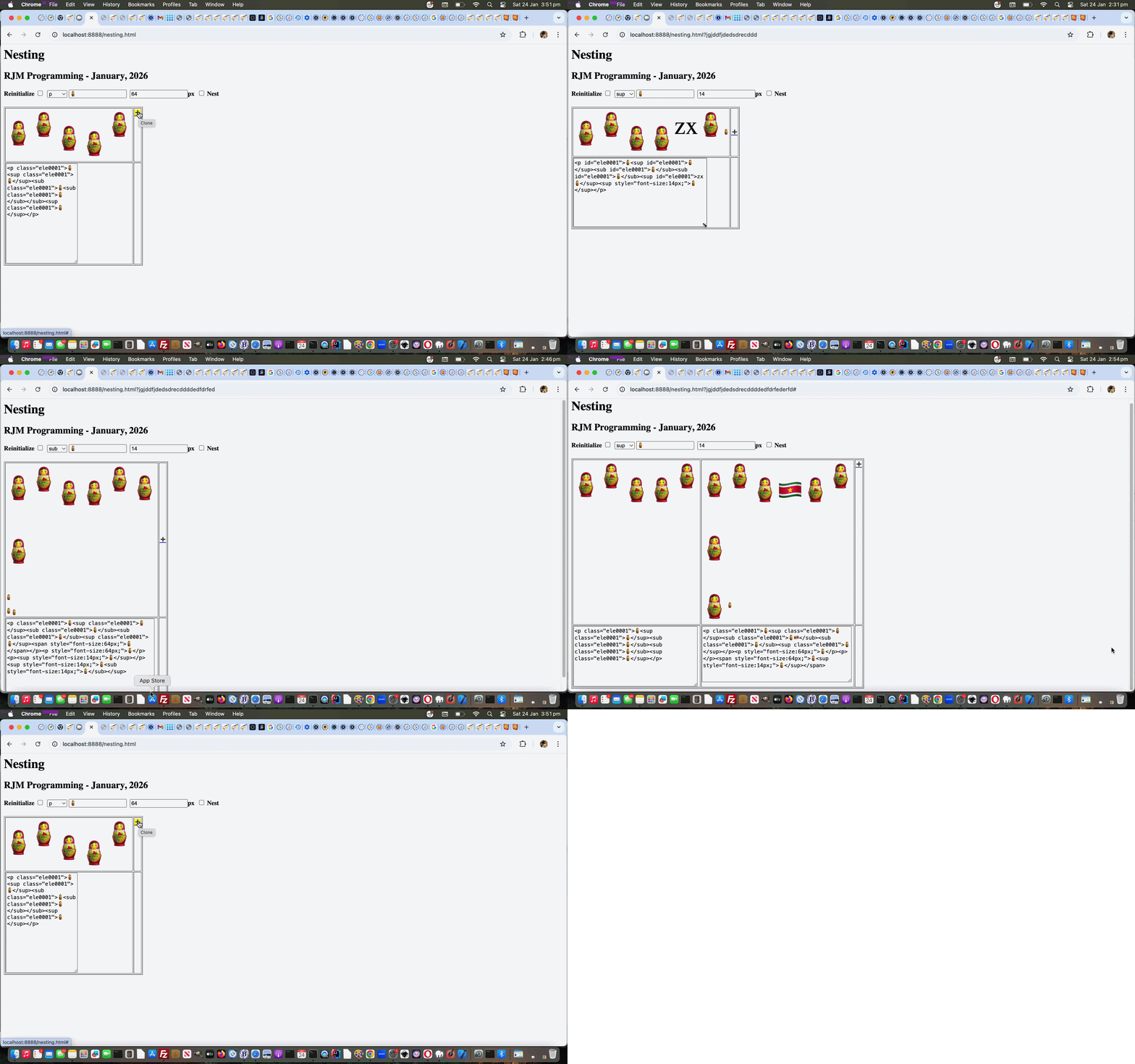
The text (which can include emojis) …
- display: inline;
- display: inline-block;
… HTML elements are endlessly fascinating in our eyes, regarding the “nesting” of elements.
You can read all you like about this at a website like W3schools but we find endless surprises, so we decided to code for a web application with scope within a table cell “parent” element …
- reinitialize (ie. append) span or p or font or sup or sub or font or h1 or h2 or h3 or h4 or div element to the end of table cell content
- nest span or p or font or sup or sub or font or h1 or h2 or h3 or h4 or div element onto the end of the most outer table cell element’s content within the table cell content, or a clicked element flagged with a pink background
We find it interesting changing up the choice above and font-size and new element content textbox settings and seeing what happens. You see the resultant HTML innards below in a textarea element which changes to are reflected above (and in this way, you can pick an element type not listed above, if you like), as are changes to second and on table cell content’s on the top row.
Feel free to try out this proof of concept Nesting web application below …
If this was interesting you may be interested in this too.
If this was interesting you may be interested in this too.
If this was interesting you may be interested in this too.

