
HTML/Javascript Cockpit of Web Applications Dropdown Cells Tutorial
We had occasion to revisit the Cockpit of Web Applications web application mentioned in HTML/Javascript Cockpit of Web Applications Home Tutorial the other day, and made the “note to self” …
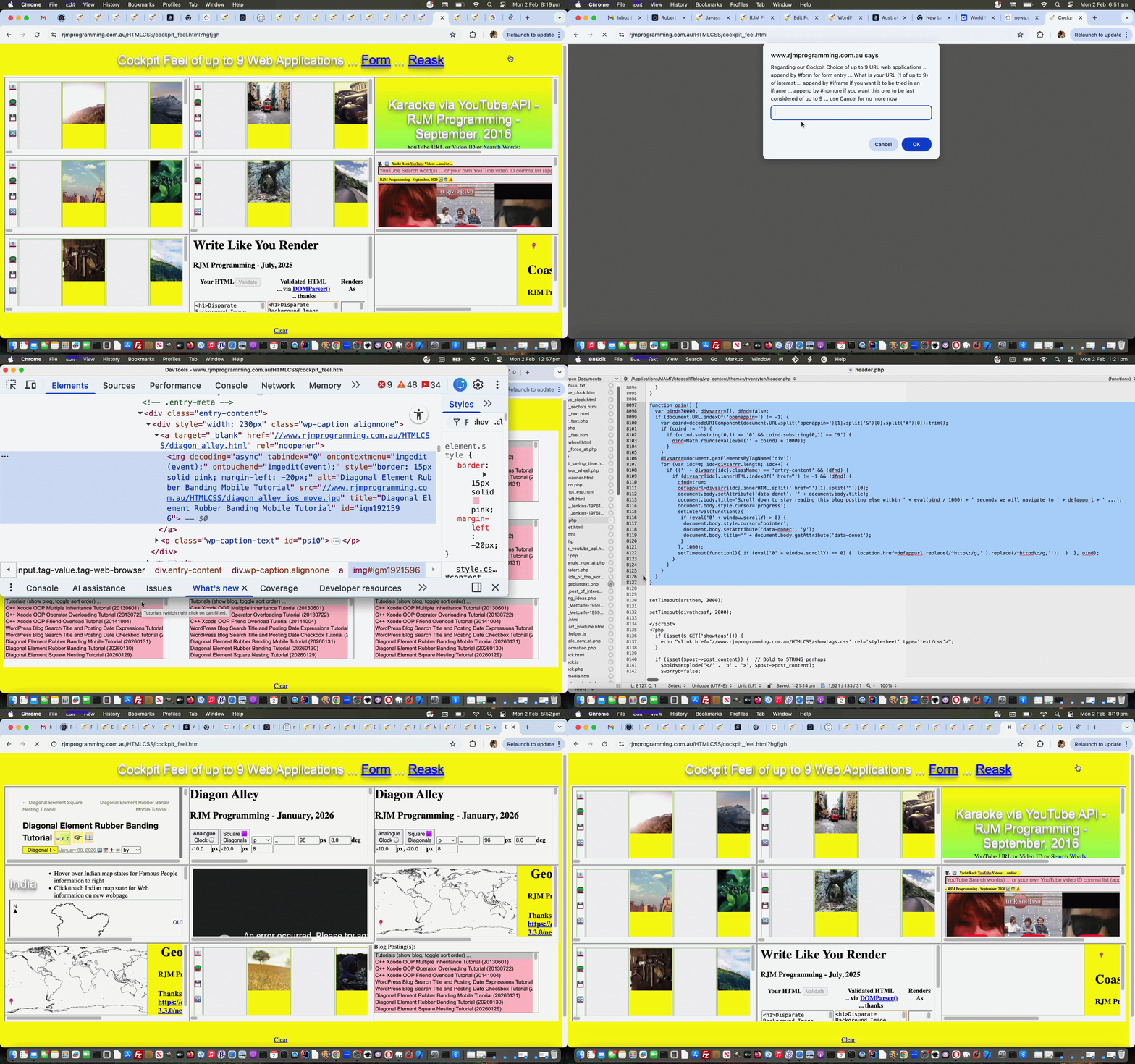
cockpit_feel.html feeling lucky option
Over a few days we stewed on this, and today, came up with a better idea, we think, that goes …
cockpit_feel.html whole new cell content idea of blog posting dropdowns in multiple entry mode
Not as snappy as the first thought, but doable, and we think the quickest methodology to glean up to 9 URLs of Cut to the Chase web application with relationships to postings of this blog, in that on our Landing Page overnight crontab/curl processing ensures it has an up to date list of Blog Posting data in a dropdown. To be frank, that is a great basis to move on from that, because this is “most of the move” to our eyes!
And so, to get this achieved relied on changes to two code sources, they being …
- header.php of the TwentyTen WordPress theme used at this blog, with a new document.body onload event spawned Javascript function …
<?php echo ”
function oain() {

  var oind=30000, divsarrr=[], dfnd=false;

  if (document.URL.indexOf('openappin=') != -1) {

    var coind=decodeURIComponent(document.URL.split('openappin=')[1].split('&')[0].split('#')[0]).trim();

    if (coind != '') {

      if (coind.substring(0,1) >= '0' && coind.substring(0,1) <= '9') {

        oind=Math.round(eval(eval('' + coind) * 1000));

      }

    }

    divsarrr=document.getElementsByTagName('div');

    for (var idc=0; idc<divsarrr.length; idc++) {

      if (('' + divsarrr[idc].className) == 'entry-content' && !dfnd) {

        if (divsarrr[idc].innerHTML.indexOf(' href="') != -1 && !dfnd) {

          dfnd=true;

          defappurl=divsarrr[idc].innerHTML.split(' href="')[1].split('"')[0].replace(/^http\:/g,'').replace(/^https\:/g,'').replace(/^\/\//g,document.URL.split(':')[0] + '://');

          document.getElementById('content').setAttribute('data-donetsry', '' + eval(30 + Math.max(700,eval('' + document.getElementById('content').getBoundingClientRect().top))));

          document.getElementById('content').setAttribute('data-donet', '' + document.getElementById('content').title);

          document.getElementById('content').title='Scroll down to stay reading this blog posting else within ' + eval(oind / 1000) + ' seconds from ' + ('' + new Date()) + ' we will navigate to ' + defappurl.replace(/^\/\//g,document.URL.split(':')[0] + '://') + ' ...';

          document.body.style.cursor='progress';

          setInterval(function(){

           if (eval('0' + window.scrollY) > eval('' + document.getElementById('content').getAttribute('data-donetsry'))) {

            document.body.style.cursor='pointer';

            document.getElementById('content').setAttribute('data-donec', 'y');

            document.getElementById('content').title='' + document.getElementById('content').getAttribute('data-donet');

           }

          }, 1000);

          setTimeout(function(){ if (eval('0' + window.scrollY) <= eval('' + document.getElementById('content').getAttribute('data-donetsry'))) {  location.href=defappurl.replace(/^http\:/g,'').replace(/^https\:/g,'');  }  }, oind);

        }

      }

    }

  }

}
“; ?> - Cockpit Feel of web applications changed cockpit_feel.html …
  function checkw(iois) {

   if (iois != null) {

   var aconto = (iois.contentWindow || iois.contentDocument);

   if (aconto != null) {

   if (aconto.document) { aconto = aconto.document; }

   if (aconto.getElementById('tuts') != null) {

     document.getElementById('dopt').innerHTML='Blog Posting(s): ' + aconto.getElementById('tuts').outerHTML.replace(' onchange=', ' multiple onchange="document.getElementById(' + "'" + 'blogp' + "'" + ').value=andlater(this); " data-onchange=').replace(/\(show\ blog\,\ toggle\ sort\ order\)/g,'').replace(/\(show\ blog\,\ toggle\ sort\ order\,\ click\ for\ keyboard\ autocompletion\)/g,'').replace(/\(show\ blog\,\ toggle\ sort\ order\,\ click\ for\ autocompletion\ keyboard\)/g,'').replace(/\(toggle\ sort\ order\)/g,'') + '<br><br>';

     amready=true;

   }

   }

   }

  }


  function blogpandtmonitor() {

    var bpt=[], ib=0, jb=0;

    if (lastblogp != document.getElementById('blogp').value && document.getElementById('blogp').value != '') {

       lastblogp=document.getElementById('blogp').value;

       bpt=document.getElementById('blogp').value.split(',');

       document.getElementById('blogp').value='';

       for (ib=0; ib<bpt.length; ib++) {

         if (sofarblogp.indexOf(',' + bpt[ib] + ',') == -1) {

            for (jb=0; jb<mapping.length; jb++) {

              if (document.getElementById('td' + mapping[jb]).innerHTML.indexOf('<select ') != -1 && sofarblogp.indexOf(',' + bpt[ib] + ',') == -1) {

                sofarblogp+=bpt[ib] + ',';

                document.getElementById('td' + mapping[jb]).innerHTML='<iframe src="//www.rjmprogramming.com.au/ITblog/?p=' + bpt[ib] + '&openappin=30#content" style=width:100%;height:100%;></iframe>';

              }

            }

         }

       }

    }

  }
… Javascript set into play via new HTML iframe as per …
<iframe src='//www.rjmprogramming.com.au/Welcome.html' onload='checkw(this);' style='display:none;'></iframe>
… the user can make happen by a first prompt answer of Cancel …
    if (('' + tn) == '1') {

    huh=prompt(prefix + "What is your URL (" + tn + " of up to 9) of interest ... append by #iframe if you want it to be tried in an iframe ... append by #nomore if you want this one to be last considered of up to 9 ... use Cancel for just using dropdown multiple selections or OK to blank for no more now", urls[eval(-1 + tn)]);

    if (huh == null) {

      cancelps=true;

      nomore='y';

      document.body.style.cursor='progress';

      setInterval(function(){

      if (amready) {

      document.getElementById('dtbl').style.width='100%';

      document.getElementById('dtbl').style.height='75%';

      for (var ijh=0; ijh<mapping.length; ijh++) {

        document.getElementById('td' + mapping[ijh]).style.width='33%';

        document.getElementById('td' + mapping[ijh]).style.height='33%';

        document.getElementById('td' + mapping[ijh]).innerHTML+=document.getElementById('dopt').innerHTML.replace(' multiple', ' size=9 multiple').replace(' selected=', ' id=selfirstopt selected=');

      }

      document.body.style.cursor='pointer';

      setInterval(blogpandtmonitor, 15000);

      amready=false;

      }

      }, 5000);

    }

    } else {

    huh=prompt(prefix + "What is your URL (" + tn + " of up to 9) of interest ... append by #iframe if you want it to be tried in an iframe ... append by #nomore if you want this one to be last considered of up to 9 ... use Cancel for no more now", urls[eval(-1 + tn)]);

    }

    } // rest of "as it used to be code here" follows
… separated off from an OK answer of blank (or some other non-blank answer) still accessing the old workflow methodologies. A cute feature (well, you had to be there) of this might be, for some users, that scrolling in Y at the blog posting cell within 30 seconds means a user can stay reading the blog posting instead (of navigating to the relevant Cut to the Chase web application), regarding the relevant one of 3×3 table cells.
Previous relevant HTML/Javascript Cockpit of Web Applications Home Tutorial is shown below.
HTML/Javascript Cockpit of Web Applications Home Tutorial
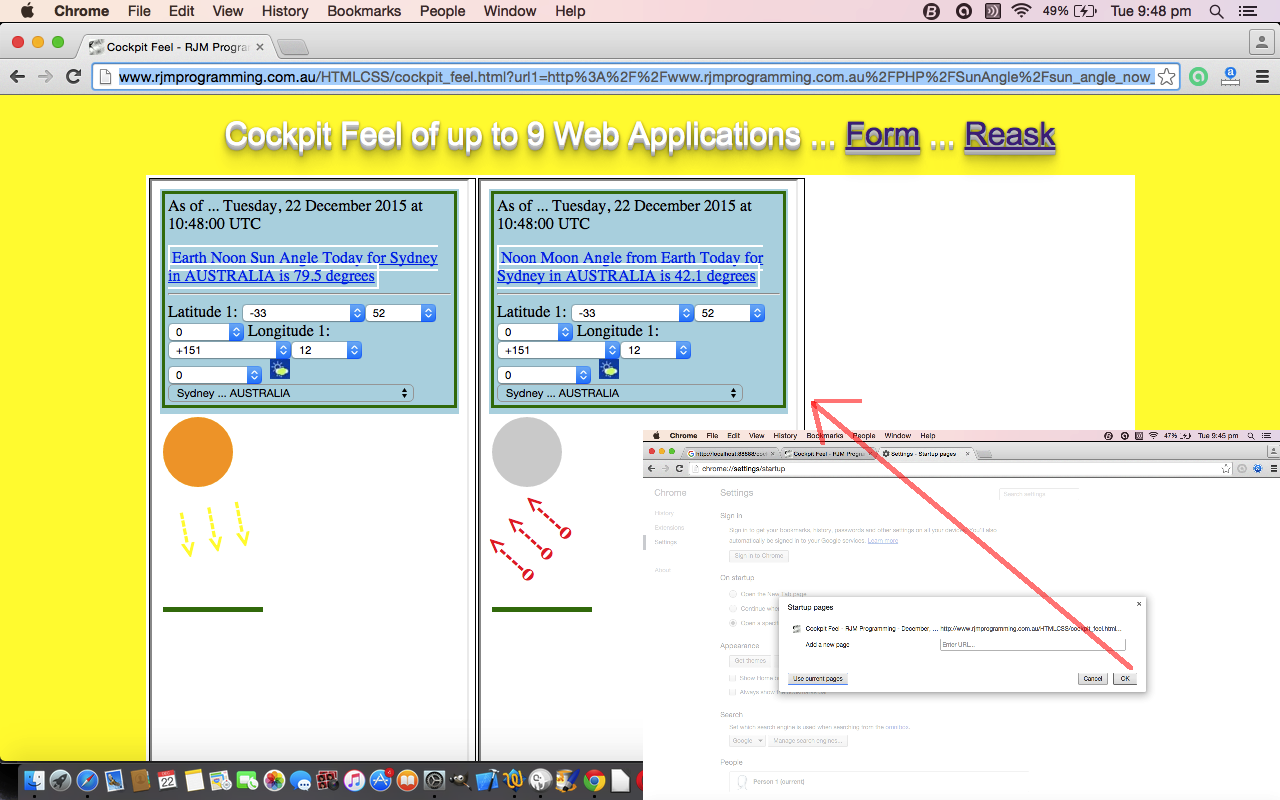
Yesterday ticked all the boxes with our Cockpit Feel web application to suggest that it is now an excellent candidate to be the designated Home Page for a web browser, as it could be the tailorable “web application central” as you enter the web browser for the first time. The Home Page of a web browser can have that important reminder functionality for how you communicate, or do your work and/or collaborate, or perform tasks, or monitor goings-on.
Yesterday’s work meant that you can send a …
- web browser address bar URL with an established list of web applications you want to open … and/or …
- cut down web browser address URL ( ie. just http://www.rjmprogramming.com.au/HTMLCSS/cockpit_feel.html ) … and let the cookies you have previously set, or not, determine what happens … thing about this is that Safari could have a different set of web applications to Internet Explorer to Firefox to Opera to Google Chrome etcetera etcetera etcetera
The thing is, we often put our favourite Search Engine URL as our web browser’s Home Page, and am not suggesting otherwise, except that these days there are so many shortcut or menu methods of getting to your favourite Search Engine that maybe what is better to put as your web browser Home Page is something more tailored to your actual use, and in any case, one of those web applications could be that favourite Search Engine, anyway.
Today’s tutorial picture URL, for example, is http://www.rjmprogramming.com.au/HTMLCSS/cockpit_feel.html?url1=http%3A%2F%2Fwww.rjmprogramming.com.au%2FPHP%2FSunAngle%2Fsun_angle_now_at.php%3Fdone%3Dy%26nowo%3Dy%26latd%3D-33%26latm%3D52%26lats%3D0%26longd%3D151%26longm%3D12%26longs%3D0%26from%3Dfrom%26country%3DAUSTRALIA%26place%3DSydney%23iframe&url2=http%3A%2F%2Fwww.rjmprogramming.com.au%2FPHP%2FMoonAngle%2Fmoon_angle_now_at.php%3Fdone%3Dy%26nowo%3Dy%26latd%3D-33%26latm%3D52%26lats%3D0%26longd%3D151%26longm%3D12%26longs%3D0%26from%3Dfrom%26country%3DAUSTRALIA%26place%3DSydney%23nomore%23iframe&url3=&url4=&url5=&url6=&url7=&url8=&url9= … representing a look at Sun Angle and Moon Angle for Sydney, Australia … and you can see that if you pick a web application from this www.rjmprogramming.com.au domain, you can use the suffix #iframe to say that the web application should “live” in an HTML iframe element.
Previous relevant HTML/Javascript Cockpit of Web Applications Form Tutorial is shown below.
HTML/Javascript Cockpit of Web Applications Form Tutorial
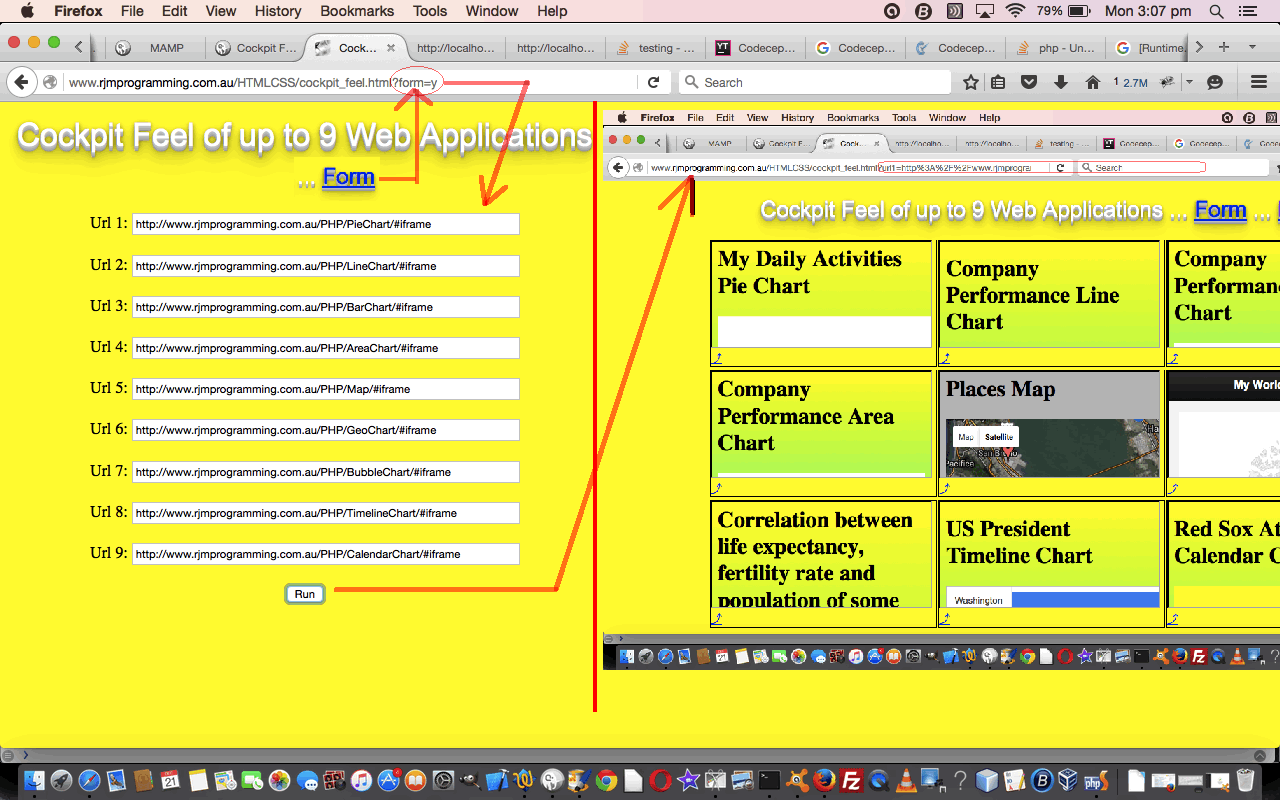
Today’s Cockpit Feel web application adds functionality along with yesterday’s pre-existing …
- Javascript DOM document.write() method nesting …
- Javascript prompt() window method
… way that asks for input from the user in that old interactive desktop command line application feeling kind of way, an …
- HTML form
… method, the more usual web application way of asking for user input.
Most websites present interactive input in an HTML form for a few reasons (we can think of) …
- everything that will be asked can be there on the webpage (so that you know what is coming)
- HTML form elements can direct the web traffic from one web page to the next via HTML input type=’submit’ buttons teamed with HTML form action=[Url] arrangements
- validation of this user entered data can be validated at the one place (via the HTML form onsubmit event we’ve talked about before), and the HTML5 input element type has several self-validating types (like type=’url’ that we make use of today)
- huge amounts of user entered data can make use of the HTML form method=’POST’ as necessary, though today we use method=’GET’ for the amounts of data we have and in order to remain with client side programming (method=’POST’ needs server side programming intervention)
- uploading of files is possible via HTML form element
The concept today remains simple …
- take the same 3×3 grid (to the beach this time, because yesterday they enjoyed the zoo so much (they’d like you to know))
- check for cookie data and $_GET[] parameters for any/all of the 3×3 and if found get (up to 9) URLs from this data, else document.write(prompt()) for the information interactively, storing good ideas in cookies for either of the two modes of display … that being …
- iframe
- window.open() popup window
… so that the next time the user runs the same web application, and they have not cleared their cookies out in the meantime, this same configuration of use, personalized to them and the web browser they’re using, will happen.
Again, regarding research and development we’d like to thank “JavaScript & Ajax” seventh edition by Tom Negrino and Dori Smith for the great code regarding cookies.
The HTML and Javascript source code you could call cockpit_feel.html (changed for HTML form functionality in this way) for which you can use this live run link. If you want to simulate the tutorial picture “Cockpit” today try this link. We hope some/all/grid-maintenance information helps today.
If this was interesting you may be interested in this too.
Previous relevant HTML/Javascript Cockpit of Web Applications Primer Tutorial is shown below.
HTML/Javascript Cockpit of Web Applications Primer Tutorial
Today’s web application continues our interest in …
- Javascript DOM document.write() method nesting …
- Javascript prompt() window method
… to give that old interactive desktop command line application feel that many of the “senior citizens” (should we diplomatically say) of the web world, may still secretly gravitate towards?!
Okay … who are the closet interactive desktop command line application lovers out there? … Come on … you know who you are?!
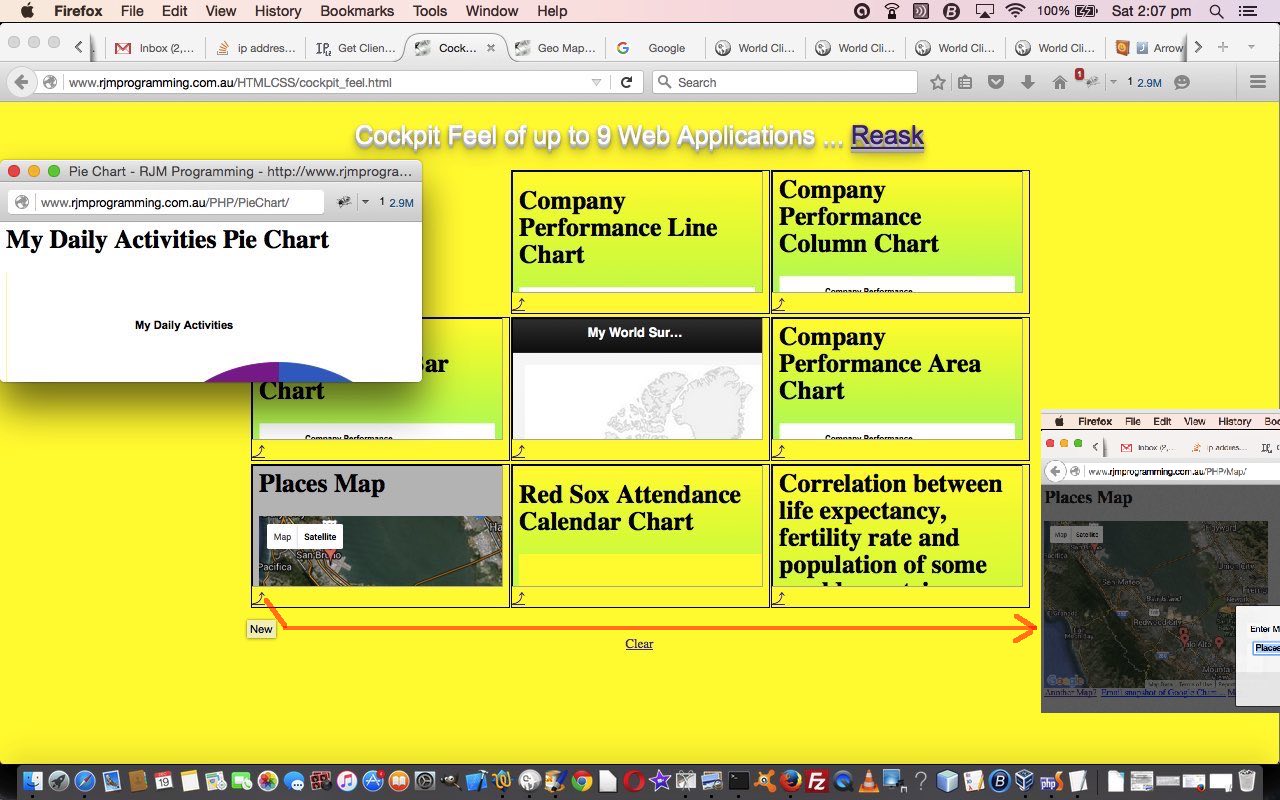
But we digress … so today, we have a web application a bit like a dashboard, a bit like a cockpit (we’ve called it) … though the looks aren’t as good at this stage. Nevertheless, maybe it has a feel of a widget to it as well, because today we only use HTML, making use of cookies to do away with the need for a serverside language like PHP, which could have done the job as well. But not everybody has PHP? Right …
… left …
… Damn! Those pesky psychological tests!
The concept today is very simple …
- take a 3×3 grid (to the zoo would be nice)
- check for cookie data for any/all of the 3×3 and if found get (up to 9) URLs from this data, else document.write(prompt()) for the information interactively, storing good ideas in cookies for either of the two modes of display … that being …
- iframe
- window.open() popup window
… so that the next time the user runs the same web application, and they have not cleared their cookies out in the meantime, this same configuration of use, personalized to them and the web browser they’re using, will happen.
Regarding research and development we’d like to thank “JavaScript & Ajax” seventh edition by Tom Negrino and Dori Smith for the invaluable code regarding cookies, and an interesting sideline, which we ended up not perusing, but is active in your *._GETME file today, to show you what is possible comes from this useful website … thanks.
The (purely) HTML and Javascript source code you could call cockpit_feel.html for which you can use this live run link. If this helps then we’re happy.
If this was interesting you may be interested in this too.
If this was interesting you may be interested in this too.
If this was interesting you may be interested in this too.
If this was interesting you may be interested in this too.

