AppML Primer Tutorial
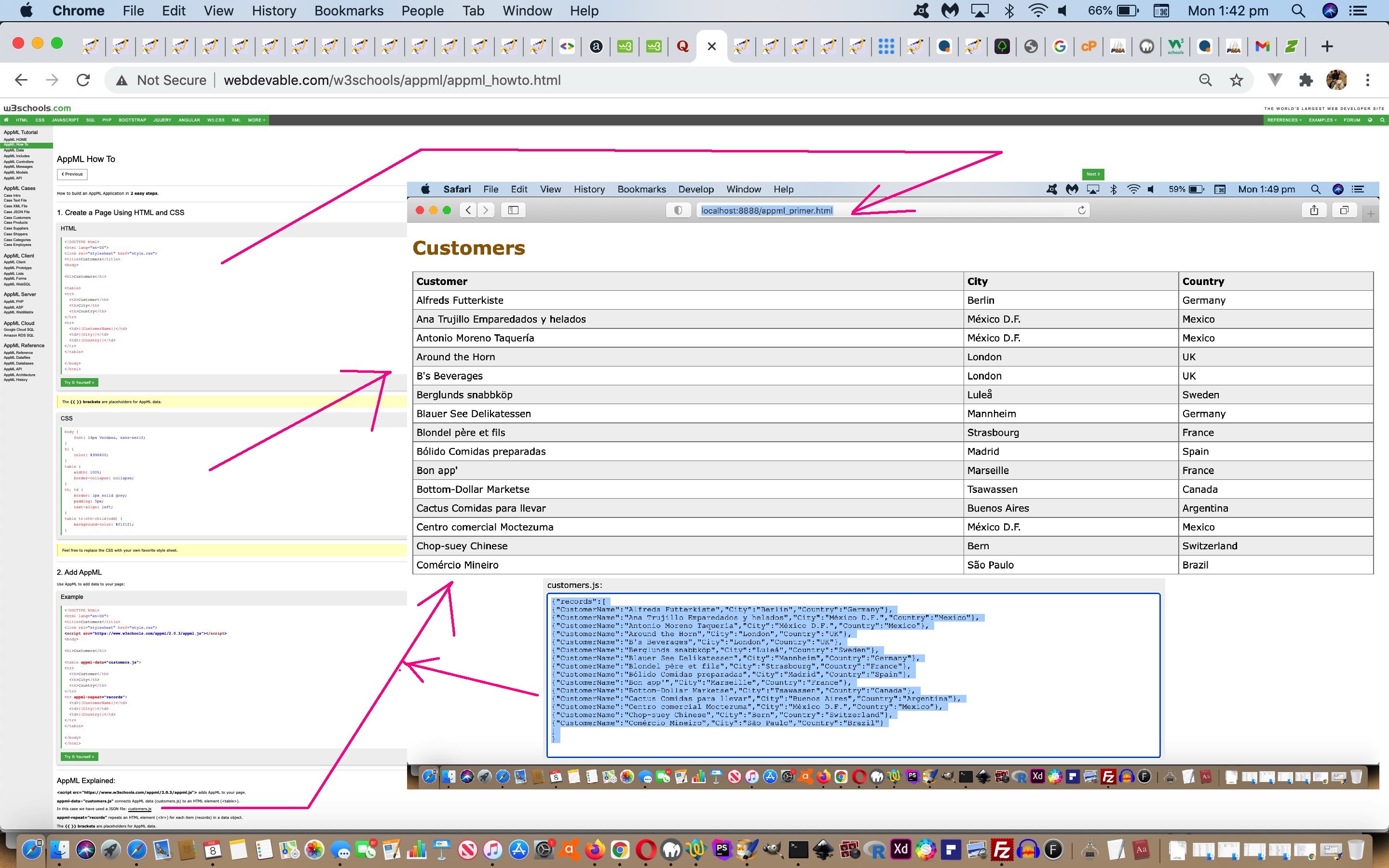
There are hundreds and perhaps thousands of Framework type applications out there that create HTML output. Some set to a Framework the handling of data, and today we’re trying out one called AppML where we are going to use the W3Schools Two Step first tutorial as per …
AppML Explained:
<script src=”https://www.w3schools.com/appml/2.0.3/appml.js”> adds AppML to your page.
appml-data=”customers.js” connects AppML data (customers.js) to an HTML element (<table>>).
In this case we have used a JSON file: customers.js
appml-repeat=”records” repeats an HTML element (<tr>) for each item (records) in a data object.
The {{ }} brackets are placeholders for AppML data.
Tokenizing this way (or you could call it substituting) gels with our thinking nearly as much as adding global data attributes as ways to make your HTML more intelligent, and more like that “protocol with glasses”, XML.
All it took to create today’s “pretty swish” table of a web application was …
- index.html HTML
- style.css CSS
- customers.js JSON
… that JSON serving as a flat file data source. Interesting, huh?!
If this was interesting you may be interested in this too.




Naming the things in a bathroom is a smarter vocabulary exercise than it first looks, because every learner already knows the room, so the words attach to objects they can see and touch instead of floating on a flashcard. Asking how many things can you name turns it into a game rather than a test, and the counting itself becomes the motivation: one more word than last time is a visible win. I like the way this kind of lesson uses a photograph as the prompt, since a picture gives every student the same starting point regardless of level, and the stronger students can move on to describing what each thing is for while beginners are still collecting nouns. The bathroom is a good choice of room too, because it is full of everyday words that textbooks often skip, the small objects people actually say out loud every morning. A daily habit of naming five new things around the house would build a working vocabulary faster than memorising lists, and this post is a good template for it.