
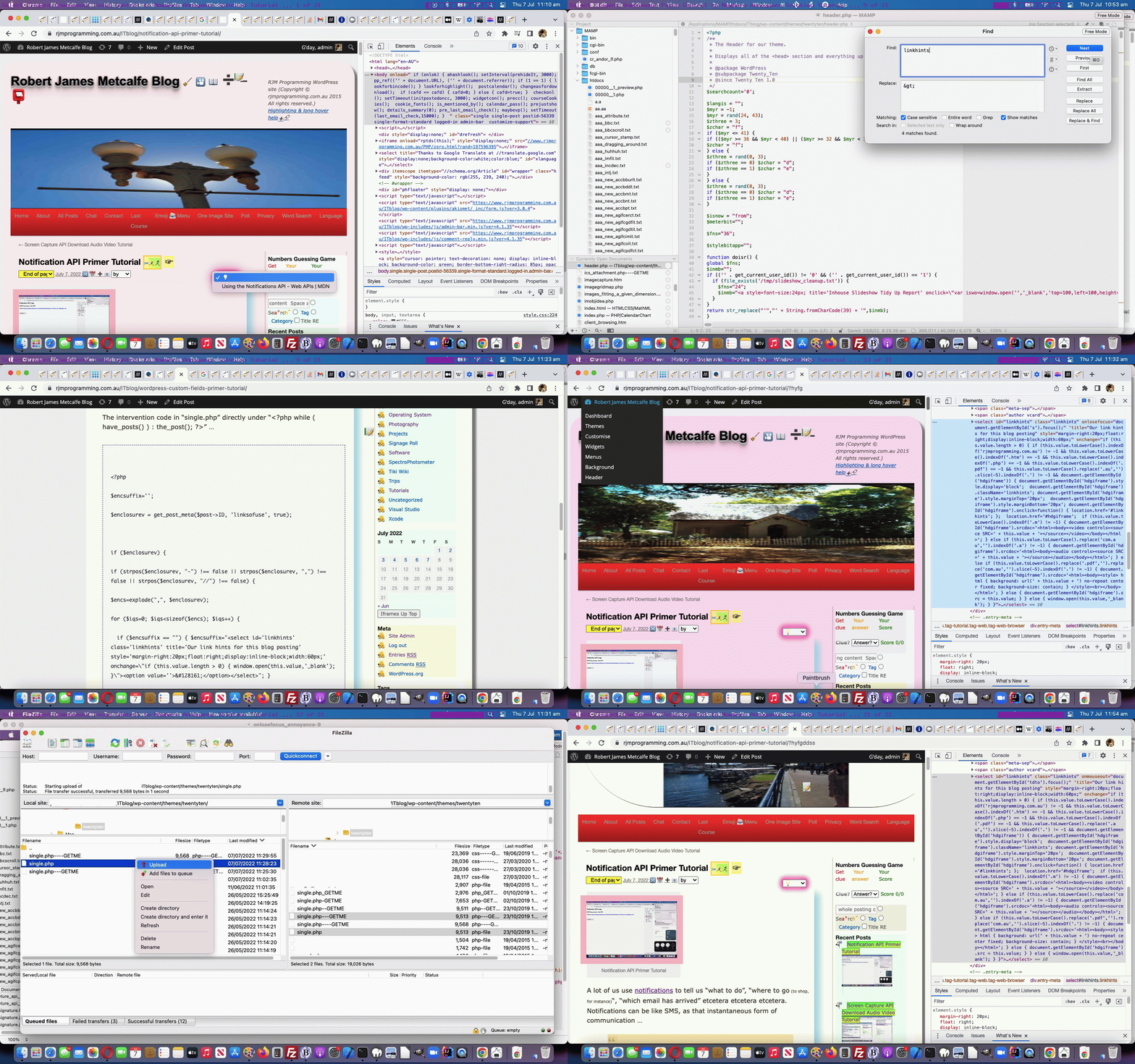
Select Element Onmouseout Focus Control to Nowhere Annoyance Solution Tutorial
We could so easily have called today’s tutorial …
- WordPress Custom Fields Focus Issue Tutorial … or …
- Select Element Focus to Nowhere Primer Tutorial … or …
- Non-mobile Focus Control Primer Tutorial … or …
- Non-mobile Onmouseout versus Onlosefocus Event Tutorial … but eventually settled on …
- Select Element Onmouseout Focus Control to Nowhere Annoyance Solution Tutorial
… because the “very specialized” annoyance left by WordPress Custom Fields Primer Tutorial code we have finally addressed, today, the symptoms being …
- a user clicks the select (size=1) Custom Fields inspired “glowing” dropdown … and …
- it “expands” to reveal extra webpages that can be visited in a new webpage … but you …
- the user decides not to navigate to any of these dropdown offerings and so you click elsewhere in the webpage (not in the search textbox, though you can if you prefer, but the issue is not with this action) … we think …
- the user should be immediately able to scroll up or down the webpage, but, before these changes, they got stuck not being able to do this, instead needing to first use the keyboard to tab out of a textbox, before being able to scroll
… obviously deserves a very long and convoluted blog posting title, now doesn’t it?
Annoying, not bad, but, annoying. What we do here is often to put off such minor annoyances, but as we have noted before, it is often these mildly annoying scenarios, taken seriously, and taken through to their conclusion (or closer to their conclusion), that can teach us quite a bit about Javascript event workings.
We’ve jotted down stand out points from today’s resolution to this …
Focus is hard to control with mobile (so, by and large, think less about trying to control it) … but for non-mobile …
Focus annoyances are sometimes to do with onmouseout not onlosefocus (eg. select element (size=1) that we just open but do not select from)
Focus setting to a hidden textbox (as if “focus to nothing”) can be the thing to do rather than a visible textbox to open the door to uninterrupted scrolling possibilities to follow (ie. tdto rather than s)
(Note to myself) Not always header.php but sometimes others (eg. single.php) … ie. look up our own blurb
Garden paths, though frustrating, can teach lots, if in moderation (hence the long animated GIF containing interim “garden paths”!)
Check that a selection in select element still works … check!
What helped end up with …
- a user clicks the select (size=1) Custom Fields inspired “glowing” dropdown … and …
- it “expands” to reveal extra webpages that can be visited in a new webpage … but you …
- the user decides not to navigate to any of these dropdown offerings and so you click elsewhere in the webpage (not in the search textbox, though you can if you prefer, but the issue is not with this action) … we think …
- the user
should beis immediately able to scroll up or down the webpage, but, before these changes, they got stuck not being able to do this, instead needing to first use the keyboard to tab out of a textbox, before being able to scroll
… just involved in this WordPress blog’s TwentyTen theme’s good ol’ header.php single.php simple change to WordPress Custom Fields Primer Tutorial‘s changes (shown below) …
<?php
if ($encsuffix == "") { $encsuffix="<select id='linkhints' class='linkhints' onmouseout="document.getElementById('tdto').focus();" title='Our link hints for this blog posting' style='margin-right:20px;float:right;display:inline-block;width:60px;' onchange=\"if (this.value.length > 0) { window.open(this.value,'_blank'); }\"><option value=''>💡</option></select>"; }
?>
Previous relevant WordPress Custom Fields Primer Tutorial is shown below.
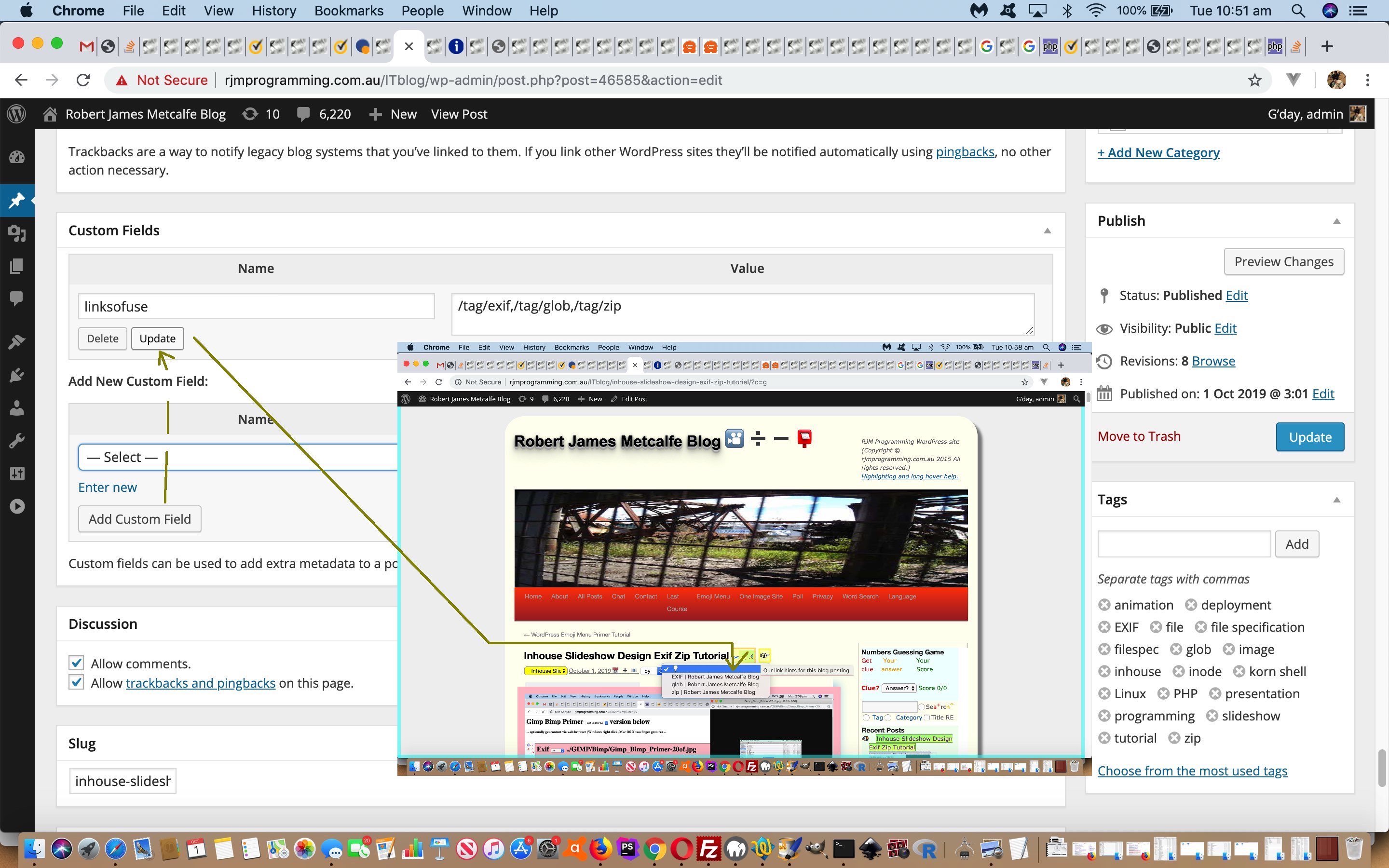
WordPress Custom Fields Primer Tutorial
I spy with my little eye something beginning with … 💡
Yes, 💡
Up above, 💡
Aw ... what a bright idea?! How come I click on the light bulb (💡) and it has dropdown options unique to this blog post?
Glad you asked. And all because …
Let’s talk about WordPress blog Custom Fields, and an associated great link we stumbled upon. We followed its advice to change Theme code … yay!!!! Except this time, it wasn’t (good ol’) header.php that changed for our Custom Field foray (we’ve codenamed “Operation 4A” … tee hee).
Working to a plan like this, often the first question is (especially with event-driven programming code) “Where is the intervention point?”.
You will need to enter your custom fields code inside the WordPress loop.
Look for the line that looks like this:
<?php while ( have_posts() ) : the_post(); ?>
You want to make sure that you add your code before the following line:
<?php endwhile; // end of the loop. ?>
… good advice, and looking in the themes “twentyten” folder several PHP files had these two. But trial and error (just placing <?php echo ‘yoo hoo!’; ?>) we found that “single.php” could be tweaked to change the WordPress blog webpage here, and intervene. Place the intervention near “endwhile” and it goes down the bottom of the post’s content, and near “while ( have_posts() ) : the_post();” you get it up near the top of the post’s content (the placement we opted for).
Working to a plan like this, often the next question is “What do you want to do now that you know where to intervene?” and here we decided we wanted a dropdown way to navigate to links that are related to the content in one of 5 ways …
- a number corresponds to a posting number webpage at the WordPress (TwentyTen themed) blog here
- a “-” (no spaces) delimited single “slug” word corresponds to this WordPress blog permalink
- “tag/[tag-words]” corresponds to this WordPress [tag-words] tag lookup
- “category/[category-words]” corresponds to this WordPress [category-words] category lookup
- absolute URL will add to dropdown and try to navigate there
… to allow the user to “read up” on the posting to follow, perhaps.
And so … “How come I click on the light bulb and it has dropdown options unique to this blog post?”
The intervention code in “single.php” directly under “<?php while ( have_posts() ) : the_post(); ?>” …
<?php
$encsuffix='';
$enclosurev = get_post_meta($post->ID, 'linksofuse', true);
if ($enclosurev) {
if (strpos($enclosurev, "-") !== false || strpos($enclosurev, ",") !== false || strpos($enclosurev, "//") !== false) {
$encs=explode(",", $enclosurev);
for ($iqs=0; $iqs<sizeof($encs); $iqs++) {
if ($encsuffix == "") { $encsuffix="<select id='linkhints' class='linkhints' title='Our link hints for this blog posting' style='margin-right:20px;float:right;display:inline-block;width:60px;' onchange=\"if (this.value.length > 0) { window.open(this.value,'_blank'); }\"><option value=''>💡</option></select>"; }
if (strpos($encs[$iqs], "//") !== false) {
$enctitle="URL " . $encs[$iqs];
$enccont=@file_get_contents("http://" . explode("//", $encs[$iqs])[1]);
if (strpos($enccont, "</title>") !== false) {
$enctitle=explode(">", explode("</title>", $enccont)[0])[-1 + sizeof(explode(">", explode("</title>", $enccont)[0]))];
}
$encsuffix=str_replace("</select>", "<option value='" . $encs[$iqs] . "'>" . $enctitle . "</option></select>", $encsuffix);
} else if (strpos($encs[$iqs], "-") !== false) {
$encsm=explode("-", $encs[$iqs]);
$encsuffix=str_replace("</select>", "<option value='//www.rjmprogramming.com.au/ITblog/" . $encs[$iqs] . "'></option></select>", $encsuffix);
$enctitle=strtoupper(substr($encsm[0],0,1)) . strtolower(substr($encsm[0],1));
for ($jqs=1; $jqs<sizeof($encsm); $jqs++) {
$enctitle.=" " . strtoupper(substr($encsm[$jqs],0,1)) . strtolower(substr($encsm[$jqs],1));
}
$encsuffix=str_replace("></option></select>", ">" . $enctitle . "</option></select>", $encsuffix);
} else {
if (substr($encs[$iqs],0,1) >= '0' && substr($encs[$iqs],0,1) <= '9') {
$enctitle="Blog Posting " . $encs[$iqs];
$enccont=@file_get_contents("https://www.rjmprogramming.com.au/ITblog/?p=" . $encs[$iqs]);
if (strpos($enccont, "</title>") !== false) {
$enctitle=explode(">", explode("</title>", $enccont)[0])[-1 + sizeof(explode(">", explode("</title>", $enccont)[0]))];
}
$encsuffix=str_replace("</select>", "<option value='" . "//www.rjmprogramming.com.au/ITblog/?p=" . $encs[$iqs] . "'>" . $enctitle . "</option></select>", $encsuffix);
} else if (strpos($encs[$iqs], "/tag/") !== false) {
$enctitle="Blog Tag " . str_replace("-"," ",str_replace("/tag/","",$encs[$iqs]));
$enccont=@file_get_contents("https://www.rjmprogramming.com.au/ITblog" . $encs[$iqs]);
$encsuffix=str_replace("</select>", "<option value='" . "//www.rjmprogramming.com.au/ITblog" . $encs[$iqs] . "'>" . $enctitle . "</option></select>", $encsuffix);
} else if (strpos($encs[$iqs], "/category/") !== false) {
$enctitle="Blog Category " . str_replace("-"," ",str_replace("/category/","",$encs[$iqs]));
$enccont=@file_get_contents("https://www.rjmprogramming.com.au/ITblog" . $encs[$iqs]);
$encsuffix=str_replace("</select>", "<option value='" . "//www.rjmprogramming.com.au/ITblog" . $encs[$iqs] . "'>" . $enctitle . "</option></select>", $encsuffix);
} else if (strpos($encs[$iqs], "tag/") !== false) {
$enctitle="Blog Tag " . str_replace("-"," ",str_replace("tag/","",$encs[$iqs]));
$enccont=@file_get_contents("https://www.rjmprogramming.com.au/ITblog/" . $encs[$iqs]);
$encsuffix=str_replace("</select>", "<option value='" . "//www.rjmprogramming.com.au/ITblog/" . $encs[$iqs] . "'>" . $enctitle . "</option></select>", $encsuffix);
} else if (strpos($encs[$iqs], "category/") !== false) {
$enctitle="Blog Category " . str_replace("-"," ",str_replace("category/","",$encs[$iqs]));
$enccont=@file_get_contents("https://www.rjmprogramming.com.au/ITblog/" . $encs[$iqs]);
$encsuffix=str_replace("</select>", "<option value='" . "//www.rjmprogramming.com.au/ITblog/" . $encs[$iqs] . "'>" . $enctitle . "</option></select>", $encsuffix);
}
}
}
}
}
?>
… looks for an optionally filled in blog posting Custom Field called “linksofuse” for a comma separated list of links as per the 5 types of definitions above, and shows these as dropdown option values under that light bulb (💡) under the blog posting title before the blog posting content (that includes the blog posting image we always have).
If this was interesting you may be interested in this too.
If this was interesting you may be interested in this too.

