PHP/HTML Image Manipulation Primer Tutorial
Here is a tutorial that shows some very rudimentary PHP GD and Image Functions (manipulation) functionality.
Link to some downloadable PHP programming code … rename to myrudimentarydrawing.php.
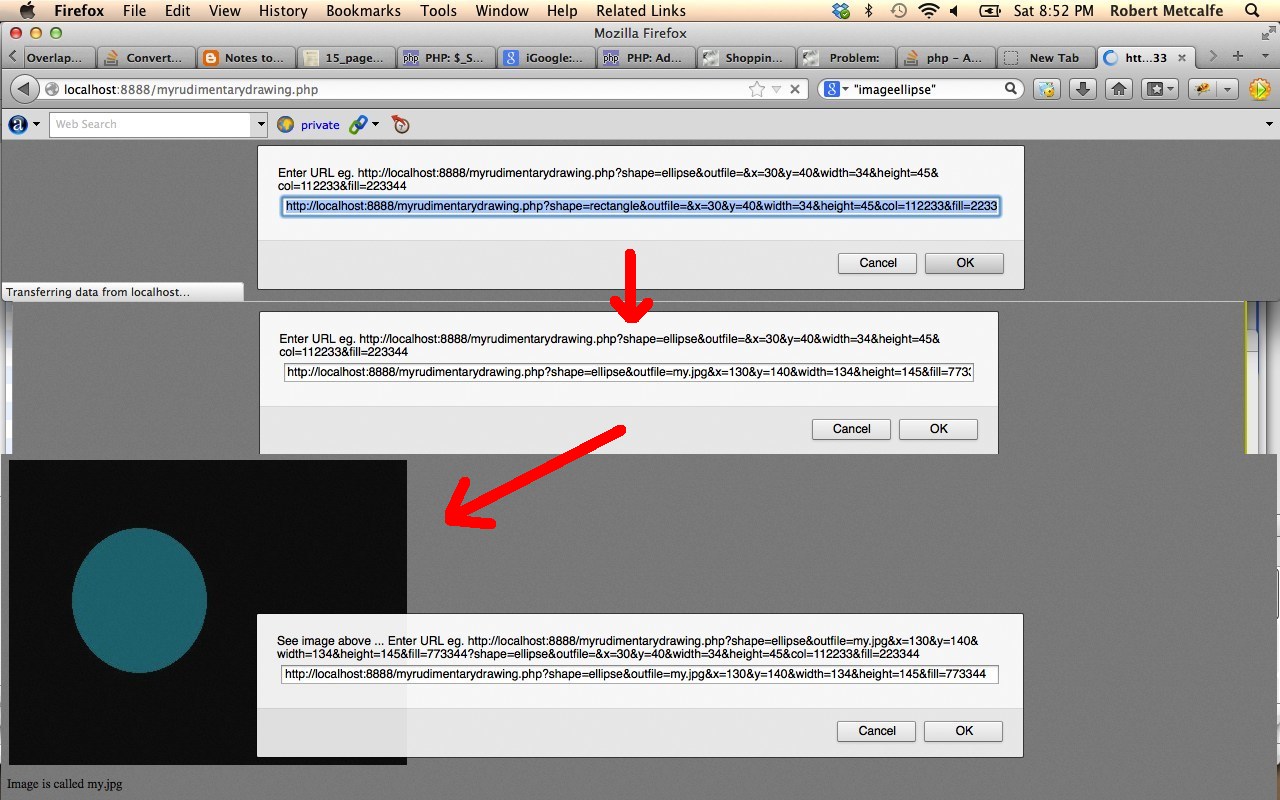
For this tutorial we show the drawing of an ellipse or a rectangle into a web image either shown at the browser, or saved to a file and then displayed at the browser, and where get parameters are used to tailor your rectangle or ellipse as to whether it has a fill colour and where it is positioned and what width and height it has, and whether the image is saved to an actual file on the server (effectively uploading).
Some good background reading for this tutorial would be:
- GD and Image Functions
- imagecreatetruecolor
- imagerectangle, imagefilledrectangle, imageellipse, imagefilledellipse
- imagepng, imagegif, imagejpeg
If this was interesting you may be interested in this too.




I like the single-row radio-play approach for keeping the controls compact while still making each selection clear. When I’m checking a calculation alongside a tutorial, I use StepStat to see the intermediate steps; how do you handle the layout when the playlist gets much longer?