
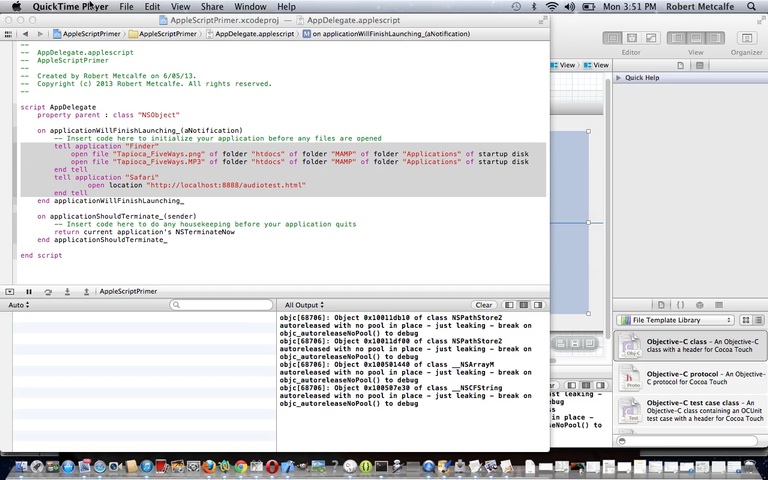
AppleScript Primer Tutorial
Here is a tutorial that introduces you to some aspects of AppleScript.
AppleScript is a scripting language created by Apple Inc. and built into Macintosh operating systems since System 7. The term “AppleScript” may refer to the scripting system itself, or to particular scripts that are written in the AppleScript language.
AppleScript is primarily an inter-application processing system, designed to exchange data between and control other applications in order to automate repetitive tasks. AppleScript has some limited processing abilities of its own – basic calculation abilities, and some more intricate text processing tools – and is extensible, allowing the addition of scripting additions which add new functions to the language itself. Mainly, however, AppleScript relies on the built-in functionality of other applications and processes to handle complex tasks.
AppleScript has some elements of object-oriented programming, particularly in the construction of script objects, and natural language programming tendencies in its syntax, but does not strictly conform to either category.
I’ve been curious about AppleScript, but have not used it extensively. It can be used as a procedural tool for Mac OS X application usage.
Let’s see some simple AppleScript in action …
Link to AppleScript information … from Wikipedia from which quote above comes.
Link to some downloadable AppleScript code … rename to AppDelegate.applescript for use within XCode.
If this was interesting you may be interested in this too.




The distinction between course-driven and immersion-driven learning is useful. A small extension to the australia.htm exercise would be a set of named map markers and a text filter: first update the visible markers on an input event, then add a collected/uncollected toggle, and finally persist only that toggle state in localStorage. That gives beginners a concrete reason to learn arrays, DOM updates and browser storage without needing PHP or MySQL first. It is also worth testing empty searches, a page reload and disabled storage separately; those are different failure cases. Disclosure: we maintain the GTA 6 interactive map. I am suggesting it as an example of a map-and-progress interface, not claiming that we used the tutorial code. Would you introduce persistence after the first working interaction, or keep the initial exercise entirely stateless?