
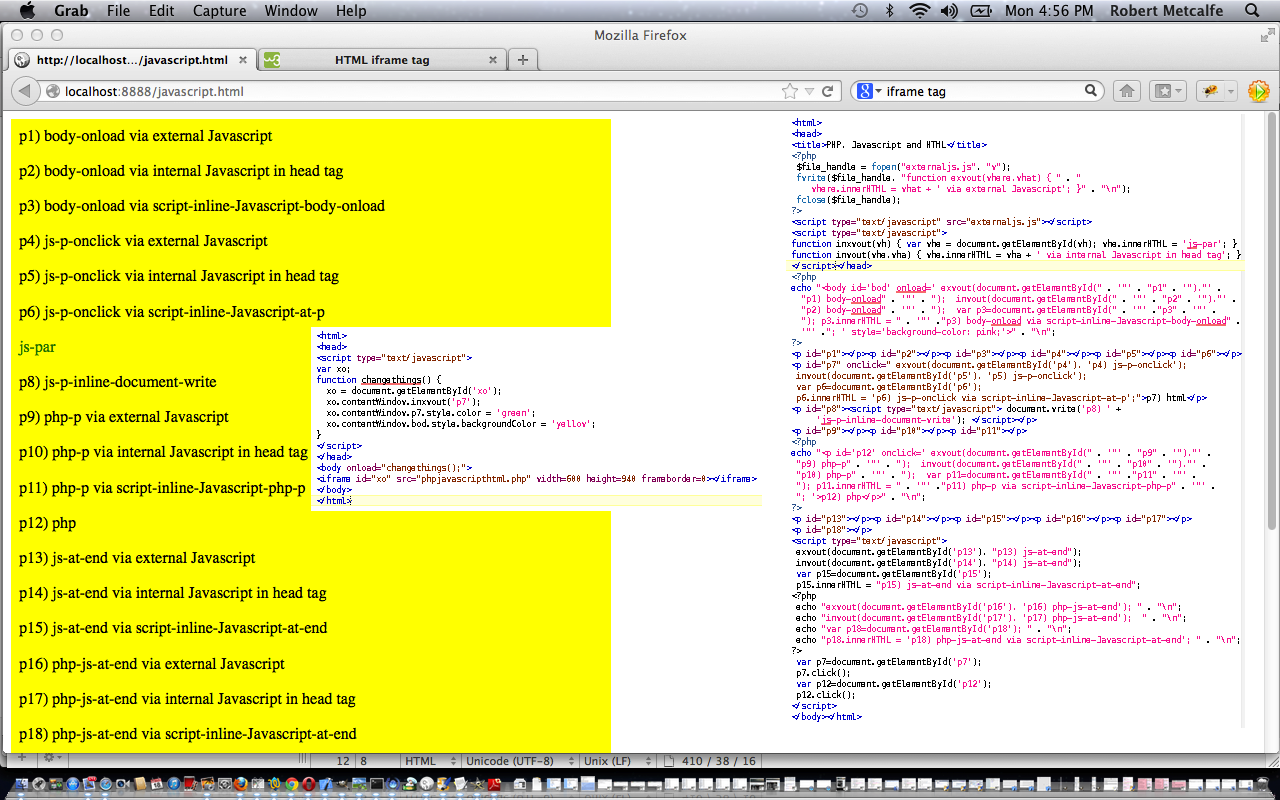
JavaScript and the DOM Tutorial
JavaScript is a tremendous web client-side language to learn. You may have heard of a server-side JavaScript, but this tutorial only deals with client-side work. This tutorial builds a JavaScript layer on top of the PHP tutorial made earlier, showing how the DOM can be used to change the look of your webpage dynamically, even if most of it is in an iFrame (but there are limits).
PHP is a wonderful language to learn. It is usually associated with being a web server-side language (as with this tutorial, where it is being shown on a local MAMP web server) but can be a command line tool as well. If you like PHP you may eventually like ASP.Net and/or Python, and vice versa. It has sophisticated data structures, Object Oriented (the thinking that you can build classes with data and methods which define objects created as you run the program … eg. you might write a class for book and have data members for things like numPages and publisher, author, creationDate and have methods called things like getCreationDate, setCreationDate, getAuthor, setAuthor allowing the user to use these methods rather than changing the data members themselves … heaven forbid that!) code concepts, and really combines well with JavaScript (as a client-side language).
Download programming source code and rename to javascript.html
Download source code and rename to phpjavascripthtml.php
Tutorial …
Did you know …
JavaScript makes a great easy-access Calculator?
Try typing the lines below into the address bar of your favourite browser:
Javascript: alert(eval(512 / 380));
Javascript: alert(eval(512 * 380));
Javascript: alert(eval(512 – 380));
Javascript: alert(eval(512 + 380));
Javascript: alert(eval(512 % 380));
These days we spend so much time on the Internet it is a much quicker way to get to a calculator!
If this was interesting you may be interested in this too.




The distinction between course-driven and immersion-driven learning is useful. A small extension to the australia.htm exercise would be a set of named map markers and a text filter: first update the visible markers on an input event, then add a collected/uncollected toggle, and finally persist only that toggle state in localStorage. That gives beginners a concrete reason to learn arrays, DOM updates and browser storage without needing PHP or MySQL first. It is also worth testing empty searches, a page reload and disabled storage separately; those are different failure cases. Disclosure: we maintain the GTA 6 interactive map. I am suggesting it as an example of a map-and-progress interface, not claiming that we used the tutorial code. Would you introduce persistence after the first working interaction, or keep the initial exercise entirely stateless?