WordPress Plugin Primer Tutorial
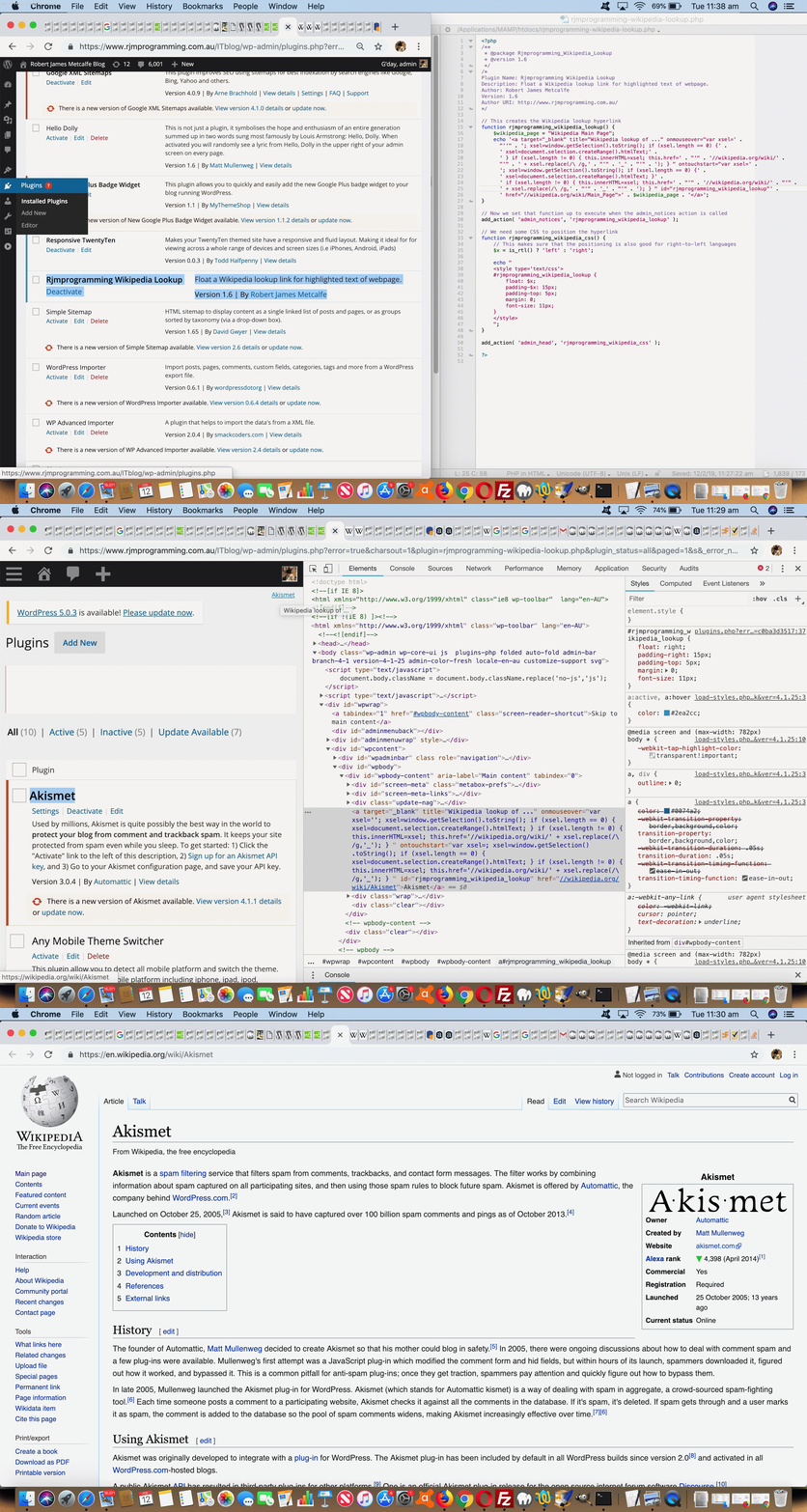
Normally we make changes to this TwentyTen themed WordPress blog by changing that theme’s wp-content/themes/twentyten/header.php file. But today we show you how to write the PHP code needed to write a WordPress.org admin login plugin to create a hyperlink to a Wikipedia page regarding any text you have highlighted on your WordPress admin area webpage.
We thank …
… and we think you should read …
For us, with our very simple rjmprogramming-wikipedia-lookup.php plugin, we only needed the one piece of PHP to sit in the current WordPress wp-content/plugins directory, and then immediately be accessible to the WordPress blog admin area’s Plugins -> Activate option …
<?php

/**

 * @package Rjmprogramming_Wikipedia_Lookup

 * @version 1.6

 */

/*

Plugin Name: Rjmprogramming Wikipedia Lookup

Description: Float a Wikipedia lookup link for highlighted text of an admin webpage.

Author: Robert James Metcalfe

Version: 1.6

Author URI: http://www.rjmprogramming.com.au/

*/


// This creates the Wikipedia lookup hyperlink

function rjmprogramming_wikipedia_lookup() {

	$wikipedia_page = "Wikipedia Main Page";

	echo '<a target="_blank" title="Wikipedia lookup of ..." onmouseover="var xsel=' .

	  "''" . '; xsel=window.getSelection().toString(); if (xsel.length == 0) {' .

	  ' xsel=document.selection.createRange().htmlText;' .

	  ' } if (xsel.length != 0) { this.innerHTML=xsel; this.href=' . "'" . '//wikipedia.org/wiki/' .

	  "'" . ' + xsel.replace(/\ /g,' . "'" . '_' . "'" . '); } " ontouchstart="var xsel=' .

	  '; xsel=window.getSelection().toString(); if (xsel.length == 0) {' .

	  ' xsel=document.selection.createRange().htmlText; }' .

	  ' if (xsel.length != 0) { this.innerHTML=xsel; this.href=' . "'" . '//wikipedia.org/wiki/' . "'" .

	  ' + xsel.replace(/\ /g,' . "'" . '_' . "'" . '); } " id="rjmprogramming_wikipedia_lookup"' .

	  ' href="//wikipedia.org/wiki/Main_Page">' . $wikipedia_page . '</a>';

}


// Now we set that function up to execute when the admin_notices action is called

add_action( 'admin_notices', 'rjmprogramming_wikipedia_lookup' );


// We need some CSS to position the hyperlink

function rjmprogramming_wikipedia_css() {

	// This makes sure that the positioning is also good for right-to-left languages

	$x = is_rtl() ? 'left' : 'right';


	echo "

	<style type='text/css'>

	#rjmprogramming_wikipedia_lookup {

		float: $x;

		padding-$x: 15px;

		padding-top: 5px;

		margin: 0;

		font-size: 11px;

	}

	</style>

	";

}


add_action( 'admin_footer', 'rjmprogramming_wikipedia_css' );


?>
We hope this is of interest to you.
If this was interesting you may be interested in this too.




Naming the things in a bathroom is a smarter vocabulary exercise than it first looks, because every learner already knows the room, so the words attach to objects they can see and touch instead of floating on a flashcard. Asking how many things can you name turns it into a game rather than a test, and the counting itself becomes the motivation: one more word than last time is a visible win. I like the way this kind of lesson uses a photograph as the prompt, since a picture gives every student the same starting point regardless of level, and the stronger students can move on to describing what each thing is for while beginners are still collecting nouns. The bathroom is a good choice of room too, because it is full of everyday words that textbooks often skip, the small objects people actually say out loud every morning. A daily habit of naming five new things around the house would build a working vocabulary faster than memorising lists, and this post is a good template for it.